

What is Keyshade?
Keyshade is an open-source secret and configuration manager published by the keyshade-xyz organization on GitHub, where the repository describes it as a realtime secret and configuration management tool. It stores two kinds of configuration: secrets, which are encrypted, and variables, which hold non-sensitive values in plaintext. Both are grouped into workspaces, projects and environments, and are delivered to a running application as environment variables through the keyshade run command. The documentation names solo developers, teams, enterprises and CI/CD pipelines as the intended users.
The hosted service runs at app.keyshade.io with its API at api.keyshade.io. The command-line client is the npm package @keyshade/cli, also installable through a Homebrew tap and a Scoop bucket that point at the main repository, and each GitHub release ships standalone CLI binaries for Linux, Amazon Linux and RHEL (x64 and arm64), macOS (x64 and arm64) and Windows. The CLI login flow and the profile command accept a custom API base URL, which the docs describe as the way to connect to a self-hosted deployment. The pricing page lists self-hosting as a feature on every plan.
The monorepo is written in TypeScript with Turborepo. It contains a NestJS API (apps/api, Prisma schema on PostgreSQL, with Redis in the Docker Compose file), the Next.js dashboard (apps/platform), the marketing site (apps/web), the CLI (apps/cli) and shared packages such as @keyshade/api-client, @keyshade/schema and a secret-scan package. Dockerfiles exist for the API, the dashboard and the website, and the running things locally guide documents docker compose up -d with default ports 4200 (API), 3025 (platform) and 3000 (web).
The latest stable GitHub release is v2.49.0, published on January 5, 2026, which updated API dependencies. The preceding v2.48.0, released the same day, updated the API encryption and decryption code, created an example project in the default workspace on sign-up, added a confirmation option for workspace deletion in the CLI, added tier limit validation for secret and variable imports and bumped the CLI to 3.8.0, which is the current @keyshade/cli version on npm. A later pre-release tag, v2.49.1-stage.1, dates from January 10, 2026, and commits on the default develop branch continued into October 2026.
The repository's LICENSE file is the MIT License, and GitHub reports the license as MIT. The cloud service is offered in Free, Hacker, Team and Enterprise plans. Similar listings on iThub include OpenBao and HashiCorp (Vault) for secrets management, and Bitwarden for encrypted credential storage.
Keyshade screenshots
Explore the interface. Open a screenshot to view it at full size.
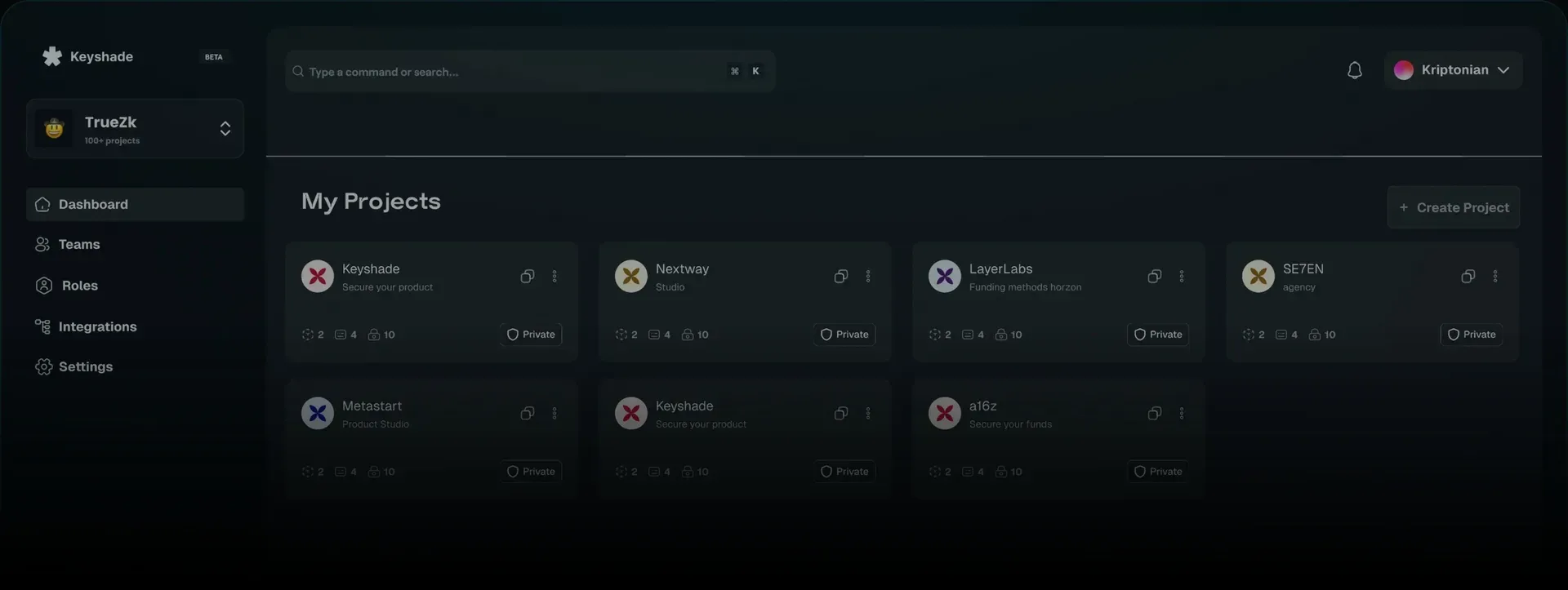
Hero image from the keyshade.io homepage showing the project dashboard with demo workspace and project names.
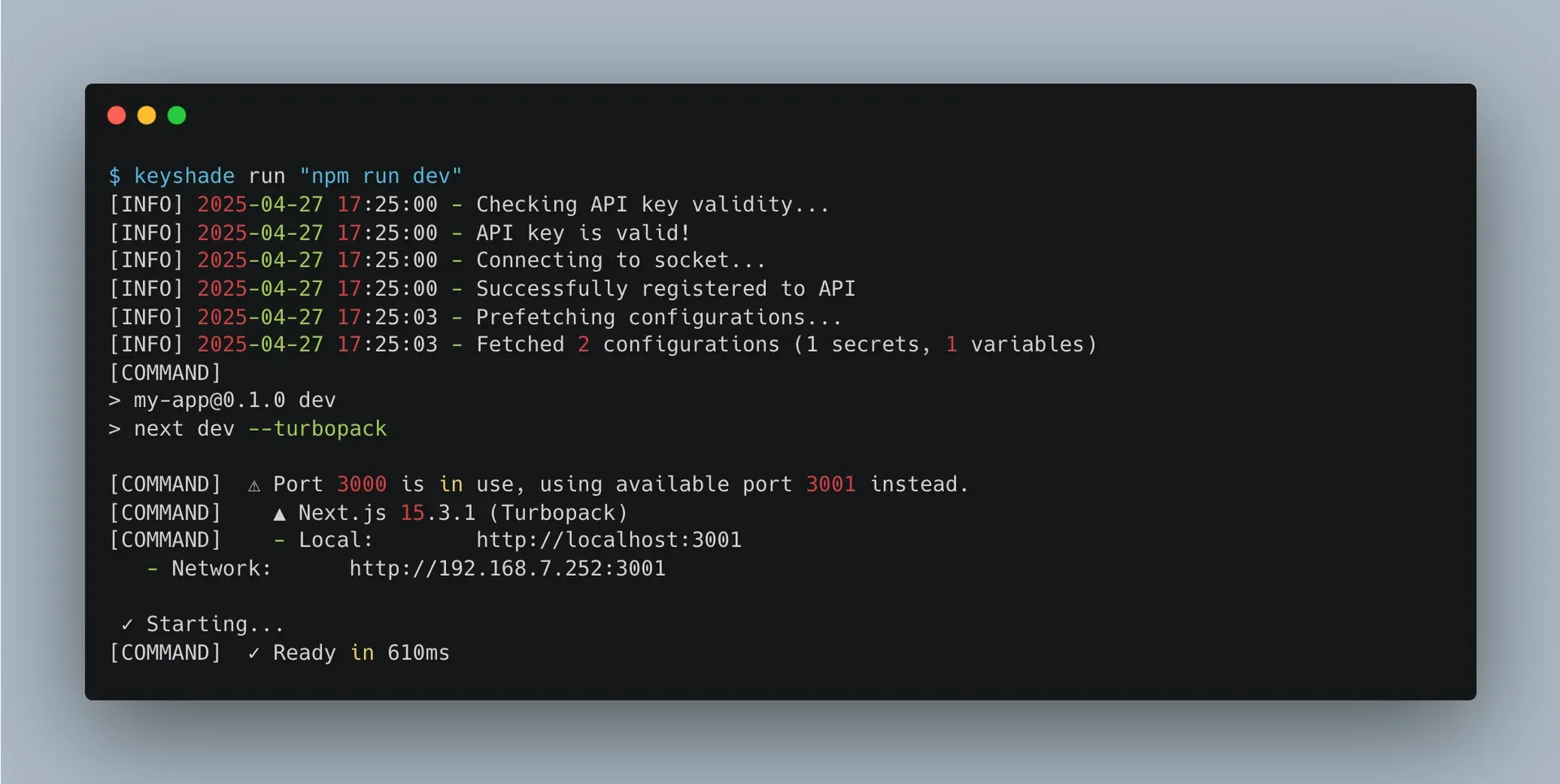
Documentation screenshot of the keyshade run command injecting fetched configurations into a Next.js development server.
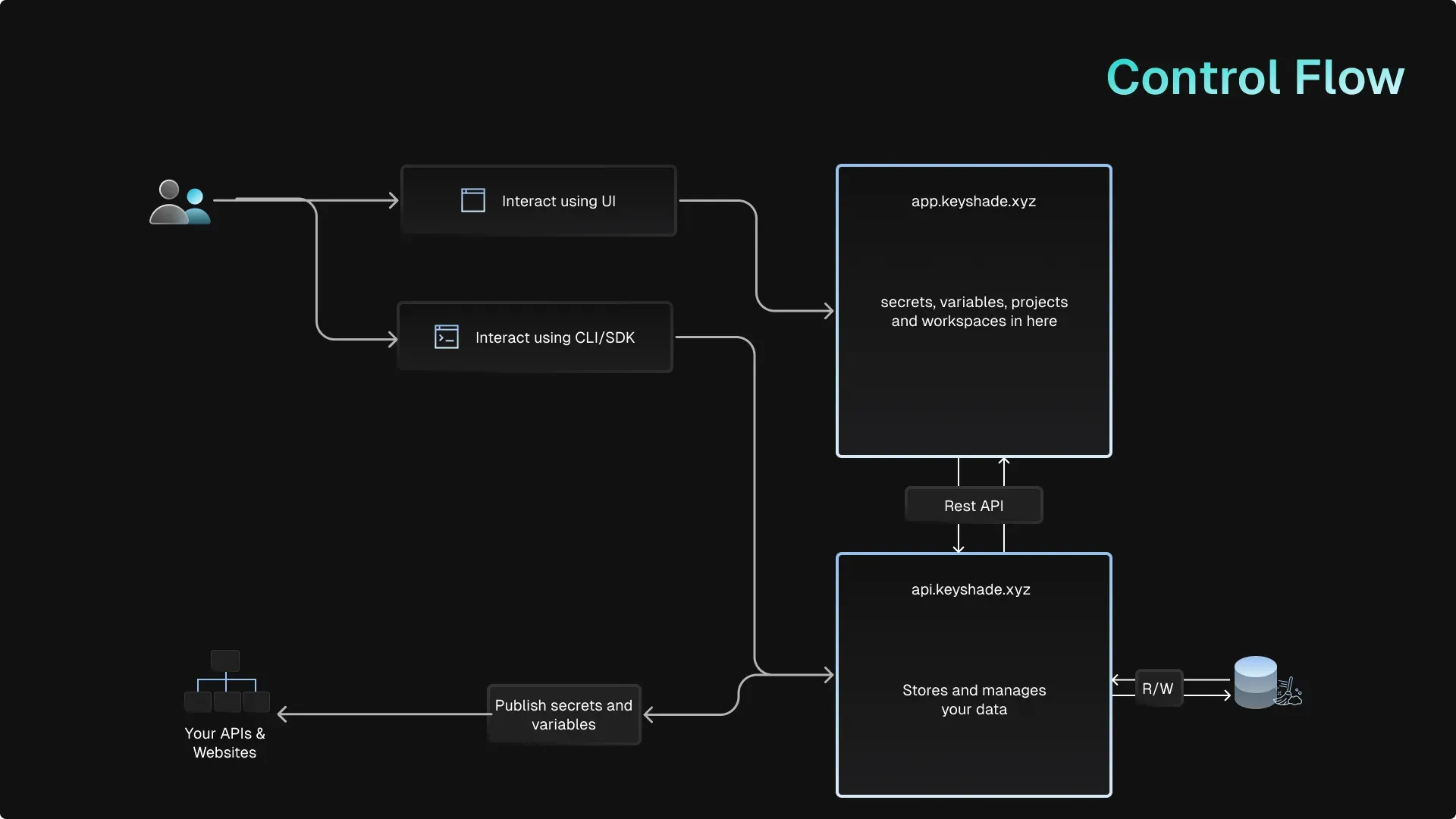
Control flow diagram from the Keyshade architecture documentation.
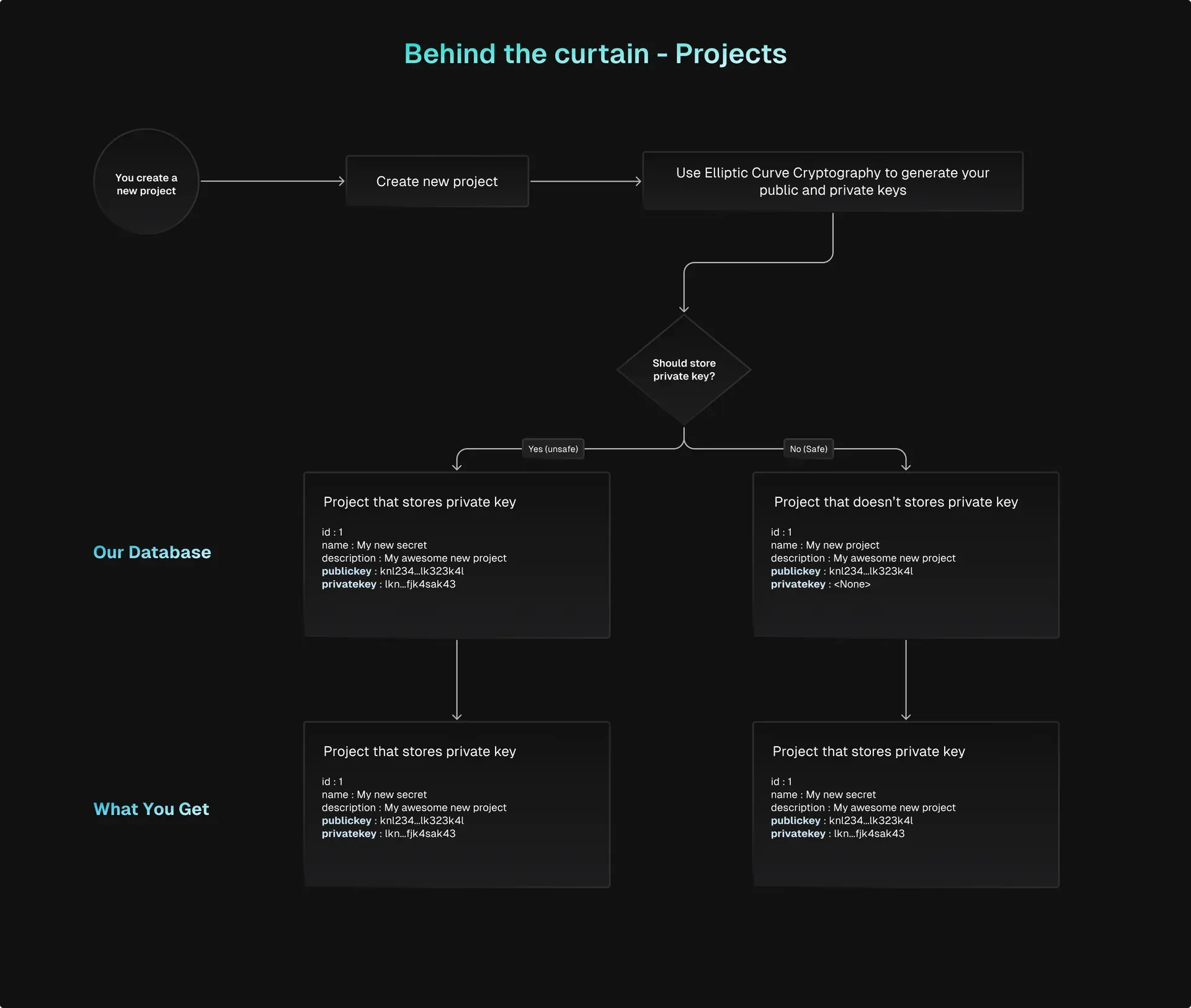
Architecture documentation diagram on how project key pairs are generated and optionally stored.
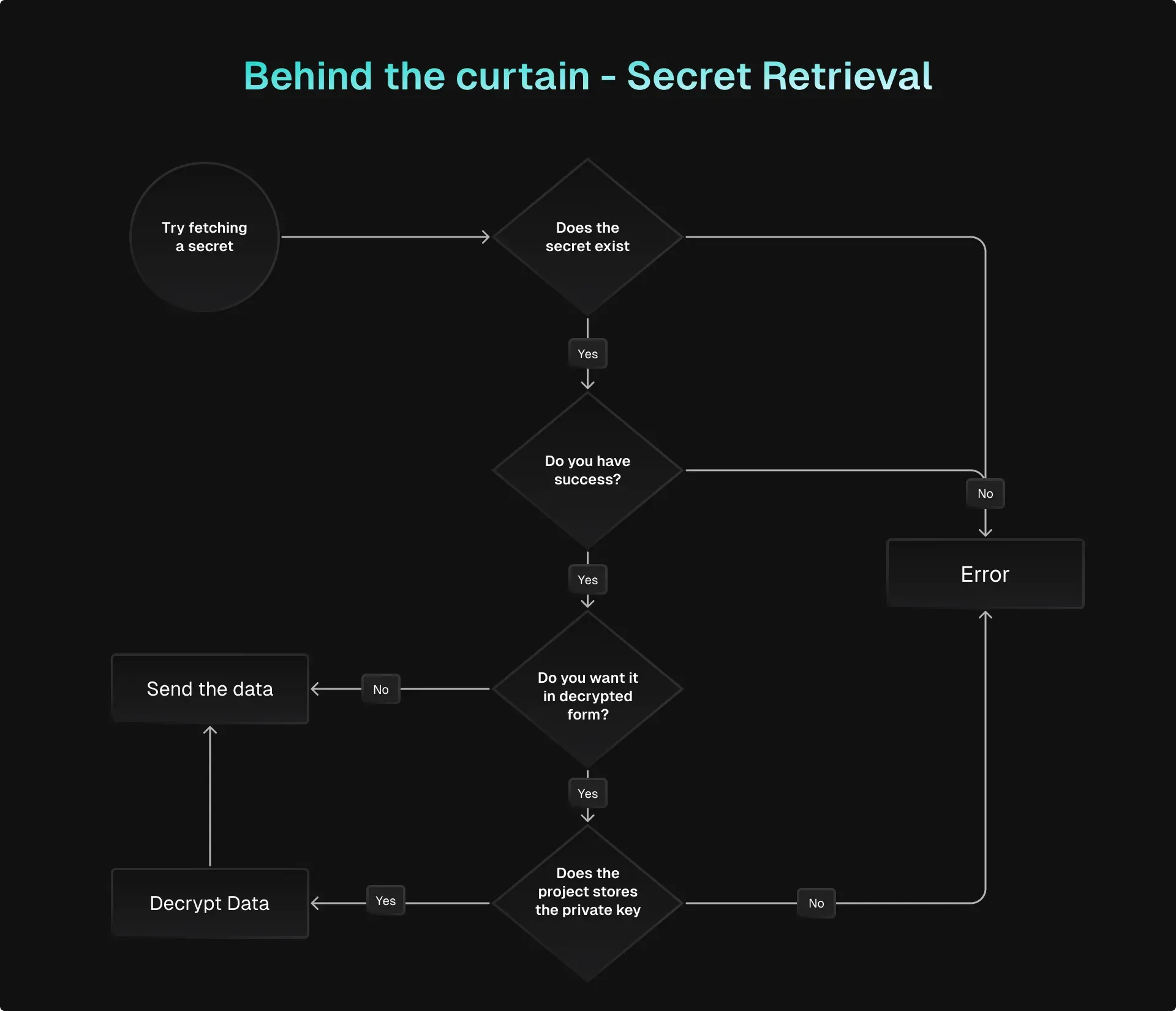
Architecture documentation diagram of the secret retrieval decision flow.
Source: official Keyshade project page.
Key capabilities
- Secrets and variables Secrets are meant for API keys, database credentials, tokens and private keys; the secret reference states they are encrypted with public key cryptography before being stored in the database. Variables hold non-sensitive values such as ports or feature flags and are stored in plaintext. Each secret or variable can carry a different value per environment, and both can be created from the dashboard or with
keyshade secret createandkeyshade variable create. - Workspaces, projects and environments A workspace holds members, projects, secrets, integrations, roles and billing; every user gets a default workspace on registration, and the workspace docs state that a user can have an unlimited number of workspaces for free. Projects sit inside a workspace and contain environments such as development, staging and production. The CLI links a local folder to one workspace, project and environment trio through a
keyshade.jsonfile. - Public key encryption per project When a project is created, Keyshade uses elliptic curve cryptography to generate a public and private key pair for it, according to the architecture diagrams in the repository docs. Secret values are encrypted with the public key; the shared cryptography module uses the
eccryptolibrary. The private key is offered for download at project creation and is stored locally by the CLI in~/.keyshade/private-keys.json, keyed by project and environment. - Optional server-side private key storage A project can be created with or without the private key stored on the Keyshade server. The getting-started guide marks storing it as not recommended for production projects, and the architecture diagram labels the stored variant unsafe and the other safe. The CLI option
--store-private-keyonproject createis documented with a default of true. When the server holds the key, secrets can be returned in decrypted form; otherwise decryption happens on the client with the local private key. - Live configuration updates The run command starts the given process with all secrets and variables of the linked environment injected as environment variables. The CLI validates the API key, connects to a socket, registers with the API and prefetches configurations before launching the command. The README states that changes to secrets are pushed to the runtime environment without restarting the application.
- Versioning and rollback Every change to a secret or variable creates a new version per environment.
keyshade secret revisionslists the history, optionally decrypting values when a project slug is passed, andkeyshade secret rollbackrestores a given version number. The number of retained versions depends on the plan: the last 5 on Free, 20 on Hacker, 50 on Team and unlimited on Enterprise. - Secret rotation settings Secrets accept a rotate-after setting through the CLI flag
--rotate-afterwith the values 24, 168, 720 and 8760 hours (1, 7, 30 and 365 days) ornever, which is the default. Individual secrets can also be disabled or enabled per environment withkeyshade secret disableandenable. - Roles and access control Access is managed through workspace roles built from a list of authorities defined in the Prisma schema, including
READ_SECRET,UPDATE_SECRET,CREATE_ENVIRONMENT,DELETE_PROJECT,CREATE_INTEGRATION,CREATE_API_KEYandWORKSPACE_ADMIN. Custom roles combine these authorities, and the pricing page lists multirole assignments. Projects have an access level ofGLOBAL,INTERNALorPRIVATE, withPRIVATEas the CLI default. - Command-line interface The CLI reference covers
profile,init,workspace,project,environment,secret,variable,run,scan,importandreset. Profiles store an API key and base URL in~/.keyshade/profiles.json, withhttps://api.keyshade.ioas the default base URL, and several profiles can coexist with one marked as default.keyshade loginsigns in with an emailed code. - Installing the CLI The installation guide lists
npm i -g @keyshade/cli(also with pnpm or bun),brew tap keyshade-xyz/keyshadefollowed bybrew install keyshadeon macOS, andscoop bucket add keyshadefollowed byscoop install keyshadeon Windows. Release v2.49.0 also attaches prebuilt binaries for Linux, Amazon Linux, RHEL, macOS and Windows. The Python guide notes that Node.js v24 may cause issues with the CLI and points to Node.js 20 LTS. - Importing .env files The import guide moves an existing
.envfile into a project, either withkeyshade importor with the Import button in the dashboard. Both paths ask for the target environment and let the user confirm which entries are classified as secrets and which as variables before the import runs. - Hardcoded secret scanning
keyshade scanlooks for hardcoded secrets in project files. It can scan a single file with-f, only the current Git changes with-c, or the whole project. The pricing page also lists a secret scanner and pre-commit hooks on every plan. - Project forks Projects can be forked into the same or another workspace with
keyshade project fork. The CLI also offerslist-forks,syncto synchronize a fork with its parent andunlinkto detach it. - Integrations The API source contains integration plugins for Discord, Slack, Vercel and AWS Lambda, and the schema also defines GitHub and GitLab integration types. The platform guides cover AWS Lambda and Vercel; the Vercel integration takes a Vercel API token and project ID and maps Keyshade environments to Vercel environments. The number of integrations per workspace is capped by plan: 3 on Free, 10 on Hacker, 30 on Team.
- Framework and language guides Setup guides exist for Next.js and Node.js and for Go, Python and Rust. Each follows the same pattern: create a project in the dashboard, link the folder with
keyshade init, start the app withkeyshade runand read values from the normal environment API of the language, such asprocess.envoros.environ. - Audit logs and alerts The README describes an event log that records who did what and when. Audit log retention on the cloud plans is 7 days on Free, 15 days on Hacker and 60 days on Team. The pricing page lists webhooks and alerts to Discord, Slack and Microsoft Teams on all plans, and event monitoring from the Hacker plan upward.
- Sign-in options The schema defines Google, GitHub, GitLab and email one-time code as authentication providers, and the dashboard sign-in page offers the OAuth providers and email. The pricing page lists two-factor authentication. The CLI authenticates with API keys stored in a profile.
- Cloud plans The Free plan includes 5 projects, 3 users, 3 environments, 15 secrets and 15 variables. Hacker costs $7.99 per user per month for 10 projects, 10 users, 5 environments and 30 secrets and variables each; Team costs $15.99 per user per month for unlimited projects and environments, 40 users and 100 secrets and variables each. Enterprise has custom pricing with unlimited limits, and the page offers a 20% discount for yearly billing. IP allowlisting and blocklisting appear only on Team and Enterprise.
Where Keyshade fits
Replacing a shared .env file
The getting-started path documented by Keyshade starts with an account at app.keyshade.io, a project with its environments, and the download of the project key pair. The existing .env file is imported with keyshade import, where each entry is classified as a secret or a variable. After keyshade init writes keyshade.json, the application is started with keyshade run "npm run dev" or an equivalent command and reads the values from its environment.
Running one codebase against several environments
Secrets and variables carry one value per environment, so the same key such as DATABASE_URL can differ between development, staging and production. The run command selects the environment from keyshade.json or from the --environment, --project and --workspace flags, and --config-file points to an alternative file such as keyshade.stage.json.
Updating configuration without a restart
A process started through keyshade run keeps a socket connection to the API. According to the README and the CLI docs, a change made in the dashboard or through the CLI is propagated to the running process, so a value such as a client ID can change without redeploying or restarting the application.
Sharing secrets inside a team
Members are invited into a workspace and assigned roles, either predefined ones or custom roles assembled from authorities such as READ_SECRET or UPDATE_ENVIRONMENT. Projects are marked GLOBAL, INTERNAL or PRIVATE. Members who run the application locally need the project private key on their machine when the key is not stored on the server, because decryption then happens in the CLI.
Pushing configuration to a hosting platform
For Vercel, the integration is created under Integrations in the dashboard with a Vercel API token and the Vercel project ID, after which Keyshade environments are mapped to Vercel environments. An AWS Lambda guide follows the same model, and Discord and Slack integrations send notifications about changes.
Finding hardcoded credentials before a commit
keyshade scan -c checks only the files changed in the working tree, keyshade scan -f path checks one file, and a plain keyshade scan checks the whole project. Pre-commit hooks for the scanner are listed on the pricing page. Values found this way can then be moved into a Keyshade project and removed from the source.
Install
npm i -g @keyshade/cliReviews of Keyshade
Be the first to share your experience with Keyshade.
Write a review
Loading review form…
Alternatives to Keyshade
 OpenBaoOpenBao is an open source secrets manager, a fork of Vault managed by the Linux Foundation's OpenSSF, for storing secrets, certificates and keys.
 HashiCorpHashiCorp builds Terraform, Vault, Consul and Nomad for infrastructure provisioning, secrets and networking, under the Business Source License.
 BitwardenBitwarden is an open source password manager for individuals, families and organizations. Vaults are end-to-end encrypted, run on a US or EU cloud or a self-hosted Docker server, with a free plan and paid tiers.