

What is Initiative?
Initiative is a shared workspace for groups that work together, such as a small business, a club, a committee, a community event team or a family. It is developed by Beyonders Studio, the business name of Morelitea LLC, in the beyonders-studio/initiative repository on GitHub. Projects, tasks, files, calendars, posts, wikis, counters, dashboards and contacts live in one place, organised as communities that contain initiatives, and each tool can be shared with specific people down to a single project or file. The README describes it as project management that starts with one board and a few tasks and adds the other tools when a group needs them.
The project is open core. Everything in the repository, which the README calls the whole app that is self-hosted, is licensed under the AGPL-3.0, while Morelitea LLC holds the copyright and commercial rights. The plug-in SDK and the initiative-developer registry repository are MIT-licensed. Automations and billing are proprietary, live outside the repository and exist to run the hosted service. Contributors sign a Contributor License Agreement with their first pull request.
Initiative is distributed in two ways. The self-hosted server is one container image, ghcr.io/beyonders-studio/initiative for linux/amd64 and linux/arm64, run beside PostgreSQL through a Docker Compose file, with native initiative-server packages for Debian 13 and Alpine 3.24 on hosts without Docker. Initiative Cloud is the paid hosted version run by Beyonders Studio; the self-host or hosted page states that both run the same software. Client apps exist for iPhone and Android in the App Store and Google Play, for Windows, macOS and Linux as Electron desktop builds, and as an installable web app.
The latest release is v0.78.0, published on November 6, 2026. Its notes add a Contacts tool, resumable uploads of large files, custom community roles, scheduled digests, access requests, editing of uploaded Word, OpenDocument, Excel, CSV and Markdown files in the app, dashboards that read spreadsheets, AI writing help and a "Catch me up" summary, and opt-in malware scanning and per-community encryption of stored files for server operators. Backups made before 0.78 no longer restore directly, and the server now runs on Python 3.14. The README notes that Initiative has not reached 1.0, so the API can still change between minor releases.
The backend uses FastAPI, SQLModel and PostgreSQL, tested on PostgreSQL 16, 17 and 18. The frontend uses React, TypeScript and Vite, with Capacitor for the phone apps and Electron for the desktop app. The user guide covers using Initiative and running a server. Other project management tools listed on iThub include Plane, Huly and Leantime.
Initiative screenshots
Explore the interface. Open a screenshot to view it at full size.
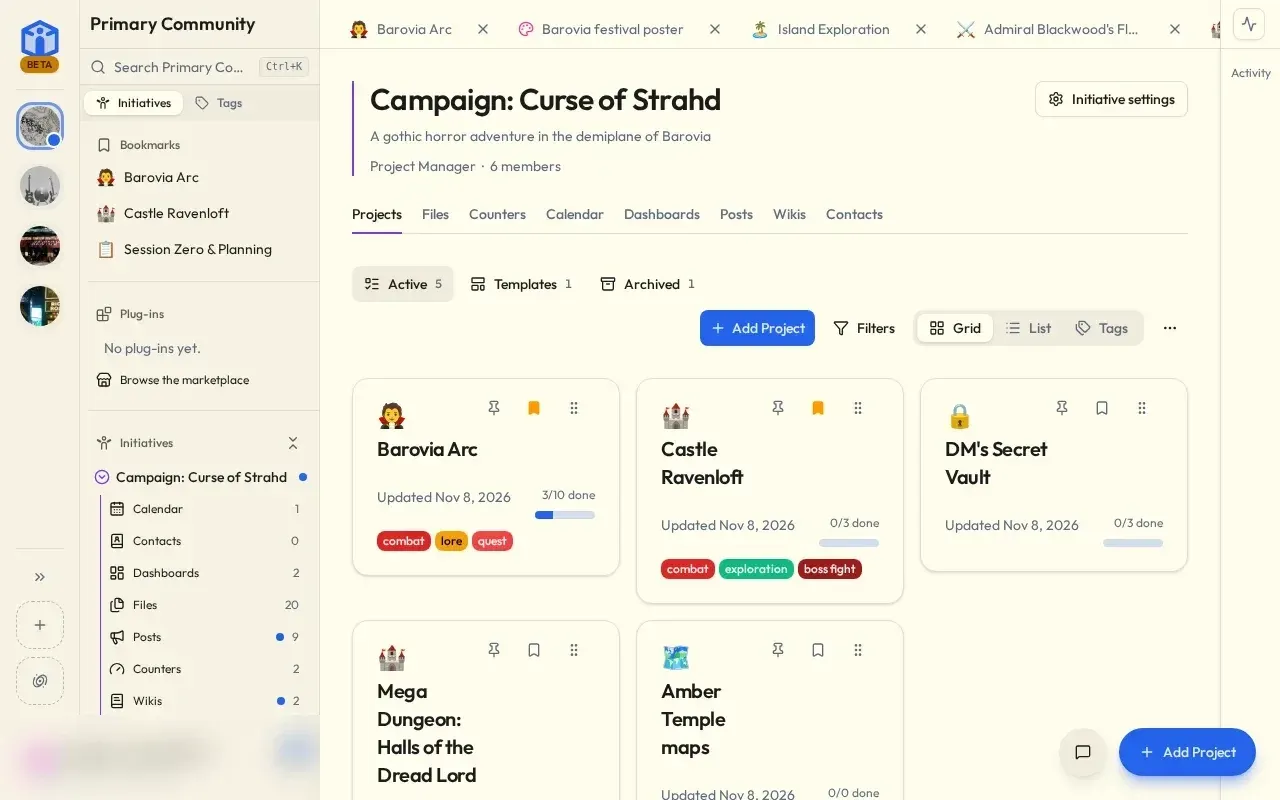
An initiative with its projects grid and tool tabs, from the official user guide. The signed-in user card is blurred.
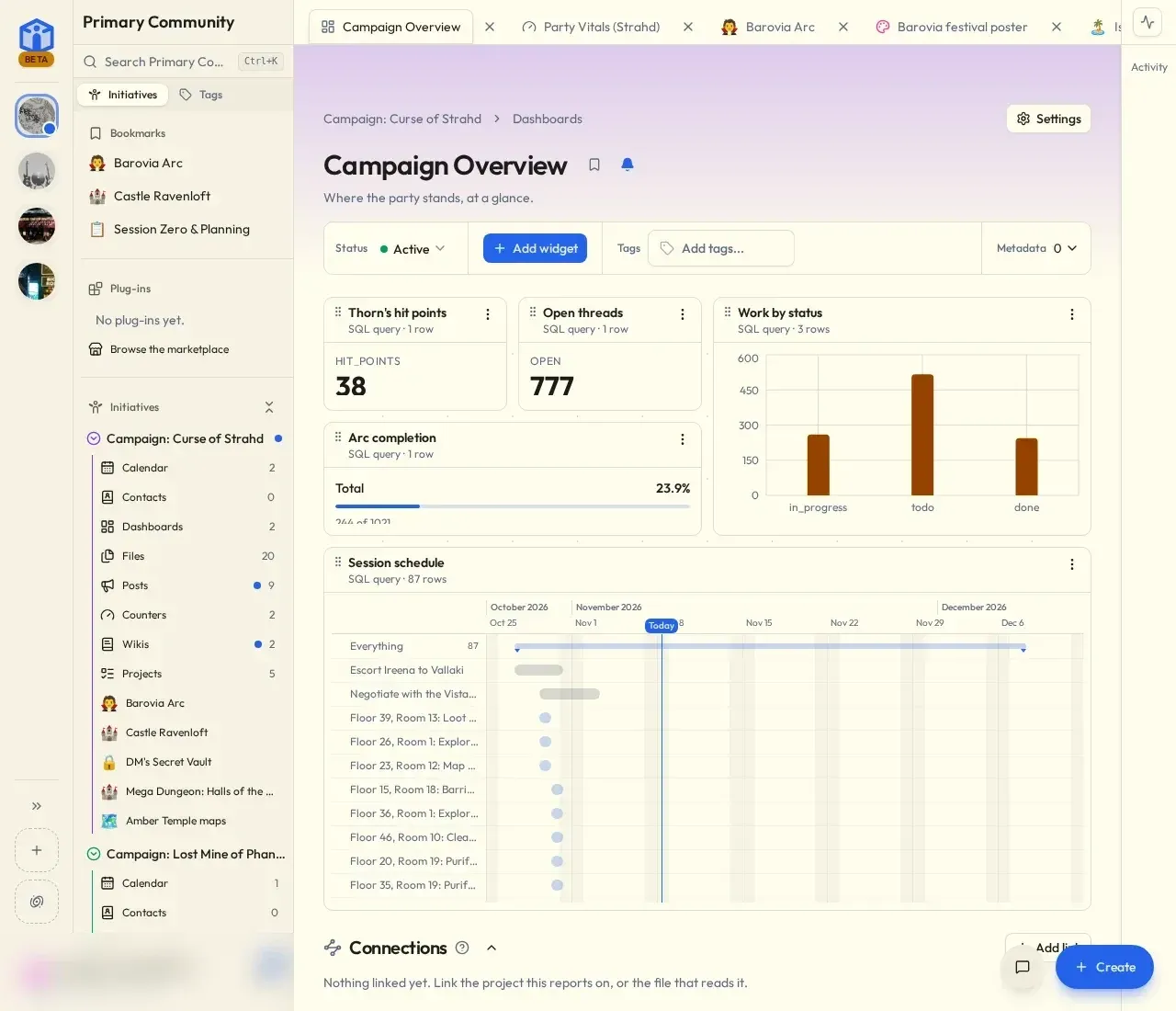
A dashboard built from SQL query widgets, from the official user guide. The signed-in user card is blurred.
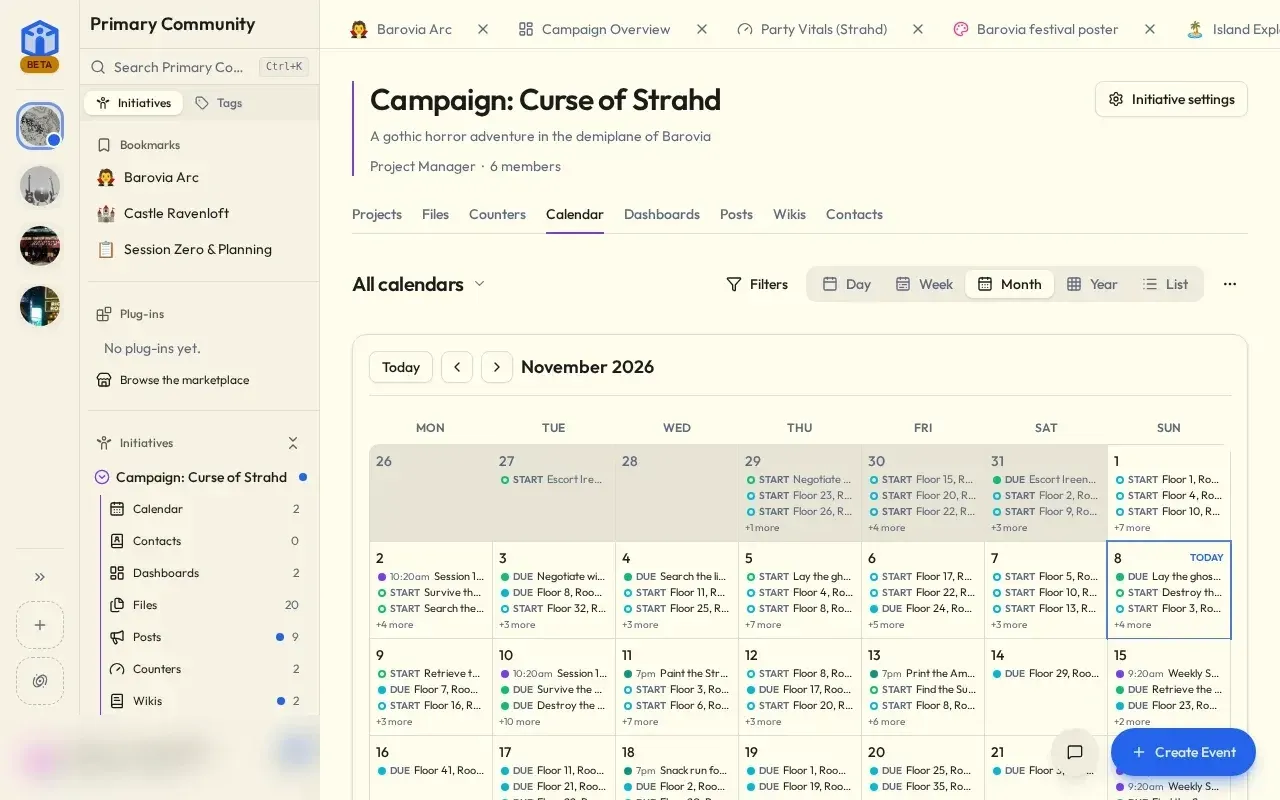
Month view of an initiative calendar with task dates and events, from the official user guide. The signed-in user card is blurred.
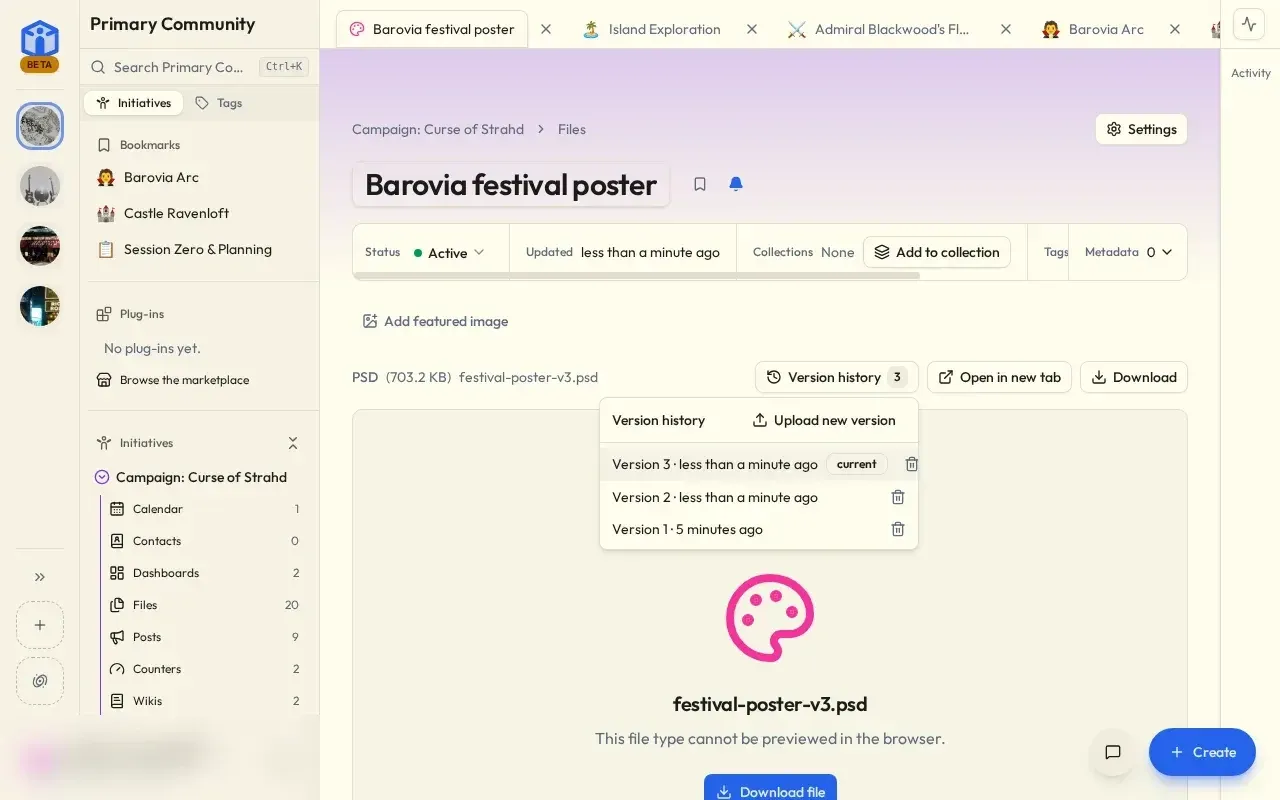
An uploaded file with its version history, from the official user guide. The signed-in user card is blurred.
Source: official Initiative project page.
Key capabilities
- Communities and initiatives A community is the top-level space for a group, and initiatives are the shared spaces inside it where work happens. A new initiative starts with projects and files switched on, and an initiative manager turns the other tools on or off; turning a tool off hides it without deleting anything. Community admins can set which tools and roles every initiative uses.
- Projects and tasks Projects hold tasks that can be shown as a table, a kanban board, a Gantt chart or a calendar. Tasks carry statuses, priorities, due dates, assignees, checklists, comments, tags and custom fields, and task types can require fields. Starting a task title with a type and a colon, such as
bug:, adds it as that type. - Files with real-time editing The Files tool creates text documents, spreadsheets and whiteboards that several people can edit at the same time, and smart links that show something kept elsewhere. Uploads accept any file except programs, go up in resumable pieces and keep a version history. Since 0.78.0 an uploaded Word, OpenDocument, Excel, CSV, Markdown or text file can be converted into an editable document or spreadsheet.
- Calendars Calendars hold events with RSVPs and reminders, with day, week, month, year and list views. Events and task dates appear together, and a calendar can be subscribed to from another calendar app through a read-only subscription link.
- Dashboards Dashboards are canvases of widgets such as charts, single numbers, timelines and boards built from the group's own data, including SQL queries over tasks and projects and, since 0.78.0, ranges of an initiative spreadsheet. Dashboards only display data and cannot change it, and each widget shows a person only what that person is allowed to open.
- Posts, wikis, counters and contacts Posts carry announcements and polls with read tracking. Wikis are sets of linked pages for what a group knows, and are off until an initiative manager turns them on. Counters track tallies, totals and scores, and the Contacts tool added in 0.78.0 is an address book linked to tasks, events and files.
- Sharing and roles Each project, file and other tool item has its own access settings, so sharing can reach down to one project or file. Initiatives have built-in roles with per-tool permissions, community admins can create custom roles, and people can ask for view or edit access to items not shared with them. Guests can be given limited access.
- Marketplace and plug-ins Each community has a marketplace of ready-made dashboards, projects and plug-ins; shipped projects include a sales pipeline, hiring pipeline, bug tracker, content calendar, grant tracker, product launch, facility maintenance and plant care. Listings come from the Initiative registry, a signed catalog that every server follows by default, checks every fifteen minutes and verifies against a built-in key. Plug-ins are written with the MIT-licensed SDK and published through a pull request to initiative-developer.
- Sign-in options A server can allow password, single sign-on, passkey and email one-time-code sign-in, with at least one method kept on. Single sign-on uses OpenID Connect and supports several providers at once, each with its own button. Authenticator-app two-factor authentication can be required by the server or by a community.
- Optional AI features AI help is off unless the server operator or a community superadmin switches it on and configures a provider, a model and usually a key. When enabled, it drafts task descriptions, suggests checklists, summarises documents and wiki pages, offers rewrite, shorten, spelling and translate actions in the editor, and produces a "Catch me up" summary of up to a week of visible changes. The AI features page states that it only runs when a user presses a button.
- API keys, webhooks and MCP Personal API keys can be limited to one community, made read-only and given an expiry, and are shown once. Webhooks notify another service when something changes and say which item and fields changed, not their content. An optional MCP endpoint at
/api/v1/mcp/, enabled withENABLE_MCP=true, exposes 55 read tools and 31 write tools to AI assistants using an API key, without delete, archive or sharing operations, as documented in API keys and integrations. - Imports from other tools Superadmins can import projects from Todoist, TickTick and Vikunja exports, read Jira projects and Confluence spaces directly with an Atlassian API token, and import Confluence HTML exports. Jira projects become Initiative projects with their columns, fields and sub-tasks, sprints become calendar events and Confluence spaces become wikis with their page tree. Imports always add new items and leave existing content unchanged.
- Docker Compose deployment The supported setup is
docker-compose.example.yml, which runs the app on port 8173 beside apostgres:17container and stores uploads in a local./uploadsfolder. Three values are required in.env:APP_URL, aSECRET_KEYof at least 32 characters that encrypts stored data, andPOSTGRES_PASSWORD. The first account to register becomes the server owner, and image tags arelatest,stableand version numbers. - Native server packages For hosts without Docker, such as an unprivileged Proxmox LXC, each release ships
initiative-serverpackages for Debian 13 (amd64, arm64) and Alpine 3.24 (x86_64, aarch64) with checksums and, for Alpine, a signing key. They bundle the app, its Python dependencies, the browser app and the document editor. The native packages guide notes that they need an existing PostgreSQL database and do not start the service on install. - Server operator controls Operators configure email, single sign-on, push notifications, object storage, announcements and platform roles. Opt-in settings added in 0.78.0 scan every upload with an external malware scanner and encrypt each community's stored files under its own key wrapped by
SECRET_KEYor a Google Cloud KMS key. Operators can also set a community's security, AI and API-key settings, which then show as set by the server. - Phone and desktop apps Phone apps are published in the App Store and Google Play under the Initiative name by Beyonders Studio, and the Android app can also be installed from the GitHub releases page or kept updated through Obtainium. Desktop installers (
.exe,.dmgand.deb) are attached to releases that change the app. Most releases only change the web side, which the apps load from the user's server. - Hosted option Initiative Cloud is a paid subscription run by Beyonders Studio. According to the project, every feature and protection is in both versions, and server-side connections for plug-ins that talk to other services are already configured on the hosted service. A whole community exports as one file that another server can import, so groups can move between hosted and self-hosted in either direction.
Where Initiative fits
Running a club, committee or volunteer group
A group creates a community, adds an initiative per effort, and starts with a project board and files, turning on calendars, posts, counters or wikis later as needed. Posts carry announcements and polls with read tracking, calendars collect events with RSVPs, and roles decide who can see and change each tool. The first community guide walks through the setup.
Small business project tracking
Projects hold tasks with types, priorities, custom fields and required fields, shown as table, board, Gantt or calendar. Marketplace templates such as the sales pipeline, hiring pipeline, bug tracker or product launch start a project with its own task types. Dashboards summarise progress with charts and SQL-based widgets, each showing a person only what that person may open.
Shared documents and files
Groups write text documents, spreadsheets and whiteboards together in real time in the Files tool and upload anything else, with version history and resumable uploads for large files. Uploaded office documents can be turned into editable documents, and smart links show content kept elsewhere. Sharing can be limited to individual files.
Moving work from Jira, Confluence or task apps
A superadmin imports Todoist, TickTick or Vikunja exports as new projects, or reads Jira projects and Confluence spaces directly with an Atlassian API token. The import shows what it found before writing anything, asks how people in the source map to members, and adds everything as new items. The importing guide lists what each source brings across.
Self-hosting for a homelab or organisation
Operators run the Compose file with PostgreSQL behind a reverse proxy that passes WebSockets to port 8173, or install the native Debian or Alpine package. The installation guide covers image tags, database setup and the two items to back up, the postgres_data volume and the ./uploads folder. The README warns against running the dev image tag on a server whose data matters, because its migrations can change between builds.
Connecting scripts and AI assistants
Users create community-scoped, optionally read-only API keys for scripts, register webhooks for change notifications, and, where the operator enables MCP, connect an assistant such as Claude Code with a bearer key. The assistant reaches only what the key holder can reach, and write tools are refused for read-only keys.
Reviews of Initiative
Be the first to share your experience with Initiative.
Write a review
Loading review form…
Alternatives to Initiative
 PlanePlane is a project management tool for tracking work items, running cycles, grouping work into modules and writing pages. The Community Edition is AGPL-3.0 and self-hosted with Docker or Kubernetes; Plane Cloud and the Commercial Edition add paid plans.
 HulyHuly is an EPL-2.0 platform for issue tracking, team planning, chat, collaborative documents, virtual office calls, HR and recruiting. The hosted service has shut down and the original repository is frozen, so new deployments run on Docker Compose or Kubernetes.
 LeantimeOpen-source project management for teams without a dedicated project manager. Kanban, table and timeline views, goals, sprints, timesheets, wikis and idea boards run on PHP and MySQL, with a paid SaaS and a plugin marketplace.