

What is Contentport?
Contentport is an open-source content platform aimed at technical founders and small teams who post on X, still called Twitter on the product's own pages. A web studio combines an AI assistant that drafts tweets and threads, a style profile trained on your recent posts, a queue that publishes at set times, a screenshot editor for images and a topic monitor that surfaces posts worth replying to. The product site is contentport.io and the code is at github.com/joschan21/contentport.
It is distributed mainly as a hosted service. The site offers a free plan and a Pro plan, and the repository holds the Next.js application that runs it. There are no tagged releases and no packaged downloads: the package.json carries version 0.1.0 and the latest commit in the repository is dated December 12, 2025, a dependency bump. The README is a public roadmap last updated on November 29, 2025, so the project documents priorities, not installation.
The stack is TypeScript on Next.js with the Hono-based jstack API layer, Drizzle ORM with a Neon Postgres driver, better-auth with Google sign-in, Upstash Redis, Vector and QStash, AWS S3 for media, Stripe for billing, PostHog analytics and Firecrawl for reading web pages. Language models are reached through OpenRouter. A separate jobs folder defines an AWS CDK stack for a transcription Lambda function. A .env.example file lists the required keys, which shows how many third-party accounts a private deployment would need.
The license is AGPL-3.0. The roadmap lists planned items such as dark mode, community posting, timezone selection and multiple workspaces, so some features requested by users were not yet built when it was published. The site's comparison section claims advantages over closed tools, such as current AI models, multiple accounts and auditable source; these are the vendor's own statements and were not verified by iThub. The project is not affiliated with X Corp.
Contentport screenshots
Explore the interface. Open a screenshot to view it at full size.
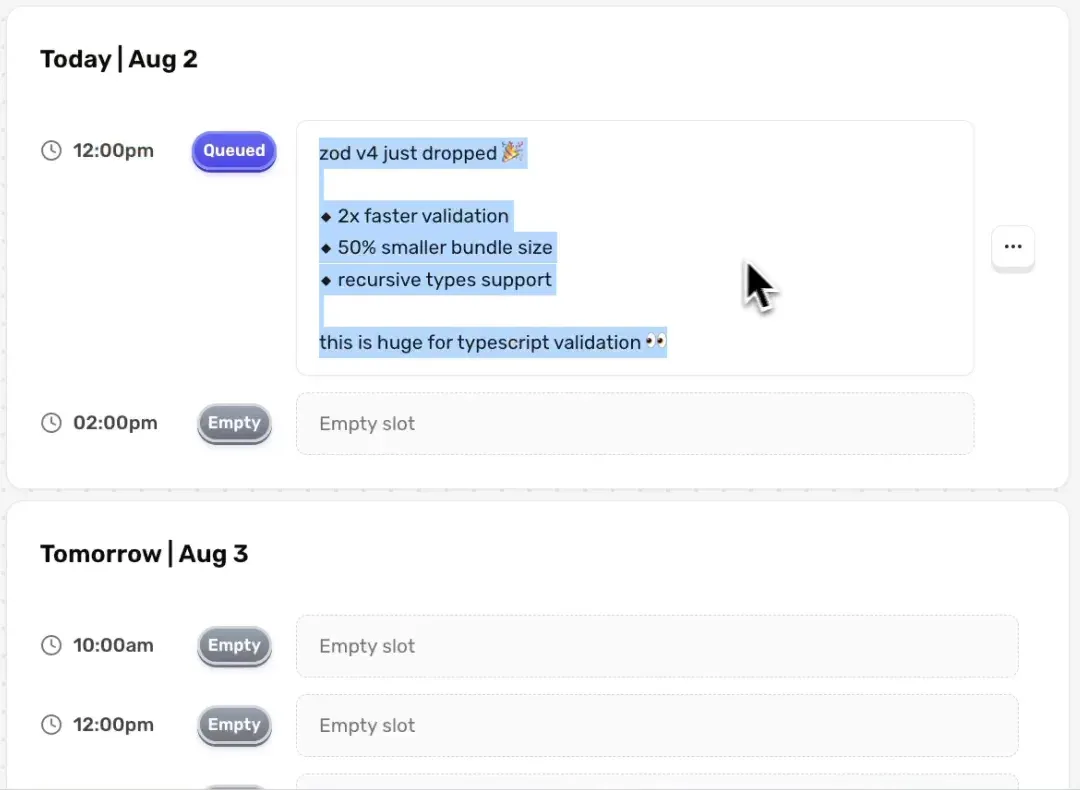
Frame from the official demo video, cropped to the interface: the queue lists time slots with queued and empty states.
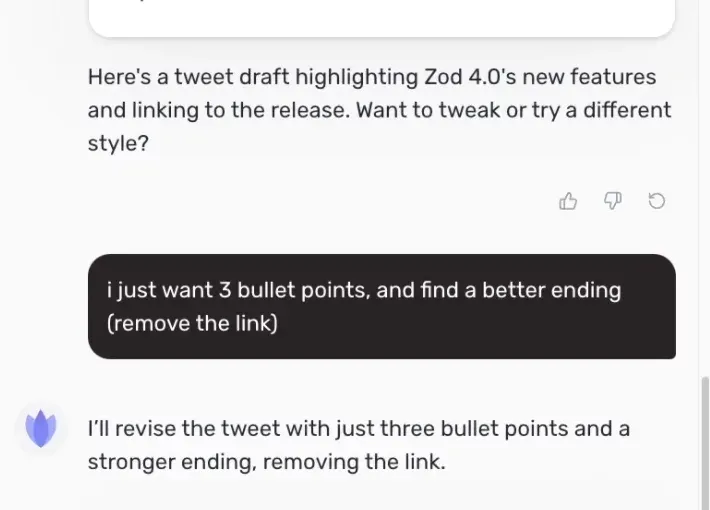
Frame from the official demo video, cropped to the assistant panel: a request to revise a draft and the model reply.
Top of the official landing page image in the repository. It shows the marketing page, not the studio.
Source: official Contentport project page.
Key capabilities
- AI tweet assistant A chat panel next to the editor drafts a tweet or thread from a prompt, then revises it on request, for example shortening to three bullet points or changing the ending. Proposed text appears as a draft with an Apply action, so you decide what enters the editor. The code routes requests through OpenRouter to an OpenAI model, with a fallback model configured.
- Writing style profile The knowledge area has a writing style tab and a memories tab. The site says the assistant is trained on your recent and most successful tweets, and you can add your own notes and documents so the output follows your wording and topics.
- Content ideas Both plans list idea generation. The assistant can also read a web page you supply through Firecrawl and turn it into a post, so check the generated claims against the source before posting.
- Tweet and thread editor The editor is built on Lexical and supports threads, mentions, link previews and a code snippet node. Free X accounts have shorter character limits, and the roadmap lists accurate handling of that limit as a priority item.
- Scheduling queue The queue publishes tweets at predefined slots, shown by day and time with queued and empty states. The Free plan holds 3 scheduled tweets at a time and Pro lifts that limit. Timezone selection and clearer timezone display are roadmap items, so confirm which timezone the slots use.
- Posting from the app A Post action publishes immediately through the X API, using OAuth tokens for the connected account. Posted tweets have their own page. The service needs X developer credentials in a self-run setup, and X's API terms and costs apply.
- Screenshot and image editor The Free plan includes access to a screenshot editor for turning images or code into visuals. The Pro plan removes the watermark on exported images.
- Topic monitor Pro includes full access to a monitor that tracks keywords, lets you see mentions of your product and offers quote and comment actions on found posts. The roadmap notes that some monitor settings are shared across accounts and should be per-account.
- Multiple accounts Free connects 1 X account and Pro connects up to 3, with an account switcher in the studio. The code also contains an invite page, whose behavior the docs do not describe.
- Video transcription job A CDK project in the repository deploys a Lambda function for transcribing video. The roadmap lists transcript creation from videos under bugs, so treat it as unfinished.
- Plans and limits The pricing page lists Free at $0 with 5 AI messages per day and Pro at $20 per month with unlimited AI assistance. The chat route in the code uses a rate limit of 80 messages per four hours for paid users and 5 per day for free users, so unlimited has a practical ceiling.
- Authentication and accounts Sign-in is by email verification or Google through better-auth. The site says you never share your Twitter password, and posting authorization goes through X's OAuth flow.
- Billing and email Stripe handles subscriptions through a webhook route, and React Email templates send welcome and subscription messages. A seed-stripe script creates the products for a private deployment.
- Inspectable infrastructure The repository shows the full set of services behind the product, from the queue to the vector store. That makes the data flow inspectable, which suits teams that must review where tweets and style data are stored.
Where Contentport fits
Drafting a post from a rough idea
Type the idea into the assistant, ask for a tweet or thread and refine it with short instructions. Read the result against your own voice, remove invented numbers and check any link before using Apply. The style profile improves with more of your real posts, so connect your account before judging quality.
Keeping a steady posting cadence
Fill the queue in one session so scheduled slots publish at peak times through the week. Check the queue page for empty slots, confirm the timezone shown in the calendar and remember that the Free plan stops at three queued tweets.
Turning product updates into content
Paste a changelog or release link, let the assistant read the page and draft a summary post. Compare each bullet with the source, since a language model can overstate a release. Keep a short list of approved product names and numbers next to the draft so you can check them quickly. Add an image from the screenshot editor to make the post easier to scan.
Finding conversations to join
Use the topic monitor with a few keywords or your product name, then reply or quote with a draft written in your style. Keep an eye on volume, and review the public roadmap for known limits such as shared settings between accounts.
Managing more than one account
Pro supports three connected accounts, which suits a founder with a company account. Confirm in the account switcher which profile is active before posting, because the roadmap flags per-account data as an area to clarify.
Running a private copy
Teams that want to inspect the data flow can read .env.example and the server routers. The setup needs a Postgres database, Upstash services, an OpenRouter key, X API credentials, AWS S3, Stripe and Google OAuth, and the repository gives no installation guide, so budget time for reverse engineering. Treat the hosted service as the supported route and the repository as reference code until the maintainers publish deployment instructions.
Reviews of Contentport
Be the first to share your experience with Contentport.
Write a review
Loading review form…
Alternatives to Contentport
 PostizOpen-source social media scheduler with a shared calendar, per-channel post editing, client preview links, analytics, RSS auto-posting, webhooks, a public API, a CLI and an MCP server. Run it on your own Docker host or subscribe to Postiz Cloud.
 TryPostOpen-source social media scheduler with a composer, calendar, per-channel queues, member approvals, analytics and video repurposing. AI agents work through an 83-tool MCP server or the REST API. Self-host with Docker under AGPL-3.0 or use TryPost Cloud.
 MixpostMixpost Lite is an MIT-licensed Laravel application for drafting, scheduling and publishing posts to Facebook Pages, X and Mastodon from your own server, with a calendar, media library and basic analytics. Pro, Enterprise and Cloud add more networks.