

What is TryPost?
TryPost is an open-source social media scheduler for writing, queueing and publishing posts to 13 networks: Instagram, Facebook, LinkedIn profiles and company pages, X, TikTok, YouTube, Threads, Pinterest, Bluesky, Mastodon, Telegram, Discord and Google Business Profile. Posts go out through each network's official API, so there is no reminder step that asks someone to finish publishing in a phone app. The project is built in the open by Paulo Castellano; the repository was created in January 2026 and version 1.0.0 followed in May 2026. It is designed for two kinds of users at once: AI agents and scripts that work through an MCP server and a REST API, and teams that plan and approve posts in the web app.
The same code base is offered in two ways. TryPost Cloud runs at app.trypost.it with two plans that differ only in workspace count: Socials at 19 US dollars a month for one workspace, and Workspaces at 99 US dollars a month for unlimited workspaces, with yearly billing at 190 and 990 dollars. Both include unlimited social accounts and members, and the plans page states there are no AI credits or usage caps. The self-hosted edition has every feature, no billing and no workspace limit. According to the privacy policy, Cloud data is stored in the European Union on Hetzner, with Cloudflare for delivery and file storage and Stripe for payments.
Technically, TryPost is a Laravel 13 application with a Vue 3 and Inertia front end styled with Tailwind CSS 4. Laravel Horizon runs the Redis-backed queue workers that publish posts, send email and webhooks and collect analytics; Laravel Reverb provides WebSockets for live updates; a scheduler runs every minute; and Laravel Passport issues REST API keys and the OAuth tokens used by MCP clients. PostgreSQL and MySQL are both supported, and media can live on local disk, Amazon S3, Cloudflare R2, DigitalOcean Spaces or another S3-compatible store. The official image ghcr.io/trypostit/trypost is built for amd64 and arm64 on Alpine with PHP 8.4, as described in the Docker guide.
The current release is v2.0.1, published November 1, 2026. It adds drag-and-drop rescheduling on the calendar, a redesigned Insights view whose charts and summary can be shared as an image, Instagram music, collaborators and trial reels, an in-app What's New changelog, sign-in inside ChatGPT conversations and several MCP OAuth fixes, plus a PHP runtime update made in response to a critical remote code execution advisory. Version 2.0.0 (October 10, 2026) imported posts published outside TryPost into workspace analytics, added media editing and separate YouTube Shorts descriptions, and merged the post_platforms table into posts. Version 1.1.0 (September 21, 2026) added Repurpose and Google Business Profile, removed the earlier automations module and introduced the current two-plan billing.
The repository has been licensed under AGPL-3.0-only since May 2026, after starting under the Functional Source License; the website privacy policy still mentions FSL-1.1-MIT, but the LICENSE file is the binding text. Some things are outside the product: the documentation describes no unified inbox or social listening, Insights does not cover LinkedIn, Telegram, Discord or Google Business because those networks do not share analytics with third-party apps, and AI writing runs only in the web app, not through the API or MCP.
TryPost screenshots
Explore the interface. Open a screenshot to view it at full size.
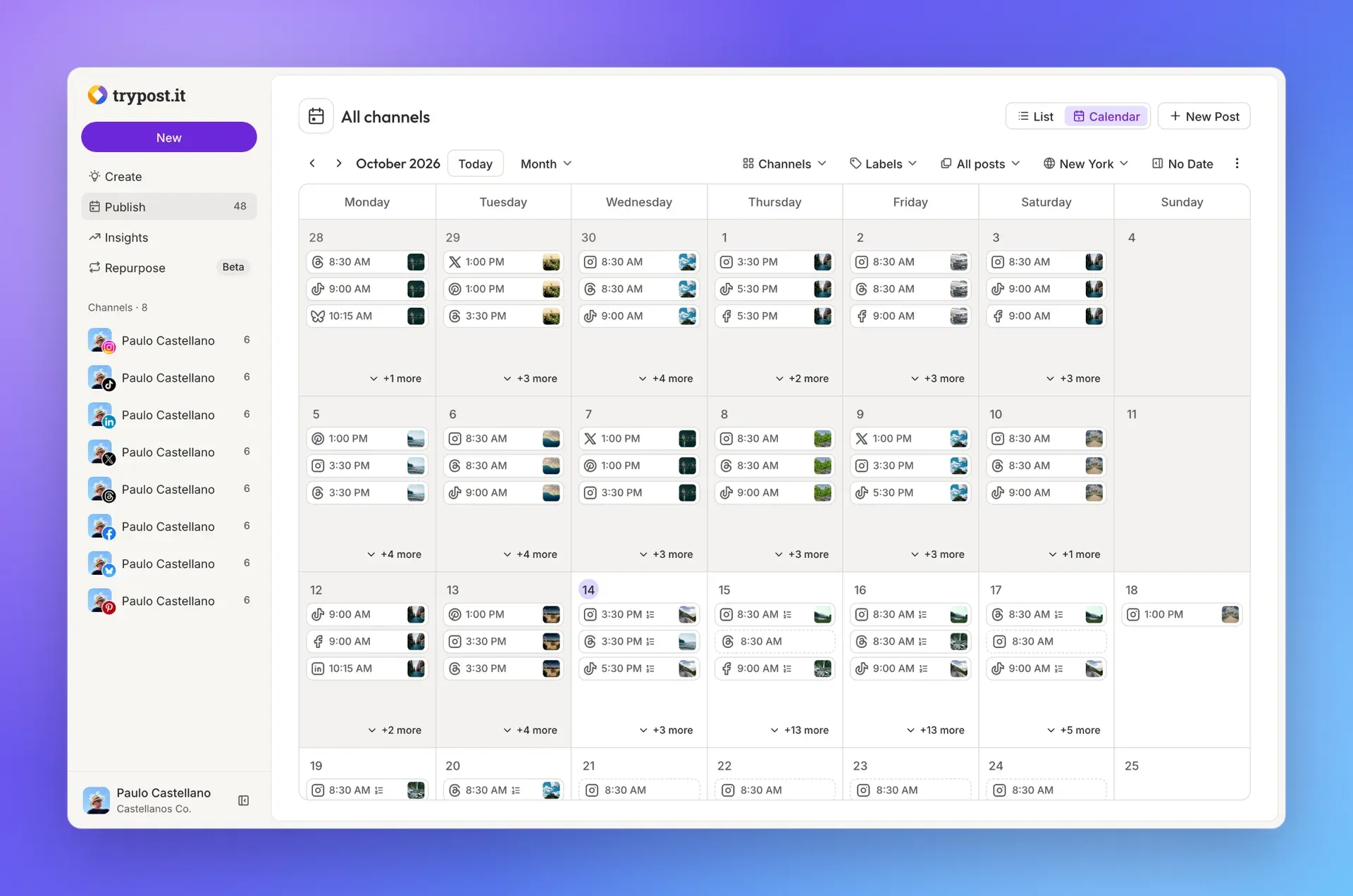
Official README screenshot of the month calendar, with demo posts for eight connected channels and filters for channels, labels, status and time zone.
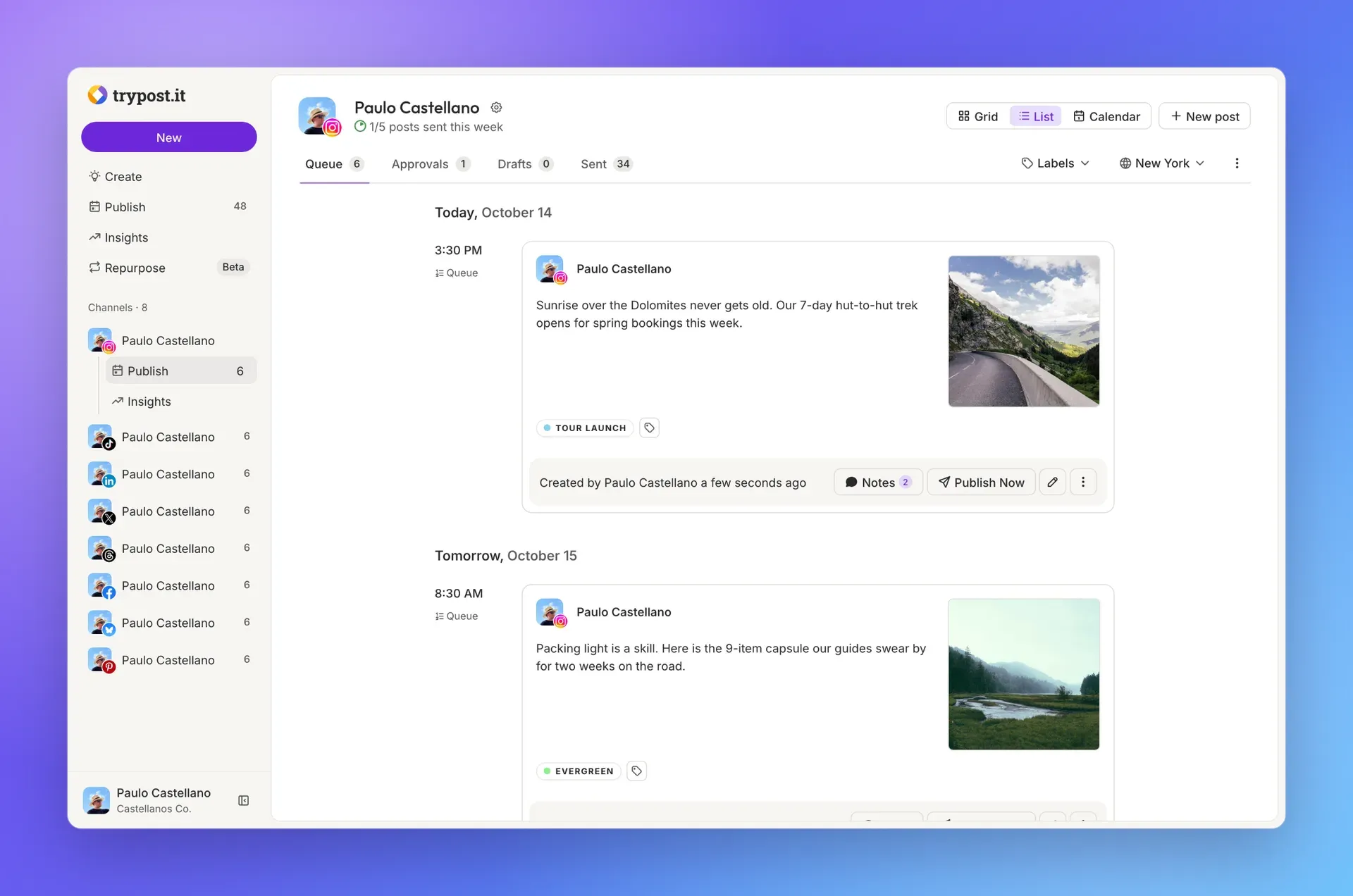
Official README screenshot of a channel queue, showing queued posts with labels, notes and a Publish Now action.
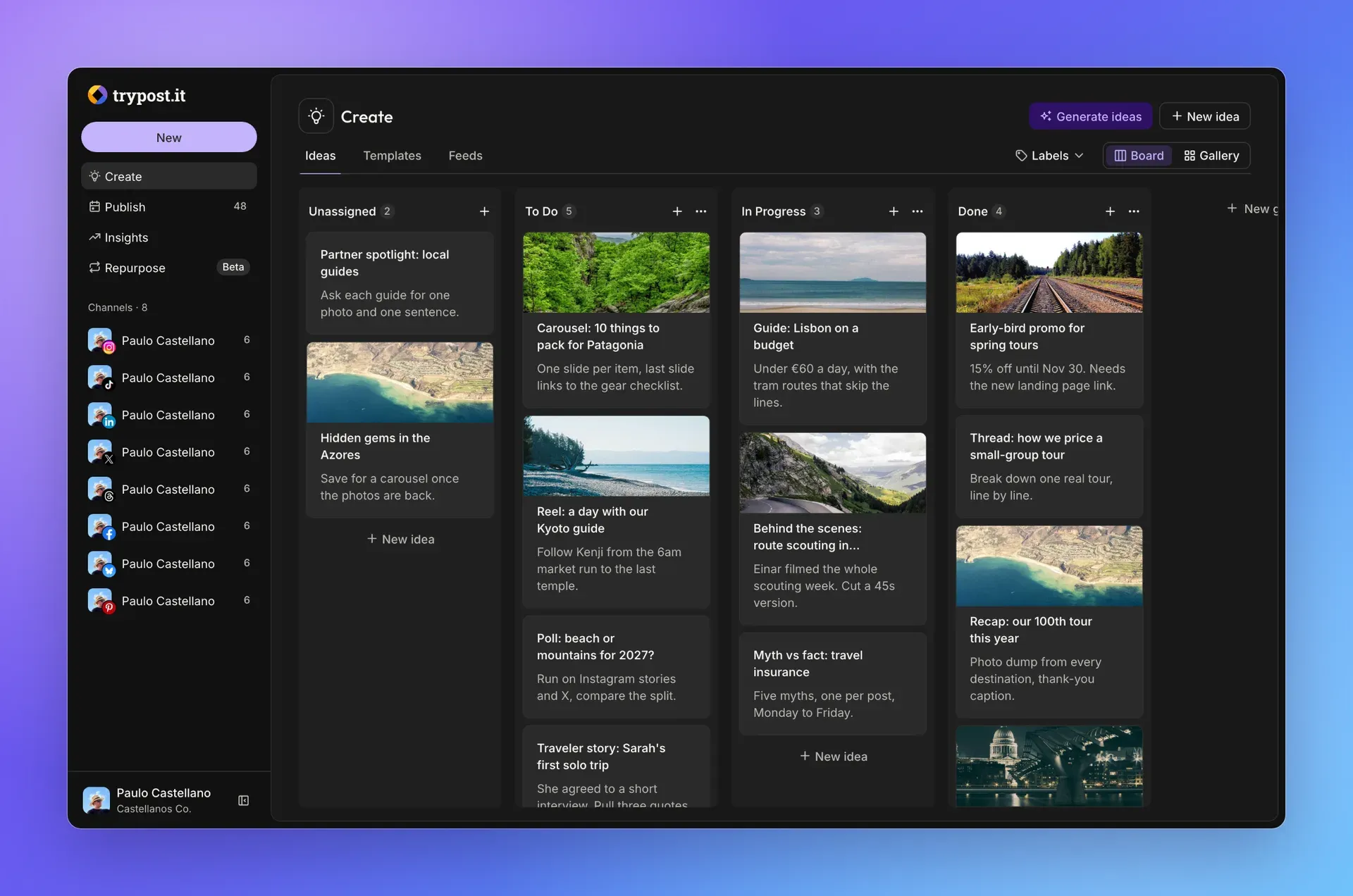
Official README screenshot of the Create area: the ideas board in dark mode, with Templates and Feeds tabs and a Generate ideas button.
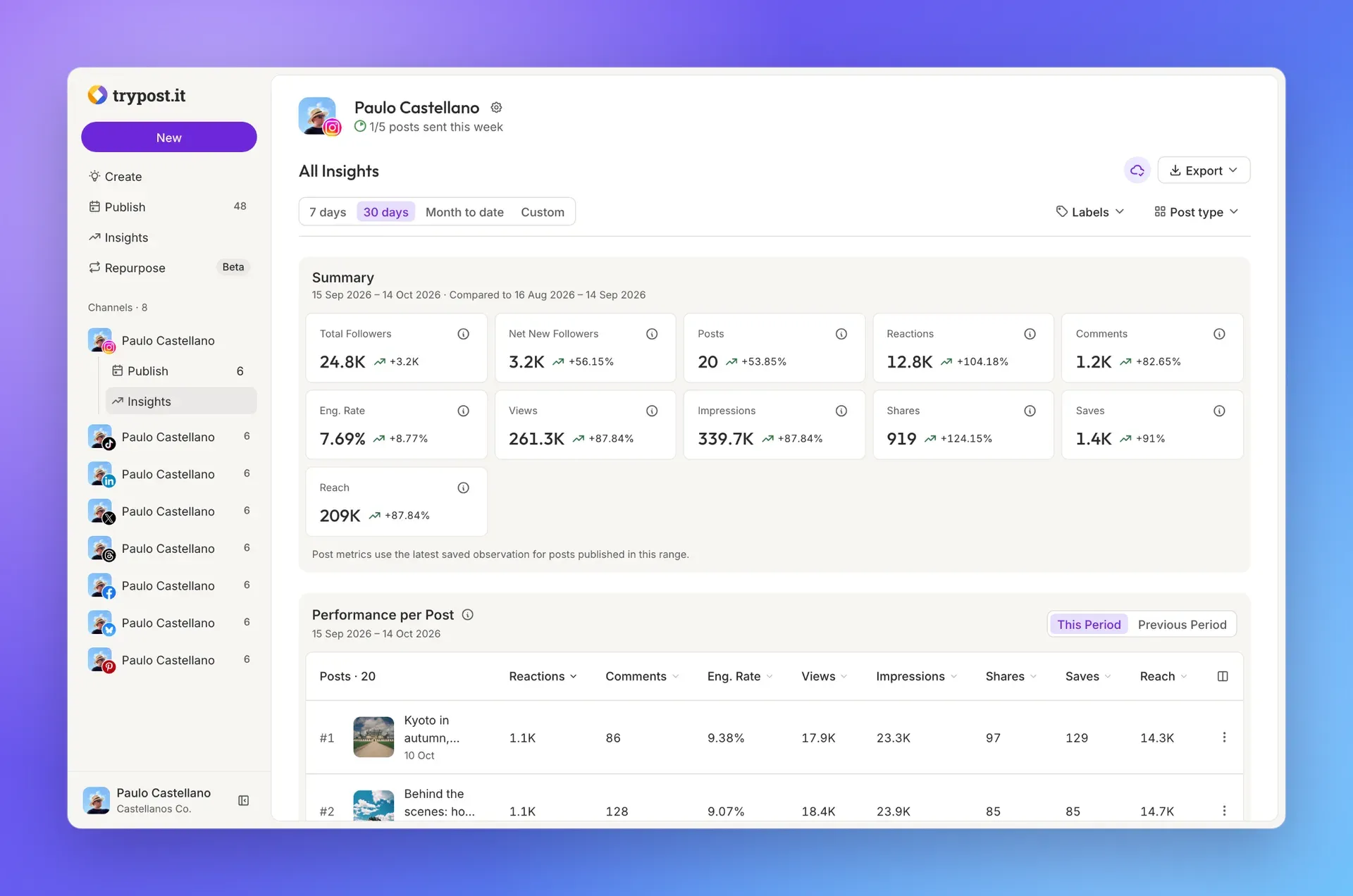
Official README screenshot of channel Insights with sample data, comparing a 30-day period with the previous one and listing performance per post.
Source: official TryPost project page.
Key capabilities
- Composer with per-network customization Write a post once, then adjust the text, media and settings for each selected network while a live preview shows how each version will look. The built-in AI assistant can generate, rephrase, shorten, expand or change the tone of a draft. Media can come from the device, Unsplash, Google Drive, Google Photos or Canva; the example configuration notes that Canva and Google Photos are effectively Cloud-only because they need an approved integration or Google verification. iPhone HEIC photos are converted to JPEG when Imagick has HEIC support.
- Calendar and list views All scheduled, queued and sent posts appear on a month calendar or in a list, filtered by channel, label, post status and time zone. Since v2.0.1 a post can be rescheduled by dragging it to another day. The toolbar also has a No Date control for posts that have not been given a time yet.
- Per-channel queues Each channel gets its own posting times in its own time zone, with up to 4 times per day and a weekly goal of up to 28 posts. Adding a post with Next available fills the first free slot, while Prioritize takes the earliest slot and shifts only the queued posts directly behind it. Queued posts never move on their own, as the queue documentation explains, and a channel without posting times cannot use the queue.
- Approvals for members There are no role presets. Each member is either Publishes directly or Needs approval, and members who need approval save with Save and request approval. The owner, admins and direct publishers then schedule, add to queue, approve with a new time, or reject the post back to draft. The approval rules apply to posts created through MCP as well, and a queued request holds its slot while it waits.
- Workspaces and permissions A workspace is one brand or client with its own channels, members, labels, signatures, analytics and MCP connections. Admins manage members, channels, webhooks and API keys; only the account owner can create or delete workspaces and handle billing. Members are invited by email, and an address that already belongs to another TryPost account cannot be invited.
- Ideas board, templates and feeds The Create area holds a board of ideas in custom stages, with an AI option to generate ideas, a template library, and a feed reader for RSS, Atom and JSON feeds. A workspace can follow up to 50 feeds; they refresh every 8 hours and keep the latest 100 articles each. An article can become a post in the composer or be saved as an idea.
- Signatures, labels and notes Signatures are reusable blocks for hashtags, links or sign-offs that are appended from the composer. Color-coded labels filter the calendar, the queue and Insights. Notes on a post are internal comments that are never published and trigger an email to the other workspace members.
- Recurring posts A scheduled post can repeat every chosen interval and frequency a set number of times. Once a recurring post has been approved, later occurrences publish without new approvals. Only members who publish directly can make a post recurring.
- Insights analytics The dashboard summarizes followers, posts, reactions, comments, engagement rate, views, impressions and reach for X, TikTok, YouTube, Facebook, Instagram, Threads, Pinterest, Bluesky and Mastodon, including posts published natively outside TryPost. New posts are picked up every 3 hours (every 24 hours on X), and post metrics are read daily for 30 days, less often on X where reads are billed. Ranges are 7 days, 30 days, month to date or custom, and the Insights page documents export to CSV or Markdown.
- Repurpose for short video (beta) A repurpose watches one Instagram or Facebook account for new Reels, videos or Stories posted outside TryPost and republishes each to other channels, either automatically or as drafts. Google Business cannot be a destination because its posts do not accept video. Captions over a network limit are shortened with AI or cut at a word, and Instagram destinations keep only the first 5 hashtags. On Cloud the source is checked about every 15 minutes, per the Repurpose guide.
- REST API The REST API covers posts, batch creation, media uploads, queues and posting schedules, ideas, labels, signatures, webhooks, repurposes, approvals and analytics. Requests use a workspace API key as a Bearer token; keys belong to admins and are bound to one workspace. Each workspace has 60 requests per minute shared by all its keys, with
429and aRetry-Afterheader above it, and lists are paginated at 25 items. Self-hosted instances serve the same API atAPP_URL/api. - MCP server for AI assistants The built-in MCP server at
/mcp/trypostexposes 83 tools for posts, threads, media, queues, approvals, recurrence, ideas, analytics, labels, signatures, webhooks, repurposes and API keys. Clients authenticate with OAuth 2.1, dynamic client registration, PKCE and themcp:usescope, and each connection is bound to one workspace. The docs include setup guides for 18 clients, among them Claude, ChatGPT, Cursor, Codex, Gemini CLI, VS Code and GitHub Copilot. MCP cannot connect channels, manage members or billing, or generate text with TryPost AI, as listed in the MCP introduction. - Signed webhooks Webhooks send a JSON
POSTfor six events: post created, scheduled, unscheduled, published, failed and deleted. Each delivery carries anX-Webhook-Signatureheader with a hex HMAC-SHA256 of the raw body. TryPost waits up to 10 seconds, treats redirects as failures, rejects private and loopback endpoints, and lets admins send test events, rotate secrets and replay deliveries, according to the webhooks page. - Choice of AI provider when self-hosting AI features use the Laravel AI SDK for text only: the composer assistant, idea generation, alt text and Repurpose captions.
AI_TEXT_PROVIDERselects OpenAI (default), Anthropic, Gemini, Azure, Bedrock, Groq, xAI, DeepSeek, Mistral, OpenRouter, Ollama or any OpenAI-compatible endpoint, with an optional model override per provider. Leaving keys blank disables AI; the provider bills you directly, as the AI provider guide notes. - Docker production install The repository ships
compose.prod.yaml, which pulls the published image with PostgreSQL 16, Redis 7, Horizon, Reverb and the scheduler, and adds an optional Caddy profile for automatic HTTPS. You generateAPP_KEYand the Passport key pair first; without the Passport keys a production container exits at boot. The app listens on port 8000 and WebSockets on 8080. Because the browser WebSocket host is baked into the image, a custom domain requires rebuilding with theVITE_REVERB_*build arguments, and the docs recommend pinning the major tag:2instead oflatest. - Bare-metal install Without Docker you need PHP 8.4.1 or later with extensions including pdo_pgsql or pdo_mysql, pcntl, intl, GD and Sodium, Composer 2, Node.js 22.12 or later, PostgreSQL or MySQL, and Redis. Horizon, Reverb and the scheduler run as long-lived processes, typically under Supervisor behind Nginx or Apache. The requirements page lists a minimum of 1 CPU core, 1 GB RAM and 10 GB storage, recommends 2 cores and 2 GB, and names Ubuntu 22.04 or later as the preferred server OS.
- Interface in 16 languages The web app is available in English, Portuguese, Spanish, French, German, Italian, Dutch, Polish, Greek, Ukrainian, Russian, Turkish, Arabic, Japanese, Korean and Chinese. Since v2.0.1 new users are signed up in their browser language, and since v1.1.0 every transactional email is translated; an invitation is sent in the interface language of the member who sends it. AI rewrites keep the language of the text they rewrite.
Where TryPost fits
Running several brands or clients
Create one workspace per client so channels, labels, analytics and MCP connections stay separate, which on Cloud requires the Workspaces plan. Invite client staff or junior team members with Needs approval and keep account managers as direct publishers. Check that approval emails reach the right people through each member's Collaboration notification switch, and remember that disconnecting a channel deletes all of that channel's posts in TryPost.
Letting an AI assistant draft the week
Connect Claude, ChatGPT, Cursor or another MCP client to /mcp/trypost, sign in in the browser and pick the workspace. The assistant inherits the signed-in member's permissions, so connecting through an account set to Needs approval turns every agent post into a pending request that a person must approve. Ask the agent to use the queue rather than fixed times, then review the Approvals tab before anything goes live.
Publishing from a CMS, script or CI job
Create an admin API key in the target workspace and call the posts endpoints, using batch creation when one article fans out to several networks. Plan around 60 requests per minute per workspace and send Accept: application/json so errors return as JSON. Subscribe a webhook to post.published and post.failed, verify the HMAC signature, and alert on failures instead of polling. The posting guide covers per-network settings such as Pinterest boards or TikTok privacy levels.
Self-hosting on a small VPS
Download compose.prod.yaml, set APP_URL, database and Reverb secrets, generate the app and Passport keys, then start the stack with the proxy profile for HTTPS. Configure SMTP, since the default mail driver only writes to the log, and register a developer app on each network with the callback APP_URL/accounts/<platform>/callback. Because the container runs migrations on every boot, take a database dump before each upgrade, as the upgrade notes stress.
Cross-posting short video
Point a repurpose at the Instagram or Facebook account where Reels are published natively, choose destinations such as TikTok and YouTube Shorts, and start with Create as draft until captions and required settings look right. Only videos posted after activation are copied, and pausing keeps a backlog while disabling discards it. Check that the source account stays connected, because a lost connection puts replication on hold.
Reporting on channel performance
Use Insights with a 30-day range and label filters to compare campaigns, then export CSV for a spreadsheet or Markdown for a client report. Explain to stakeholders that LinkedIn, Telegram, Discord and Google Business numbers are not available, and that follower history only starts when a channel is connected. For X, expect fewer metric readings because each API read is billed.
Install
docker compose -f compose.prod.yaml up -dReviews of TryPost
Be the first to share your experience with TryPost.
Write a review
Loading review form…
Alternatives to TryPost
 PostizOpen-source social media scheduler with a shared calendar, per-channel post editing, client preview links, analytics, RSS auto-posting, webhooks, a public API, a CLI and an MCP server. Run it on your own Docker host or subscribe to Postiz Cloud.
 n8nn8n is a fair-code workflow automation platform from n8n GmbH in Berlin. It combines a node-based visual editor with JavaScript and Python code, AI agent nodes, 1500+ integrations, a REST API and an MCP server, self-hosted or on n8n Cloud.SMSocial Media Skills for AI AgentsMIT-licensed Markdown skills for Codex and Claude covering social media writing, author voice, LinkedIn research, visual prompts, Reel scripts and analytics.