

What is Hold My Docs?
Hold My Docs, shortened to HMD, is a self-hosted wiki published by soollabs in the soollabs/holdmydocs repository on GitHub under the MIT license. The project describes it as a browser-based place to write, find and share documentation, from a personal knowledge base to a team's internal guides or a public documentation site. Every page is a Markdown file inside an ordinary Git repository, and every save or delete becomes a Git commit, so page history is the repository history. Writers do not need to run Git commands themselves.
HMD is written in Go and runs as a single binary. It needs no separate database: pages, attachments and wiki or namespace configuration live in a content repository folder, while accounts, hashed passwords, access tokens, OAuth connections, server settings and a rebuildable search index live in an application folder made of JSON files. The installation guide lists three paths: release binaries for Linux, macOS and Windows with a SHA256SUMS file, the container image ghcr.io/soollabs/holdmydocs tagged with each release, and building from source with the Go version named in go.mod. A systemd unit example is included for running it as a Linux service.
The current release is v0.10.2, published on November 4, 2026, which consists of dependency updates. Version 0.10.0 added MCP tools to move and rename pages and made page moves keep attachments and history in one commit. Version 0.9.0 made the plain "bare" skin the default and stopped the login page from revealing the version and Git remote. Version 0.7.0 reworked the MCP tools and the read-only mode, and removed the path alias from MCP tools as a breaking change. The README labels HMD an early-stage project and warns users to expect rough edges and breaking changes, to keep backups and to test upgrades.
The limitations page states what HMD does not do: there is no real-time collaborative editing or live cursors, concurrent saves use optimistic locking and produce a conflict screen, Git remotes must use HTTPS because SSH remotes are unsupported, namespaces exist only at the top level, and bidirectional sync only fast-forwards. The project FAQ adds that HMD is not a hosted service and that live-wiki search requires a login even for public pages.
The README notes that parts of HMD are developed with AI coding assistants and several models, and that the maintainer reviews, corrects and tests all changes. Documentation for installation, configuration, operations, MCP and development is published at hmd.sool.dev, which is itself a static export produced by HMD. Similar self-hosted wikis listed on iThub include Docmost, XWiki and SilverBullet.
Hold My Docs screenshots
Explore the interface. Open a screenshot to view it at full size.
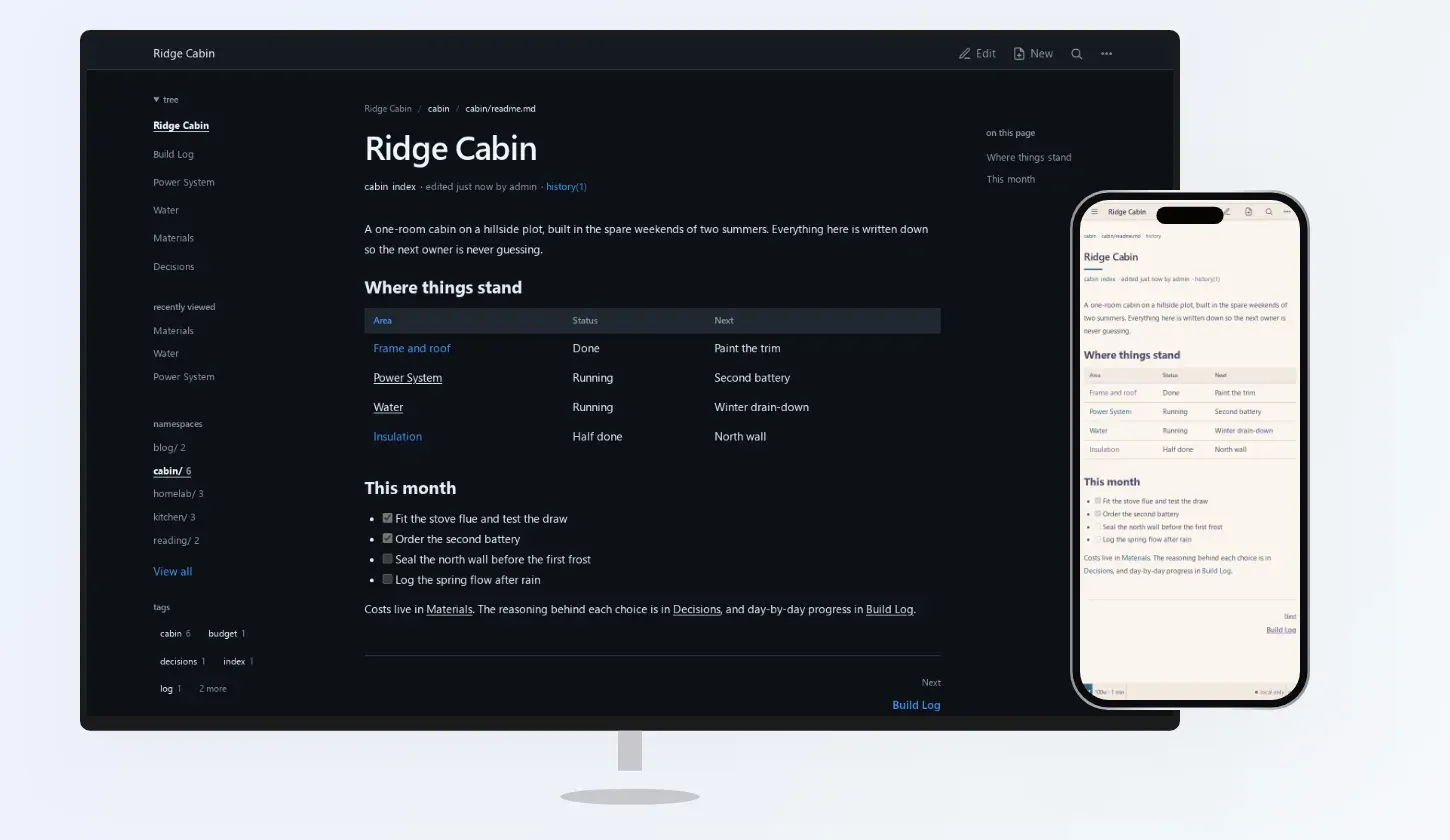
A fictional Ridge Cabin wiki in HMD on desktop and mobile, from the project README.
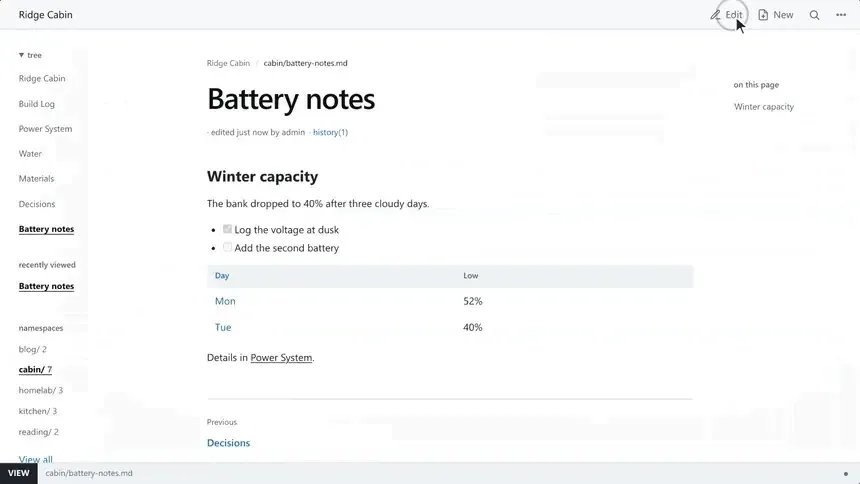
A saved Markdown page with a checklist, table and wiki-link, frame from the official README demo.
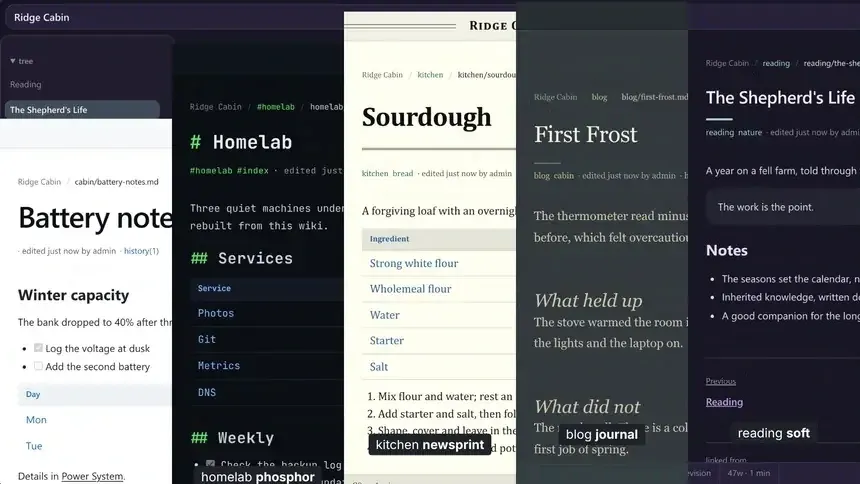
Namespaces rendered in the phosphor, newsprint, journal and soft skins, frame from the official README demo.
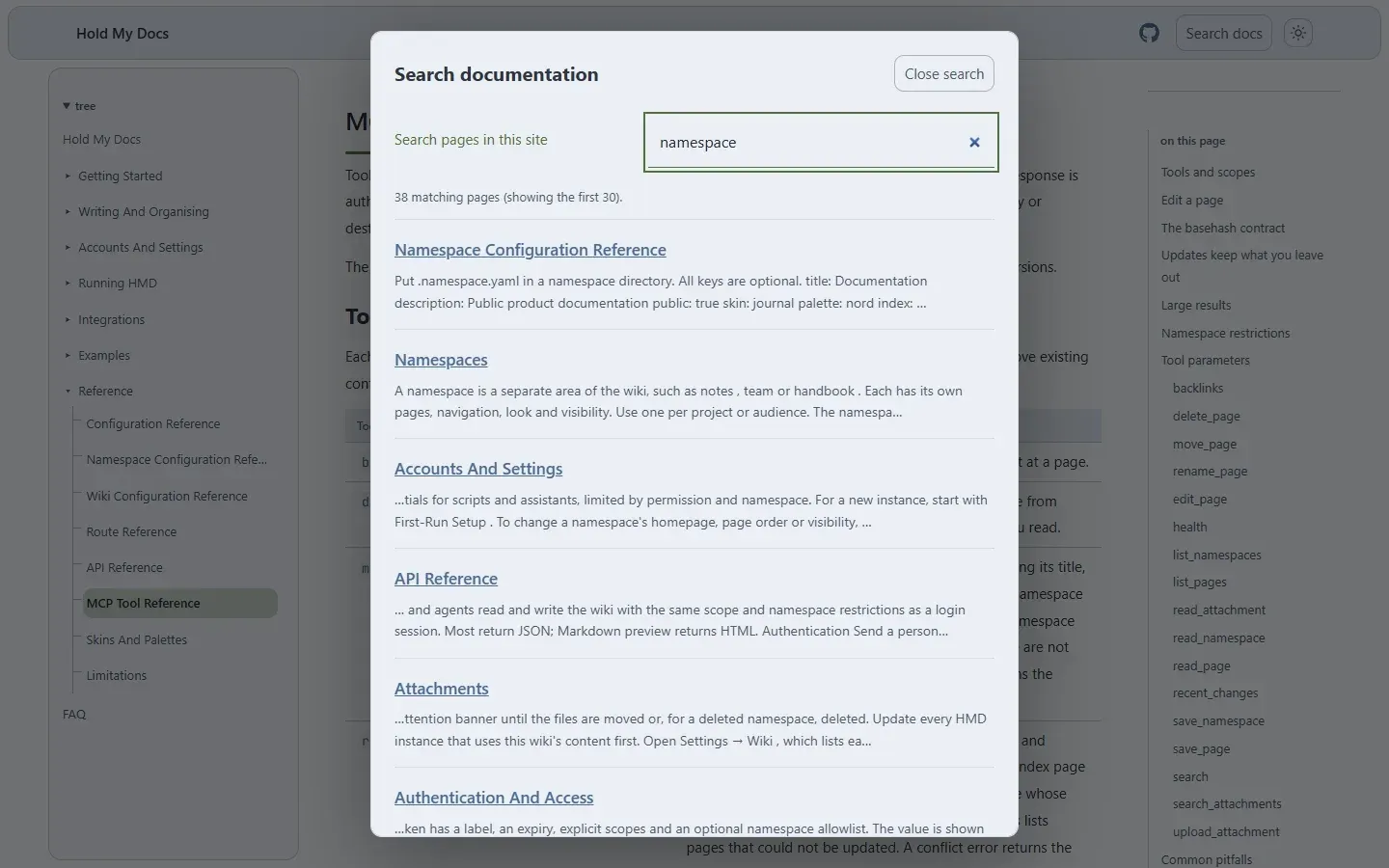
Browser-local search on hmd.sool.dev, the project documentation published as an HMD static export.
Source: official Hold My Docs project page.
Key capabilities
- Markdown pages in a Git repository Each page is stored as a
.mdfile whose path matches its URL, for exampleteam/guides/onboarding.mdserved at/team/guides/onboarding. Frontmatter holds the title and tags, and the editor manages it so YAML is not written by hand. Because the content is plain Markdown in Git, it can be backed up or edited with other tools. - Commit on every save Every save and delete creates a local Git commit, and page history lets users inspect changes and revert to earlier revisions. Without a remote the status line shows "local only" and saves still commit locally. The Git sync documentation describes how commits, history and conflicts are handled.
- Git remote sync With a configured remote, HMD pushes asynchronously after each write, so a save does not wait on the network. The default push mode only pushes, while bidirectional mode fetches and fast-forwards before saves and on a sync poll; divergent histories fail rather than creating merge commits. Remotes must use HTTPS, and the token is supplied through
HMD_GIT_TOKENor a private token file, never inconfig.yamlor the UI. - Read-only mirror mode Setting
HMD_SERVER_READ_ONLY=truewith a remote URL serves a Git repository without allowing changes, for example to browse public documentation locally. Public repositories clone without a token, and HMD fetches updates every 10 seconds. Nobody can save pages, upload files or change settings in this mode, administrators included. - Namespaces A namespace is a top-level area such as
notes,teamorhandbookwith its own page tree, navigation, appearance, visibility and page-creation defaults. Namespaces are private by default; a public namespace lets visitors read ordinary pages and attachments without signing in but not edit them. Deeper folders organise pages but are not namespaces. - Markdown editor The editor shows Markdown source in the page column with a toolbar for bold, italic, headings, links, code, tables, images, attachments and a table-of-contents token, plus a preview toggle and a focus mode. Keyboard shortcuts cover save, command palette, edit and preview, new page from a template and heading levels. Drafts are kept locally until a save writes them to the repository.
- Wiki-links, backlinks, tags and diagrams Pages link to each other by title with
[[Page Title]], and each page lists the pages that link to it. Tags group related pages across topics. Fencedmermaidblocks render as diagrams in the preview and on the saved page, and raw HTML is rendered after a sanitizer strips scripts and event handlers. - Full-text search Search uses a local index of page titles, bodies and tags with no external service. Text in
.txtand.mdattachments is also searched. Live-wiki search requires a login even when pages are public. - Attachments and document search Files up to 10 MiB by default can be attached to a page and share that page's visibility; PNG, JPEG, GIF and WebP display inline while other types, including SVG and HTML, download. With an operator-supplied Apache Tika Server, HMD also extracts and searches PDF and Office attachments locally, combining keyword and semantic search. The README asks operators to keep Tika private.
- Accounts, scopes and single sign-on Users sign in with local accounts or OIDC single sign-on. Scopes are
read,writeandadmin, can be limited to namespaces, and every user needs at least one. Passwords must be at least 12 characters, sessions expire after 30 days and local login throttles repeated failures, as described in Authentication and Access. - Personal access tokens Each token has a label, an expiry, explicit scopes and an optional namespace allowlist. The value is shown once and HMD stores only a SHA-256 digest. Changing a user's scopes also limits that user's tokens from the next request.
- HTTP API The
/_/api/*endpoints let scripts read and write the wiki with the same scope and namespace restrictions as a login session, authenticated with a bearer token. Endpoints cover search, attachment search, a health report, sync status and push, page create, delete, rename, tags and revert, namespace configuration and Markdown preview. The API reference lists each route and its required scope. - MCP server An MCP endpoint at
/_/mcplets authorised AI assistants list, read, search, create, edit, move, rename and delete pages, read the health report and upload or read attachments. Clients connect with a personal access token or through OAuth, which requires HTTPS and lasts 30 days per connection. Every assistant edit is a normal Git commit, and MCP cannot access hidden pages or browse attachment directories. - Static export A namespace can be exported as a self-contained static website, either as a ZIP from the namespace list or with
hmd -export-namespacefrom the command line. The export includes every page and attachment, a sitemap by default, browser-local search over page text and link preview tags, and blocks search bots by default. Editing, sign-in, history, backlinks and hidden pages are left out, and the site must be re-exported after changes. - Skins and palettes Five skins (bare, phosphor, newsprint, journal and soft) set typography and layout, and ten palettes such as nord, dracula, gruvbox and solarized set colours, each with light and dark variants. Skins and palettes are per-user choices, while a namespace can set what anonymous viewers see. The interface is translatable since version 0.6.0.
- Health report and readiness check
/_/health-reportlists missing wiki-link targets, orphan pages with no incoming links and pages unchanged for at least 180 days, and can be scoped to one namespace through the API./_/readyis a readiness endpoint used in the install checks. Fixed limits include a 2 MiB cap on ordinary form requests and 10,000 files per namespace export. - Release binaries and container image Each release publishes binaries for Linux amd64 and arm64, macOS amd64 and arm64 and Windows amd64, with a SHA256SUMS file. The container image
ghcr.io/soollabs/holdmydocsis tagged per release, and the project notes thatlatestfollows unreleased development. The repository's Docker Compose file starts a loopback-only instance with optional Git sync and a Tika profile. - Administrator recovery With HMD stopped,
hmd -reset-admin <user>creates or resets an account with all three scopes against the same application directory. Recovery refuses to run while a server is using that directory. The first administrator is created fromHMD_ADMIN_USERandHMD_ADMIN_PASSWORD, which are ignored once accounts exist.
Where Hold My Docs fits
Personal or homelab wiki
The install guide starts a private instance bound to 127.0.0.1 with local storage only, using a release binary, Docker Compose or a source build. After first-run setup names the wiki and creates a namespace, pages are written in the browser and each save is committed to the local repository. A Git remote can be added later through Git sync, and the project's topics list homelab use.
Internal team documentation
For project or team documentation, the docs point to namespaces for separating areas and to authentication settings before inviting people. Accounts receive read, write or admin scopes per namespace, OIDC provides single sign-on, and private namespaces keep material away from anonymous visitors. Concurrent edits are not merged live: a save based on an older revision shows a conflict screen instead of overwriting.
Publishing a public documentation site
A namespace can be exported as a static site with navigation, browser-local search, a sitemap and link preview tags, then uploaded to any static file host or CDN. The export can run from the settings UI or from the command line for automated publishing, with flags for the base URL, sitemap, allowed bots and external links. The static export guide notes that every attachment in the namespace becomes public, and the HMD documentation site itself is produced this way.
Knowledge base maintained by an AI assistant
The LLM Wiki example describes a private research namespace where an agent connected over MCP uploads source documents as attachments, reads their extracted text and updates topic pages, an index and a log. Access is limited by token or OAuth scopes and namespaces, and each agent change lands in Git history where it can be reviewed and reverted. Attachment text search for this workflow needs the optional Tika-based document search.
Browsing a docs repository read-only
Read-only mode clones a public Git repository without a token and serves it without allowing any changes, refreshing every 10 seconds. The Git sync page shows this with the HMD documentation repository. Private repositories need a Git token, and private namespaces still require a sign-in.
Scripting against the wiki
Scripts authenticate to the HTTP API with a personal access token and can search pages, create or update them, change tags, revert revisions, trigger a push to the remote or read the health report for dangling links and stale pages. Tokens restricted to namespaces only see results from those namespaces, and missing or insufficient scopes return 401 or 403 JSON errors rather than a login redirect.
Reviews of Hold My Docs
Be the first to share your experience with Hold My Docs.
Write a review
Loading review form…
Alternatives to Hold My Docs
 DocmostDocmost is an AGPL-3.0 wiki and documentation platform for teams, deployed with Docker, PostgreSQL and Redis on your own servers. Business and Enterprise license keys add SSO, AI search, MCP, the API, Bases and audit features.
 XWikiXWiki is an open-source Java wiki platform under LGPL 2.1 for knowledge bases, intranets and small business apps. Install it with Debian packages, Docker or a WAR, or use XWiki Cloud; XWiki SAS sells support plans and Pro apps.
 SilverBulletSilverBullet stores notes as Markdown files in a folder and adds backlinks, object queries and Space Lua scripting. The Server is MIT-licensed and self-hosted; Desktop for macOS, Windows and Linux is free for personal use.