

What is Blinko?
Blinko is an open-source note-taking application built around two kinds of entries: short Blinko cards for quick capture, which can be archived automatically, and Notes for material you intend to keep. AI features work on top of that store, so you can search and question your own notes in natural language through a provider you configure. The project is developed by the blinkospace team on GitHub, where the repository was created in October 2024, and the code is licensed under the GNU General Public License version 3. The same team runs Blinko Cloud, a hosted edition with free and paid plans; this profile focuses on the self-hosted edition and notes where Cloud differs.
The server ships as the blinkospace/blinko Docker image listening on port 1111, with PostgreSQL 14 as the documented database. The install guide covers an interactive install.sh script, plain docker run commands and Docker Compose, and the repository includes a Helm chart for Kubernetes. PikaPods offers one-click hosting, and the docs state that part of those fees goes to the project. Each release also publishes client apps: a Windows x64 installer and MSI, an Apple Silicon DMG, Linux AppImage, DEB and RPM packages for x86_64, and a universal Android APK. The desktop and Android apps are clients for a Blinko server. There is no iOS build of the open-source edition, and the macOS package is not notarized, which the README addresses with a quarantine-removal command.
The current release is Blinko 1.8.9, published November 5, 2026. It is a maintenance and security-hardening release without a database migration. Existing stdio MCP server configurations now need operator approval through the BLINKO_MCP_STDIO_ALLOWLIST variable, the public origin must be set in NEXT_PUBLIC_BASE_URL or NEXTAUTH_URL, and server and clients should be updated together. Version 1.8.8 added streamable HTTP MCP transport, LiteLLM as an AI gateway and Ukrainian localization. Version 1.8.7 added MiniMax as a model provider and fixed upload errors caused by unusual filenames. Version 1.8.0, from December 2025, moved background jobs to pg-boss and introduced AI scheduled tasks and MCP server management.
Blinko is a TypeScript monorepo run with Bun. The frontend uses React 18, Vite, HeroUI, Tailwind CSS and the Vditor Markdown editor, and Tauri 2 wraps it for desktop and Android. The backend is Express 5 with tRPC and Prisma on PostgreSQL. AI functions use the Vercel AI SDK and Mastra, and note embeddings are stored in a local LibSQL file under .blinko/vector. Attachments go to the .blinko data directory or to S3-compatible storage. The interface ships with 17 language files.
Some things are outside its scope. Blinko is a personal or small-group note store, not a real-time collaborative wiki: shared notes are read-only links. End-to-end encryption is not documented. AI features need your own API key or a local model server, and the open-source edition has no built-in model. Blinko Cloud features such as custom blog domains and the Blinko CLI are listed on the pricing page for paid Cloud plans, not as part of the self-hosted release.
Blinko screenshots
Explore the interface. Open a screenshot to view it at full size.
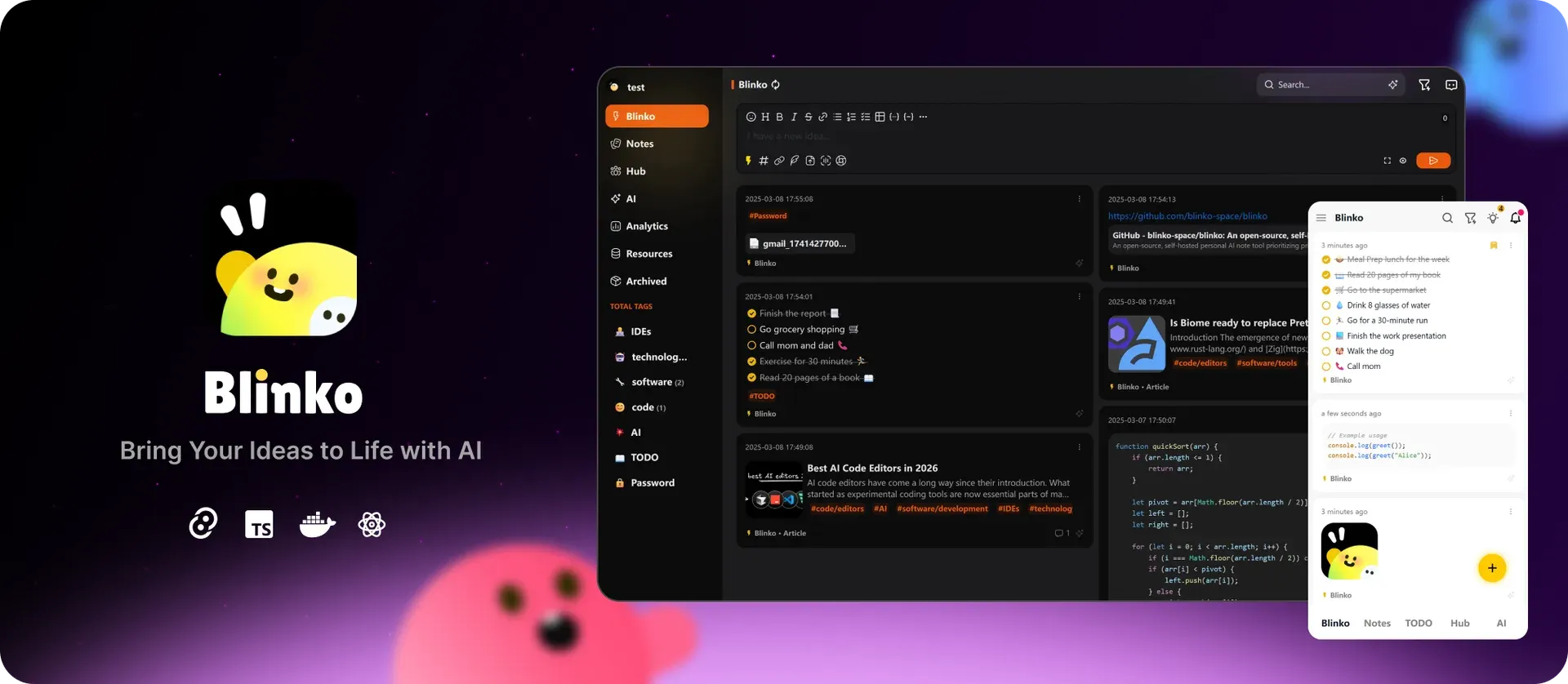
Official Blinko overview image from the README: the desktop web interface with nested tags and note cards, and the mobile layout on the right.
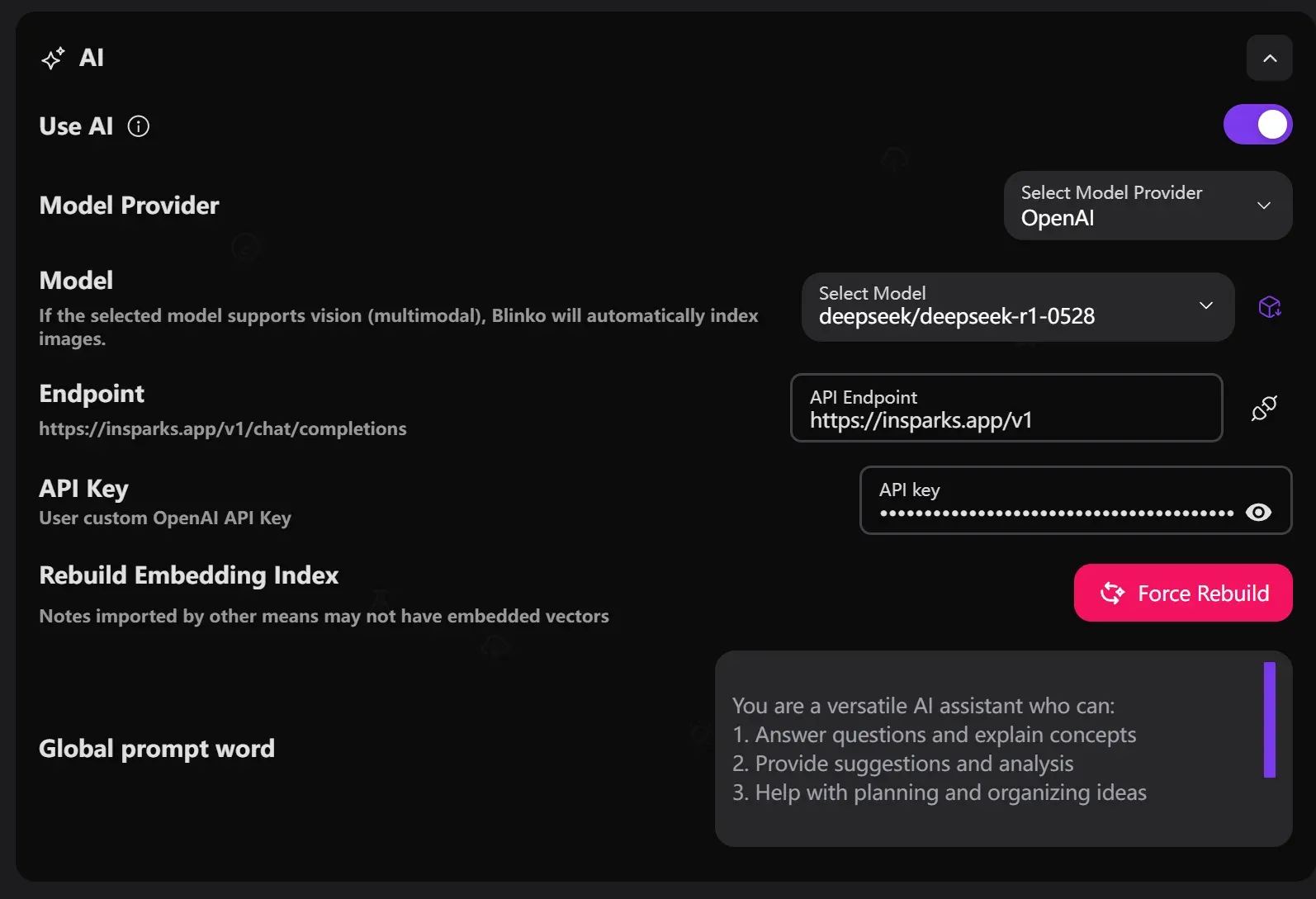
AI settings panel from the official docs, where the provider, model, endpoint and key are set and the embedding index can be rebuilt.
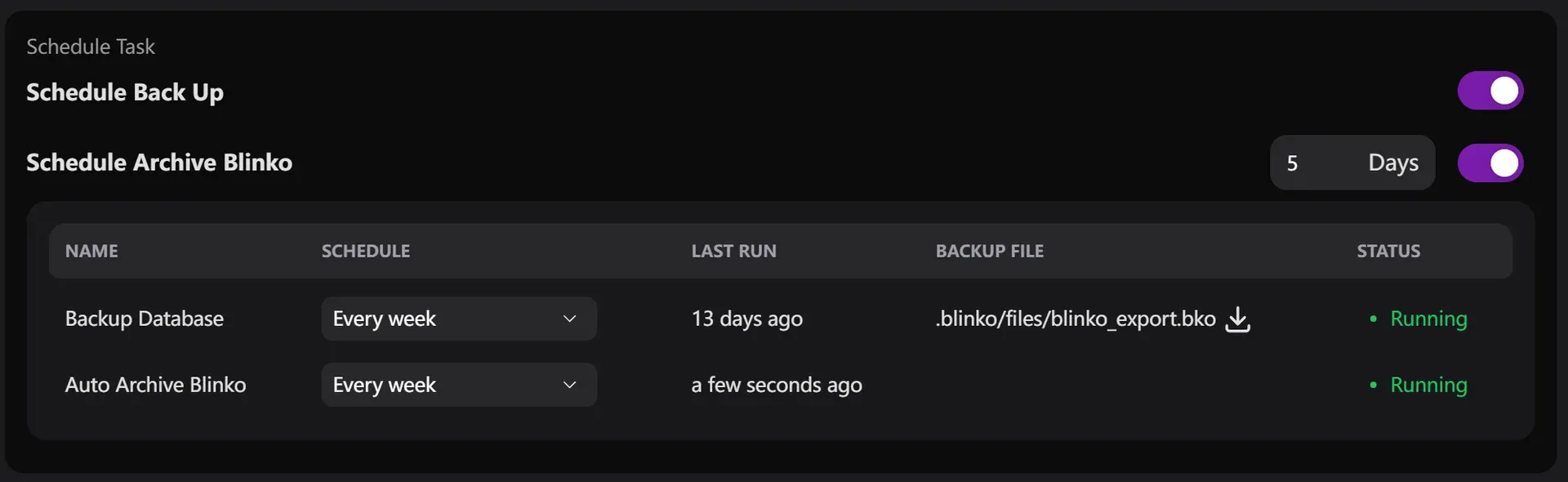
Scheduled backup and archive tasks, with the .bko backup file available for download.
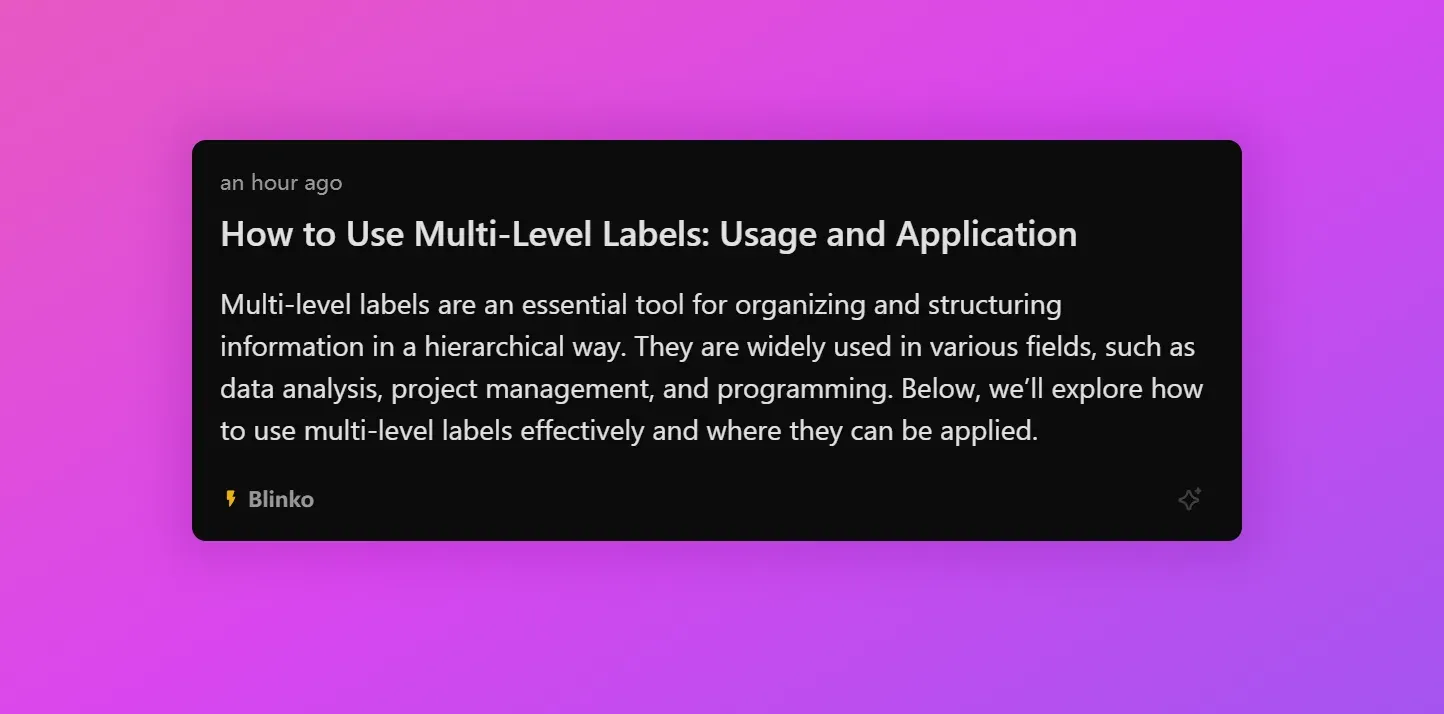
Public view of a shared note from the official sharing guide; shared notes are read-only.
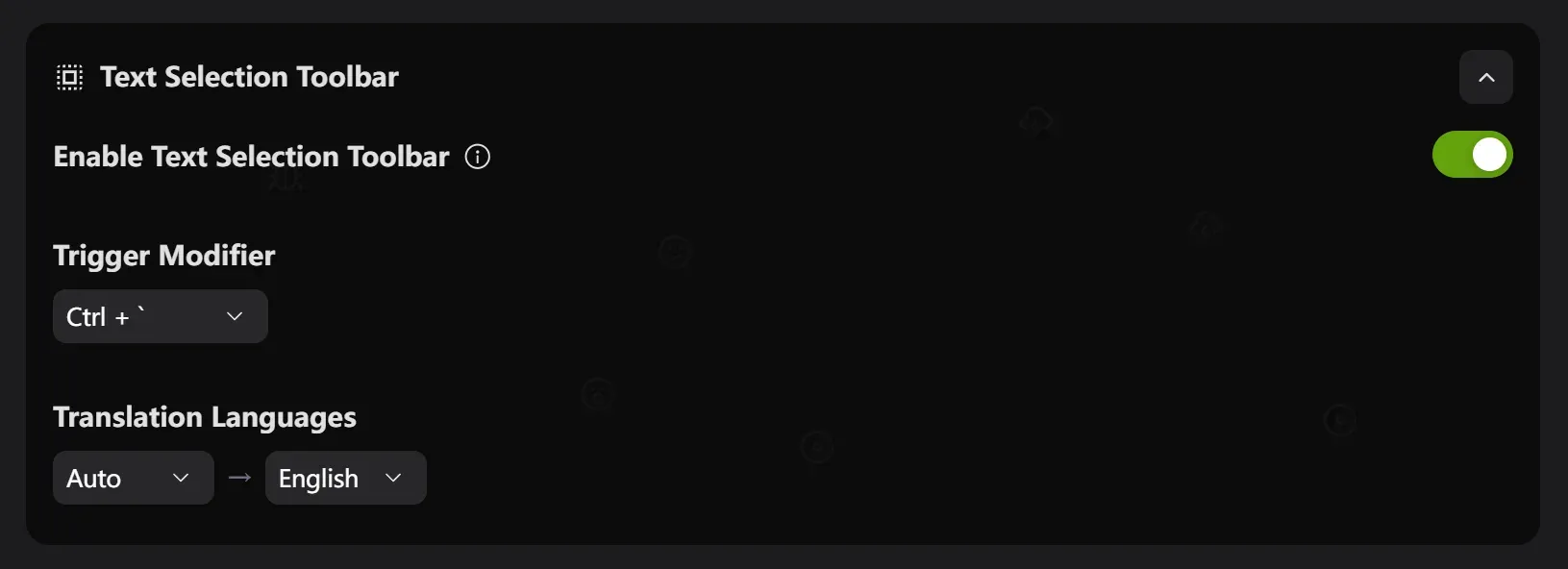
Desktop text selection toolbar settings from the official docs, used to translate, ask AI about or save selected text.
Source: official Blinko project page.
Key capabilities
- Self-hosted server with Docker One container image serves the web app, API and background jobs on port 1111, with PostgreSQL as the database. The documented setup needs a persistent volume for PostgreSQL and, optionally, one for
/app/.blinko, where files, backups, plugins and the vector index live. The docs warn that data is lost if the PostgreSQL volume is not mounted and that the defaultNEXTAUTH_SECRETmust be replaced, for example withopenssl rand -base64 32. - Kubernetes deployment through Helm The repository's Helm chart deploys Blinko with ingress, autoscaling and secret templates and pulls PostgreSQL from the Bitnami chart repository. Its README lists Kubernetes 1.19 or later and Helm 3.2 or later. The chart is installed from the local folder or a packaged archive rather than from a published chart repository.
- Download Blinko for Windows, macOS and Linux Each GitHub release includes a Windows x64 setup executable and MSI, an Apple Silicon DMG and app archive, and Linux x86_64 AppImage, DEB and RPM packages, with signature files for the updater. No Intel Mac package is listed in the open-source release. The macOS build is not notarized, so the README documents removing the quarantine attribute with
xattr. The desktop apps sign in to an existing Blinko server. - Download Blinko for Android A universal APK is attached to each release; there is no Play Store listing in the project sources. The Android share target accepts text, links, images and files from other apps and opens them in the Blinko editor, and app shortcuts launch common actions. iOS is not offered for the open-source edition.
- Blinko cards and Notes Short entries are created as Blinko cards and longer material as Notes. A scheduled task can archive Blinko cards after a set interval, while Notes stay until you remove them. The Blinko vs Note guide suggests treating cards as an inbox and moving content worth keeping into Notes before archiving.
- Markdown editor, tags and comments The editor is based on Vditor and supports headings, lists, checklists, tables, code blocks and attachments from a toolbar. Tags are written inline with
#and can be nested with slashes, such as#code/editors, which builds the tag tree in the sidebar. Notes keep a version history and can receive comments, and a daily review view brings back recent entries. - Bring-your-own model providers AI is off until enabled in settings. The AI settings guide lists OpenAI, Azure OpenAI, Anthropic, DeepSeek, Gemini, Grok, Ollama and OpenRouter, and recent releases added MiniMax and LiteLLM. A custom endpoint field supports proxies and self-hosted OpenAI-compatible servers, and an HTTP proxy can be configured for restricted networks.
- Retrieval over your notes Embeddings are generated with a separately configurable model and stored in a local LibSQL file. Search settings expose Top K from 1 to 20 and a similarity threshold from 0 to 1, and an optional rerank step currently uses a chat model rather than a dedicated rerank model. Changing the embedding model requires a forced index rebuild, and when the chat model supports vision, Blinko also indexes images.
- AI chat, writing and tagging A chat view answers questions from your stored notes and keeps conversation history. Further functions cover writing assistance on selected text, suggested tags, emoji suggestions and post-processing that runs on newly created notes. Since 1.8.0, scheduled AI tasks can run prompts on a timer through the pg-boss job queue.
- MCP client for external tools The AI assistant can call tools from external MCP servers configured in settings, and an existing
mcp.jsoncan be imported. Streamable HTTP transport was added in 1.8.8. From 1.8.9, stdio servers, which start local processes, only run when the operator lists the exact command, arguments and environment inBLINKO_MCP_STDIO_ALLOWLIST. - MCP server, REST API and OpenAI-compatible endpoint Each instance exposes an MCP endpoint at
/mcp, with SSE as an alternative, offering tools to search, create, update and delete notes, add comments and manage scheduled tasks. A Swagger UI at/api-docand an OpenAPI document at/api/openapi.jsondescribe the HTTP API, and/v1/chat/completionsprovides an OpenAI-style chat route. Requests authenticate with a bearer access token, as shown in the access token guide. - Desktop quick capture On desktop,
Shift+Spaceopens a quick-note window andAlt+Spaceopens an AI prompt over your notes; both shortcuts can be changed. A text selection toolbar, triggered byCtrl+`by default, translates, copies, asks AI about or saves selected text from other applications. The quick note guide covers setup and conflicts. - Share links, RSS and Blinko Hub A note can be shared as a read-only link with an expiry time, seven days by default, and an optional numeric password; expired or revoked links cannot be reactivated. Public notes without a password appear in per-user RSS and Atom feeds with a configurable item count. Blinko Hub is an opt-in directory where instances register through a GitHub repository to be discovered by others.
- Import and export Settings import a Blinko
.bkobackup, a single Markdown file or a ZIP of Markdown files, and a Memosmemos_prod.dbSQLite database; the Memos container should be stopped first to avoid partial data. Notes export to Markdown, JSON or CSV. Restoring a.bkobackup requires S3 storage to be disabled temporarily. - Scheduled backup and archive A task scheduler creates database backups at a chosen interval as a downloadable
.bkofile in.blinko/filesand archives old Blinko cards. The task table shows schedule, last run, backup file and status. These backups do not replace a PostgreSQL dump and volume snapshot for disaster recovery. - Single sign-on and accounts OAuth 2.0 providers are configured in settings, with built-in templates for GitHub, Google, Apple, Discord, Slack, Twitch and others, plus custom providers with well-known, authorization, token and user-info URLs. The callback path is
/api/auth/callback/{providerId}, which requiresNEXTAUTH_URLto match your domain. An SSO identity can be linked to a password account. - S3-compatible attachment storage Files can stay on local disk under
.blinkoor go to AWS S3, MinIO or another S3-compatible service configured with endpoint, region, bucket and access keys in the S3 settings. The 1.8.9 notes ask operators to refresh CDN or proxy caches for attachment responses after upgrading. - Webhooks A webhook URL receives JSON payloads when notes are created, updated or deleted, including note content, flags and attachment metadata. Signature verification is listed as a best practice in the docs, so check what your receiving endpoint can validate before sending private content to it.
- Plugins A plugin marketplace adds optional functions such as a music player or focus timer, and settings manage installed plugins. The plugin guide documents a JavaScript API, a shared store through
window.Blinko.store, settings panels and publishing to the marketplace. Plugins run inside the Blinko web interface with access to that API.
Where Blinko fits
Running a personal capture inbox on a home server
Deploy the Docker Compose file from the install guide rather than the one-line script if you want control over secrets and volumes: the script starts PostgreSQL without a data volume and keeps the sample secret. Set a random NEXTAUTH_SECRET, a non-default database password and the public URL, then put the service behind HTTPS. Capture short items as Blinko cards, enable auto-archive at an interval you are comfortable with, and check that archived cards are still searchable before relying on it.
Asking questions over your notes with a local model
Point the chat and embedding settings at an Ollama server or another OpenAI-compatible endpoint on your network so note text does not leave your infrastructure. Pick an embedding model, run a forced rebuild, and test Top K and score thresholds with questions whose answers you know. Retrieval quality depends on the embedding model and on how much you have written; reindex after any model change.
Capturing from desktop and phone
Install the desktop client for your operating system and the Android APK from the same release as the server, since 1.8.9 asks for matching versions. Configure the quick-note and quick-AI shortcuts, check that they do not collide with existing system shortcuts, and use the Android share sheet to send links and images into the editor. Note that the macOS package is Apple Silicon only and needs its quarantine flag removed.
Publishing selected notes
Share individual notes with an expiring link and an optional numeric password, or mark notes public to include them in the RSS and Atom feeds documented in the RSS guide. Review which notes are public before adding the feed to a reader or registering with Blinko Hub. The sharing guide confirms that recipients cannot edit shared notes.
Migrating from Memos or Markdown files
Stop the Memos container, copy its memos_prod.db file and import it from Blinko settings, or upload a ZIP of Markdown files exported from another tool. Compare note counts, tags and attachments after the import, then run an embedding rebuild so imported notes become searchable by AI, because notes imported by other means may lack vectors.
Automating with the API, webhooks and MCP
Create an access token and post notes from scripts to the upsert endpoint, or browse the full interface at /api-doc on your instance. Register a webhook to forward note changes to another system, and connect an MCP-capable assistant to the /mcp endpoint so it can search and write notes. Treat tokens as full account credentials and keep stdio MCP servers on the allowlist to commands you control.
Install
curl -o install.sh https://raw.githubusercontent.com/blinko-space/blinko/main/install.sh && bash install.shReviews of Blinko
Be the first to share your experience with Blinko.
Write a review
Loading review form…
Alternatives to Blinko
 MemosMemos is an MIT-licensed, self-hosted note-taking server written in Go. Short Markdown memos land on a dated timeline with tags, Views, Spaces and per-memo visibility, stored in SQLite, MySQL or PostgreSQL on your own host.
 JoplinJoplin is a free, open-source note and to-do app for Windows, macOS, Linux, Android and iOS, with offline-first storage and encrypted sync.
 SiYuanSiYuan is an AGPL-3.0 personal knowledge management app built on block-level references, Markdown WYSIWYG editing and databases. It runs on desktop, mobile or Docker, keeps data in a local workspace and sells optional sync.