

What is Memos?
Memos is an open-source, self-hosted note-taking application built around a personal timeline. Each memo can be a single sentence or a longer Markdown entry, stays attached to the day it was written and can carry tags, attachments, a location, comments and links to other memos. The project is developed in public by the usememos organization on GitHub, released under the MIT License, and documented at usememos.com/docs. The official pricing page states that the software costs nothing and that there is no hosted Memos service: any cost comes from the server, storage or domain you choose.
The server is a single Go binary that also serves the React web interface. Releases ship as the neosmemo/memos Docker image and as prebuilt archives for Linux (amd64, arm64, armv7), macOS (Intel and Apple Silicon) and Windows amd64, each with a checksums file. The deployment guide covers Docker, Docker Compose, a plain binary under a service manager, Kubernetes, building from source and running behind a reverse proxy. SQLite is the default database; MySQL and PostgreSQL are supported for larger installations or when the database should live on an existing server, and the 26.10.0 notes add that MariaDB works.
The current release is Memos 26.11.0, published on November 1, 2026. It fixes Japanese and Korean input in Safari, returns JSON errors and 404 responses for unreadable or missing attachments instead of broken files, corrects the in-memory cache under load and logs a warning when legacy deployment files in /etc/secrets are still present. The previous release, 26.10.0, switched to calendar versions (YY.MM.N, no v prefix), made a rich editor the default, added per-user usage limits, declarative JSON configuration, audio transcription into drafts and attachment filters. Version 0.31.0 in September 2026 introduced Spaces, Calendar and Map views, saved Views and a ZIP export format.
Upgrades need attention. Installations older than 0.31.0 must run 0.31.0 once before moving to the calendar-versioned releases, and versions before 0.22 pass through 0.25.3 first. Upgrading to 26.10.0 signs every user out, drops the old memo length and upload size settings in favour of usage limits with built-in defaults of 8 KiB per memo and 32 MiB per file, and makes export an administrator action. Database migrations run at startup, so the documented recovery path is restoring a compatible backup rather than starting the older binary again.
Memos is deliberately narrow. It is a timeline of short notes with sharing controls, not a document wiki, a page hierarchy, an offline-first desktop vault or an end-to-end encrypted sync service. There are no official native mobile apps in the release assets; phones use the responsive web interface. Around the server, the project maintains a Web Clipper for Chrome and Firefox, the Memogram Telegram bot and a Raycast extension.
Memos screenshots
Explore the interface. Open a screenshot to view it at full size.
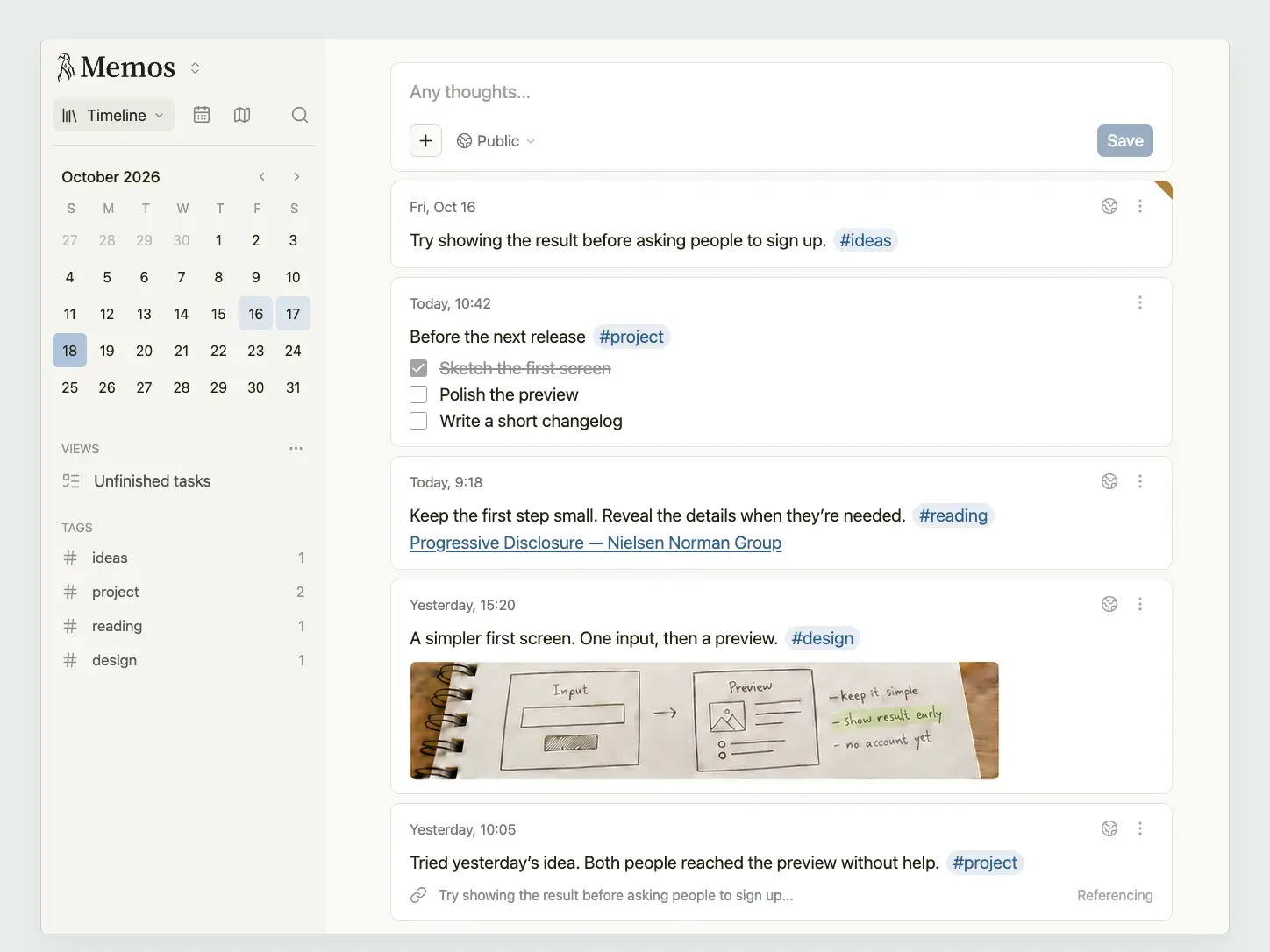
Timeline view in the light theme: composer with visibility menu, October calendar, a saved View, tag counts and recent memos. Official preview image from the project.
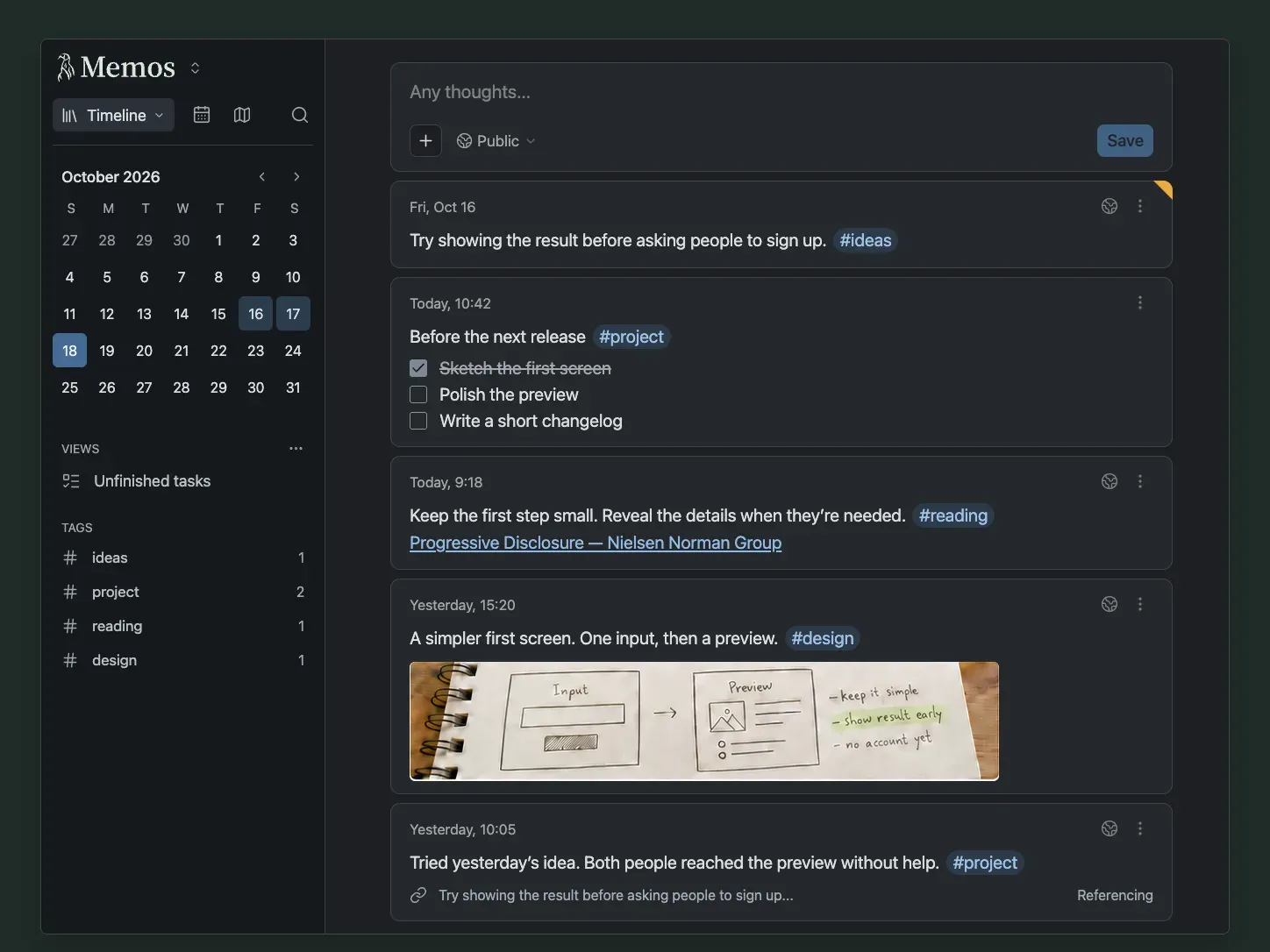
The same timeline in the dark theme, showing a task list memo, a linked reference between memos and tag counts in the sidebar. Official preview image from the project.
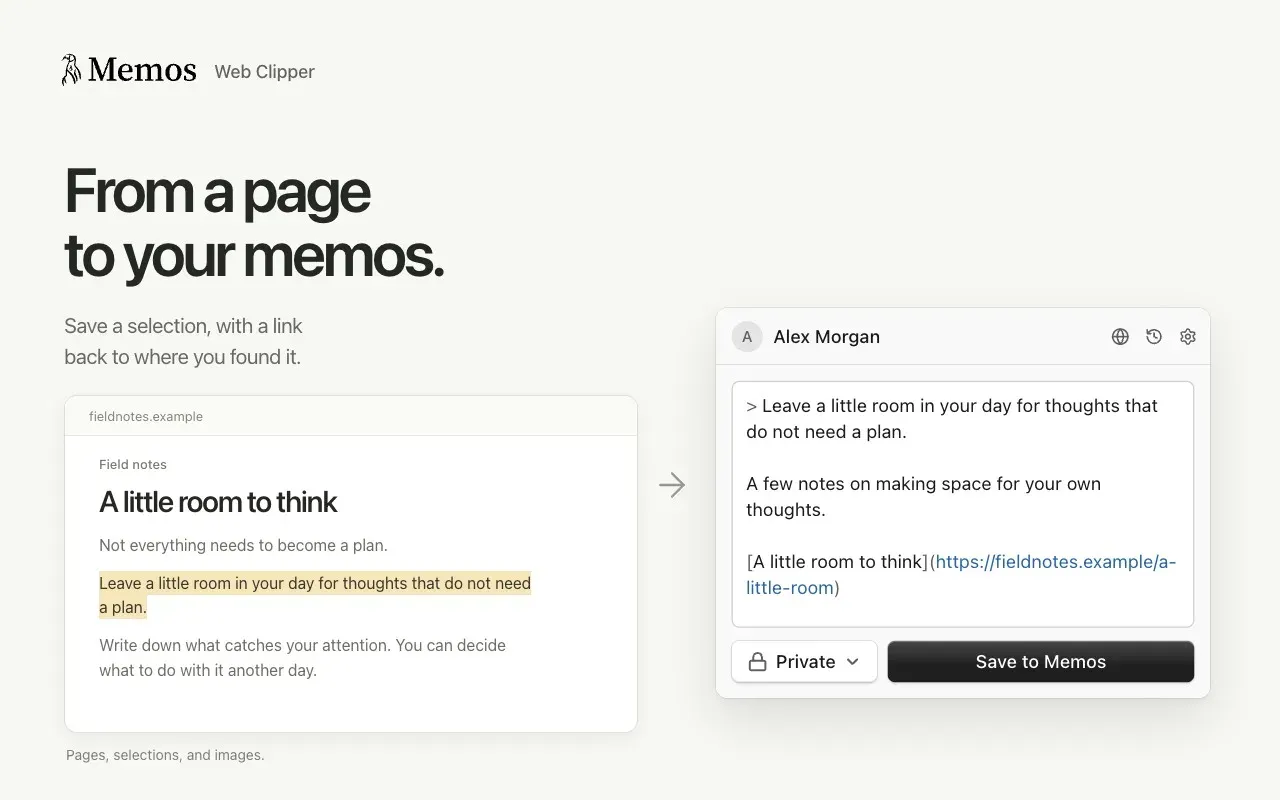
Web Clipper store image: a highlighted passage becomes a Markdown quote with a link back to the page, ready to save as a Private memo. Official image from the Web Clipper repository.
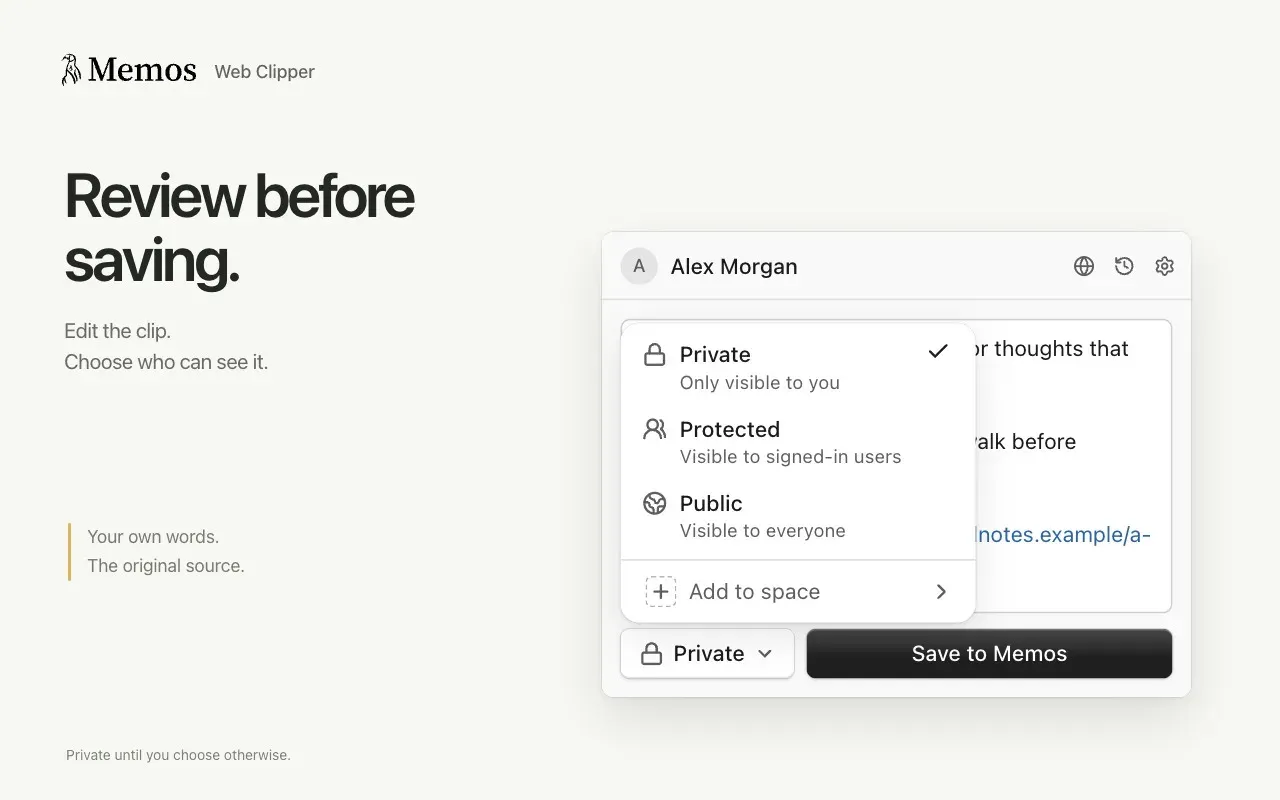
Web Clipper store image showing the visibility menu before saving: Private, Protected, Public or a Space. Official image from the Web Clipper repository.
Source: official Memos project page.
Key capabilities
- Run Memos with Docker The quick start is one
docker runcommand that publishes port 5230 and mounts~/.memosto/var/opt/memosinside theneosmemo/memos:stableimage. Everything the default SQLite setup keeps lives in that folder, which makes it the backup target. Thestabletag follows stable releases, a month tag such as26.11follows the newest stable release of that month, andcanaryfollows development builds. Docker Compose is documented separately for repeatable settings and volumes. - Run the native binary on Linux, macOS or Windows Each release on the GitHub releases page includes archives for Linux amd64, arm64 and armv7, macOS amd64 and arm64, and Windows amd64, plus a checksums file. The binary guide asks you to choose a persistent data directory and run the server under systemd, launchd or a Windows service wrapper, which you configure yourself. The default port of the binary is 8081 unless
--portorMEMOS_PORTsets another. - Kubernetes and reverse proxy deployment The Kubernetes guide uses plain resources with a PersistentVolumeClaim mounted at
/var/opt/memos. It recommends a single replica with SQLite and an external MySQL or PostgreSQL database before trying multiple replicas. Behind a proxy,MEMOS_INSTANCE_URLshould hold the canonical external HTTPS address so links and sign-in redirects resolve correctly. - Timeline writing with a rich or Markdown editor Since 26.10.0 the composer opens in a rich editor that shows the memo as it will be saved, with a toolbar over selected text, a slash menu and Markdown shortcuts. Markdown mode keeps raw text and is stored per account under Settings, and focus mode opens a narrower sheet with larger text. Rendering covers headings, task lists, tables, footnotes, callouts, code highlighting, LaTeX math and Mermaid diagrams.
- Tags, Views and Quick Find Hashtags in memo text become searchable tags, with tag hierarchies for nested topics. Views save filter conditions under a name and icon, for example
has_task_list && has_incomplete_tasksto replace the removed built-in Tasks view. Filters such ashas_attachmentsandhas_imagework in Views, Quick Find and the API, and search matches are highlighted in memo content. - Calendar, Map and attachment browsing The Calendar view browses memos by month and lets you open a day to read or add notes for that date. The Map view shows memos that carry location data, using keyless OpenStreetMap tiles. An attachment library lists uploaded files and unused uploads, and the image preview supports pinch to zoom, panning and swiping between images.
- Four visibility levels per memo Each memo is Private (author only), Protected (any signed-in user of the instance), Public (anonymous readers when the instance is in public mode) or Space (active members of its assigned Space). The sharing documentation notes that assigning a memo to a Space does not by itself widen its audience, so a Private memo in a Space stays author-only.
- Share links and memo images A share link exposes a single memo with its attachments and reactions, without sign-in, even when the memo is Private or Protected. Links expire never, after 1 day, 7 days or 30 days, and can be revoked at any time. Space memos cannot have share links. The Open image option renders a memo as a standalone image for chat apps or social posts.
- Spaces for shared writing Spaces gather members and memos: people are invited through their inbox, memos can move between Spaces from the editor's audience menu, and each Space can have a custom icon or emoji. Authorship, placement and visibility stay independent, and each person keeps their own memos. Comments, reactions and mentions appear in the Inbox.
- Database choice: SQLite, MySQL or PostgreSQL The driver is selected with
MEMOS_DRIVER(sqlite,mysqlorpostgres) and the connection withMEMOS_DSN. SQLite defaults tomemos_prod.dbin the data directory and runs with WAL mode and a busy timeout. MySQL and PostgreSQL require an explicit DSN. The database page recommends them for existing database servers, managed backups and larger datasets. - Attachment storage backends Attachments can be stored in the database (the default), on the local filesystem or in S3-compatible object storage, configured as named storage entries with one selected as the default for new uploads. Changing the default affects only new files, so older configurations and their credentials must remain available. Uploads are sent in chunks, and usage per account appears in account settings.
- Usage limits per instance and per user Settings, Usage limits holds an ordered list: the last entry applies to everyone and earlier entries give named users their own caps on memo length, upload size, memo count and total storage. Built-in defaults are 8 KiB per memo and 32 MiB per file, with no count or storage cap. A refused save names the limit it hit and nothing already stored is hidden.
- Sign-in with passwords, OAuth2 SSO and access tokens Password sign-in is on by default. OAuth2 identity providers such as GitHub or Google can be added with client ID, secret, endpoints, scopes and field mappings, and password sign-in can then be disabled for regular users while administrators keep a password path. With one SSO provider and passwords off, sign-in starts SSO automatically. Personal access tokens serve scripts and integrations.
- Declarative configuration for operators From 26.10.0, identity providers, instance settings, bootstrap users and their SSO identities can be described as JSON files in
/etc/memos/config(--config-dir,MEMOS_CONFIG_DIR). The server applies them at startup, ormemos config validate,plan,applyandstatework from the command line. Managed resources become read-only in the UI and API, and secrets can come from${env:NAME}or${file:/path}. - REST API with eight services The API reference documents the AI, Attachment, Auth, Identity Provider, Instance, Memo, Space and User services under
/apion your instance. Requests use Bearer tokens, list calls page withpageSizeandpageToken, filters follow Google AIP-160 syntax and updates take anupdateMask. The reference tracks themainbranch, so pick the version that matches your instance. - Built-in MCP server for AI assistants Every instance exposes a Model Context Protocol endpoint at
/mcpover Streamable HTTP, authenticated with a personal access token. The MCP documentation lists 20 tools for memos, comments, attachments, reactions, relations and Views, each annotated as read-only, destructive or idempotent. Browser-based clients pass an origin check, and over-limit calls fail withRESOURCE_EXHAUSTED. - Webhooks, Web Clipper, Telegram and Raycast Webhooks deliver memo events to your endpoints; private network destinations must be allowed with
MEMOS_WEBHOOK_PRIVATE_NETWORK_ALLOWLIST. The Web Clipper for Chrome and Firefox saves pages, selections and images as Markdown with a source link and a visibility choice. Memogram forwards Telegram messages and images, and the official Raycast extension writes and searches memos from Raycast. - Export, import and audio transcription Memos Export Format is a ZIP with memos, archived memos, the account's comments and attachment files; since 26.10.0 administrators download it for any account and stream it directly to the browser. Import accepts current and older export files into another account or instance. An existing audio attachment can be transcribed into a draft through the configured AI provider, which then receives that audio.
Where Memos fits
Keeping a private daily log on a home server
Start the Docker container with a mounted data folder, create the first account, which becomes the administrator, and set the default memo visibility to Private. Write short entries through the day and add tags for recurring topics. Check that the instance is in private access mode if it is reachable from the internet, and confirm that the mounted folder appears in your backup job before relying on it.
Running a small shared instance for a family or team
Create accounts or connect an OAuth2 provider, then create Spaces for shared subjects and invite members through the Inbox. Explain the visibility model up front: Protected memos reach every signed-in user, Space memos reach only active Space members. Use Usage limits to cap memo length, upload size or storage for named members, and test that a regular member cannot see another member's Private memos.
Capturing from the browser, Telegram and AI tools
Create one personal access token per client so each can be revoked separately. Install the Web Clipper to save selections with their source link, connect Memogram for messages and photos sent from a phone, and register the /mcp endpoint in an MCP client with the same token model. Review which tools a client may call, since mutating tools act with the full permissions of the token's account.
Managing Memos as infrastructure
Describe identity providers, instance settings and bootstrap administrators as JSON files in the configuration directory and keep secrets in environment variables or mounted files. Run memos config validate and memos config plan in CI or before a deployment, then let the server apply the directory at startup. This gives staging and production the same settings without clicking through the browser.
Upgrading an existing installation safely
Read the release notes for the version you are skipping to and follow the stepping stones: 0.25.3 for very old instances, then 0.31.0, then the calendar releases. Back up the database, every attachment store still referenced and the deployment configuration, and test a restore. After 26.10.0, expect everyone to sign in again, move any files left in /etc/secrets into the configuration directory and reset usage limits if you had changed the old caps.
Publishing selected notes
Switch the instance to public access only if anonymous readers should see Public memos, and leave the rest Private or Protected. For a one-off share, create an expiring share link instead of changing visibility, and revoke it when the conversation is over. Check what the link exposes: the memo, its attachments and reactions, but not comments, the parent memo or related memos.
Install
docker run -d --name memos -p 5230:5230 -v ~/.memos:/var/opt/memos neosmemo/memos:stableReviews of Memos
Be the first to share your experience with Memos.
Write a review
Loading review form…
Alternatives to Memos
 JoplinJoplin is a free, open-source note and to-do app for Windows, macOS, Linux, Android and iOS, with offline-first storage and encrypted sync.
 ObsidianObsidian is a free note-taking app by Dynalist Inc. that stores notes as local Markdown files, with links, graph view, Canvas, Bases, a CLI and community plugins, plus optional paid Sync and Publish services.
 LogseqLogseq is a privacy-first, open-source platform for knowledge management and collaboration, with PDF annotation, task management and Markdown or Org-mode files.