

What is SiYuan?
SiYuan is an open-source, local-first personal knowledge management system organized around content blocks. Every paragraph, heading, list item, table or database in a document is a block with its own ID, so it can be referenced, embedded, queried with SQL or opened on its own. The editor works as Markdown WYSIWYG, with outline-style lists and support for very large documents. The project is developed in the siyuan-note GitHub organization, and the official website and pricing pages carry the name Yunnan Liandi Technology Co., Ltd. The repository was created in August 2020.
The official download page and GitHub releases provide Windows installers for x64 and ARM64, macOS DMGs for Intel and Apple Silicon, Linux AppImage, DEB, RPM and tar.gz packages for amd64 and arm64, and an Android APK. Store channels include the Microsoft Store, the App Store, Google Play, F-Droid and the HarmonyOS app store. A server edition ships as the b3log/siyuan Docker image for browser use, and the README adds Unraid and TrueNAS templates plus a community-maintained Helm chart that it labels as unofficial.
The current release is SiYuan 3.8.9, published October 29, 2026. It allows / in document titles and asks users to update every device that shares the same data so older versions do not overwrite those changes. It also adds mind map themes and node clipboard operations, database automations that collect block references or match attribute names by regex, backlink filtering by database fields, better sync cancellation and file change detection, and upgrades Electron, Go and CA certificates to distrust compromised eMudhra intermediates. Version 3.8.8 added a compact desktop mode, the Gemini Interactions API and AppImage startup without libfuse2. Version 3.8.0, released in August 2026, introduced the built-in AI agent, semantic search with embeddings and reranking, Model Context Protocol support, OIDC authentication and LAN-assisted cloud sync. Version 3.8.3 dropped macOS 12.
The kernel is written in Go and serves an HTTP API on port 6806; the same binary doubles as a command-line tool. The interface is TypeScript, packaged with Electron on desktop. Companion projects supply the Lute editor engine, the dejavu data repository used for snapshots and sync, the riff spaced-repetition module, the petal plugin API and the bazaar community marketplace. A workspace is a plain folder: each document is a .sy file stored as JSON, with assets, templates, widgets, plugins and settings in sibling folders, and a SQLite index rebuilt from those files.
The source is licensed under AGPL-3.0. According to the README, most features are free, including for commercial use, while third-party S3 or WebDAV sync and the official cloud service are paid. SiYuan is designed as a personal workspace: the README does not document real-time multi-user co-editing, it warns against syncing a workspace through third-party sync folders, and the Docker edition is limited to browser use without PDF, HTML or Word export or Markdown file import.
SiYuan screenshots
Explore the interface. Open a screenshot to view it at full size.
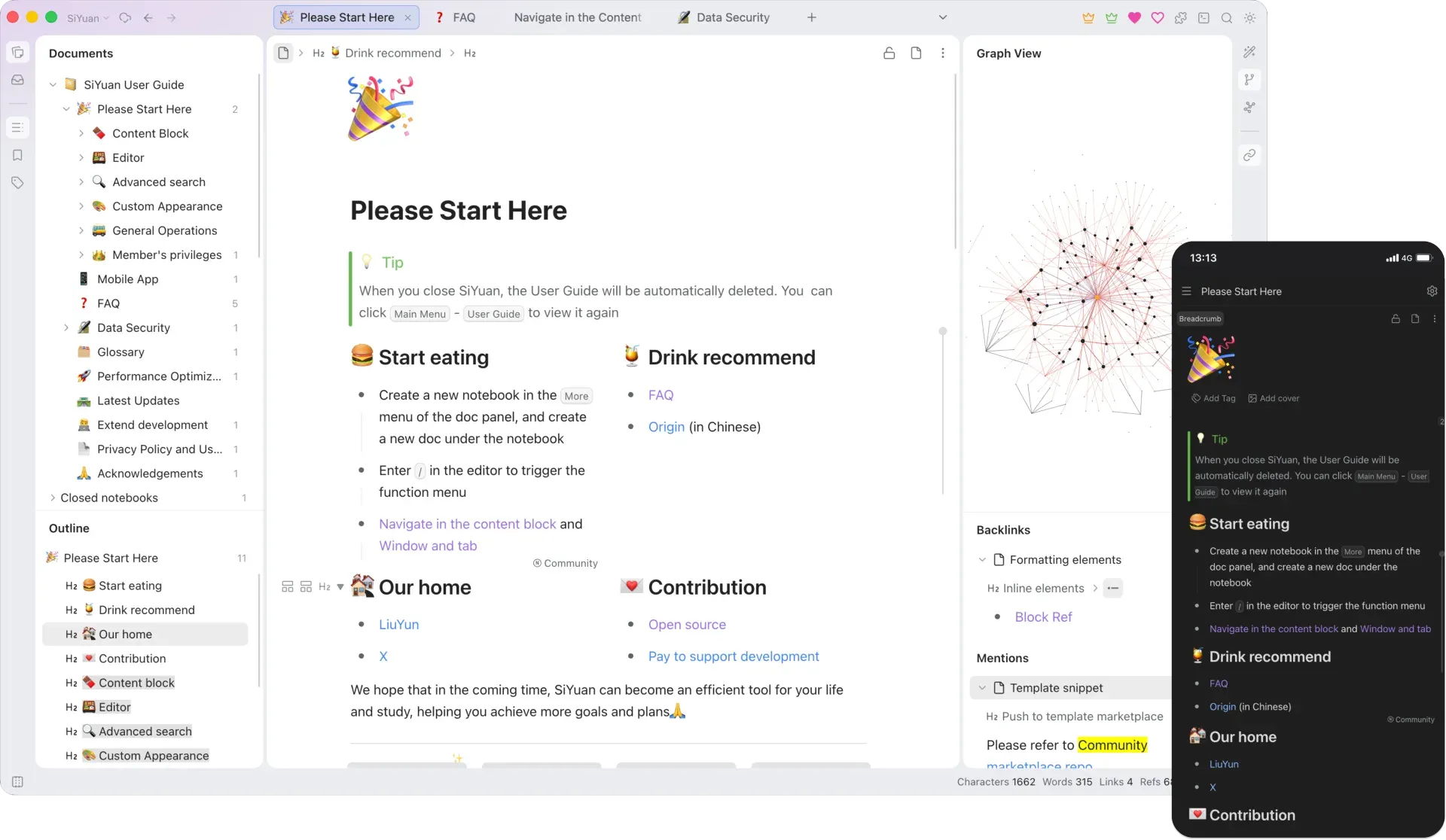
The desktop interface with document tree, outline, editor tabs, graph view and backlinks panel, next to the mobile app in dark mode. Official screenshot from the SiYuan repository.
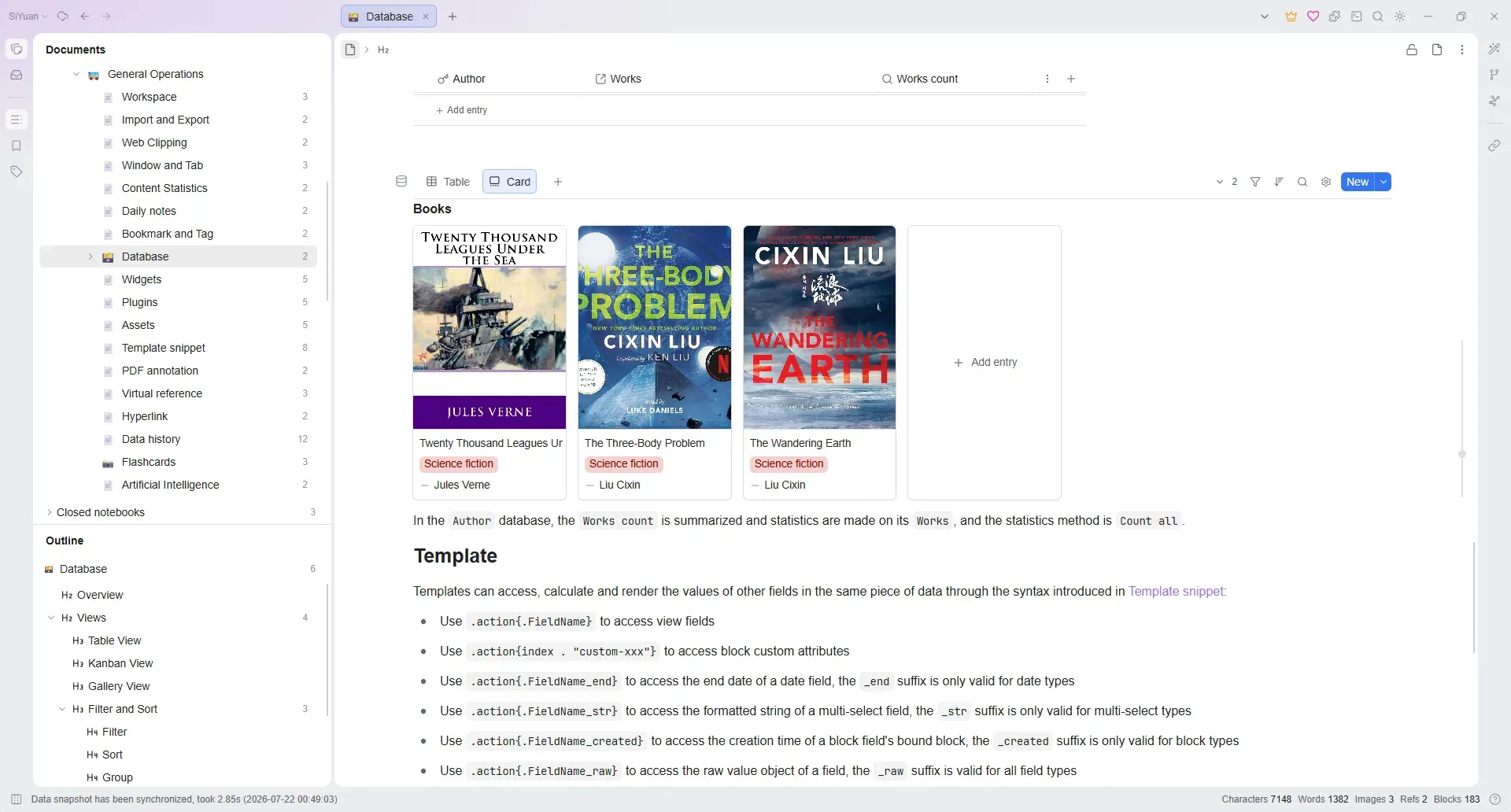
A database block switched from table to card view, with cover images, a genre field and an author relation, followed by the template field syntax reference. Official screenshot from the SiYuan repository.
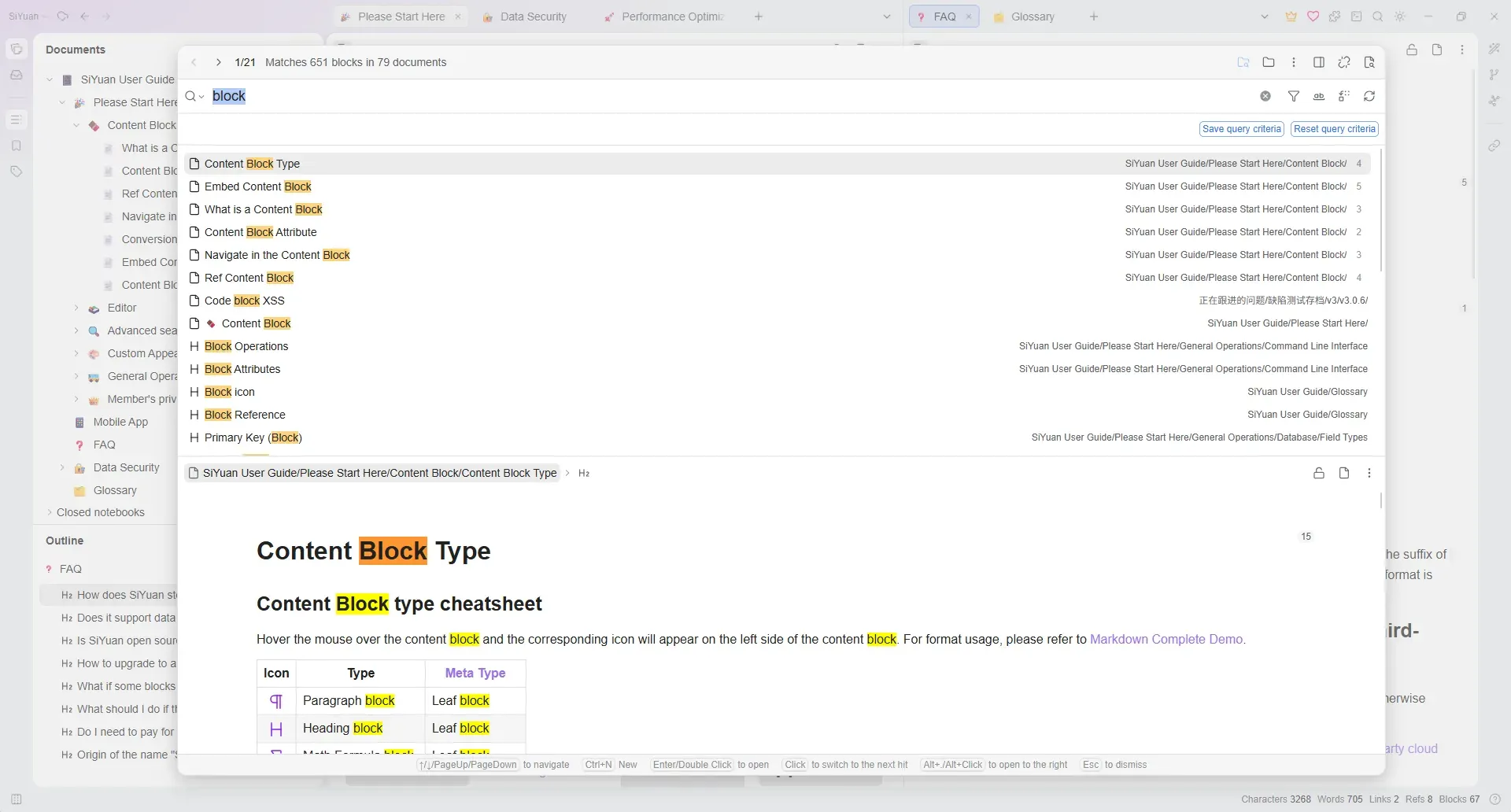
Global search for the word block: results by document and heading with their paths, saved query criteria buttons and a preview of the selected document. Official screenshot from the SiYuan repository.
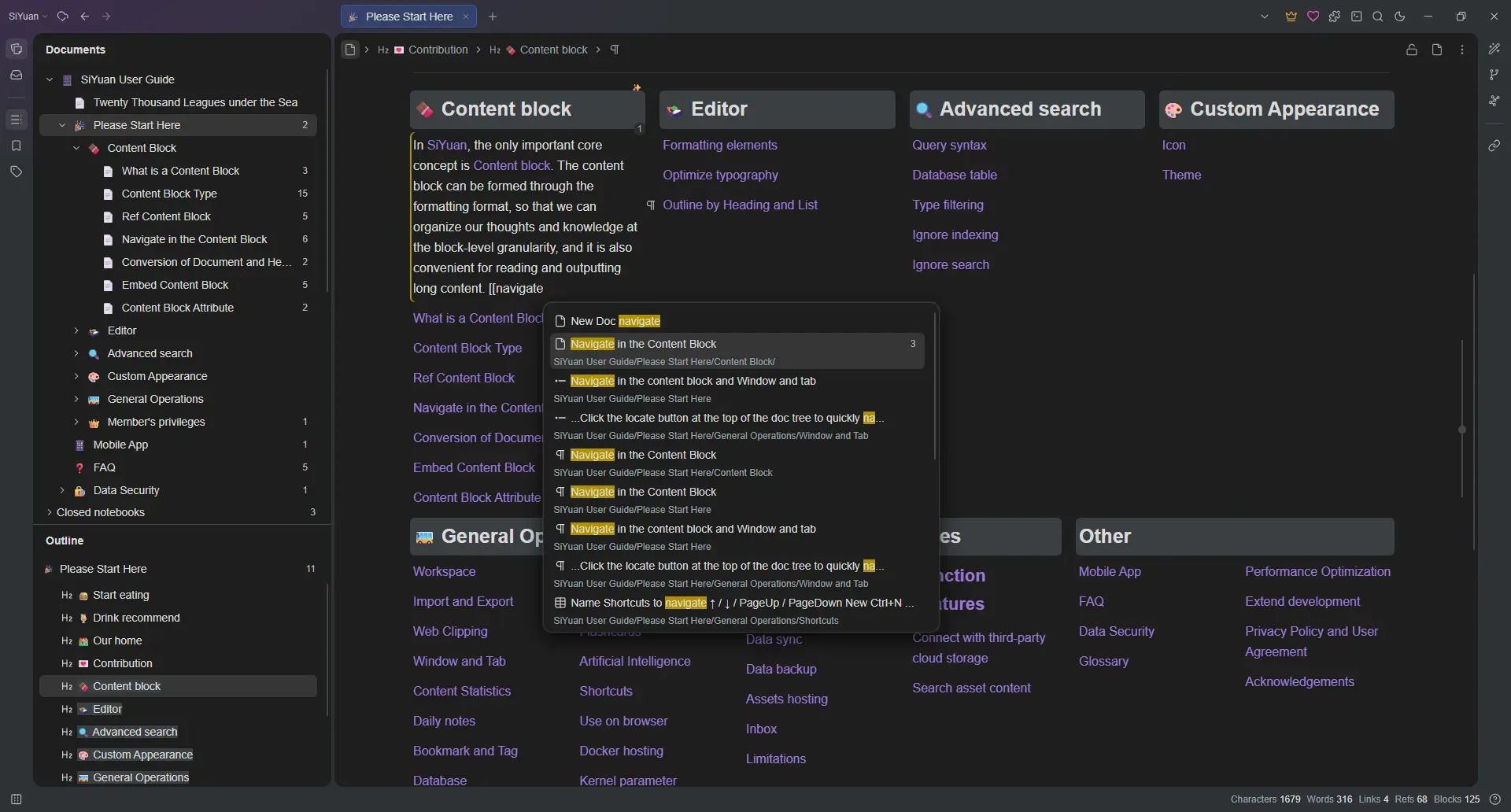
Typing a double bracket opens the block reference search, which lists matching documents, headings and paragraphs with their paths. Official dark theme screenshot from the SiYuan repository.
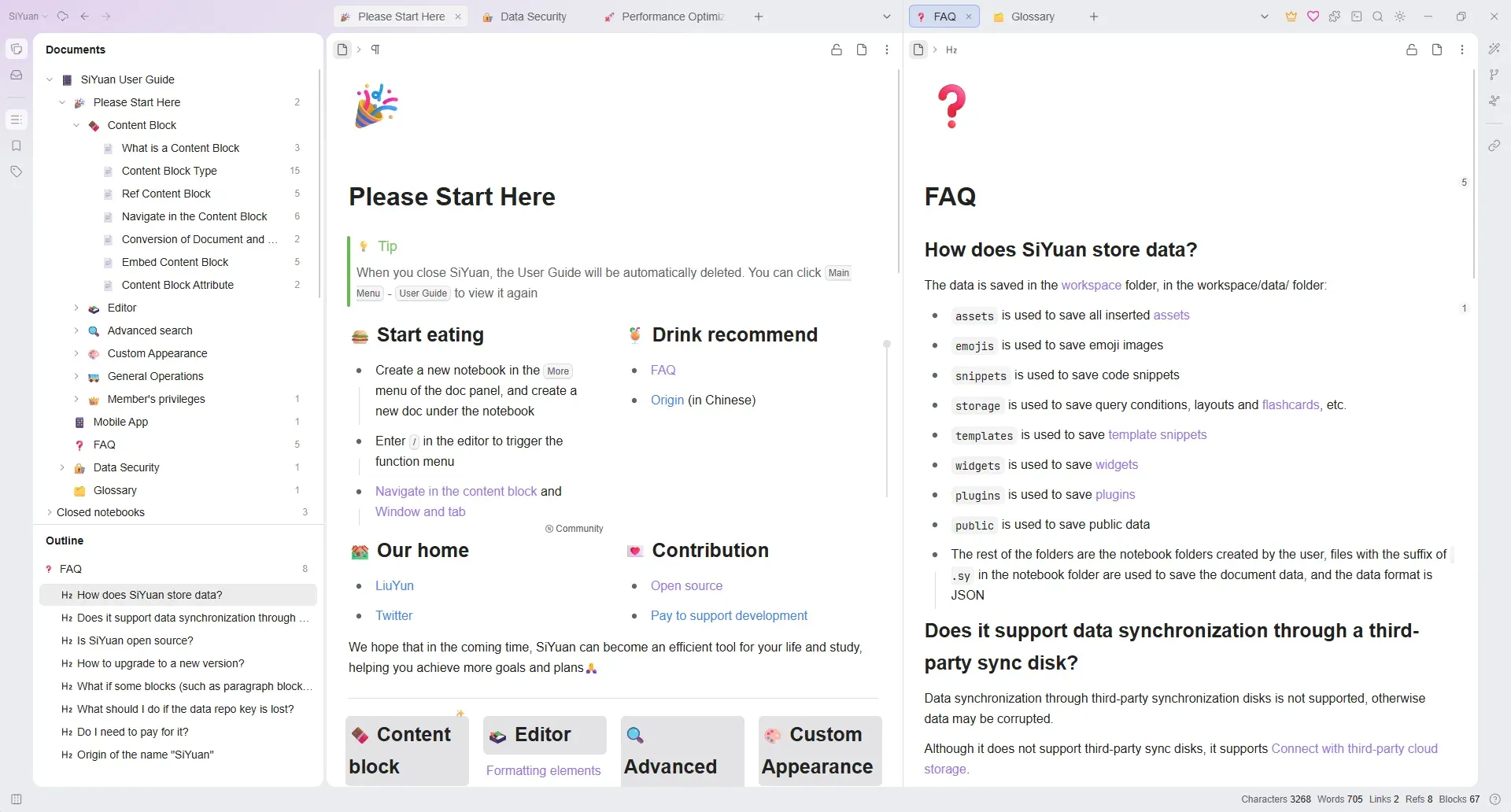
Split-screen editing with two tab groups; the right pane shows the FAQ entry on how SiYuan stores workspace data. Official screenshot from the SiYuan repository.
Source: official SiYuan project page.
Key capabilities
- Download SiYuan for Windows The 3.8.9 release ships separate EXE installers for x64 and ARM64, with a SHA256SUMS file. The Microsoft Store edition updates in place, and on Windows 10 1607 or later it registers a
siyuan.exealias for the CLI. Desktop installs can download update packages automatically from Settings, About. - Download SiYuan for macOS Separate DMGs are published for Apple Silicon and Intel Macs. Version 3.8.3 ended support for macOS 12, so plan for macOS 13 or later. The download page notes that a manual DMG upgrade means downloading the new package again.
- Download SiYuan for Linux Each release includes AppImage, DEB, RPM and tar.gz builds for amd64 and arm64. Since 3.8.8 the AppImage starts without libfuse2, and built-in OCR works with glibc 2.28. Distribution packages also exist under the names
siyuanandsiyuan-notein several repositories tracked by Repology. - Mobile apps SiYuan is available from the App Store for iPhone and iPad, from Google Play and F-Droid or as an APK for Android, and for HarmonyOS NEXT phones, tablets and 2-in-1 devices. Recent releases improved iOS text selection, mobile search navigation, audio recording on Android and HarmonyOS, and backlinks displayed at the bottom of mobile documents.
- Self-hosting with Docker The
b3log/siyuanimage runs the kernel withserve --workspace=..., an explicit subcommand since 3.7.0. SetPUIDandPGIDto match the mounted workspace owner and always set an access authorization code. The Docker edition serves the web interface only; it cannot export PDF, HTML or Word or import Markdown files. - Block references and backlinks Type
((or[[to search for and link any block, then view backlinks and mentions in a side panel. Embedded blocks render the referenced content live, and thesiyuan://protocol links to blocks from outside the app. Documents can be converted to headings and back without breaking references, because links target block IDs rather than titles. - Markdown WYSIWYG editor The editor renders Markdown as you type, with block zoom-in, list outlines, callouts, tab blocks, math formulas, Mermaid and other chart types, Gantt and timing diagrams, and staves. Templates use Sprig syntax, and JavaScript or CSS snippets can adjust behavior and appearance. Copy and export of Markdown lists was improved again in 3.8.9.
- Databases Database blocks, also called attribute views, offer table, kanban, gallery, calendar and list views, with relation, rollup, template, date, location and lunar date fields. Automations arrived in 3.8.7, 3.8.8 lets them collect blocks and set field values from templates, and 3.8.9 adds block reference collection, regex attribute matching and subdocument depth limits. Locked views still allow temporary sorting.
- Search and SQL Full-text search covers documents, headings and blocks, with filters, saved query criteria and a preview pane. SQL queries can be embedded in documents and executed through the API. Since 3.8.0 semantic search uses an embedding model and reranker that you configure, and asset search reaches inside PDF, Word, Excel and text files.
- Graph view and mind maps A global relationship graph and a focused block-level graph show references between blocks. List blocks and tab blocks can be viewed and edited as mind maps; 3.8.9 adds mind map themes, global styling, node selection with copy, cut and paste, and better summary connectors.
- Flashcards Any block can become a flashcard reviewed with the FSRS spaced-repetition algorithm, implemented in the separate riff module. Flashcards are not available inside encrypted notebooks.
- AI agent and writing actions The built-in agent works on workspace content in natural language, with pinned sessions, custom editor actions and skills. Providers are configured by the user; release notes cover OpenAI-compatible APIs including the Responses API, Gemini and DeepSeek search and fetch APIs. Workspace skills live under
data/storage/ai/agent/skills, and external skills in~/.agents/skillscan be enabled individually. - MCP server and client The kernel exposes a Streamable HTTP endpoint at
/mcpthat requires MCP authorization and the administrator role, with OAuth discovery, consent, token and revoke routes. Tools cover notebooks, documents, blocks, attributes, databases, search, SQL, history and exports. The agent can also connect to external MCP servers, including servers that require OAuth. - HTTP API and plugins The API reference documents POST endpoints on
http://127.0.0.1:6806for notebooks, documents, blocks, attributes, databases, SQL, templates and files, authenticated withAuthorization: Tokenand the token shown in Settings. Plugins, themes, icons, templates and widgets are distributed through the community marketplace. - Command-line interface The kernel binary works as a
siyuanCLI without a running server: notebooks, documents, daily notes, blocks, tags, search, SQL, references, import and export, snapshots, sync and databases. Output can be-f jsonfor scripts, and most mutating commands support--dry-run. The CLI cannot operate on encrypted notebooks. - Encrypted notebooks An encrypted notebook stores its
.syfiles and assets as AES-256-GCM ciphertext and keeps its index in a separate SQLCipher database, unlocked with a master password through Argon2id. Encrypted notebooks stay out of global search, the graph, semantic search and cross-notebook references, and they do not support tags, bookmarks, flashcards or OCR. When unlocked, AI features can read their content. - Snapshots, history and sync The data repository stores encrypted snapshots protected by a data repo key that must match on every device. Paid plans sync through the official cloud or your own S3 or WebDAV storage, with LAN peer assistance since 3.8.0 and on-demand asset downloads since 3.8.3. Losing the data repo key means resetting the repository, as described in the README FAQ.
- Import, export and web clipping Export standard Markdown with assets, PDF, Word, HTML, images or
.sy.zip, and copy formatted content to WeChat MP, Zhihu and Yuque. Imports accept Markdown and.sy.zip. The Chrome and Edge extension clips web pages into a notebook, and PDF annotations link back to the source page. - OCR Image text recognition runs locally with Tesseract or, since 3.8.7, PaddleOCR, and an AI OCR action is available in the image menu. Recognized text can be copied and edited and is included in search. OCR is not applied to assets in encrypted notebooks.
- Access control for servers A lock screen password, set with
--accessAuthCodeorSIYUAN_ACCESS_AUTH_CODE, protects browser access. Since 3.8.0 OIDC can replace it, with custom, Google, Microsoft and GitHub providers, PKCE and claim rules that restrict which identities receive administrator access.
Where SiYuan fits
Building a block-linked personal knowledge base
Create a notebook, write daily notes and link ideas with (( block references instead of copying text between documents. Review backlinks and mentions in the side panel, and use embedded SQL queries or database blocks to collect tasks, reading lists or meeting notes across documents. Check that references survive when documents are moved or converted to headings, and keep the workspace folder outside the installation directory, because updates clear the install folder.
Self-hosting SiYuan in the browser with Docker
Run the b3log/siyuan image with the serve subcommand, mount a host folder owned by the configured PUID and PGID, and set a strong access authorization code or OIDC. Put NGINX in front for HTTPS, proxy WebSockets on /ws and preserve the original Host header, as the Docker hosting notes explain. Never run two instances on the same workspace, and back up the full workspace after stopping the container rather than copying the live SQLite index.
Connecting AI agents through MCP
Enable an AI provider in Settings, Artificial Intelligence, and test the chat, embedding and rerank models separately before relying on semantic search. External MCP clients connect to the kernel endpoint at /mcp and must be authorized through the OAuth consent flow with administrator rights. Decide which notebooks an agent may reach: unlocked encrypted notebooks are readable by AI features, and every prompt is processed by the provider you configured.
Syncing several devices
Choose official cloud sync with the subscription, or your own S3 or WebDAV storage with the PRO features. Initialize the data repo key on one device, import the same key on the others, then copy it somewhere safe. Do not place the workspace in Dropbox-style sync folders. Before a release such as 3.8.9 that changes title handling, update every device that shares the data and confirm plugin compatibility.
Scripting with the API and CLI
Use the HTTP API with the token from Settings, Authentication, to create documents from Markdown, append blocks or run SQL, and check the code field of every response. For batch work without a running server, call the siyuan CLI with -w pointing at the workspace, -f json for output and --dry-run first. The online user guide describes the command tree and kernel parameters.
Keeping sensitive notes in encrypted notebooks
Enable encryption with a master password, create a separate encrypted notebook and keep matching key backups outside the workspace. Expect each unlock to take about a second and the notebook to close on restart. Content inside will not appear in global search, the graph or cross-notebook references, so structure those notes to be self-contained, and read the encrypted notebook design before moving existing data.
Install
docker run -d -v /siyuan/workspace:/siyuan/workspace -p 6806:6806 -e PUID=1001 -e PGID=1002 b3log/siyuan serve --workspace=/siyuan/workspace/ --accessAuthCode="${AuthCode:?Set AuthCode}"Reviews of SiYuan
Be the first to share your experience with SiYuan.
Write a review
Loading review form…
Alternatives to SiYuan
 LogseqLogseq is a privacy-first, open-source platform for knowledge management and collaboration, with PDF annotation, task management and Markdown or Org-mode files.
 ObsidianObsidian is a free note-taking app by Dynalist Inc. that stores notes as local Markdown files, with links, graph view, Canvas, Bases, a CLI and community plugins, plus optional paid Sync and Publish services.AAFFiNEAFFiNE is an open-source, local-first workspace that merges documents, an edgeless whiteboard and databases as an alternative to Notion and Miro.