
What is Anchor?
Anchor is an open-source note taking application that describes itself as offline first and self hostable. It is developed in the ZhFahim/anchor repository on GitHub and released under the GNU Affero General Public License v3.0 (LICENSE). The project states that it focuses on speed, privacy, simplicity and reliability across mobile and web: notes are stored locally on each device, can be edited without a connection and are synchronized across devices when a connection is available.
The product has three parts. The server is written with Nest.js, uses PostgreSQL through Prisma and also serves the web app, which is built with Next.js and TypeScript. The mobile app is written in Flutter for Android and iOS and keeps its own local SQLite database through the Drift library, then performs bidirectional sync with the user's Anchor server. The mobile app requires a running Anchor server: the README says to set up the server first and then sign in with its address.
Distribution follows that split. The server and web app ship as a single Docker image, ghcr.io/zhfahim/anchor:latest, which bundles PostgreSQL, the API and the web front end in one container and keeps data in a /data volume. A next image tag is built from the next branch for pre-release testing, and the project warns against using it in production. The Android app is published on Google Play and as APK files attached to each GitHub release. The iOS app is in beta and is distributed through TestFlight. The project does not publish desktop builds; on the desktop, Anchor is used through the web app.
The current release is v0.18.0, published on November 5, 2026, after three release candidates. It redesigned every screen of the web and mobile apps around a new set of design tokens and a new app icon, added Share to Anchor on Android and iOS, five highlight colors, a slash menu for formatting, checklist actions, archived notes in search results and a heading outline for long notes on the web. Fixes in the same release cover large attachment uploads on slow connections, smaller voice recordings within the 50 MB attachment limit, repeating reminder schedules and a clean PostgreSQL shutdown when the container stops. The Docker image now runs on Node 26.
Features listed in the README include a rich text editor, tags with colors, note backgrounds, pinning, archive, trash, version history, reminders, local search, attachments for images and audio, note sharing with other users, import and export, an Android home screen widget, an admin panel and OpenID Connect sign-in. Real-time collaboration is listed on the roadmap and is not part of the current release. Community support runs through a Discord server and GitHub issues. Similar self-hosted note apps in the directory include Memos, itsnotes and Standard Notes.
Anchor screenshots
Explore the interface. Open a screenshot to view it at full size.
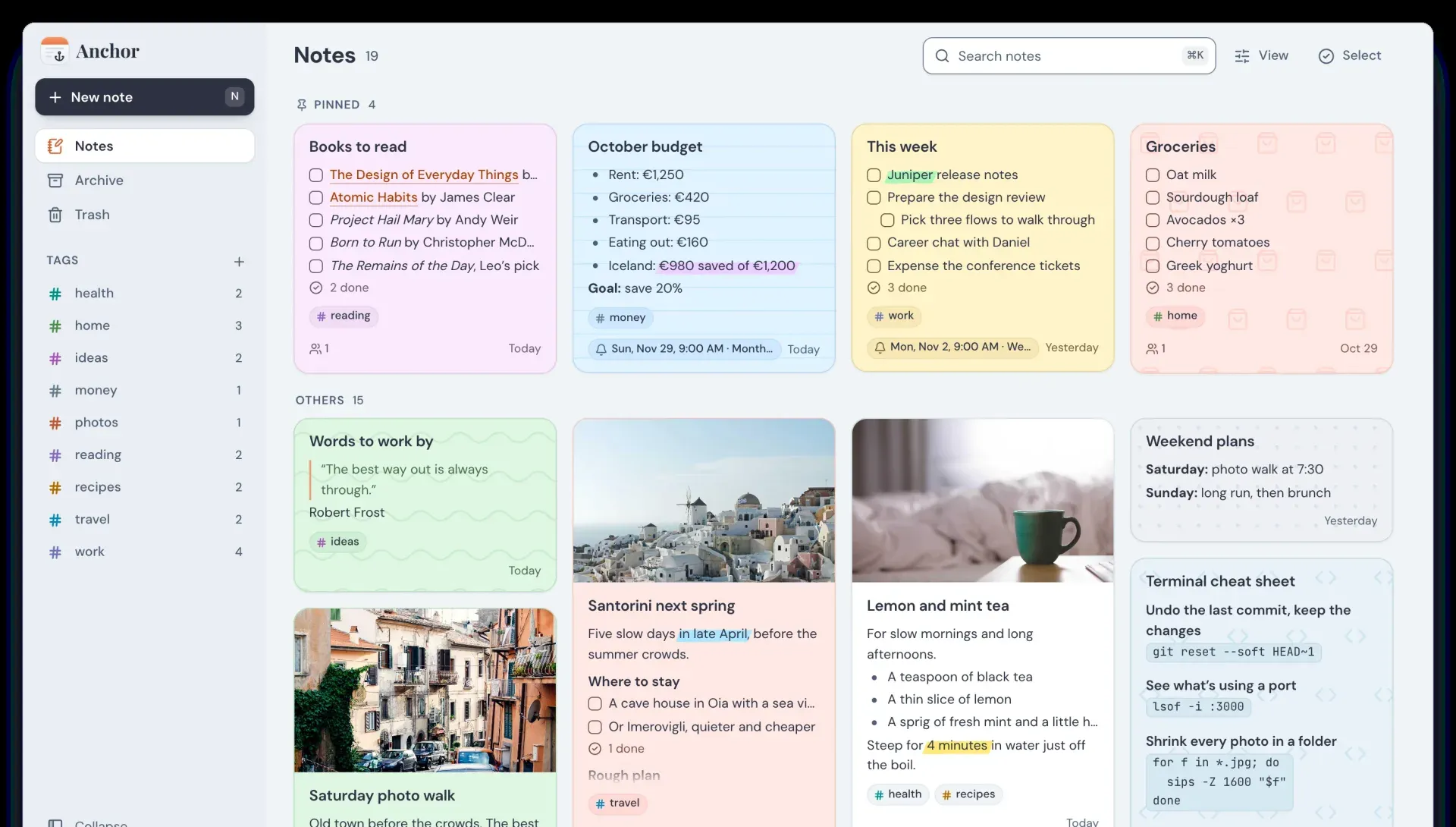
Anchor web app in light mode: notes grid with pinned notes, tags and colored backgrounds. Official README screenshot, cropped at the bottom.
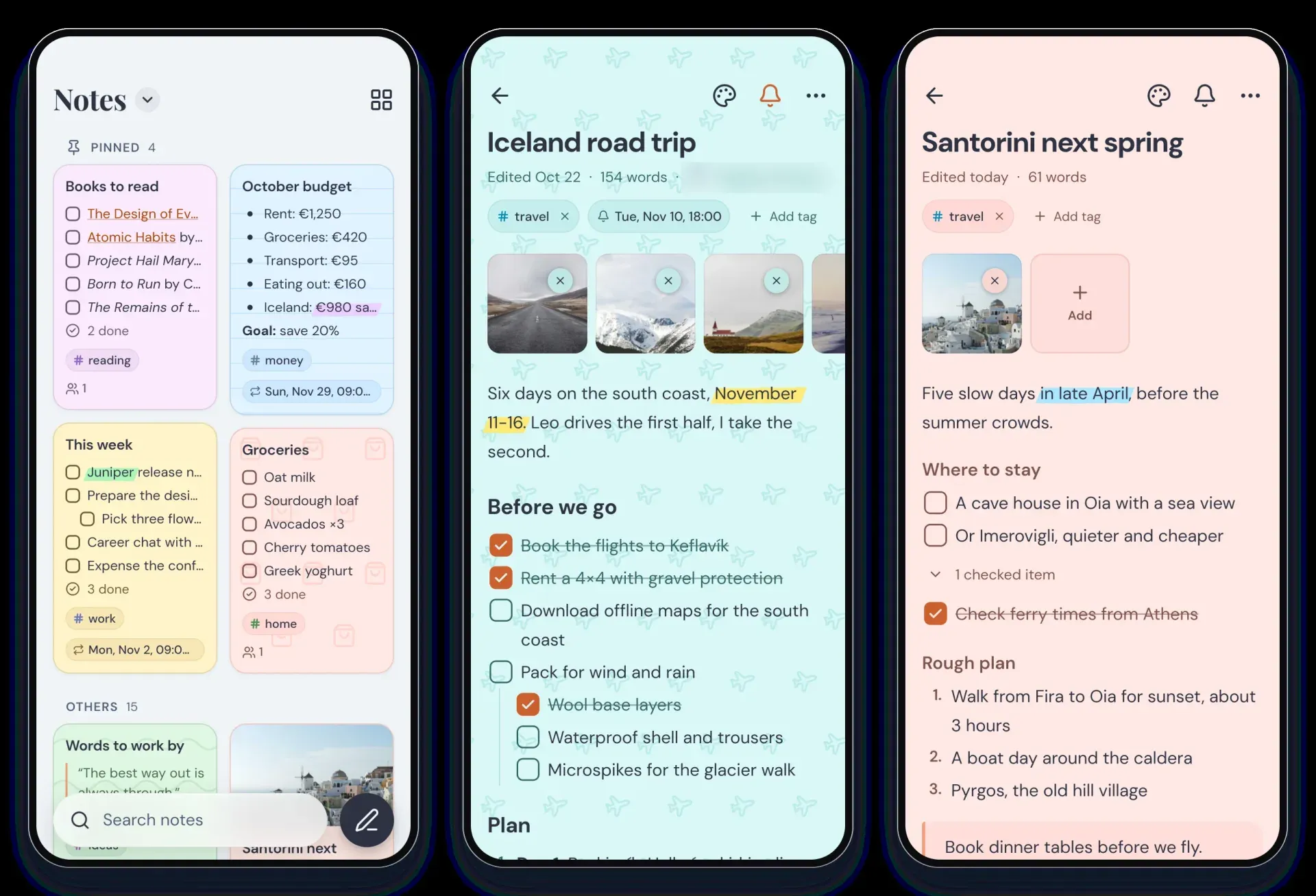
Anchor mobile app in light mode: notes list and two note editor screens. Official README screenshot; the sharing line is blurred.
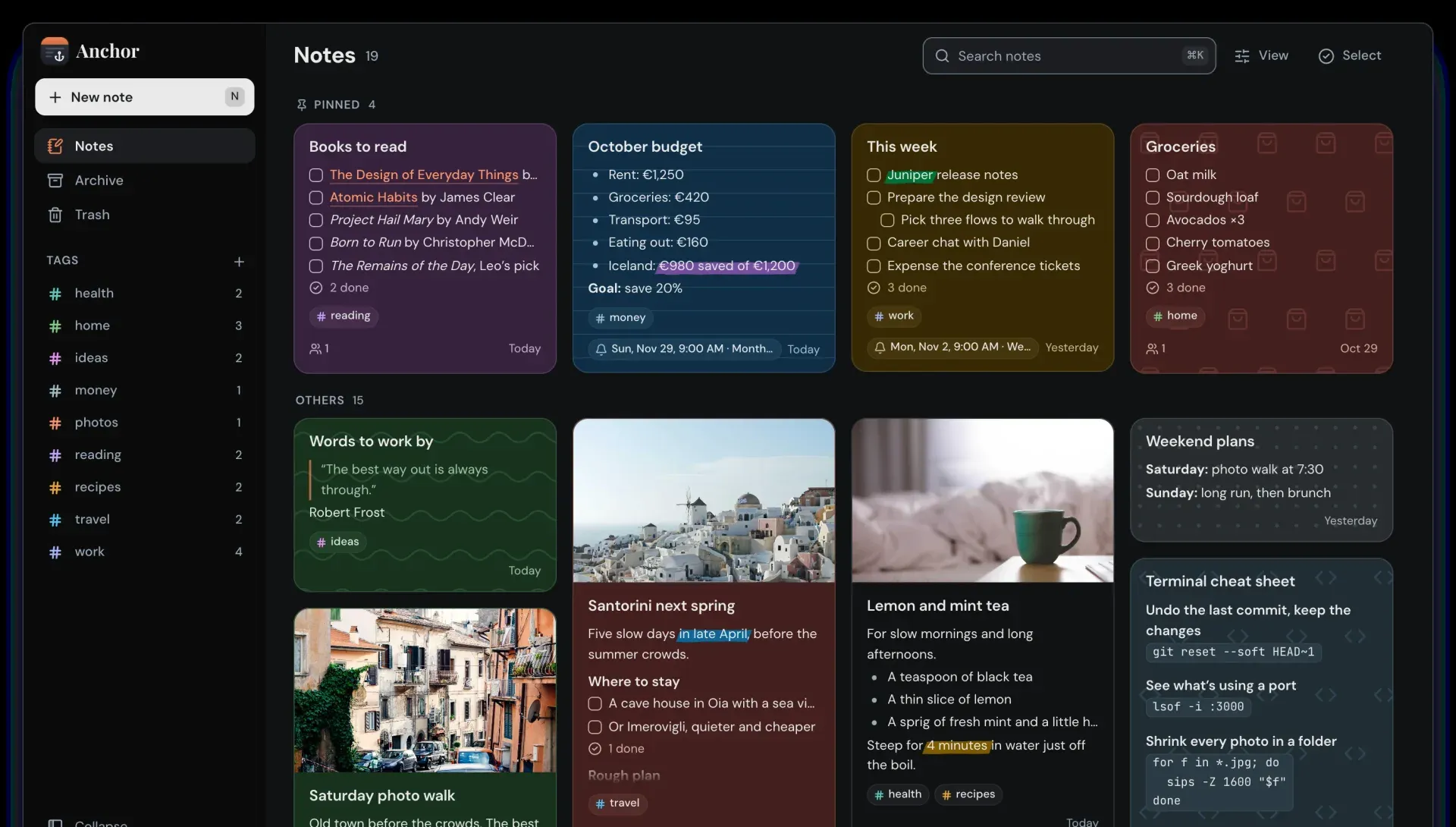
Anchor web app in dark mode. Official README screenshot, cropped at the bottom.
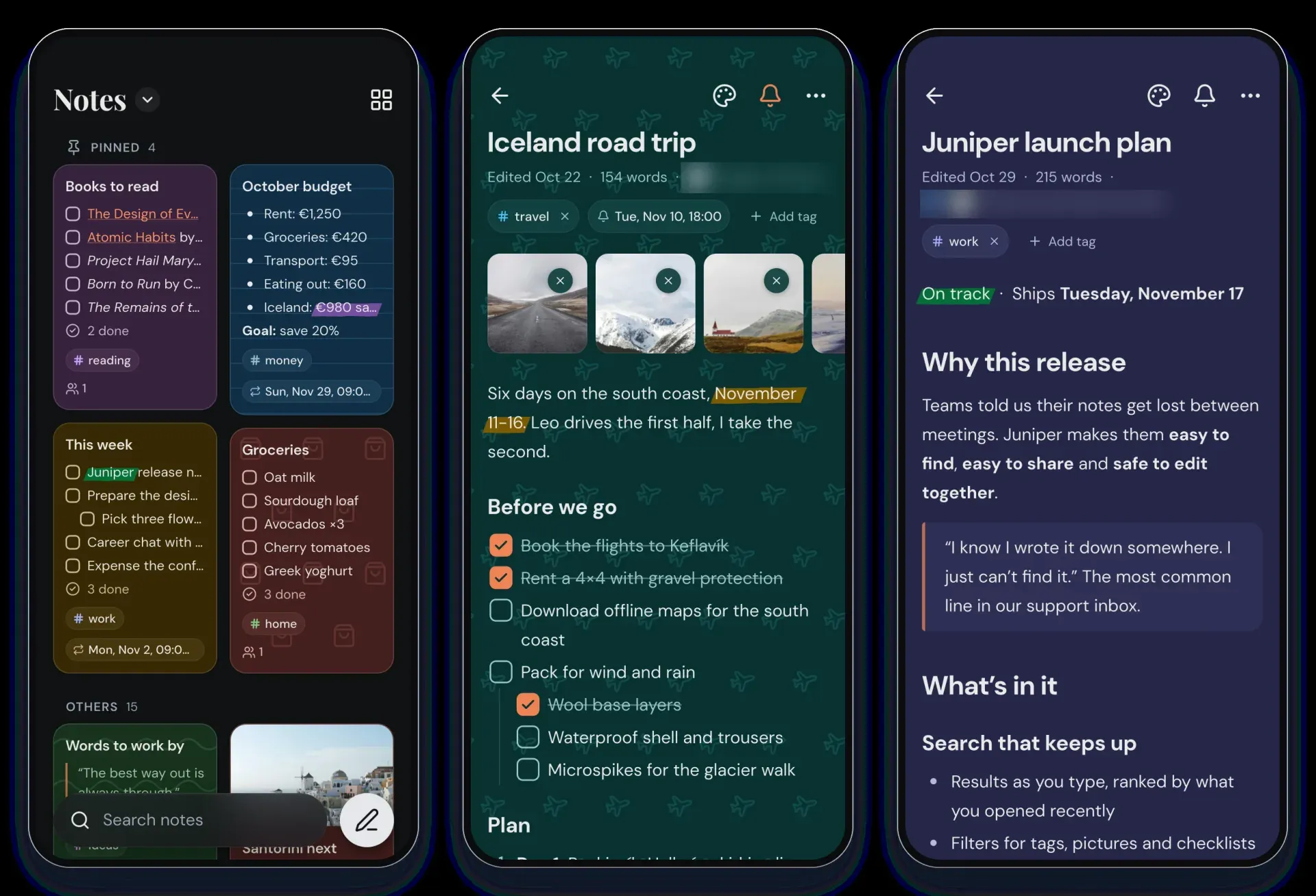
Anchor mobile app in dark mode. Official README screenshot; sharing lines are blurred.
Source: official Anchor project page.
Key capabilities
- Docker deployment The documented setup is a
docker-compose.ymlthat runs theghcr.io/zhfahim/anchor:latestimage on port 3000 with a named volume mounted at/data, followed bydocker compose up -d. The image contains PostgreSQL, the Nest.js API and the Next.js web app in one container. Environment variables are optional; the README states that the defaults work without changes. - Build from source As a second option, the repository can be cloned and started with
docker compose up -d; the bundleddocker-compose.ymlbuilds the image from source. Contributors build the web and server parts with pnpm and the mobile app with the Flutter SDK, as described in the mobile README. - Embedded or external PostgreSQL By default the container runs its own PostgreSQL instance with data under
/data/postgres. SettingPG_HOSTpoints Anchor at an external PostgreSQL server instead, withPG_PORT,PG_USER,PG_PASSWORDandPG_DATABASEfor the connection. Uploaded files are kept underDATA_DIR, which defaults to/data. - Server configuration Other documented variables are
APP_URLfor the public base URL,JWT_SECRETfor the authentication token secret (auto-generated when unset, at least 16 characters when set) andCORS_ORIGINSfor a comma-separated allowlist of origins.USER_SIGNUPacceptsdisabled,enabledorreview; when it is not set, administrators control registration from the admin panel. - Offline-first mobile app The Flutter app stores notes in a local SQLite database through Drift, so notes can be created and edited without a connection. Changes sync automatically and in both directions with the Anchor server once the device is online. Local search on the phone covers titles and content, including archived notes.
- Android distribution The Android app is available on Google Play. Each GitHub release also attaches a universal APK named
anchor-{version}.apkand architecture-specific APKs for arm64-v8a, armeabi-v7a and x86_64, which are smaller. An Android home screen widget lists notes and opens or creates a note with a tap. - iOS beta on TestFlight The iPhone and iPad app is in beta. Users install TestFlight from the App Store and open the project's Anchor beta link on the device. Like the Android app, it signs in to a self-hosted Anchor server.
- Web app The web front end is a Next.js application with Tailwind CSS and shadcn/ui components, served by the same container. It offers the notes grid with pinned and other notes, archive, trash, tags in a sidebar, a view menu, multi-select and a search field. Since v0.18.0, long notes with headings show a clickable outline at the right edge.
- Rich text editor Notes support bold, italic, underline, five highlight colors, headings, lists, checkboxes, quotes and code blocks. Typing
/opens a menu that turns the line into a checklist, heading, list, quote or code block, or adds a link or attachment. Checklist actions include Uncheck all, Delete checked items and an option to move checked items to the bottom under a collapsible row. - Tags, backgrounds, pin and archive Notes are organized with custom tags that carry colors, and each note can get a solid color or pattern background. Notes can be pinned to the top of the list or moved to the archive. Since v0.18.0, search results and tag pages include archived notes in a separate Archived section.
- Attachments and voice recordings Images and audio can be attached to notes, with drag and drop on the web. Attachments have a 50 MB limit. According to the v0.18.0 release notes, voice recordings now take half the space, so about an hour of audio fits in that limit, and the recorder stops at the limit while keeping the recording.
- Reminders Any note can get a time and trigger a notification on the phone, once or repeating. Release v0.18.0 fixed repeating reminders that rang before their start date and monthly reminders set for the 29th to 31st, which now ring on the last day of shorter months.
- Sharing and version history Notes can be shared with other users of the same server with viewer or editor rights. Note history shows earlier versions of a note and can restore one. Deleted notes go to a trash with a recovery period, which the web README gives as 30 days.
- Share to Anchor Added in v0.18.0 on Android and iOS: choosing Anchor Notes in the system share menu saves text, links or pictures from another app as a new note. Title, text and tags can be edited before saving without leaving the source app.
- Import, export and backup Under Settings, Import and export, an export produces
anchor-export-YYYY-MM-DD.zipwith amanifest.json(backup metadata, tags, notes and attachment references in plain text) and anattachmentsfolder. Import accepts that backup, Google Keep exports and Markdown files from Obsidian and Nextcloud Notes. Notes can also be exported as plain Markdown. - OIDC single sign-on Anchor supports OpenID Connect providers such as Pocket ID, Authelia, Authentik and Keycloak, configured with
OIDC_ENABLED,OIDC_ISSUER_URL,OIDC_CLIENT_IDand optionalOIDC_CLIENT_SECRET, or in the admin panel. Public clients with PKCE are supported, and the mobile app needs a public client with the redirect URIanchor://oidc/callback.DISABLE_INTERNAL_AUTHhides the local login form for OIDC-only mode; users can be created on first login and linked to existing accounts by email. - Admin panel Administrators manage users, control registration and view system statistics. Since v0.18.0 the admin user list can be searched and shows whether an account has a password. Sign-in settings, including single sign-on, live under Admin, Sign-in.
- Local logs, no data collection The README states that Anchor never collects any data. The mobile app keeps rolling logs on the device, about 2 MB at most, and users can save them to a file from Settings, Logs. Authorization headers, passwords, tokens, secrets and email addresses are replaced with
***before anything is written.
Where Anchor fits
Running a private notes server at home or on a VPS
The project's main documented path is a single container started from a short docker-compose.yml with a persistent volume, reachable on port 3000. Setting APP_URL to the public address is covered by the environment variable table in the README. Notes, attachments and the bundled PostgreSQL database stay in the /data volume on that host.
Writing notes on a phone without a connection
The Android and iOS apps keep notes in a local database, so notes, checklists and reminders can be edited offline. When the phone reaches the server again, the app syncs changes in both directions. Reminders notify on the phone, once or on a repeating schedule.
Moving from Google Keep or Markdown notes
The import screen in Settings takes Google Keep exports and Markdown files from Obsidian and Nextcloud Notes, as well as Anchor's own backup archive. Notes can go out again as plain Markdown, and the full library can be exported as a zip archive with a plain text manifest and the attachment files. Related directory entries: Obsidian and Joplin.
Sharing lists and notes within a household or small team
Several accounts can exist on one server, with registration open, closed or subject to admin review. A note can be shared with another user as viewer or editor, and the note screen shows who it is shared with. Version history allows reading and restoring earlier versions of a shared note. Real-time collaborative editing is listed on the project roadmap, not in the current release.
Signing in through an existing identity provider
Instances that already use Pocket ID, Authelia, Authentik or Keycloak can enable OpenID Connect through environment variables or the admin panel. The web callback is {APP_URL}/api/auth/oidc/callback, and the mobile apps use a public PKCE client with anchor://oidc/callback. Local password login can be hidden for an OIDC-only setup, as documented in the OIDC section.
Capturing content from other apps
With Share to Anchor, added in v0.18.0, text, links and pictures shared from another app become a new note, with title, text and tags editable before saving. On Android, the home screen widget gives direct access to notes and to a new note.
Reviews of Anchor
Be the first to share your experience with Anchor.
Write a review
Loading review form…
Alternatives to Anchor
 MemosMemos is an MIT-licensed, self-hosted note-taking server written in Go. Short Markdown memos land on a dated timeline with tags, Views, Spaces and per-memo visibility, stored in SQLite, MySQL or PostgreSQL on your own host.
 itsnotesMIT-licensed, self-hosted note board in the style of Google Keep, run with Docker and PostgreSQL. Adds month markers, folders, saved searches, note history, Keep and Obsidian import, a Markdown mirror, optional AI and a read-only MCP server.
 Standard NotesAGPL-licensed note-taking app that encrypts notes, tags and files on the device before sync. Free plan with unlimited devices; paid plans add the Super editor, spreadsheets, revision history and 100 GB of file storage. The server runs on Docker.