

What is itsnotes?
itsnotes is a self-hosted, MIT-licensed note-taking web application modelled on Google Keep. It keeps the familiar masonry board of colored note cards, then adds the navigation that a large Keep archive lacks: month markers in the timeline, quick-access panels for colors, tags, saved searches and a calendar, basic folders, internal links between notes and a dense list view. The project is developed by the GitHub user alexmicuplusfour, with source code in the itsnotes repository, a project page at itsnotes.app and a public demo instance that is reset from seed data.
Distribution is Docker only. Each tagged release publishes two images to the GitHub Container Registry, itsnotes-server and itsnotes-client, built for linux/amd64 and linux/arm64, and the README provides a Compose file that runs them next to a postgres:17-alpine database. The client container serves the interface on port 80. Example files cover automatic HTTPS with Caddy, an existing Traefik installation and serving the app under a subpath such as /itsnotes through the BASE_PATH variable. There are no native desktop or mobile apps; the web client is installable as a progressive web app and registers as a share target.
The current release is itsnotes 2026.10.0, published on October 30, 2026. It changes folder selection so that a note's folders follow the parent and subfolder relationship: checking a subfolder unchecks its parent and the reverse, the same rules apply to bulk edits, and a failed save keeps the original folder membership. It needs no database migration or configuration change. Release 2026.9.1 reset retired AI model choices to new defaults, fixed OCR instructions on new installs, improved Ollama handling, asks OpenAI not to store requests and moved the images to Node 22. Release 2026.9.0 started calendar versioning (year.month.patch) and permanent image tags alongside latest.
The stack is React on the client and Node.js with Express, PostgreSQL and Socket.io on the server. The server image also bundles Chromium for page fetching, the PostgreSQL client for pg_dump backups and numbered SQL migrations that run on start. Optional features include AI auto-tagging, OCR, summarization and reminder parsing through OpenAI, Anthropic or Ollama, a read-only MCP endpoint, a REST API with long-lived tokens, a Chrome clipping extension and a proxy agent for fetching pages from a home network.
Scope is deliberately personal. The first-run setup creates a single account, and the documentation describes no shared notebooks, real-time collaboration, end-to-end encryption or hosted service. Note content is stored as HTML in PostgreSQL; Markdown files exist through import and the optional Markdown mirror rather than as the primary format. The README states that the project is entirely vibecoded, meaning the code was produced with AI assistance, which matters for teams that review code before deployment.
itsnotes screenshots
Explore the interface. Open a screenshot to view it at full size.
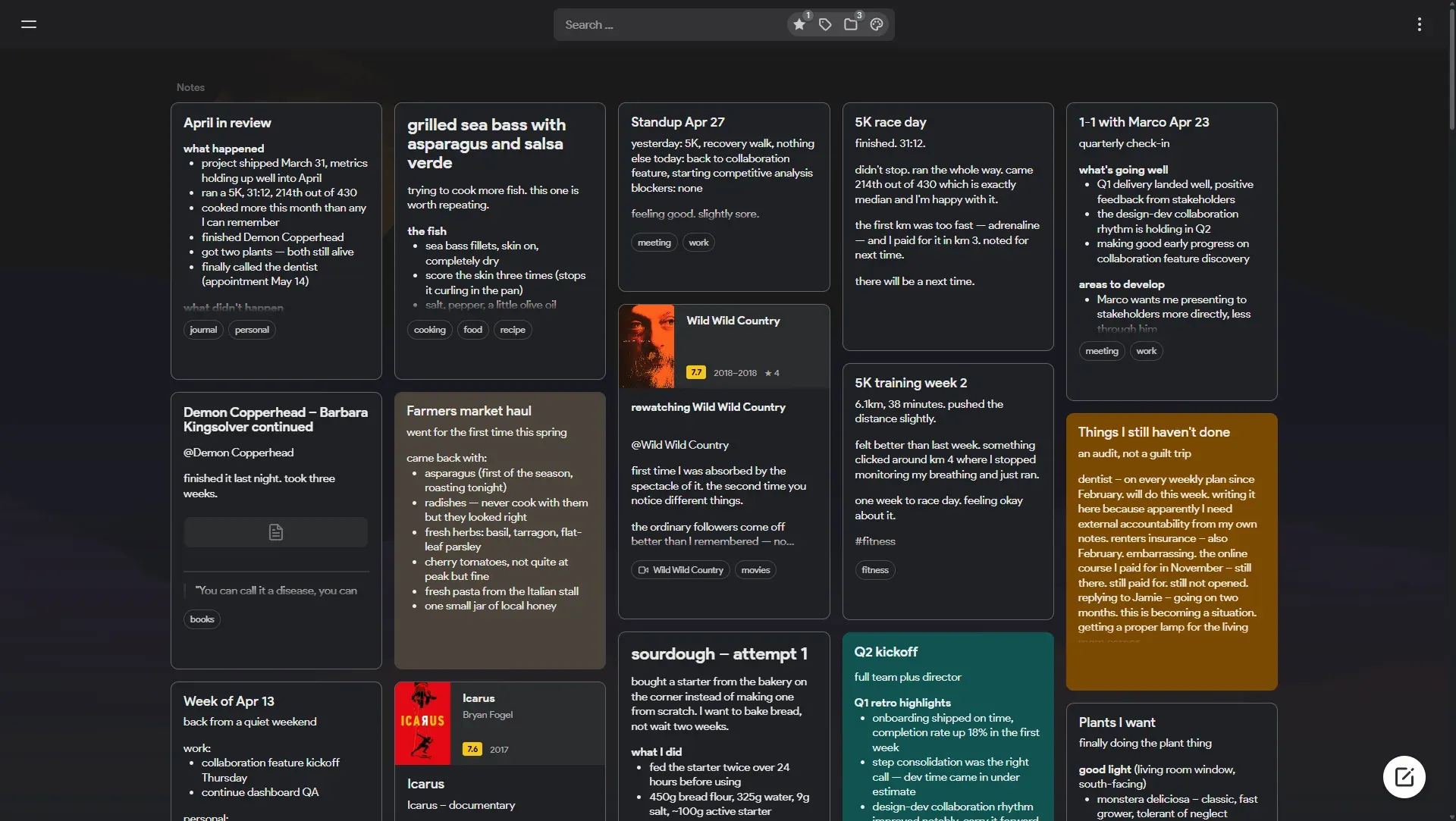
Official README screenshot: the dark-theme masonry board with tagged notes, colored cards and media cards created from book and show references.
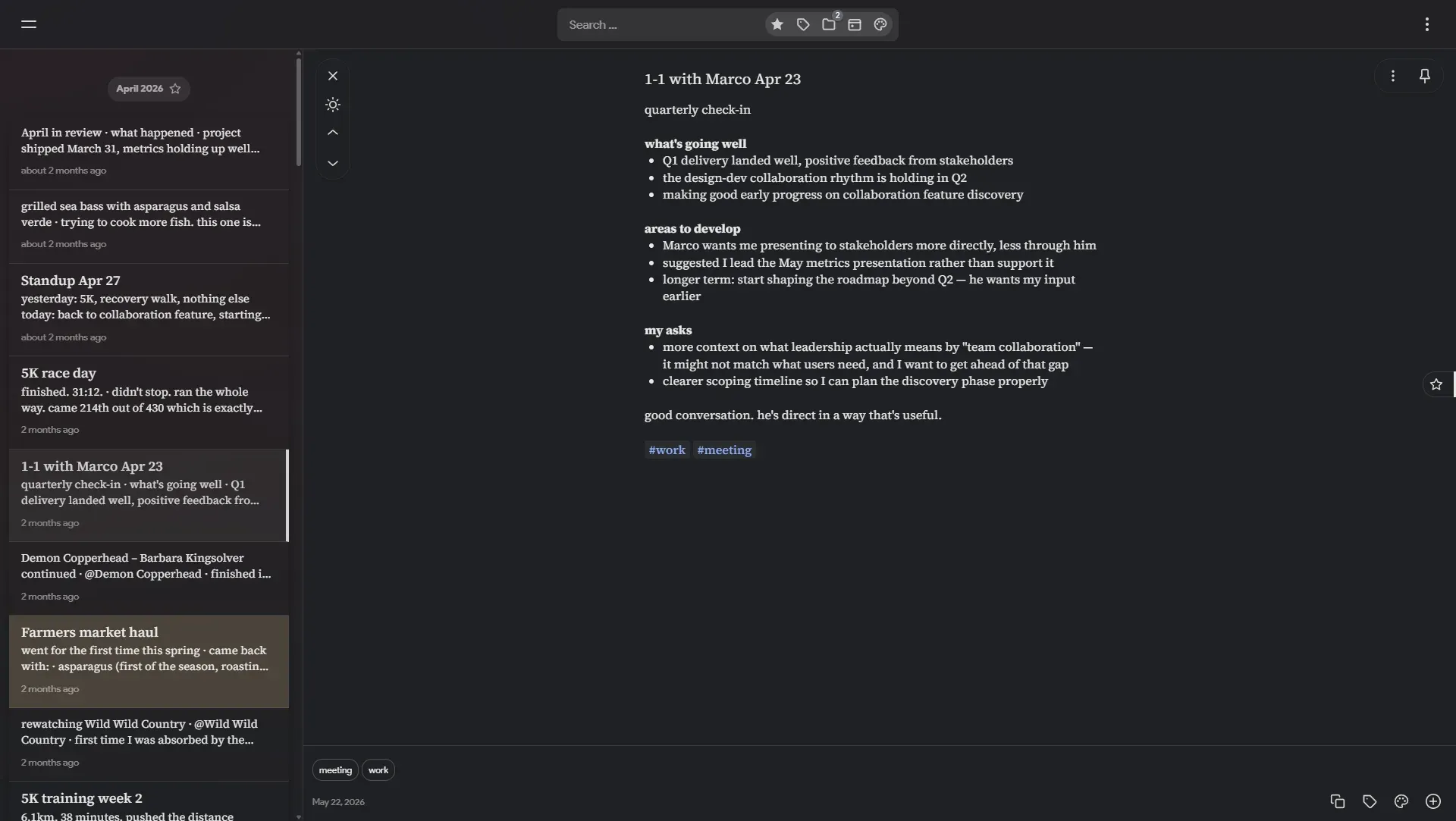
Official README screenshot: the dense list view grouped by month, with the selected note open in a reading pane.
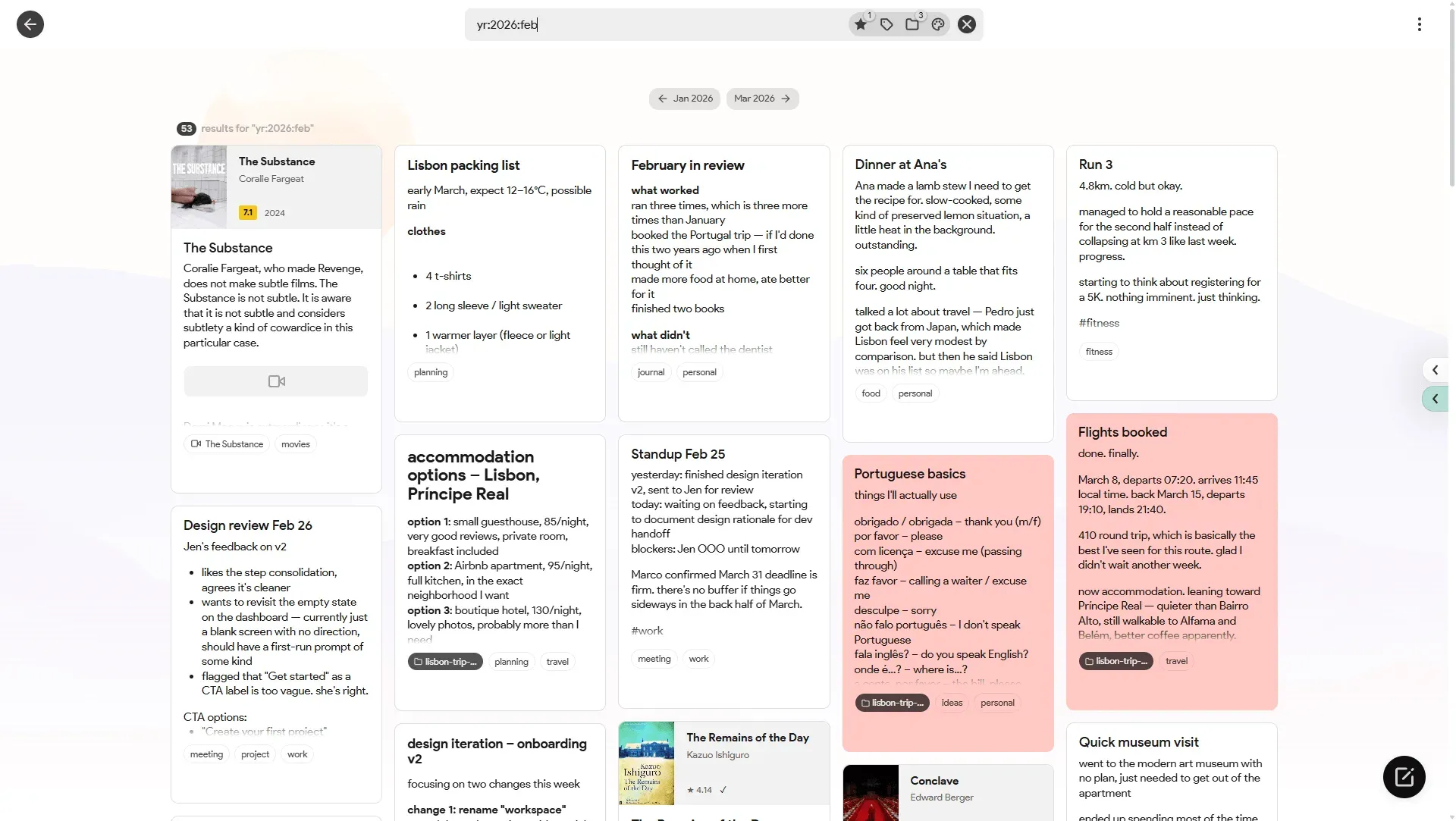
Official README screenshot: a date-operator search for February 2026 with month navigation and colored, folder-tagged results.
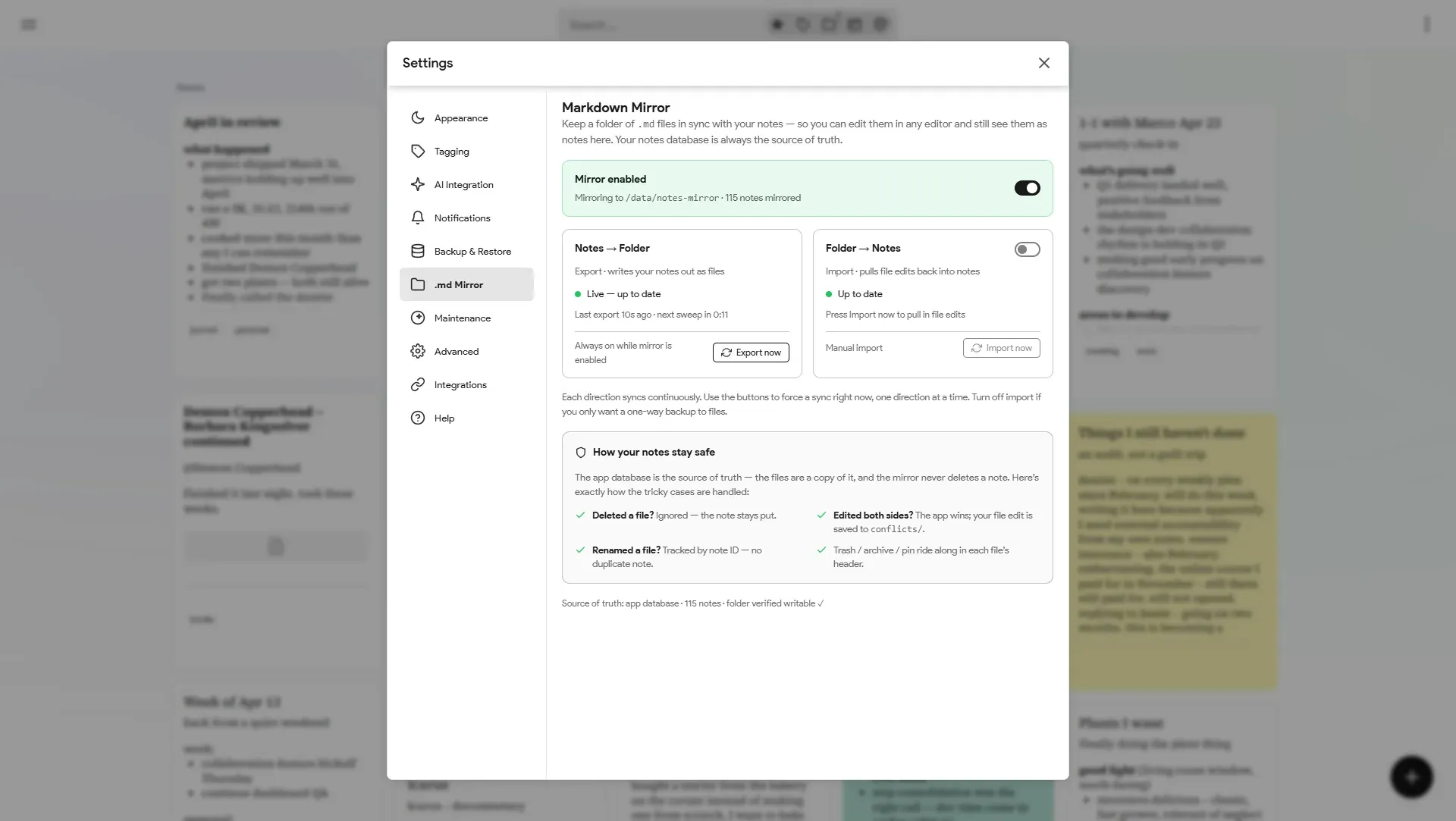
Official README screenshot: Markdown mirror settings, showing notes-to-folder export, folder-to-notes import and how conflicts are handled.
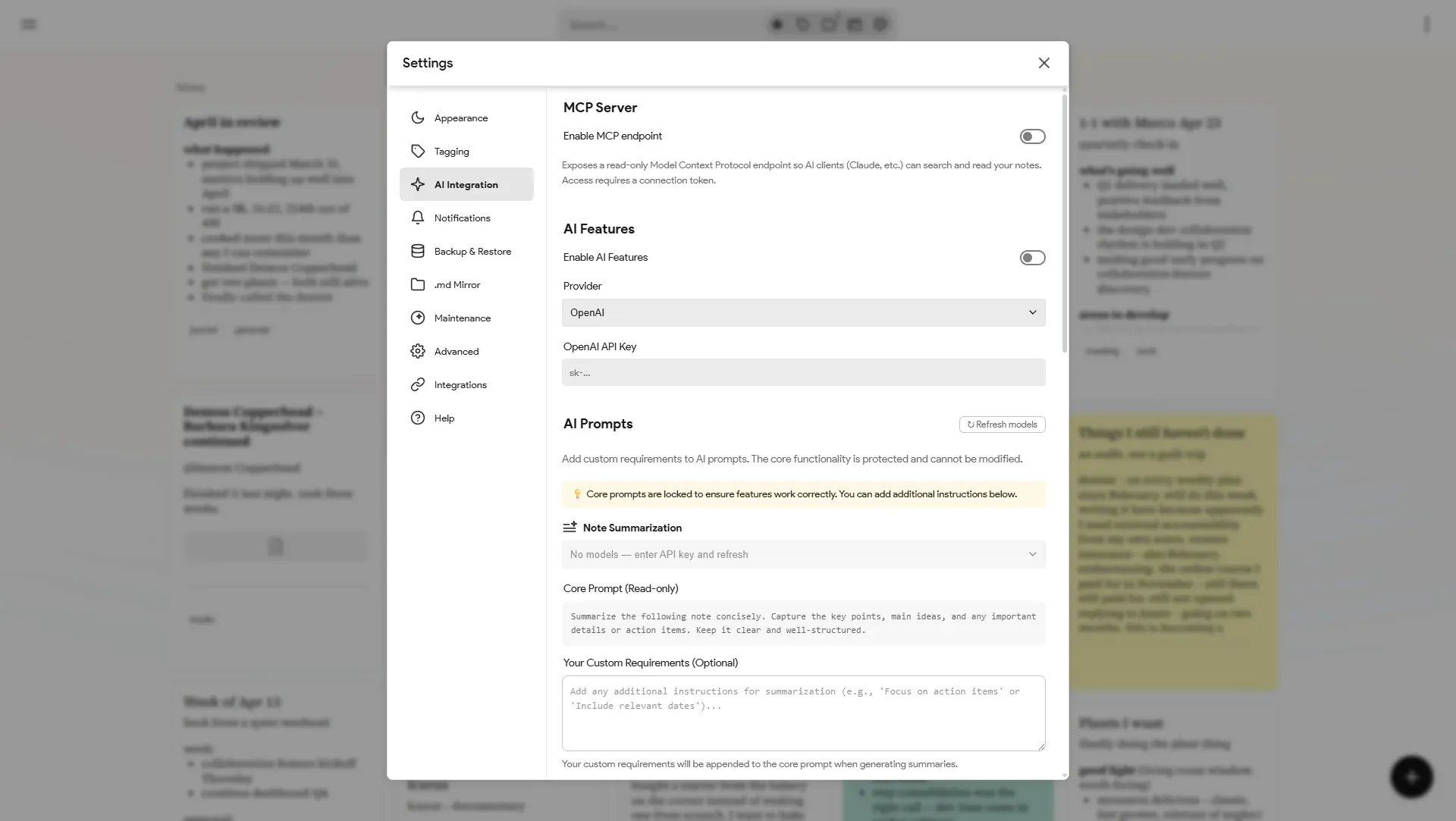
Official README screenshot: AI settings with the read-only MCP endpoint switch, provider choice and locked core prompts with custom requirements.
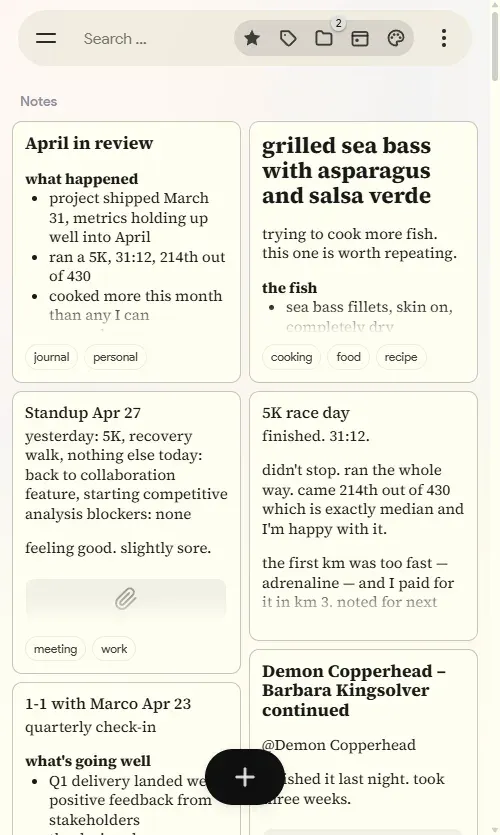
Official README screenshot of the web client on a mobile screen, two-column grid in the light theme.
Source: official itsnotes project page.
Key capabilities
- Docker Compose deployment The documented install is a Compose file with three services: PostgreSQL 17, the itsnotes server and the nginx-based client. Change the database password, optionally set values from .env.example, then run
docker compose up -d; the app answers on port 80. Pin images to a release tag such as2026.10.0to control upgrades, or followlatest. - HTTPS, reverse proxy and subpath hosting A Caddy Compose example with a Caddyfile handles certificates automatically, and a Traefik example uses Traefik's Docker provider. Setting
BASE_PATHon the client container serves the app under a path prefix without rebuilding the image, provided the proxy strips the prefix before forwarding. - Keep-style board with three view modes Notes appear as colored cards in a masonry grid, a stacked view or a dense list view with a reading pane. Light and dark themes, page backgrounds, layout and form behavior are set in a large settings dialog. Notes can be pinned, starred, archived and trashed, and color labels can be renamed to match your own scheme.
- Timeline with month markers and calendar The feed is split by month markers instead of one continuous wall, and a calendar panel jumps to a given period. Month navigation pills move between adjacent months when a date search is active. This is the main difference from the Keep interface the project imitates.
- Search operators and saved searches Plain words are matched with AND logic, and the search operator reference documents quoted phrases,
OR, exclusion with-, single-word wildcards, grouping with parentheses,#tag,$colorand date filters such asyr:2024:mar. Searches run as PostgreSQL ILIKE and regular-expression queries, not a dedicated full-text index. Frequent queries can be saved in a quick-access panel. - Folders, tags and note links Notes carry tags and can belong to several folders, with subfolders. Since 2026.10.0, choosing a subfolder removes the parent from the same note and the reverse, while sibling folders and tags stay selected. Notes can also link to each other, and Obsidian wikilinks are converted into these internal links on import.
- Note history, attachments and drawings Each note keeps revisions that can be listed, downloaded and restored. Notes hold an image gallery, file attachments with type icons and freehand sketches drawn in the editor. Link previews are generated for URLs, and book or movie references can be turned into cards with fetched metadata.
- Google Keep import Request a Keep-only export from Google Takeout and load the ZIP under Settings, Backup and Restore. Notes, checklists, labels, colors, archive, trash and pin state, original timestamps, images and other attachments are imported. Bulk upload of individual
.txtand.mdfiles is also supported. - Obsidian vault import A zipped vault, or a selection of
.mdfiles, is converted with titles, frontmatter tags including nested hierarchies, inline tags, wikilinks, embedded and standard images, highlights, task lists and created, modified, pinned and archived fields. Obsidian comments are removed. A two-pass import resolves wikilinks to notes that appear later in the batch. - Two-way Markdown mirror When enabled, every note is written to a folder of
.mdfiles with a metadata header for tags, color, reminders and state, with images and attachments alongside. Edits made in Obsidian, VS Code or any editor can be pulled back, manually or automatically. The database remains the source of truth: deleted files are ignored, renames are tracked by note ID and conflicting edits are saved to aconflicts/folder. - Backups and restore Settings include manual and scheduled backups written to
BACKUP_PATH. Each archive is a ZIP holding apg_dumpof the database and the uploads folder; the scheduler defaults to every 24 hours and keeps the five newest files. A backup ZIP can be uploaded to restore an instance, which replaces the current database contents. - Maintenance jobs Cron-style jobs remove empty notes left by abandoned new-note clicks, permanently delete notes that have sat in the trash for 30 days and optionally archive notes not edited for 365 days. Each job has an environment switch, an age setting and a cron expression documented in .env.example.
- Reminders and push notifications Notes can carry reminders, and AI reminder parsing can extract them from text. Notifications are sent through Pushover, Pushbullet or an ntfy server and topic, configured with environment variables. No email delivery is documented.
- Optional AI features Auto-tagging, OCR of images, note summarization and reminder parsing work with OpenAI or Anthropic API keys, or with Ollama without a key. Models are assigned per feature, and the core prompts are locked while custom instructions can be appended. OCR needs a vision-capable model, and result quality depends on the model you run.
- Read-only MCP server A built-in Model Context Protocol endpoint exposes tools to search notes, read a note, list notes and list tags. It is off by default, read-only and requires a token generated under Settings, AI. The settings page gives the connector URL for Claude and a
claude mcp addcommand for Claude Code. - REST API The API reference covers the same endpoints the frontend uses: listing, searching and reading notes, tags and write operations for creating, updating, archiving, trashing, pinning and tagging notes. Authentication is a Bearer token;
POST /api/auth/api-tokenissues a token valid for 10 years. Note content is HTML, so plain text should be wrapped in a<p>tag. - Chrome clipper extension The itsnotes clipper is a Manifest V3 extension loaded unpacked in developer mode; it is not listed in the Chrome Web Store. It captures the article from your own browser session, so pages behind a login you can already see are included, and the server extracts the text with Readability, re-hosts images and adds the original URL and tags.
- Proxy agent for page fetching The proxy agent is a small Node.js service run at home that holds an outbound socket to the server. Link previews and article extraction are routed through it, so sites that block datacenter addresses see a residential IP. It opens no inbound port and authenticates with a token from Settings, Integrations.
Where itsnotes fits
Moving a Google Keep archive to your own server
Request a Takeout export that contains only Keep, deploy the Compose stack and import the ZIP from Settings, Backup and Restore. Afterwards, compare note counts, open a few checklists and colored notes, and confirm that original timestamps place notes under the right month markers. Check that archived and trashed notes landed in the matching views and that image attachments appear in each note gallery.
Keeping notes editable as Markdown files
Mount a host folder at MD_MIRROR_PATH, enable the mirror and decide whether file edits should be imported manually or automatically. Open the folder in Obsidian or VS Code, edit one note and import it back. Then edit the same note in both places to see how the conflict copy is written to conflicts/. Remember that deleting a file does not delete the note, so cleanup still happens in the app.
Finding notes in a large, long-running collection
Use the month markers and calendar to browse by period, and build saved searches for recurring questions, for example #meeting yr:2026:apr or project (review OR planning) -cancelled. Switch to list view for dense scanning with a reading pane. Test search speed on your real volume of notes, because matching uses ILIKE and regular expressions rather than a ranked full-text index.
Adding local AI without sending notes to a vendor
Run Ollama on the host or as a Compose service, select it under Settings, AI, set the base URL, refresh the model list and assign a model per feature. Use a vision model for OCR. Check that the chosen models are local ones, since Ollama models marked as cloud send content to ollama.com, and raise OLLAMA_CONTEXT_LENGTH if long notes are summarized poorly.
Querying notes from Claude or scripts
Enable the MCP endpoint and generate its token when an assistant should search and read notes; it cannot change them. For automation that writes notes, create an API token and call the REST endpoints instead. Store both tokens as secrets, because the API token is valid for 10 years, and verify that the reverse proxy only exposes the instance over HTTPS.
Clipping articles and links into notes
Load the clipper extension unpacked in Chrome, generate an extension token under Settings, Integrations and test the connection. Clip a paywalled article you can read and check that text and images were saved to your server. If link previews from your VPS return challenge pages, run the proxy agent at home and confirm previews now resolve.
Reviews of itsnotes
Be the first to share your experience with itsnotes.
Write a review
Loading review form…
Alternatives to itsnotes
 MemosMemos is an MIT-licensed, self-hosted note-taking server written in Go. Short Markdown memos land on a dated timeline with tags, Views, Spaces and per-memo visibility, stored in SQLite, MySQL or PostgreSQL on your own host.
 JoplinJoplin is a free, open-source note and to-do app for Windows, macOS, Linux, Android and iOS, with offline-first storage and encrypted sync.
 ZenZen is an AGPL-licensed, single-user notes server: Markdown stored in SQLite, tags and Focus Modes instead of folders, BM25 search, version history, templates, tag-scoped API tokens and an experimental MCP server. It runs from Docker or one Go binary.