

What is Papermark?
Papermark is a document-sharing and virtual data room application developed by Papermark, Inc. The GitHub repository describes it as an open-source alternative to DocSend: a document is uploaded once and shared through a link, and the owner sees who opened it and how each page was viewed. The company runs a hosted service at app.papermark.com, and the same codebase can be self-hosted. The copyright notice in the license file runs from 2023, the year the repository was created.
The application is written in TypeScript on Next.js, with Tailwind CSS and shadcn/ui for the interface, Prisma as ORM over PostgreSQL, NextAuth.js for authentication, Tinybird for analytics, Resend for email and Stripe for payments, and the README lists Vercel as the hosting platform. Self-hosting requirements in the README are Node.js, a PostgreSQL database, blob storage (AWS S3 or Vercel Blob) and a Resend account; the README names Node.js 18.17.0 or later, while the engines field in the current package.json requires Node.js 24 or later. Installation is a git clone followed by npm install, a copied .env file, npm run dev:prisma and npm run dev. The repository has no official Docker image or Compose file.
The latest tagged GitHub release is v0.22.0, published on December 6, 2025. Its highlights are AI generation of data room folder structures, Slack notifications for document and data room views, and a hierarchical auto-index that numbers folders and files (1, 1.1, 1.1.1). It also added .tsv, .m4a, .mp3 and .keynote files, data rooms created from templates, a customizable welcome message, multiple teams, event-based workflows in preview, publishable Q&A, compliance text on agreements and search across data rooms. Development continued on the main branch after that tag: the most recent commits date from August 28, 2026, without a newer tagged release. The previous release, v0.21.0 (August 20, 2025), added a views dashboard, Slack alerts for data room access and internal document previews.
Licensing is split. Code outside two directories is under the GNU AGPLv3. Everything under ee/ and app/(ee)/ is covered by the Papermark Commercial License, which permits production use only with a Papermark Enterprise Edition subscription and allows copying and modification for development and testing. The ee README lists data rooms, Q&A conversations and advanced permissions among these features. The self-hosting help article states that personal self-hosting is free for non-commercial use without data rooms and advanced security features, and that commercial self-hosting needs a Papermark self-hosting license listed from $500 per month.
The hosted product is sold in plans from Free to Data Rooms Unlimited plus a custom Enterprise plan, with prices in euros on the pricing page. Papermark also publishes a REST API, a command-line tool and an MCP server for programmatic access, documented at papermark.com/docs. Papermark is not an e-signature platform for contracts in general and not a file synchronization client: its signature feature gates access to shared documents behind an NDA or agreement.
Papermark screenshots
Explore the interface. Open a screenshot to view it at full size.
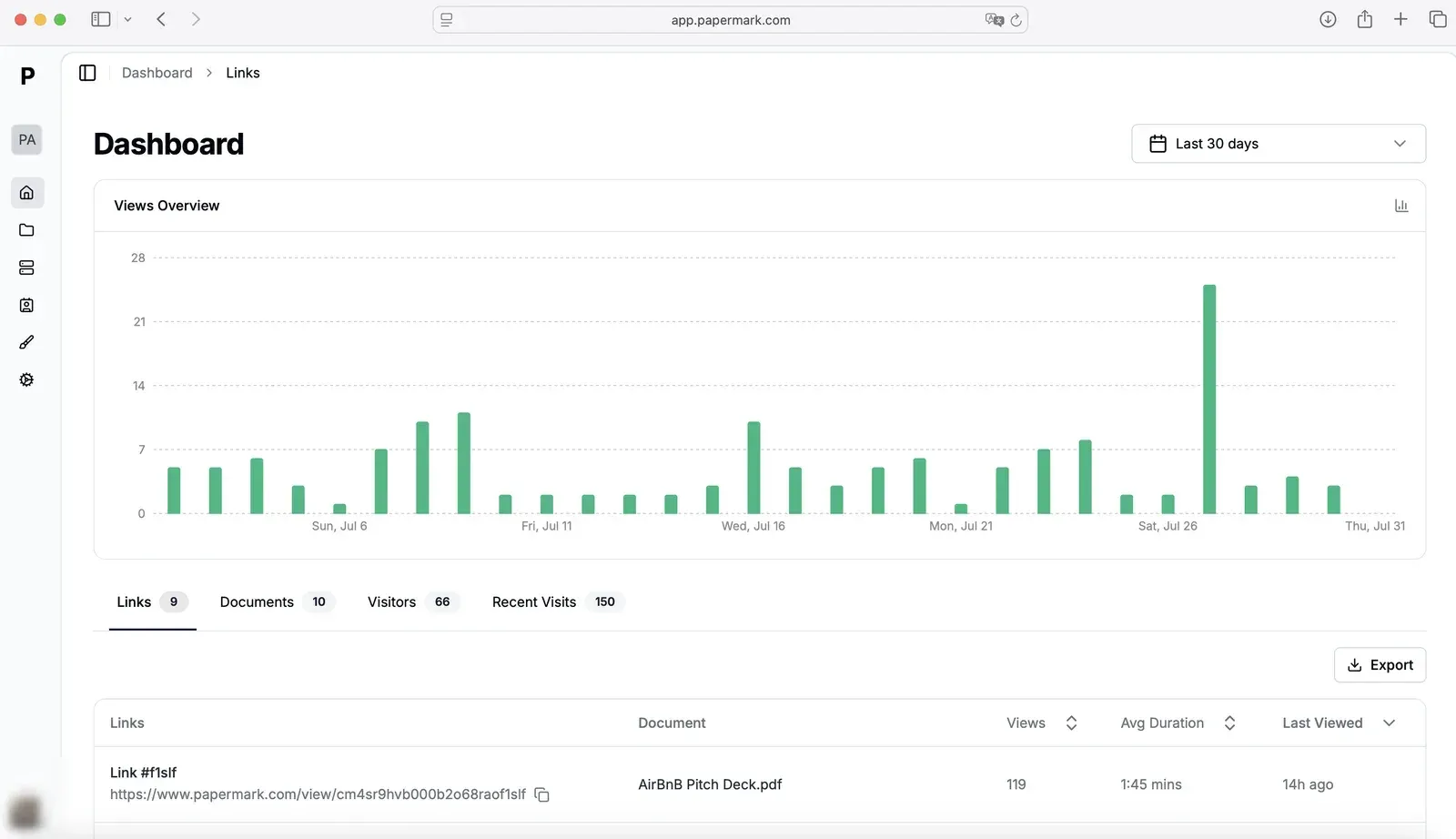
Dashboard from the v0.21.0 release notes: daily views and per-link statistics. Account avatar blurred.
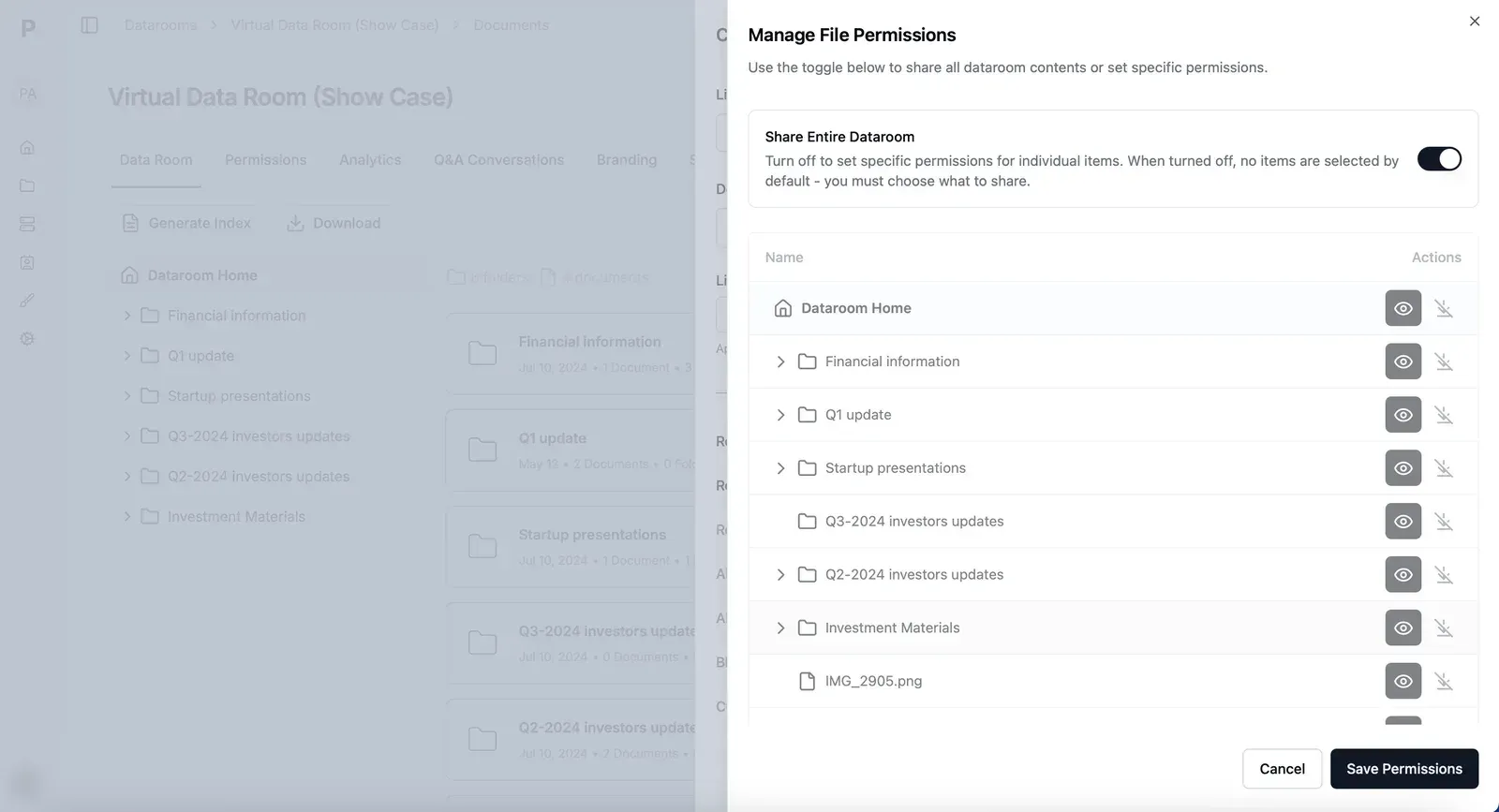
Data room file permissions from the v0.21.0 release notes. Account avatar blurred.
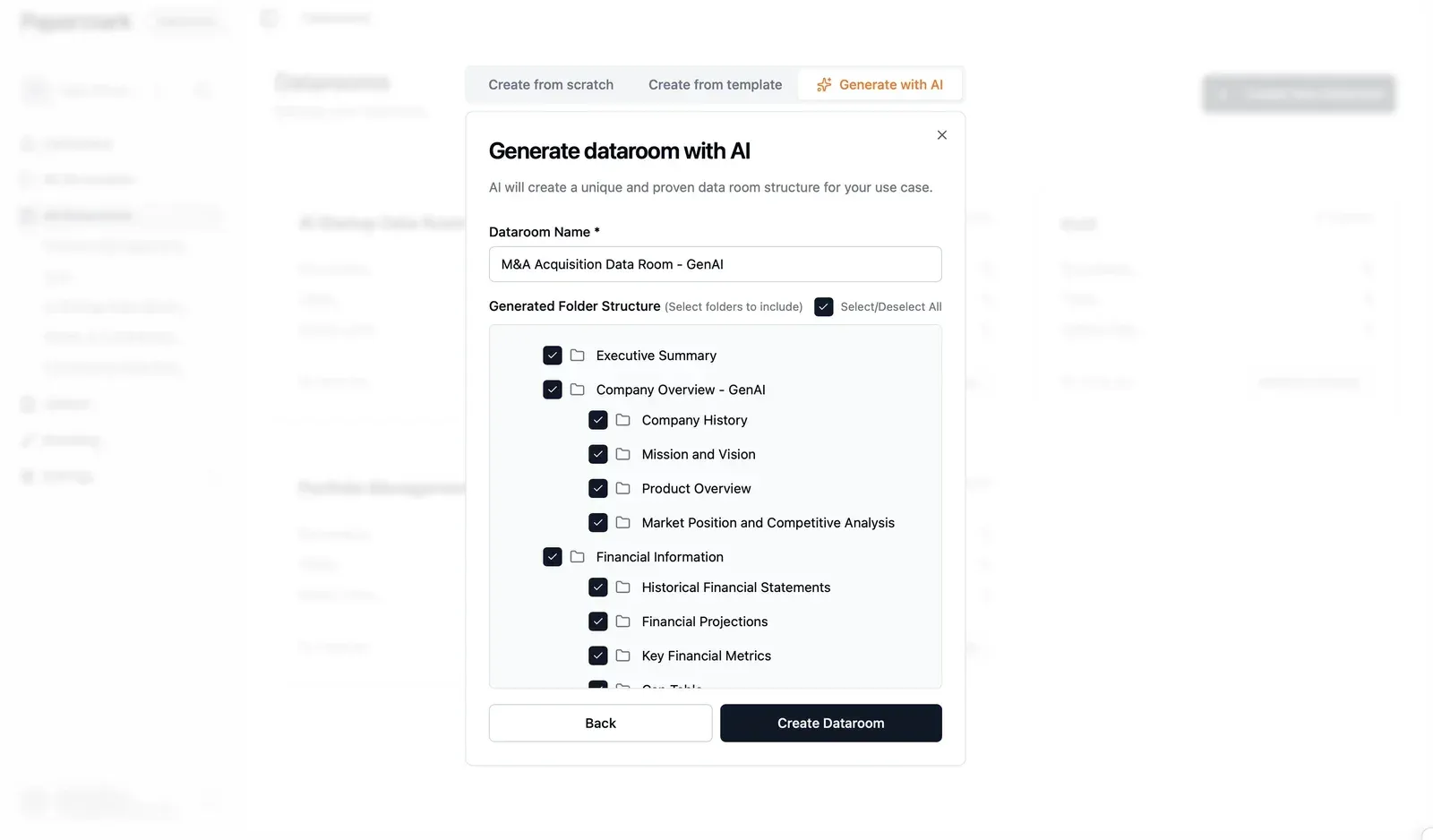
AI data room structure generation from the v0.22.0 release notes.
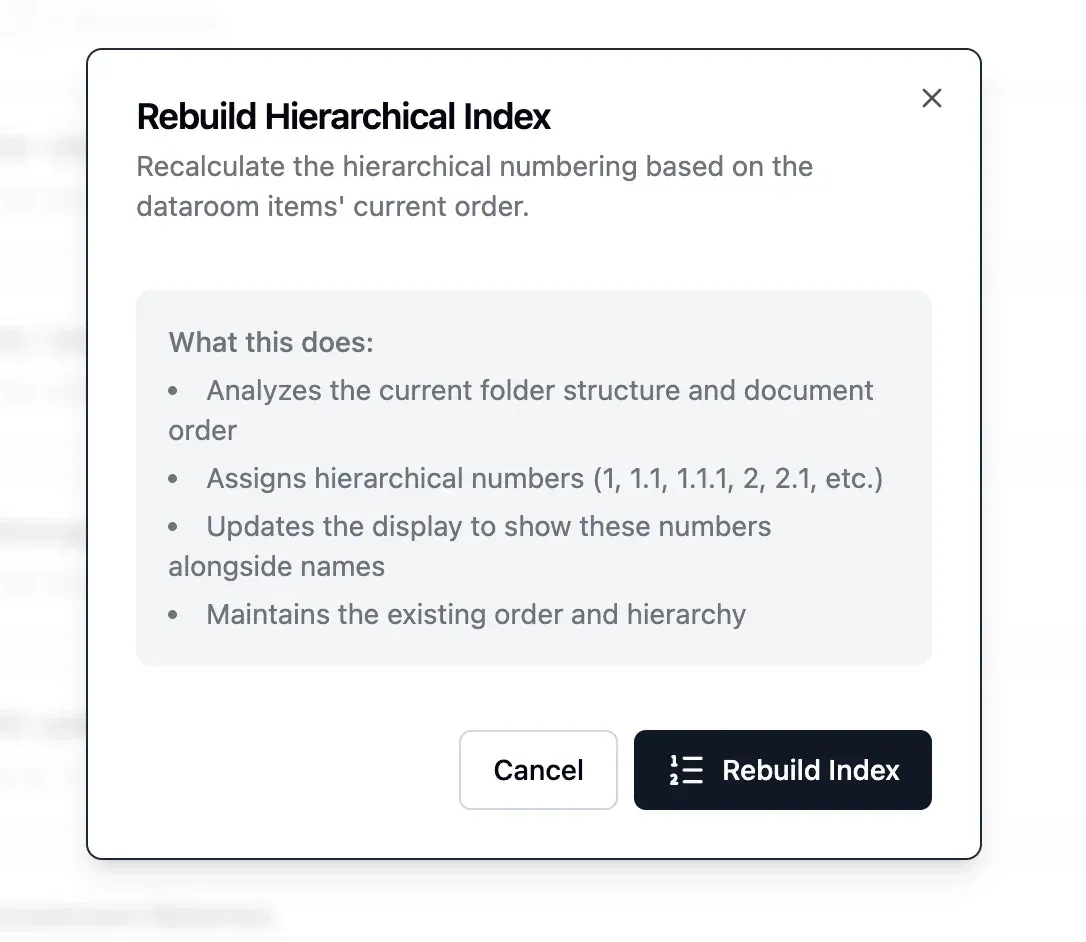
Hierarchical auto-index dialog from the v0.22.0 release notes.
Source: official Papermark project page.
Key capabilities
- Trackable document links Each upload can receive one or more share links, and each link has its own settings and analytics. Link options described in the link settings article include requiring an email to view, view notifications by email, allowing downloads, an expiration date, a password and visitor feedback, all on the Free plan. Updating a file keeps the same link, so recipients see the latest version.
- Page-by-page analytics The document analytics page lists time spent per page for each viewer, completion through the document, total and unique views, view duration, download status, country and city location, device type, operating system and platform. Video content has its own view analytics. Analytics are available on every plan, including Free, and internal visits can be excluded.
- Virtual data rooms Data rooms hold unlimited nested folders and documents for fundraising, M&A and due diligence. Features described on the data room page include file- and folder-level permissions per viewer or group, file requests from visitors, a Q&A module, AI redaction, an append-only audit log and analytics rolled up per room. Data rooms start with the Data Rooms plan.
- Email verification, allow lists and block lists A link can require that viewers verify their email address before access, and can admit only listed viewers or domains or deny specific ones. These options are listed for the Business plan. Verified visitors are identified as such in analytics.
- Password protection and expiration A unique password can be set per document or data room link and changed or revoked at any time, according to the password protection page. A custom message can be shown on the password screen. Password and expiration settings are available on all plans, including Free.
- NDA and agreement gating Viewers can be required to accept an agreement with one click or sign it with signature, name and date fields before any page loads. Papermark records name, email and timestamp and saves the signed PDF next to the documents. One agreement can be reused across documents and data rooms. The one-click NDA page lists it under the Data Rooms plans.
- Dynamic watermarking Watermarks are composed per view from the viewer email, name, IP address, date and time, and rendered over each page. Tiling, position, rotation, font size, color and opacity are configurable. The watermarking page lists the feature under the Data Rooms plans.
- Screenshot protection This option blocks the main screenshot commands, deters screen recording and logs capture attempts while a document or data room is open. The feature page states that it does not work in every case and that some mobile browsers cannot be fully blocked. It is included from the Business plan.
- Custom domains and branding Links can be served from your own domain, for documents from the Business plan and for data rooms from the Data Rooms plan. Branding covers logo, banner, brand color and front-page background, and can be set globally or per data room. The Pro plan can remove Papermark branding, and full white-labeling is listed for Data Rooms Premium and Enterprise.
- Supported file types The document types article lists PDF, spreadsheets (.xls, .xlsx, .xlsm, .csv, .ods), PNG and JPEG images and Notion pages on the Free plan. Pro adds presentations including .pptx and .key, video, audio and Outlook .msg files; Business adds CAD (.dwg, .dxf), KML and KMZ, ZIP, Markdown and HTML. ZIP, KML and KMZ files are download-only.
- Custom fields and visitor questions Business plan links can ask viewers additional questions before they reach the document, and links can collect feedback after viewing. Custom social media cards set the preview image and description shown when a link is pasted elsewhere.
- Teams, groups and roles Team members manage documents, data rooms and analytics together, with seat counts that range from 1 on Free and Pro to unlimited on Data Rooms Unlimited. Viewer groups carry their own permissions inside a data room. SSO and multiple teams are listed from the Data Rooms Premium plan, and the help center has an article on SAML SSO and SCIM.
- AI features for data rooms The AI page describes chatting with a data room, answers that cite the pages they come from, search and summary of documents and folders, review personas and AI redaction. Release v0.22.0 added AI generation of a data room folder structure from a name and use case.
- REST API The API reference uses bearer tokens against
https://api.papermark.com/v1and covers data rooms, documents, folders, links, visitors and analytics. Large uploads use S3 presigned URLs. The documentation lists webhooks as planned and GraphQL as not planned. The pricing page includes the API from the Business plan. - Command-line tool The CLI is installed with
npm install -g papermarkand offers login, documents, datarooms, links, views, config and doctor commands. A--jsonflag returns a fixed envelope with ok, data and meta fields, and--dry-runprints the HTTP request with the token redacted. Exit codes separate authentication, validation and network errors. - MCP server The MCP server is published as
@papermark/mcp-serverfor local stdio use with aPAPERMARK_TOKEN, and is also hosted athttps://mcp.papermark.com/mcpwith OAuth 2.0 and PKCE. Its tools cover data rooms, documents, links, folders, branding, visitors and analytics. The documentation marks version 0.1.0 as alpha with possible breaking changes between minor versions. - Integrations and notifications Slack notifications report document and data room views in a chosen channel, and webhooks can be created for events. The v0.22.0 notes also mention a Dub integration. Email notifications are sent for each view unless switched off per link.
- Self-hosting from source The README describes a manual installation: clone the repository, install npm dependencies, configure environment variables, initialize the database with Prisma and start the Next.js server on port 3000. Tinybird data sources and endpoints are pushed with the Tinybird CLI. The self-hosting article limits free self-hosting to personal, non-commercial use.
Where Papermark fits
Sharing a pitch deck with investors
The document analytics page names fundraising as a main use: a founder uploads the deck, creates a link per investor or a single link with email capture, and sees which investors opened it and how long they stayed on each slide. Notifications arrive by email or in Slack when a link is opened. Password, expiration and download settings apply per link, and the deck can be replaced without changing the link.
Running an M&A or due diligence data room
The data room page describes staging the full document set in nested folders, controlling access per bidder or viewer group, requiring an NDA before any document loads and keeping an audit log of each view and action. A Q&A module handles buyer questions, file requests collect documents from the other side, and the hierarchical index from v0.22.0 numbers folders and files for reference.
Distributing confidential reports to limited partners
Papermark lists venture funds, family offices and fund administrators as users who share portfolio updates and LP reports. Dynamic watermarks carry the viewer email, IP address and time on each page, screenshot protection blocks common capture commands, and analytics record which partner read which report.
Sending sales proposals and following up on engagement
Sales teams share proposals as tracked links and use the per-page view data and visitor list to see which recipients read the material. Link presets store a set of security and download settings for reuse, and tags group links for later filtering. Analytics can be exported.
Automating data rooms from scripts and agents
The agents page describes creating a data room, uploading and organizing documents, issuing permissioned links and reading analytics through the REST API, the CLI or the MCP server. Typical flows listed there include setting up a data room in one script and provisioning a separate room for a buyer after an NDA is signed. Programmatic access is included from the Business plan.
Hosting Papermark on your own infrastructure
Self-hosting starts from the GitHub source with PostgreSQL, blob storage, Resend and Tinybird. The help center describes four hosting options: the hosted service, the hosted service with your own storage bucket, free personal self-hosting without data rooms and advanced security features, and licensed commercial self-hosting from $500 per month. The Enterprise page offers managed self-hosting with dedicated support. Related document tools listed on iThub include Documenso and DocuSeal for e-signatures and Seafile for file sync and sharing.
Reviews of Papermark
Be the first to share your experience with Papermark.
Write a review
Loading review form…
Related to Papermark
 SeafileOpen-source file sync and share platform with libraries, delta sync, optional client-side encryption, SeaDoc documents, wikis and file properties. Run it with Docker, or use the hosted Plus edition.
 FilestashFilestash is an AGPL-3.0 Go file manager that gives one browser interface to SFTP, S3, SMB, WebDAV and other storage, with plugins, protocol and MCP gateways, a workflow engine and optional SSO.
 DocumensoAGPL-licensed document signing platform built with TypeScript, React Router and PostgreSQL. Use Documenso Cloud or self-host it with Docker, with templates, a REST API, webhooks, embedded signing and X.509 sealed PDFs.