

What is Fileship?
Fileship is a self-hosted file hosting server that works as a ShareX upload target and as a personal or team file cloud. It stores files, nested folders, Markdown notes, short links and upload inboxes, shares them publicly with passwords, expiry dates and view limits, and can analyze uploads with AI models that run on the same server. It is developed in the hanzydev/Fileship repository, with a website and documentation at fileship.app. The project compares itself with Zipline, XBackBone and Chibisafe and provides an importer for all three.
The server is built with Nuxt, Vue, Tailwind CSS, shadcn-vue and TypeScript, stores data in PostgreSQL through Prisma, uses Socket.io for live updates and runs its AI models with Transformers.js. The documented installation is Docker Compose: a postgres service on the ghcr.io/hanzydev/fileship-postgres image, a Caddy proxy on port 3000, two Fileship containers used in a blue/green pattern and an updater-agent that performs updates through the Docker socket. The installation guide lists x86-64 or ARM64, 2 cores, 2 GB of RAM and 4 GB of disk with AI off, or 4 to 8 GB of RAM with AI on; guides for installing without Docker and on Windows are on the website.
Around the server sit several clients. Fileship for Windows, developed in a separate fileship-desktop repository, captures, records and uploads from the system tray and adds Fileship Harbor, which shows the cloud files in File Explorer; it needs 64-bit Windows 11 24H2 or newer and a Fileship 6.0 server. A browser extension is published on the Chrome Web Store and Firefox Add-ons, the dashboard installs as a progressive web app that Android apps can share to, and ShareX, macOS and Linux upload integrations are provided.
The current release is v6.6.0, published November 8, 2026. It moves the database to an image that upgrades PostgreSQL in place (16 to 18 on the first start) and lets the updater agent update the database and itself, requires one manual update for older installs, streams uploads and caps image decoding at 120 megapixels to bound memory use, runs the privacy filter in pieces of at most 512 tokens, and ships alongside Fileship for Windows 2.3.0. The same release launched the fileship.app website and documentation.
From 6.6.0 the server is licensed under AGPL-3.0-only with an additional term that keeps the "Powered by Fileship" notice on the sign-in pages; Fileship for Windows, the browser extension and the shared packages stay MIT, and versions 6.5.0 and earlier remain MIT, as explained in LICENSING.md. The interface is available in 12 languages. Anonymous telemetry is collected by default and can be turned off, as described in the telemetry page. Similar directory entries: ShareX, Sync-in and Nextcloud.
Fileship screenshots
Explore the interface. Open a screenshot to view it at full size.
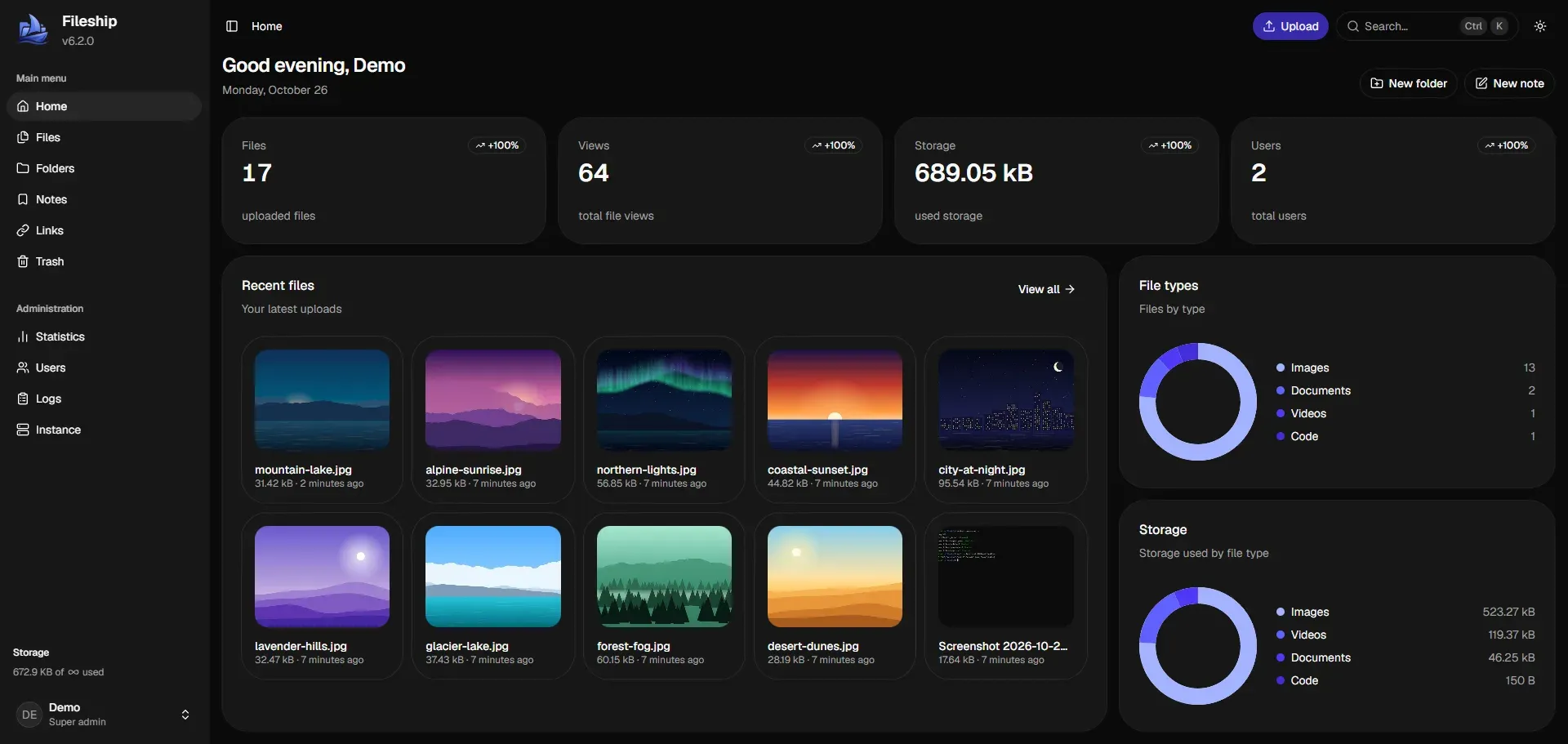
Dashboard home with usage counters, recent files and storage by file type. Official README screenshot.
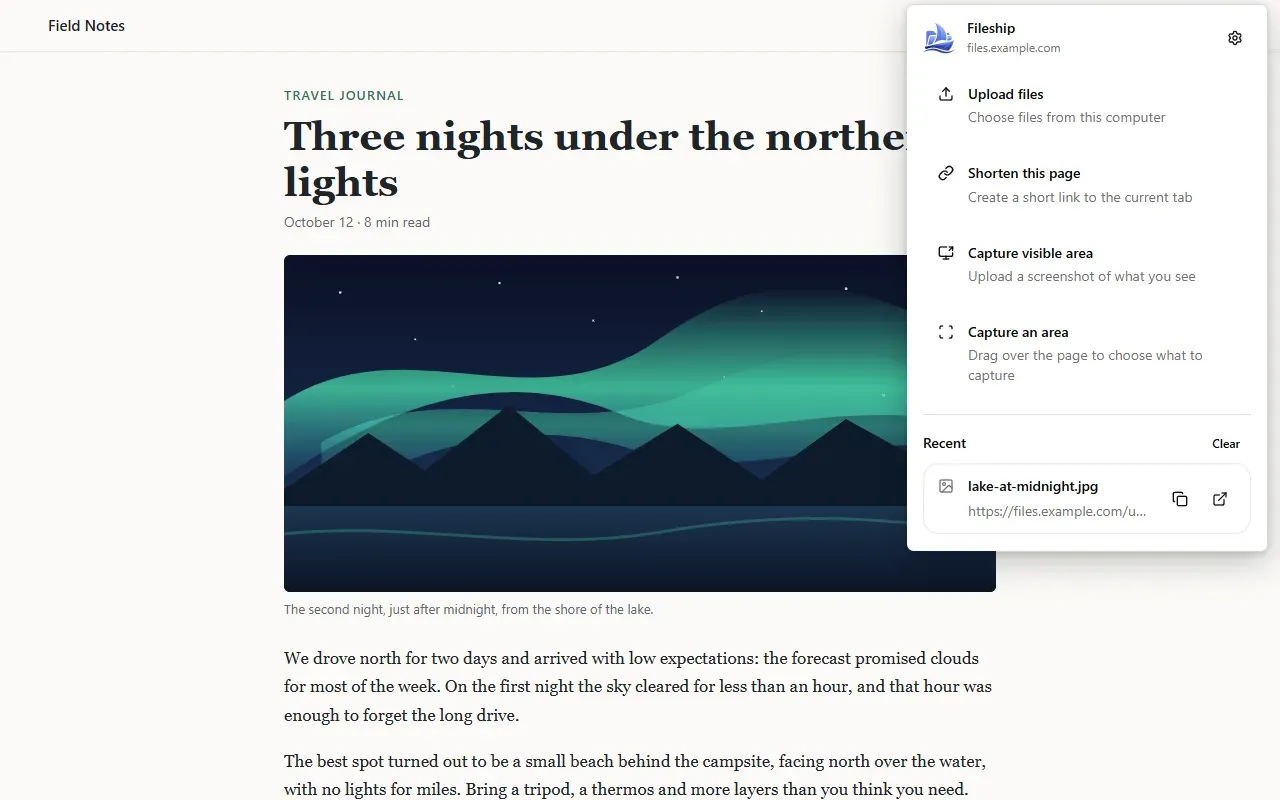
Browser extension popup with upload, link shortening and capture actions. Official store screenshot from the repository.
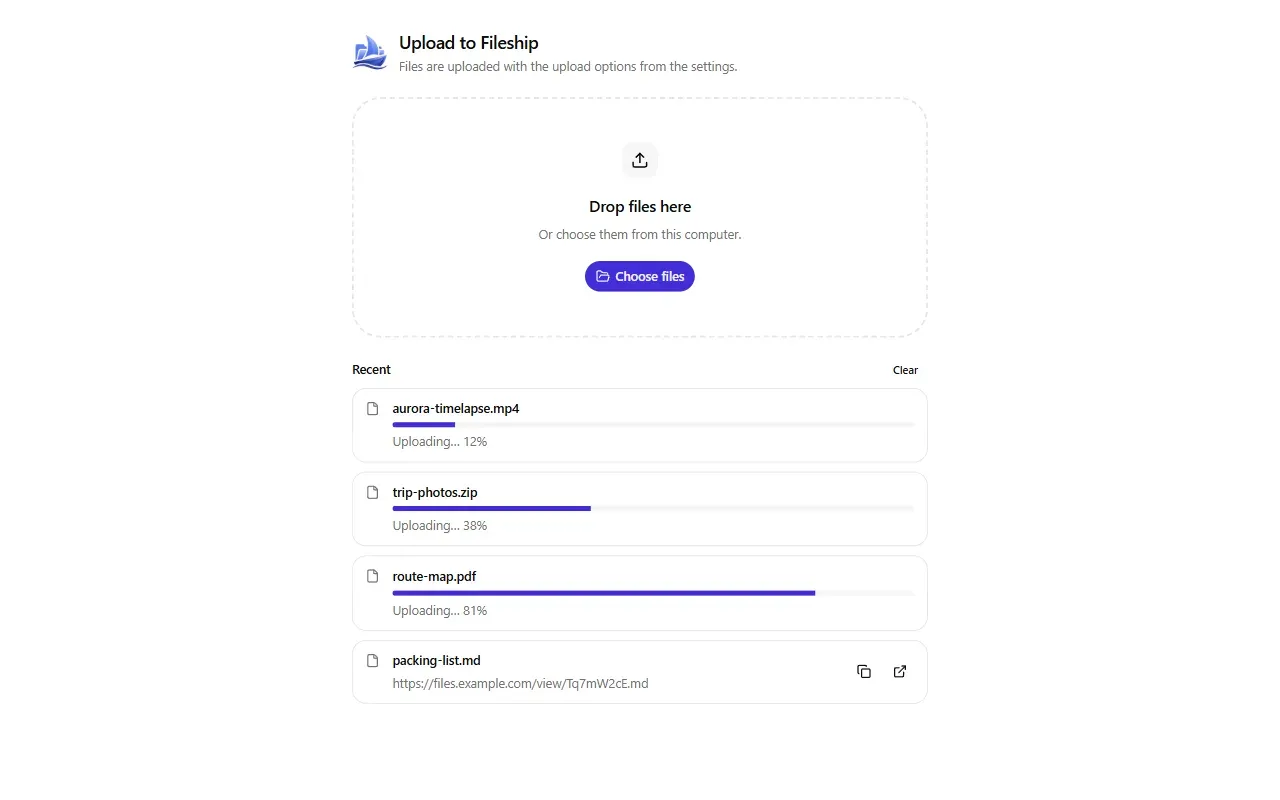
Extension upload tab with drag and drop and per-file progress. Official store screenshot from the repository.
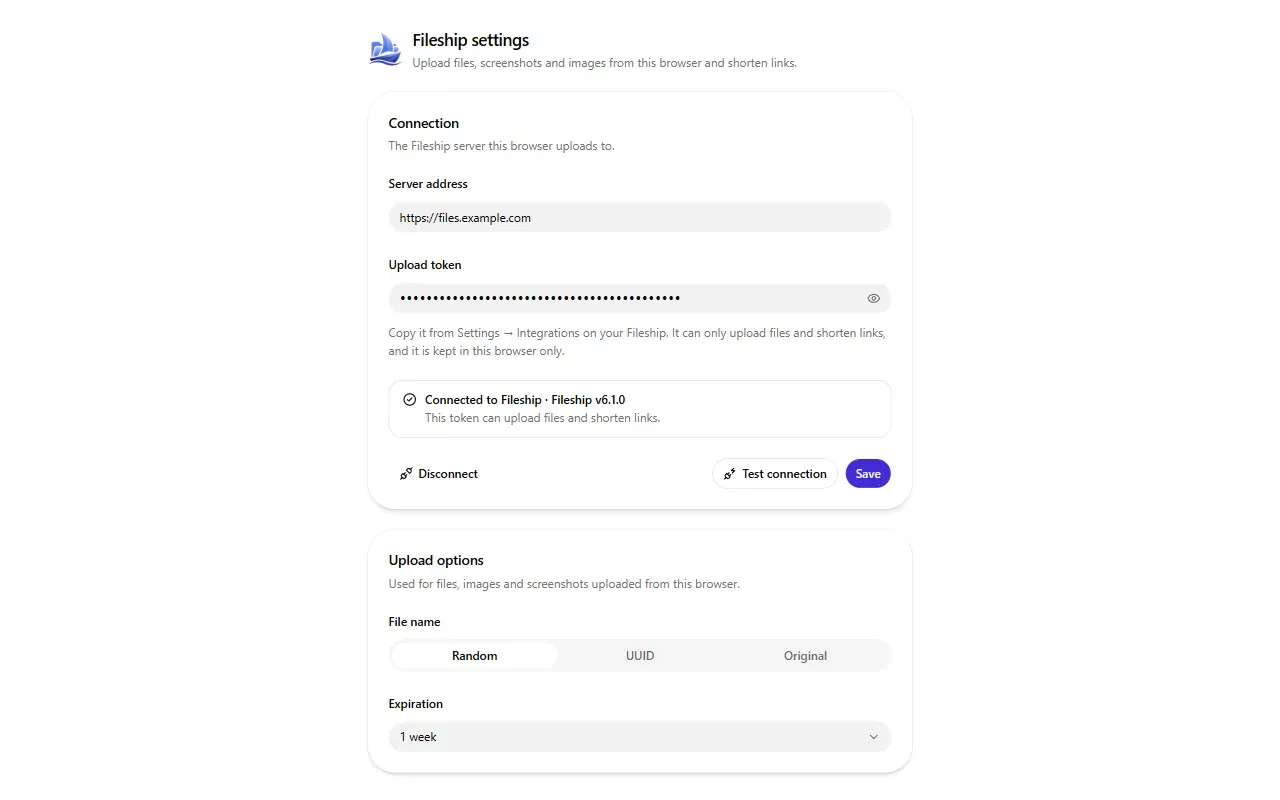
Extension settings: server address, upload token and default upload options. Official store screenshot from the repository.
Source: official Fileship project page.
Key capabilities
- Files, folders, notes, links and inboxes Accounts hold files, nested folders that can be shared with other users, Markdown notes, short links and inboxes that accept uploads from visitors. Deleted files, folders and notes move to a trash, kept for 30 days by default. The dashboard home shows file counts, views, storage use and recent uploads.
- Public sharing controls Shared items can carry a password, an expiry date and a view limit. Links render rich embeds in Discord and other apps. Files marked sensitive by the AI are kept out of public folders and their archives.
- ShareX and other uploaders Fileship acts as a custom upload target for ShareX, with upload integrations for macOS and Linux as well. Upload tokens are created under Settings, Integrations. Large single-request uploads from ShareX or curl are written to disk since v6.6.0.
- Fileship for Windows A tray app captures the active monitor, a window, the full screen or a region, with annotations such as arrows, text, step numbers, blur and pixelate while picking the region. It records the screen or GIFs with microphone and system audio, copies text through the server's OCR, uploads with the user's upload settings and copies the link. The installer is
Fileship-Setup-<version>.exefrom the desktop releases; it is not code signed yet, so SmartScreen may warn. - Fileship Harbor Harbor shows Fileship files and folders in File Explorer, downloading files only when opened and showing thumbnails without a download. Added files upload, renames and moves sync, deletions go to the Fileship trash, notes appear as Markdown files and short links as shortcuts. It needs an empty folder; details are in the Windows app docs.
- Browser extension The extension uploads files, images and screenshots of the visible page or a dragged area, and shortens the current tab or a link from the right-click menu. It needs Chromium 116 or newer or Firefox 142 or newer and an upload token, which stays in the browser. See the extension docs.
- Installable phone app The dashboard installs as a web app on Android, iPhone, iPad and desktop browsers when served over HTTPS. On Android it appears in the share sheet: shared files are uploaded with the usual options, links can be shortened or saved as notes, and text becomes a note.
- On-server AI Smart search, captions, OCR and sensitive content detection run locally with Transformers.js, and the project states that no file leaves the server. Models are downloaded from Hugging Face on first use and cached in
data/models. Presetslow,mediumandhighchoose model precision, video frames analyzed and memory residency; AI is on by default and can be disabled per instance or per user (AI docs). - Smart search Search combines what images and videos show, captions, OCR text, text file contents and file names, in over 50 languages. When AI is disabled it falls back to full-text search. The models listed include mSigLIP, Florence-2, PaddleOCR and a multilingual MiniLM.
- Sensitive content detection The OpenAI Privacy Filter model reads document text and OCR text to flag private contact details, ID and account numbers, passwords and keys, payment card numbers and IBANs. Sensitive files are hidden from public folders and their previews can be blurred. Users can override a decision from the file menu.
- Storage backends Uploads and backups can live on the local data directory, any S3-compatible service such as AWS, Cloudflare R2, Backblaze B2 or MinIO, SFTP or FTP. Storage is configured under Administration, Instance, Storage. Credentials are encrypted with
data/secret.key. - Users and authentication Multiple users have permissions and storage limits, and self-registration, invites and Cloudflare Turnstile are configurable. Logins support passkeys, two-factor authentication and OpenID Connect single sign-on with providers such as Authentik, Authelia, Keycloak, Pocket ID, Zitadel or Google.
- Account backups Users can download a backup of their account and restore it, created by hand or on a daily or weekly schedule. Since v6.6.0, folder archives and backups download at most six files at a time, and a backup's contents are checked against usable space before extraction.
- Webhooks Each user can add up to 10 webhooks in Discord, Slack or signed JSON format for
file.uploaded,file.deleted,storage.almostFull,link.createdandnote.created. Failed deliveries are retried up to five attempts, and a webhook is turned off after five failures in a row. Private and loopback targets are blocked unless a super admin allows them (webhook docs). - Zero-downtime updates The Caddy proxy routes requests to whichever Fileship container is healthy while the other is replaced. Super admins can update with one click, and scheduled updates run daily at 3:00 AM by default through
AUTOUPDATER_CRON. PostgreSQL major upgrades happen in place, so the updating guide notes keeping a copy of thepg_datavolume. - Importing from Zipline, XBackBone and Chibisafe Super admins import accounts, files with original names and dates, folders or albums, short links and snippets from Zipline 3.7 and 4.x, XBackBone 3.x and Chibisafe 6.x. Files are read from
data/importor from the old app's S3, SFTP or FTP storage. The migration guide notes that the import moves files rather than copying them. - Installation with Docker Compose The README installs with
git clone, writingSECRET_TOKEN=$(openssl rand -hex 32)to.envanddocker compose up -d; Fileship then answers on port 3000. The default login isadminwith passwordpassword, which the project says to change immediately. Files live in thedatafolder and the database in thepg_datavolume.
Where Fileship fits
Hosting ShareX screenshots on your own domain
Fileship replaces a public image host as ShareX's upload target: screenshots go to the server, the link lands on the clipboard and the link renders an embed in Discord. Fileship for Windows offers the same flow natively, with region capture, annotation, OCR text capture and screen or GIF recording from the tray.
A personal or small team file cloud
Folders can be nested and shared with other users, each user has permissions and an optional storage limit, and Harbor puts the files in Windows File Explorer with on-demand download. Phones use the installable web app, and Android can share files, links and text straight into it, as covered in the phone app docs.
Sharing files with expiry, passwords and view limits
A file, folder, note or short link can be published with a password, an expiry date or a maximum number of views. Inboxes accept uploads from visitors who have no account, and the owner's remaining space is checked while the upload arrives.
Finding files by describing them
With AI enabled, uploaded images, videos and text files are analyzed once in the background. A query such as a scene description, or a word in another language, finds matching photos, captions and OCR text. Smaller servers can pick the low preset or lower parallel jobs and threads per job.
Moving from Zipline, XBackBone or Chibisafe
The importer in Administration, Instance, Storage reads the old app's export or database and its uploads folder, and keeps original names, dates and link names. The project describes stopping uploads to the old app before copying its data.
Getting notified about uploads
Webhooks post uploads, deletions, new links and notes to Discord or Slack, or a signed JSON body to an internal service. Sensitive, private or password-protected items are sent with their link name and without a preview. Releases are listed on the website and in the GitHub releases.
Reviews of Fileship
Be the first to share your experience with Fileship.
Write a review
Loading review form…
Alternatives to Fileship
 Sync-inSync-in is an AGPL-3.0 self-hosted platform for file storage, sharing, synchronization and collaboration, with spaces, guests, WebDAV, desktop sync clients, full-text search and Collabora or OnlyOffice editing.
 NextcloudAGPL-licensed collaboration server for files, sharing, Talk calls, Calendar, Contacts, Mail and browser office editing. Run it with the official All-in-One Docker setup or on your own PHP stack, with clients for desktop and mobile.
 FilestashFilestash is an AGPL-3.0 Go file manager that gives one browser interface to SFTP, S3, SMB, WebDAV and other storage, with plugins, protocol and MCP gateways, a workflow engine and optional SSO.