

What is UnInbox?
UnInbox is an open-source, team-oriented email platform built around shared spaces, per-conversation workflow statuses and additional addresses on custom domains. It is made by Unproprietary Corporation, whose copyright notice appears on uninbox.com and in the repository license. The official GitHub repository describes it as modern email for teams and professionals, and the project positions itself as an alternative to Hey, Front and Missive. It is not a mail server that replaces SMTP; it sits on top of email and adds a collaboration layer.
The hosted service runs at app.uninbox.com, where a free account receives an address on the uninbox.me domain. Paid plans add custom domains, SMTP and API access, and an enterprise tier offers a dedicated instance. The README states that self-hosting is possible but needs extra manual email configuration, and it points to the project Discord for production guidance rather than to a written deployment guide. The documented local setup uses Docker containers, Node.js 20 or newer and pnpm 9 or newer.
The monorepo contains a Next.js web app, a Hono and tRPC platform API, a storage service for attachments and avatars, a mail-bridge service that talks to Postal for inbound and outbound mail, a background worker, and shared packages for the database (Drizzle ORM with MySQL), realtime updates, rich-text editing and OpenTelemetry. A planning document in the repository, the January 2026 architecture PRD, describes consolidating these services into fewer Vercel deployments; it is a proposal, not a shipped change.
The repository has no tagged releases. The product screenshots show version 1.0.0 in the sidebar, the latest commits to the main branch are from January and February 2026 (dependency security alignment and a bug fix), and before them the public history has a long gap since September 2024. Evaluate it as a project with a live hosted service and low public development activity. Code outside the ee directory is under the AGPL-3.0 license; the ee directory holds Enterprise Edition code under a separate commercial license, and the license file explains the split. The gallery uses official screenshots from the project website, with participant avatars blurred by iThub.
UnInbox screenshots
Explore the interface. Open a screenshot to view it at full size.
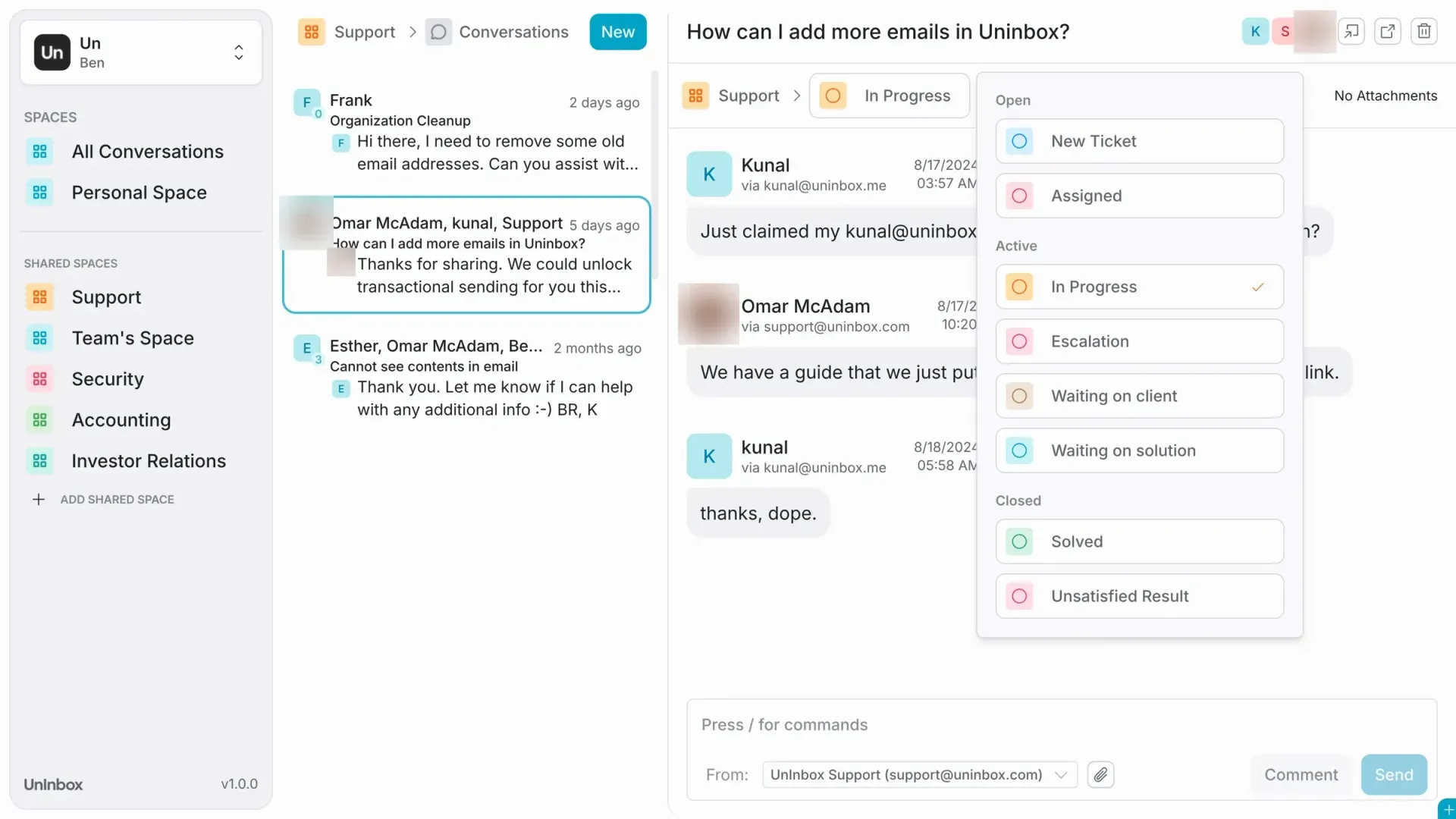
Official website screenshot of the app, with avatars blurred by iThub.
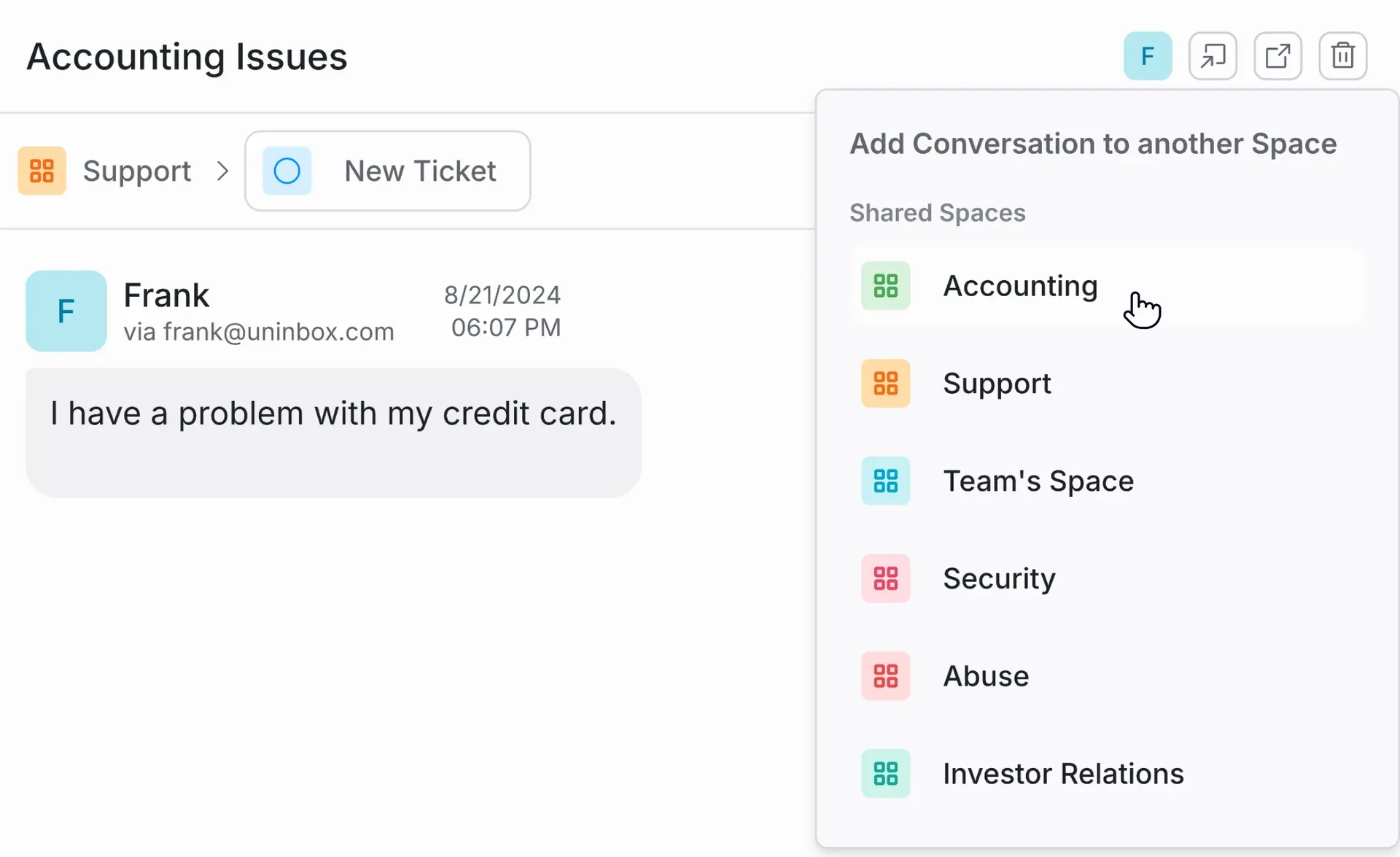
Official website image of moving a conversation into another shared space such as Accounting or Security.
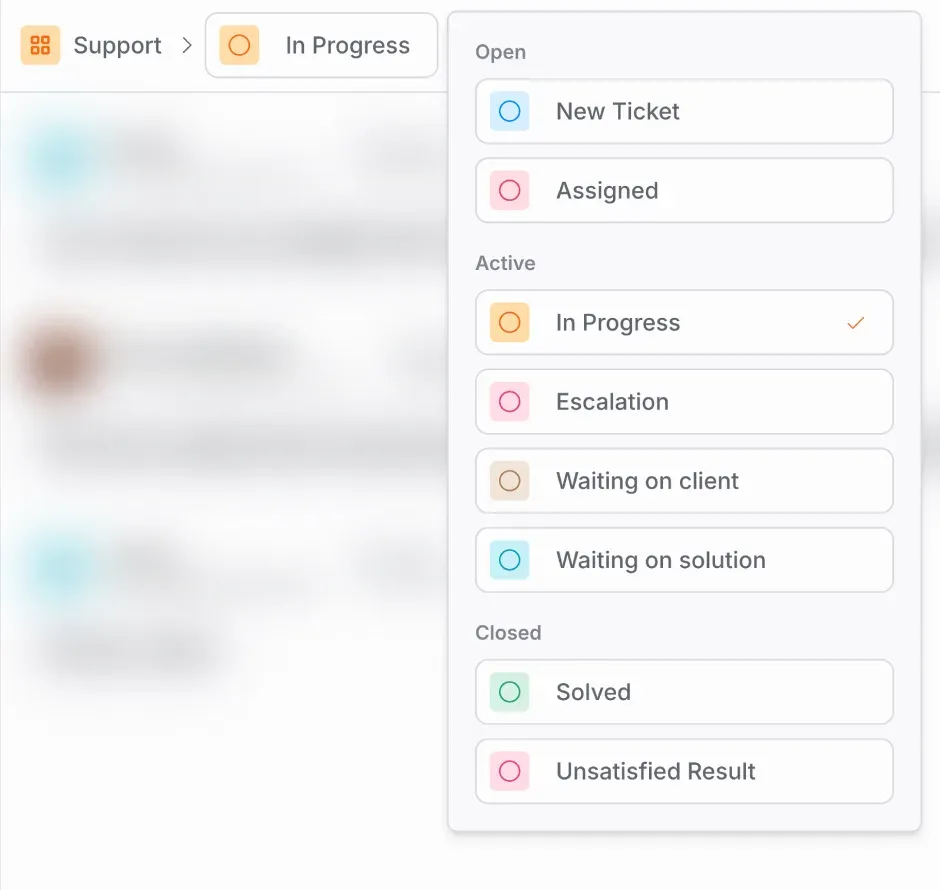
Official website image of the per-conversation status list; the background is blurred in the source.
Source: official UnInbox project page.
Key capabilities
- Shared spaces for team conversations A space is a shared inbox that several people can open. Team members comment on a conversation and reply from a shared address instead of forwarding messages. A conversation can also be added to another space, such as moving an accounting question out of a support space, as the official screenshot of the space picker shows.
- Personal spaces Each user has a personal space beside the shared ones, and an All Conversations view across spaces. On the free plan the personal address is on the uninbox.me domain. The pricing section describes personal spaces as part of the free tier.
- Per-conversation workflow statuses Every conversation carries a status that the team can change from a menu. The shown set is grouped as Open (New Ticket, Assigned), Active (In Progress, Escalation, Waiting on client, Waiting on solution) and Closed (Solved, Unsatisfied Result). The free plan limits a space to three workflows, according to the pricing section.
- Additional addresses per organization The website describes adding as many addresses as needed, such as support, sales, billing or careers, each routed into a space. Custom domains are listed as unlimited on the Pro plan; DNS checks for domains run in a background worker service.
- Compose and reply from a chosen identity The compose box offers a From selector so a reply goes out as a team address rather than a personal one, plus attachments and slash commands in a rich-text editor built on Tiptap. Comments are separate from outgoing replies, so internal discussion stays inside the conversation.
- Conversation assignees The Pro plan lists assignees on conversations, and the Assigned status exists in the workflow list. Together they let a team show who owns a thread. The free plan does not list assignees.
- New sender screener and conversation notes The README names a new-sender screener and conversation notes as native features of the collaboration model. The documentation for how screening rules work is not published in the repository, so test it in the hosted app.
- SMTP and API access The Pro plan lists SMTP and API access for sending from applications. The repository has no published API reference, so confirm endpoints and limits with the project before depending on them.
- Realtime updates and storage The platform includes a realtime package for live updates, built on Pusher-compatible services, and an S3-compatible storage service with presigned uploads for attachments and avatars. The local setup runs MinIO and a realtime server in Docker.
- Mail delivery through Postal Mail enters and leaves through Postal servers. The mail-bridge service handles Postal webhooks, routing rules and outbound sending, with BullMQ queues backed by Redis. Retention is configurable per Postal server; the free plan keeps raw email for 7 days.
- Billing and enterprise features The ee directory contains a Stripe-based billing service and a separate Next.js command app. These are under the commercial license, so they are not part of the AGPL code and may not be used to host a competing copy of the hosted service.
- Enterprise tier The listed Enterprise plan starts at 30 users and adds a dedicated instance, custom IP, SAML single sign-on, 10-year conversation history and raw email retention, dedicated onboarding and organization-wide video call support. Pricing is by contact.
- Local development environment Clone the repository, run nvm install, pnpm i, copy .env.local.example to .env.local, start the Docker containers, push the schema and run pnpm run dev. The container set includes a database, Redis, S3-compatible storage and realtime services, so allow time and memory for it.
- Community and security contact Questions go to the project Discord rather than GitHub issues, per the support guide. Security reports go to the address in SECURITY.md, which also lists out-of-scope report types.
Where UnInbox fits
Replacing a forwarded shared mailbox
Create a space for support or billing, connect the team address and move conversations through the status list instead of forwarding messages. Check that every member sees replies and comments, that the From address is correct and that nothing is sent from a personal identity by mistake. Keep the old mailbox forwarding in place for a short overlap so no message is lost during the switch.
Adding a custom domain
On the Pro plan, add the domain and publish the DNS records the app requests. The worker runs DNS checks, so confirm that verification finishes before moving live traffic, and keep SPF, DKIM and DMARC aligned with any other service that sends for the domain.
Triage with workflow statuses
Agree on what Assigned, In Progress, Escalation and the waiting states mean before inviting a team. Review a week of conversations and check that closed statuses reflect resolution rather than inbox cleanup. Count how many threads sit in a waiting state, because that is the quickest sign that the workflow list is too long for the team.
Sending application mail over SMTP or API
The Pro plan lists SMTP and API access. Send a test from a staging address, inspect headers and bounce handling, and compare the behavior against a dedicated mail platform such as Postal if volume matters.
Giving different teams their own spaces
Use separate shared spaces for support, accounting and security, as the official screenshots do, and decide who can see each one. Test moving a conversation between spaces and check that the original participants, comments and status survive the move, since that is where a shared mailbox usually loses context.
Evaluating a self-hosted deployment
Use the Docker-based setup to learn how the services connect, then plan production separately: MySQL, Redis, S3 storage, Postal servers, DNS and the realtime service all need operating. Ask on Discord for current production guidance before committing.
Reviews of UnInbox
Be the first to share your experience with UnInbox.
Write a review
Loading review form…
Alternatives to UnInbox
 MacroMacro is an open-source workspace from Macro Inc. that puts Gmail and Outlook email, channels, markdown docs, tasks, calls, calendar, databases and a CRM behind one inbox, with @links, shared AI memory and an MCP server. Hosted plans start free; self-hosting is allowed under AGPLv3.
 ChatwootChatwoot is an open-core customer support platform: a shared inbox for website chat, email, WhatsApp, Instagram, Telegram, SMS and voice, plus help center, contacts, reports and an AI agent. Self-host it with Docker, Helm or a Linux script, or use Chatwoot Cloud.IZInbox ZeroInbox Zero combines background email automation with an independent email client. It organizes messages, drafts replies, tracks follow-ups, and supports hosted or self-hosted deployment.