

What is Postal?
Postal is an open-source mail delivery platform for websites and web applications: it sends outgoing email over SMTP or an HTTP API, receives incoming email and passes it on to your application, and records every message, delivery attempt, open and click in a web interface. The project describes itself as a self-hosted counterpart to services such as SendGrid, Mailgun or Postmark. It is a mail transport agent with management tooling, not a mailbox server: its feature list has no webmail, IMAP access or address book, and incoming mail is routed to HTTP, SMTP or address endpoints rather than stored in user mailboxes.
The code is published in the postalserver/postal repository under the MIT licence. The licence file credits Krystal Hosting Ltd for 2017 to 2024 and Adam Cooke and Charlie Smurthwaite from 2024, and the documentation home page lists Krystal and Katapult as supporters of the project. Postal has no hosted edition and no paid tier; the getting-started guide is direct that anyone running it is responsible for DNS, deliverability and upgrades, and suggests a hosted platform for teams that do not want that work.
Distribution is container-only. Each release is published as ghcr.io/postalserver/postal with a version tag, and the installation helper repository provides a postal command that wraps Docker Compose. The same image runs three processes: postal web-server for the admin interface and tracking requests on port 5000, postal smtp-server on port 25, and one or more postal worker processes that deliver mail and run housekeeping. A MariaDB 10.6 or later server holds the configuration and one message database per mail server; MySQL is explicitly not supported. The application is Ruby on Rails, currently Ruby 3.4.6 and Rails 7.1.6.
The current release is 3.3.7, published June 3, 2026. It blocks server-side request forgery in outbound webhook and HTTP endpoint requests, fixes an SQL injection through message database condition keys (advisory GHSA-x2hq-rfpg-3xr5) and updates Rack and Rails. Version 3.3.6 in April 2026 sandboxed rendered email HTML as an extra XSS defence and tightened login redirect validation; 3.3.5 in February 2026 moved to Rails 7.1 and Ruby 3.4, escaped delivery details against HTML injection and fixed OIDC scope handling. Postal v3, released in March 2024, removed RabbitMQ and the separate cron and requeuer processes, so workers now coordinate only through the database. The full history is in the changelog.
Some limits are stated plainly in the docs. The FAQ says Postal will not gain mailing list features such as unsubscribe management, because it is a transport layer. The HTTP API covers sending and message lookup only; a v2 API is planned without a date, and pull requests extending the current API are not accepted. Upgrades restart all containers and are not zero downtime. Only the 3.x line receives security fixes, according to the security policy.
Postal screenshots
Explore the interface. Open a screenshot to view it at full size.
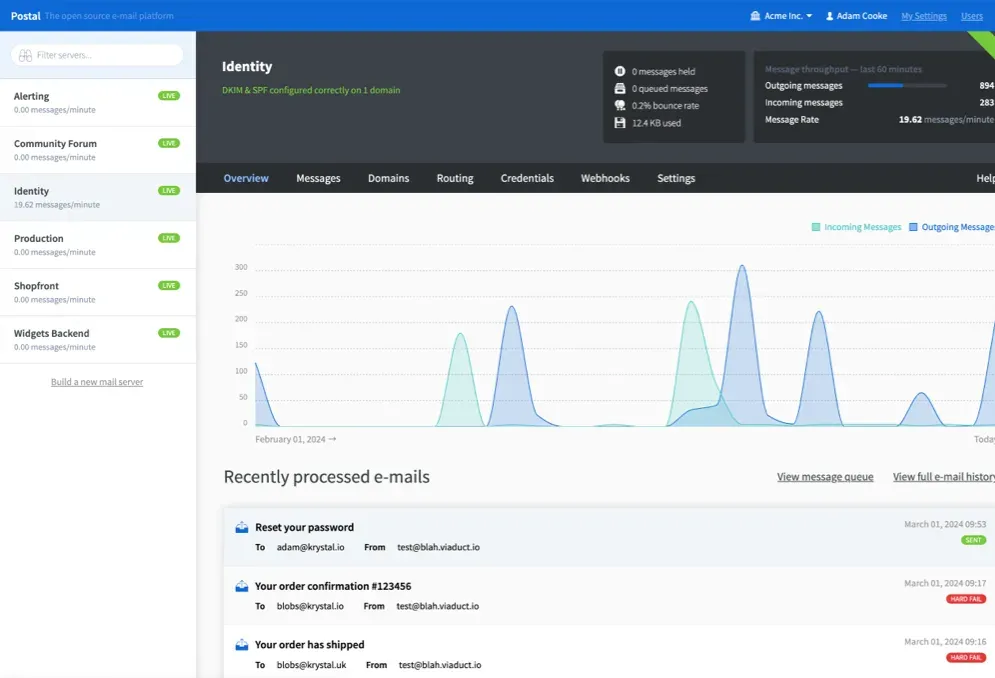
Overview page of a mail server called Identity: server list on the left, held, queued and bounce counters, a 60-minute throughput panel, a traffic graph and the latest sent and failed messages.
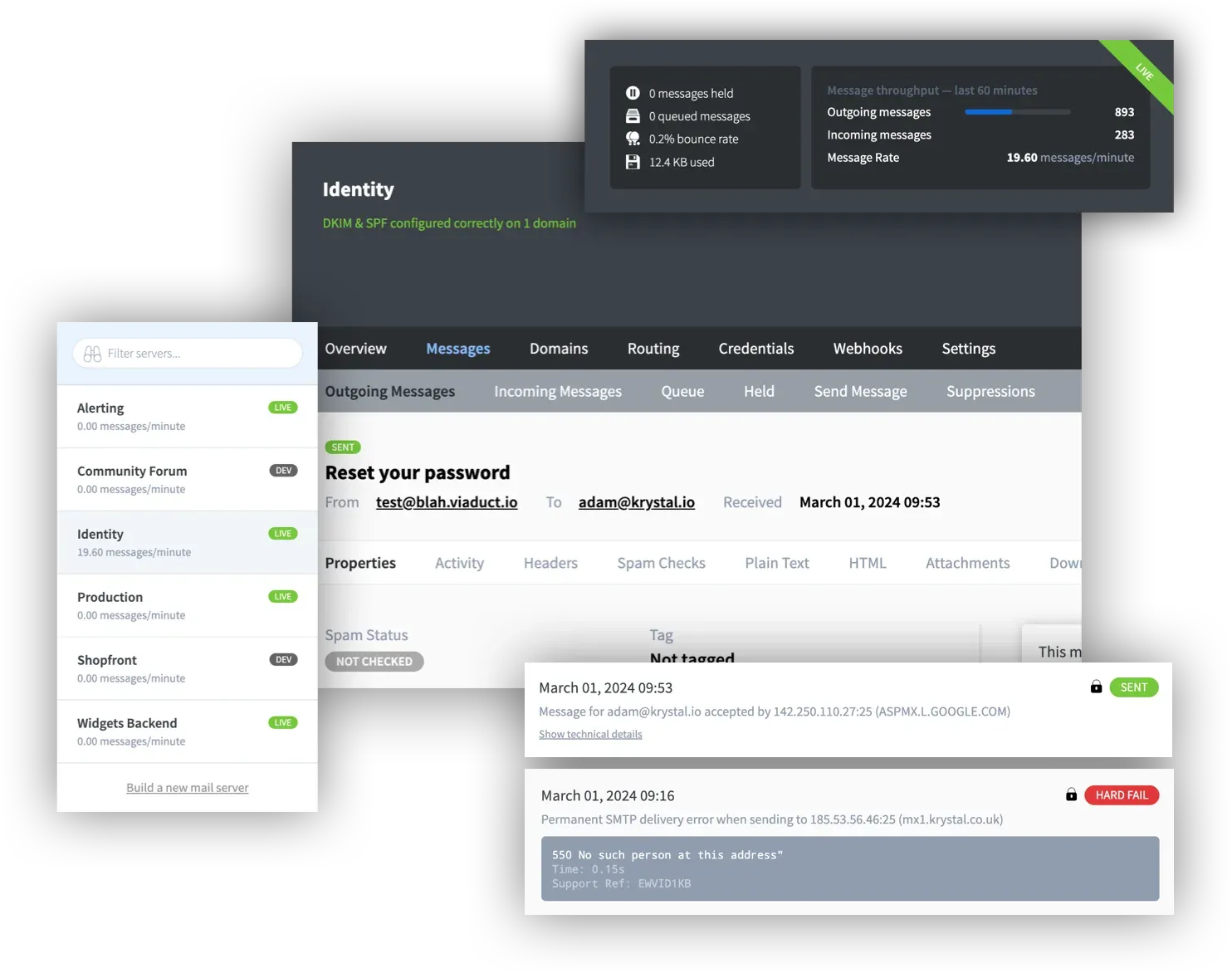
Composite from the Postal docs: mail server list with Live and Dev badges, the Messages menu with queue, held and suppressions, and two delivery attempts, one accepted by Gmail and one rejected with 550.
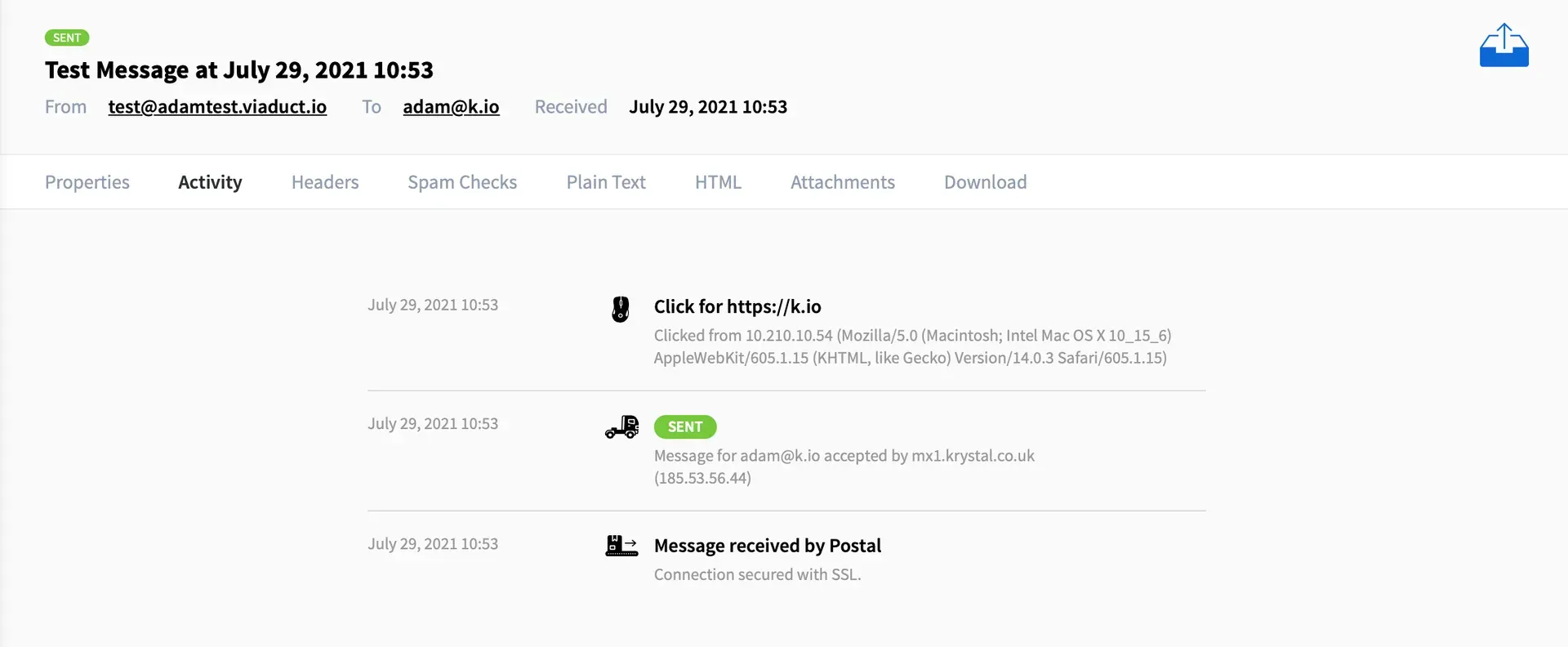
Activity tab of a single message: received over SSL, delivered to the recipient server, then a tracked click with IP address and user agent.
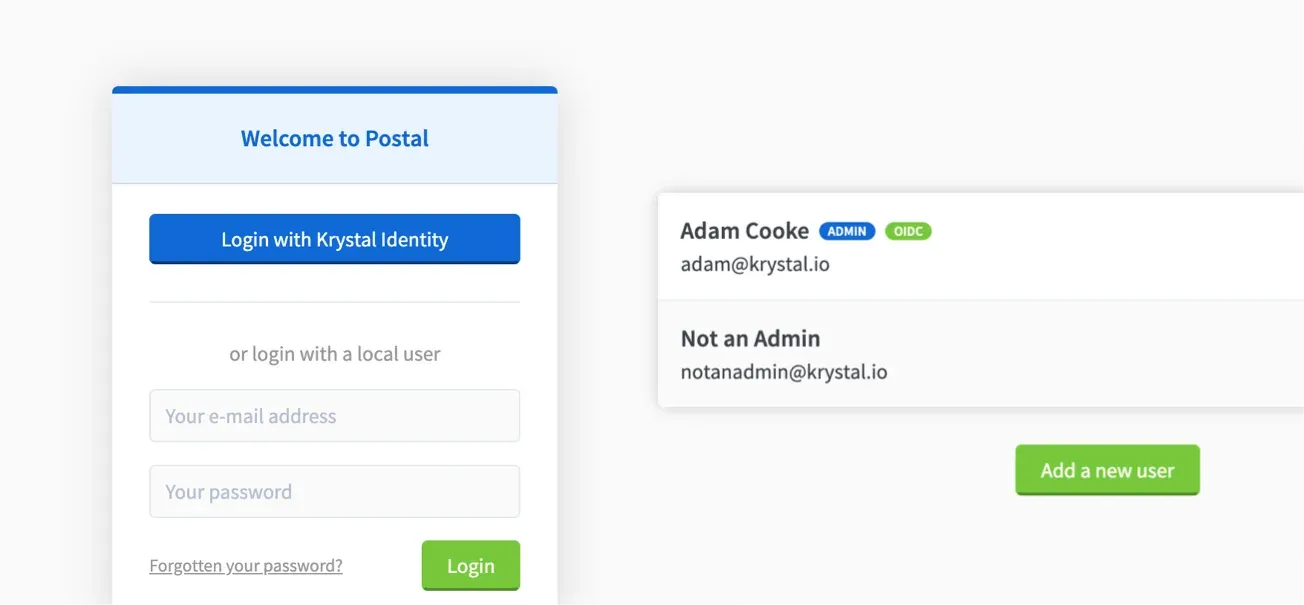
OpenID Connect login: the provider button above the local login form, and users linked to an OIDC identity marked in the user list.
Source: official Postal project page.
Key capabilities
- Organizations, mail servers and users An installation holds organizations, each with any number of virtual mail servers, and each mail server gets its own message database, credentials, domains, routes and webhooks. Global administrators see everything; ordinary users belong to one or more organizations and have full access to every server in them. There are no per-server or read-only roles, which matters when several teams share one installation.
- SMTP submission Applications send through the SMTP server using a credential created in the web interface.
PLAINandLOGINaccept any username with the credential as password, whileCRAM-MD5needs the organization and server permalinks as username. TheFromdomain must belong to the server or its organization, otherwise the server answers530 From/Sender name is not valid. SMTP-IP credentials authorize a host or network by address, which the docs warn can create an open relay if scoped too widely. - HTTP sending API The legacy v1 API takes JSON over HTTPS
POSTrequests authenticated with anX-Server-API-Keyheader. It can send a message from individual fields or a complete RFC 2822 message, and returns a message ID plus a per-recipient ID and token; a messages endpoint retrieves a message with optional expansions. The API reference lists every action. The API does not manage domains, routes or servers. - Client libraries The Postal team maintains libraries for Ruby, Rails, the Ruby mail gem, PHP and Node.js, and the docs link community libraries for Java, .NET, .NET Core, Go, Python, Elixir through Swoosh, and Drupal. All of them use the HTTP API rather than SMTP.
- Domain verification and DKIM A sending domain must be verified with a
postal-verificationTXT record or a six-digit code mailed to an address such aspostmaster@. Postal then generates a 1024-bit RSA DKIM key per domain with a selector likepostal-KJHDSAand checks SPF, DKIM, MX and return path records on demand and every hour. If a domain's DKIM record is not valid, mail still goes out but is signed with the installation key on the return path domain, so DMARC alignment fails. See Sending domains. - Custom return path for DMARC alignment By default the envelope sender is a token at the installation's return path domain, which does not align SPF with your
Fromdomain. Adding apsrp.yourdomain.comCNAME to the return path domain makes Postal use it as the envelope sender, and bounces still reach Postal. - Incoming mail routing Routes match an address, a
*wildcard or a plus-tagged address on a verified domain, and send each message to an HTTP endpoint, another SMTP server or an ordinary email address. Special modes accept and store, hold, bounce or reject atRCPT TOtime, and a route can copy the same message to additional endpoints. Mail reaches Postal either through MX records or by forwarding to a per-route token address on the route domain, so an existing mailbox provider can stay in place. - HTTP delivery of incoming messages HTTP endpoints receive a form or JSON
POSTcontaining either the raw message in Base64 or a processed payload with sender, recipients, subject, plain and HTML bodies, spam status and optional Base64 attachments. Your endpoint must answer within 5 seconds; failures are retried up to 18 times with exponential back-off, while a5xxresponse fails immediately and triggers a bounce to the sender. Payload formats are on the Receiving email by HTTP page. - Webhooks Webhooks report
MessageSent,MessageDelayed,MessageDeliveryFailed,MessageHeld,MessageBounced,MessageLinkClickedandMessageLoaded, plusDomainDNSErrorand send limit events. The last 7 days of webhook requests are kept for debugging, and since 3.3.7 outbound webhook requests are guarded against SSRF. - Click and open tracking When a tracking domain is configured, Postal rewrites links and inserts a tracking image so clicks and opens are logged against each message. The tracking hostname should sit on the sending domain (for example
click.yourdomain.com) and be proxied to the web server with anX-Postal-Track-Host: 1header and TLS. A message can opt out with theX-AMP: skipheader, individual links with a+notrackscheme suffix, and whole link domains from the tracking domain settings. - Message history, queue and search The interface lists outgoing, incoming, queued and held messages, with tabs for properties, activity, headers, spam checks, plain text, HTML, attachments and download. Each delivery attempt shows the remote server's response, which is usually enough to diagnose a rejection.
- Retention controls Each mail server keeps raw message content for 30 days, caps raw data at 2048 MB and keeps message metadata for 60 days by default. A daily task at 03:00 removes data past these limits, oldest day first; after raw data is removed a message still appears in lists but its body and attachments cannot be opened.
- Send limits, holds and suppression list An administrator can set a send limit per mail server over a rolling 60-minute window; at 90 percent the organization is warned, and above the limit further outgoing mail is held. Held messages expire after 7 days by default. Addresses that hard fail twice within 24 hours or exhaust the default 18 delivery attempts (about 31 hours) go on a per-server suppression list for 30 days. Development mode holds every message for inspection instead of delivering it.
- IP pools With
postal.use_ip_poolsenabled, administrators group sending addresses into pools, assign pools to organizations and servers, and add rules that pick an IP by sender or recipient. This requires host networking for the containers, and every IP entered must actually be configured on the host running the workers, or delivery fails. - Spam and virus checking Postal can pass messages to SpamAssassin's
spamdon TCP port 783, to rspamd and to ClamAV; all are disabled by default and run outside the Postal containers. Each route decides whether spam is marked, quarantined in the hold queue or failed, and a separate outbound threshold can fail outgoing mail that scores too high. The docs suggest starting with a threshold of 5. - Single sign-on with OpenID Connect The web interface can delegate login to any OIDC provider that supports discovery, with Google given as a worked example. Users are matched by email address on first login and by the issuer's identifier afterwards, and
oidc.local_authentication_enabled: falseremoves password logins completely. Configuration is described on the OpenID Connect page. - Metrics, health checks and logs Worker and SMTP processes expose Prometheus metrics at
/metricsand an/healthendpoint, on ports 9090 and 9091 by default. Thepostal_message_queue_latencymetric shows how long messages wait for a worker. All processes log to standard output, and log lines can also be sent to Graylog through GELF over UDP. - Installation with Docker on Linux The documented path is a dedicated server with at least 4 GB RAM, 2 CPU cores and 25 GB disk, Docker Engine with the Compose plugin, and
git,curlandjq. After cloning the helper repository to/opt/postal/install,postal bootstrapwritespostal.yml, a signing key and a Caddyfile,postal initializecreates the schema,postal make-usercreates the first administrator andpostal startruns the containers. The hosting provider must allow outbound port 25. - Scaling and upgrades Web and SMTP processes can be run several times behind a load balancer, and any number of workers can share one database, each with a configurable thread count (2 by default).
postal upgradepulls a newer or pinned image, migrates the schema and restarts the containers, with a short interruption.
Where Postal fits
Transactional email for a web application
Create an organization and a mail server, add and verify the sending domain, publish its SPF include and DKIM record, and create an API or SMTP credential for the application. Keep the server in Development mode while wiring up password resets and receipts, then switch it to Live. Before going live, check that the DKIM and return path checks show OK, that reverse DNS for the sending IP matches the SMTP hostname, and that a test message to an external inbox passes DKIM and SPF in its headers.
Receiving replies and inbound mail in an application
Point the domain's MX records at Postal, or keep the existing mail provider and forward one address to a route's token address. Create an HTTP endpoint that accepts the processed JSON payload and answers with 200 OK within 5 seconds, then attach a route such as support@ or reply+ticket@ using address tags. Test that slow or failing responses are retried, that attachments arrive only when enabled, and that a 5xx response produces the expected bounce.
Several products or customers on one installation
Give each product or customer its own organization or mail server so credentials, domains, retention and send limits stay separate. Administrators can set a send limit per server and suspend a server that misbehaves, which holds its mail and rejects its credentials. Remember that organization members see all servers in that organization, so isolation between customers depends on putting them in separate organizations.
Deliverability operations and IP reputation
Enable IP pools when different streams need different sending addresses, for example keeping marketing-style notifications away from password resets. Watch the suppression list, the bounce rate on the server overview and the remote responses in each message's activity tab. The FAQ notes that new IPs sending large volumes will deliver poorly at first and that sending IPs should be checked against blocklists before use.
Monitoring the mail pipeline
Scrape the worker and SMTP /metrics endpoints with Prometheus and alert on postal_message_queue_latency, and use /health for liveness checks. Subscribe to MessageDeliveryFailed, MessageBounced, DomainDNSError and the send limit events so problems reach the application or on-call channel. Configure Docker log size limits or forward logs to syslog or Graylog so container logs do not fill the disk.
Upgrading an existing installation
Pull the helper repository, then run postal upgrade or postal upgrade 3.3.7 to pin a version during a low-traffic window, since the containers restart. Installations still on v2 should confirm that MariaDB tables use the DYNAMIC row format and remove RabbitMQ, cron and requeuer services after the move to v3. Afterwards check the version in the interface footer, send a test message and confirm that workers stopped with SIGTERM rather than being killed, so no queued message is left locked.
Install
git clone https://github.com/postalserver/install /opt/postal/install && sudo ln -s /opt/postal/install/bin/postal /usr/bin/postalReviews of Postal
Be the first to share your experience with Postal.
Write a review
Loading review form…
Alternatives to Postal
 PlunkPlunk is an AGPL-3.0 email platform that combines a transactional API, SMTP relay, campaigns, segments and event workflows on one contact list. Use the hosted service at $0.001 per email or self-host it with Docker and your own Amazon SES account.
 BillionMailAGPL-licensed mail server and newsletter platform for Linux. Docker Compose deploys Postfix, Dovecot, Rspamd, Roundcube and a Go console for domains, contact lists, campaign tasks, a transactional sending API and delivery analytics.
 listmonkAGPL-licensed newsletter and mailing list manager that runs as one Go binary with PostgreSQL. It handles opt-in lists, SQL segmentation, templated campaigns, a transactional mail API, bounce processing, analytics and SMS or push messengers.