

What is oh-my-hermes?
oh-my-hermes, shortened to OMH, is an open-source operating layer for Hermes Agent, the agent made by Nous Research. It is developed in the rlaope/oh-my-hermes repository and describes itself as an independent, unofficial layer on top of Hermes. The README states that OMH never patches or replaces Hermes: the user keeps talking to Hermes, while OMH decides which model and reasoning effort each lane gets, who owns a code change, which skills apply and what counts as done. The ultrawork concept is credited to the OmO project (oh-my-openagent).
OMH adds a set of workflows triggered from the Hermes prompt. The central one, dag-ulw, turns a goal into a graph of small nodes that run in parallel, each on its own category's model, with a separate node verifying the goal and failed nodes repaired before the report. Other ulw- workflows cover interviews, research, planning, parallel execution, loops until a gate passes, QA and performance work, and delegation to Claude Code or Codex. A catalog of more than a hundred omh-* skills is loaded by a router, and statuses always name a stage and an evidence level, such as Plan · not run or Test · verified.
The command-line package is published on npm and Bun as oh-my-hermes, through a Homebrew tap and through an install script from omher.app for macOS, Linux and Windows. The latest CLI release is v4.0.7 of November 9, 2026. It makes bare omh open the OMH TUI on its own Hermes runtime profile by default, reusing the existing login, and introduces omher, a desktop app for Hermes bots.
omher ships under separate omher-v* tags. Release omher 0.2.2 of November 10, 2026 provides an ad hoc signed DMG for Apple Silicon and Intel Macs and an unsigned setup EXE and MSI for Windows x64, with a SHA256SUMS file. The builds are not notarized, and the release notes describe the first-launch steps on macOS and Windows SmartScreen. If Hermes Agent is not installed, omher offers to install it together with oh-my-hermes on first launch.
The project is MIT-licensed and, per the README, built with its contributors as part of Team Art and Engineering, with the AI agents Friren and Kami credited as collaborators. Documentation lives in the repository's docs folder and on the website, and the README is available in ten languages. The README states that the product A/B benchmark comparing Hermes alone with Hermes through OMH has its corpus and offline pilot in place but no published measured run yet. Hermes Agent itself has its own iThub listing at Hermes Agent.
oh-my-hermes screenshots
Explore the interface. Open a screenshot to view it at full size.
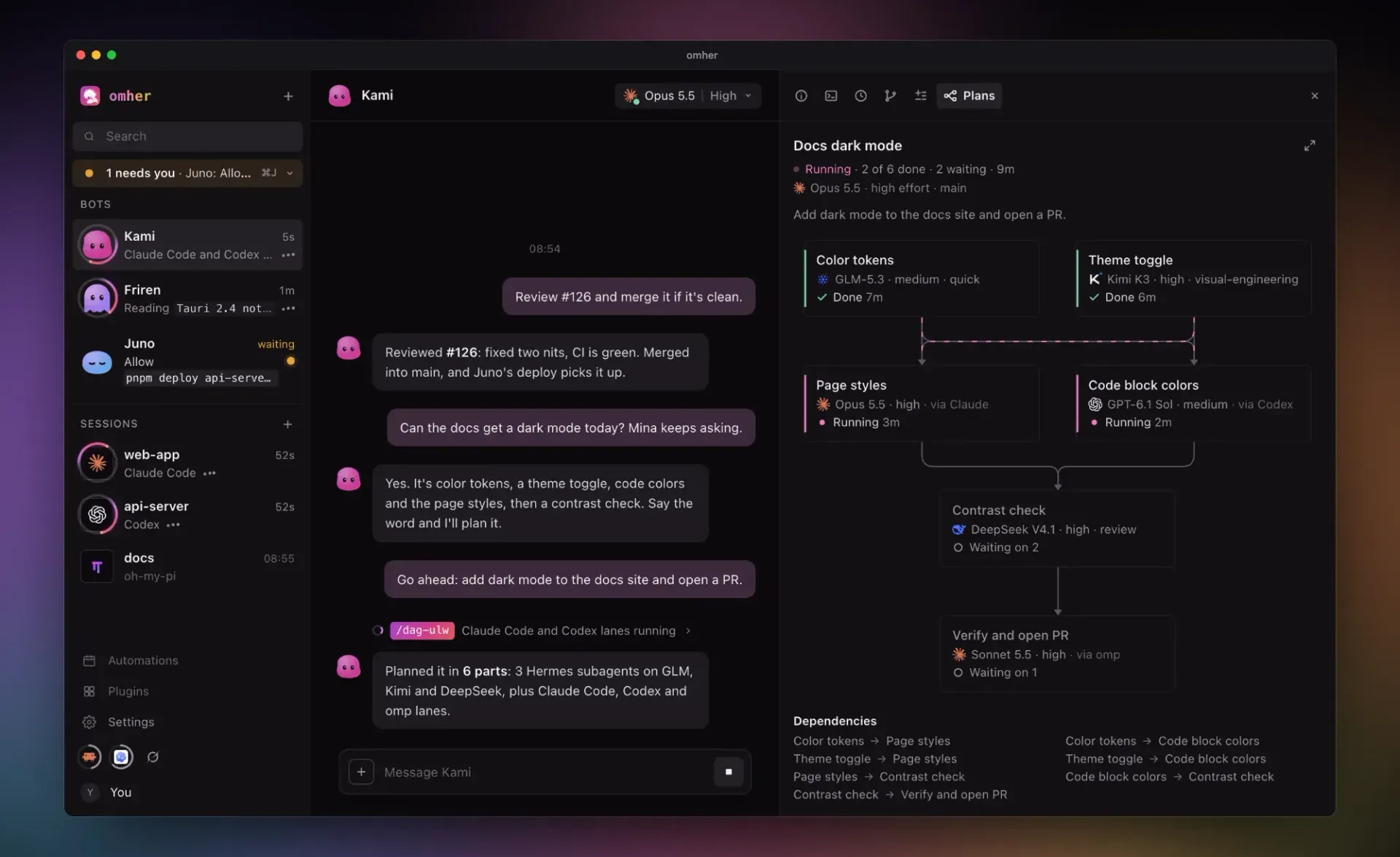
The omher desktop app from the README: a bot chat that planned a change with dag-ulw, and the Plans panel showing six lanes on different models.
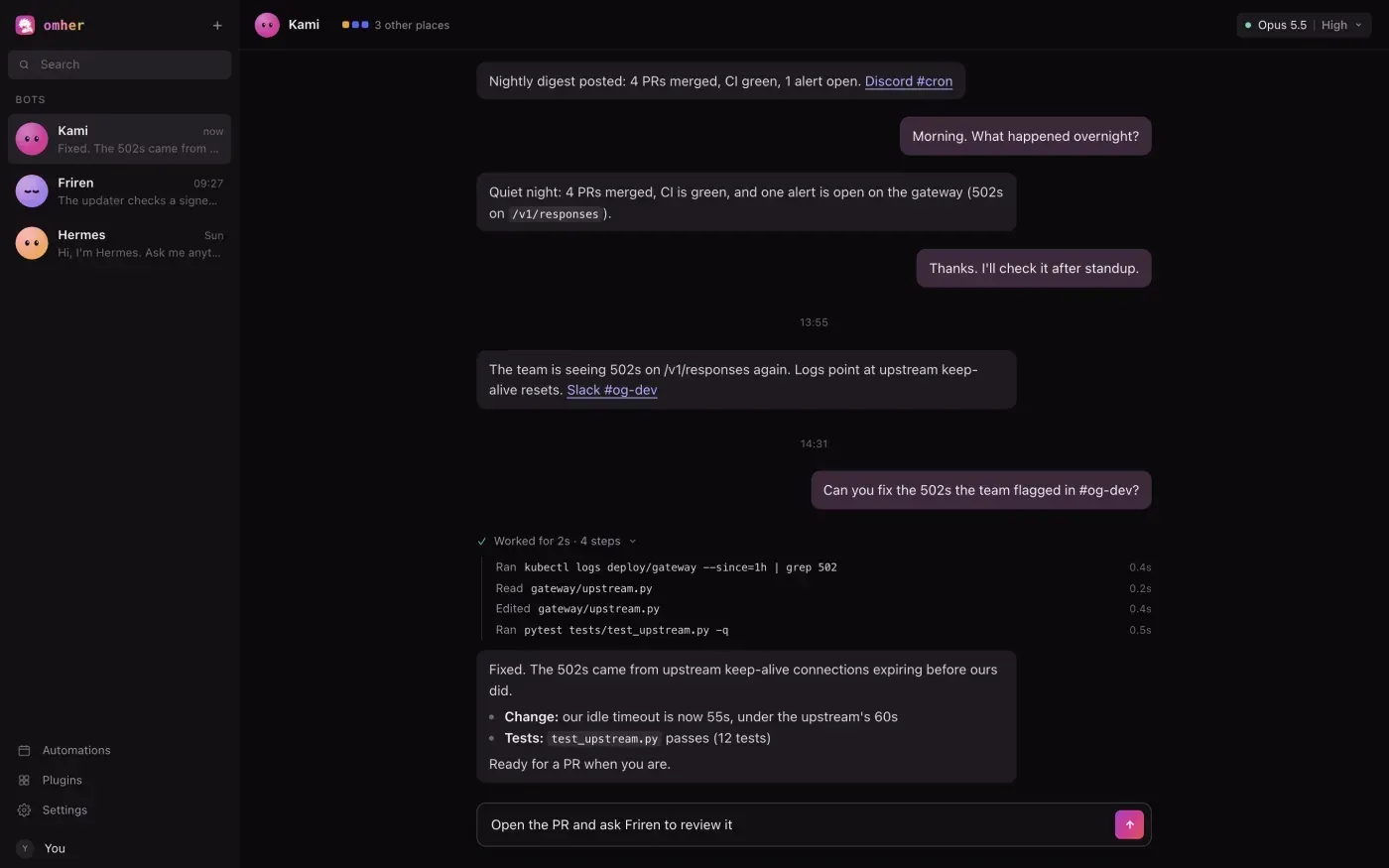
omher in dark mode: a bot chat with links to Discord and Slack threads and an activity line listing the commands, reads and edits that ran.
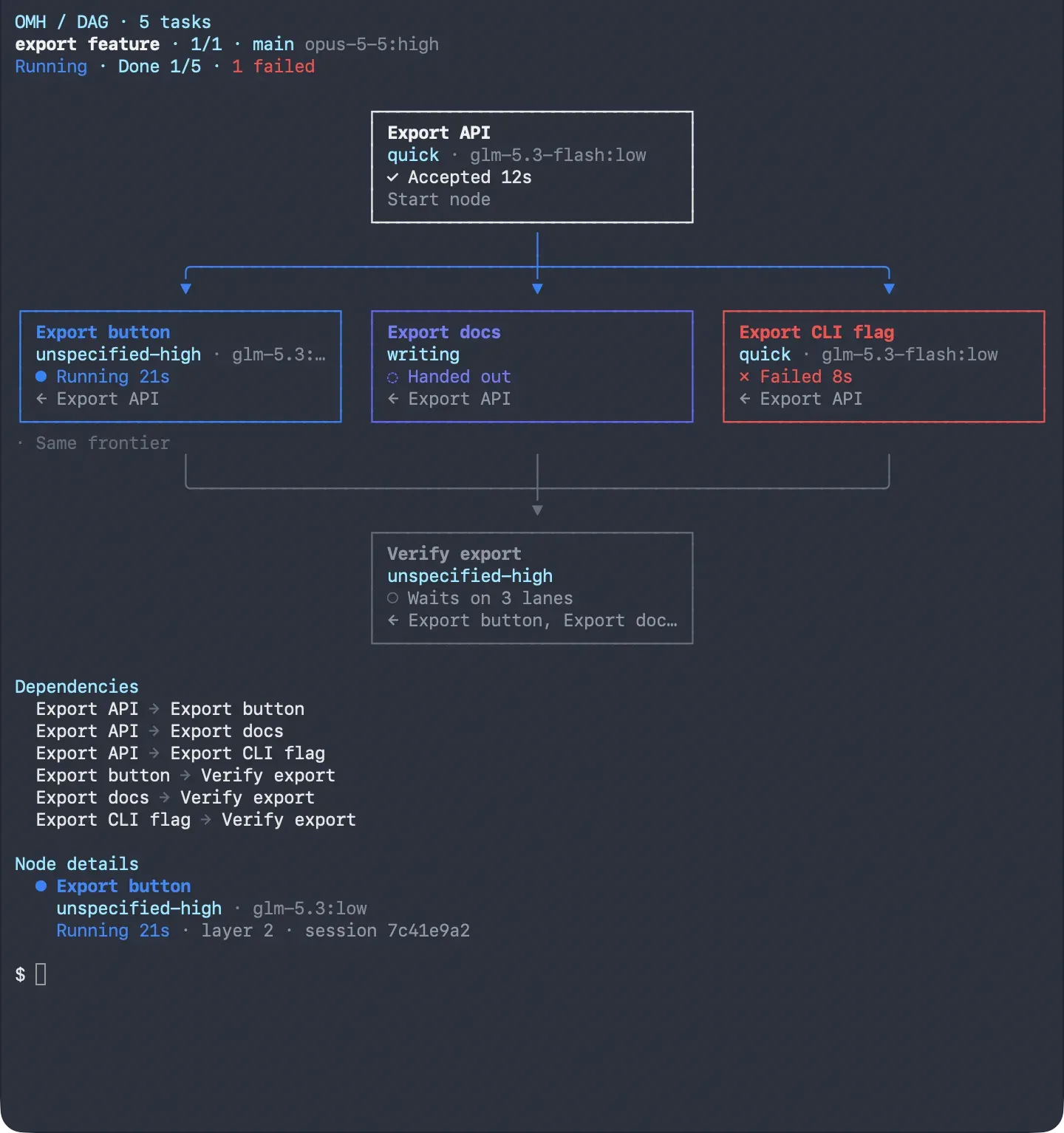
OMH DAG box view in the terminal: five tasks with their category, model, running, failed or waiting status, and the dependency list.
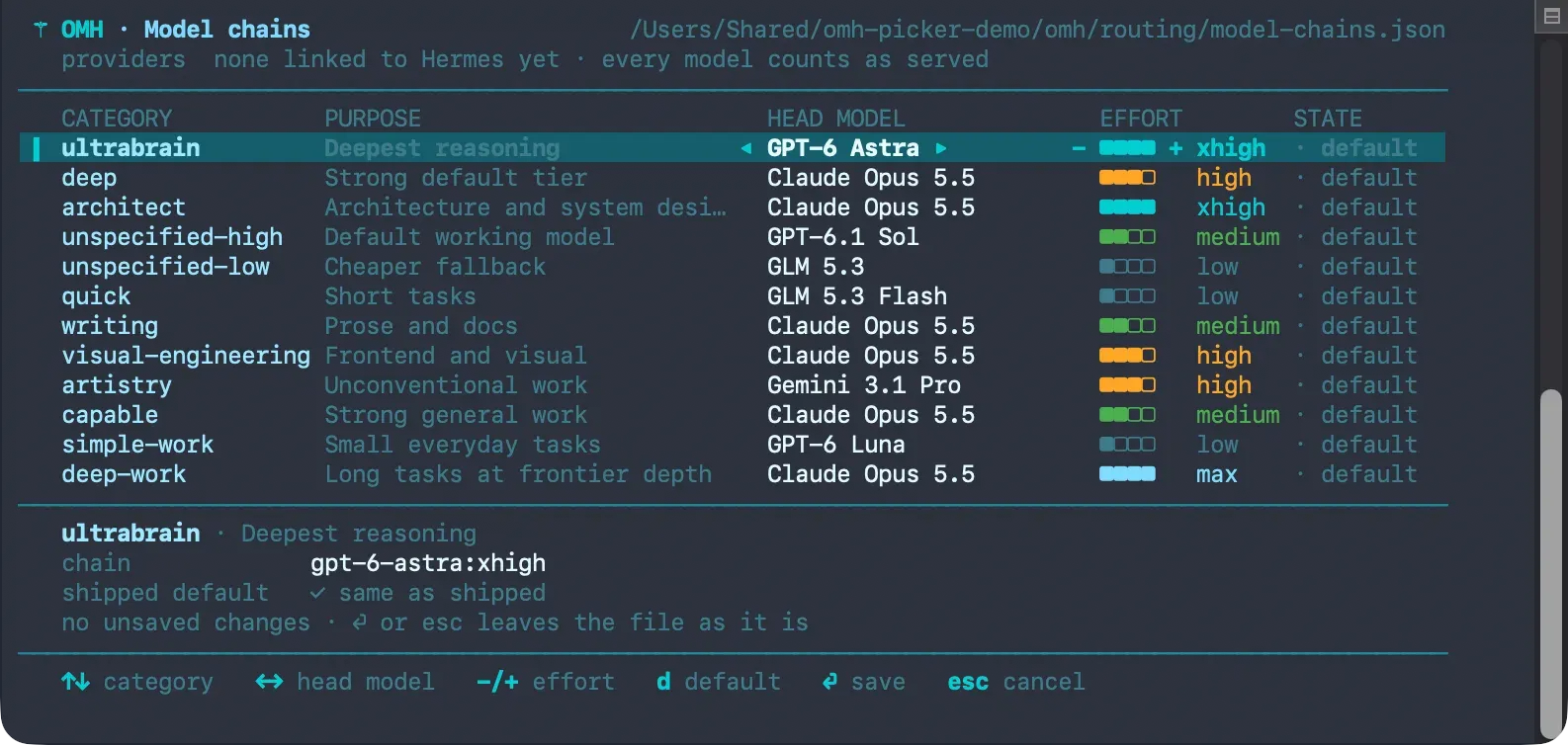
The omh model picker: each work category with its purpose, head model and reasoning effort, with keys to change and save them.
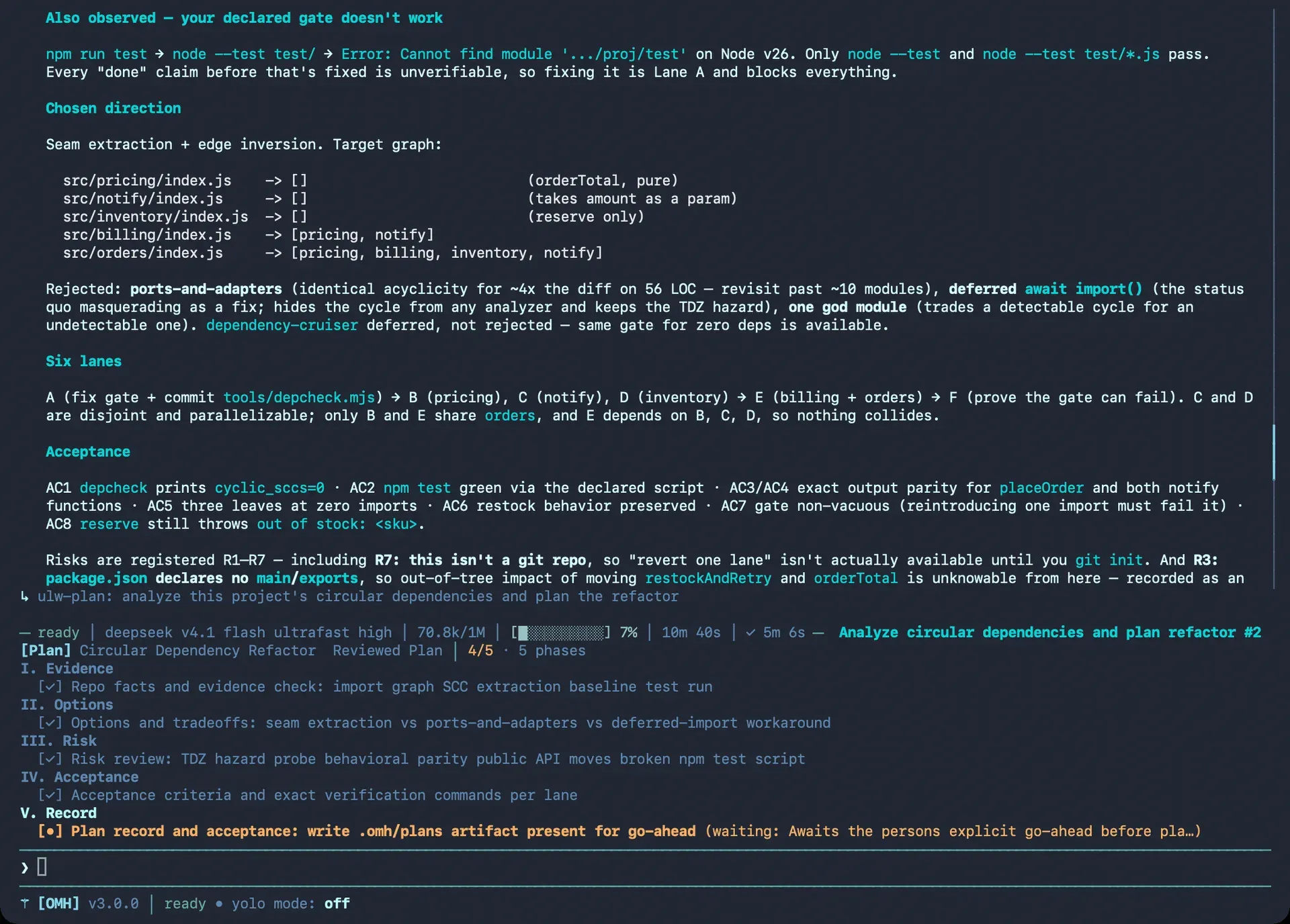
A ulw-plan run for a circular-dependency refactor: chosen direction, rejected options, six lanes, acceptance criteria and the phase checklist.
Source: official oh-my-hermes project page.
Key capabilities
- Install on macOS and Linux The README's one-liner is
curl -fsSL https://omher.app/install | shfollowed byomh setup.omh updatedetects how the command was installed, upgrades it through that installer and refreshes the managed skills, plugin bundle and Hermes registration.omh doctorverifies the install. - Install on Windows PowerShell 5.1 or later runs
irm https://omher.app/install.ps1 | iex. Further options are described in the installation guide. - Package managers The CLI is also available as
brew install rlaope/tap/omh,bun install -g oh-my-hermesandnpm install -g oh-my-hermes. Bun and npm installs also need Node 18 or later and Python 3.11 or later on the PATH; Homebrew brings its own Python. A Hermes skill tap path is documented as well. - Agent-driven install The README provides a prompt to paste into an AI agent. It tells the agent to resolve the main branch to one commit SHA, follow only the pinned
INSTALL_FOR_AGENTS.md, ask the user each setup choice instead of taking defaults, and require explicit approval for model-alias changes. - Model routing by work category Each lane is tagged with a category such as
ultrabrain,deep,visual-engineering,quickorwriting, which selects a model chain and reasoning effort. When a provider rejects a model, the chain moves to the next model.omh modelopens a picker to change each category's head model and effort, andomh model-chains setreorders chains. - dag-ulw graph runs A goal becomes a graph of small nodes; ready nodes run in parallel on their category's model, and nodes running at once never share a write scope. A separate node checks the goal, and failed nodes are repaired before the report.
- Ten ulw workflows
ulw-context,ulw-interview,ulw-research,ulw-plan,ulw-work,dag-ulw,ulw-maestro,ulw-loop,ulw-qaandulw-perfare triggered by typing them at the Hermes prompt.ulw-maestroruns a delegated task on Claude Code or Codex using that CLI's installed skills. The full catalog is in the workflow reference. - Specialist skills More than a hundred
omh-*skills cover areas such as frontend, backend, Rust, security review and verification gates. The router loads the relevant ones into a run as tool calls. The catalog is generated from one source, with drift gates in CI. - LSP in the loop Definitions, references and renames can come from the language server instead of text search, so aliases, re-exports and shadowed names are handled by meaning. This is off by default and enabled with the
lsp_toolsplugin setting. - Long-term project memory A file-backed memory provider that Hermes loads keeps, refuses or defers each candidate with a written reason. The next session receives a recall pack ranked for its task and cut to a token budget. The README states that Hermes' own memory is never read or patched.
- OMH Native TUI Bare
omhopens OMH's own TUI on Hermes' gateway, with themes, a live lane tree showing each lane's model, effort and tokens, agent steering and interrupts,!shell lines and rewind with Esc Esc. Since v4.0.7 it runs on a dedicated Hermes runtime profile by default. - Evidence levels Every status names its stage and certainty: not run, running, reported done or verified. A run counts as verified only when a test, review or CI gate passed. Capability impact is reported in separate dimensions, described in the evidence rules.
- Cost telemetry Token counts and dollar figures appear on HUD rows and run summaries, priced from a rate table that cites its source. A run that cannot be priced shows
unknownrather than zero. - Structural code search An
ast-grepplaybook covering 28 languages, with grep fallback, andomh codegraph umlfor an architecture view are injected where executors read code.omh codegraph tests --changednames the tests a change reaches. - Guardrails User-written toolcall rules block off-script calls with the user's own rule text, a completion-integrity gate refuses stubs and skipped tests as evidence, and an approval tier applies to risky actions.
- omher desktop app Omher shows each Hermes profile as a bot in a sidebar with one main chat, activity lines naming the steps that ran, approval and clarify cards and a model and reasoning picker. Sessions on Claude Code, Codex and oh-my-pi appear alongside, and bot sessions from Slack, Discord or cron are shown read-only. Downloads for macOS (Apple Silicon and Intel) and Windows are linked from omher.app.
- Uninstall and data Removing the command package keeps OMH state;
omh uninstall --allperforms a full removal before the package manager's remove command. - MIT license The code is released under the MIT License. Support channels include a Discord community and GitHub issues.
Where oh-my-hermes fits
Running a large change as a parallel graph
Typing /dag-ulw followed by a goal at the Hermes prompt makes OMH split the goal into nodes, show a box graph with dependencies, then run ready nodes in parallel on the models chosen by their categories. The TUI shows a live lane tree with each lane's status, model, effort and tokens. A separate verification node checks the goal, failed nodes are repaired, and the report states which results were verified.
Shaping, building and finishing a feature
The README describes a recommended sequence: ulw-interview when an idea is unclear or ulw-plan when a change is known but risky, then ulw-work to run the accepted plan in parallel lanes that never edit the same file, and ulw-loop to keep cycling until a named gate, such as a test command, passes.
Assigning models to kinds of work
The omh model picker lists each category with its purpose, head model and effort, and saves changes to the model-chain file. The /omh-model-setup skill onboards a new model family. Prompting is calibrated per model family, and an entitlement interview reorders chains for the models available on a machine.
Delegating to Claude Code or Codex
ulw-maestro composes a prompt from the target CLI's own installed skills and spawns a live, steerable Claude Code or Codex session with a dock row. In omher, these coding-agent sessions appear next to the Hermes bots in the sidebar.
Working with Hermes bots from a desktop window
omher connects existing Hermes profiles without copying them and presents each as a bot with a main chat. A turn collapses into one activity line listing the commands, paths and queries that ran. Sessions a bot runs in Slack, Discord or cron are shown read-only with a link back to the original thread.
Keeping project memory between sessions
OMH's memory provider records lessons only through reviewed admission, each with a reason, and builds a recall pack for the next session within a token budget. The memory model documentation describes admission, retention and per-profile settings. Related agent tools on iThub include Omnigent and NVIDIA NemoClaw.
Install
curl -fsSL https://omher.app/install | shReviews of oh-my-hermes
Be the first to share your experience with oh-my-hermes.
Write a review
Loading review form…
Related to oh-my-hermes
 OmnigentOpen-source meta-harness for AI agents. It puts Claude Code, Codex, Cursor, Pi and custom YAML agents behind one session layer with policies, sandboxes, a web UI, desktop and mobile apps and a REST API. Marked alpha.
 NVIDIA NemoClawApache 2.0 reference stack from NVIDIA for running OpenClaw, Hermes or LangChain Deep Agents Code inside OpenShell sandboxes, with guided onboarding, provider keys kept outside the sandbox, deny-by-default egress and state-preserving rebuilds.
 OpenHandsOpenHands Agent Canvas is an MIT-licensed control center for coding agents. It runs the OpenHands agent or ACP agents such as Claude Code and Codex on local, Docker, VM, Kubernetes or cloud backends, with scheduled and event-driven automations.