

What is YAFFA?
YAFFA, short for Yet Another Free Financial Application, is a self-hosted personal finance web application written in PHP with the Laravel framework. It is built for long-term financial planning: recording income and spending, scheduling future transactions, setting budgets and tracking investments in one place. The README states the data-handling premise directly: by hosting your own instance, your financial data is not uploaded to a cloud or shared with third parties. It is free and licensed under MIT.
Distribution is through the source repository and a Docker image named kantorge/yaffa. The installation guides cover Docker on Windows, Docker on a VPS, XAMPP on Windows and a Raspberry Pi LEMP stack, plus a page on a custom reverse proxy with HTTPS. The documented stack needs PHP 8.4 or later, MySQL 8.0 or later (MariaDB 10.5 or later is possible but described as not thoroughly tested), Composer, Node.js for building assets, a cron job for the scheduler and a queue worker such as Supervisor. Redis is optional and is used by the Docker setup for cache, sessions and queues.
The newest release is v4.5.1, published November 6, 2026. It closes notifications that were waiting for an itemized document, unifies the wording for missing values and fixes a waterfall chart label, and it carries an openapi.json asset. Release 4.5.0 added group toggles and investment buy and sell bars to the category waterfall and updated the Gemini model handling; 4.3.0 introduced API support for a mobile app; 4.2.0 introduced AI-based transaction creation from qualifying payees and documents. The project ships frequent small releases, and major versions have documented upgrade steps in UPGRADE.md.
The README is direct about scope. It is a personal finance tool, not accounting software, and its precision is not meant for accounting or cryptocurrency. It does not download transactions from banks, has no native mobile app and is optimized for desktop browsers. Multi-user family handling, more reports and a better onboarding experience are listed as planned. A public sandbox exists at sandbox.yaffa.cc with a demo account, and its database is wiped regularly.
YAFFA screenshots
Explore the interface. Open a screenshot to view it at full size.
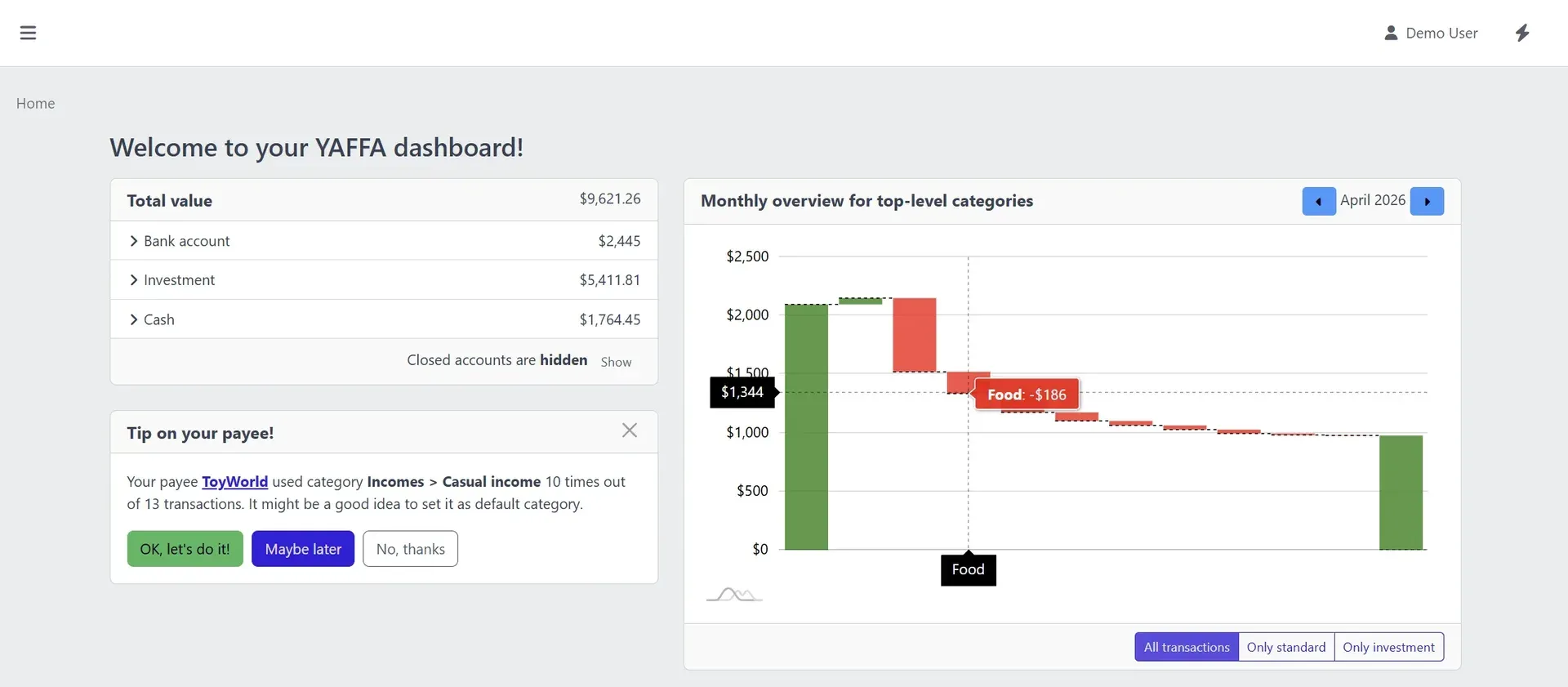
Official YAFFA dashboard screenshot with sample data: account groups, a monthly overview chart and a tip about payee categories.
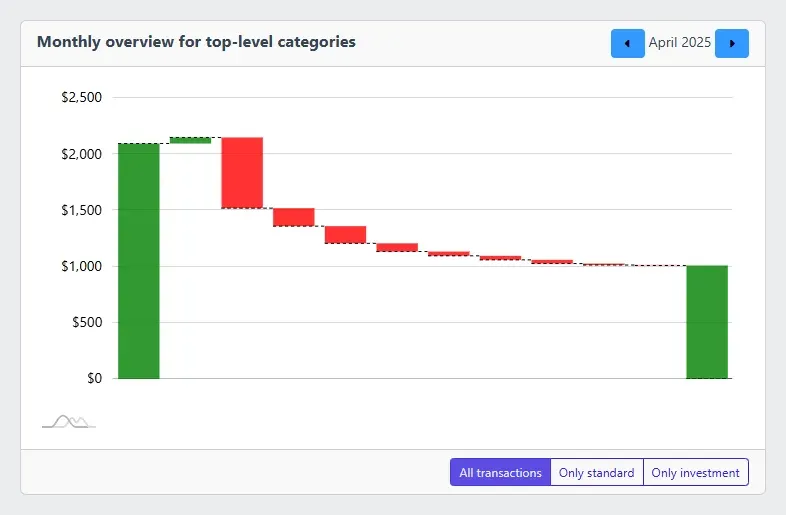
Official dashboard widget showing a monthly waterfall of income and spending by top-level category.
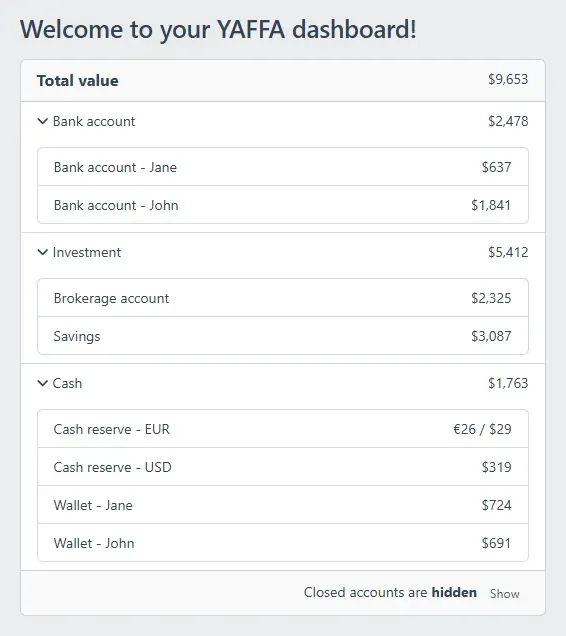
Official dashboard widget listing total value and balances grouped into bank, investment and cash accounts, including foreign currency cash.
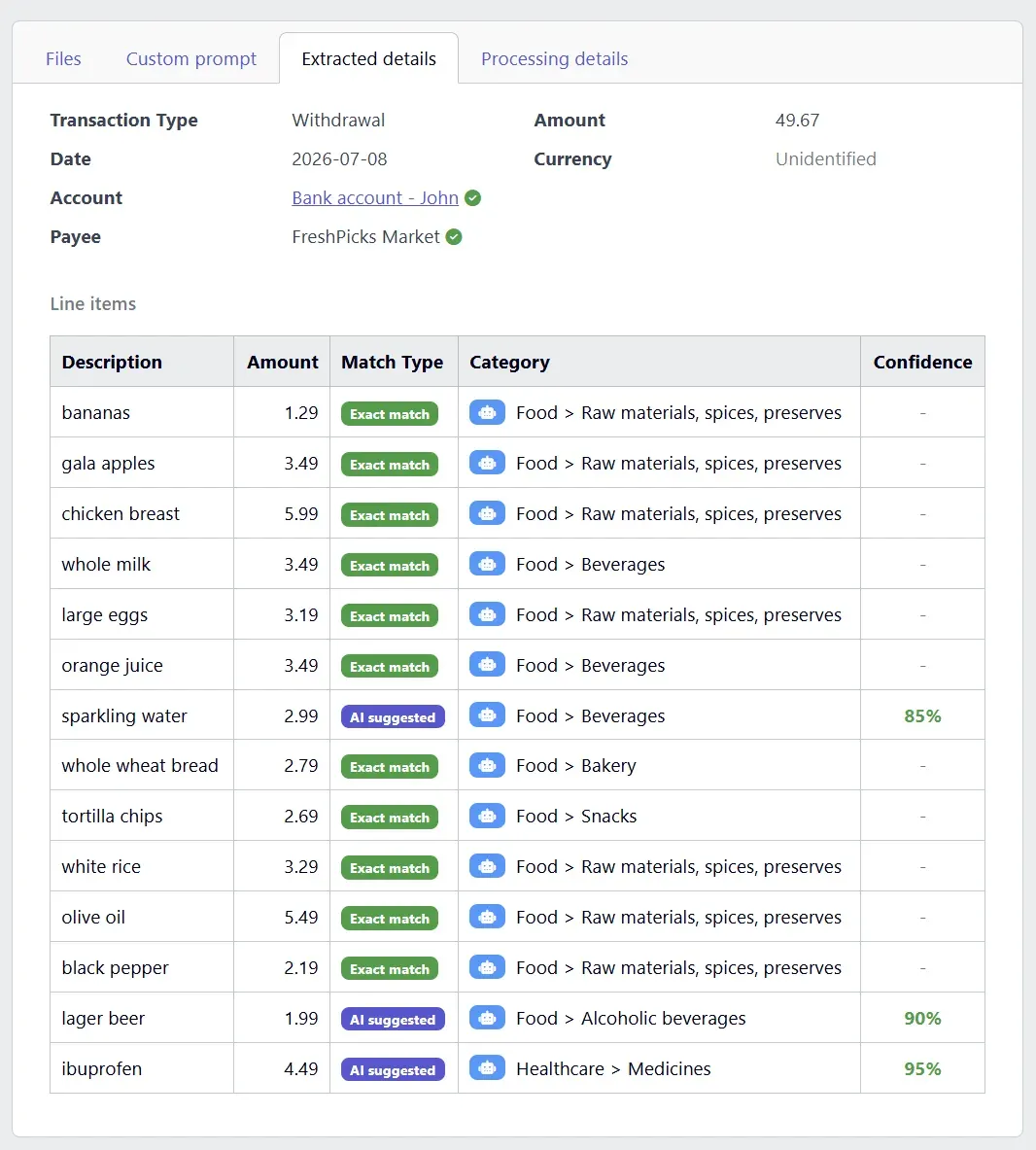
Official screenshot of extracted details from a sample receipt, with line items, match types and suggested categories to review.
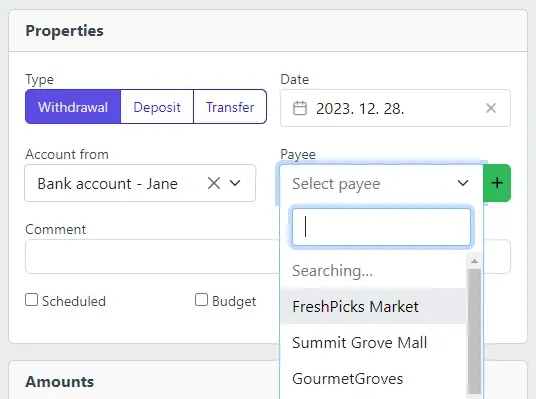
Official screenshot of the transaction form where payees are suggested as you type.
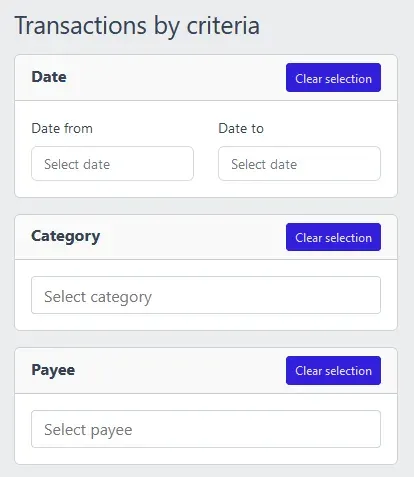
Official screenshot of the transaction report filters for date range, category and payee.
Source: official YAFFA project page.
Key capabilities
- Multiple accounts and account groups Cash, bank, credit card and investment accounts can be created without a stated limit, and grouped for the dashboard. Closed accounts can be hidden from the balance summary.
- Transactions with payees and categories Each transaction has an account, a payee and a category, and can be split across categories to show spending patterns. Types include withdrawal, deposit and transfer. The form suggests payees as you type, and a payee can carry a default category.
- Multi-currency support There is a default currency used for dashboards and charts, with other currencies kept per account. Rates are updated daily from the free Frankfurter service, which needs no API key or registration.
- Scheduled and recurring transactions Future and repeating transactions feed the forecast data. Recurring entries can be recorded automatically or with one click, and the schedule view shows upcoming items. This needs the scheduler (cron) to be running on the host.
- Budgets as plans A budget is a planned transaction, so planned and actual values can be compared. A budget chart shows spending trends and helps turn them into future plans.
- Investment tracking You add investments, record purchases and sales, and see gain and loss. Prices can be retrieved automatically; the README names alphavantage.co with your own free API key, and the changelog also lists web scraping as a price provider.
- Import from CSV and QIF Files are parsed into a list for review, and nothing is recorded until each row is confirmed. Customizable import rules handle country- and bank-specific formats, which matters because YAFFA does not connect to banks.
- AI document processing An optional feature reads receipts and invoices, uploaded as text, PDF or images, received by email or imported from Google Drive. It extracts payee, date, amount and line items and fills a draft transaction for review. It supports OpenAI or Gemini with your own API key and billing, and images can use Tesseract OCR you host or a vision-capable model. Document data goes to the provider you select.
- Auto-recording and document statuses The upgrade notes describe statuses such as ready for review, auto recorded, duplicate, awaiting itemization and dismissed, with a user-set retention period. Auto-recording is off by default and opt-in per user.
- Dashboard and widgets The home page shows total value by account group, a monthly overview and upcoming schedules. Widgets include an account balance summary and a category waterfall chart that gained group toggles and investment buy and sell bars in release 4.5.0.
- Reports A cash flow report shows monthly income and expense balance including investment values, and a transaction report filters history by date, category, payee, account and tag, with summaries and breakdowns. A monthly breakdown with drill-down exists as well.
- Security options Optional two-factor authentication protects login. Scoped, expiring personal API tokens let you automate your own data, and the 4.x releases add API behavior used by a mobile client. Review the token scopes before giving them to scripts.
- REST API with OpenAPI description Releases attach an openapi.json file. The upgrade guide documents API changes such as new document statuses, so API clients should read it on upgrade.
- Languages The repository ships English, French, Hungarian and Polish translation files. A CI check keeps translation files in sync for pull requests.
- Docker deployment The compose file runs the application container, with a Caddy profile for automatic HTTPS, a storage volume and optional Tesseract and Redis services. The scheduler is controlled by an environment variable. See the Docker on a VPS guide.
- Manual installation The XAMPP guide targets a Windows desktop and the Raspberry Pi guide a LEMP stack. These routes need PHP extensions including BCMath, which is required since YAFFA 4.0, along with Composer and Node.js to build assets.
- Public sandbox The sandbox offers a demo account with sample data and open registration. It is explicitly not a production service, so use a disposable email address and expect data to be wiped.
Where YAFFA fits
Long-term household planning
Record regular income and spending, add scheduled transactions for known future items and set budgets as plans. Use the budget chart and forecast to see whether planned months stay positive. Check the first months against your bank statements, since transactions are entered or imported by you rather than downloaded, and keep the plan simple until the forecast matches what actually happens.
Importing bank statements
Export CSV or QIF files from your bank, create an import rule for the column layout and review the parsed rows before confirming. Keep one rule per bank and country format. Duplicate detection is a point to test with overlapping date ranges.
Tracking investments
Add each investment, enter purchases and sales and configure a price provider with your own Alpha Vantage key. Compare the reported gain and loss with your broker's statement, and keep in mind that the project states it is not designed for cryptocurrency precision.
Receipt and invoice capture with AI
Enable the optional AI feature only after deciding which provider may see your documents. Upload a sample receipt, review the extracted line items and categories, and edit the draft before saving. Consider Tesseract on your own server for images if you want to limit what goes to a third party.
Multi-currency finances
Set a default currency, add accounts in other currencies and check that reports convert as expected. Rates come from Frankfurter daily, so historical conversions follow that source. Confirm the scheduled job runs, or rates will stop updating.
Running and upgrading your own instance
Deploy with Docker behind a reverse proxy with HTTPS, back up the database and the storage volume, and read UPGRADE.md before changing major versions. Test an upgrade on a copy first, because releases arrive frequently, and confirm after each upgrade that the scheduler and the queue worker are still running.
Reviews of YAFFA
Be the first to share your experience with YAFFA.
Write a review
Loading review form…
Alternatives to YAFFA
 Firefly IIIFirefly III is a free, AGPL-licensed personal finance manager you host yourself with Docker or on a PHP server. It records income and expenses in double-entry form, with budgets, rules, recurring transactions, reports and a REST API.
 Actual BudgetActual Budget is a free, MIT-licensed personal finance app built on envelope budgeting. Data lives in a local SQLite database, and an optional self-hosted server adds multi-device sync, end-to-end encryption and bank sync.
 ezBookkeepingezBookkeeping is a free, MIT-licensed, self-hosted personal finance app written in Go. It records transactions across accounts and currencies, imports bank and app exports, and offers charts, Insights Explorer, an HTTP API and MCP.