

What is Financial Freedom?
Financial Freedom is an open-source personal finance application from Server Side Up, a two-person bootstrapped team that also publishes the Spin deployment tool and serversideup/php Docker images. The project positions itself as a self-hosted alternative to Mint and YNAB: a budget, accounts and cash-flow application whose data stays on a server you control instead of with an aggregator. The source is released under GPL-3.0 at github.com/serversideup/financial-freedom, and the product page is at serversideup.net.
The first thing to know is the project status. The README carries a "Project On Hold" notice and tells readers not to install the application until that notice is removed, because the code is in the middle of a major refactor and the interface renders a blank screen. The documentation introduction repeats the warning, and the GitHub repository is marked archived. The authors explain that they are pursuing self-funding rather than venture capital and are building other paid products to finance later work. This profile therefore describes a project to read, fork or watch, not a finished budgeting tool to deploy today.
The latest GitHub release is v0.2.0-alpha1, published on January 10, 2024. Its notes say it was cut to test the continuous-integration process and that the application is not stable. The repository is a PHP 8.1 and Laravel 10 application with an Inertia and Vue front end, Laravel Sanctum, Spatie Laravel Data and the nwidart laravel-modules package. A Docker image named serversideup/financial-freedom is referenced by the Synology guide, and the default environment file uses SQLite.
The planned scope, taken from the README and repository code, covers accounts (cash, credit card and loan models exist in the source), institutions, categories, rules, budgets, goals, reports and a dashboard. Bank-feed connections, a hosted service and mobile applications are not documented as shipped. Read the official documentation and the public project board for the current state before relying on any feature mentioned on the marketing page.
Financial Freedom screenshots
Explore the interface. Open a screenshot to view it at full size.
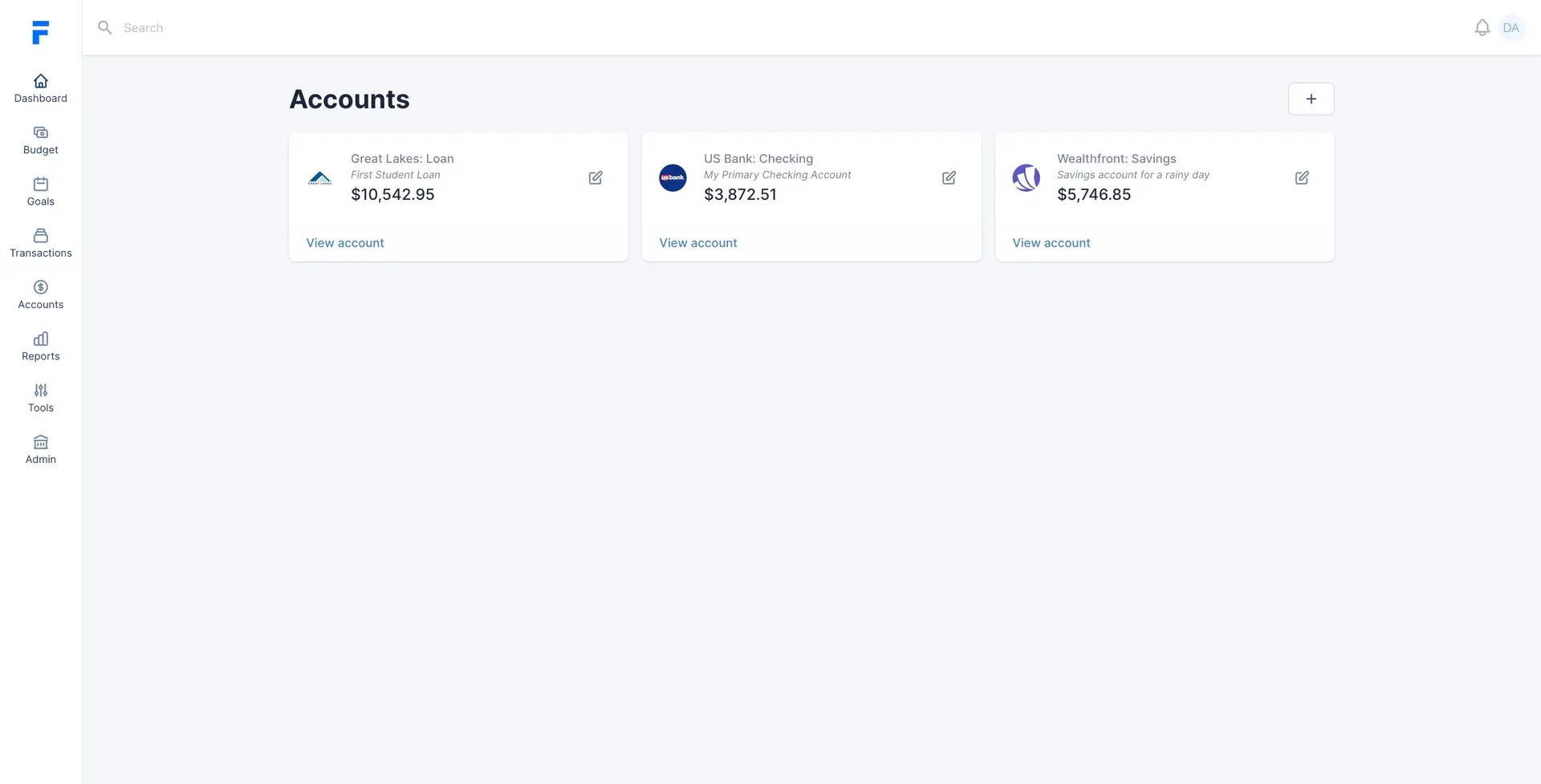
The Accounts page from the official repository preview, showing account cards with institution logos and balances. Demonstration data.
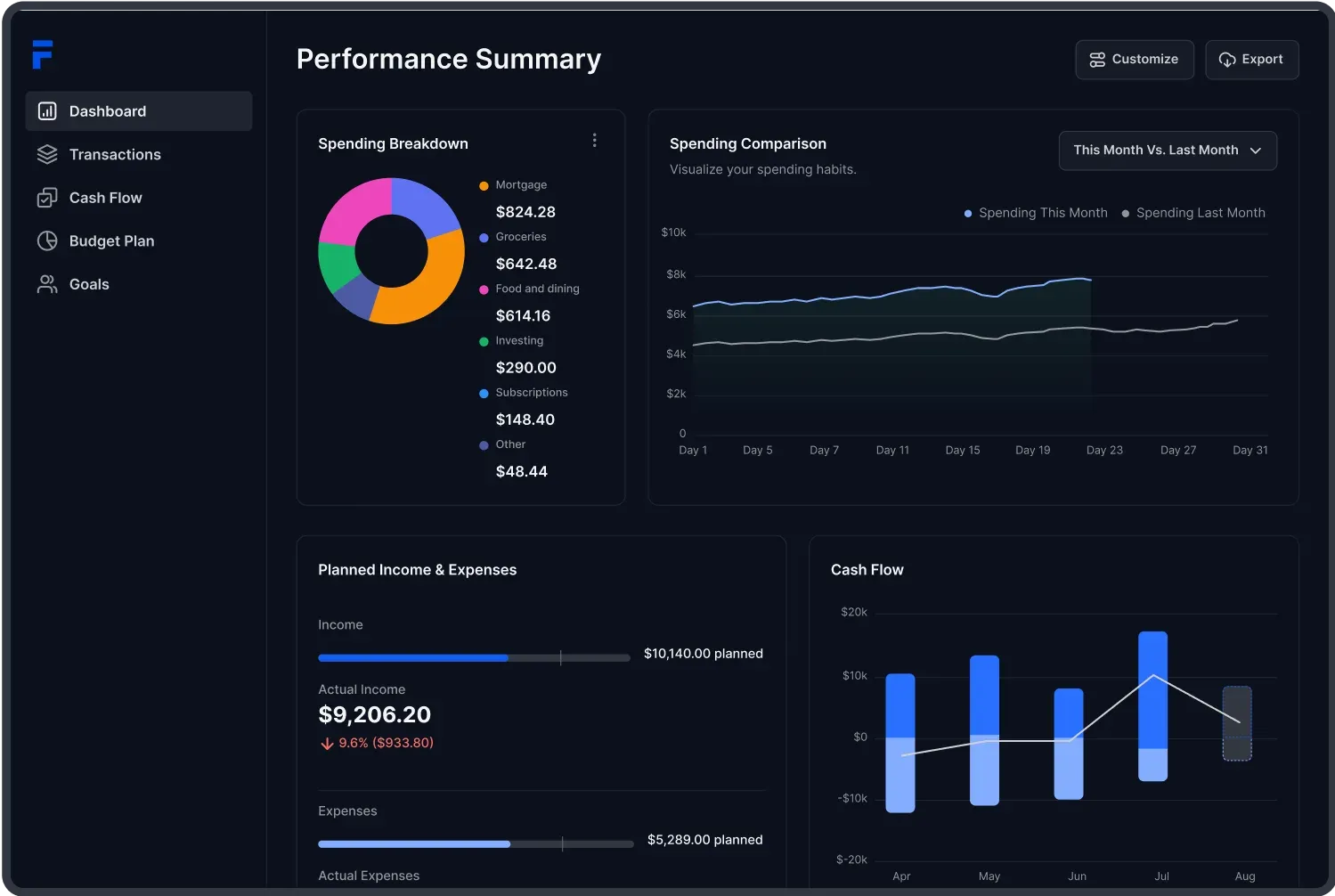
The dashboard shown on the official documentation site: spending breakdown, month-over-month comparison, planned versus actual income and expenses, and cash flow. Demonstration data.
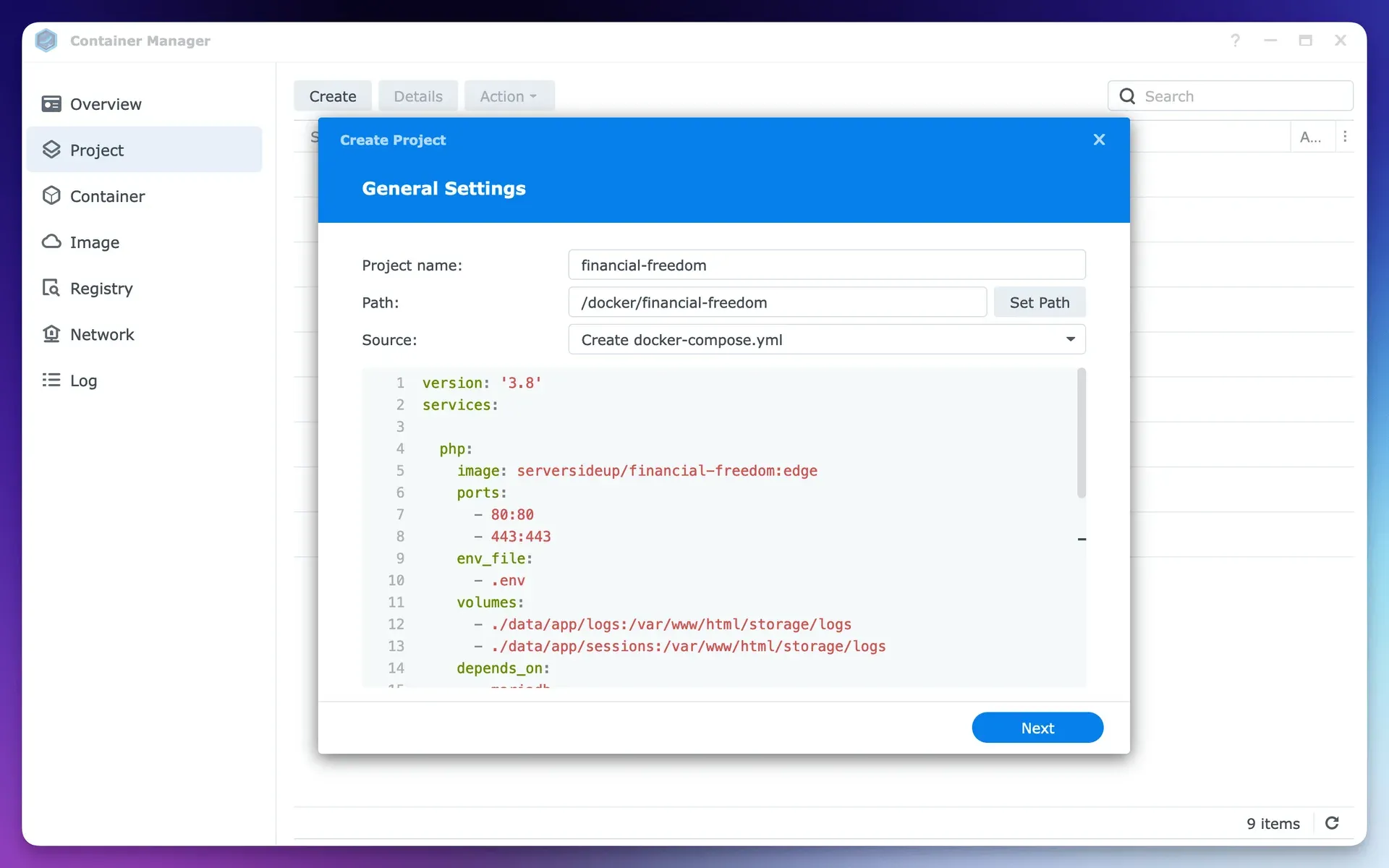
Official documentation figure for the Synology installation guide, showing a Container Manager project with a Compose file. The guide pre-dates the on-hold notice.
Key capabilities
- Self-hosted, Docker-based design The project is built to run on any host that runs Docker, from a cloud server to a Raspberry Pi or a NAS. The repository ships development, CI and production Compose files, and the production file mounts persistent volumes for storage, sessions, logs and the SQLite database. Treat these as developer material while the project is on hold.
- Synology installation guide The only installation page in the documentation targets Synology DSM 7.2 or later with the Container Manager package. It walks through creating a data folder, copying the example environment file to
.env.conf, setting a LaravelAPP_KEYand creating a Compose project. The page opens with the same on-hold warning, so use it to understand the intended deployment, not as a working procedure. See the Synology guide. - Accounts and institutions The interface has an Accounts page with cards per account showing a name, a description and a balance, and the source contains models for cash accounts, credit cards, loans and institutions. Institution logos are used on the cards. Whether each account type is complete in the current branch is unclear because the code is mid-refactor.
- Dashboard and performance summary The product artwork shows a Performance Summary with a spending breakdown donut chart, a this-month versus last-month spending comparison, planned versus actual income and expenses, and a cash-flow bar chart. The figures in these images are demonstration data, not a record of real use.
- Budgets and goals The navigation in the project screenshots lists Budget and Goals next to Dashboard, Transactions, Accounts, Reports, Tools and Admin. The README lists cash flow and budgets as a headline feature and invites contributors to track progress on the project board.
- Transactions, tagging and splitting The README feature grid advertises tagging and splitting transactions. A Transaction module exists in the repository with a data class for transactions. Check the current branch before assuming splits work end to end.
- Rules and categories Services in the source seed default categories per user and create rules, which suggests automatic categorisation of imported transactions. The README does not document the rule syntax, so this is a code-level observation rather than a documented workflow.
- Private synchronization and bank connectivity The README advertises "Works with Any Bank" and "Private Synchronization" as planned strengths. No bank-aggregator integration or sync service is documented in the repository docs, so connectivity should be treated as an intention, not an available feature.
- Global currency support Currency handling is listed in the README feature grid. The documentation does not state which currencies or exchange-rate sources are supported.
- Registration control The example environment file sets
FINANCIAL_FREEDOM_ALLOW_REGISTRATION=false, so a self-hosted instance is meant to restrict who can create accounts. It also defaults to SQLite, cookie sessions and a synchronous queue, which keeps the first deployment to a single container. - Demo and fresh initialisation commands An Initialize module provides console commands for a fresh install and for a demo dataset, including generated accounts, transactions and a merchants list. This helps a developer seed realistic data while exploring the interface without importing real finances.
- Laravel and Vue development stack The code uses Laravel 10, Inertia, Vue, Sanctum, Ziggy, Spatie Laravel Data and Spin from the same authors. A contributing guide asks contributors to open a discussion before sending a pull request. A Gitpod configuration is included for browser-based development.
- GPL-3.0 licence and public roadmap The source is licensed GPL-3.0, and development is tracked on a public GitHub Projects board and in GitHub Discussions. Security issues go through a responsible-disclosure policy linked from SECURITY.md.
Where Financial Freedom fits
Evaluating the codebase before any deployment
Clone the repository, read the README notice and run the local development Compose file with the Initialize demo command. This produces a populated interface without any real data. Compare what renders with the dashboard images, and record which screens are blank or broken so you know the real state of the refactor.
Following the project's recovery
Watch the GitHub repository, the public project board and the Server Side Up blog. The authors state that the notice will be removed when the project is installable again, so the removal of that notice is the reasonable trigger to schedule a proper evaluation. Check the release list for a version newer than the January 2024 alpha. Subscribing to GitHub Discussions is a lighter way to see maintainer updates than watching every commit.
Planning a Synology or NAS deployment
If you want to prepare, read the Synology guide for the folder layout, the environment file and the persistent volumes. Verify the image tag and the database settings against the current repository, because the guide and screenshots show an older Compose layout than the one in the repository. Do not put real financial data into an unreleased build.
Learning a Laravel and Inertia finance application
The source is a compact example of Laravel service classes, Spatie data objects and nwidart modules applied to accounts, cards, loans and rules. A developer building a similar application can study the structure and licence terms, remembering that GPL-3.0 applies to derived work that is distributed.
Choosing a maintained alternative for budgeting now
Anyone who needs a working self-hosted budget today should compare the maintained projects in the same iThub category. Check the last release date, the sync model and the import formats you need rather than the length of a feature list. The positioning notes below name the closest options. Whatever you pick, export your data on a schedule and keep a copy outside the application, since a budget history is hard to rebuild by hand.
Reviews of Financial Freedom
Be the first to share your experience with Financial Freedom.
Write a review
Loading review form…
Alternatives to Financial Freedom
 Actual BudgetActual Budget is a free, MIT-licensed personal finance app built on envelope budgeting. Data lives in a local SQLite database, and an optional self-hosted server adds multi-device sync, end-to-end encryption and bank sync.
 Firefly IIIFirefly III is a free, AGPL-licensed personal finance manager you host yourself with Docker or on a PHP server. It records income and expenses in double-entry form, with budgets, rules, recurring transactions, reports and a REST API.
 YAFFAYAFFA is a free, MIT-licensed personal finance web app you host yourself. It records transactions, schedules recurring items, plans budgets, tracks investments and imports CSV and QIF, with optional AI receipt processing.