

What is Grida?
Grida is an open-source canvas for design and creative work, developed by Grida Inc. and published under the Apache License 2.0 in the gridaco/grida monorepo. The current product centre is Grida Desktop, an application for arranging images, type and vectors on an open canvas, building slides, importing Figma files and generating media with AI models. The same repository also contains the web editor behind grida.co, the Forms builder, the Database/CMS views for Supabase projects, an SVG editor, the Grida CLI and a set of independently published npm packages. The project's own history notes that its founder has worked on Grida full-time since 2020; the GitHub repository dates from February 2021.
Desktop is distributed from the downloads page and from GitHub releases. The latest release, Grida Desktop 0.0.25, was published on November 9, 2026. It ships signed DMG and ZIP builds for Apple Silicon and Intel Macs, an unsigned x64 Windows installer, and DEB and RPM packages for Linux on x64 and arm64; its release notes contain the download table only. Repository changes between the 0.0.24 and 0.0.25 tags include a rewrite of the Grida CLI in Rust with native npm delivery, AI commands grouped under grida ai, Grida FX bundled as grida fx with a daily update notice, a new Open API application that serves the public Forms operations under /v1/forms, a renewed website centred on Desktop and creative workflows, and a pricing page that presents Grida as free and open source. The previous release, 0.0.24 (September 13, 2026), added 3D mesh generation with Tripo models and a rigging tool for existing GLB files: reference images must be PNG or JPEG up to 20 MB, and rigging accepts a self-contained GLB up to 60 MB. Release 0.0.23 moved provider API keys into a store shared with the CLI on macOS and Linux, unified the media generation code between Desktop and CLI, and added a --disable-agent launch flag for media-only use.
The architecture is split across several pieces. The 2D rendering engine lives in a separate repository, gridaco/nothing, written in Rust on Skia and consumed as the @grida/canvas-wasm package, which renders through WebGL2 in the browser and to raster surfaces in Node.js. Documents are stored as .grida files in a FlatBuffers schema. The Desktop app is an Electron host: it loads the hosted editor under /desktop/* and supervises a local agent sidecar that handles provider requests, media files and agent sessions. The web side is a Next.js application backed by Supabase, with a separate Nitro service for the public Forms API under /v1/forms.
AI access has several options. Users can bring their own keys for OpenRouter or Vercel AI Gateway, connect a ChatGPT subscription for supported text models (marked experimental), run text models locally through Ollama or other OpenAI-compatible endpoints, or buy prepaid Grida credit for hosted image, video, audio and 3D models. The Grida CLI, installed with npm install -g grida on Node.js 24 or later, exposes the same model discovery and generation from a terminal without Desktop running.
The pricing page describes Grida as free and open source, with a Free plan that includes every feature without a subscription and a Custom plan priced by agreement. Grida-hosted agent and image models use prepaid credit, bought manually in amounts from $10 to $500 and shared across an organization. Several surfaces carry explicit maturity labels: the Supabase integration and chart views are Beta, and the embeddable canvas viewer and SVG SDK are Alpha. The repository guide states that its Canvas, Database and Forms screenshots show earlier product UI rather than current Desktop. Out of scope today: a component and instance model, a WebGPU backend, and a documented self-hosting guide for the full platform. Contributor setup is described in CONTRIBUTING.md.
Grida screenshots
Explore the interface. Open a screenshot to view it at full size.
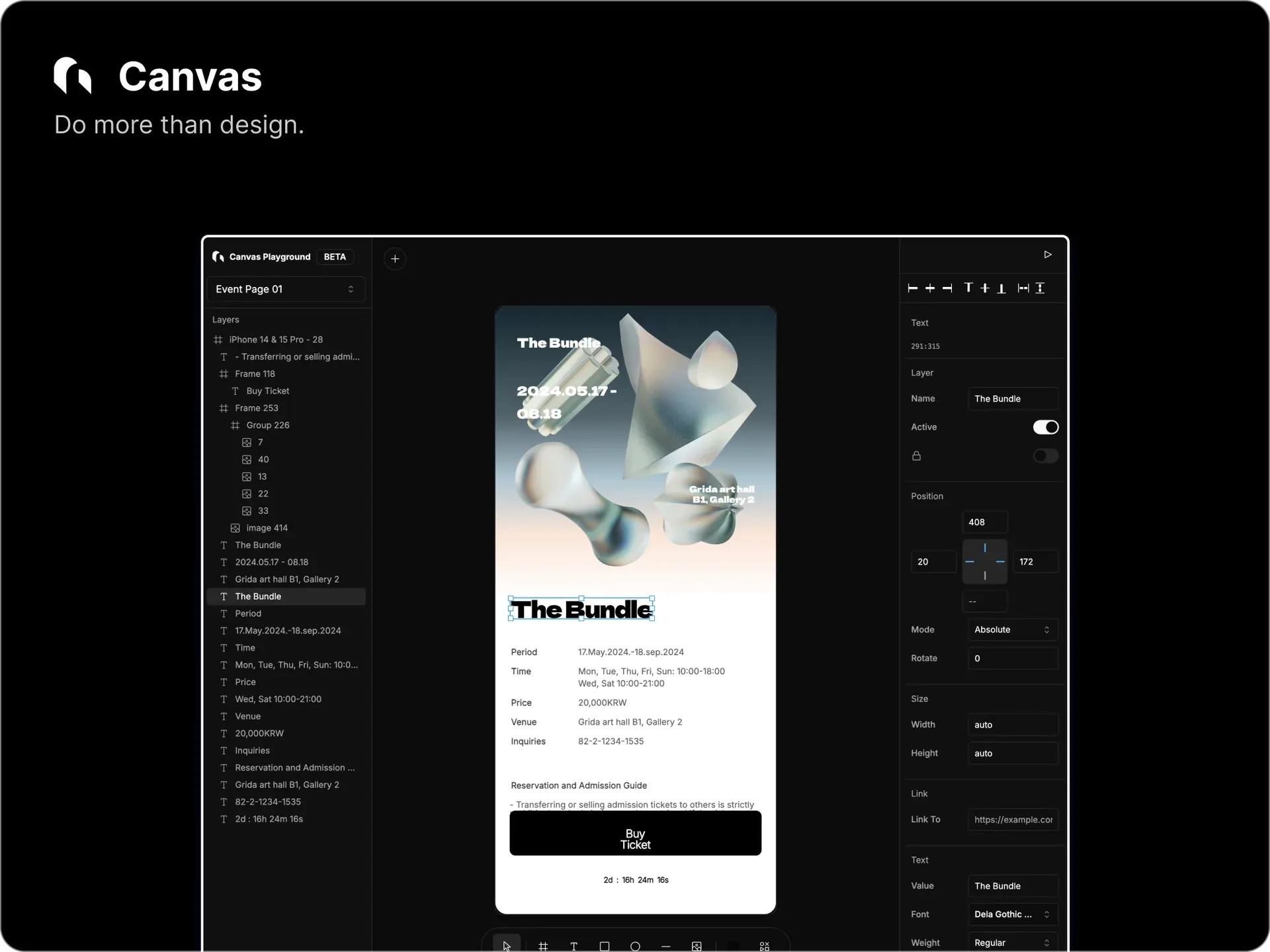
Official README image of the Canvas editor: layer tree on the left, an event page frame in the centre, position and text properties on the right. The repository notes it shows earlier product UI.
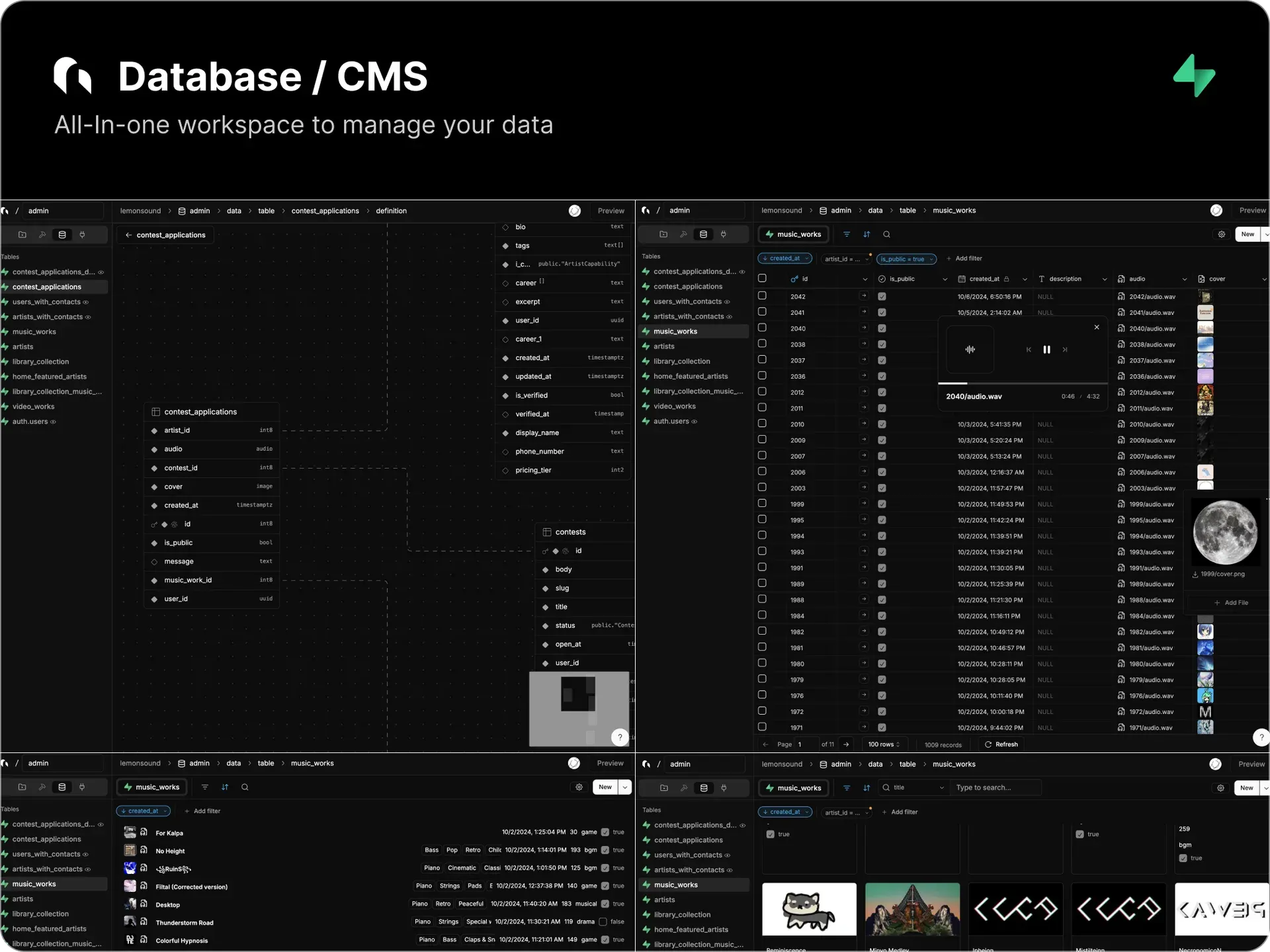
Official README image of the Database/CMS views connected to a Supabase project: schema diagram, table grid with an audio player, list and gallery layouts.
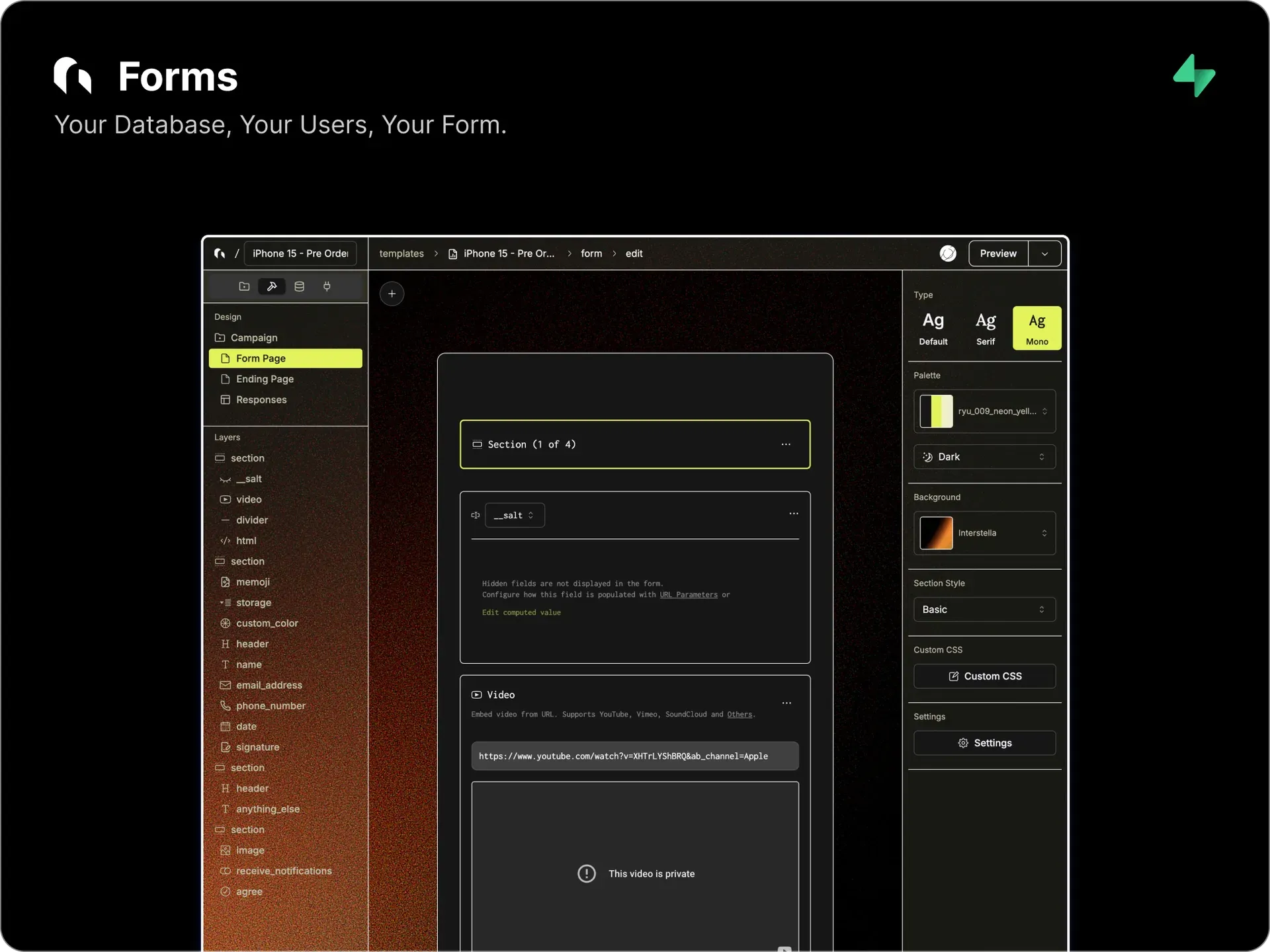
Official README image of the Forms builder: layer list of fields, a hidden salt field and video block, and type, palette, background and custom CSS controls.
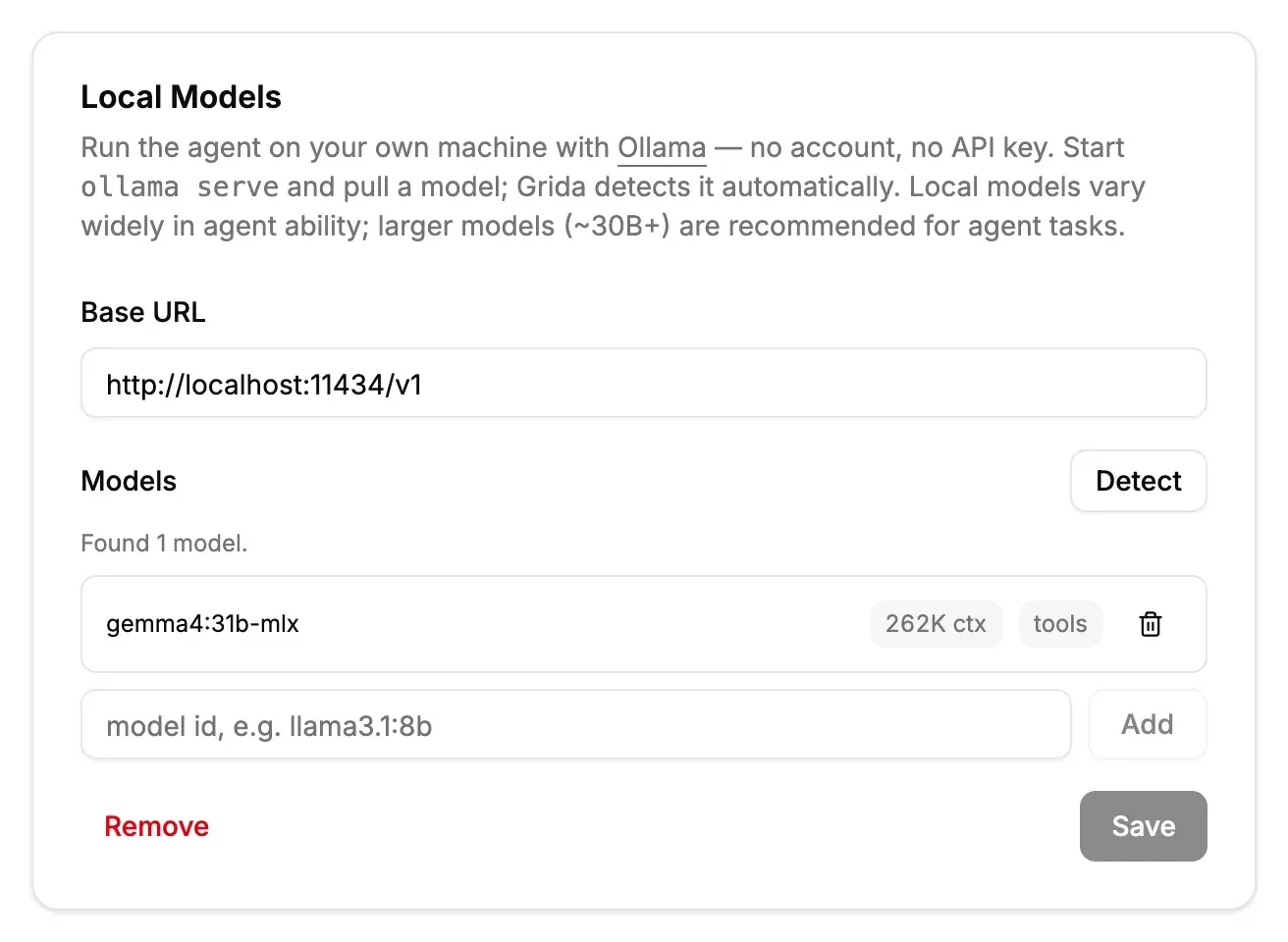
Figure from the official Local Models documentation: Ollama endpoint at localhost:11434 with one detected model, its context window and tool-calling badge.
Source: official Grida project page.
Key capabilities
- Open canvas for images, type and vectors The editor combines bitmap, text and vector layers on an infinite canvas with pan and zoom, a layers panel and a property inspector. Text is edited directly on the canvas, and history uses time-bucketed undo and redo with preview. The vector network model supports paths, holes and compound shapes. A component and instance model is still listed as unfinished.
- Rust and Skia rendering engine Rendering comes from the separate
gridaco/nothingengine, compiled to WebAssembly as@grida/canvas-wasm. In the browser it draws to a WebGL2 surface; in Node.js it renders to raster surfaces for headless export. A DOM renderer exists for HTML and CSS workflows. A WebGPU backend through Skia Graphite is planned but not shipped. - The .grida file format Projects are saved as
.gridadocuments built on a FlatBuffers schema published in the engine repository. The format is designed for large documents and schema evolution. Desktop keeps projects in ordinary folders on the user's machine rather than in a proprietary cloud library. - Figma import and Refig Figma documents can be imported from
.figexports or from REST API JSON. The@grida/refigpackage renders Figma nodes to PNG, JPEG, WebP, PDF or SVG in Node.js or the browser, with a CLI such aspnpm dlx @grida/refig ./design.fig --export-all. The pricing page also lists import from the Figma clipboard and import of Figma Slides.deckfiles. - Slides Presentation editing and presenting are built on the same canvas engine, using a slide mode and a presentation engine in the editor. Slides share layers, text and image tools with ordinary canvas work. Multi-page PDF export covers handouts and review copies.
- Round-trip SVG editor The SVG editor at grida.co/svg aims for byte-equal round trips: an unchanged file saves identically and a single edit produces a single diff. The headless core and React bindings ship as
@grida/svg-editor, labelled alpha, backed by the trivia-preserving parser in@grida/svg. AI chat is built into the editor. - AI agent with bring-your-own keys Desktop includes an AI agent that reads and edits workspace files and generates assets. Text providers include OpenRouter, Vercel AI Gateway, Grida-hosted models and an experimental ChatGPT subscription connection that needs no OpenAI API key. Provider keys on macOS and Linux are stored in a shared plaintext credentials file under the Grida home directory, private to the user; Windows keeps a Desktop-local store.
- Local models through Ollama The Local Models card detects models served by Ollama at
http://localhost:11434/v1and shows each model's context window and tool-calling support. Any OpenAI-compatible local server such as LiteLLM or vLLM can be added. The documentation recommends models of about 30B parameters or larger for agent tasks, and warns when a model lacks tool support. - Image, video, audio and 3D generation Media generation covers images, video, music, sound effects, speech and 3D. Release 0.0.24 adds Tripo H3.1, P1 and P2 Preview for meshes and a rigging step for humanoid and supported creature GLB models, with local Dance and Samba motion previews. Hosted models draw from prepaid Grida credit; your own Tripo key can be used instead, and a failed request does not switch funding sources.
- Grida CLI The CLI was rewritten in Rust before the 0.0.25 tag; it installs with
npm install -g gridaon Node.js 24 or later, and a launcher selects the native executable per platform without a Rust toolchain. AI tools for provider keys, models, voices, generation and rigging are grouped undergrida ai, and account commands sit at the root. When a newer version is on npm, commands print a one-line notice at most once a day;GRIDA_NO_UPDATE_CHECK=1disables the check. It lists models, configures provider keys and saves outputs with areceipt.json;--jsonoutput and documented exit codes support scripting and coding agents. Stored credentials work on macOS and Linux; Windows users pass keys through environment variables or stdin. - Grida FX workflows Each
gridarelease pins a Grida FX version, andgrida fxruns workflow files that chain models and checks, prices a plan before spending, caches paid calls and records each run, for example with--max-usd 2as a budget cap. FX runs on macOS and on Linux with glibc 2.28 or later; Windows needs WSL 2. FX is a separate preview project with JavaScript and Python SDKs. - Forms builder Forms provides more than 30 input types, including file upload, signature, rich text and SMS verification, plus logic blocks, computed and hidden fields, URL parameter seeding, themes and custom CSS. Partial submissions sync in real time, and responses can go to a Grida table or a connected Supabase table. Forms are published as hosted pages or iframe embeds, the form interface is available in 13 languages, and a headless submission API is served by the Open API application under
/v1/forms. The response simulator is Beta and ticket inventory tracking is Alpha. - Database and CMS for Supabase The Database view connects a Supabase project's tables, views, storage and auth, with read-only views, a storage-connected rich text editor and computed or foreign-key virtual attributes. Data can be filtered, sorted, searched locally or with full-text search, and exported as CSV. Joins, API access and localization remain on the open checklist.
- Desktop workspace and terminal According to the pricing page, Desktop works directly in local project folders and opens SVG, code, Markdown, image and video files in its workspace. It includes a built-in workspace terminal, prompt-to-editable presentation decks and visual reference search with image generation on compatible models.
- Library and templates The Library at grida.co/library offers free examples and templates that can be used as references or starting points inside the canvas. Library items include asset metadata and search.
- Reusable npm packages The monorepo publishes building blocks that work outside Grida:
@grida/historyfor undo and redo transactions,@grida/cmathfor canvas math,@grida/ruler,@grida/pixel-grid,@grida/tree-view,@grida/keybindingand@grida/tailwindcss-colors. Stability is stated per package, and several are marked experimental. - macOS installation Signed DMG and ZIP builds are published for Apple Silicon (arm64) and Intel (x64) Macs. The 0.0.23 release notes ask users to quit earlier Desktop instances before upgrading.
- Windows installation A single x64 setup executable is published per release; the release table marks the macOS builds as signed but not the Windows installer. There is no arm64 Windows build in 0.0.25.
- Linux installation DEB packages target Debian and Ubuntu and RPM packages target Red Hat, Fedora and SUSE, each for x64 and arm64. The downloads page lists the x64 packages; arm64 files are attached to the GitHub release.
Where Grida fits
Social and campaign graphics with AI assistance
The Grida website describes projects that combine your own images or a Library reference with AI image models on the canvas, for example adapting one product image into poster, square social and vertical motion formats. Generated assets stay as ordinary layers that are edited with the design tools and exported as PNG, JPEG, WebP, PDF or SVG. Requests use your own provider key, a local model or Grida credit, and the website states that zero data retention applies to eligible cloud model requests through supported providers.
Moving Figma work into an open format
Figma files enter Grida from .fig exports, REST API data or the clipboard, and Figma Slides .deck files are also importable. The @grida/refig package renders Figma nodes headlessly in Node.js or the browser to PNG, JPEG, WebP, PDF or SVG without opening Figma. Imported work is saved in the portable .grida format.
Presentations on the canvas
Slide mode lays out a deck with the same layers, text and image tools as the canvas, presents it from the app and exports a multi-page PDF. The pricing page also lists prompt-to-editable presentation decks and a vector-native presentation workspace.
Media generation from a terminal or coding agent
The CLI guide shows configuring an OpenRouter key with grida ai providers configure openrouter, listing image models with grida ai models list and generating with grida ai generate into a new output directory, which receives the media and a receipt.json. Desktop does not need to be running, and the website names Claude Code and Codex as agents that can call the CLI to save assets into a project. The documentation states that generation does not automatically retry a possibly accepted paid request and that keys must not be passed as command arguments.
Reusable asset pipelines with Grida FX
Grida FX, a separate preview project bundled as grida fx, runs workflow files that connect models, tools and checks. grida fx plan prices a workflow before spending, grida fx run --live --max-usd 2 runs it with a budget cap, paid calls are cached and each run is recorded. The website shows examples such as repainting the seams of five landscape layers into a looping game background and exploring materials for one product silhouette.
Running the agent on local models
The Local Models documentation describes installing Ollama, pulling a tool-capable model and detecting it in Settings, Local Models; any OpenAI-compatible local server can be added as well. With no other provider configured, the agent uses Ollama, and the detected context window can be overridden in endpoints.json. The documentation recommends models of about 30B parameters or larger for agent tasks.
Forms and data on Supabase
Forms combine more than 30 field types with logic, hidden and computed fields, themes and custom CSS, and are published as hosted pages or iframe embeds. Responses are stored in a Grida table or a connected Supabase table and managed in the Database view with filters, gallery views and CSV export. Headless submissions use the public Forms API under /v1/forms; the Supabase integration is labelled Beta. Similar canvas and design tools on iThub include Penpot and tldraw.
Install
npm install -g gridaReviews of Grida
Be the first to share your experience with Grida.
Write a review
Loading review form…
Alternatives to Grida
 OpenPencilOpenPencil is an open-source design editor for macOS, Windows, Linux and the browser. It reads and writes Figma .fig files, edits designs through a bring-your-own-key AI chat, and exposes documents to scripts, a CLI, MCP clients and a Vue SDK.
 FramerFramer is a website builder combining freeform visual design with a built-in CMS, animations and one-click publishing, plus the option to extend pages with custom React code components.