

What is OpenPencil?
OpenPencil is an open-source design editor for interface and product design work. It opens and saves Figma .fig files, opens supported Pencil .pen documents and includes an AI chat that edits the canvas through more than 100 tools. Danila Poyarkov holds the copyright together with the OpenPencil contributors, and the privacy documentation describes the project as built by a small team. The repository was created in February 2026, and the README calls the editor usable today but in active development, with rough edges while features change.
The editor is distributed in several forms. The web app at app.openpencil.dev runs in Chrome 111, Edge 111, Firefox 128 or Safari 16.4 and later and can be installed as a PWA. Desktop builds of about 15 MB use Tauri v2 and are published on the GitHub releases page: DMG files for Apple Silicon and Intel Macs, MSI and EXE installers for Windows x64 and ARM64, and AppImage, DEB and RPM packages for Linux x64, with signature files and a SHA256SUMS list. macOS users can also install the official Homebrew cask. Separate npm packages provide the CLI (@open-pencil/cli), the MCP server (@open-pencil/mcp) and a headless Vue SDK.
The latest stable release is 0.16.0, published October 14, 2026. It added comments pinned to layers, shared rooms with peer-to-peer voice calls, follow mode for collaborators and AI agents, slots, component properties, behaviours that turn components into working controls in Preview, shader fills, a Lint tab, variable modes on layers, a pencil tool and Vue or React output in the Code tab. Saving a .fig file now writes only what an edit changed. The release raised the desktop minimum to macOS 13 and requires openpencil-mcp to be updated together with the app. Pre-releases 0.17.0-beta.1 and beta.2 followed in November with an eyedropper, Cursor and Grok Build as desktop design agents, interface scaling and chat compaction; they use the npm next tag and are not offered to stable installs.
The stack is TypeScript and Vue 3 with Reka UI and Tailwind CSS 4. Rendering uses Skia through CanvasKit WASM on WebGL, layout uses a Yoga WASM fork with flex and CSS Grid support, and documents use the Kiwi binary format with Zstd compression inside ZIP. Collaboration combines Trystero WebRTC connections with Yjs CRDTs, and the AI layer uses the Vercel AI SDK, the MCP SDK and Hono. The editor itself has no backend; the project's architecture comparison with Penpot explains that single-process design.
The editor is MIT licensed. OpenPencil Cloud, an optional server for shared workspaces, is licensed under Apache 2.0 and can be self-hosted; the hosted service is currently a waitlist with no published price. Full Figma parity is not claimed: the roadmap lists import and export fidelity, remaining mask cases, blend isolation, pattern fills and right-to-left and CJK text as ongoing work. Official builds send one anonymous daily ping, documented on the privacy page.
OpenPencil screenshots
Explore the interface. Open a screenshot to view it at full size.
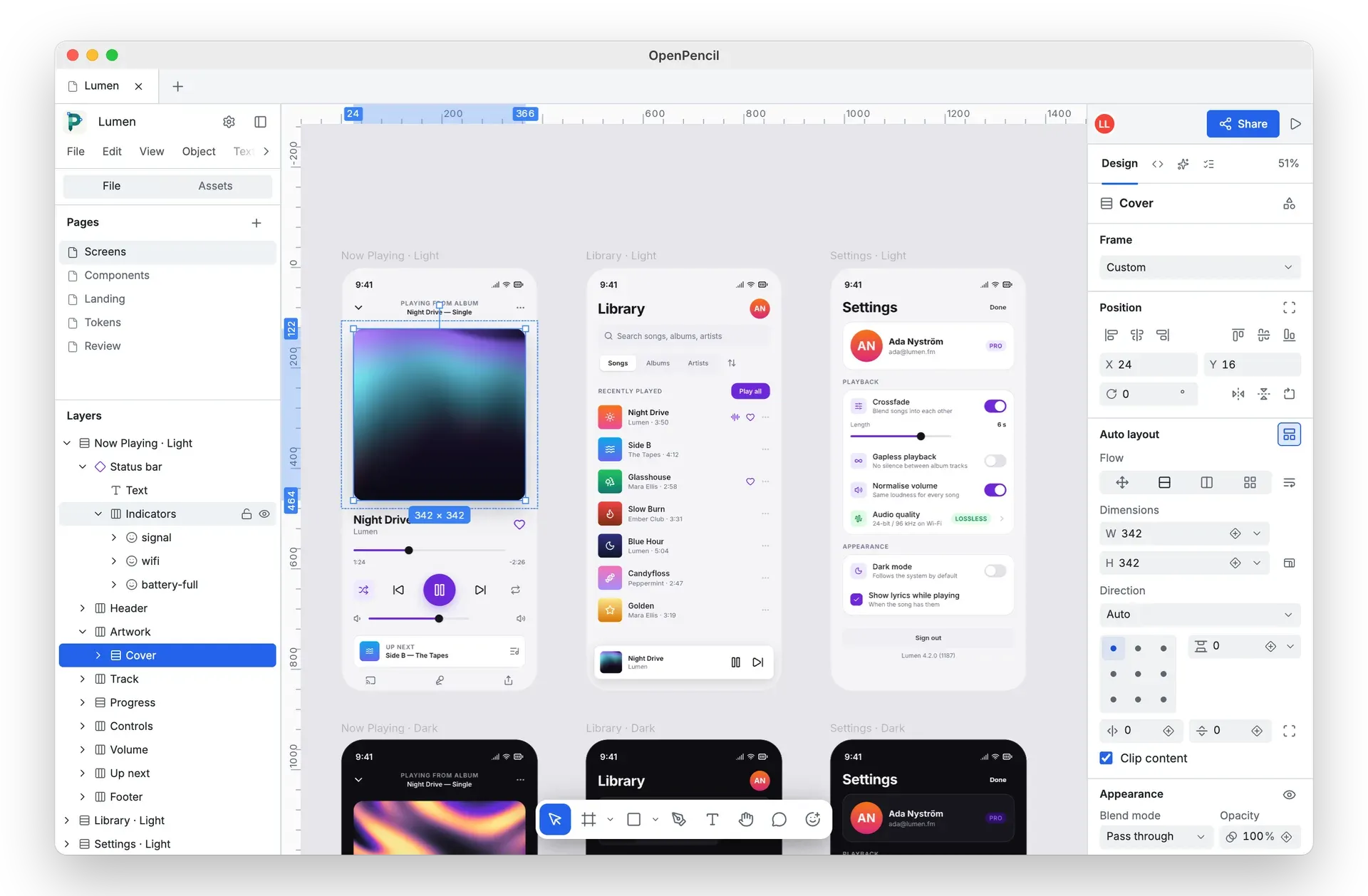
Official OpenPencil screenshot: a selected frame with dimensions, the layer tree and auto layout controls.
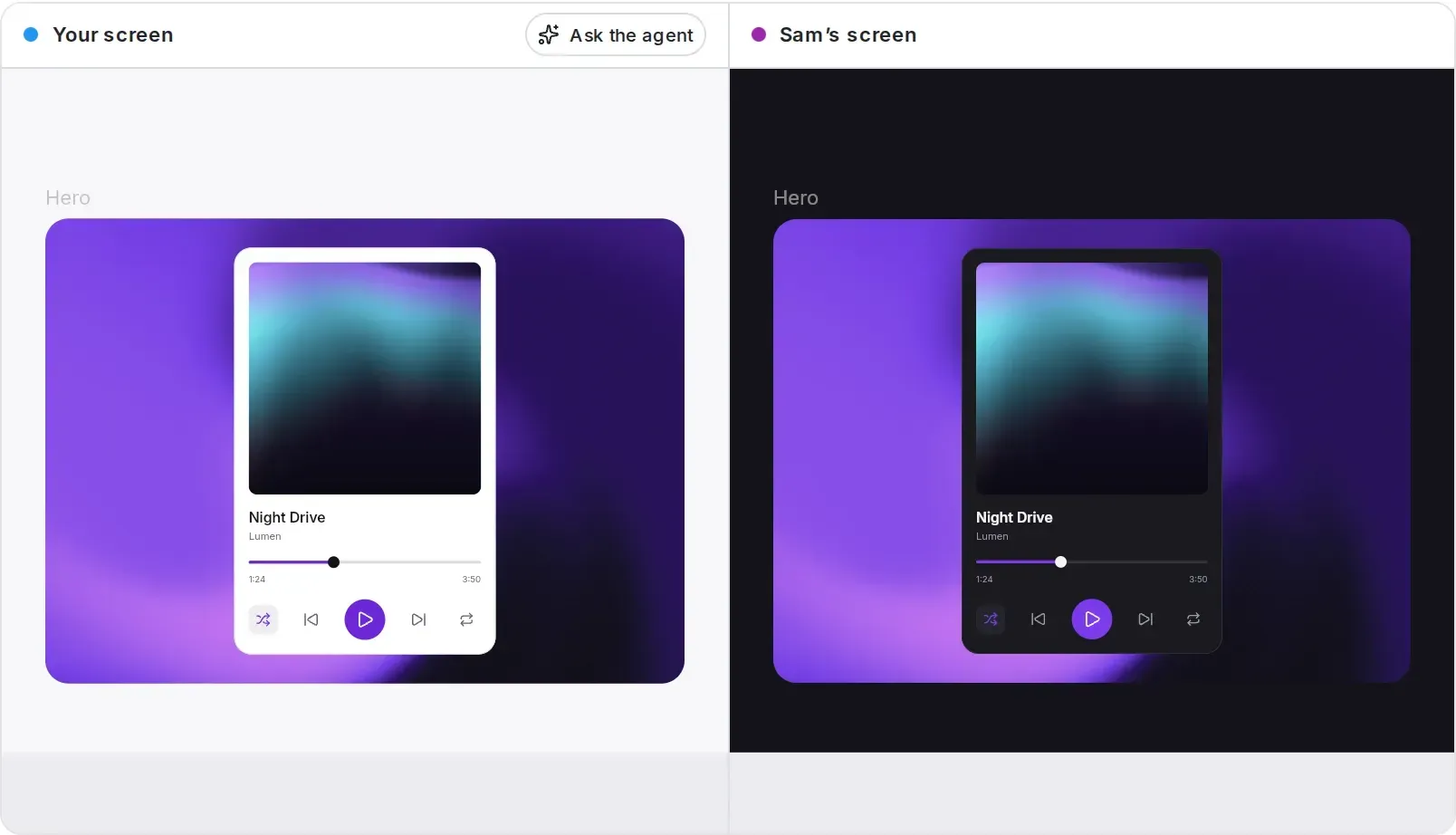
Official openpencil.dev illustration of a shared room: two collaborators see the same frame, each in their own theme.
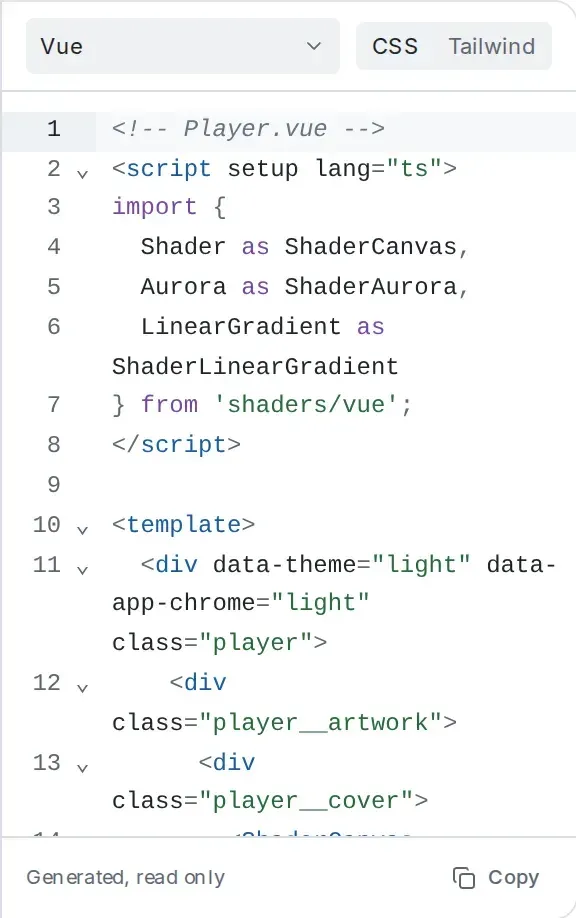
Code tab from the official openpencil.dev demo: the selection as a generated, read-only Vue component.
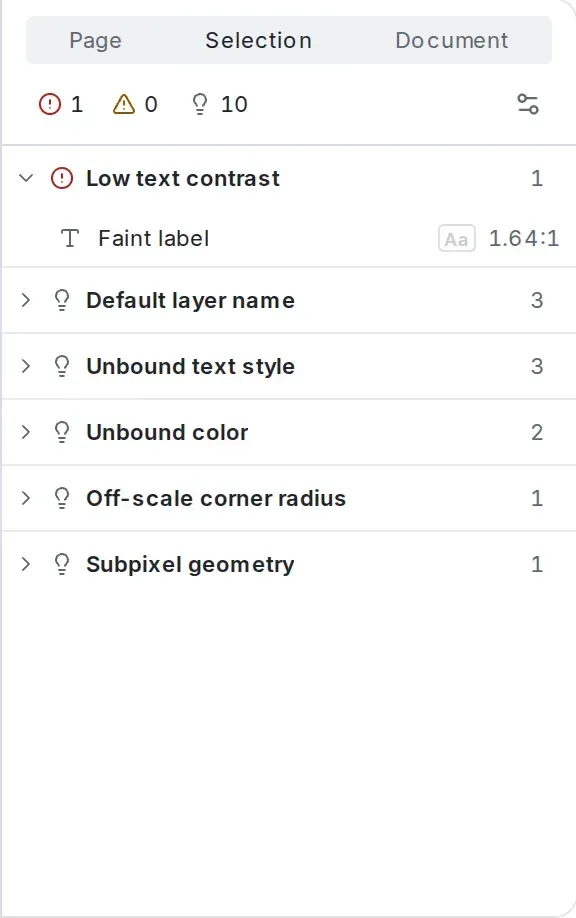
Lint tab from the official openpencil.dev demo, with issues grouped by rule and a 1.64:1 contrast error.
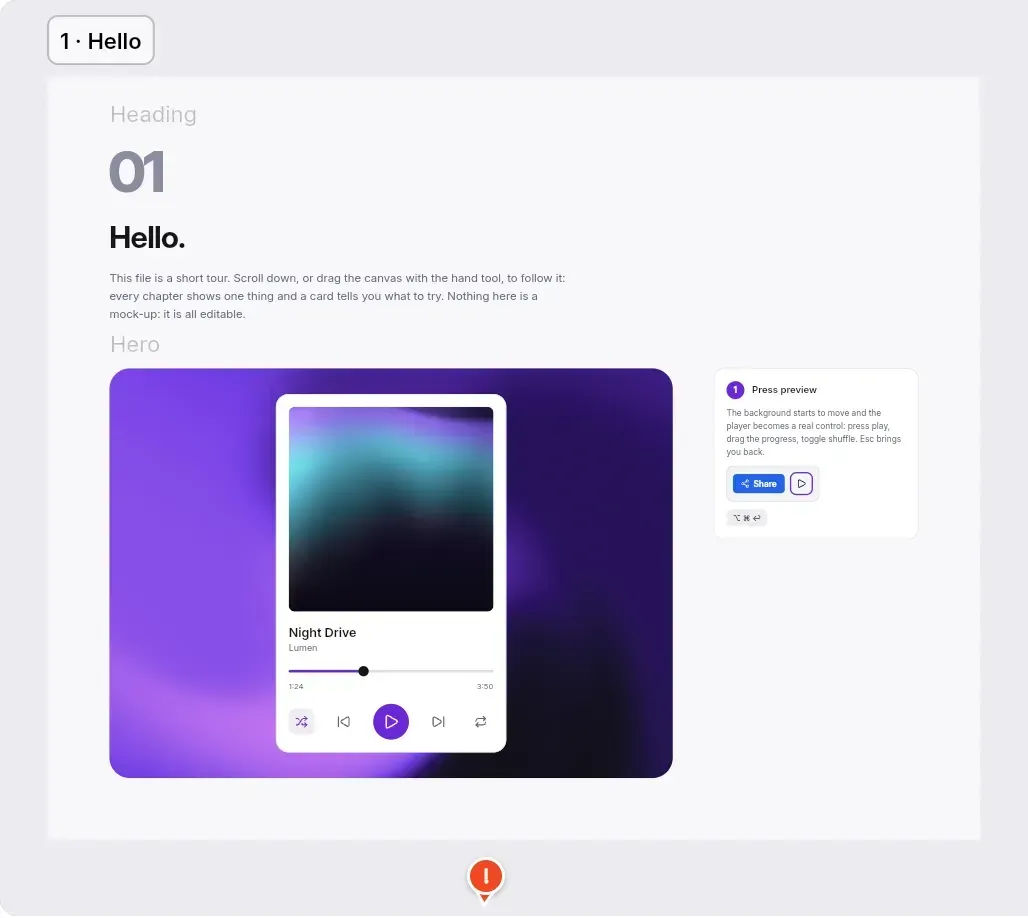
Opening chapter of the official demo tour on the OpenPencil canvas, with instructions to try Preview.
Source: official OpenPencil project page.
Key capabilities
- Download OpenPencil for macOS The release page offers DMG files for Apple Silicon (aarch64) and Intel (x64), plus app archives used by the updater.
brew install --cask openpencilinstalls the signed app from the official Homebrew cask, which is reviewed upstream and can lag behind GitHub releases. Version 0.16.0 requires macOS 13 Ventura or later with current Safari updates, because the app renders in the system WebView. The cask does not install the CLI. - Download OpenPencil for Windows Windows 10 or later on x64 or ARM64 can use either the MSI package or the setup EXE from the download page. The app relies on the Microsoft Edge WebView2 Evergreen runtime, which is preinstalled on current Windows 10 and Windows 11 systems. Installers ship with signature files, and the desktop app shows updates in a Software Update window with release notes and a cancellable download.
- Download OpenPencil for Linux Linux x64 builds are published as AppImage, DEB and RPM packages. The requirement is WebKitGTK 2.40 or later (
webkit2gtk-4.1). The 0.17 beta notes warn that package managers rank0.17.0-beta.2above the final 0.17.0, so DEB and RPM users should remove a beta before installing the stable version. - Web app and installable PWA The browser version needs no installation and works in Chrome 111, Edge 111, Firefox 128, Safari 16.4 or later, and Chromium browsers that follow those versions. A guided demo document at
/demowalks through preview, slots, behaviours, variable modes, shader fills, the Code tab, Lint and sharing in eight chapters. Shader fills show their first frame on the canvas and animate in Preview where WebGPU is available. - Figma .fig and Pencil .pen files OpenPencil reads and writes native
.figfiles, opens supported.pendocuments and copies or pastes nodes to and from Figma through the clipboard. Since 0.16.0 it saves only the parts an edit changed and stores comments, lists, variable bindings and aspect-ratio locks in the file. Compatibility gaps are tracked publicly on the roadmap rather than hidden. - Built-in AI chat with your own key Ctrl+J (Cmd+J on macOS) opens an assistant with more than 100 tools for shapes, fills, auto layout, components, variables, booleans, tokens and export. Keys for OpenRouter, Anthropic, OpenAI, Google AI, DeepSeek, Z.ai, MiniMax or a compatible endpoint go directly to that provider, with no OpenPencil backend or account. Each tool call shows a before and after image with a JSX diff and can be reverted. Not every provider works from a browser; the BYOK compatibility page lists measured results.
- Coding agents as design agents The desktop app can run Claude Code, Codex, Gemini CLI or Pi in its chat panel under your own subscription, reaching the canvas through the local MCP server; the 0.17 betas add Cursor and Grok Build. Settings, Models, Run guided setup checks that the agent's ACP program and
@open-pencil/mcpare installed and that a session reaches the tools. This path is desktop only. - MCP server for external agents
npm install -g @open-pencil/mcpprovidesopenpencil-mcpover stdio for Claude Code, Cursor, Windsurf and other MCP clients, andopenpencil-mcp-httponhttp://127.0.0.1:7600/mcpplus a Unix socket for scripts and CI.OPENPENCIL_MCP_ROOTlimits file access to one directory and defaults to the working directory. The MCP server guide documents the tools and permissions. - Headless CLI
npm install -g @open-pencil/cli(orbun add -g) installsopenpencil, which prints node trees, finds nodes by name or type, reads properties and runs XPath queries such as//FRAME[@width < 300]without opening the editor. Without a file argument it acts on the document open in the running app, including undo, settings and any MCP tool. Every command accepts--json; the CLI reference lists the options. - Export, conversion and HTML import The CLI renders to PNG, JPG, WEBP, SVG, PDF, PPTX, HTML, JSX, Tailwind JSX, Storybook stories and
.fig, and converts between document formats such as.pento.fig.openpencil importturns HTML and CSS into editable layers. In the app, the Export section supports scales from 0.5x to 4x and several export settings per node. - Design lint and analysis The Lint tab groups issues by rule, marks them on the canvas and in Layers, and offers one-click fixes such as binding a colour to a matching variable. The Recommended preset checks touch targets against WCAG 2.2 AA and text contrast.
openpencil lint --fixandopenpencil analyze colors, typography, spacing or clusters give the same checks in scripts. - Scripting with the Figma Plugin API
openpencil evalruns JavaScript against a document using Figma's Plugin API plus anopenpencilglobal, and-wwrites the result back to the file. Inside instances the API refuses the same edits Figma refuses, with matching errors. Text properties returnfigma.mixedfor mixed ranges, as in Figma. - Components, slots and working controls Components support variants, component sets, text, boolean and instance-swap properties, exposed nested instances and slots. The Behaviour section turns a component into one of 15 Reka UI-style controls such as Button, Switch, Slider, Tabs or Text field. View, Preview lets you use them live without changing the document.
- Variables, modes and design tokens Variables have collections, modes and per-layer mode selection. Variables, text styles and effect styles import and export as W3C design tokens from the variables dialog, by dropping
.tokensfiles or withopenpencil tokens --format dtcg. Variables can also be copied as CSS custom properties or a Tailwind v4 theme. - Code tab for developers The Code tab shows the selection as a Vue or React component styled with CSS or Tailwind, links code elements to canvas layers both ways and underlines design issues in the code. The output is generated and read only. Storybook export with
--framework vueor--framework reactproduces stories with variant controls. - Peer-to-peer rooms and voice calls Sharing creates a room link where peers connect over WebRTC with no account and no server holding the document; the file lives on the devices of people who have joined. Cursors, presence, follow mode, comments and voice calls work in rooms, and AI agents appear with labeled cursors. Rooms from 0.16.0 use a new layer-tree format, so earlier versions cannot join them.
- Your own S3-compatible storage Documents and component libraries can live in a bucket on AWS S3, Backblaze B2, Cloudflare R2, MinIO or another S3-compatible service, with the editor talking to the bucket directly. The desktop app keeps access keys in the system credential store; the web app needs a CORS rule. Each document uploads whole and the last upload wins, as described in the storage guide.
- Self-hosted OpenPencil Cloud Cloud is one Node 22+ process in front of PostgreSQL 15 or later and an S3-compatible object store, with optional SMTP. Each release publishes
ghcr.io/open-pencil/cloudfor linux/amd64 and linux/arm64, listening on port 8787 with a/readyhealth check; it can also run on Cloudflare Workers. The self-hosting guide covers configuration, authentication and a Compose file for local trials. - Vue SDK for custom editors Headless Vue components and composables let teams embed the canvas or build workflow-specific editing surfaces. Releases document breaking API changes in detail, including moved packages in 0.16.0, so pin versions and read the release notes before upgrading. The SDK documentation lists every composable.
Where OpenPencil fits
Opening Figma files without Figma
Open a .fig file by dragging it onto the desktop or web app, edit it and save it back, or inspect it first with openpencil tree and openpencil info. Check text rendering, masks, gradients and component instances against the original before relying on round trips, because the roadmap still lists fidelity gaps. Gradients created in OpenPencil before 0.16.0 draw differently after the update, so reopen older files once and compare.
Generating and editing designs with AI
Choose one of three paths: the built-in chat with an API key, a coding agent such as Claude Code or Codex in the desktop chat panel, or an external MCP client connected to openpencil-mcp. Review each tool call's before and after image, and revert a reply when it goes wrong. Check which provider receives your prompts and keys, and confirm that your chosen model streams tool calls correctly on the AI chat page.
Auditing a design system in CI
Install @open-pencil/cli on a build runner and run openpencil lint --preset strict, openpencil analyze colors and openpencil variables against committed design files with --json output. This surfaces unbound colours, off-scale spacing, low contrast and the real palette in use. Agree which rules block a merge and which stay suggestions before wiring results into a pipeline.
Handing designs to developers
Use the Code tab for Vue or React components with CSS or Tailwind, export Tailwind JSX or Storybook stories from the CLI, and export variables as W3C design tokens or a Tailwind v4 theme. Treat generated code as a starting point and compare it with your component library. Check that token names follow your code syntax, since 0.16.0 changed how design_to_tokens names CSS custom properties.
Co-editing with a small team
For ad hoc sessions, share a peer-to-peer room link: no account is needed, but the document is available only while someone who holds it is online, and everyone must run a compatible version. For durable shared workspaces with accounts and invitations, run OpenPencil Cloud on your own server or use an S3-compatible bucket. Test the collaboration model on your network before a client review.
Building a custom editing surface
Teams that need a constrained editor, such as a template tool or an internal brand editor, can build it on the Vue SDK and the scene-graph packages. Start from the SDK documentation, pin exact package versions and plan time for upgrades, because each minor release has carried breaking changes. Keep the MIT license and the separate Apache 2.0 Cloud license in mind when redistributing.
Install
brew install --cask openpencilReviews of OpenPencil
Be the first to share your experience with OpenPencil.
Write a review
Loading review form…