

What is Morphic?
Morphic is an open-source AI answer engine with a generative user interface. A question goes to a research agent that writes search queries, reads the pages it selects and streams back an answer with numbered citations. Instead of returning plain Markdown, the answer is rendered from a streamed JSON specification, so it can contain headings, image grids, tables and linked source cards. The project is developed by Yoshiki Miura (GitHub user miurla) in Tokyo; the repository was created in April 2024. A hosted instance runs at chat.morphic.sh and is operated by Shironel, a Tokyo corporation, under its own terms of use.
The source is published on GitHub under the Apache License 2.0. It is distributed as a prebuilt container image (ghcr.io/miurla/morphic), as a Docker Compose file that starts PostgreSQL 17, Redis, SearXNG and the application, and as a Vercel deploy button. There are no desktop or mobile packages: Morphic is a web application served on port 3000, and local development uses Bun.
The current release is v1.9.0, published October 27, 2026. It adds a side panel for writing and editing drafts with a Save button, presents found items as linked source cards, searches chat history from the sidebar, adds OIDC sign-in through Better Auth, a maintenance mode switch, a sidebar version footer with an update indicator for administrators, and an option to route regular page fetches through an extraction service. Version 1.8.0 (October 17) introduced the Better Auth provider for multi-user self-hosting and moved source favicons to the instance's own origin. Version 1.7.0 (September 16) made the fetch tool and crawler refuse private network addresses and allowed a stateless start without a database. Version 1.0.0 shipped on February 7, 2026, after a beta series.
The stack is Next.js 16, React 19, Tailwind CSS 4, the Vercel AI SDK 7 with its tool-loop agent, json-render 0.21 for the generative components and Drizzle ORM over PostgreSQL. Two research modes exist: Quick allows up to 20 agent steps with search, fetch and draft tools, while Adaptive allows up to 50 steps and adds a task-list tool for multi-step research. Models come from OpenAI, Anthropic, Google Gemini, Vercel AI Gateway, Ollama or any OpenAI-compatible endpoint. The repository also contains an evaluation harness for related questions, source cards and draft edits.
Morphic does not run its own web index: it depends on an external search API or on SearXNG, which queries upstream engines. It documents no public REST API for third-party clients, file upload needs external S3 or Cloudflare R2 storage, and Supabase authentication requires building the image from source. Setup and data handling are documented in the configuration guide, the Docker guide and the privacy and telemetry document.
Morphic screenshots
Explore the interface. Open a screenshot to view it at full size.
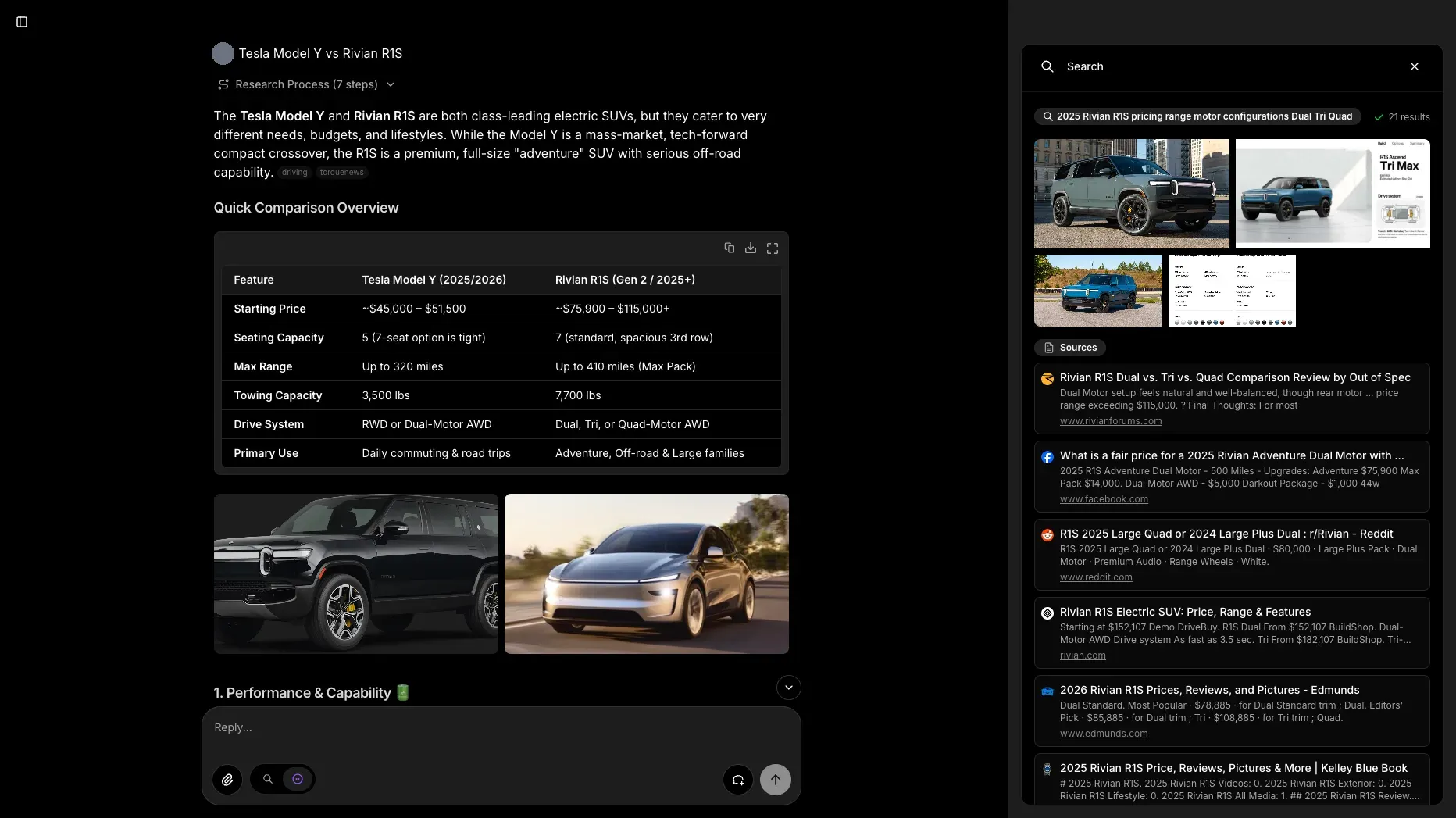
Official README screenshot: a cited comparison answer with research steps, a generated table, image grid and the source panel.
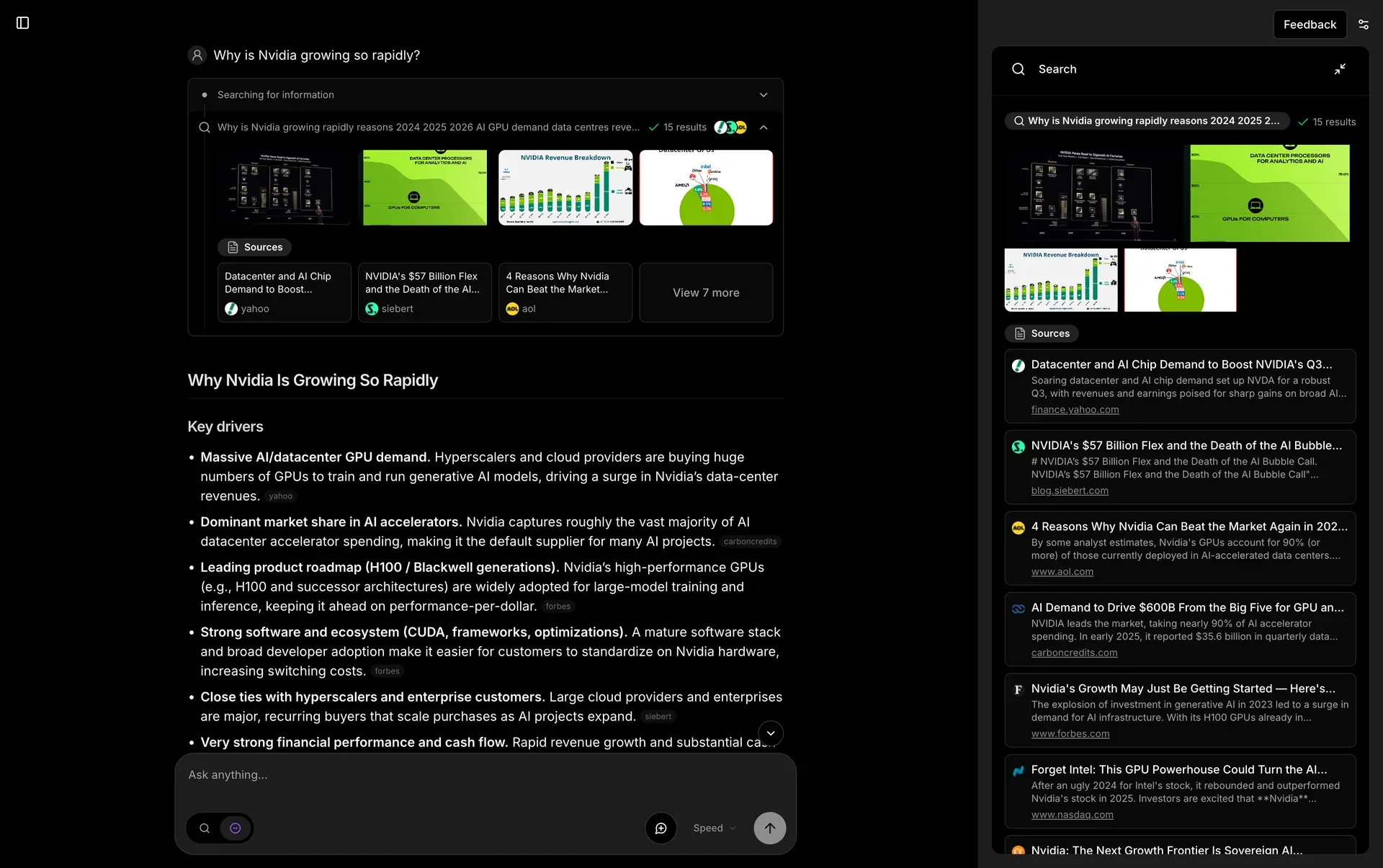
Screenshot from the morphic.sh website: a search step with images and source cards above a structured answer with citation chips.
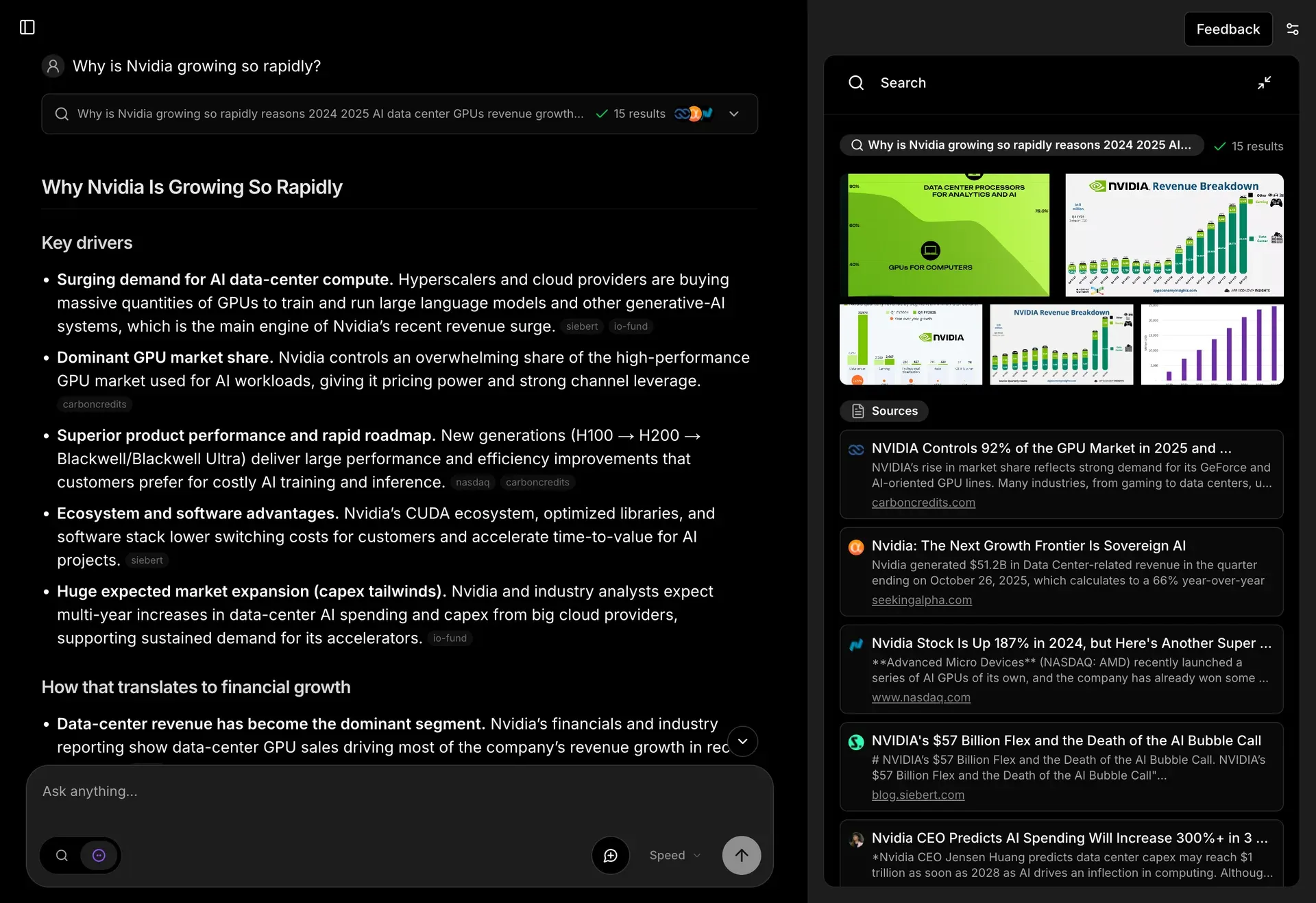
README screenshot from the v1.0.0 release: answer headings with source chips and the expanded search panel.
Source: official Morphic project page.
Key capabilities
- Self-hosting with Docker Compose Clone the repository, copy
.env.local.exampleto.env.local, set at least one model provider key and rundocker compose up -d. Compose starts PostgreSQL 17, Redis, SearXNG and Morphic, runs database migrations at startup and serves the interface on http://localhost:3000. No search API key is needed in this setup because SearXNG is bundled and selected by default. The Docker guide lists the defaults that Compose sets. - Prebuilt image, source builds and Vercel The image is published as
ghcr.io/miurla/morphic:latest;docker compose up -d --buildbuilds it locally instead. A Vercel deploy button clones the repository with OpenAI, Tavily and authentication variables. Because Next.js inlinesNEXT_PUBLIC_*values at build time, the prebuilt image cannot use Supabase authentication; that path requires a source build. - Local development with Bun Developers install dependencies with
bun install, runbun run migrateagainst their own PostgreSQL and start the server withbun dev. Any PostgreSQL provider works, including Neon, Supabase or a local instance. Without a database, Morphic can start in stateless guest mode, but chat history, permalinks, uploads and feedback are unavailable. - Cited answers with a generative UI Answers stream as a JSON specification rendered into components: headings, tables, source-credited image grids, linked source cards and related questions. Citations are numbered by result position and link back to the pages the agent read. A side panel lists each search query with its result count, images and sources, so a reader can inspect what the answer was built from.
- Quick and Adaptive research modes Quick mode limits the agent to 20 steps and the search, fetch and draft tools for short factual answers. Adaptive mode allows up to 50 steps and adds a task-list tool, so the agent can plan several searches before writing. Both modes rely on tool calling, so the selected model must support it.
- Model selector with provider detection Morphic detects which providers have keys and fills a model selector: OpenAI, Anthropic, Google Gemini, Vercel AI Gateway, Ollama and OpenAI-compatible endpoints such as DeepSeek or a self-run gateway. In local and Docker mode the chosen model is stored in a cookie. In cloud mode, models are fixed by a configuration file and the selector is hidden.
- Local models through Ollama Setting
OLLAMA_BASE_URLmakes Ollama models appear in the selector through dynamic discovery. OpenAI-compatible providers accept a base URL with or without/v1, an optional model whitelist when/v1/modelsis missing, and a display name for the selector. Answer quality depends on how well the local model handles tool calls. - Choice of search provider
SEARCH_APIselects Tavily (the default outside Docker), SearXNG, Exa or Firecrawl. A Brave Search key adds video and image search. SearXNG supports basic and advanced depth, where advanced mode crawls result pages and scores relevance, plus settings for engines, time range, safe search and result count. Recoverable provider failures fall back to another path since v1.7.0. - Page reading and content extraction The fetch tool requests pages directly from the server by default. For PDFs and JavaScript-rendered pages it uses an extraction service: a self-hosted crawl4ai instance when configured, otherwise Jina Reader or Tavily Extract. Since v1.9.0,
FETCH_REGULAR_VIA_API=truesends regular fetches through the extraction service too, so the Morphic server does not contact the target sites itself. - Chat history, search and sharing With PostgreSQL configured, conversations are stored, opened at
/search/[id]permalinks and, since v1.9.0, searchable from the sidebar. Sharing produces a unique URL; it works by default with Supabase, is opt-in withENABLE_SHARE=trueunder Better Auth and is unavailable in anonymous mode. - Authentication options Anonymous mode gives every visitor one shared user ID and suits a single operator. Better Auth stores accounts in Morphic's own database, with a bootstrap administrator, open or invite-only sign-up, seven-day invitation links, SMTP password reset and OIDC sign-in for Keycloak, Authentik, Okta, Azure AD and similar providers. Supabase authentication remains available for existing Supabase projects.
- Guest mode for public demos
ENABLE_GUEST_CHAT=truelets visitors ask questions without an account and stores no history. Uploads, sharing and the history sidebar are disabled for guests. In cloud mode, a per-IP daily limit backed by Upstash Redis caps guest requests. - File upload and attachment limits Uploads need Cloudflare R2 or another S3-compatible bucket; without storage variables the upload endpoint returns 400. Each message accepts up to three files, delivered to the model as signed URLs that expire after one hour by default. Older attachments and long pasted blocks are replaced with placeholders once a conversation exceeds configurable limits, which keeps prompt size and cost under control.
- Draft side panel Version 1.9.0 adds a panel where the agent writes and edits a draft beside the conversation, with a Save button. The draft tool is available in both research modes. It is meant for turning research into a text you continue editing, not a full document editor.
- Outbound request controls The fetch tool and the advanced-search crawler refuse loopback, RFC1918, link-local and other non-global addresses, which blocks requests to cloud metadata endpoints.
FETCH_ALLOW_PRIVATE_NETWORK=truelifts the guard for private deployments only. Source favicons are fetched by the server and served from/api/favicon, and the provider can be changed or switched off. - Observability and evaluations Langfuse tracing is off by default and records full prompts and completions when enabled; OpenTelemetry honours standard OTLP variables. PostHog and Vercel Analytics are used by the hosted deployment and stay off unless configured. The repository includes an eval harness with datasets and thresholds for related questions, source cards and draft edits.
- Operations: version check and maintenance mode The sidebar shows the running version and install method, and administrators see an update link when a newer GitHub release exists. The check runs once per 24 hours by default and can be disabled.
MAINTENANCE_MODE=trueserves a static page and returns 503 from API routes during long migrations.
Where Morphic fits
Running a personal research assistant on one machine
Use the Docker Compose setup with anonymous mode, which is the default, and one provider key. Open http://localhost:3000, pick a model and ask a question in Quick mode, then repeat a harder question in Adaptive mode and compare the research steps shown in the answer. Check that the side panel lists the queries and sources and that each citation opens the page it names. Anonymous mode shares one user ID, so keep the instance on localhost or a private network.
Keeping prompts and searches on your own infrastructure
The privacy document describes a fully local setup: Ollama for the model, the bundled SearXNG with engines you accept, the Compose PostgreSQL and Redis containers, no analytics or tracing keys, NEXT_TELEMETRY_DISABLED=1 and MORPHIC_UPDATE_CHECK_DISABLED=true. Pages the agent reads are still fetched from their origin sites, SearXNG still queries upstream engines, and result images load in the visitor's browser. Confirm with a network capture that no unexpected hosts are contacted.
Opening an instance to a team
Set AUTH_PROVIDER=better-auth, a stable BETTER_AUTH_SECRET and BOOTSTRAP_ADMIN_EMAIL, then create the administrator account before anyone else can reach the instance. Switch to invite-only sign-up and issue invitation links from the admin page, or connect an OIDC provider with OIDC_ISSUER, client credentials and BETTER_AUTH_URL. Serve the instance over HTTPS, because production session cookies use the __Secure- prefix, and put a rate-limiting reverse proxy in front of it, as the configuration guide recommends.
Publishing a public demo
Enable guest chat so visitors can try the engine without accounts and without stored history. Rate limiting for guests applies only in cloud mode with Upstash Redis credentials, so plan request caps and model costs before exposing a provider key. On Vercel, BotID screens scripted requests to the chat endpoint. Check what analytics you enable, since PostHog events carry chat IDs and URLs even though they exclude query text.
Researching with attachments and drafts
Configure an R2 or S3-compatible bucket, then attach up to three files to a message and ask the agent to combine them with web results. The model fetches attachments from your bucket through signed URLs, and the object key contains the user ID, chat ID and filename. For written output, use the v1.9.0 draft panel and save the draft. Check how the attachment replay limit affects long conversations: older files are replaced by placeholders and the model asks for a re-attach when it needs one.
Upgrading and operating an instance
Read the release notes before pulling a new image, because recent versions changed authentication, fetch behaviour and defaults. Turn on maintenance mode during long database migrations, back up the PostgreSQL volume, and remember that docker compose down -v deletes all data. Administrators see the update link in the sidebar; disable the check if the server must not contact GitHub.
Install
git clone https://github.com/miurla/morphic.git && cd morphic && cp .env.local.example .env.local && docker compose up -dReviews of Morphic
Be the first to share your experience with Morphic.
Write a review
Loading review form…
Alternatives to Morphic
 KhojOpen-source personal AI server under AGPL-3.0: semantic search and chat over PDF, Markdown, org-mode, Word and Notion content, with agents, research mode, automations and Obsidian, Emacs and web clients. Khoj Cloud closed in April 2026, so it is self-hosted.OWOpen WebUIOpen WebUI is a self-hosted AI platform that runs offline and connects to local models through Ollama or to OpenAI-compatible APIs.