

What is Worklenz?
Worklenz is a project management platform for agencies, consultancies and software teams that track time and cost against client work. It combines task lists, Kanban boards, a roadmap, a cross-project Planner with Schedule, Timeline and Workload views, time tracking, project finance, reporting and a client portal in one web application, with companion apps for iOS and Android. The company describes itself as a technology startup based in Sri Lanka, founded in 2022. The source code is published at github.com/Worklenz/worklenz under the GNU Affero General Public License v3.0, the product site is worklenz.com and the user manual is at docs.worklenz.com.
There are three ways to run it. Worklenz Cloud is operated by the vendor with Free, Pro and Business plans. The open-source distribution is self-hosted; its README states that WORKLENZ_DEPLOYMENT_MODE=self_hosted is always set in the public code and enables Planner, Finance and Client Portal for every organization, and the docs state that a self-hosted install behaves like the Business plan without billing screens. A paid Self-hosted Business package adds deployment, maintenance, 12 months of updates and priority support, either on the customer's server or on a dedicated server in the vendor's Microsoft-hosted infrastructure, priced through sales.
The stack is React with Ant Design on the front end and TypeScript with Express.js on the back end, with PostgreSQL 15 or newer, Nginx and S3-compatible object storage; the README also lists Redis as the cache layer. The Docker setup bundles SeaweedFS, and AWS S3 or Azure Blob Storage can replace it in advanced mode. Manual installs require Node.js 22.12 or newer. The README states that the web app loads Google Analytics in every case and Mixpanel when a token is configured, without waiting for cookie consent, while Microsoft Clarity loads only after consent.
The latest GitHub release, v3.4.0 (November 9, 2026), adds a team-wide Docs section, custom dashboards with agile velocity, cumulative flow, SLA and time-in-status charts, saved views with persistent filters, client and client-user delete, restore and deactivate controls, PDF export for quotes and invoices, cascading custom fields, subtasks that move between parents, timers that roll over past midnight, rich text task comments, inline sprint editing and automatic date cascading when a sprint ends early. It also fixes access validation on client portal API routes, task dependency selection, real-time Planner and Roadmap updates and GitHub status automation. The previous release, v3.3.1 (October 26, 2026), fixed disappearing task attachments and sub-tasks and changed recurring tasks to skip missed occurrences; v3.3.0 introduced Client Portal v2, the software project type and the GitHub integration.
The pricing page lists CRM and HR modules as coming soon; they are not part of the current product. Similar open-source projects in this directory include OpenProject, Leantime and Plane.
Worklenz screenshots
Explore the interface. Open a screenshot to view it at full size.
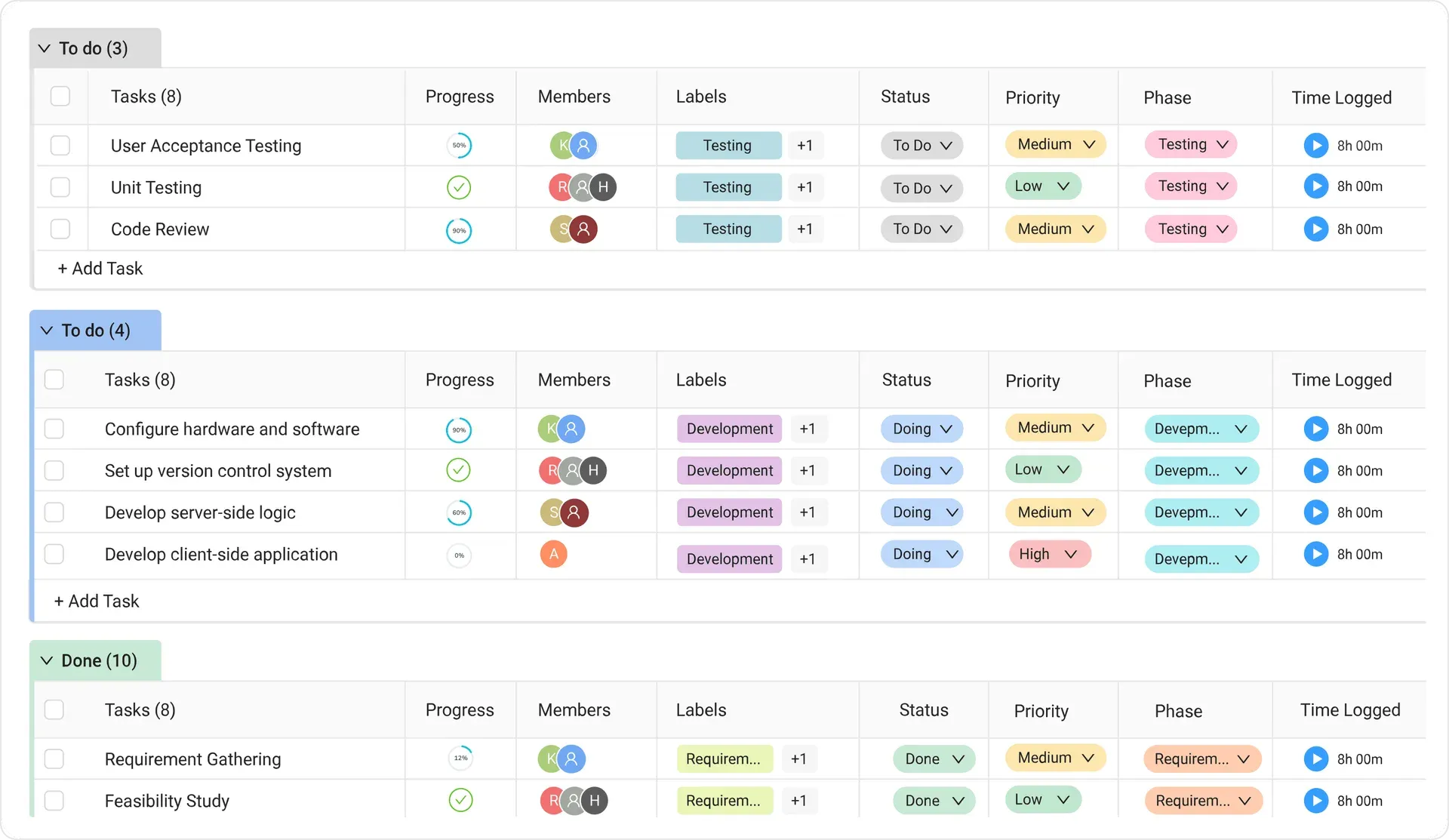
The task list view from the official README: tasks grouped by status with progress rings, member avatars, labels, priority, phase and a timer with logged time.
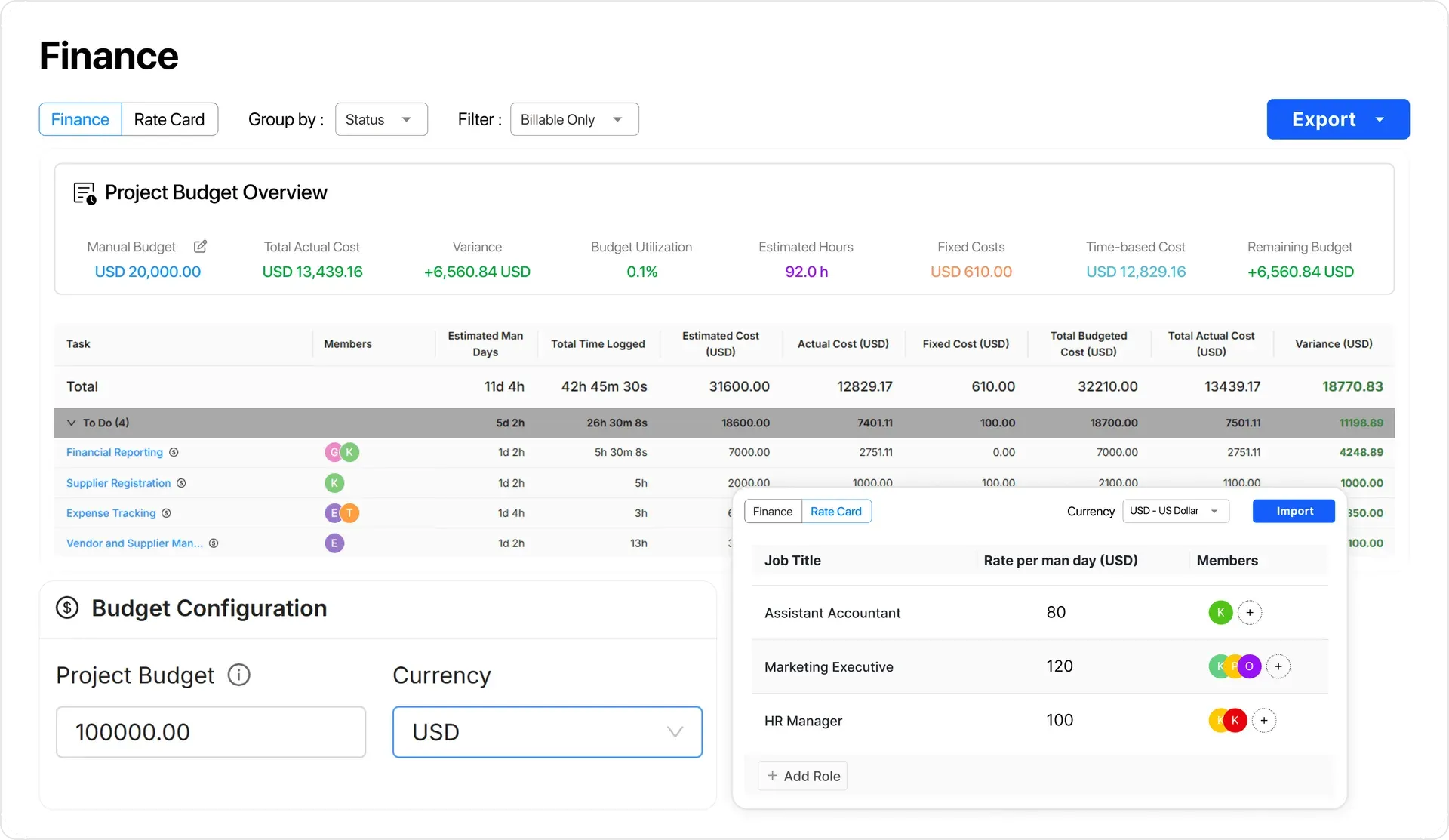
The project finance view from the official README: budget overview with actual cost and variance, a task cost table and a rate card with rates per man-day.
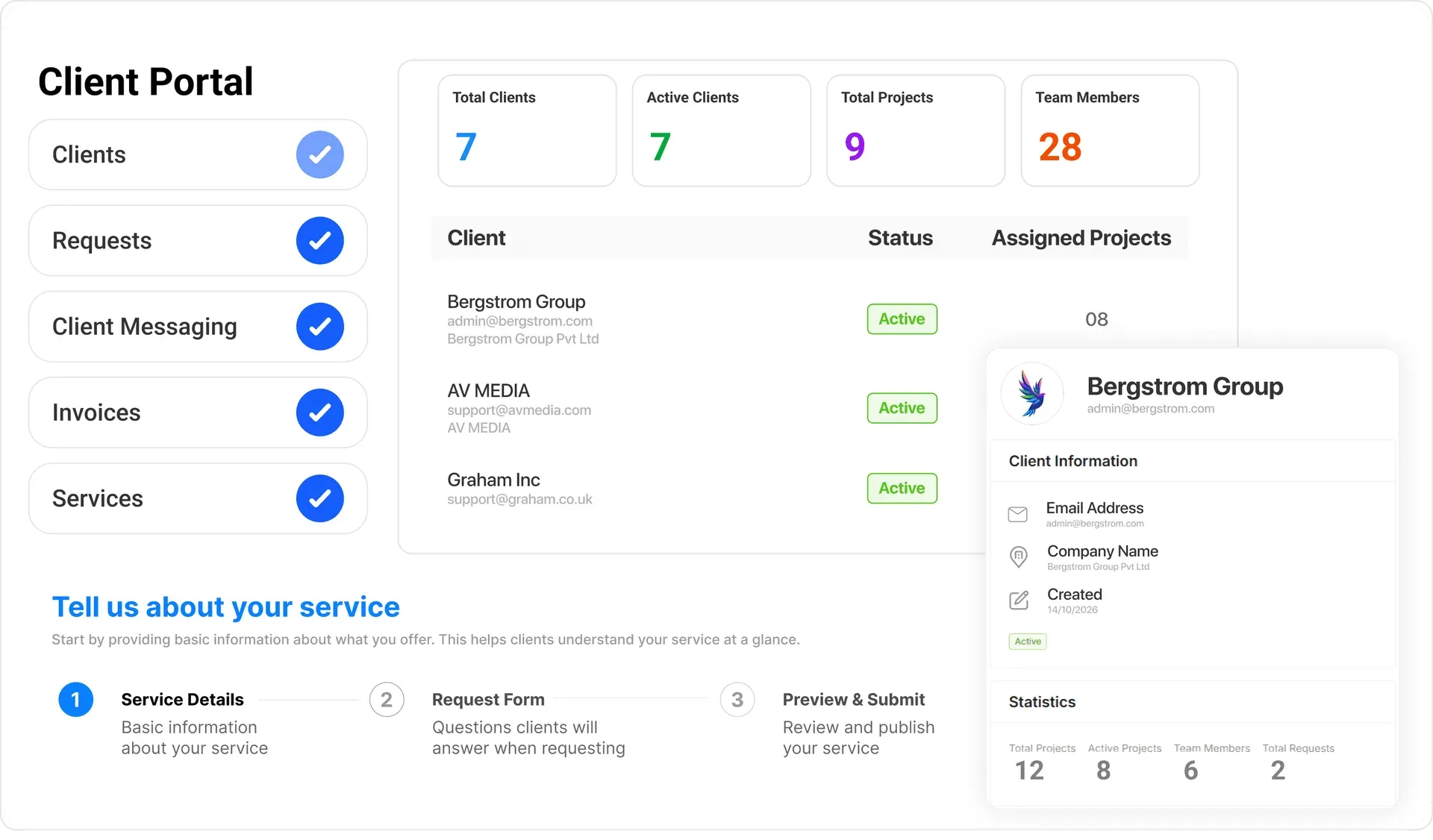
The client portal administration from the official README: client counts, a client list with status and assigned projects, a client detail card and a service setup wizard.
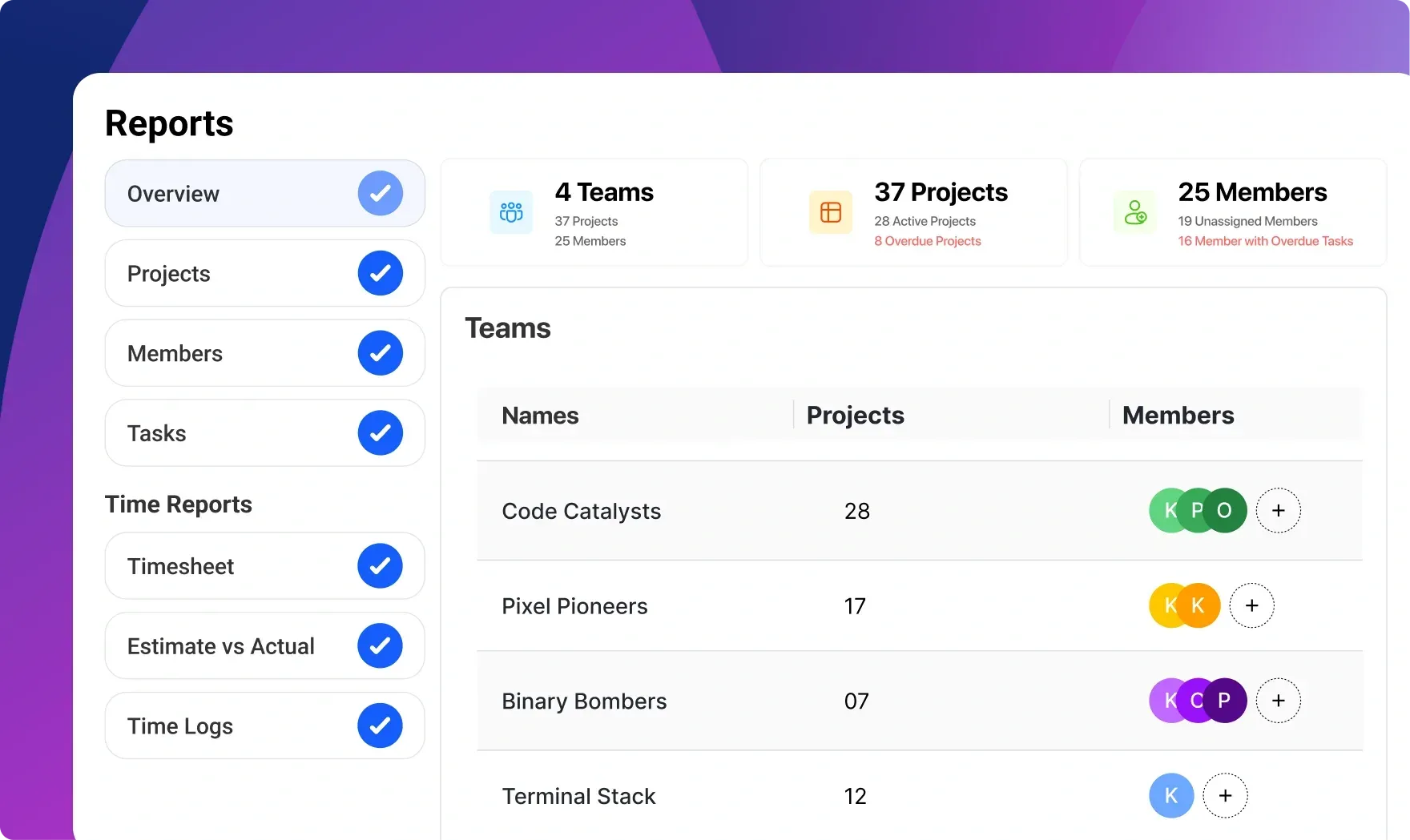
Reports overview from the worklenz.com homepage: totals for teams, active and overdue projects and unassigned members, with a navigation list for project, member, task and time reports. Sample data.
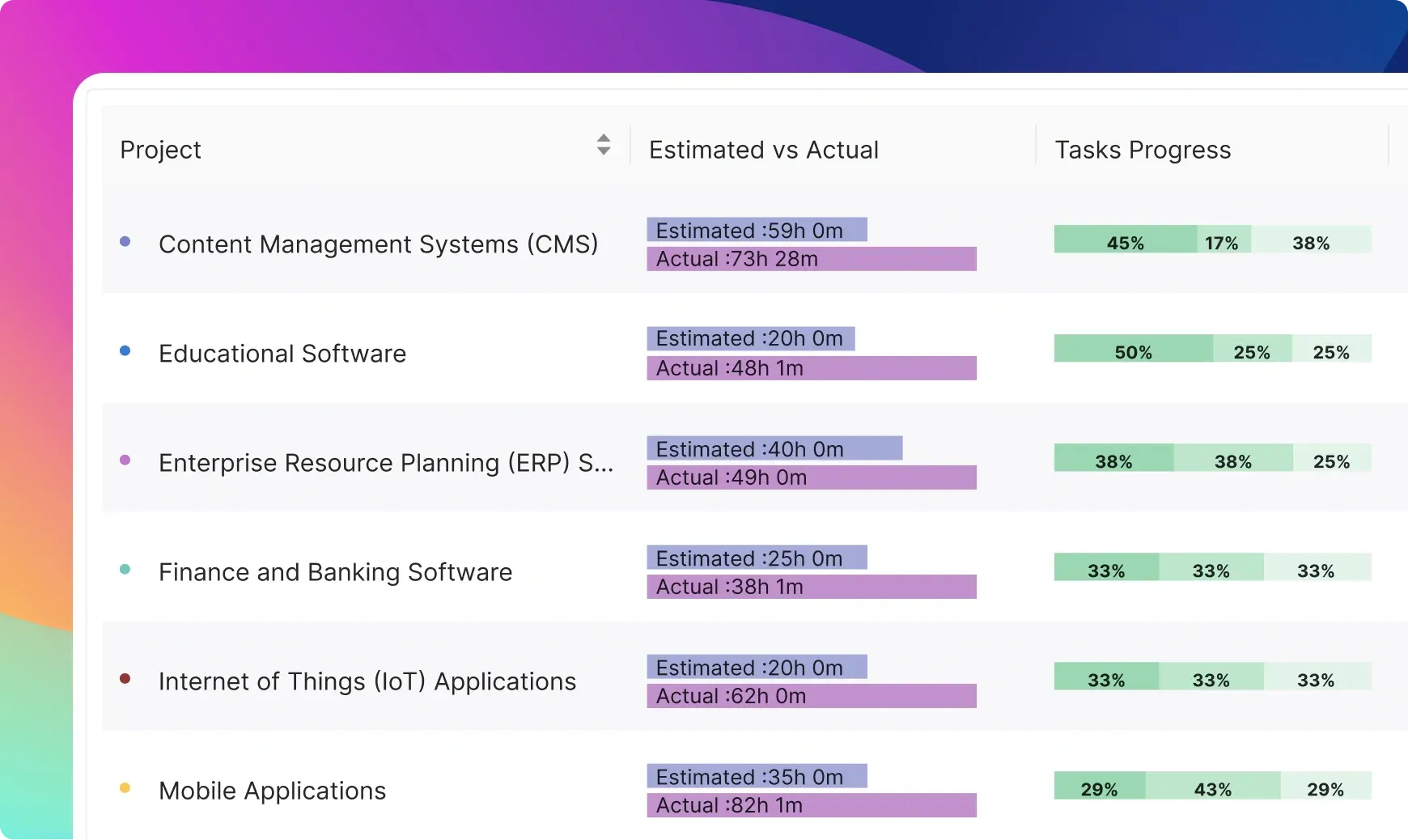
Estimated versus actual time per project from the worklenz.com homepage, with done, doing and to-do task shares for each project. Sample data.
Source: official Worklenz project page.
Key capabilities
- Task list and Kanban board A general project groups tasks by status in a list with columns for progress, members, labels, status, priority, phase and logged time, and the same tasks appear on a drag-and-drop Kanban board. Tasks support subtasks (movable between parent tasks since v3.4.0), labels, priorities, phases, custom statuses, custom columns and custom fields, with cascading dependent options added in v3.4.0. Bulk actions cover status, assignee, labels, start date and delete.
- Roadmap and task dependencies The Roadmap tab shows scheduled tasks as bars that can be dragged to change dates and durations, grouped by phase, status or priority. Tasks without dates do not appear as bars. The docs state that only the Blocked by dependency type is supported, and blocked tasks are marked on both the Roadmap and the task list.
- Planner: Schedule, Timeline and Workload The Planner groups three cross-project views. Schedule is a day-by-day grid per member where task chips can be dragged to reschedule or reassign; Timeline is a portfolio Gantt chart of every project, with bars split into done, doing and to-do segments and zoom from days to years; Workload shows committed hours per member or per project against capacity, with bands for available (under 80%), near capacity and over-allocated (over 100%). Planner settings define working days, hours per day and a default estimate. The docs list it for Business, Enterprise and self-hosted plans; the cloud Pro plan has read-only Gantt and schedule.
- Time tracking and time off Time is always logged against a task, either with a timer from the task drawer, task list or recent-timer menu, or as a manual entry. The timer cannot be paused: each start and stop creates a separate entry, and since v3.4.0 running timers roll over past midnight. Time off can be marked as all day or partial day with a type (vacation, sick, personal or other) and is subtracted from capacity in Schedule and Workload.
- Project finance Finance connects tasks and time logs to a project budget. Costs are calculated with hourly rates or with daily rates per man-day, set in rate cards by job title and currency; logged hours multiplied by the rate give time-based cost, and fixed expenses can be added per task. Billable hours produce revenue, non-billable hours count only as cost. Finance pages include budgets, expenses, billable time, invoices, profitability and a three-month forecast that the docs describe as a linear trend, not a pipeline forecast.
- Client portal Each client gets a separate sign-in-protected portal that shows only the projects, tasks and files marked client visible. Clients can comment, upload files, approve work, submit change requests and requests for services, and view quotes and invoices; the agency side handles approvals, discussions and invoices with an audit log and its own branding. Version 3.4.0 added lifecycle controls for clients and client users, emoji reactions, project-level visibility of client access and PDF export for quotes and invoices. Client portal email notifications are off by default for new setups.
- Software projects A software project is a separate project type with issues (task, story, bug, subtask and epic), a backlog, sprints, epics, story points, a software board, releases and software reports. The type is chosen at creation and cannot be changed later, and software projects start blank rather than from a template. Version 3.4.0 added inline sprint name and date editing and automatic shifting of later sprints when one finishes early.
- Reporting and analytics The Reporting section contains Overview, Projects, Members, Tasks and Progress Tracking reports, plus time reports for timesheets, time per project with billable and non-billable split, time per member, estimate versus actual and time logs. Members and Tasks reports export to Excel, and Tasks also to CSV. Project insights show progress and bottlenecks per project. Version 3.4.0 added custom dashboards, velocity, cumulative flow, SLA and time-in-status charts and saved views; on the cloud, advanced and custom reports are Business features.
- Docs, files and collaboration Projects hold documents, files, links and project updates, and tasks accept attachments, comments with mentions and internal notes. Version 3.4.0 added a team-wide Docs section and rich text task comments. Members can subscribe to projects or tasks and receive in-app notifications, email notifications and a daily digest.
- Templates and recurring tasks Built-in project templates and saved custom project and task templates start new work with predefined structures. Recurring tasks repeat on a schedule; since v3.3.1 missed occurrences are skipped instead of replayed. Tasks can be imported from CSV and exported for backup or reporting.
- Integrations The manual documents GitHub, Slack, Microsoft Teams, Google Calendar, Google Drive and Microsoft Calendar integrations. Slack sends task and project notifications to chosen channels and can create tasks with slash commands; the docs list Slack and Teams notifications for Business, Enterprise and self-hosted plans. GitHub links repositories to software projects and can update issue status from branches, commits and pull requests that mention the issue key; on a self-hosted install without a configured GitHub app the card shows Not configured.
- Mobile apps Worklenz publishes apps on the Apple App Store and Google Play. The mobile documentation lists sign-in, project and team management, status updates, timers and manual time logs, notifications and real-time sync with the web app. The vendor states that the web app has more features than the mobile apps.
- Roles, guests and admin center Workspaces have owner, admin, member and guest roles, project managers assigned per project, with team hierarchy, departments and practices, job titles and granular permissions. The Admin Center covers users, teams, projects, utilization settings and a security audit log. Members can be deactivated without deleting data, and deactivated members do not count toward paid seats.
- Docker self-hosting The recommended install clones the repository and runs
./quick-setup.sh, which generates secrets in.env, configures URLs for the domain, obtains Let's Encrypt certificates for a public domain or self-signed ones for localhost, and starts all services../manage.shhandles install, status, logs, backup, restore, upgrade and SSL. Express mode bundles PostgreSQL, Redis and SeaweedFS; advanced mode uses external PostgreSQL and AWS S3 or Azure Blob Storage. See DOCKER_SETUP.md. - Manual installation Without Docker, the backend and frontend are installed with npm, the PostgreSQL schema is created from SQL files and versioned migrations are applied with
npm run migrate:up. For production the README describes building both applications, serving the frontend build directory from a web server that proxies/apiand/socket.io, and running the backend under a process manager such as systemd or PM2. Invitations use an SMTP relay configured in the backend environment file. - Security features stated by the project The README lists non-root Docker containers, an internal-only backend network, SSL/TLS, rate limiting on API and login endpoints, security headers such as HSTS and CSP, and generated secrets. Version 3.3.0 added parameterized queries and configurable invitation and phishing protections, and v3.4.0 corrected access validation on client portal API routes. Vulnerabilities are reported by email to info@worklenz.com rather than in public issues.
- Cloud plans and lifetime deal Free costs $0 for up to 5 members, 3 active projects and 1 GB of storage. Pro costs $8 per active user per month ($6 billed annually) with no member or project cap, time tracking, timesheets, workload, custom fields, read-only Gantt and schedule, 3 guests per project and 5 GB. Business costs $12 ($10 billed annually) and adds client portal, project finance, full Gantt and schedule editing, advanced reporting, unlimited guests, Slack integration and 25 GB. Paid plans have a 14-day trial without a card. A lifetime Business deal costs $79 per code, each code adding 5 seats and 5 GB, up to 10 codes per checkout, according to the pricing page.
Where Worklenz fits
Running client projects against a budget
A project is created from a template, divided into phases and given a budget, a currency and a calculation method based on hourly or daily rates. Team members log time on tasks with the timer or manually, and the Finance view compares actual cost, fixed costs and time-based cost with the budget as work proceeds. Billable hours produce revenue, invoices are created in the client portal, and paid invoices feed the profitability report and the three-month forecast.
Planning capacity across projects
The Planner shows every member's scheduled tasks by day in Schedule, project dates across the portfolio in Timeline, and committed hours against capacity in Workload. Tasks can be dragged to another day or member, project bars can be moved or resized, and time off reduces available capacity. Utilization filters separate available, near-capacity and over-allocated members based on the working days and hours set in Planner settings.
Sharing progress with clients
Clients are added in the workspace settings, client users are invited, and projects are shared through the portal, where only items marked client visible appear. Clients can submit requests and change requests, approve work, join discussions and view quotes and invoices, while a preview-as-client option shows the portal from their side. Version 3.4.0 added deactivation and restore for clients and client users and a view of which client users can access a project.
Running a software team in sprints
A software project starts with a backlog of issues typed as task, story, bug, subtask or epic. Issues are estimated with story points, pulled into sprints, tracked on the software board and grouped into named releases with a target date. When the workspace GitHub connection is linked to the project, branches, commits and pull requests that contain the issue key appear on the issue and can move its status. Velocity and cumulative flow charts arrived in v3.4.0.
Tracking where time goes
Time logs from the web and mobile apps feed timesheets and time reports by project and member, with billable and non-billable splits and an estimate-versus-actual comparison per project. Member and task reports can be filtered by date range, team, client or phase and exported to Excel or CSV, and since v3.4.0 saved views keep report filters between sessions.
Self-hosting the open-source edition
On a server with Docker, ./quick-setup.sh prepares secrets, domain URLs and certificates and starts the containers defined in the Compose file: frontend, backend, client portal, PostgreSQL with a backup service, SeaweedFS and Nginx. SMTP settings in the environment file enable invitations, and ./manage.sh runs backups, restores and upgrades, with backup retention set by BACKUP_RETENTION_DAYS (30 days by default). The self-hosted install has Planner, Finance and Client Portal enabled and no seat limits, as described in the self-hosting guide.
Install
git clone https://github.com/Worklenz/worklenz.git && cd worklenz && ./quick-setup.shReviews of Worklenz
Be the first to share your experience with Worklenz.
Write a review
Loading review form…
Alternatives to Worklenz
 OpenProjectOpenProject is open-source project management software from OpenProject GmbH in Berlin. It combines work packages, Gantt charts, boards, Scrum backlogs, time and budgets, wikis and meetings. Self-host the free Community edition or use the paid Enterprise cloud.
 LeantimeOpen-source project management for teams without a dedicated project manager. Kanban, table and timeline views, goals, sprints, timesheets, wikis and idea boards run on PHP and MySQL, with a paid SaaS and a plugin marketplace.
 PlanePlane is a project management tool for tracking work items, running cycles, grouping work into modules and writing pages. The Community Edition is AGPL-3.0 and self-hosted with Docker or Kubernetes; Plane Cloud and the Commercial Edition add paid plans.