

What is TimeScribe?
TimeScribe is a desktop application for tracking working hours on macOS and Windows. The README describes it as smart and private time tracking with the line "No cloud. No registration. No paywall." It is aimed at freelancers billing clients, remote workers logging hours and people tracking their own productivity. The project is developed in the open on GitHub under the WINBIGFOX account, with community contributions for translations and features, and the official website is timescribe.app.
The README and website make three privacy and pricing statements. The README lists "Completely Free: No hidden costs, no premium plans, no paywalls", "No Registration: No email required" and "100% Offline & Private: Your data stays on your device. We don't track you." The website FAQ states that "All data is stored locally on your device, without a cloud and without an account", that TimeScribe "works completely offline and is designed for offline use", and that it is "completely free" with "no hidden costs, no subscriptions, and no restrictions." The FAQ also states that TimeScribe is intentionally built for individual users rather than teams. Development can be supported through GitHub Sponsors or Buy Me a Coffee.
The latest release is TimeScribe v1.18.0, published on November 4, 2026. It lets individual time entries on billable projects be marked as non-billable, adds Spanish and Persian, and updates the bundled PHP binary to address the PHP2Shell vulnerability. Version 1.17.0 (September 2026) added full right-to-left layouts with Arabic and Hebrew and showed daily project time in the menu bar. Version 1.16.0 introduced a simple and a detailed day view, an app-wide visual refresh, a resizable main window and macOS 27 support, and 1.15.0 stopped the internally used port 4000 from being reachable from other hosts on the network.
TimeScribe is built with Laravel (PHP) as the core, NativePHP on Electron as the desktop runtime, Vue.js with Tailwind CSS for the interface and a local SQLite database. Each release on the GitHub releases page ships a Windows setup executable and macOS DMG and ZIP packages for Apple Silicon (arm64) and Intel (x64). The README also documents installation through Homebrew and WinGet and a build from source with Composer, npm and php artisan native:build.
The repository is distributed under the GPL-3.0 License, and its only license file is the GNU GPL version 3 text; no separately licensed paid edition or closed component is described. The first public release, v0.1.0, appeared in February 2025, version 1.0.0 followed in April 2025, and Windows support arrived with 1.2.0 in May 2025. Similar listings on iThub include solidtime, a time tracker for freelancers and teams, and Super Productivity.
TimeScribe screenshots
Explore the interface. Open a screenshot to view it at full size.
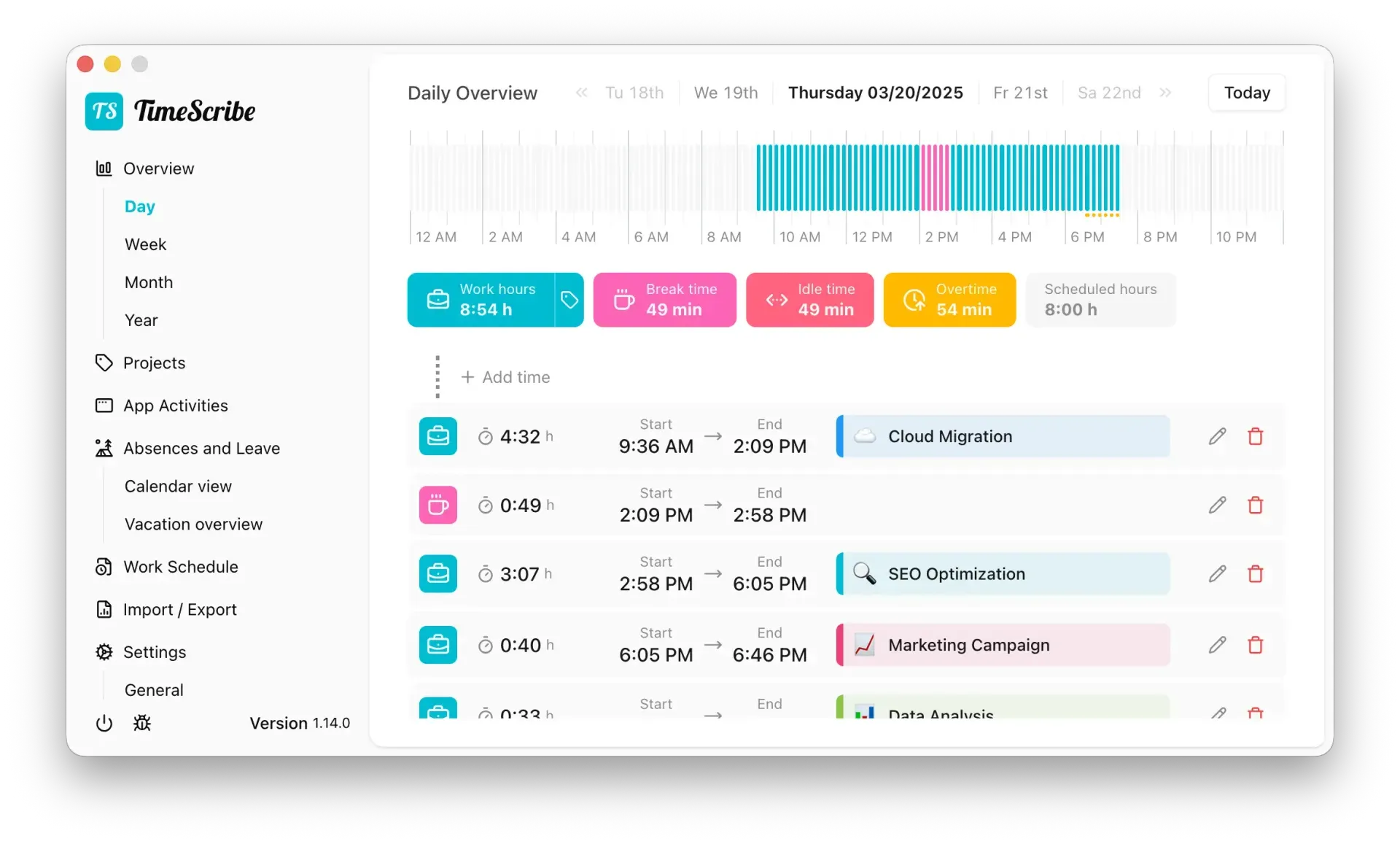
Daily overview from the TimeScribe README, with timeline, totals and time entries assigned to projects.
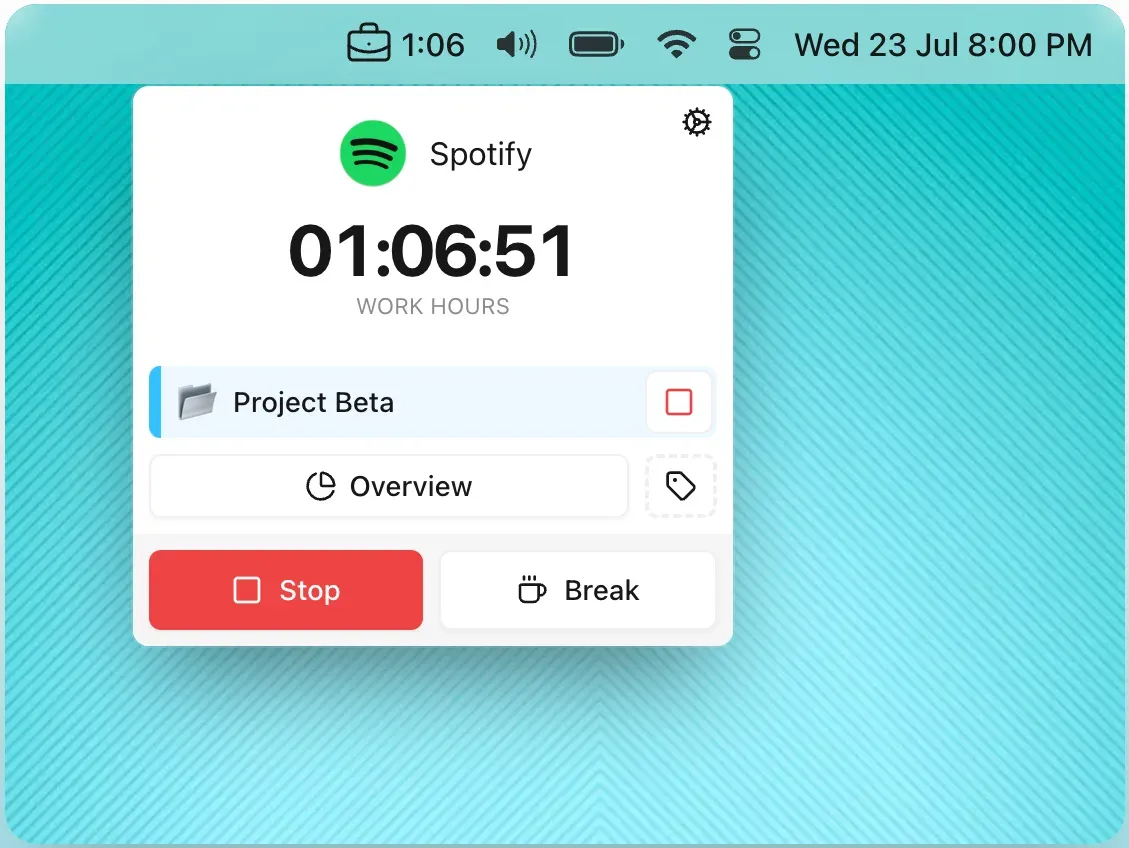
Menu bar popup on macOS showing the work timer, the active project and controls for stopping or taking a break.
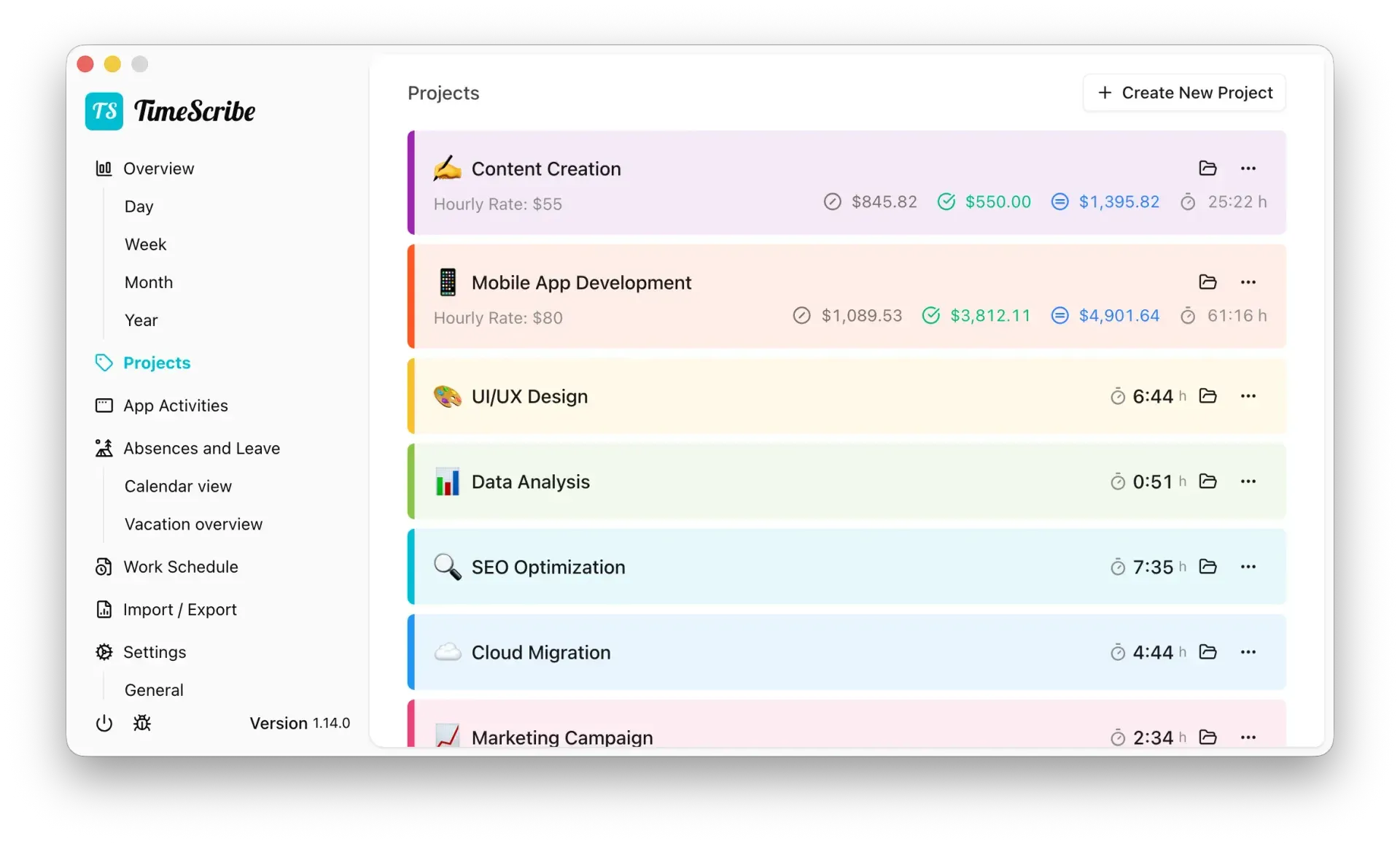
Projects view with hourly rates, billing amounts and tracked time per project.
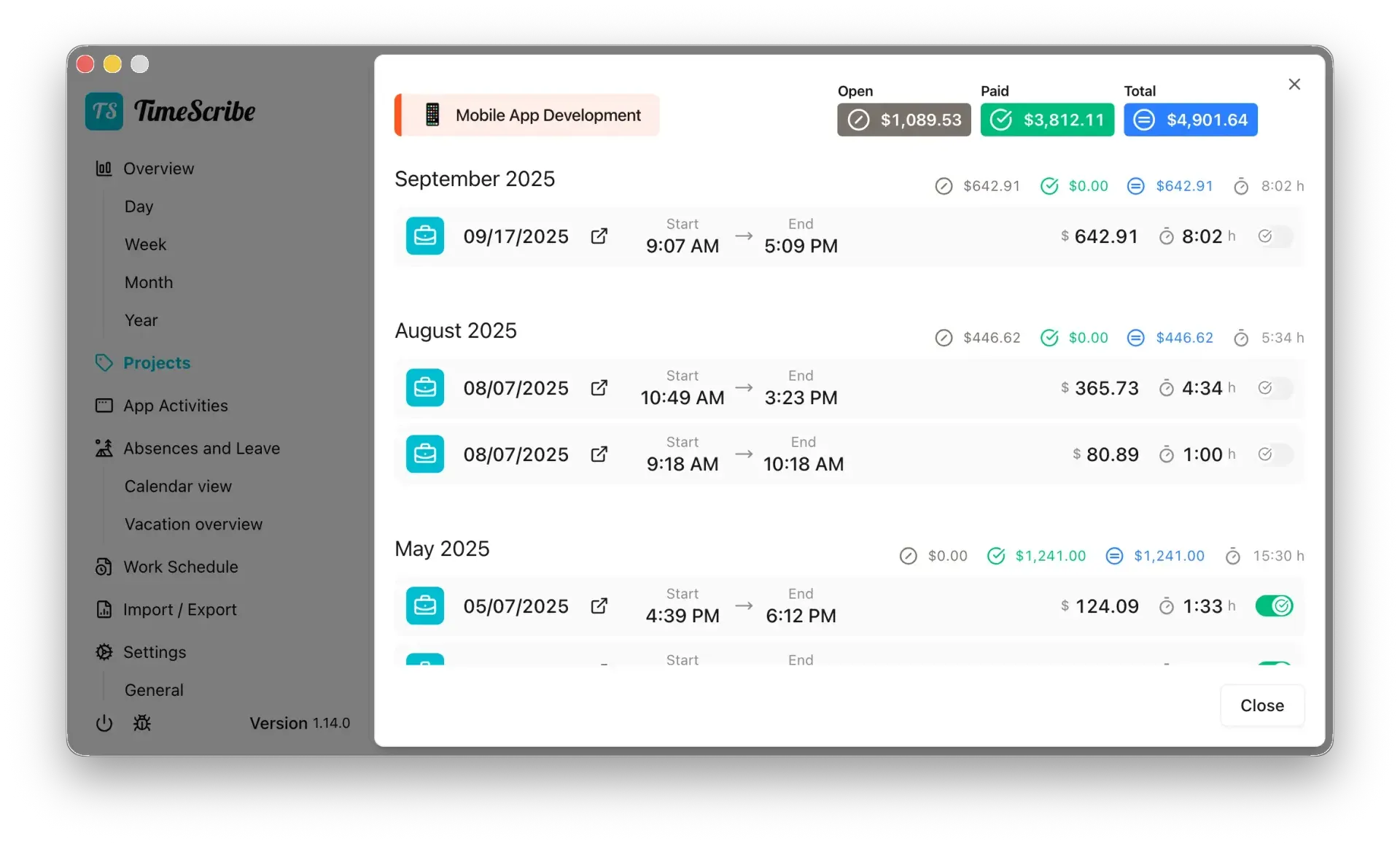
Project detail view grouping entries by month, with per-entry amounts and a toggle to mark entries as paid.
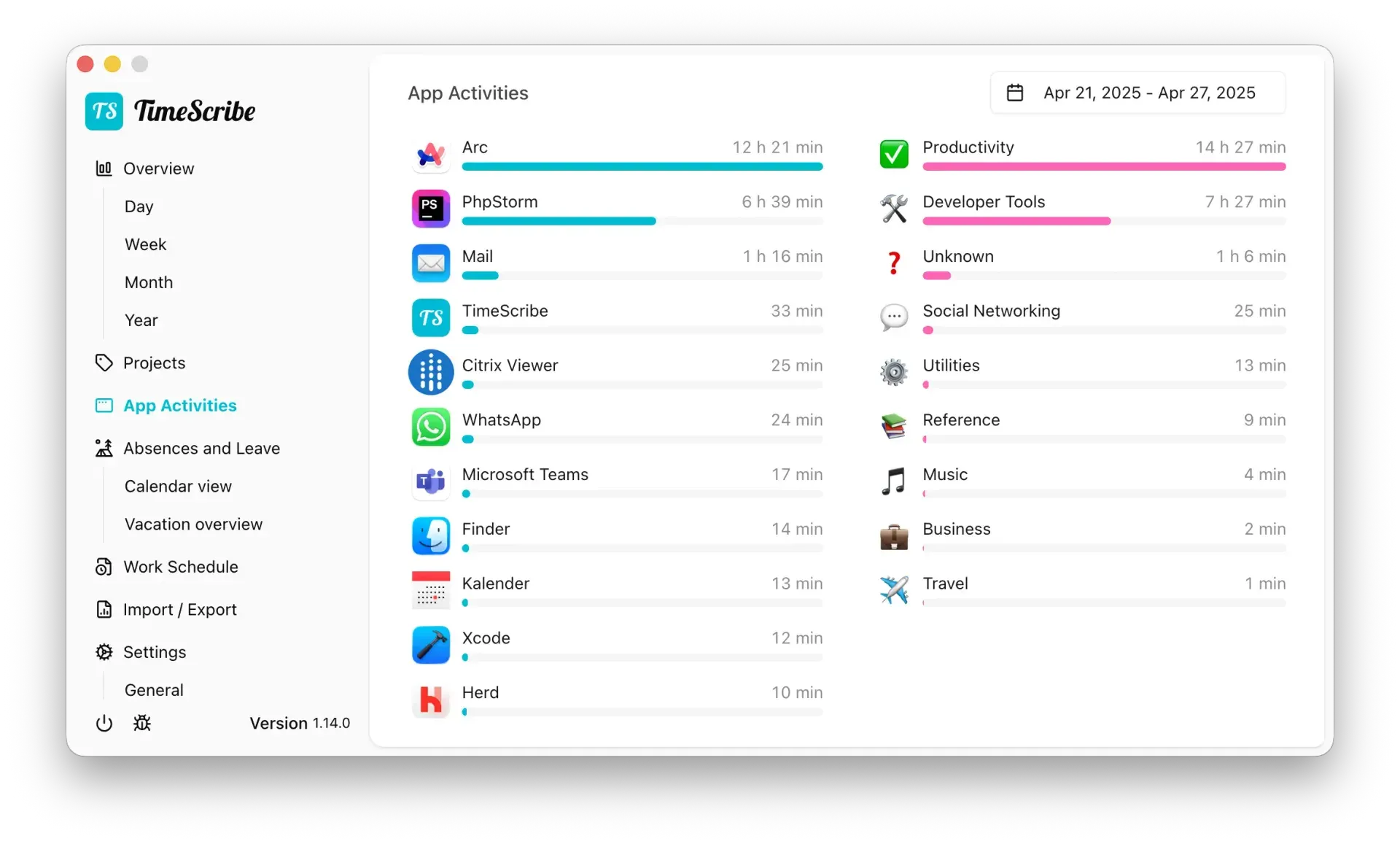
Optional app activity view with usage per application and per category for a selected week.
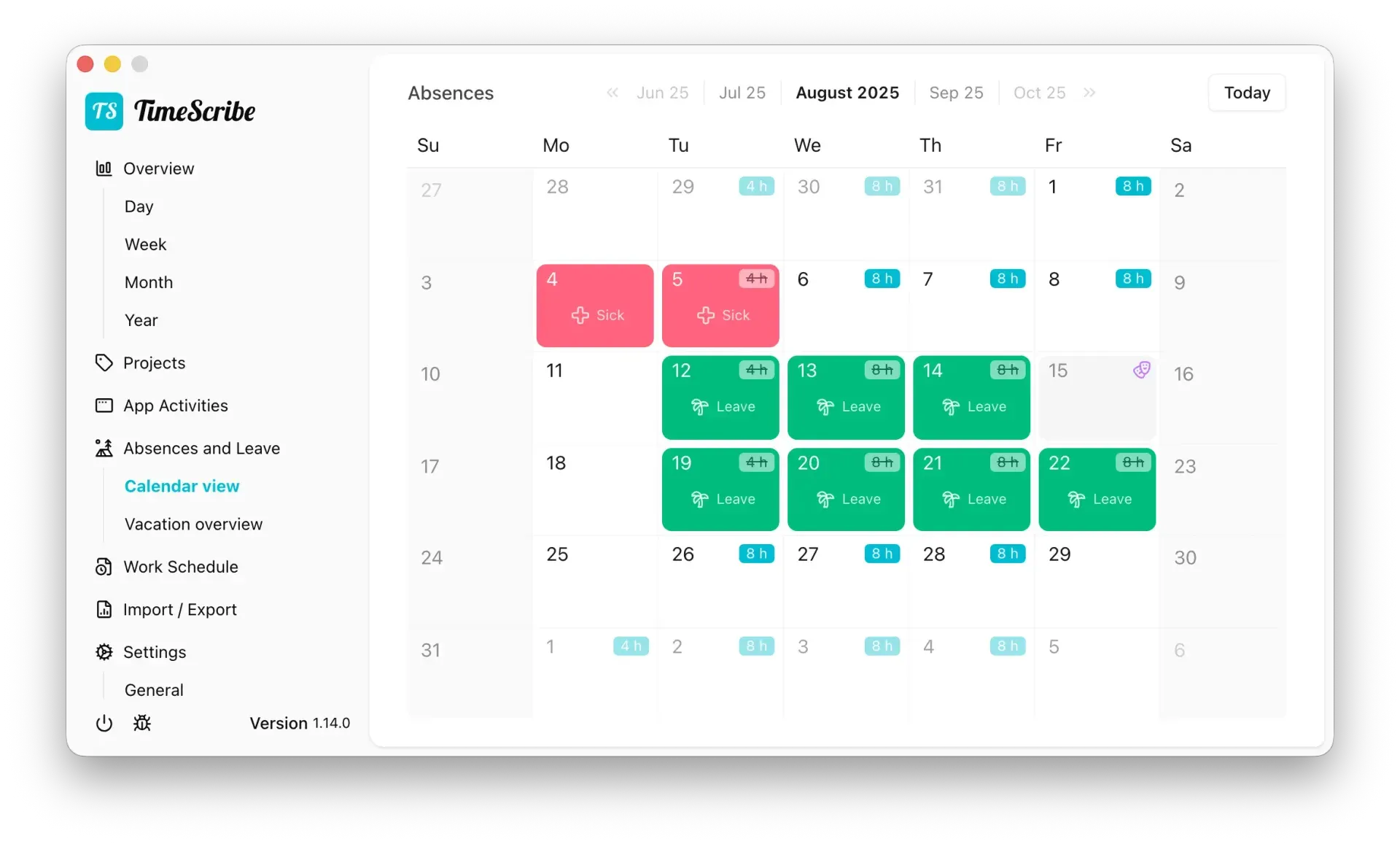
Absences calendar showing sick days, leave and the scheduled hours from the work schedule.
Source: official TimeScribe project page.
Key capabilities
- One-click work and break tracking Work time is started, paused and stopped from the main window or the menu bar popup, which shows the running timer, the active project and Stop and Break buttons. The start time of a running timer can be adjusted, and a description can be added while tracking. A floating timer overlay, added in v1.4.0, can be pinned on top of other windows.
- Day, week, month and year overviews The daily overview shows a 24-hour timeline with totals for work hours, break time, idle time, overtime and scheduled hours, followed by the list of entries. Since v1.16.0 the day can be shown in a simple or a detailed view. Entries and breaks can be created by drag and drop on the timeline, and consecutive entries can be merged.
- Automatic start and pause The settings can stop working time or start a break when the computer is locked, and stop forgotten work or break time retroactively. Tracking can also start or pause automatically based on screen time and idle status, as listed in the README feature list.
- Work schedules and overtime A work schedule defines weekly working hours, with daily hours set in 0.1-hour steps since v1.2.0. TimeScribe calculates overtime and a weekly balance, and since v1.10.0 the balance can be adjusted at a reference date. Version 1.7.0 added overtime handling without a work plan for freelancer mode.
- Absences, vacation and holidays A calendar view records vacation, sick leave and other absences, and public holidays can be considered, with working hours on holidays fully credited. The yearly vacation overview calculates remaining days from a configured quota and can carry remaining days over from the previous year. Vacation is only counted against a work schedule.
- Projects, hourly rates and billing Time entries can be assigned to projects with a color, icon, description and hourly rate in a selectable currency. The project view shows open, paid and total amounts and tracked hours, and individual entries can be marked as paid (v1.9.0) or, since v1.18.0, as non-billable on a billable project. Project metadata and a project breakdown in the overview were added in v1.12.0.
- App activity (optional) TimeScribe can record which application was active and for how long while the work timer runs, and group usage into categories such as productivity, developer tools or social networking. The website FAQ states that app tracking is optional and disabled by default. Version 1.16.0 fixed activity tracking on macOS 27.
- Exports to CSV, Excel and PDF Time entries can be exported as CSV, Excel or PDF with a selectable date range, filters for projects and work or break time, and customizable, reorderable columns, as described in the v1.11.0 notes. Absences and holidays can be exported since v1.14.0, and export filter preferences are remembered. The README notes that PDF exports use Dompdf, whose right-to-left text support is incomplete.
- Clockify import Version 1.2.0 added an import of existing data from Clockify. Imports and exports share the Import and Export section of the application.
- Backup, restore and data reset The application can create a backup of its data for safekeeping or migration to another device and restore it in one step. A full data reset deletes all TimeScribe data permanently, and the interface suggests creating a backup first.
- Deep-link API Other tools such as Shortcuts, Alfred, Raycast, AutoHotkey or scripts can control the timer through
timescribe://start/work,timescribe://start/breakandtimescribe://stop. The deep-link documentation states that this works on macOS and Windows. - Keyboard shortcuts Custom keyboard shortcuts were added in v1.6.0 and extended in v1.13.0, including a shortcut for the project list in the menu bar.
- Twelve interface languages TimeScribe is available in Arabic, Danish, English (UK and US), French (France and Canada), German, Hebrew, Italian, Polish, Persian, Brazilian Portuguese, Spanish and Chinese. Arabic, Hebrew and Persian use right-to-left layouts.
- Automatic updates The application checks for updates automatically and notifies the user, according to the website FAQ. Release assets include the update manifests used by the desktop runtime.
- Download for macOS DMG and ZIP packages are published for Apple Silicon and Intel Macs, with direct links on the website for Apple Silicon and Intel. The README also documents
brew install timescribe. The DMG is installed by dragging TimeScribe into the Applications folder. - Download for Windows Windows users run
TimeScribe-setup.exefrom the Windows download link or the latest GitHub release. Since v1.13.0 the README also documentswinget install WINBIGFOX.TimeScribe. - Build from source Developers can clone the repository, install dependencies with Composer and npm, generate an application key and build with
php artisan native:build macornative:build win. Contribution guidelines, GitHub Discussions and a public feature roadmap are linked from the README.
Where TimeScribe fits
Logging employee working hours
A user sets up a weekly work schedule, starts work time in the morning and takes breaks from the menu bar. TimeScribe calculates the daily total, overtime against the schedule and the running weekly balance. Locking the computer can stop work time or start a break automatically, and forgotten timers can be stopped retroactively.
Billing freelance work by project
Freelancers create projects with an hourly rate and currency and assign each time entry to a project. The project detail view lists entries by month with open, paid and total amounts, and entries are marked as paid or non-billable. The project feature set was introduced in v1.3.0 and extended in later releases.
Preparing timesheets for invoices or accounting
The export dialog produces CSV, Excel or PDF files for a chosen date range, filtered by project and by work or break time, with selected columns. The website FAQ names invoices and accounting as typical uses of these exports. Absences and holidays can be exported separately.
Planning vacation and recording sick days
The absences calendar marks leave, sick days and public holidays against the work schedule. The yearly vacation overview shows taken and planned days and the remaining quota, including automatic carryover from the previous year.
Reviewing where working time goes
With app activity enabled in the settings, TimeScribe records the active application during work time and shows totals per application and per category for a selected date range. The feature is off by default, and the recorded data stays in the local database.
Automating the timer from other tools
The timescribe:// deep links let launchers, Shortcuts, AutoHotkey or scripts start work, start a break or stop the timer. Combined with custom keyboard shortcuts, this allows tracking without opening the main window.
Install
brew install timescribeReviews of TimeScribe
Be the first to share your experience with TimeScribe.
Write a review
Loading review form…
Alternatives to TimeScribe
 solidtimesolidtime is an AGPL-3.0 time tracker built on Laravel with timer, calendar and timesheet, billable rates, goals, reports, invoicing, desktop apps and Toggl, Clockify or Harvest import, as cloud or self-hosted.SPSuper ProductivitySuper Productivity is an open-source, offline-first to-do list, time tracker and planner with Jira, GitHub and GitLab integrations on desktop, mobile and web.
 Invoice NinjaSource-available invoicing app for freelancers and small businesses: invoices, quotes, recurring billing, expenses, projects and time tracking, a client portal, REST API and apps, hosted or self-hosted.