

What is Mimir (MIMRAI)?
Mimir, published in the repository as mimrai-org/mimrai, is an open-source task and project management application with an AI assistant. It was built by MIMRAI as a product and is described in the README as no longer operated as a hosted service. The whole codebase is now published as a template: you can fork it, self-host it for a team or lift individual parts into another tool. The public site at tasks.mimrai.com is a static showcase of that template, not a sign-up page.
The application covers tasks with statuses, labels, checklists and due dates, projects with milestones, kanban boards, a backlog, recurring tasks and task dependencies. On top of that sits an assistant called Mimir that can answer questions about your workload in a chat panel, propose follow-ups on stalled work and prepare a daily digest and an end-of-day summary. The AGENTS.md specification in the repository documents the structure in detail.
The stack is a Bun and Turborepo monorepo in TypeScript. The dashboard is a Next.js and React application styled with Tailwind CSS and Shadcn UI. The API is a Hono server with tRPC, Drizzle ORM on PostgreSQL, Better Auth for sign-in and the Vercel AI SDK for model calls. Supporting packages cover Redis caching, React Email templates, Trigger.dev background jobs, vector embeddings and Stripe billing. The README lists the reference deployment: Supabase for database, storage and realtime, Vercel for the website and dashboard, Fly.io for the API, plus Trigger.dev, Resend, Upstash, Sentry, OpenPanel and OpenAI.
The repository has not published a stable release. The latest tag in the repository is 0.1.4 and the most recent GitHub release, v0.1.5, is marked as a pre-release. It attaches Electron desktop builds: a Windows installer, a macOS zip for Apple silicon, and Debian and RPM packages. Development has continued on the main branch since, mostly around the open-source template relaunch.
The license is AGPL-3.0 for non-commercial use. The README states that commercial use, or deployments that involve a setup fee, require a separate commercial license, and gives founders@mimrai.com as the contact. Read the license file and that note before building a product on the code.
Mimir (MIMRAI) screenshots
Explore the interface. Open a screenshot to view it at full size.
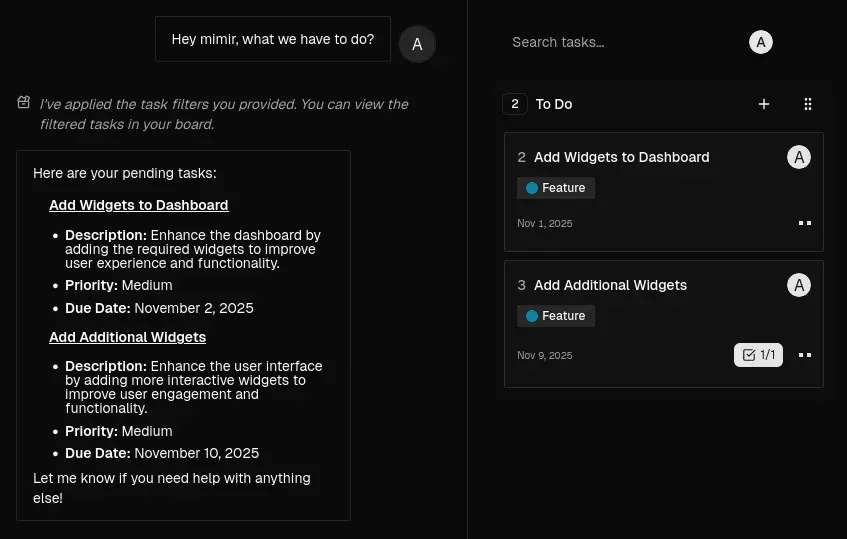
Official project image of the chat panel answering a question about pending tasks while the board is filtered.
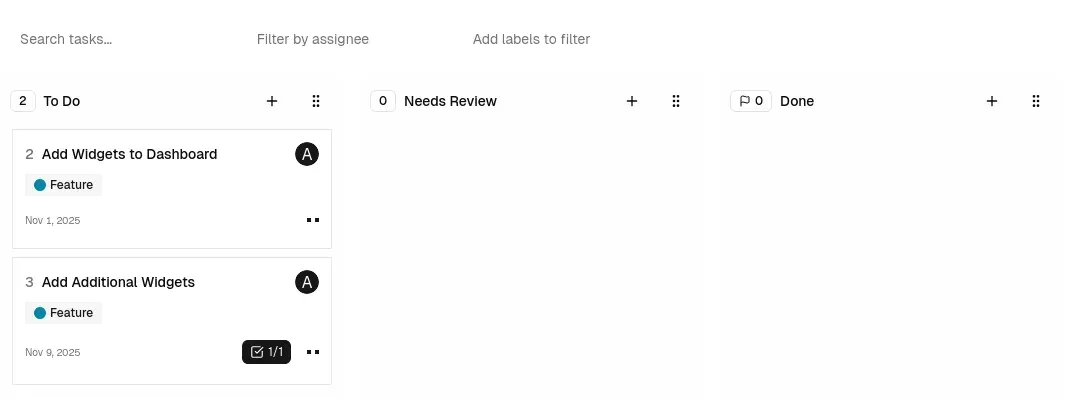
Official project image of the board in light theme with search, assignee and label filters.
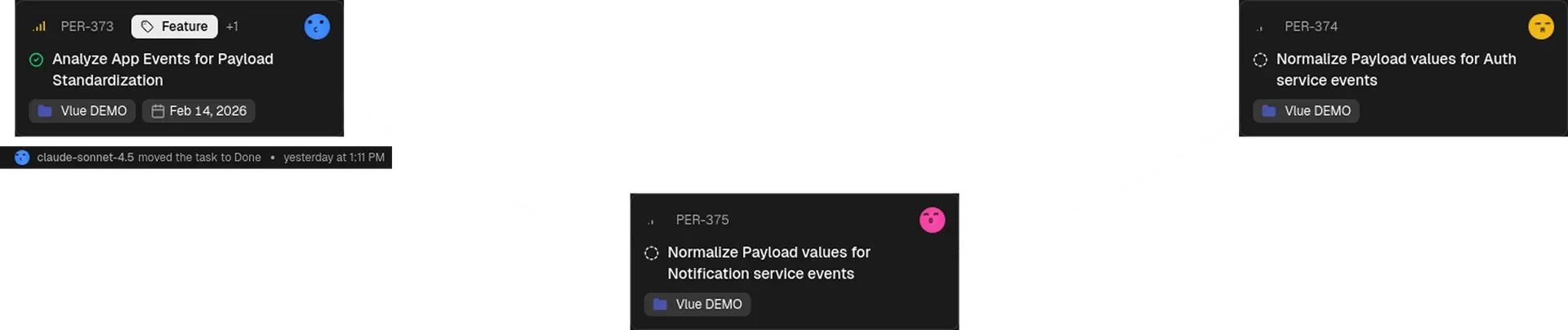
Official project image of task cards worked on by AI agent identities, with an activity line under the first card.
Source: official Mimir (MIMRAI) project page.
Key capabilities
- Tasks with statuses, labels and checklists Each task carries a status (the schema documents backlog, to do, in progress, done and canceled), labels, a due date, an assignee, a description edited with the TipTap rich-text editor and checklists. Boards show the task number, labels, date and checklist progress on the card, as in the project screenshots.
- Kanban board with custom columns The board groups tasks into columns such as To Do, In Progress, Reviewing and Done, and the code includes a column model so teams can define their own. Cards can be dragged between columns and a filter bar searches by text, assignee, project and label.
- List view and backlog The Tasks section of the sidebar has Workstation, Board, Backlog, Recurring and Done views. Backlog holds work that is not scheduled yet, so the board stays limited to what the team is acting on.
- Projects and milestones Tasks can be grouped into projects, and projects can carry milestones, a lead, members, a duration and a health status. This gives a roadmap level above the individual card. Limits are those of a young codebase: check the project page you need rather than assuming parity with Jira or Linear.
- Task dependencies The data model stores dependency relations between tasks (blocks and blocked by). The assistant uses this information when it orders the daily digest, so a blocked item is not presented as the first thing to do.
- Recurring tasks A dedicated Recurring view lists tasks that repeat on a schedule. Background jobs are run through Trigger.dev, so recurrence needs that job runner configured in a self-hosted deployment.
- Mimir chat assistant A chat panel answers questions such as which tasks are pending, applies filters to the board and can act on tasks through tools. Model calls go through the Vercel AI SDK; the API environment example lists an AI gateway key, so a model provider account is required and its usage is billed separately.
- Follow-ups on stalled work The website describes Mimir detecting stalled tasks and prompting the right person, for example asking whether to ping the owner of a blocked item. The repository has a follow-up job type for this behavior.
- Zen Mode and Smart Daily Digest Zen Mode reduces the interface to the current focus, and the digest serves tasks one at a time in an order based on deadlines and blockers. An end-of-day summary reports progress and blockers. These are described on the official site; how well the ordering fits a team has to be judged in use.
- AI agents as task participants A project screenshot shows tasks moved to Done by an AI agent identity, with an activity note under the card. This suggests agents can be treated as actors in the task history; read the code for the current permission model before relying on it.
- Integrations The integration package lists Slack, Mattermost, GitHub and WhatsApp. GitHub needs an OAuth app and webhook secret, Slack needs client credentials and a signing secret, and WhatsApp is wired through Twilio in the environment example. Each integration needs its own credentials in a self-hosted setup.
- Imports from CSV and Excel A jobs package handles imports of tasks from spreadsheet files. Test it on a copy of your data first, since column mapping and status names differ between tools.
- Notifications by email and in the app A notifications package sends in-app notifications and email through Resend, using React Email templates for verification, password reset, invitations and welcome messages. Self-hosting therefore needs an email provider.
- Meet bot job The jobs package includes a meeting bot job type, and a project screenshot lists a Google Meet Bot task as done. Treat it as experimental until you have read its job code and the privacy implications of recording meetings.
- Teams, roles and sign-in The schema models users, teams, sessions and OAuth accounts, with owner and member roles in a team, handled by Better Auth. Pluggable single sign-on and audit logging are not documented in the README.
- Billing hooks that can be disabled A billing package integrates Stripe with free and team plans. The API environment example includes
DISABLE_BILLING=true, which is what a self-hosted copy would normally set. - Desktop application An Electron Forge project in
apps/desktopproduces a desktop shell. The pre-release v0.1.5 lists a Windows Setup.exe, a macOS arm64 zip, a .deb and an .rpm. It wraps the web application and still needs a reachable server. - Source, workspace layout and agent guide The monorepo has separate apps (api, dashboard, desktop, website) and packages (db, cache, jobs, email, integration, ui and others). The AGENTS.md file explains conventions such as Biome formatting and Zod forms, which helps a team adopting the template.
Where Mimir (MIMRAI) fits
Forking it as the base for your own task tool
The project is explicitly offered as a template. Create a copy from the GitHub template button, rename the product, remove integrations you do not need and keep the packages that match your data model. Check the AGPL-3.0 obligations for a network service and the commercial-license note in the README before you ship the result to customers.
Self-hosting for a small team
The reference deployment uses Supabase, Vercel, Fly.io and several SaaS services, and the repository does not contain a one-command production installer. A team should plan a PostgreSQL database, Redis (the docker-compose file only starts Redis), a Trigger.dev project, an email provider and a model key. Start from the .env.example files in apps/api and apps/dashboard and set DISABLE_BILLING.
Running a kanban board with an AI assistant
Create a project, add columns and milestones, then ask Mimir for pending work in the chat panel. Compare what it returns with the board filters so you know whether it reads current data. Decide up front which tasks may be changed by the assistant and which only answer questions.
Keeping a team informed through Slack, Mattermost or GitHub
Install the integration you use and connect it to a test workspace first. Check which events create notifications, who receives them and whether webhook signatures are verified. Keep tokens and signing secrets in your secret store, not in the repository.
Bringing tasks in from a spreadsheet
Use the CSV or Excel import for a one-off migration. Map spreadsheet statuses to the application statuses, import a small sample and review labels, dates and assignees before running the full file. Keep the original spreadsheet as the rollback.
Studying a modern TypeScript monorepo
The repository is a compact example of Next.js 16, Hono, tRPC, Drizzle and Better Auth in a Turborepo workspace, with a documented agent guide. Reading the packages for jobs, embeddings and notifications shows how a task product splits web, API and background work.
Reviews of Mimir (MIMRAI)
Be the first to share your experience with Mimir (MIMRAI).
Write a review
Loading review form…
Alternatives to Mimir (MIMRAI)
 KaneoKaneo is an open-source, MIT-licensed project management app with Board, List, Calendar and Gantt views, GitHub, Gitea and GitLab sync, a REST API, CLI and MCP server. Self-host it with Docker or Helm, or use Kaneo Cloud.
 PlanePlane is a project management tool for tracking work items, running cycles, grouping work into modules and writing pages. The Community Edition is AGPL-3.0 and self-hosted with Docker or Kubernetes; Plane Cloud and the Commercial Edition add paid plans.
 VikunjaVikunja is an AGPL-licensed task manager written in Go. It runs as a single binary or Docker container on SQLite, MySQL or PostgreSQL, offers four project views, CalDAV, webhooks, SSO and an MCP server, and is also sold as an EU-hosted cloud service.