

What is Kanzo?
Kanzo is a kanban board and a Model Context Protocol (MCP) server packaged as one program. The board runs in a web browser for people, the MCP server gives coding agents such as Claude Code and Codex access to the same tasks, and a kanzo command covers terminals and scripts. It is developed in the emanuele-em/kanzo repository on GitHub and released under the GNU Affero General Public License v3.0 (LICENSE). The project describes itself as self-hosted and sharable, with no account, no separate server and no setup step: running kanzo starts the board at http://localhost:4242.
The program is written in Rust and ships with SQLite built in. According to the README, the binary is 4.7 MB, uses about 5 MB of memory when idle and 12 MB with 3,000 tasks, starts in 3 ms and loads a 3,000 task board in the browser in 17 ms; the project states these figures were measured on an Apple M4. For agents, the tool list costs about 1,000 tokens once per session and replies are 10 to 60 tokens of plain text. The first run creates a ~/kanzo folder holding the board in kanzo.db and settings in config.toml.
Distribution covers macOS, Linux and Windows. A shell installer handles macOS and Linux, including Raspberry Pi boards, and a PowerShell installer handles Windows; both put Kanzo on the PATH. Release archives are published for x86_64 and ARM64 macOS, x86_64 Windows and Linux builds for x86_64, ARM64, ARMv6 and ARMv7, each with a SHA256 file, and release artifacts carry GitHub attestations that can be checked with gh attestation verify. The crate is also on crates.io for cargo install kanzo, and the repository includes a server.json entry for the MCP registry under the name io.github.emanuele-em/kanzo.
The current release is 0.4.1, published November 7, 2026. It lets agents switch to a new Kanzo version at their next call without reconnecting, restarts the board on a new version within seconds however it was updated (both on macOS and Linux), renders Markdown tables in descriptions and comments, and fixes a board started with kanzo network on stopping when an update restarted it. The first public release, 0.1.0, appeared on October 26, 2026; the full history is in the changelog.
The interface is available in English and Chinese, and the README has a Chinese translation. Sharing a board has no logins: the project states that a shared board should only be exposed on a trusted network, and suggests a VPN such as Tailscale, NetBird or WireGuard for access over the internet. Similar entries in this directory: Kan and PLANKA.
Kanzo screenshots
Explore the interface. Open a screenshot to view it at full size.
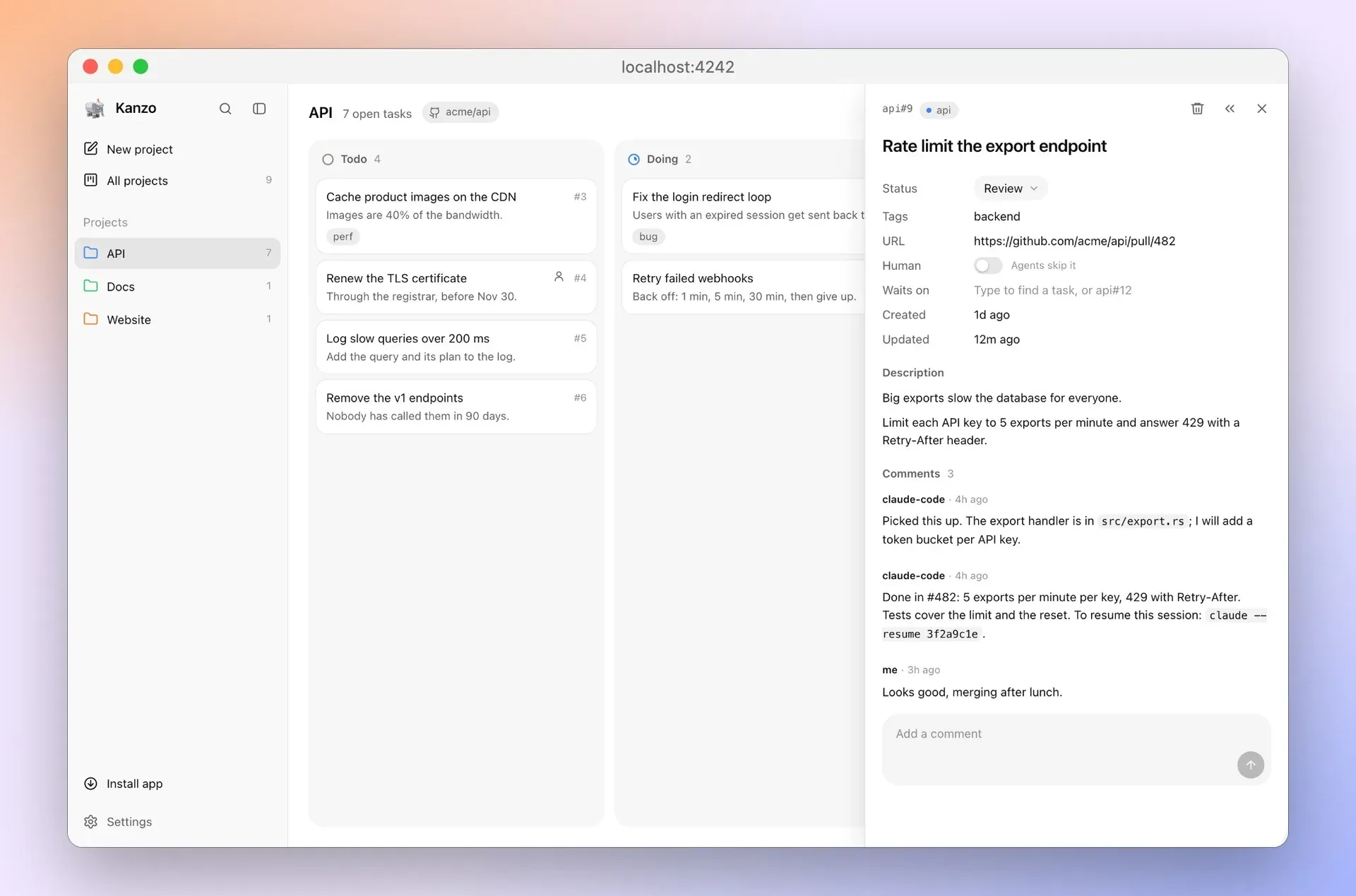
Task panel in review with agent comments, one giving the command to resume its session. Official README screenshot.
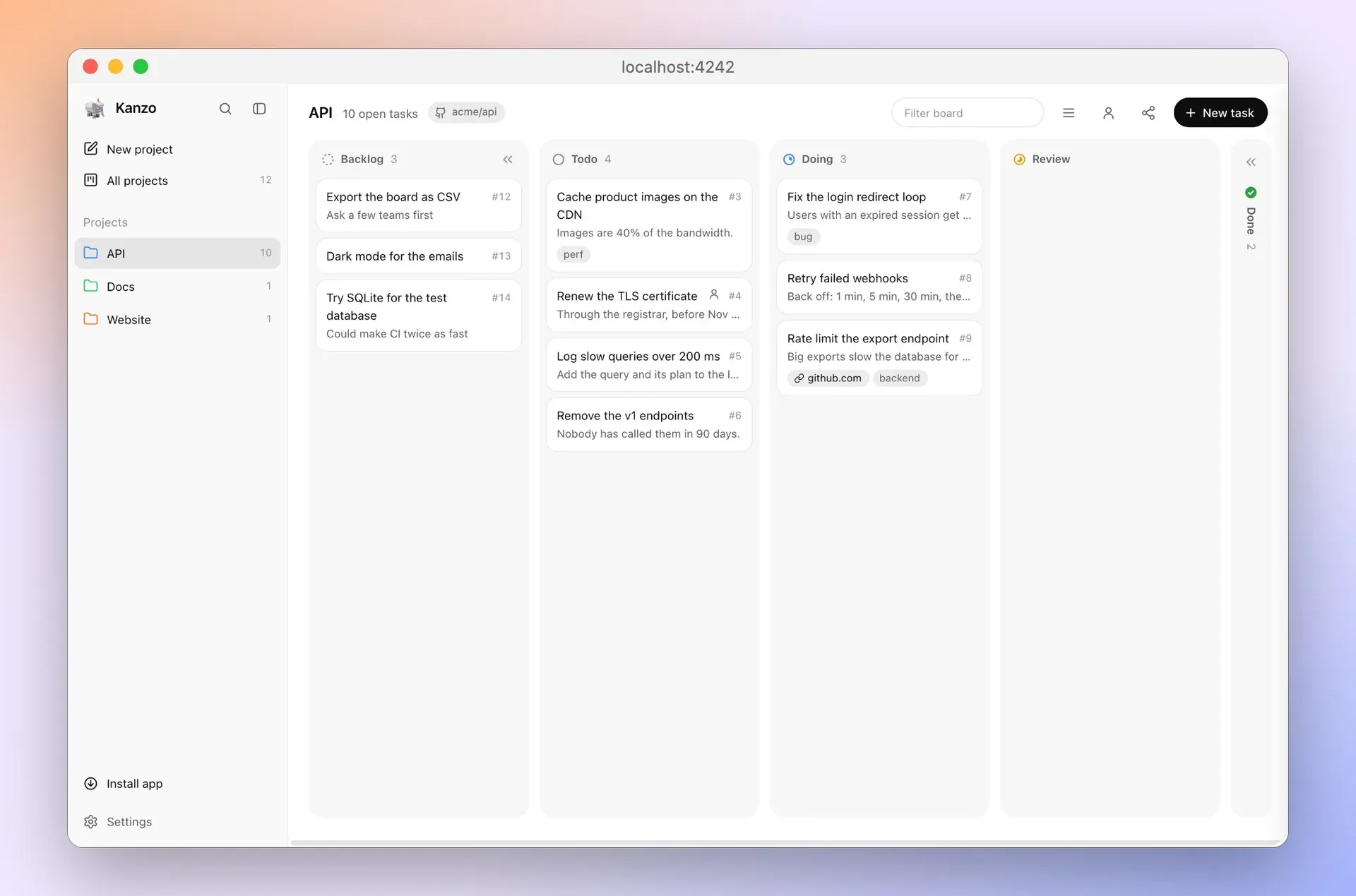
Board with the optional Backlog column turned on, left of Todo. Official README screenshot.
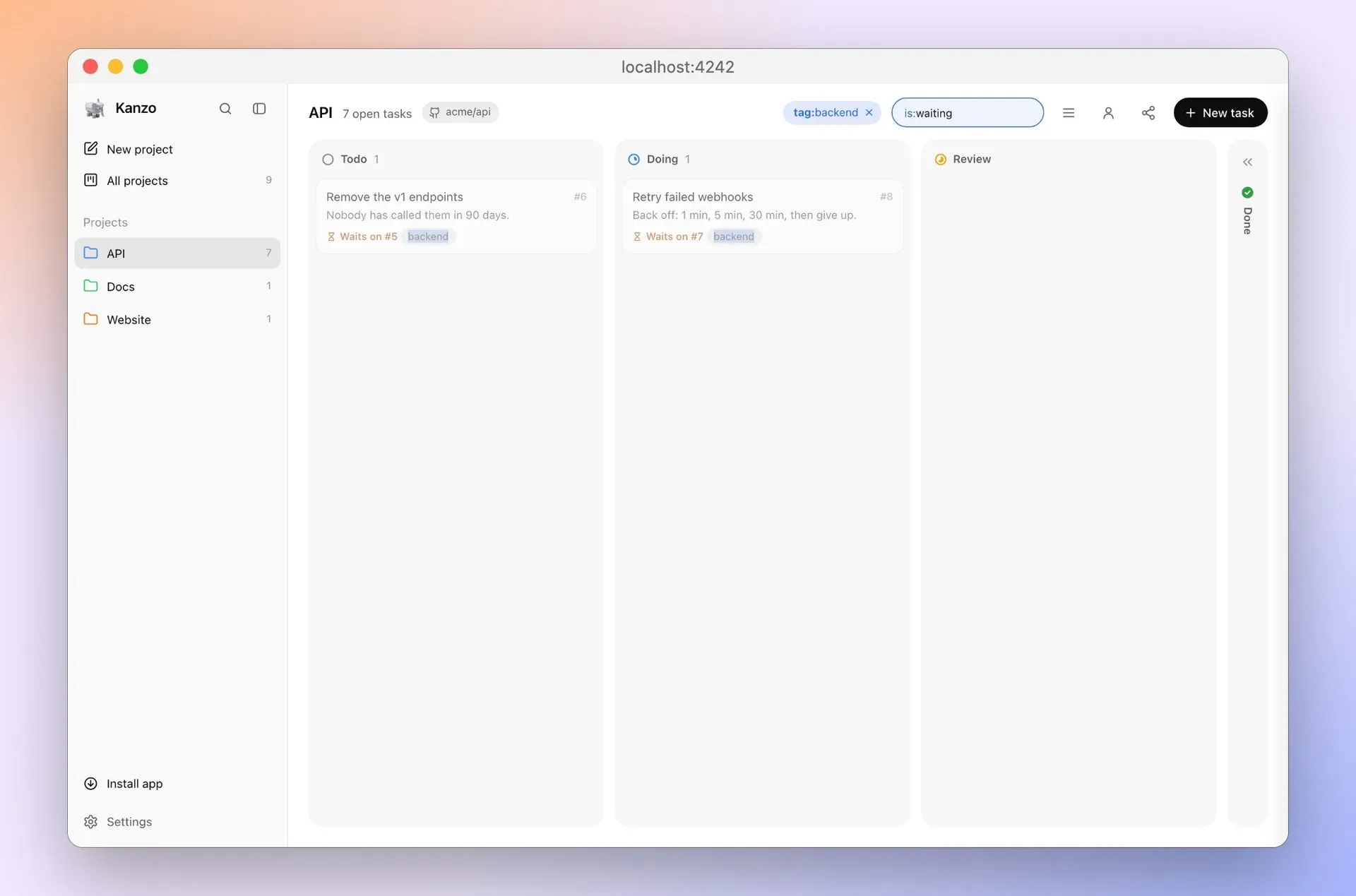
Board filtered with tag:backend and is:waiting; each card says which task it waits on. Official README screenshot.
Source: official Kanzo project page.
Key capabilities
- Browser kanban board Running
kanzoopens the board athttp://localhost:4242, with--portfor another port and--no-opento skip opening a tab. Tasks sit in Todo, Doing, Review and Done columns, grouped into projects listed in a sidebar. Keyboard shortcuts includenfor a new task,/or Cmd+K to search every project andfto filter the board. - Built-in MCP server
kanzo mcpruns the MCP server over stdio, and a running board also serves MCP over HTTP at/mcpunlessmcp_httpis turned off inconfig.toml. The README documents oneclaude mcp addcommand for Claude Code and onecodex mcp addcommand for Codex, both registeringkanzo mcp. Other MCP clients can call the binary by its full path. - Agent tools The server source defines tools to list and create projects, link another GitHub repo to a project, list tasks in board order, show a task with comments and image paths, add, update, comment on and delete tasks, and take the next todo task.
next_taskmoves the top todo task to Doing and returns it. Deleting a task removes its comments and images and cannot be undone. - Project detection from git An agent finds its project from the git remote of the repository it works in, and further repositories can be linked from a project's menu. While working, the agent moves the card to Doing and comments on progress. When it moves a task to Review, it comments how to resume its session.
- Human tasks and backlog A task marked Human is left alone by agents, and a person icon filters the board to those tasks. An optional Backlog column, turned on in Settings, is also skipped by agents until its tasks are moved to Todo. Both features appear in the README screenshots.
- Task dependencies The Waits on field links a task to others in its project, and agents set it with
waits_on. Until those tasks are in Done,next_taskskips the waiting task and its card is dimmed with a note of what it waits on; a task in Review still blocks. A person can still move a waiting task manually, andis:waitingfinds such tasks. - Filter and search syntax The board filter, search and the
filterargument oflist_tasksandnext_taskshare one GitHub-like syntax. Qualifiers includetag:,status:,project:, field text such astitle:orcomment:, number ranges forid:,comments:andimages:, and date ranges forcreated:andupdated:. A leading-negates a qualifier and every part must match. - Task details Images can be pasted or dropped into a task or comment, and a task can carry a URL such as its pull request, opened from the card. Links of the form
[name](file:///path)open in the editor set inconfig.toml. Release 0.4.1 renders Markdown tables in descriptions and comments. - Selection, list view and app mode Several tasks can be selected with Cmd-click or a drag on empty space, then moved, tagged or deleted together. A list view shows the same tasks as sortable, groupable rows. In Chrome or Edge, Install app turns the board into its own app window, with Cmd+1 to Cmd+9 for projects and Cmd+0 for all of them.
- Live sharing on a network
kanzo share on, or the share icon on the board, opens the board to other computers, which connect withkanzo join <address>or the Join button. Their boards and agents then use the shared board, still finding projects from their own repositories. There are no logins; the project states sharing is meant for trusted networks. - Git-based sync For machines used one at a time,
kanzo syncturns~/kanzointo a git repository and commits, pulls or pushes the board to a private repo set in Settings or with--repo. When both sides changed, Kanzo asks which one to keep, or--keep-localand--keep-remotedecide. Per-machine settings inconfig.tomlare left out of sync. - Background service
kanzo service installkeeps the board running and starts it at login, anduninstallremoves it. The README uses it on a Raspberry Pi that holds a shared board for several computers. Release 0.4.1 restarts a running board on a new version within seconds on macOS and Linux. - Export
kanzo exportprints the board as Markdown, with-f jsonfor JSON,-pfor one project and-oto write to a file. The board data itself is the SQLite filekanzo.dbin the data folder. Every command accepts--home <dir>, andKANZO_HOMEsets another data folder. - Settings and properties
config.tomlholds the port, the listen address (127.0.0.1by default), the MCP-over-HTTP switch and the editor path. On the board, task properties such as tags or comments can be hidden, which also removes them from what agents receive without deleting data. The language setting offers English or Chinese. - Updates The sidebar offers new versions and installs them in one click, and
kanzo updateinstalls the latest release and restarts the board's service. The README notes that a Windowskanzo.exeupdates itself only when placed in a folder namedbinon thePATH. Since 0.4.1, agents move to the new version at their next call on macOS and Linux. - Installation on macOS and Linux The documented one-liner is
curl -LsSf https://github.com/emanuele-em/kanzo/releases/latest/download/kanzo-installer.sh | sh, which covers Raspberry Pi boards too. Prebuilt archives for each architecture are attached to every release.cargo install kanzobuilds it from crates.io; the crate declares Rust 1.89 as its minimum version. - Installation on Windows A PowerShell installer is fetched with
irmfrom the latest release, and a Windows x86_64 zip is also published. Both installers add Kanzo to thePATHfor newly opened terminals. Release files can be verified withgh attestation verify.
Where Kanzo fits
Handing tasks to a coding agent
After adding Kanzo as an MCP server, a person can ask an agent to take the next task. The agent detects the project from its repository's git remote, calls next_task, works with the card in Doing, comments on progress and, on Review, leaves a comment with the command that resumes its session. The task panel screenshot in the README shows such comments from Claude Code next to a reply.
Keeping some work for people
Tasks marked Human and the optional Backlog column are both skipped by agents. Ideas can be parked in Backlog and moved to Todo when they are ready for an agent, while tasks that need a person stay visible on the same board and can be filtered with is:human.
Ordering work with dependencies and filters
The Waits on field and waits_on argument hold a task back until the tasks it depends on are Done. Agents can be pointed at a subset of work with a filter such as tag:billing in next_task or list_tasks, using the same qualifier syntax as the board filter.
One board for several computers
A board can be shared live from one computer or from an always-on Raspberry Pi with kanzo share on, and other machines connect with kanzo join; agents on every machine then work on the same tasks. For access across the internet, the README describes putting the Pi and each computer on a VPN, after which the share popover also lists the VPN address.
Carrying a board between machines
Someone who works on one machine at a time can keep the board in a private git repository with Sync in Settings or kanzo sync. The command is described as safe while the board and agents are running, and it asks which side to keep when both changed. Releases and changes are tracked in the changelog.
Scripting and exporting tasks
The kanzo command line exports the board as Markdown or JSON for one project or all of them, and can install, update and run the board as a service. Every command takes --home, so separate boards can live in separate data folders.
Install
curl -LsSf https://github.com/emanuele-em/kanzo/releases/latest/download/kanzo-installer.sh | shReviews of Kanzo
Be the first to share your experience with Kanzo.
Write a review
Loading review form…
Alternatives to Kanzo
 KanKan (kan.bn) is an AGPL-3.0 kanban project management app with boards, lists, cards, labels, comments, checklists, activity logs and templates. It runs on Kan Cloud or self-hosted with Docker Compose and PostgreSQL.
 PLANKAPLANKA is a self-hosted Kanban board from PLANKA Software GmbH with real-time collaboration, Markdown cards, webhooks, a REST API and two-factor sign-in. Community is free under a fair-code license; Pro adds mobile, timeline views and SSO.
 PlanePlane is a project management tool for tracking work items, running cycles, grouping work into modules and writing pages. The Community Edition is AGPL-3.0 and self-hosted with Docker or Kubernetes; Plane Cloud and the Commercial Edition add paid plans.