

What is RAWmakase?
RAWmakase is a free, open-source RAW photo developer for macOS, Linux and Windows, written in Rust. It pairs a Library module (catalogs, folders, ratings, flags, color labels and keywords) with a Develop module whose controls follow Adobe Lightroom Classic, and it can import an existing Lightroom Classic catalog with its ratings, flags, labels, keywords and compatible develop settings. The original .lrcat file and the photos are never written to. The project is maintained by Piotr Chmolowski (GitHub user pch) and describes itself as a personal project in active development. Its first public release, 0.1.0, appeared on September 26, 2026.
Distribution runs through GitHub Releases and the official website. Each release ships signed and notarized DMGs for Apple Silicon and Intel Macs (macOS 15 or newer), a Homebrew cask, DEB packages for Ubuntu 24.04+ and Debian 13+, RPM packages for Fedora 43+, an Arch Linux package with a build recipe, and a Linux tarball and AppImage for x86_64 and aarch64. Windows gets per-user installers and portable ZIPs for x86_64 (Windows 10 or newer) and ARM64 (Windows 11). Omarchy users can install the rawmakase-bin package. Windows builds are not code-signed yet, and AUR publication is currently paused.
The current release is RAWmakase 0.4.12, published November 5, 2026. It adds export in Adobe RGB (1998) and ProPhoto RGB, opens HEIC and HEIF photos on all three systems, builds Library previews much faster, adds the Crop padlock and Alt-drag from the centre, and fixes the MCP editing tools for Claude clients. Version 0.4.11 introduced AI Denoise for high-ISO Bayer and X-Trans RAWs and free community camera profiles for 72 camera bodies; 0.4.5 applied the lens corrections that cameras store in their RAW files; 0.4.0 replaced LibRaw with the project's own Rust RAW decoders. New versions have appeared every few days, so pin one for any shared workflow.
The code base is a Cargo workspace in which separate crates own the edit model, Lightroom interoperability, the SQLite catalog, the renderer, the RAW decoders and the inference runtime. The CPU pipeline is the reference renderer; interactive previews run the color and tone stage on the GPU through wgpu (Metal, Vulkan or DirectX 12) with a CPU fallback. Subject, sky and background selection and AI Denoise use ONNX Runtime 1.23.2, which release packages bundle, with models downloaded on request and checked by SHA-256. The architecture guide documents the crate boundaries.
RAWmakase is MIT licensed; bundled components such as the Adobe DNG SDK tone curve, the Inter font and the Lucide icons keep their own licenses. Rendering aims for close, not exact, Lightroom parity, and the project lists known differences in its parity gaps record. Out of scope today: exporting to WebP, AVIF, HEIF or JPEG XL, editing HDR or animated files, Sigma Foveon cameras, GoPro GPR files and Adobe's older lossy DNGs. Until 1.0 the rendering engine may change between versions, so earlier edits can look different after an upgrade. No Adobe camera profiles are bundled, and the project is not affiliated with Adobe.
RAWmakase screenshots
Explore the interface. Open a screenshot to view it at full size.
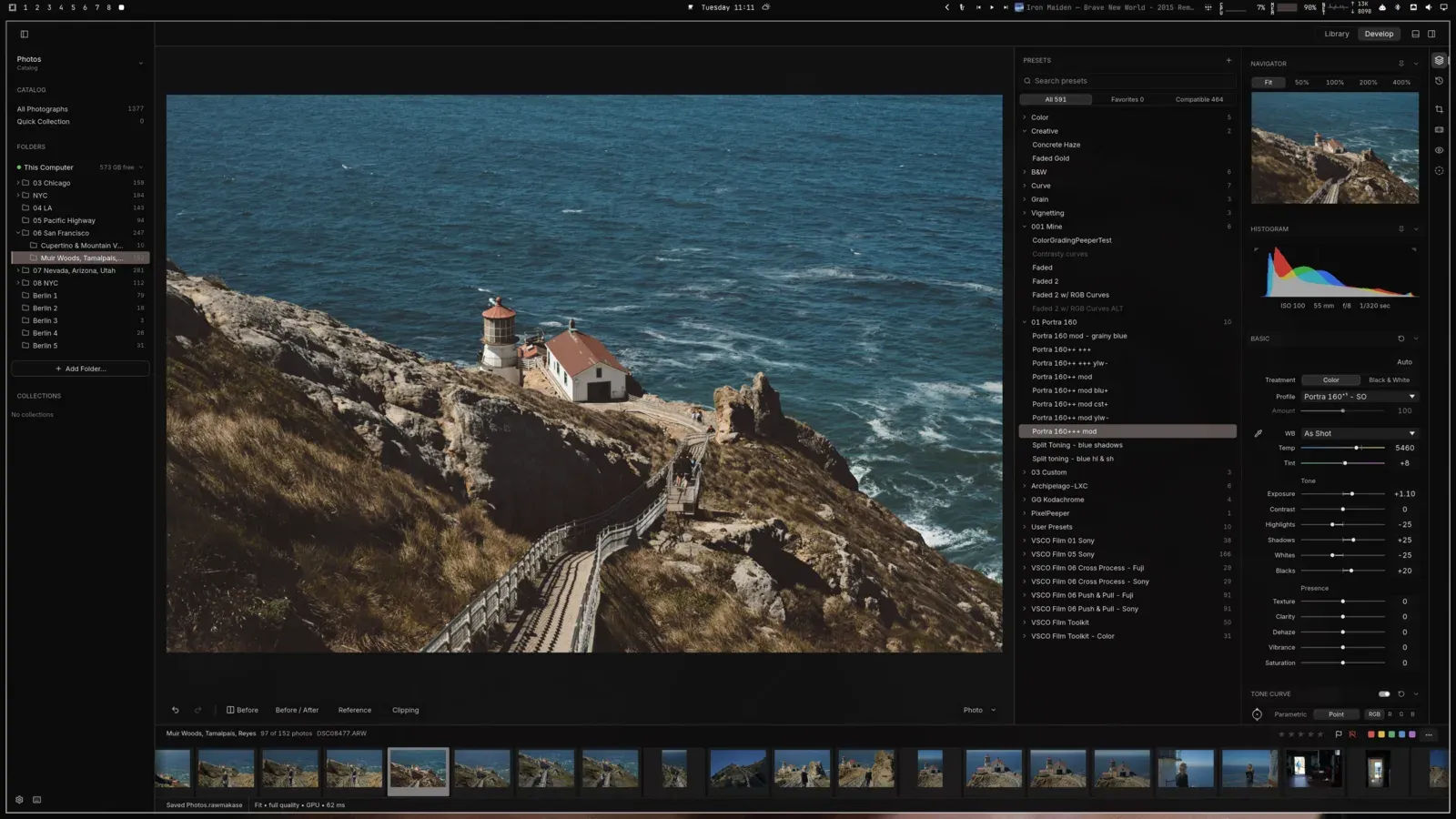
Official screenshot of the Develop view: folders on the left, presets and the Basic panel on the right, filmstrip below.
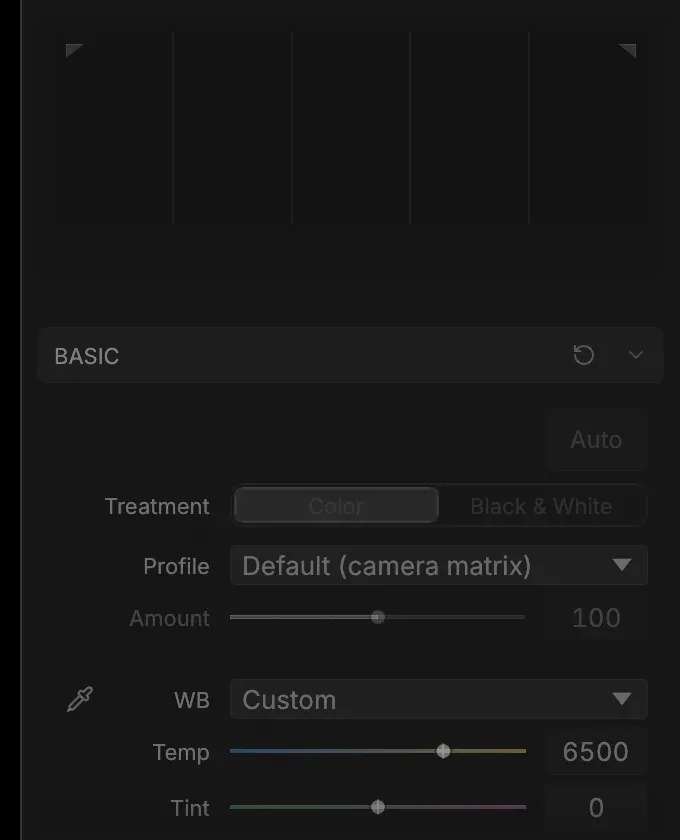
Basic panel close-up from a project pull request, showing profile and white balance controls.
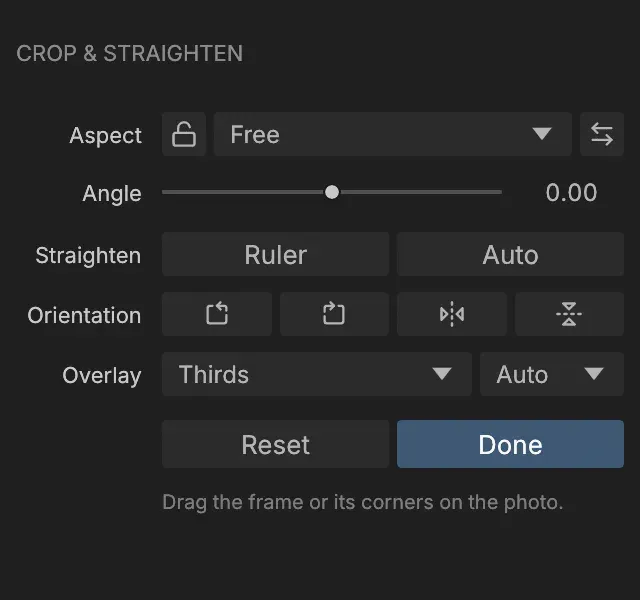
Crop and Straighten drawer with the aspect padlock added in 0.4.12, from the project pull request.
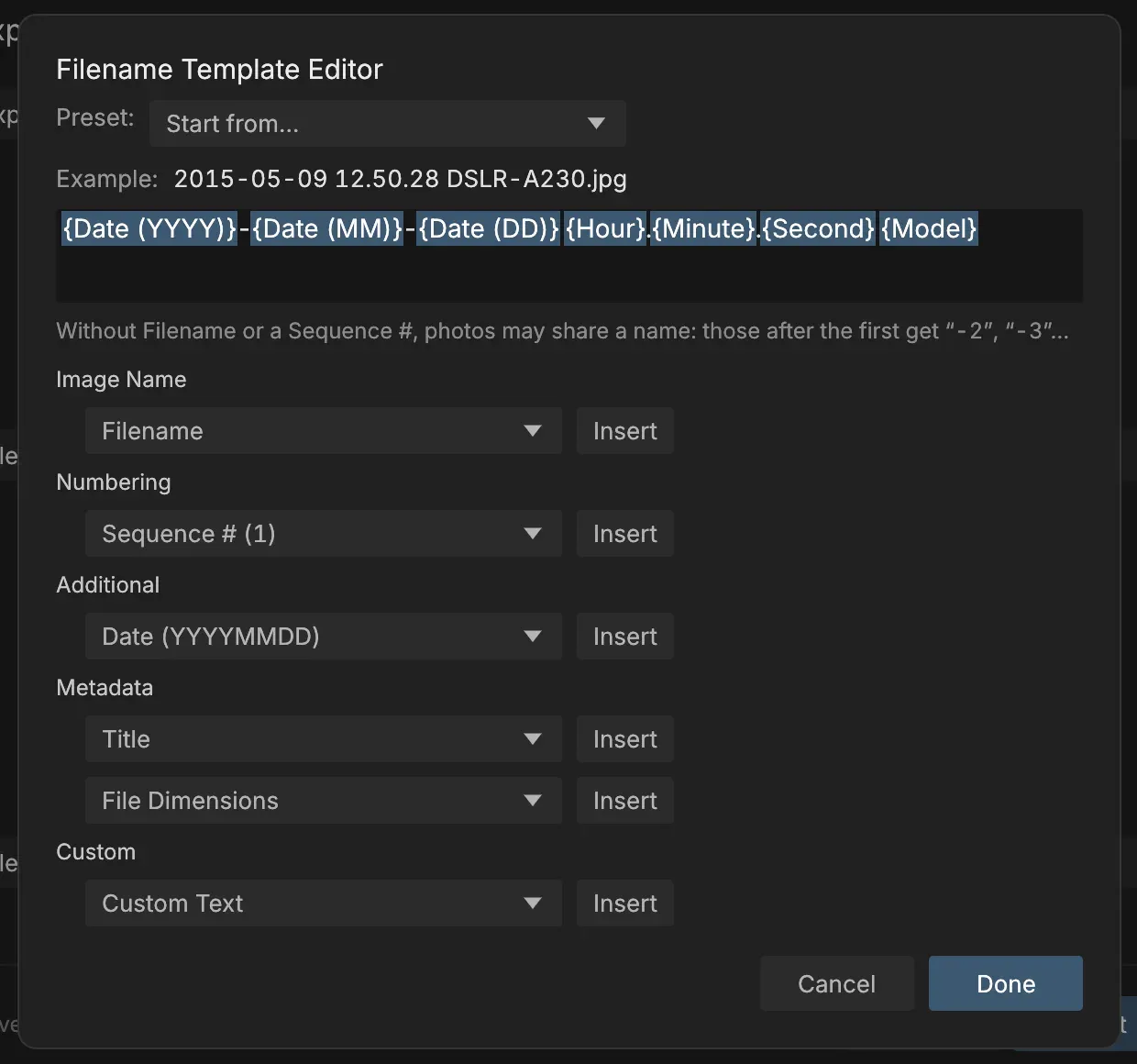
Filename Template Editor used for export and rename, with an example file name built from capture date and model.
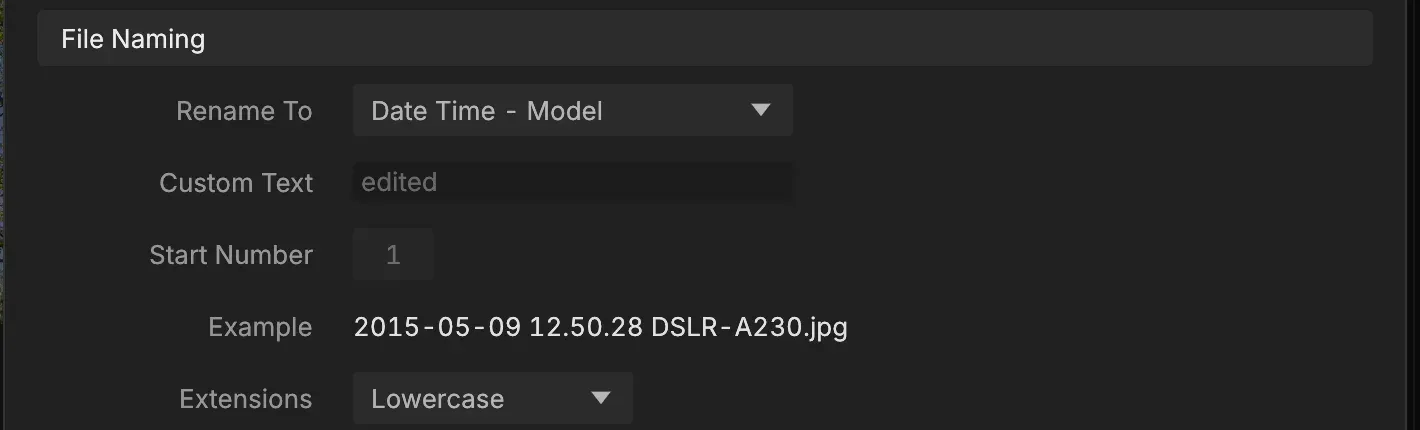
File Naming section of the Export dialog, from the project pull request that added template editing.
Source: official RAWmakase project page.
Key capabilities
- Download for macOS MacOS 15 Sequoia or newer:
rawmakase-v<version>-macos-arm64.dmgfor Apple Silicon or thex86_64DMG for Intel, both signed and notarized. Drag RAWmakase into Applications. Homebrew users can runbrew install --cask pch/tap/rawmakaseand update withbrew upgrade --cask rawmakase. The DMGs carry the ONNX Runtime library that AI selection and AI Denoise need. - Download for Linux DEB for Ubuntu 24.04+ and Debian 13+, RPM for Fedora 43+, a
.pkg.tar.zstfor Arch Linux, plus a tarball and an AppImage, each for x86_64 and aarch64 (the Arch package is x86_64 only; Arch Linux ARM builds from the recipe withmakepkg -si). The packages need glibc 2.39 or newer and a working Vulkan graphics driver. The AppImage carries update information for AppImageUpdate or Gear Lever. On Omarchy,omarchy pkg add rawmakase-bininstalls it. - Download for Windows Per-user installers for x86_64 (Windows 10 or newer) and ARM64 (Windows 11), installed without administrator rights, plus portable ZIPs. The installers are not code-signed yet, so SmartScreen may warn. HEIC photos rely on the HEIF Image Extensions and HEVC Video Extensions from the Microsoft Store. All packages are listed on the latest release page.
- Build from source Linux and macOS builds need Rust 1.98 or newer and a C compiler; no RAW or color-management library is required.
makeruns a locked release build andmake install PREFIX="$HOME/.local"installs the binary, desktop entry, icon and licenses without compiling as root. A source-built macOS app is unsigned and does not include ONNX Runtime unless you add the pinned library. - Lightroom Classic catalog import Catalog, Import Lightroom catalog reads a closed
.lrcatinto a new.rawmakasecatalog: folders, ratings, flags, color labels, keywords, stacks and compatible develop settings, with folder relinking. Existing destination files are never overwritten and the Lightroom catalog stays untouched. The catalog guide describes what is carried over. - Develop controls White balance with a picker, Auto tone and Auto white balance, exposure and tone, Shadows and Highlights, Texture, Clarity, Dehaze, parametric and point curves, HSL color mixer, three-way color grading, denoise and sharpening, crop and straighten, Transform, lens corrections, effects and calibration. Sliders accept typed values and Lightroom keyboard steps. Before/after views, clipping warnings and a Reference View sit under the photo.
- Spot removal and masks Heal and Clone spots and brushed areas with automatic sources, and brush, gradient and range masks with local adjustments, including masks imported from Lightroom. Select Subject, Select Sky and Select Background create soft raster masks from local ONNX models. The project marks spots and masks as experimental and not yet measured against Lightroom.
- AI Denoise Added in 0.4.11, AI Denoise removes noise from high-ISO Bayer and X-Trans RAWs with a neural network that runs on your computer. Results are cached in a folder chosen in Preferences, and Library thumbnails switch to the denoised version only once it is finished. The command line can run it in
render,render-batchanddenoise. - Presets, camera profiles and LUTs 26 built-in presets plus your own Lightroom XMP presets. Every camera with a usable color matrix gets RAWmakase Standard and RAWmakase Color profiles; DCP and XMP profiles you are licensed to use can be imported, and
.cubeLUTs become look profiles with an Amount slider. The Lightroom profiles guide covers the import order. - Library and catalog management Catalogs are SQLite files you choose, with folders, collections, ratings, flags, labels, keyword and date search, and Lightroom-style folder stacks. Synchronize Folder finds photos moved, renamed, added or deleted outside the app. Photos can be renamed by template, moved between folders or sent to the Trash, and catalog writes are atomic.
- GPU previews Every change renders at viewport size, with the color and tone stage on the GPU (Metal on macOS, Vulkan on Linux, DirectX 12 on Windows) and a CPU fallback. Since 0.4.10 Windows falls back to another graphics API when a DirectX 12 device fails. The preview is always sRGB and is not a soft proof of a wider export.
- Export JPEG, 16-bit TIFF or PNG, in sRGB by default or Adobe RGB (1998) and ProPhoto RGB (16-bit TIFF only) with embedded CC0 profiles. File naming uses Lightroom-style templates with date, model, sequence and original-filename tokens. WebP, AVIF, HEIF and JPEG XL are read but cannot be exported yet.
- Command line
rawmakase inspect,thumbnail,render,render-batch,import-catalog,import-profilesandfingerprintwork without the GUI. With--catalog,renderuses the photo's catalog edit, as Export does;--xmpapplies a preset on top and--overwriteis required to replace a file. - Local scripting and control socket With Allow local scripts and applications enabled (off by default),
rawmakase controlcan list photos, open one, set parameters in displayed units, apply presets, save, preview and export from the running app. A standalonerawmakase-ctlclient builds from the repository. The automation guide documents the JSON protocol and value ranges. - Built-in MCP server
rawmakase mcpexposes the live editor to a local MCP client over stdio, with no account, API key, Python or Node installation and no network listener. Tools cover state, search, parameters, tone curves, presets, auto tone, previews, saving and export, guarded by generation and revision values so stale commands fail. Setup examples for Codex andmcpServersJSON clients are in the MCP guide. - MIDI controllers MIDI input works on macOS and Windows, with a supplied Loupedeck+ profile and custom mappings for other controllers. Absolute and relative encoder formats are supported, controls follow the selected mask where possible, and continuous turns group into one undo step. Details are in the MIDI guide.
- Input formats and cameras Develops RAW files from almost every current camera, including monochrome DNGs, linear DNGs such as iPhone ProRAW and Lightroom HDR and panorama merges, plus JPEG, PNG, TIFF, WebP, AVIF, HEIF/HEIC and JPEG XL. Exceptions are Sigma Foveon, GoPro GPR, the Pentax K-3 Mark III Monochrome PEFs and older lossy DNGs. On Linux, HEIC needs the system libheif with its HEVC decoder.
- Updates and verification The app checks GitHub after launch and once an hour (switchable in Preferences). The Apple Silicon DMG and Windows installer update themselves; other installs are pointed at the release page or their package manager. Each release includes
SHA256SUMSforsha256sum --ignore-missing -c. Settings and catalogs live outside the installed app, so reinstalling loses nothing.
Where RAWmakase fits
Moving off a Lightroom Classic catalog
Close Lightroom, then use Catalog, Import Lightroom catalog to create a new .rawmakase file from a copy of the .lrcat. Relink folders if the photos moved, then compare ratings, flags, keywords and stacks with the source. Open a sample of edited photos side by side with Lightroom exports: imported develop settings render close to, not identical with, Camera Raw, and the parity gaps list explains known differences. Import your own DCP or XMP camera profiles first if Adobe Color starting points matter.
Developing a shoot on a Linux workstation
Install the DEB, RPM or Arch package, confirm the Vulkan driver works, and add the card folder to a catalog. The embedded JPEG appears while the RAW develops. Cull with P, X and the number keys, apply a preset or Auto tone, then refine with the Develop panels. On Omarchy, add the documented window rule so Hyprland transparency does not change how photos look. Check the status bar for GPU rendering and watch preview build times on large folders.
Batch rendering from scripts
Use rawmakase render or render-batch with --catalog to export catalog edits, or with --recipe for a render that depends on nothing saved. Pass --xmp to layer a preset, --max-edge for web sizes and --color-space for wide-gamut TIFFs. Outputs refuse to overwrite existing files unless --overwrite is given. For regression checks across releases, rawmakase fingerprint writes per-file decode facts as JSON lines.
Letting an agent adjust the open photo
Enable Preferences, Automation, Allow local scripts and applications, then register rawmakase mcp with an absolute executable path in your MCP client and set a tool timeout of about 150 seconds for preview waits. The agent reads state, sets parameters in displayed units, applies presets and requests JPEG previews to inspect its own work. Every edit needs fresh generation and revision guards, so a change made in the GUI meanwhile causes an error rather than an overwrite. Keep exports pointed at new absolute paths.
Running AI selections on another machine
When the editing computer lacks GPU headroom, run rawmakase-remote-worker on a machine with CUDA or Apple Silicon and point RAWmakase at a local port forwarded through SSH. The worker only binds the loopback and has no authentication, so treat anyone who can reach the port as trusted and never expose it directly. The remote inference guide lists options, providers and the security model; local inference stays the default and works offline.
Keeping edits stable across upgrades
Because the engine may change before 1.0, export finished work to TIFF or JPEG and keep those files. Back up the .rawmakase catalog and the data folder (profiles, presets and previews) before upgrading. After an upgrade, compare a few reference photos against their earlier exports and read the release notes' upgrade sections, which flag shifts such as the crop changes in 0.4.0.
Install
brew install --cask pch/tap/rawmakaseReviews of RAWmakase
Be the first to share your experience with RAWmakase.
Write a review
Loading review form…
Related to RAWmakase
 ImmichImmich organizes photos and videos on a self-hosted server, with web and mobile access, automatic mobile backup, facial recognition, metadata search and album sharing.
 GIMPGIMP, the GNU Image Manipulation Program, is a free and open source cross-platform image editor for GNU/Linux, macOS and Windows with scripting and plug-ins.
 PhotoCraftPhotoCraft is a clean-room, Photoshop-style image editor written in Rust by the ArtCraft team. It edits layered PSD and PSB files, runs on macOS, Windows, Linux, FreeBSD and the web, and exposes 500+ commands to a CLI, JSON control channel and MCP server.