

What is Immich?
Immich is a self-hosted photo and video management application, described by its developers as a high performance self-hosted photo and video management solution. A server on hardware the operator controls stores the library, while a web app and native Android and iOS apps browse, upload and organize it, with automatic backup of selected device albums. According to the project roadmap, the first commit landed on GitHub in February 2022, and the core team has worked full-time since joining FUTO in May 2024. The source code is published under the AGPL-3.0 license.
The server ships as container images and runs with Docker Compose, which the documentation names as the recommended production method. The requirements page lists a 64-bit Linux system as the recommended host, at least 6 GB of RAM (8 GB recommended) and 2 CPU cores (4 recommended) on amd64 or arm64. Windows and macOS hosts are possible through Docker Desktop or WSL 2, but the documentation describes non-Linux hosts as strongly discouraged. Other documented routes are an official Helm chart for Kubernetes, an experimental Linux install script, NAS guides and one-click marketplace images at DigitalOcean and Vultr.
The design is client-server. The server is a TypeScript application for Node.js built with NestJS, the web client uses SvelteKit, and the mobile app is written in Dart with Flutter. A separate Python service runs machine learning models in ONNX format, Postgres stores users, albums, asset metadata and search vectors through the VectorChord extension, and Redis holds the background job queues. All clients talk to the server over a REST API described with OpenAPI and documented at api.immich.app; the architecture page shows how these parts connect.
The latest release is v3.4.1, published November 11, 2026. It is a patch release that fixes bugs, including slow shared links, and updates the bundled FUTO Backups component to 1.16.0. Version 3.4.0, released the day before, added JPEG XL support, tags in the mobile app, OCR-based workflow triggers and filters, and a batch of security fixes, including a Content Security Policy without unsafe-inline. Version 3.3.0 in October 2026 introduced shared people management, birthday memories, automatic stacking of edits made in other mobile apps, OAuth claim sync on every login and opt-in optimized machine learning models.
Immich is free to use, and the documentation states that all features will stay free with nothing placed behind a paywall. Users can optionally buy a product key at buy.immich.app: the Single key for one user costs $25 and the Family key, listed for the whole family, costs $100. Both are lifetime purchases that grant supporter status, not extra features. The project also states that Immich is not a backup by itself: the README asks users to follow a 3-2-1 backup plan, and the built-in database dumps contain metadata only, not the photos and videos. Other self-hosted photo projects in this directory include Ente, Lychee and Piwigo.
Immich screenshots
Explore the interface. Open a screenshot to view it at full size.
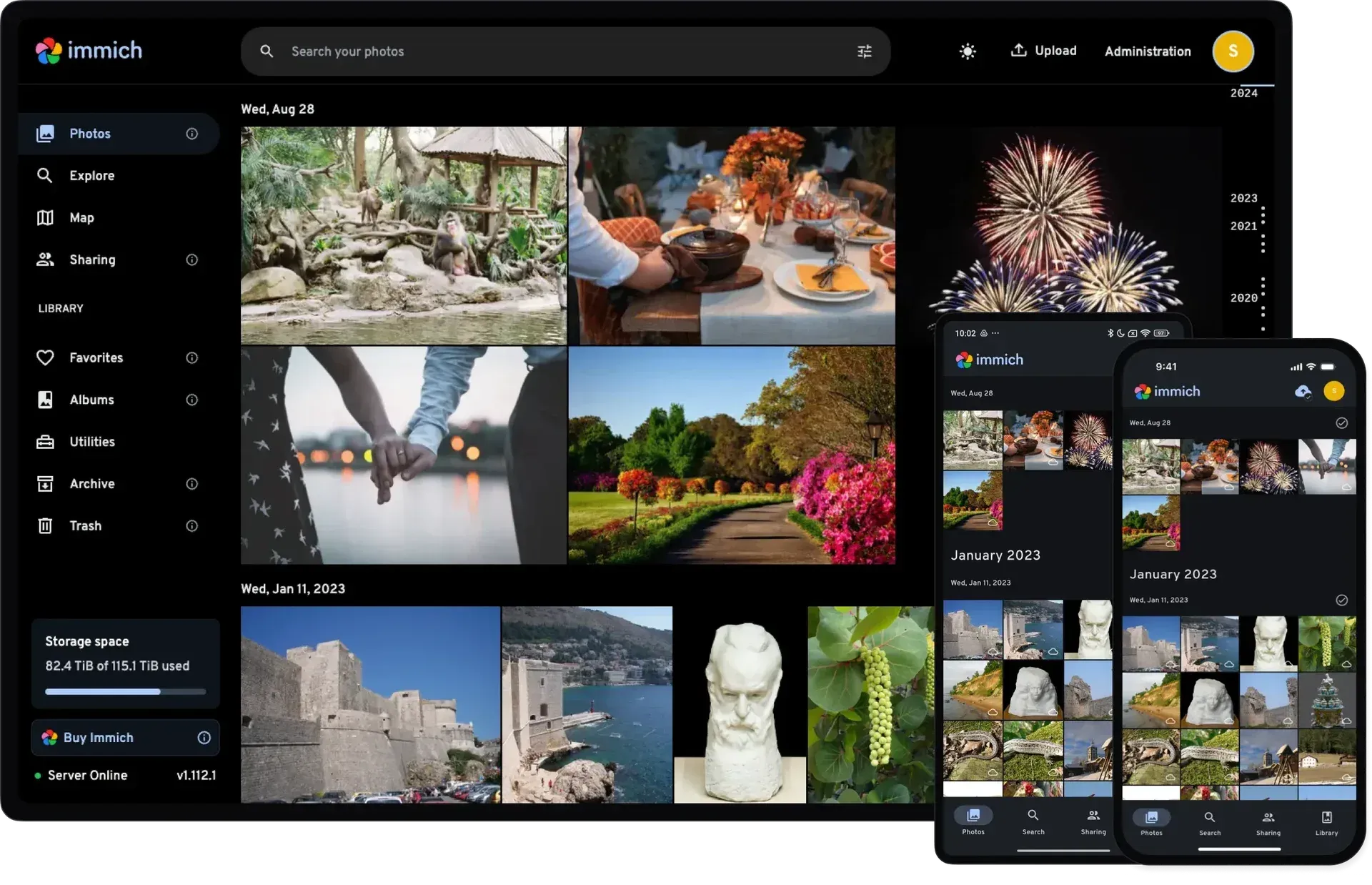
Official Immich product image from immich.app: the web timeline with sidebar, storage usage and year scrubber, beside the Android and iOS apps.
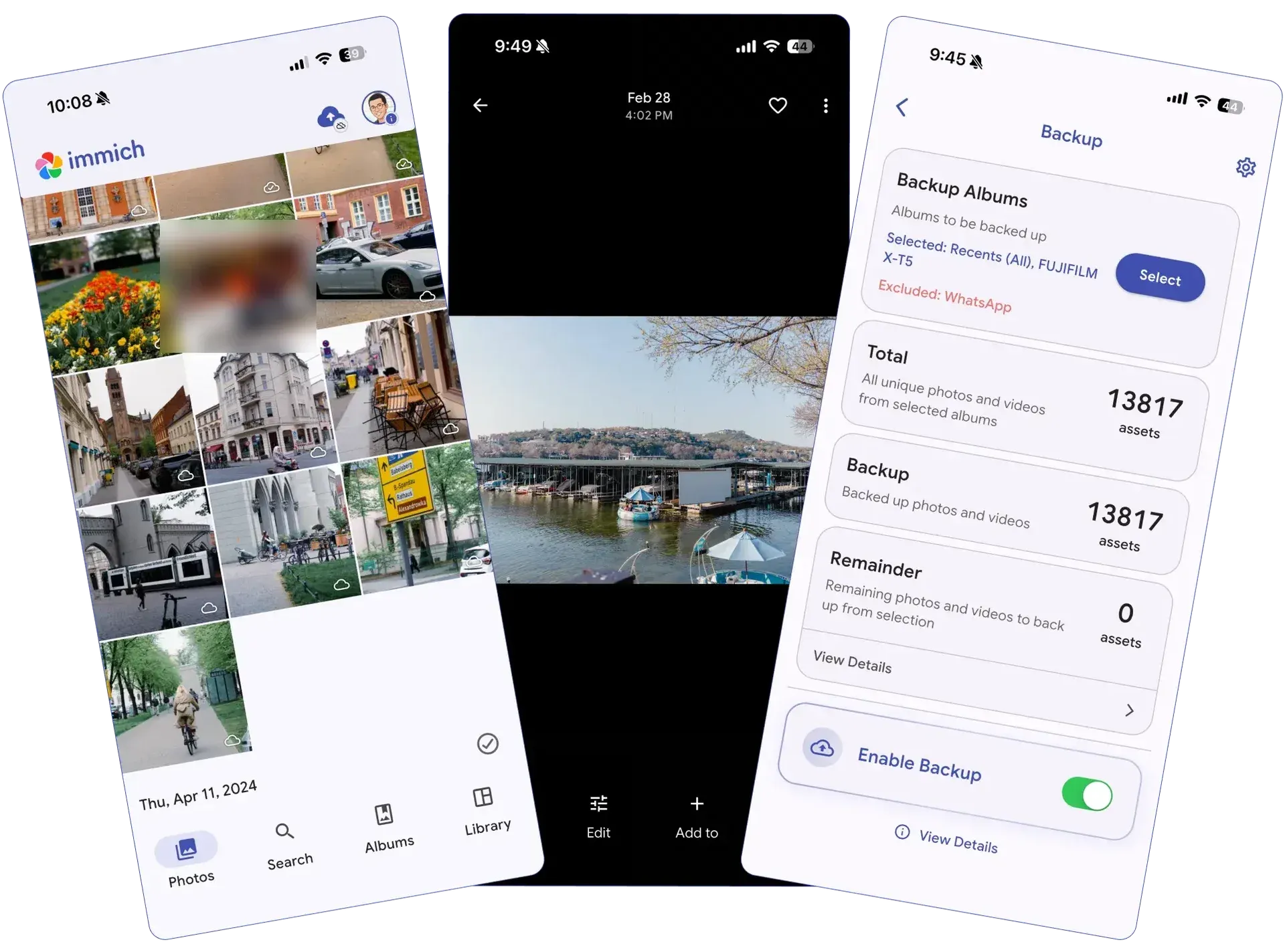
Official mobile app image from immich.app showing the photo grid, the viewer and the backup screen with album selection and asset counts.
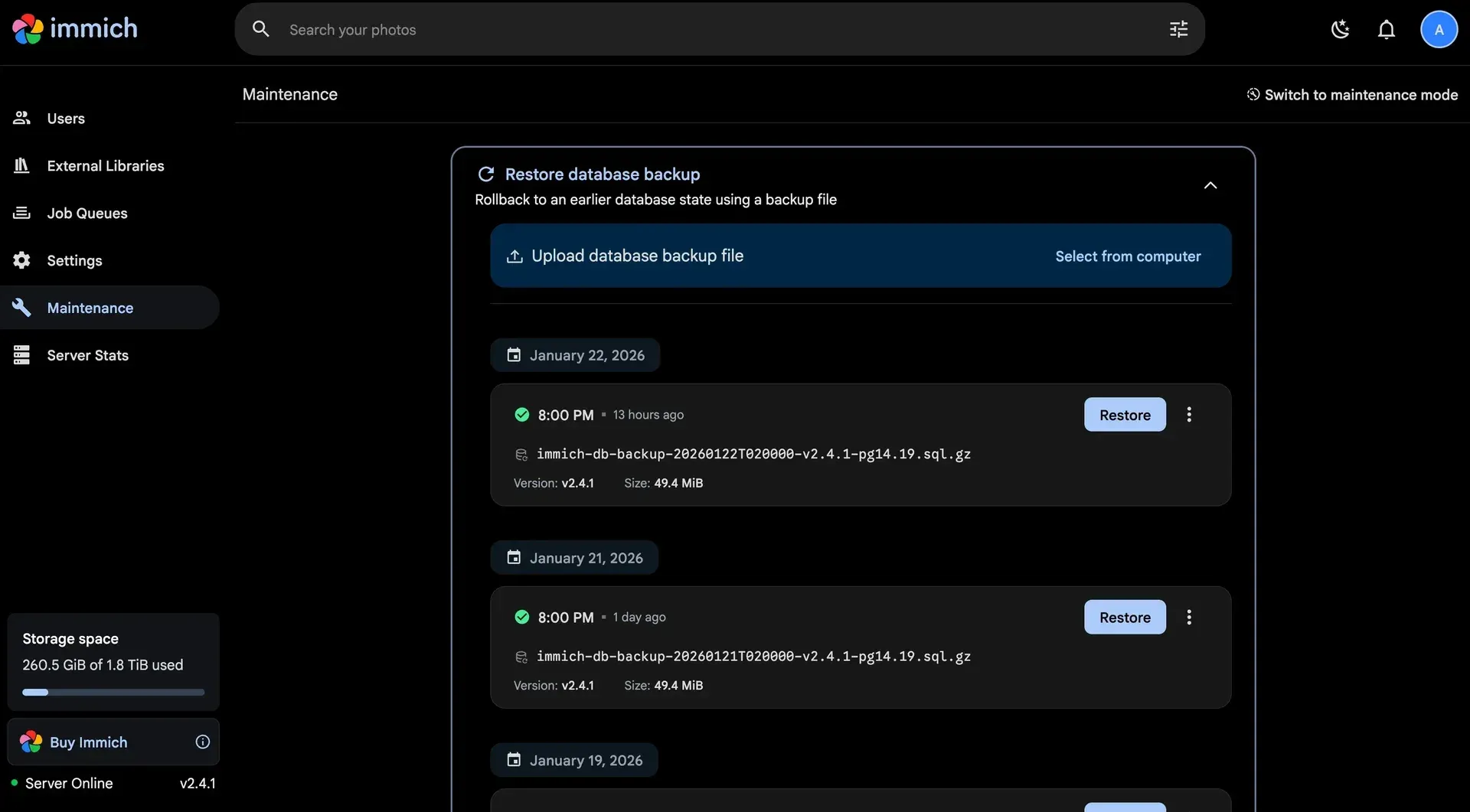
Restore database backup section of the administration Maintenance page, from the official backup and restore documentation.
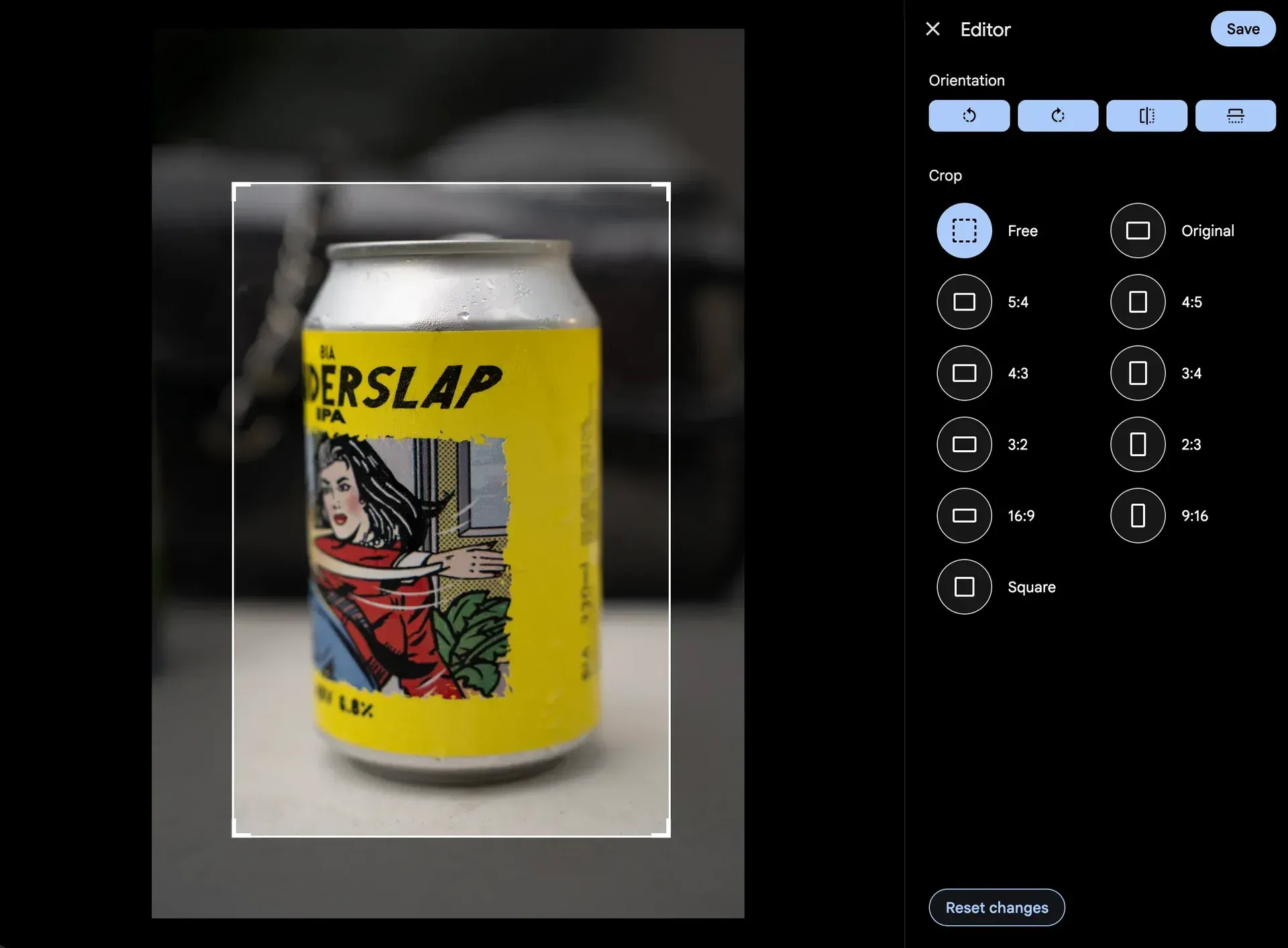
Non-destructive web editor with rotate, mirror and crop presets, from the official editing documentation.
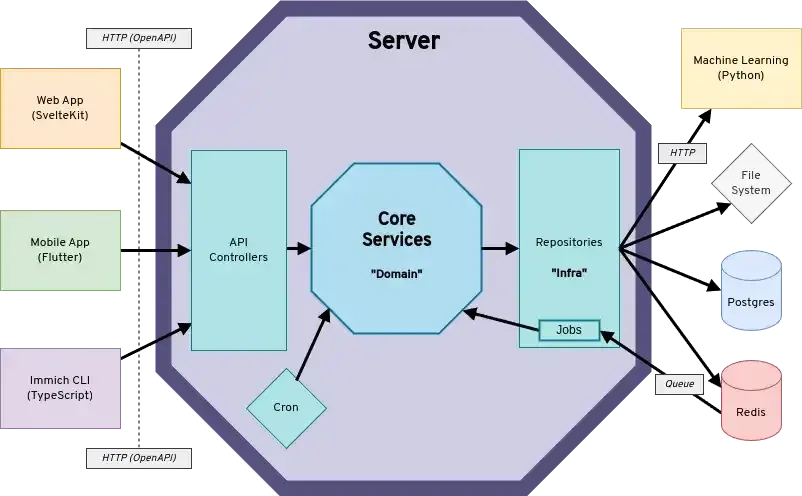
Official architecture diagram from the Immich developer documentation.
Source: official Immich project page.
Key capabilities
- Server deployment with Docker Compose The Docker Compose guide downloads
docker-compose.ymlandexample.envfrom the latest release, setsUPLOAD_LOCATION, the database password and the time zone in.env, then starts the stack withdocker compose up -d. The web app and API are then reachable on port 2283. Immich requires the Compose plugin invoked asdocker compose; the olderdocker-composecommand is not supported. - Hardware and storage requirements The minimum is 6 GB of RAM and 2 CPU cores; systems with 4 GB can run Immich with machine learning disabled. The Postgres data directory, typically 1 to 3 GB, is documented for local SSD storage and never a network share, on a filesystem with Unix permissions, not NTFS or FAT. Thumbnails and transcoded videos add 10 to 20 percent to the library size on average.
- Android and iOS apps The mobile app is published on the Apple App Store, Google Play, GitHub Releases as an APK and the FUTO F-Droid repository, and it can also be installed through Obtainium. The mobile app documentation lists the SHA-256 signing fingerprints of each Android build. The public demo at demo.immich.app also works as a server endpoint for trying the app.
- Automatic mobile backup With backup enabled, the app uploads new photos and videos from selected device albums when it opens or resumes and periodically in the background. Albums can be excluded, uploads run on Wi-Fi only by default, and an album sync option creates matching server albums in a one-way sync. A checksum for each file skips assets already on the server. On Android the background task can be limited to charging; on iOS it depends on Background App Refresh and the system scheduler, as the mobile backup guide explains. Free Up Space deletes local files that are already backed up.
- Timeline, albums and library views The web and mobile apps show a virtual-scroll timeline with a draggable scrubber, albums, favorites, archive, trash, a global map, a folder view and memories such as photos from previous years and, since 3.3.0, birthday memories. Stacks group related shots and a Recently added view sorts by upload time. The README lists user administration and API keys as web-only and offline support as mobile-only.
- Contextual and metadata search Search runs on Postgres. Contextual search uses CLIP models through the VectorChord extension, so free-text queries such as a sunrise on the beach match image content without keywords, and multilingual CLIP models can replace the default English one. The search documentation lists filters for people, file name, folder path, description, OCR text, location, tags, camera and lens, date range, media type and star rating.
- Facial recognition and people Faces are detected by the machine learning service and grouped with an algorithm derived from DBSCAN; by default a new person is created once three similar faces exist. People can be named, merged, hidden, favorited and given a date of birth, which shows a person's age when a photo was taken. Since 3.3.0 a person can be shared with another user in the same cluster group, with cross-user merging (see the facial recognition page).
- OCR and workflows Text in images is extracted with OCR models and becomes searchable; 3.3.0 added the multilingual PP-OCRv6 models. Workflows, introduced in 3.0.0, automate tasks from triggers and filters; 3.4.0 added a trigger that runs after OCR extraction and an OCR text filter.
- Sharing between users and public links Albums can be shared with other users on the same instance as editors (read-write) or viewers (read-only). Partner sharing gives another user access to the entire non-archived library, including GPS metadata, and works in one direction only. Public links share a selection or an album through a random URL, with an optional expiry date, password and switches for showing metadata and allowing downloads or uploads, as described in the sharing documentation.
- Multi-user administration and OAuth sign-in Each user has a separate library. Administrators create users, set storage quotas and send welcome emails through SMTP. Sign-in through OpenID Connect providers such as Authentik, Authelia, Keycloak, Okta or Google is set up in the administration settings, with
app.immich:///oauth-callbackas the redirect URI for the mobile apps. Since 3.3.0, storage quota, role and username claims can be synced from the identity provider on every login, as covered in the OAuth guide. - External libraries Existing folders mounted into the server container can be registered as external libraries, each owned by one user. Import paths are scanned recursively, glob exclusion patterns such as
**/Raw/**skip files, and a nightly scan or experimental file watching picks up changes. Albums, descriptions and other metadata added in Immich stay in Immich and are not written to the external files, and mounts marked:roprevent Immich from deleting originals. - Original files, storage template and XMP sidecars Immich does not modify original files; edited metadata goes to the database and to XMP sidecar files, which are read during metadata extraction and written back for description, rating, date, location and tags. By default uploads are stored under random UUID file names; the optional storage template defines folder and file naming, and a migration job applies it to existing files.
- Media formats and non-destructive editing The format list includes JPEG, PNG, HEIC, HEIF, AVIF, WebP, JPEG XL, TIFF, PSD and raw files, and video in MP4, MOV, MKV, WebM, AVI, MTS, WMV and other containers. iOS Live Photos and Android Motion Photos are backed up and played back. The editor crops, rotates and mirrors photos without changing the original, and downloads offer either the edited or the original version.
- Video transcoding and streaming The server transcodes videos for playback; version 3.0.0 added HTTP Live Streaming with automatic quality switching and real-time transcoding for the web app. Hardware transcoding through NVENC, Quick Sync, RKMPP or VAAPI is labelled experimental and supported on Linux and on Windows through WSL2. The documentation notes that hardware encodes are usually larger than software encodes.
- Machine learning acceleration The machine learning container can use CUDA (compute capability 5.2 or higher, NVIDIA driver 545 or later), ROCm, OpenVINO, ARM NN on Mali GPUs or RKNN on Rockchip boards according to the experimental acceleration guide. Machine learning can be turned off entirely or per model type, and because it is a separate service it can run on another machine.
- Duplicates, Locked Folder and casting A duplicates utility uses machine learning to find visually similar assets and preselects the largest file with the most EXIF data. The Locked Folder keeps selected assets out of normal views behind a PIN, with an unlocked session lasting 15 minutes. Google Cast from the web client is opt-in, because it loads scripts from Google servers.
- Database dumps and restore The server writes automatic database dumps to
UPLOAD_LOCATION/backups, by default daily at 2:00 AM keeping the last 14. Since 2.5.0 the web interface lists the dumps with their Immich version and restores them from Administration, Maintenance, creating a restore point first and rolling back if the restore fails. The backup and restore guide states that dumps contain metadata only and that the media files need a separate backup tool. - Command-line upload tool The Immich CLI is the npm package
@immich/cli, which needs Node.js 22 or later, and is also available as a Docker image. It uploads files and folders with options for recursion, dry runs, albums named after folders, glob ignore patterns, visibility and JSON output. - REST API, API keys and monitoring API keys created in the web app authenticate scripts and integrations against the REST API, from which the project generates TypeScript and Dart SDKs. Opt-in Prometheus metrics for API, host and IO groups are enabled with
IMMICH_TELEMETRY_INCLUDE, and OpenTelemetry traces can be exported; the documentation states this data goes only to the targets the operator configures.
Where Immich fits
Moving a household off a cloud photo service
An administrator installs the server with Docker Compose, creates one account per family member and can assign storage quotas. Each person installs the mobile app, enters the server URL and selects device albums for automatic backup, after which new photos upload when the app opens and in the background. Shared albums and partner sharing let members see each other's photos. The README feature table and the mobile app documentation list which functions exist on the phone and which on the web.
Indexing an existing photo archive
Folders on a NAS or local disk are mounted into the server container, read-only with :ro when Immich must not delete files, and registered by the administrator as external libraries. Scanned assets then appear in the timeline, map and search. The external library guide walks through a mount, an exclusion pattern for a raw subfolder and a custom scan interval. For Google Takeout exports, the documentation points to the community tool immich-go.
Finding photos by content, people, place or text
After upload, background jobs generate thumbnails, extract EXIF metadata, reverse geocode GPS coordinates, detect faces, run OCR and compute CLIP embeddings. Users then search with natural-language queries or filter by named people, city, camera, date range, tags or recognized text. Reverse geocoding uses GeoNames data stored in the local Postgres database.
Sharing an event album with guests
A user creates an album and generates a public link with an optional password, an expiry date and permissions to download or upload; recipients open the link in a browser. For people with accounts on the same server, the album can instead be shared with editor or viewer rights, and editors add their own photos to it.
Automating library organization
Workflows combine triggers and filters to act on assets, for example adding photos whose OCR text matches receipt keywords to an album, as shown in the 3.4.0 release notes. The CLI uploads folders and creates albums from folder names, and API keys let scripts call the same REST API as the official clients.
Operating and recovering the server
The administration area shows job queues, per-user storage statistics and maintenance tools. Automatic database dumps cover the metadata, while the media folders under UPLOAD_LOCATION are copied with a separate tool. A fresh installation can start from Restore from backup on the welcome screen, which runs folder integrity checks before restoring a dump. Version 3.4.0 adds an integration with FUTO Backups, which bundles restic in the server image and adds a Backups section to the web app. Updates follow the upgrade guide.
Reviews of Immich
Be the first to share your experience with Immich.
Write a review
Loading review form…
Alternatives to Immich
 EnteEnte is an AGPL-3.0, end-to-end encrypted cloud for photos (Ente Photos), 2FA codes (Ente Auth) and documents (Ente Locker), with apps for mobile, desktop and web, 10 GB free and a Go server you can self-host.
 LycheeOpen-source photo management system you run on your own server: albums, EXIF and GPS metadata, password-protected sharing, smart albums, timeline, map, ratings and an optional Supporter Edition with a webshop, using PHP and Docker.
 PiwigoPiwigo is GPL-2.0 photo gallery software written in PHP. It imports, organizes and shares photos and videos with albums, tags, user groups, plugins and themes, a web API and an official Docker image, self-hosted or as Piwigo Cloud.