

What is Lychee?
Lychee is a free, open-source photo management system that runs on your own server or web space. Users upload images into albums, edit titles and descriptions, tag and star them, and publish albums to visitors through the browser. The official site describes it as self-hosted photo management in which the server, the data and the rules stay with the operator, with no storage limit and no compression of uploaded photos. It is a PHP and Laravel application with a Vue front end, released under the MIT license and maintained by the LycheeOrg organization.
The project has a long history. Its release notes start with Lychee v1.0 on October 2, 2012, and the numbering has reached version 7. Version 7, released on December 31, 2025, raised the minimum to PHP 8.4, switched the Docker image to FrankenPHP with Laravel Octane instead of nginx and PHP-FPM, added AVIF support, per-user star ratings and worker mode for background processing, and introduced a webshop for selling photos in the Pro edition.
The current release is v7.13.0, published November 9, 2026, which the release notes also label v8.0.0-rc1, the first Version 8 release candidate. Setting V8_ENABLED=true in the .env file turns on the new Version 8 front end and its features for beta testing. The release makes the Struct-of-Arrays data approach the default, which the project pairs with SQL optimizations for speed and with virtual scrolling in albums instead of pagination. It also adds an admin setting for album tile size and gap with a live preview page, inline feedback when password logins are throttled, and stricter IP validation against SSRF on import via links. The previous release, v7.12.2 of November 7, 2026, replaced the abandoned WebAuthn library with a maintained one, and 7.12.0 of October 22, 2026 upgraded the Docker images to PHP 8.5.12 to close the remote code execution issues the project calls Php2Shell, which the official site lists with a CVSS score of 9.3.
Lychee is offered as a Free Edition and a Supporter Edition (SE). The Free Edition includes unlimited users, albums, tags and photo uploads. The Supporter Edition costs 5 euros per month and adds statistics, user groups and upload quotas, anonymous uploads, secured image links, watermarking and extended customization; a license key received through GitHub Sponsors, or on request for Open Collective supporters, unlocks these features and works on any number of instances. The project states that it offers no trial period and no refunds. A Pro edition, described as a small add-on on top of SE, adds the webshop.
Lychee can be installed with the official Docker image ghcr.io/lycheeorg/lychee (also on Docker Hub), from a release ZIP on a PHP web server, or from source with Composer and npm. Data lives in MariaDB, MySQL, PostgreSQL or SQLite, and the photos are stored as files on the operator's storage. Lychee is not a hosted service and does not ship a desktop or phone client. Similar self-hosted projects listed on iThub include Piwigo and Immich.
Lychee screenshots
Explore the interface. Open a screenshot to view it at full size.
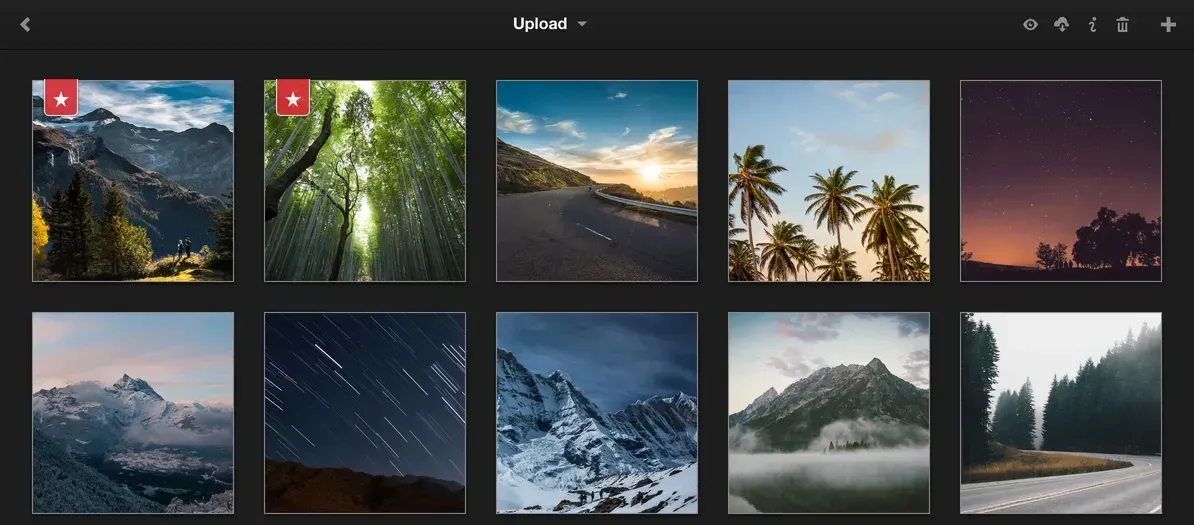
Official website screenshot of an album grid with starred photos and the album toolbar.
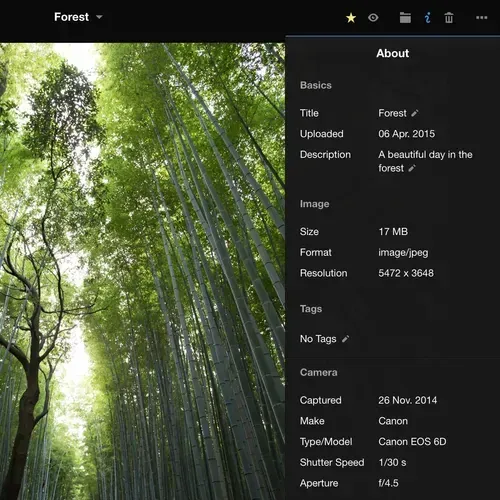
Official website screenshot of the photo info panel with basics, image and camera metadata.
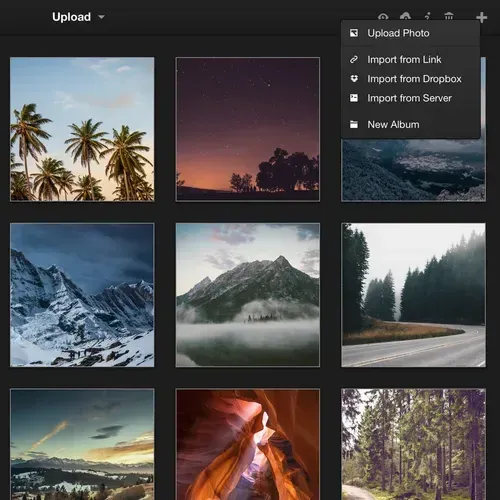
Official website screenshot of the add menu with the import sources.
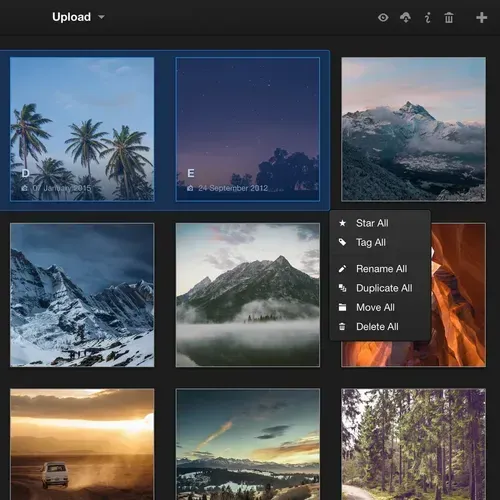
Official website screenshot of batch selection with the actions menu.
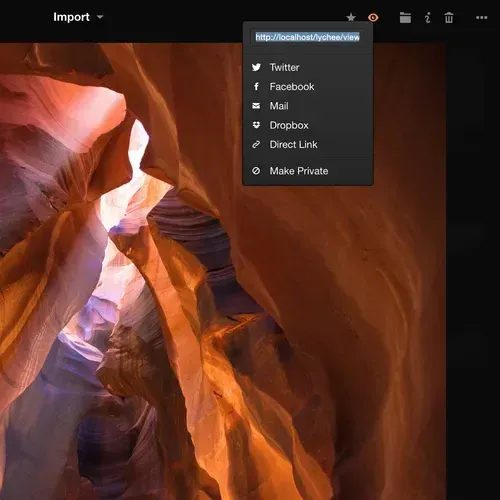
Official website screenshot of the share dialog with the public link and Make Private.
Source: official Lychee project page.
Key capabilities
- Albums, nested albums and photo upload Photos are organized in albums and in albums inside albums, with no limit on photos per album. Upload goes through the browser with chunked transfer for large files, and the home page also lists import from a URL, from the server filesystem and from Dropbox. Originals are kept, and thumbnails and size variants are generated next to them.
- Metadata and EXIF display Lychee reads and shows EXIF and IPTC metadata such as camera, lens, exposure and capture date, and uses GPS data for locations. Titles, descriptions and tags are editable per photo or in batch selections. The optional ExifTool binary improves metadata handling on the server.
- Sharing and access control Albums and photos can be made public with one click, protected with a password or shared with specific users. Access rights are managed per album, and links can be shared to other services. Hotlink protection is part of the Free Edition, and AES-secured image links are a Supporter Edition feature.
- Multiple users and sign-in options The Free Edition supports an unlimited number of users, a registration page, invite links and per-album access rights. Login with WebAuthn passkeys and with OAuth providers is documented, and since 7.12.0 an email address can be used as the login name once the setting is enabled. Multi-admin delegation, user groups and upload quotas belong to the Supporter Edition.
- Smart albums, tags and search Smart albums such as starred photos, recent uploads and On This Day collect photos automatically, and tags can drive albums of their own. A search function finds photos and albums by text, and tags can be renamed, merged and deleted in one view. Tag auto-completion is included, and displaying tags on the album view is a Supporter Edition feature.
- Timeline, map and slideshow views Albums can be shown as a timeline grouped by date, on a map using GPS data or as a slideshow, and there is a frame mode for dedicated displays. Albums with a date in the title are placed on the timeline automatically since version 7. Per-album timeline granularity is a Supporter Edition option.
- Flow feed Flow displays albums like a feed, newest first, as a standalone page with access control. The base album for the feed is configurable. The Supporter Edition adds a compact mode and more card customization.
- Layouts and customization Album layouts include justified, masonry and square grids, with customizable sorting, covers, header photos and thumbnail aspect ratios, all per album. Light and dark themes are built in and the CSS can be customized. Embedding an album in another website is documented as well.
- Photo ratings Each user can rate photos from one to five stars, a version 7 addition. Smart albums can also be defined per user since version 7.
- Live photos, motion photos and modern formats Apple Live Photos play in the lightbox, with a dock button added in 7.12.1, and Google Motion Photos in the Android 11 format are extracted from JPEG data since 7.12.0. AVIF and JPEG XL images are supported. Version 7.12.1 also made client-side caching optional.
- Import tools and duplicate detection Photos can be imported from server directories as a full album tree, through the web interface or through the command line, and the documentation covers sync with local directories. Duplicate detection works by filename and title or by hash, and albums or photos no longer found in the source directories can optionally be removed.
- Worker mode and background jobs Thumbnail generation and other heavy tasks can run in separate worker containers, and version 7 added horizontal scaling with multiple workers. The minimal compose file already includes a worker for background jobs.
- REST API with personal tokens The API under
/api/v2is available to scripts and tools. A personal token created in the profile settings is sent as a Bearer header, which skips the CSRF check that browser sessions need. The API documentation states that the token grants full access to the account. - Facial recognition as an optional service Face detection and clustering run in a separate Lychee-Facial-Recognition microservice, so the heavy machine-learning work stays off the gallery server. People can be labelled and Person Albums built from them. The comparison table lists facial recognition in the Free Edition, marked as coming with version 8, and the documentation carries a legal notice about biometric data.
- Supporter Edition The Supporter Edition costs 5 euros per month and is unlocked with a personal license key entered in the About Lychee dialog. It adds statistics, user groups and upload quotas, anonymous uploads, secured image links, watermarking, white label options and extended customization. The Supporter Edition page has the full comparison table.
- Webshop The webshop requires the Pro edition, an add-on on top of SE aimed at selling pictures, and lets visitors pick photos and sizes into a basket and pay through Mollie, PayPal or offline payment. Selling the original size creates a download link automatically after payment, and prints or custom sizes are fulfilled by hand. Custom pricing, sizes and license types, order administration and download link management are listed; prints are supported without integration with printing services.
- Docker deployment and Compose wizard The documented route is Docker Compose, either from the minimal template with MariaDB or from a file generated by the Docker documentation wizard. Tags include latest, edge, a version tag and a deprecated legacy line with nginx and PHP-FPM. The README sets
APP_URLand anAPP_KEYgenerated withopenssl rand -base64 32as environment variables. - Manual installation on PHP hosting Without Docker, Lychee needs PHP 8.4 or newer with the listed extensions (bcmath, exif, gd, mbstring, fileinfo and others), a web server and MySQL 5.7.8 or newer, MariaDB 10.2 or newer, PostgreSQL 9.2 or newer or SQLite. Imagick improves thumbnails, FFmpeg creates video thumbnails and Redis is optional. A 64-bit operating system is recommended.
- Translations and community Interface translations are managed on a Weblate instance, and the 7.12.0 notes say the latest translation keys were generated with AI and may be incomplete, with pull requests welcome. Support goes through GitHub issues, the documentation FAQ and a Discord server.
Where Lychee fits
Publishing a photo portfolio
Albums are created per project with their own cover, header photo, sorting and a justified, masonry or square layout, and each album is made public or kept private individually. The landing page module, the Flow feed and the RSS feed present new albums to visitors, and EXIF and IPTC data are shown next to each photo. Version 7.13.0 adds an admin setting for album tile width and gap, with a preview page for testing sizes.
Sharing albums with a group
An album can be shared through a public link, protected with a password or shared with selected user accounts, with access rights set per album. Users can be added through a registration page or invite links, and cross-user sharing and a trust level per user are part of the Free Edition. The Supporter Edition adds user groups with group admins and group sharing.
Importing an existing photo folder
Photos already stored on the server can be imported from directories as a full album tree, through the web interface or through the command line. Duplicate detection uses filename and title or a hash, and the Supporter Edition adds renaming rules on import or upload. Albums and photos that disappear from the source directories can optionally be removed.
Browsing a large library
Smart albums collect starred photos, recent uploads and On This Day photos, and tags can define albums of their own. The timeline view groups photos by date, the map view places them by GPS data and the frame display shows a slideshow on a dedicated screen. With Version 8 enabled, the Struct-of-Arrays approach made default in 7.13.0 brings virtual scrolling to albums instead of pagination.
Selling photos online
With the Pro edition, the webshop lets visitors place photos and sizes in a basket and pay through Mollie, PayPal or an offline payment method. Prices, sizes and license types are configured by the operator, and selling an original size generates a download link after payment. Prints are listed as supported without integration with printing services, and orders are managed in an order administration view.
Running Lychee on a server
The documented route is Docker Compose with the minimal template, which includes MariaDB and a separate worker container, or a file from the Docker Compose wizard. Administrators get logs, diagnostics tools, a maintenance page, upload moderation and full manual control over more than 350 settings. The upgrade guide covers moving from earlier versions to the new version 7 Docker image.
Install
curl -O https://raw.githubusercontent.com/LycheeOrg/Lychee/master/docker-compose.minimal.yaml && docker compose -f docker-compose.minimal.yaml up -dReviews of Lychee
Be the first to share your experience with Lychee.
Write a review
Loading review form…
Alternatives to Lychee
 ImmichImmich organizes photos and videos on a self-hosted server, with web and mobile access, automatic mobile backup, facial recognition, metadata search and album sharing.
 EnteEnte is an AGPL-3.0, end-to-end encrypted cloud for photos (Ente Photos), 2FA codes (Ente Auth) and documents (Ente Locker), with apps for mobile, desktop and web, 10 GB free and a Go server you can self-host.
 PiwigoPiwigo is GPL-2.0 photo gallery software written in PHP. It imports, organizes and shares photos and videos with albums, tags, user groups, plugins and themes, a web API and an official Docker image, self-hosted or as Piwigo Cloud.