

What is Ente?
Ente is an end-to-end encrypted cloud platform built by Ente, an open-source company started in 2020 and funded by customer subscriptions, according to its about page. On one shared account and server it runs three apps: Ente Photos, a replacement for Google Photos and Apple Photos; Ente Auth, a two-factor authentication (2FA) code generator; and Ente Locker, an encrypted store for documents, credentials and notes. Files, metadata, albums and codes are encrypted on the device before upload, so the hosted service stores only ciphertext and cannot read the content.
All client apps and the server live in the ente/ente monorepo under AGPL-3.0. Ente Photos ships for iOS, Android (Play Store, F-Droid, a signed GitHub APK and Obtainium), Windows, macOS and Linux, plus a web app at photos.ente.com. Ente Auth covers the same mobile stores, desktop builds published as auth-v4 GitHub releases and a web app at auth.ente.com. Ente Locker is available for iOS and Android. The project tags each app separately, so the newest GitHub release always belongs to one product rather than to the whole platform.
The latest GitHub release is photos-v1.3.69 from November 5, 2026, an Android build that fixes photo viewer and text recognition reliability; v1.3.68 fixed crashes during on-device photo processing. The larger mobile update v1.3.67 moved to Flutter 3.47.8, added a date-based photo picker and refreshed onboarding, recovery and subscription screens, while v1.3.66 added a mosaic gallery, text overlays and photo straightening. On desktop, v1.7.30 added album slideshows and better RAW previews, and v1.7.31 rejects compromised eMudhra TLS certificates. Ente Auth v4.4.26 added a macOS menu bar mode and import fixes for 2FAS, Aegis, Bitwarden and Google Authenticator exports. The Photos changelog and Auth changelog list every build.
Mobile apps are written in Flutter and Dart, the desktop app is an Electron application, the web apps use TypeScript, and a Rust workspace holds shared components such as machine-learning asset handling. The server, called Museum, is a single Go binary backed by PostgreSQL and S3-compatible object storage. Cryptography uses libsodium: Argon2id derives the key-encryption key from the password, XChaCha20-Poly1305 encrypts file data in chunks, and X25519 sealed boxes wrap album keys for sharing, as described in the architecture document. Face recognition and semantic search run on the device, and their indexes are encrypted before they sync.
The hosted service keeps three copies of encrypted data with three providers in the EU, documented in the replication specification. Self-hosting uses the same Museum code that runs in production, started with a Docker Compose quickstart. Ente states it cannot prioritize self-hosting support requests and points operators to GitHub Discussions and Discord. Ente is not a general file sync client, has no server-side search or AI processing, and cannot recover an account when both the password and the recovery key are lost.
Ente screenshots
Explore the interface. Open a screenshot to view it at full size.
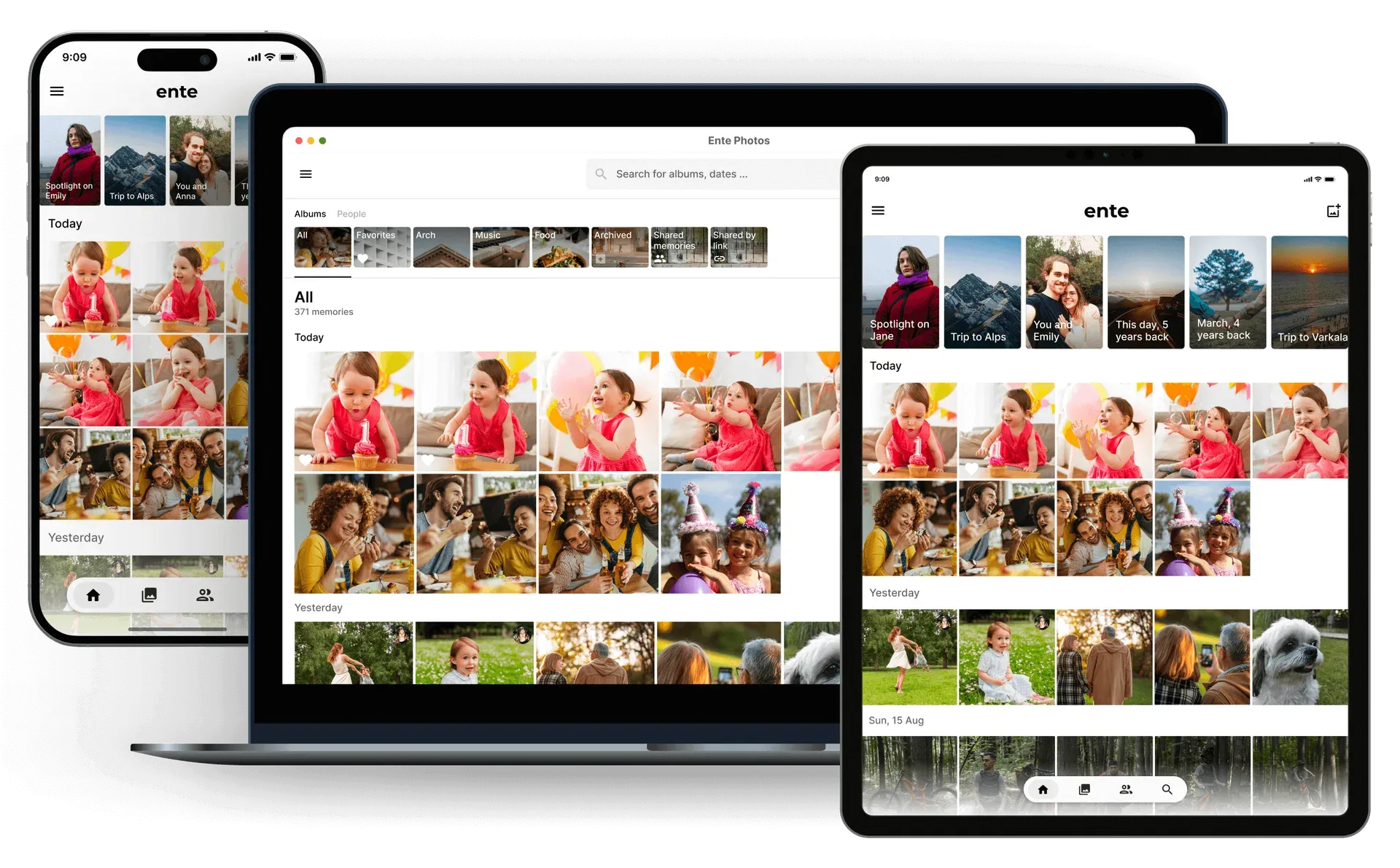
Official README illustration of Ente Photos on mobile, desktop and tablet, showing album shortcuts, memories and a dated timeline.
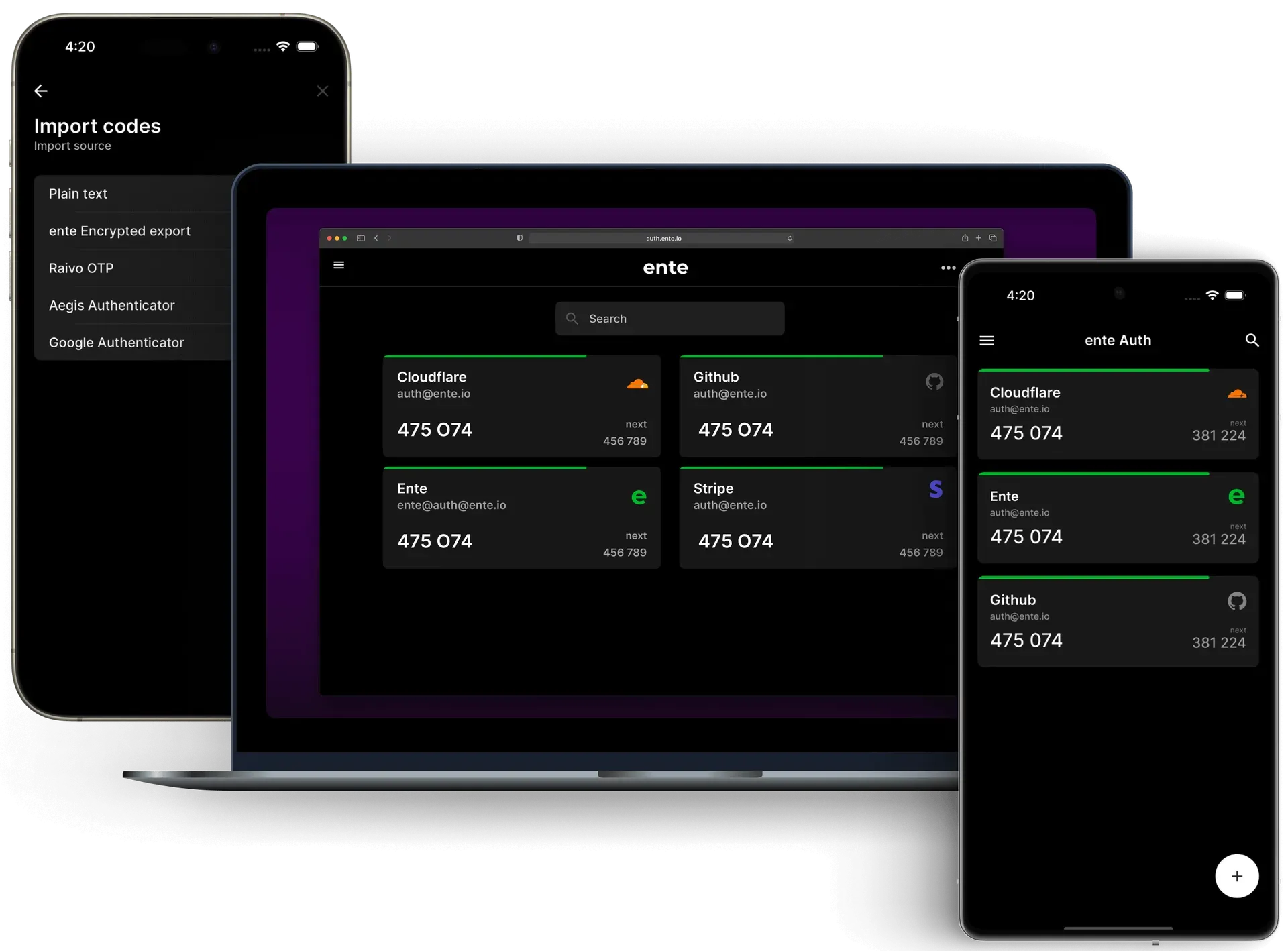
Official README illustration of Ente Auth: rotating codes with next-code preview, search and the import sources list.
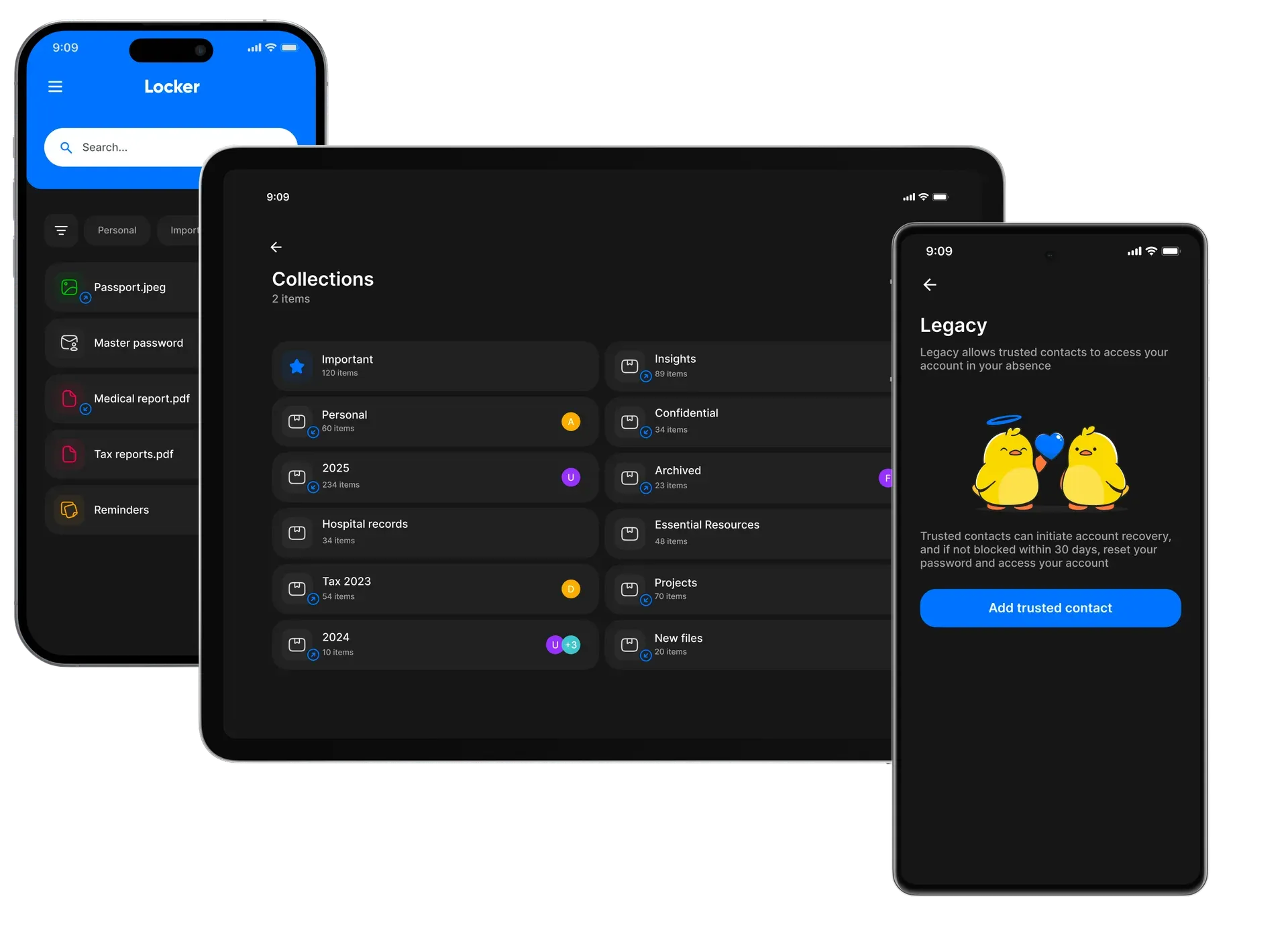
Official README illustration of Ente Locker with stored documents, shared collections and Legacy emergency access.
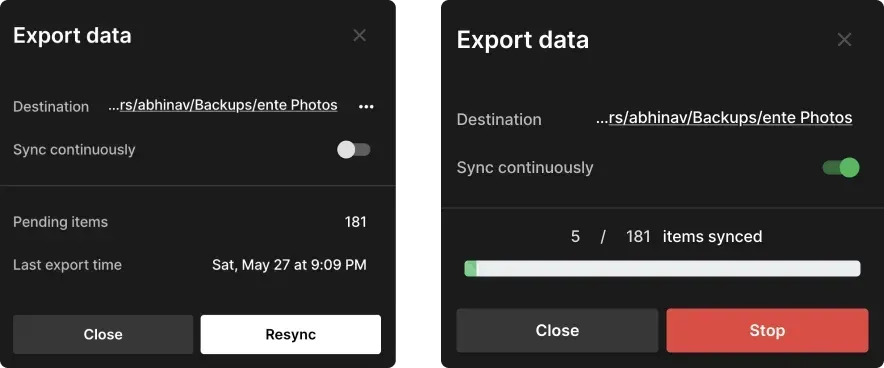
Documentation screenshot of the desktop Export data dialog before and during continuous sync to a local folder.
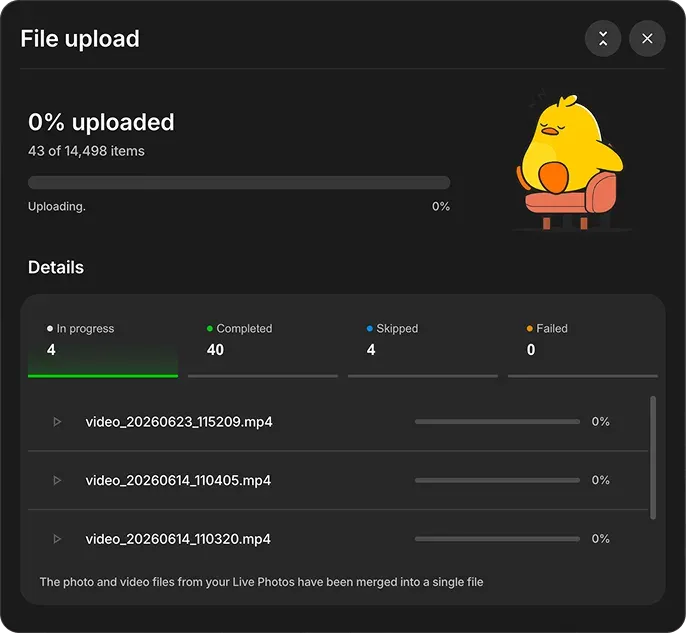
Documentation screenshot of the upload dialog listing per-file progress and status tabs during a large import.
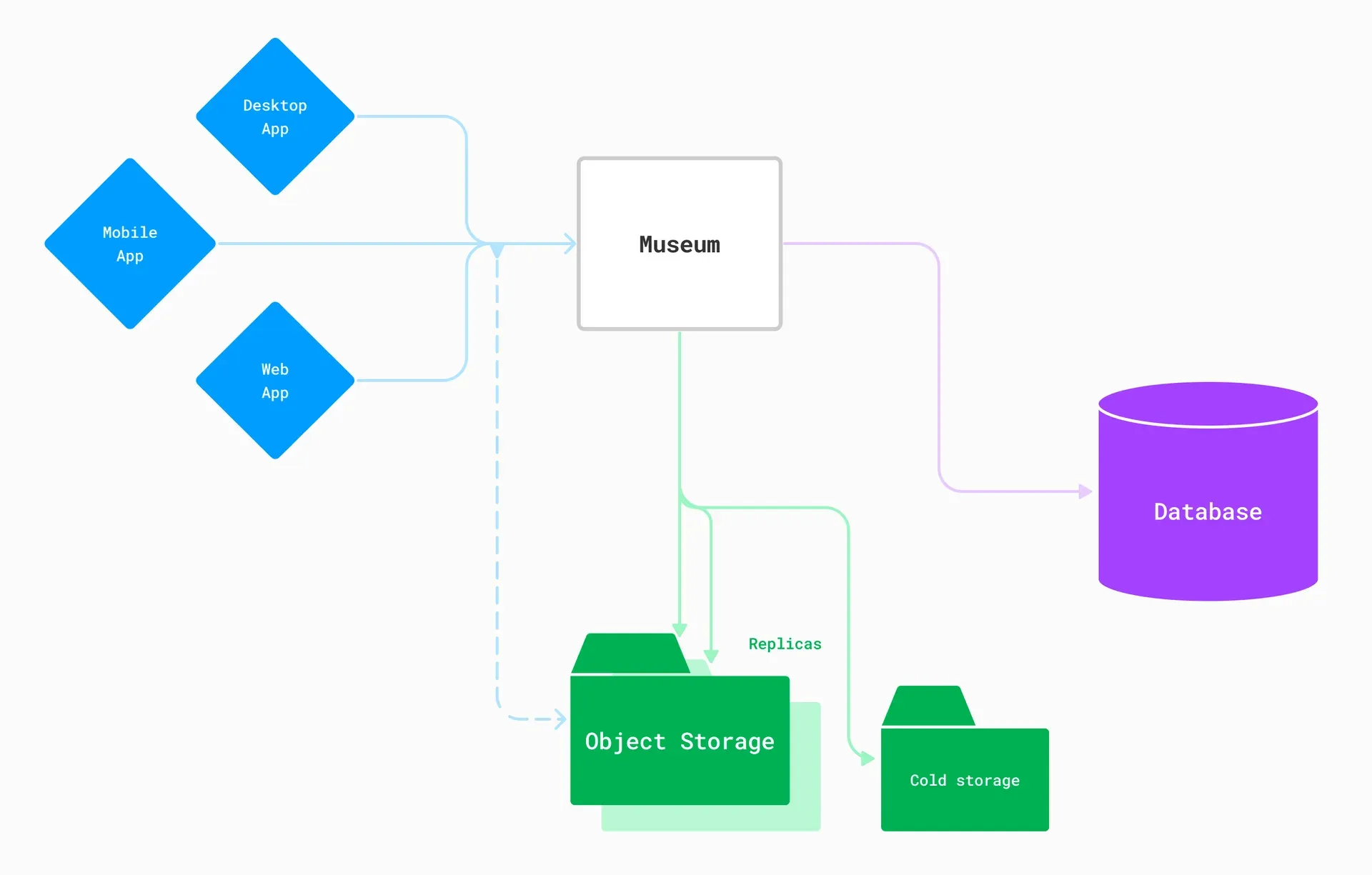
Official server README diagram of Museum, the Go API server, with its database, replicated object storage and cold storage.
Source: official Ente project page.
Key capabilities
- Ente Photos for iOS and Android Install from the App Store, Google Play, F-Droid or as a signed APK from GitHub releases. The F-Droid build (io.ente.photos.fdroid) and the GitHub APK (io.ente.photos.independent) use different package IDs, so switching channels installs a second copy instead of updating. Background uploads back up the camera roll automatically, and iOS now offers a backup mode when 50 or more files are pending.
- Desktop apps for Windows, macOS and Linux The download page lists a Windows installer, a macOS build, and Linux AppImage, DEB, RPM and Flathub packages. The macOS app requires macOS 13.3 or later. The desktop app is built on Electron and adds folder watching, continuous export and wider RAW preview support than the browser.
- Web access Ente Photos runs in the browser at photos.ente.com and Ente Auth at auth.ente.com, with the same account and password as the native apps. The older web.ente.io and photos.ente.io addresses redirect to the new domain. Public album links are served by a separate Albums app.
- End-to-end encryption by default Each file gets a random 256-bit key, which is wrapped by an album key and then by the account master key. File data is encrypted in chunks with XChaCha20-Poly1305, and metadata such as EXIF dates, locations and descriptions is encrypted as well. The master key never leaves the device unencrypted; the server stores only an encrypted copy protected by an Argon2id key derived from the password.
- Recovery key and Legacy contacts A recovery key generated at sign-up can reset a forgotten password; without it and the password, the data cannot be decrypted by anyone. Legacy lets a user appoint trusted contacts who can start account recovery; if the owner does not block the request within 30 days, the contact can reset the password and take over the account. Two-factor authentication and passkeys protect the login itself.
- Encrypted sharing and collaborative albums Albums are shared by encrypting the album key with the recipient's public key, and a verification ID lets both sides compare keys. Collaborative albums allow other Ente users to add photos, and public links work for people without an account. Location tags and captions stay end-to-end encrypted when shared.
- On-device face recognition and magic search Face grouping and natural-language search run locally after photos are downloaded and indexed on the device. The resulting indexes are encrypted before they sync to other devices, and Ente states that no external AI service is used and photos are not used to train models. Indexing a large library takes time and battery, so the docs suggest letting it run on a charger or on desktop.
- Storage plans and free tier Every account includes 10 GB of free storage. Paid plans published by Ente range from 50 GB at USD 2.99 per month or USD 29.88 per year to 2 TB at USD 23.99 per month or USD 239.88 per year, with 200 GB and 1 TB tiers in between and a single global price. Storage is counted in binary units (1024 based), and needs above 2 TB go through support.
- Family plans and referrals A family plan shares one storage pool across members, with an optional per-member limit, while each member's library stays private. Each friend who upgrades through a referral code adds 10 GB, capped at the size of the current plan. Free storage is replaced, not added, when an account upgrades.
- Three-copy replication in the EU Hosted data is stored with Backblaze in Amsterdam, Wasabi in Frankfurt and Scaleway in Paris, the last being a cold-storage copy in a former fallout shelter. The Wasabi bucket uses a 21-day compliance lock, so files cannot be deleted from that replica, even by Ente, until the user has permanently deleted them. The PostgreSQL database runs as an active-passive pair with snapshots every 6 hours.
- Import from other services Migration guides cover Google Takeout, Apple Photos, Amazon Photos, Proton Drive and local hard disks. The upload dialog reports in-progress, completed, skipped and failed items, and merges Live Photo image and video parts into one file. Deduplication avoids counting the same file twice across albums.
- Export and continuous sync The desktop app exports a decrypted copy of the library to a local folder, and the Sync continuously option keeps that folder updated as new photos arrive. The export guide also covers the Ente CLI, which can export from the command line on a server. This gives an exit path that does not depend on the hosted service.
- Ente Auth for 2FA codes Ente Auth stores TOTP and HOTP secrets with the same end-to-end encryption and syncs them across mobile, desktop and web. It supports tags, pinning, notes, custom sort order, simple-icons service icons and time-limited sharing links that expire after 2, 5 or 10 minutes without revealing the secret. Ente Auth is free and its README states it will remain free.
- Ente Auth offline mode and imports Choosing Use without backups keeps codes only on the device, encrypted with a key held in the platform secure storage. Device transfers and OS backups do not restore offline codes, so an encrypted export is required. Imports cover Google Authenticator multi-QR exports, Aegis, Bitwarden, 2FAS, Raivo, OTP Auth and plain text, and v4.4.26 added a macOS menu bar mode.
- Ente Locker for documents Locker stores documents, credentials and notes in encrypted collections and supports private sharing and emergency access through trusted contacts. It is available for iOS and Android. Locker is free for up to 100 items, and Ente Photos subscribers can store up to 1000 items.
- Other client features Clients include a photo editor with crop, straighten, text overlays and adjustments, a map view from encrypted location data, memories, archive and hidden albums, a trash that keeps items for 30 days and a free-up-space action that removes backed-up originals from the phone. Albums can be cast to a TV. Feature availability differs between mobile, desktop and web, so check the target client.
- Self-hosted server Museum is a single Go binary published as the ghcr.io/ente/server image. The quickstart script creates a my-ente directory with PostgreSQL 15, MinIO object storage, Museum and the web apps, serving Photos on port 3000 and public albums on port 3002. The requirements page asks for at least 1 GB RAM, 1 CPU core, Linux with Docker Compose 2.30 or later and a filesystem with Unix permissions.
- Ente CLI The CLI logs in to an existing account, exports decrypted data and, on a self-hosted instance, performs administrative actions such as raising storage limits for whitelisted admins. It cannot create new accounts. Releases are tagged ente-cli, with v0.4.3 published on November 4, 2026.
- Security audits and disclosure The cryptography and source code were audited by Cure53 with Symbolic Software, and a later audit was completed on behalf of CERN; the reports are linked from the Ente blog. Vulnerabilities go to security@ente.com or a private GitHub security advisory. Android APKs from GitHub can be checked against published signatures and SHA256SUMS files.
Where Ente fits
Replacing Google Photos or iCloud Photos
Create an account on a phone, enable background backup and pick which device folders to upload. For an existing cloud library, export it first, for example with Google Takeout, then upload the archive from the desktop app so dates and locations from the sidecar JSON files are read. Check the skipped and failed tabs in the upload dialog, compare item counts with the source and keep the original export until the counts match. The storage and plans FAQ explains quotas, deduplication and plan changes.
Sharing a family library without shared passwords
Put relatives on one family plan, set per-member storage limits if needed and use shared or collaborative albums for joint events. Each member keeps a private library under their own keys. Compare verification IDs when sharing sensitive albums, review public links periodically and remove expired ones. Add a Legacy contact so a trusted person can recover access after the 30-day waiting period if the owner is unavailable.
Moving 2FA codes into Ente Auth
Export codes from the current authenticator, such as Google Authenticator, Aegis or Bitwarden, and import them into Ente Auth on one device. Confirm that each imported entry produces the same code as the old app before removing the old app, then install Ente Auth on a second device or open auth.ente.com to test sync. For an air-gapped setup, use offline mode and schedule encrypted exports, because offline codes are not restored by device transfer. The Auth feature guide covers tags, sharing and imports.
Keeping a local decrypted copy
Install the desktop app on a machine with enough disk space, open Export data, select a destination folder and turn on Sync continuously. The export writes the original files into album folders, so ordinary backup tools such as a NAS snapshot or offsite job can protect it. On a headless server, the Ente CLI can run the same export on a schedule. Treat the export folder as sensitive, because it is not encrypted, and verify that new uploads appear in it after a sync.
Self-hosting for a household or small team
Run the quickstart script on a Linux host with Docker Compose 2.30 or later, then change the default credentials and endpoints in compose.yaml and museum.yaml before exposing it. Put a reverse proxy with TLS in front, point the object storage at durable S3-compatible storage and back up PostgreSQL and the bucket together. Mobile apps connect after entering the server URL in developer settings; whitelist an admin in the CLI to manage storage limits. The self-hosting docs cover post-install steps, upgrades and Kubernetes with Helm.
Storing identity documents and recovery material
Use Ente Locker on iOS or Android for passports, insurance papers, medical records and similar files that should not sit in a regular gallery. Group them into collections, share individual items with trusted people and set up emergency access. Check the 100-item free limit, or 1000 items with a Photos subscription, before migrating a large archive, and store the Ente recovery key itself somewhere outside the account.
Install
sh -c "$(curl -fsSL https://raw.githubusercontent.com/ente/ente/main/server/quickstart.sh)"Reviews of Ente
Be the first to share your experience with Ente.
Write a review
Loading review form…
Alternatives to Ente
 ImmichImmich organizes photos and videos on a self-hosted server, with web and mobile access, automatic mobile backup, facial recognition, metadata search and album sharing.
 VaultwardenVaultwarden is an unofficial Rust implementation of the Bitwarden Client API for self-hosting, with personal vaults, organization sharing and multifactor login.
 KeePassXCKeePassXC is an open-source password manager for Windows, macOS and Linux that stores entries in an offline, encrypted KeePass-compatible KDBX file.