

What is PicPeak?
PicPeak is an open-source, self-hosted platform for sharing photo and video galleries with clients, aimed at photographers and event organizers. The project presents it as an alternative to hosted services such as PicDrop and Scrapbook.de: galleries can be time-limited and password-protected, carry the studio's own branding and stay on the operator's server. The code is developed in the PicPeak/picpeak repository under the MIT license, with a homepage at picpeak.app, documentation at docs.picpeak.app and a public demo at demo.picpeak.app that resets periodically.
The backend is Node.js with Express and uses SQLite or PostgreSQL; the frontend is React with Tailwind CSS and Framer Motion. Images are processed with Sharp. Media can live on the local filesystem or in an S3-compatible object store such as AWS S3, MinIO, Cloudflare R2, Backblaze B2, Wasabi or DigitalOcean Spaces, and an external media mode references existing originals read-only. Email goes through SMTP with editable templates, and analytics can be connected to Umami. The interface ships in English and German.
Deployment is Docker based. The standard stack uses docker-compose.production.yml with prebuilt backend and frontend images plus PostgreSQL and Redis, and is reached on port 3000. An all-in-one image runs the whole application as one process with SQLite for a home server, NAS or small studio. Images are published on GHCR under ghcr.io/picpeak/picpeak and on Docker Hub as picpeak/backend, picpeak/frontend, picpeak/aio and the optional picpeak/ml sidecar, for linux/amd64 and linux/arm64. The system requirements list 2 CPU cores, 4 GB of RAM for a normal upload workload, 20 GB of storage plus photos, Linux, macOS or Windows with WSL2, and Node.js 22.12 or later for native installs.
Releases follow stable and beta channels selected with PICPEAK_CHANNEL, and the admin UI can update the install itself when in-app updates are enabled. The latest stable release is v3.135.10, published November 10, 2026; it shows photos in the masonry layout mode on stable, applies the Max Video Size setting to guests and uploads large guest files in chunks, and fixes naming of untyped media files. In 2026 the project moved to its own GitHub organization; images under the old ghcr.io/the-luap path were frozen on May 27, 2026, as described in the migration note.
A CRM and accounting module with quotes, contracts, invoices, hours logging, expenses and tax reports exists in beta and is switched off by default; the README states that its contract texts and tax figures are examples that are jurisdiction specific. Optional photo sales use Stripe Checkout or Snipcart, with provider fees. Similar directory entries: Lychee, Piwigo and Immich.
PicPeak screenshots
Explore the interface. Open a screenshot to view it at full size.
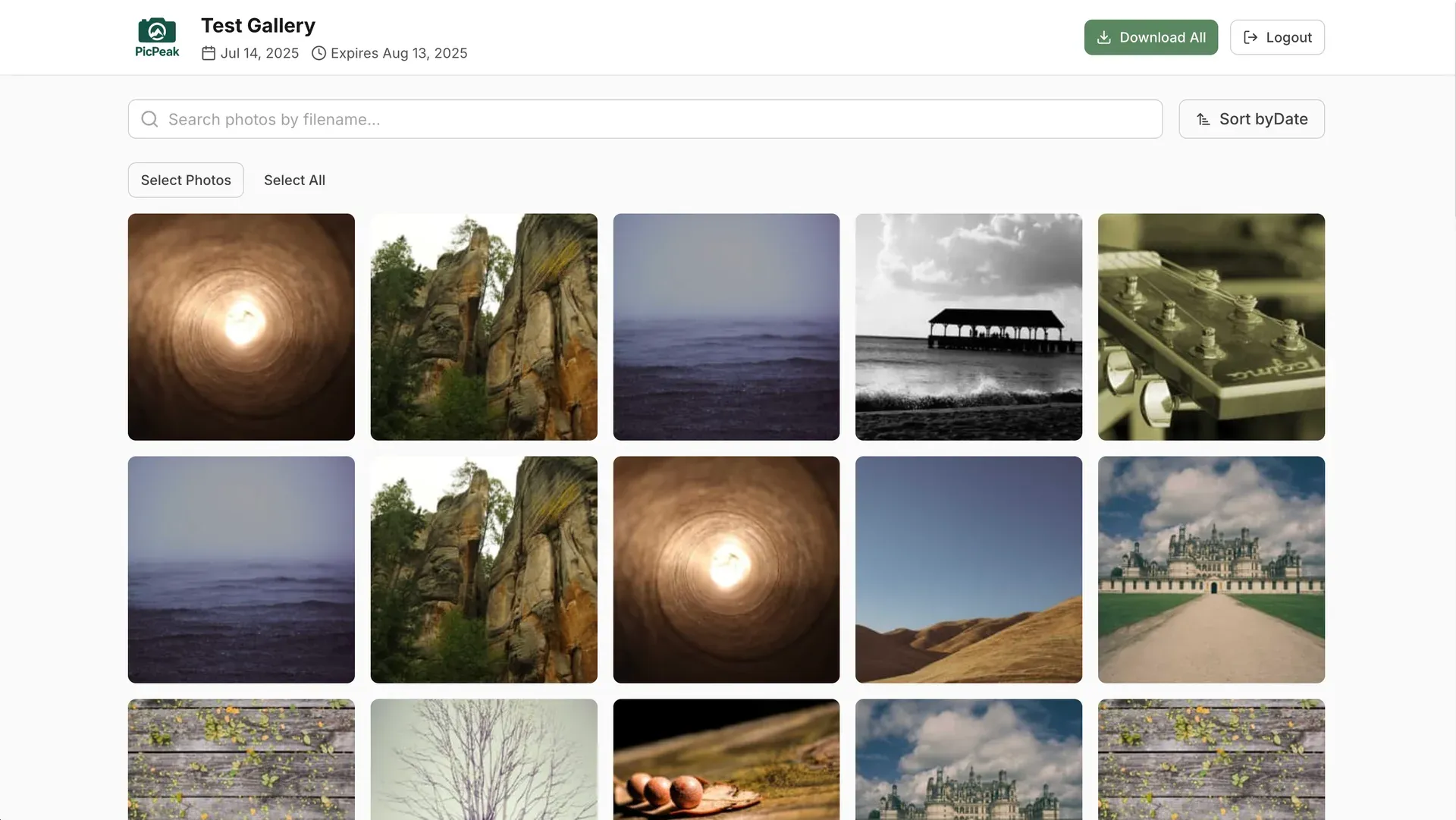
Client gallery view with expiry date, search, selection and Download All. Official README screenshot.
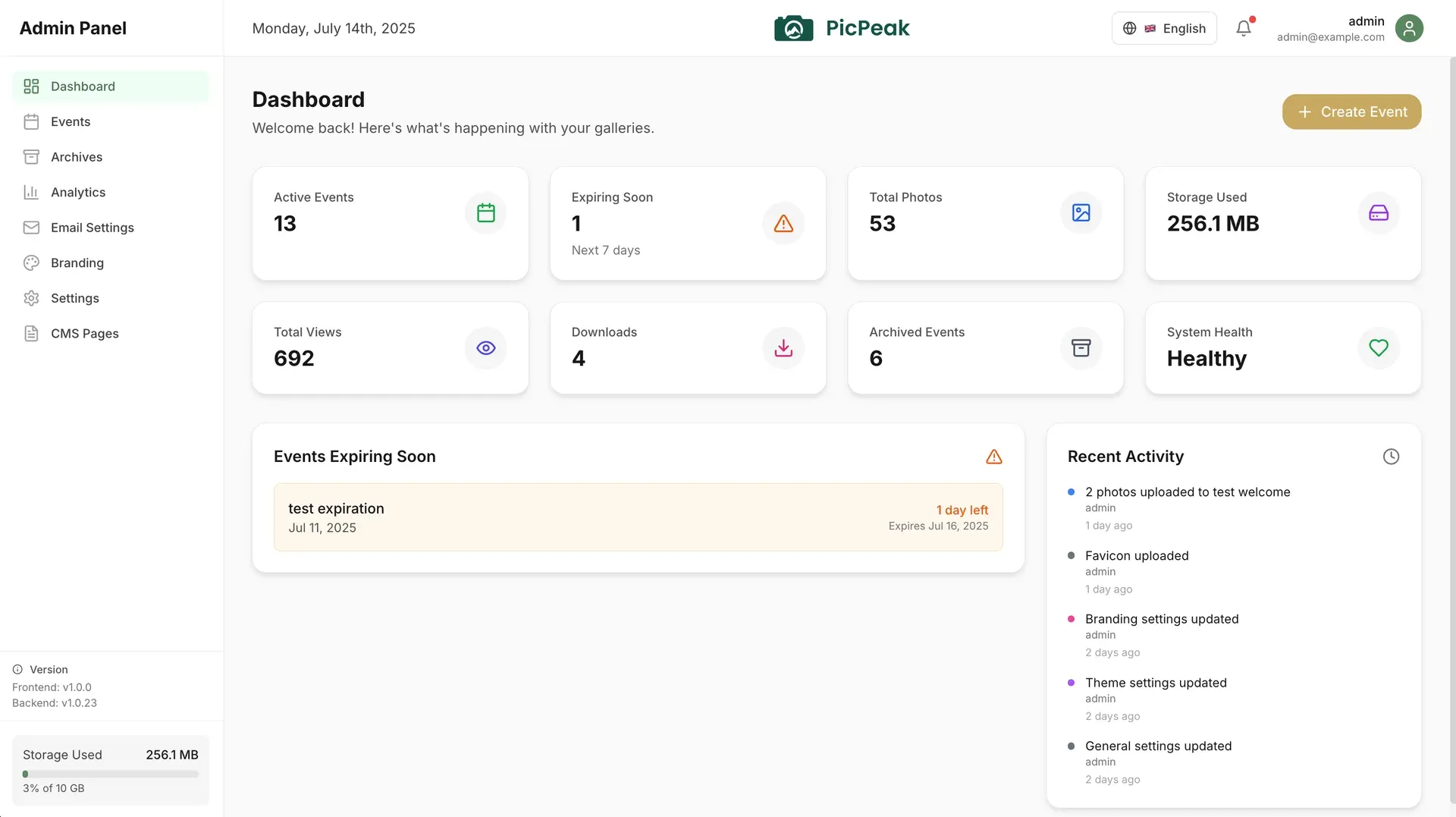
Admin dashboard with event, storage and download counters, expiring events and recent activity. Official README screenshot.
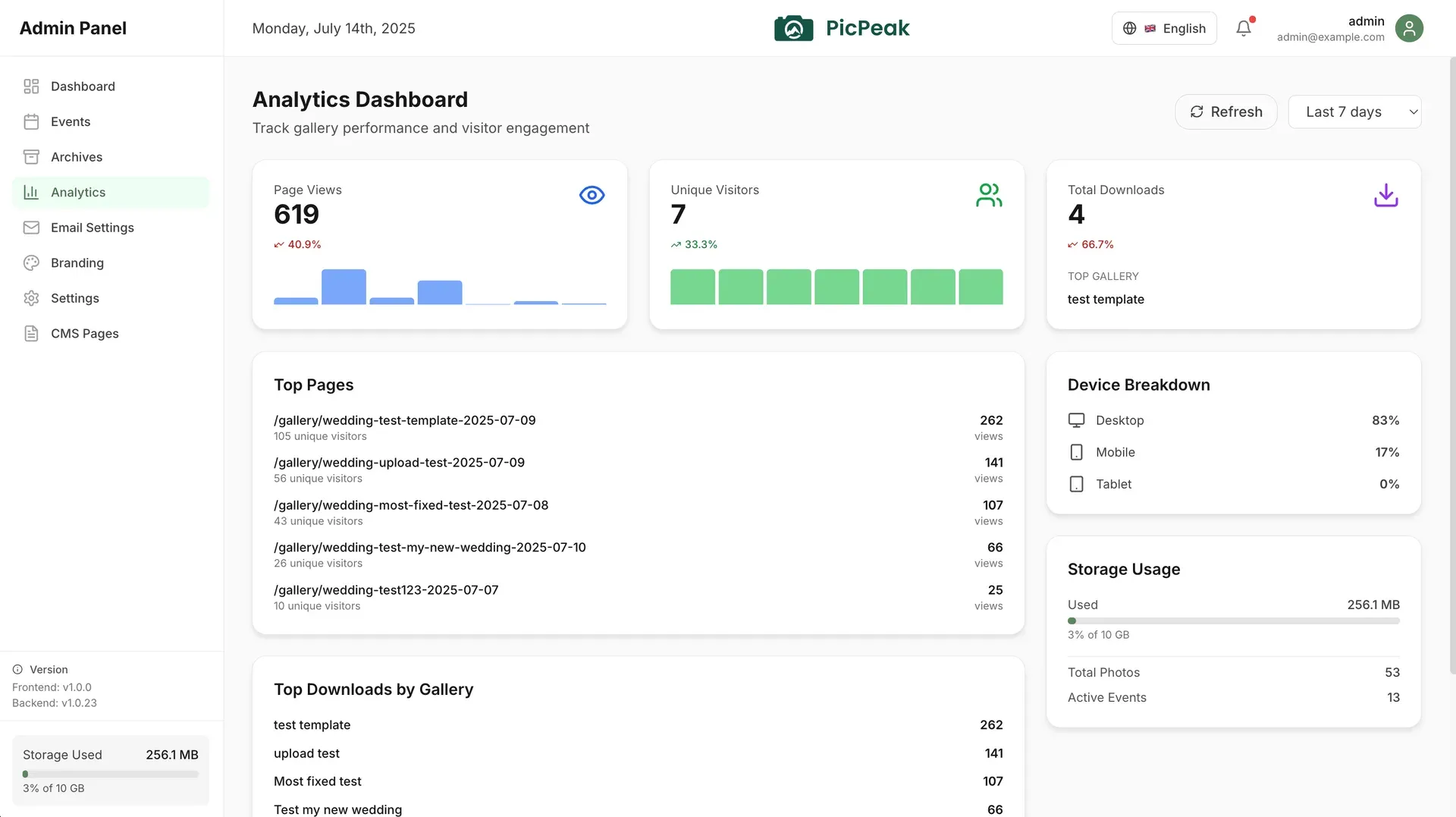
Analytics dashboard with page views, visitors, top galleries and device breakdown. Official README screenshot.
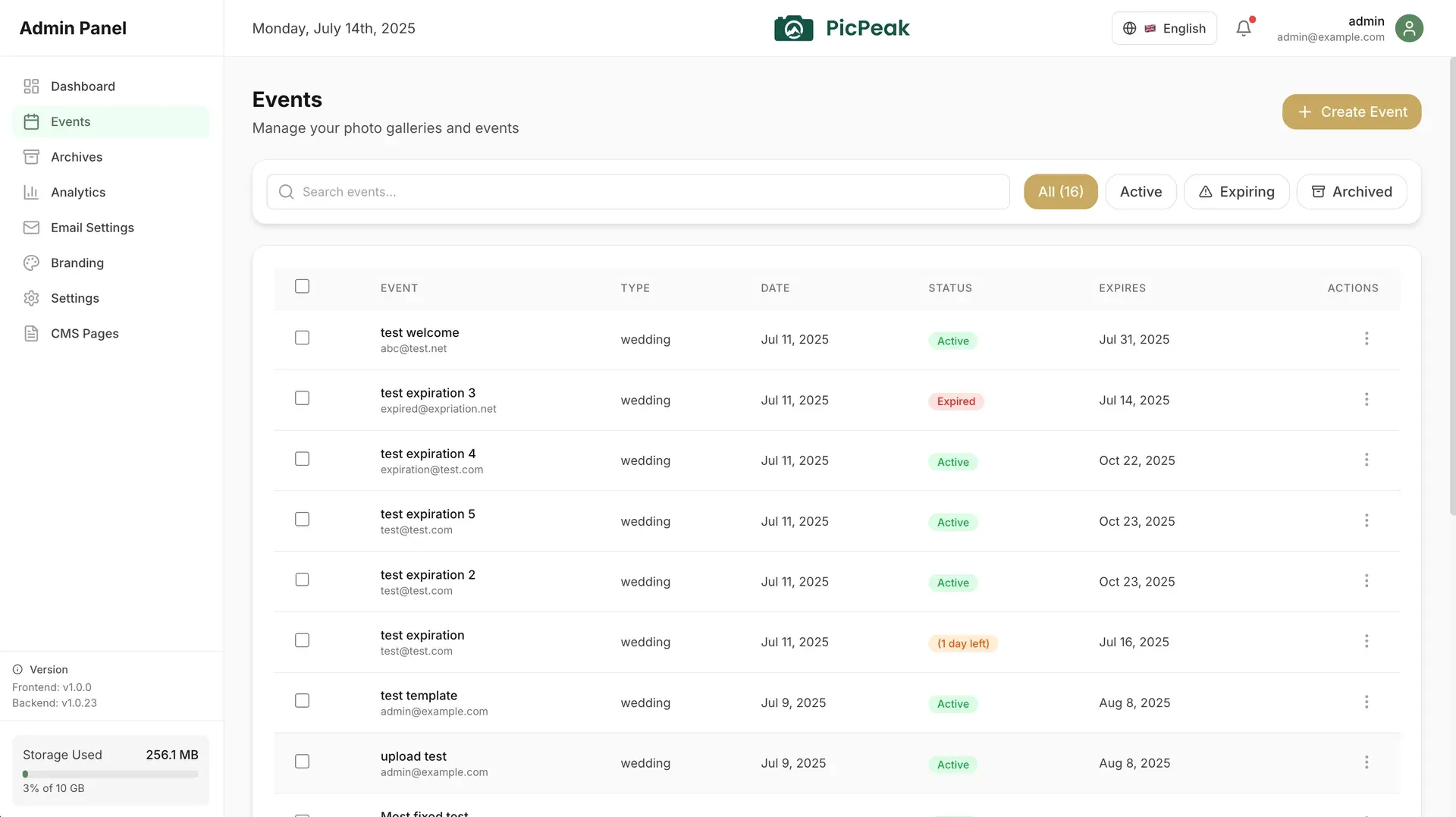
Event management list with status filters and expiry dates. Official README screenshot.
Source: official PicPeak project page.
Key capabilities
- Event galleries Each event becomes a gallery with a date, an expiry date and an event type, managed from an Events list that filters active, expiring and archived galleries. Galleries can be password protected and expire automatically. Expired galleries can be archived, as described in the event guide.
- Client gallery view Guests open a mobile-oriented gallery where photos can be searched by filename, sorted, selected and downloaded, including a one-click download of the whole gallery. The release notes mention layout modes such as a masonry view. Download sizes and a reveal mode are covered in the documentation.
- Uploads Photographers upload by drag and drop, and large files go through a chunked upload API in 10 MB resumable chunks. Thumbnails are generated automatically. Guest uploads to a gallery are optional, and since v3.135.10 large guest files are also uploaded in chunks.
- Video support MP4, WebM, MOV and AVI files can sit next to photos once their extensions are added to the Allowed File Types list, which ships with only image formats. Max Video Size defaults to 500 MB per file and is separate from the photo limit. The documentation notes that browsers mostly play H.264 in MP4, and a conversion option for other formats is on the beta channel.
- Download protection and watermarks Galleries can apply watermarking and right-click prevention to limit copying. In priced galleries, guests see watermarked previews and receive a download link for clean originals after payment. Photo protection settings are documented under image security.
- Branding and themes The admin area has Branding and theme settings, custom CSS, custom fonts, CMS pages and a public landing page, so galleries carry the studio's identity. The project describes the product as white-label ready. Email notifications use customizable templates.
- Live Slideshow A token-only fullscreen URL shows an event's published photos on a projector and picks up new uploads while it runs. It is off by default and enabled under Settings, Features; each link can be regenerated or disabled. Details are in the Live Slideshow docs.
- People in this gallery Optional face grouping lets a guest pick a face and see only the photos containing that person. It runs in a separate
picpeak-mlcontainer on the same server, with no external service and no runtime model download, needs aFACE_ML_TOKEN, and is not available on the all-in-one image. The documentation notes that detected faces are personal data under GDPR Article 9. - Analytics dashboard The admin dashboard shows active and expiring events, total photos, storage used, views, downloads and system health, and an analytics page lists page views, unique visitors, top galleries and device breakdown. The project describes its analytics as privacy focused, with an Umami integration.
- Multiple administrators and roles Any number of admin accounts can exist, each with a role built from a permission matrix. Stable ships Super Admin, Solo Photographer, Admin, Editor, Team Photographer and Viewer roles; editable roles arrived on stable in v3.132.1. Admin single sign-on through OIDC is documented.
- Customer accounts Clients can have customer accounts and documents, which the README comparison table lists as a feature. Customer groups are part of the CRM section of the documentation. A Customer Support role exists on the beta channel.
- REST API and webhooks A public v1 API under
/api/v1, authenticated with API tokens, creates galleries, uploads photos, lists photos with proofing marks, downloads originals and returns share links. Each instance serves an OpenAPI 3 spec and a Swagger UI for logged-in admins. Outbound webhooks and their deliveries are managed through the same API. - Photo sales A gallery can be switched to priced, with payment through Stripe-hosted Checkout, Snipcart or a choice between both. After verified payment, PicPeak emails a personal download link for the originals. The README states that provider fees apply.
- Storage backends Local disk is the default, and
STORAGE_BACKEND=s3moves the live media store to an S3-compatible bucket. The backup destination is configured separately as local, S3 or rsync over SSH. See storage backends. - Backup and restore Backups create standalone restore points with signed HMAC-SHA256 manifests, keep a configurable number of points (seven by default) and can include a database dump. A portable
.picpeakexport moves an instance, for example from the all-in-one image to the full stack. Restores refuse unsigned or downgraded manifests unless an explicit recovery procedure is followed. - Security defaults The stack uses JWT sessions, rate limiting and CORS, binds the raw backend port to loopback and trusts a set number of proxy hops via
TRUST_PROXY. Mail and rsync connections only reach vetted addresses. The documentation covers reverse proxies, SSL certificates and CrowdSec setups. - CRM and accounting (beta) A feature-flagged module adds quotes, contracts with templates and signing, invoices with cancel-and-reissue, hours logging, a calendar, incoming supplier invoices, expenses, VAT handling and tax report exports, including a Swiss Treuhänder or Banana journal. It is off by default. The disclaimers state that the figures and contract texts are not legal or tax advice.
- Installation with Docker The README quick start clones the repository, copies
.env.example, setsCOMPOSE_FILE=docker-compose.production.ymland runsdocker compose up -d; secrets are generated on first run and the admin account is created in the browser at/admin. The single-container option is onedocker runofghcr.io/picpeak/picpeak/aio:stablewith a volume at/data. NAS container apps can pullpicpeak/aiofrom Docker Hub.
Where PicPeak fits
Delivering a wedding or event gallery
A photographer creates an event, uploads the photos and sends the client the gallery link with its password. The gallery expires on the configured date and can then be archived. Clients browse on a phone or desktop and download single photos, a selection or the whole gallery, as described in the event guide.
Collecting guest photos
With guest uploads enabled, attendees add their own photos and, if allowed, videos to the event gallery. Moderation settings and upload limits such as Max Video Size apply, and large guest files are uploaded in chunks since v3.135.10.
Showing photos live at the venue
The Live Slideshow link runs fullscreen on a projector and adds new photos as the photographer uploads them during the event. It shows only published, non-hidden photos, needs no gallery password and can be disabled or rotated at any time. Global transition and display defaults for all slideshows live under Settings, Slideshow.
Selling prints or downloads
A priced gallery shows watermarked previews, takes payment through Stripe or Snipcart and emails a download link for the originals once payment is verified. A one-time promo credit per gallery can be configured.
Running a small studio on a NAS
The all-in-one image runs the application with SQLite in one container, which NAS container managers from Synology, QNAP and UGREEN can pull from Docker Hub. The project describes moving to the PostgreSQL stack later by restoring a .picpeak backup, as covered in the single-container guide.
Automating gallery creation
Studios with their own tools can create galleries, upload photos and read proofing marks through the v1 API with an API token, and receive webhook events for changes. The OpenAPI spec on each instance, served at /api/openapi.json with a Swagger UI at /api/docs for logged-in admins, can be imported into Postman, Insomnia or another OpenAPI tool.
Install
docker run -d --name picpeak -p 127.0.0.1:3000:3000 -e COOKIE_SECURE=auto -v picpeak:/data ghcr.io/picpeak/picpeak/aio:stableReviews of PicPeak
Be the first to share your experience with PicPeak.
Write a review
Loading review form…
Alternatives to PicPeak
 LycheeOpen-source photo management system you run on your own server: albums, EXIF and GPS metadata, password-protected sharing, smart albums, timeline, map, ratings and an optional Supporter Edition with a webshop, using PHP and Docker.
 PiwigoPiwigo is GPL-2.0 photo gallery software written in PHP. It imports, organizes and shares photos and videos with albums, tags, user groups, plugins and themes, a web API and an official Docker image, self-hosted or as Piwigo Cloud.
 ImmichImmich organizes photos and videos on a self-hosted server, with web and mobile access, automatic mobile backup, facial recognition, metadata search and album sharing.