

What is Backstage?
Backstage is an open source framework for building developer portals. It was created at Spotify and is now hosted by the Cloud Native Computing Foundation (CNCF) as an incubating project: the CNCF page states that Backstage was accepted on September 8, 2020 and moved to the Incubating maturity level on March 15, 2022. The project describes the portal as being powered by a centralized software catalog that tracks services, libraries, websites, data pipelines and ML models, with a plugin architecture on top. Its background page says it grew out of fragmentation at Spotify, where engineers struggled to find APIs, owners and documentation.
Out of the box the project lists three core products: the Software Catalog, Software Templates (the scaffolder) and TechDocs, plus search, a Kubernetes plugin, authentication, permissions and notifications, and a large ecosystem of open source plugins. The plugin directory on backstage.io lists community and vendor plugins. Backstage is a framework rather than a finished product: an organization creates its own app, configures integrations and chooses plugins, so the resulting portal is its own TypeScript codebase.
The code lives in the backstage/backstage repository, written mainly in TypeScript, and is licensed under Apache-2.0. The repository was created in January 2020 and the project was open sourced in March 2020. The latest GitHub release is v1.56.4, published on November 9, 2026. The v1.56.0 release notes list several breaking changes, among them stricter filter predicates in the catalog, removal of the Atlassian username sign-in resolver and a required instance ID for custom root instance metadata services. Governance is described in the GOVERNANCE.md file of the backstage/community repository, and the ADOPTERS list records organizations that use Backstage, including Spotify.
Installation uses the official scaffolder CLI: the standalone installation guide starts with npx @backstage/create-app@latest, which generates a monorepo with a frontend app and a backend. The guide states that this result runs locally with an in-memory SQLite database and demo content and is not a production-ready installation. For deployment, the Docker deployment guide describes building the backend into a container image and expects a configured auth provider and a Postgres database. Security issues are reported through Spotify's bug-bounty program rather than GitHub issues, according to the README.
Backstage screenshots
Explore the interface. Open a screenshot to view it at full size.
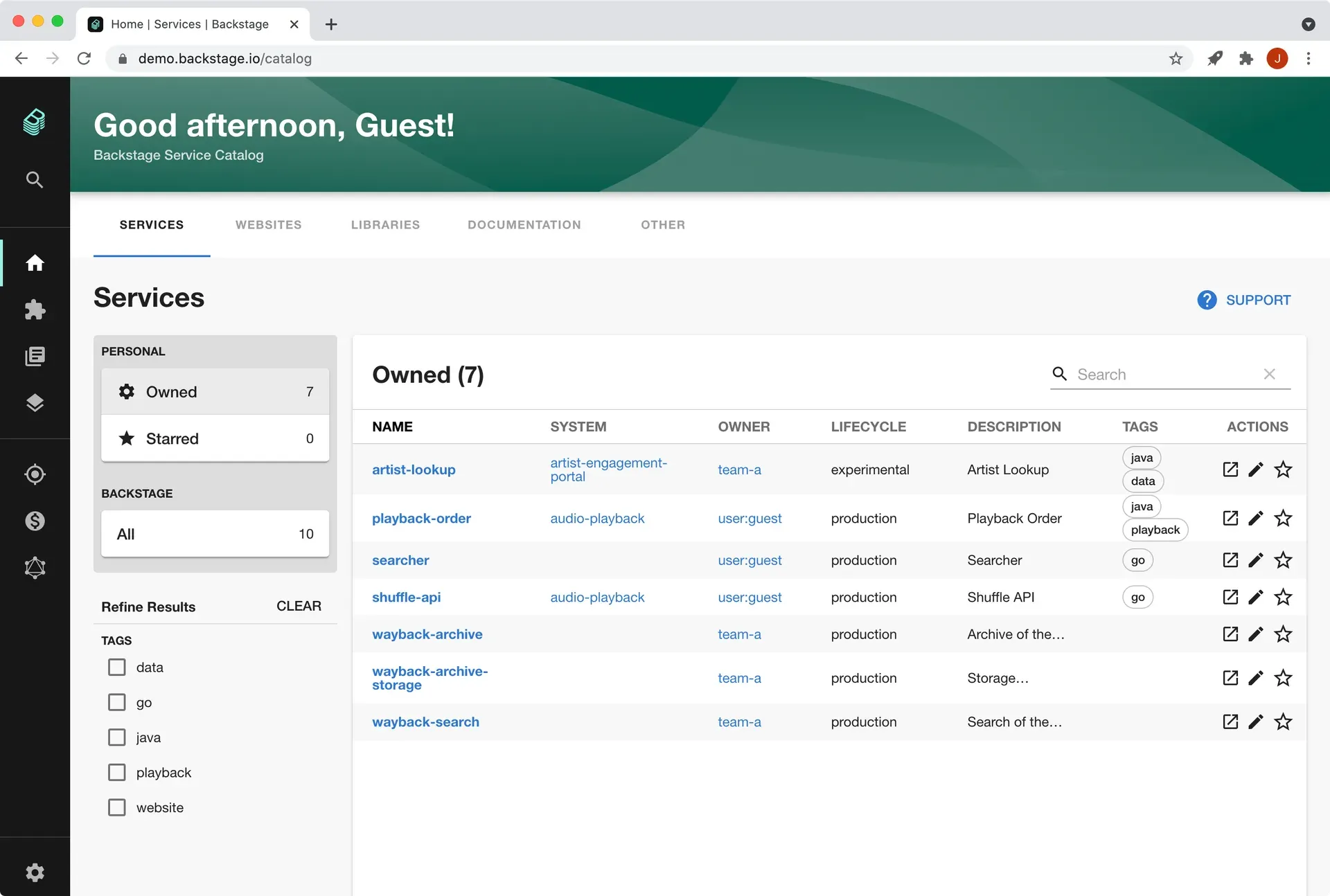
Official demo screenshot of the software catalog table with tag filters.
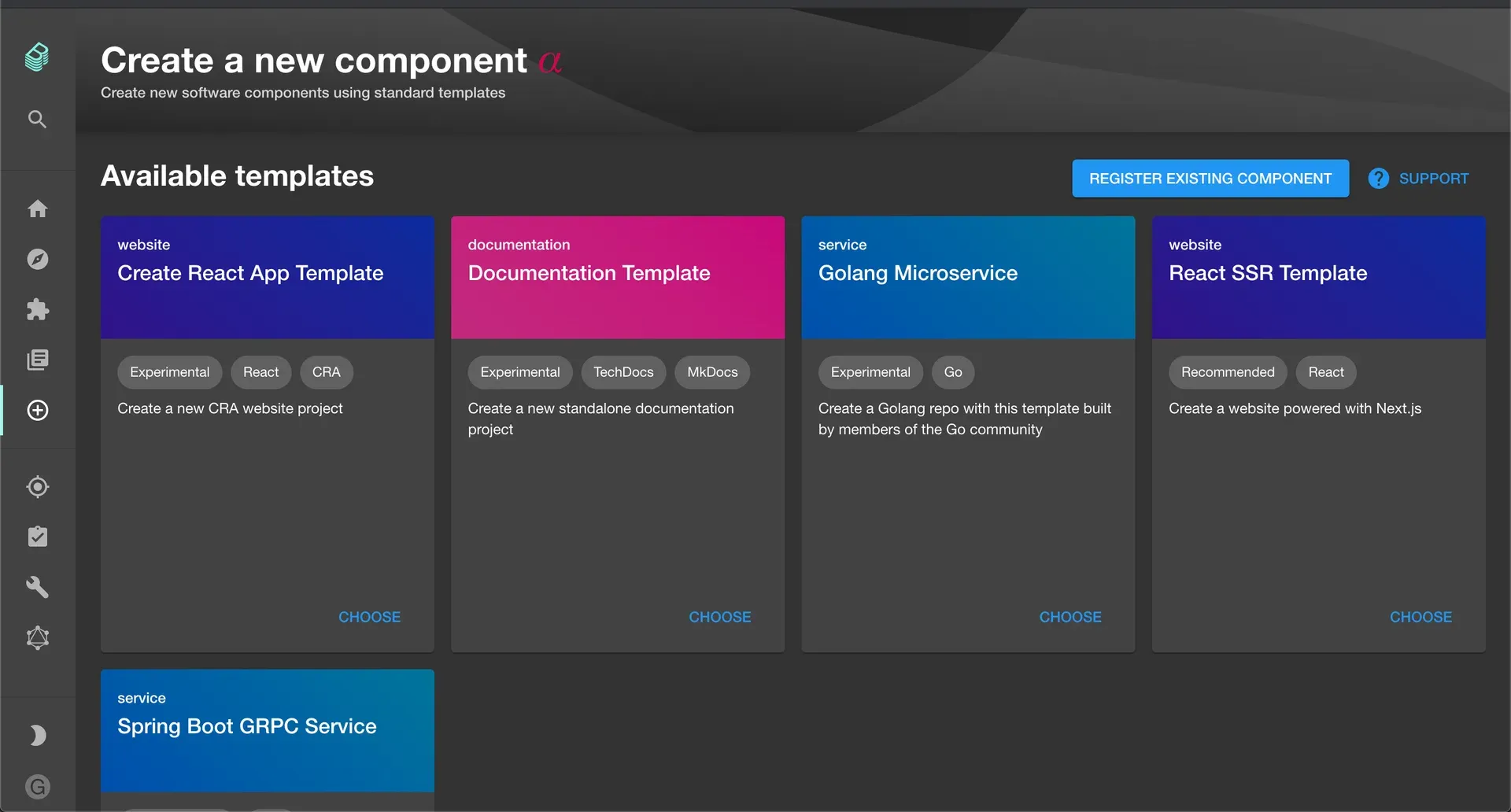
Official documentation screenshot of the template chooser in the scaffolder.
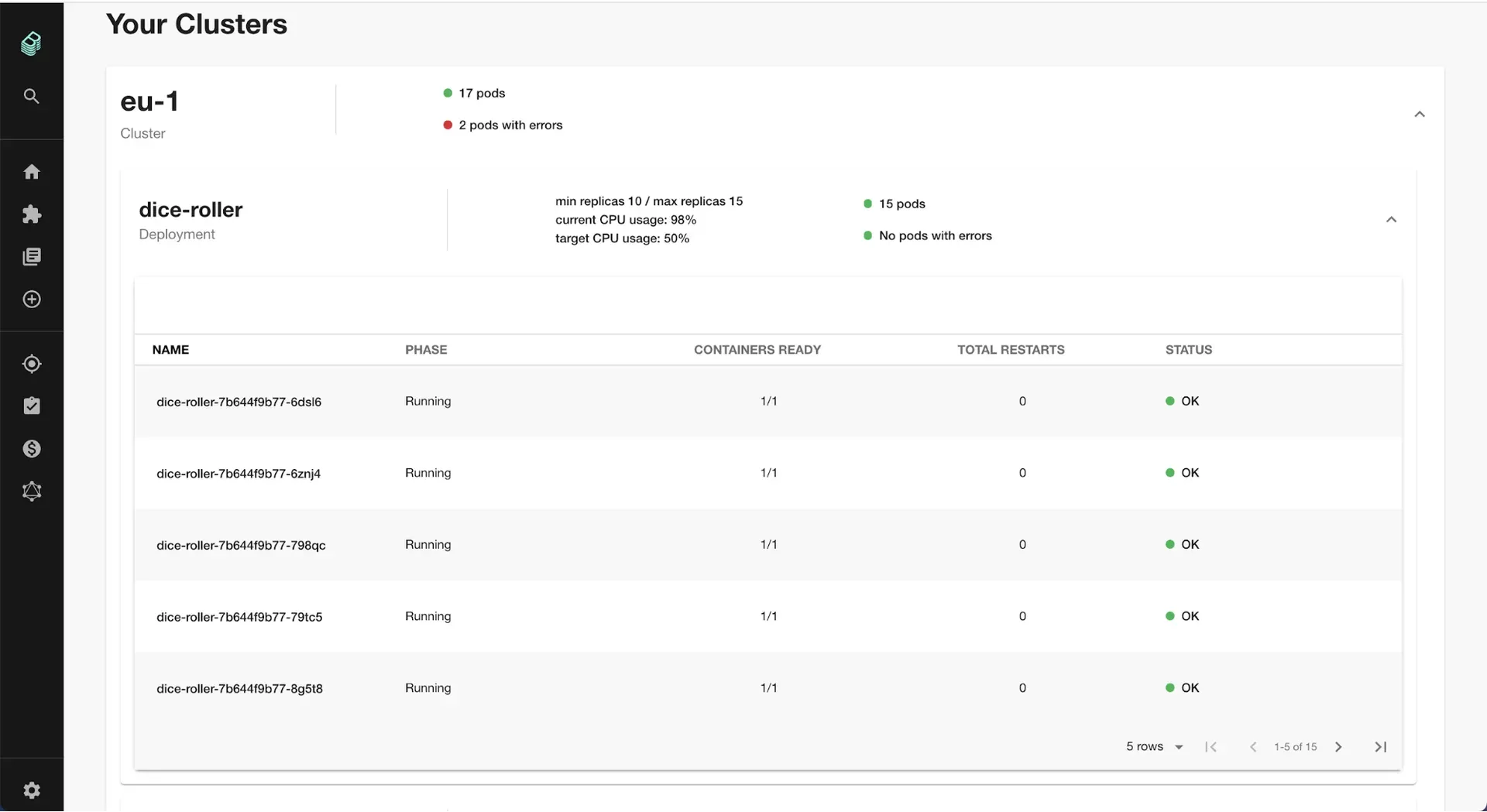
Official documentation screenshot of cluster and pod health for a service.
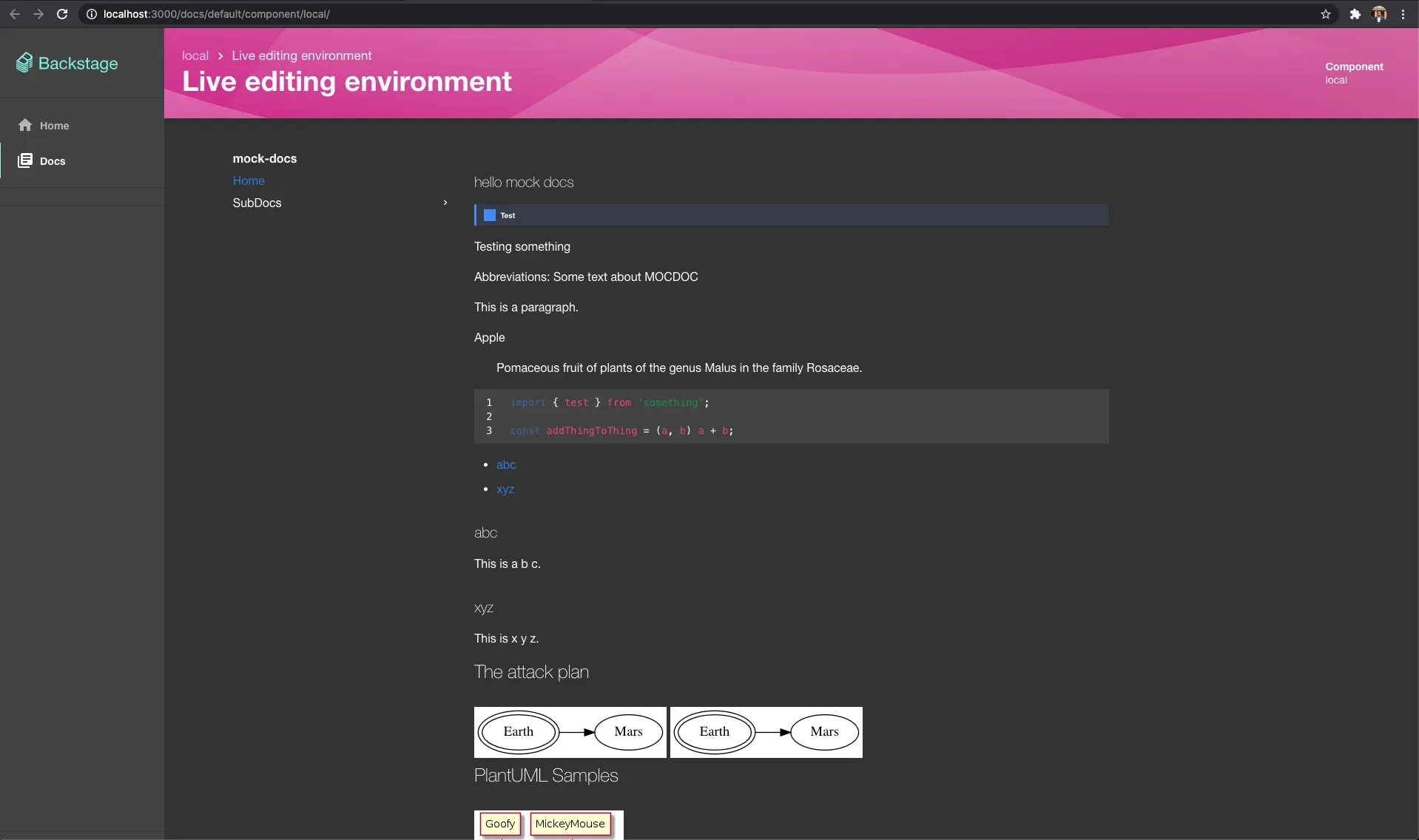
Official documentation screenshot of the TechDocs preview.
Source: official Backstage project page.
Key capabilities
- Software Catalog A centralized system holding metadata for software such as services, websites, libraries, ML models and data pipelines, and optionally the infrastructure needed to run them. Entities are described in YAML descriptor files such as
catalog-info.yamlstored next to the code, and the catalog can be viewed and searched in the UI. The descriptor format defines kinds, owners, lifecycle and relations. - Catalog ingestion and system model Entities are ingested from registered locations and from backend modules, then processed and stitched into a graph of relations. The documentation describes the life of an entity through ingestion, processing and stitching, and an incremental ingestion module exists for large sources.
- Software Templates (scaffolder) Templates load skeletons of code, fill in variables and publish the result to a location such as GitHub or GitLab. Templates are found under the
/createroute of the app and can run custom actions; the docs note that custom action IDs should use camelCase so template expressions evaluate correctly. - TechDocs A docs-like-code solution: engineers write Markdown next to their code and a documentation site appears inside Backstage and on the service page in the catalog. It builds on MkDocs and its plugin ecosystem, includes search for docs, supports documentation-only sites and offers an add-on framework for extra reader features.
- Search The search feature finds information across the Backstage ecosystem. The technical overview says the look of each result can be customized and that a deployment can use its own search engine, so catalog entities, TechDocs and plugin content can be indexed together.
- Kubernetes plugin Lets developers check the health of their services, whether running on a local host or in production. The documentation screenshot shows clusters, deployments, pod counts and per-pod status for a service.
- Plugin architecture Plugins are client-side applications that mount themselves on the Backstage UI so many tools share one interface. The technical overview describes three plugin types, and the repository contains a large number of first-party plugins under
plugins/. - New backend system The backend is assembled from plugins and modules with
createBackend, with core services such as logging, database, scheduler and instance metadata. The v1.56 notes mention an instance ID option forcreateBackend. - Frontend system The project documents a newer frontend system alongside the original app structure; its roadmap page describes work to make it ready for adoption and to support it in core plugins.
- Authentication and identity Built-in authentication providers handle sign-in and delegated access to third-party resources. The default Guest provider is not intended for containerized environments, per the Docker guide.
- Permissions A permission framework enforces rules about the access a user has to specific data, APIs or interface actions.
- Notifications Notifications provide a means for plugins and external services to send messages to individual users or groups.
- Configuration Behavior is set in
app-config.yaml, the main configuration file of a generated app. Integrations with source control and other systems are configured there as well. - Installation with create-app Run
npx @backstage/create-app@latestand enter an app name. The docs list Node.js 24 or 26 as supported as of 1.57.0, Yarn 4.4.1 via corepack, Docker, git, a GNU-like build environment, at least 20 GB disk and 6 GB memory for the standalone demo, and ports 3000 and 7007. A Unix-like OS is expected: Linux, macOS or Windows Subsystem for Linux. - Docker deployment The generated app includes a Dockerfile built on a Node slim base image that runs the backend as the unprivileged
nodeuser. The guide covers a host build, a multi-stage build and separate frontend and backend images, and lists Postgres as a prerequisite. - Database The standalone app uses in-memory SQLite for local runs. Deployment documentation names PostgreSQL.
- Design language and Storybook The project publishes design guidelines and a Storybook of UI components for building plugins that look consistent with the app.
- Community and releases Support runs through the Backstage Discord, GitHub, RFCs, community sessions and a newsletter. Releases are published on GitHub with detailed highlights.
Where Backstage fits
Cataloging services, ownership and documentation
Teams register a catalog-info.yaml file for each component, system, API or resource. The catalog then shows owner, lifecycle, tags, relations and links to source and documentation, and the UI lets users filter by owned or starred entities and by tags. A catalog graph view shows relations between entities, and the documentation covers extending entity kinds.
Creating new projects from templates
A template collects parameters in a form, fetches a code skeleton, runs scaffolder actions and publishes to a repository host such as GitHub or GitLab. Registered templates appear on the /create page, which also offers registering an existing component. The documentation describes templates as a way to standardize tooling with an organization's practices.
Publishing technical documentation
Documentation is written in Markdown with MkDocs configuration next to the code, and readers open it from the entity page in the catalog. TechDocs also supports documentation-only sites and a CLI preview server for authors. The overview page reports that Spotify uses TechDocs for thousands of documentation sites.
Viewing service health in Kubernetes
The Kubernetes plugin shows workloads for a catalog entity on configured clusters, including deployments, replicas, pods and error states, as in the documentation screenshot.
Searching across the portal
The search platform indexes catalog entities, TechDocs and content contributed by plugins, with a pluggable search engine and customizable result renderers. The search architecture documentation describes collators that feed the index and a query translator for the chosen engine.
Extending the portal with plugins
Organizations use plugins from the ecosystem listed on backstage.io/plugins or write their own following the plugin documentation. Similar projects in the directory include Humanitec; Backstage also connects to Kubernetes, GitHub and GitLab through plugins and integrations.
Install
npx @backstage/create-app@latestReviews of Backstage
Be the first to share your experience with Backstage.
Write a review
Loading review form…
Alternatives to Backstage
 HumanitecHumanitec is a Platform Orchestrator that provisions infrastructure for developers and AI agents within the security, cost and compliance rules you define.
 HelmHelm is the Apache-2.0 package manager for Kubernetes: charts define, install and upgrade applications, with releases that can be rolled back.