

What is OneGlanse?
OneGlanse is an open-source tracker for AI visibility, the discipline also called answer engine optimization (AEO) or generative engine optimization (GEO). It records how ChatGPT, Perplexity, Gemini, Claude and Google AI Overview mention a brand, where they place it against competitors and which sources they cite. Instead of calling model APIs, it opens each product's website in an automated browser, submits the prompts you define with your own accounts, and stores the rendered answer and its citations. A separate analysis model that you configure then reads each saved answer and produces the scores shown in the dashboard.
The repository was created in September 2025 under a personal GitHub account and later moved to the oneglanse organization; older documentation pages still show the previous repository path, which redirects. The code is released under the MIT License. There is no hosted app and no subscription. The project's self-hosting explanation says that running browsers, authenticated sessions and residential proxies centrally at scale would be expensive, so every user runs OneGlanse locally or on a server they control. Model API usage, AI product plans, VPS hosting and proxy service can still cost money.
No tagged GitHub release exists yet. OneGlanse is installed from a source checkout with pnpm scripts, and the self-hosted stack pulls prebuilt Web, Agent and PostgreSQL images from GitHub Container Registry. CI builds those images for AMD64 and ARM64, tests them, and publishes multi-architecture manifests with latest and commit-based tags on eligible pushes to the main branch. The most recent commits on main, from early October 2026, rewrote the README and landing copy, restored a generated AI content index and added a page explaining the move from Chromium to Camoufox. Local and self-hosted setup are documented separately on docs.oneglanse.com.
The codebase is a TypeScript monorepo managed with pnpm and Turborepo. A Next.js web app with tRPC and Better Auth handles the interface, authentication and workspace access. An Agent worker consumes BullMQ queues in Redis and drives Camoufox, a modified Firefox, through Playwright; each provider has its own implementation for sessions, selectors, prompt submission and source extraction. PostgreSQL holds users, organizations, workspaces and schedules through pg_cron, while ClickHouse stores prompts, captured responses, sources and derived analysis. The architecture document notes that the worker currently runs one provider job at a time across its process.
Several things are outside the current scope. OneGlanse has no public REST API, MCP server or hosted edition, and it does not collect answers through provider APIs. Its scores are the configured model's reading of the saved text, not values returned by the AI websites. Self-hosted browser runs require a ThorData residential proxy discovery endpoint; an arbitrary proxy URL is not accepted in its place. WSL is not part of the supported local setup path, and a provider interface change can break extraction until the matching provider code is updated.
OneGlanse screenshots
Explore the interface. Open a screenshot to view it at full size.
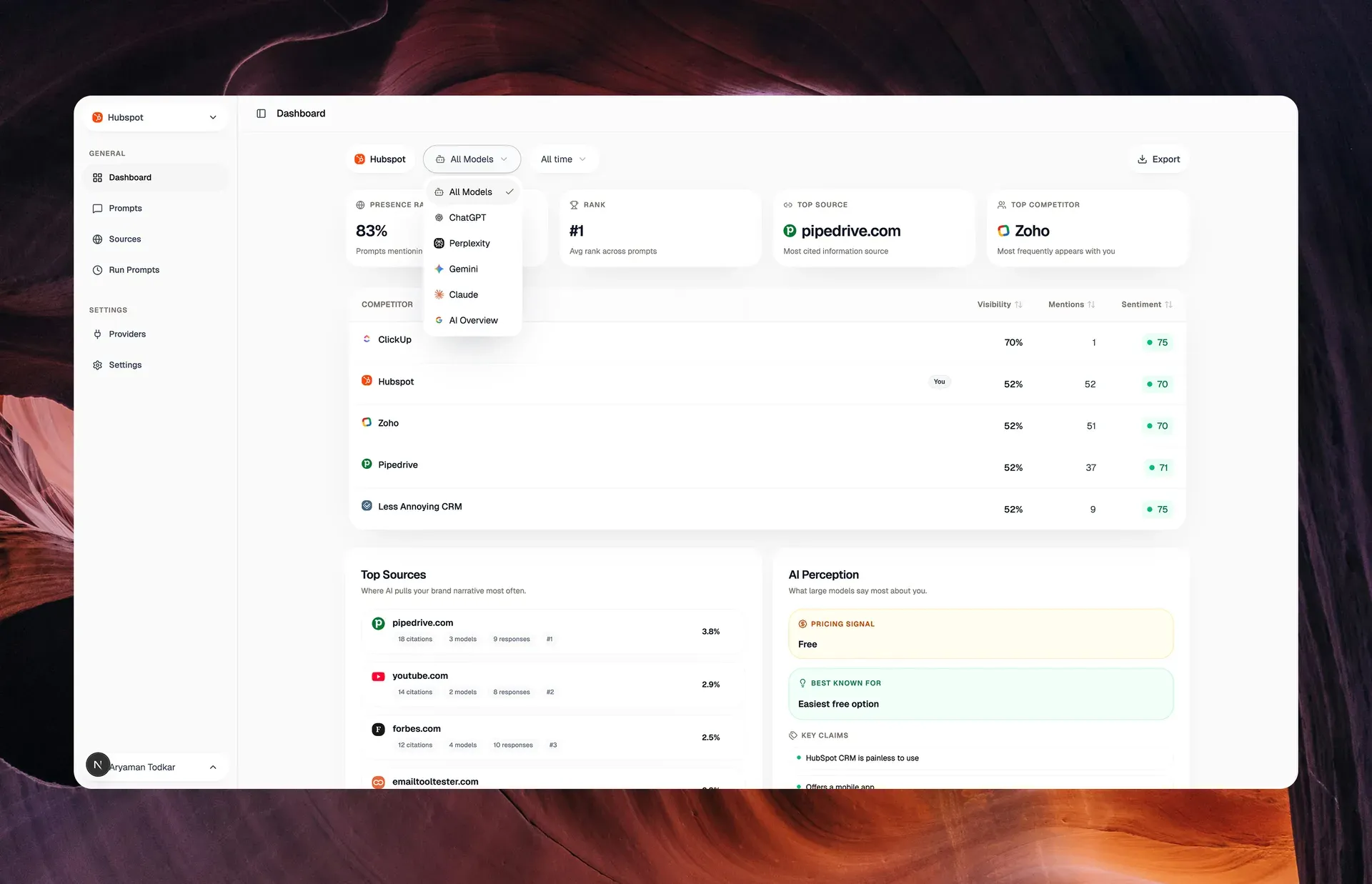
Official README screenshot of the dashboard for a sample HubSpot workspace, showing the model filter, competitor visibility, top sources and AI perception panels.
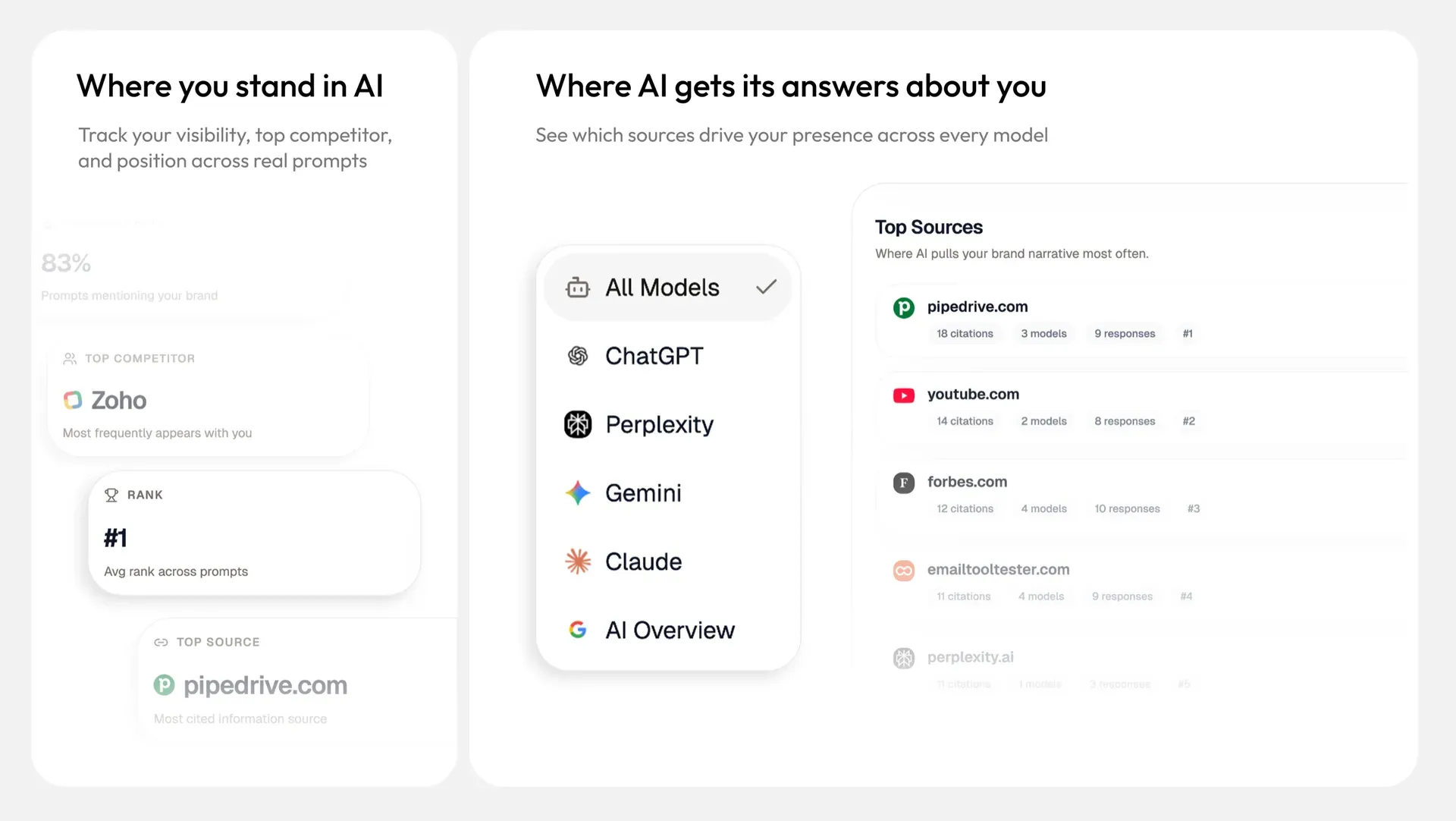
Official product mockup of the visibility cards, the selector for the five AI products and the Top Sources list with citation, model and response counts.
Source: official OneGlanse project page.
Key capabilities
- Prompt runs in five AI products OneGlanse submits your prompts to ChatGPT, Perplexity, Gemini, Claude and Google AI Overview through their consumer websites and saves each answer. Runs use your own provider accounts and saved browser logins, so results reflect what those accounts see. Answers can still vary by account, location, prompt wording and time, which makes repeated runs more useful than a single sample.
- Browser collection with Camoufox and Playwright The Agent worker drives Camoufox, an anti-fingerprint Firefox build, through Playwright. The maintainer moved from Chromium after keeping screen, WebGL, font, locale and worker signals consistent became a project of its own, as described on the Camoufox page. The local script pins
cloverlabs-camoufox==0.5.5; published Agent images already contain their browser runtime. - Saved answers and citations Each run stores the response text together with the citations and source domains extracted from the provider interface. Individual responses can be opened next to their analysis, so a score can be traced back to the answer that produced it. Captured responses and sources are written to ClickHouse in your own deployment.
- Visibility, rank and sentiment scoring After capture, the configured model returns a GEO score, presence and visibility, rank position, sentiment and a recommendation type for the target brand. The published analysis prompt tells the model to justify every value with text from the answer, to ignore brand names that only echo the question, and to score conservatively when unsure. The scores remain a model's interpretation and help compare runs rather than certify a ranking.
- Competitor comparison You add the competing brands you want to follow, and the dashboard lists them beside your own brand with visibility, mention counts and sentiment. A top competitor card shows the brand that most often appears in the same answers. Filters narrow the view to one AI product or to a time range.
- Source and citation attribution The Sources view ranks the domains that AI answers cite, with citation counts, the number of models citing each domain and the number of responses involved. This shows which review sites, publishers or competitor pages shape the answers about your category. Sources only appear when the provider interface exposes them and the extractor can read them.
- AI perception summary The dashboard groups how the answers describe your brand: pricing language, what the brand is best known for, key claims and strengths. These summaries come from the analysis step and are limited to phrases that can be traced to saved answers. They are useful as a checklist for content and positioning work, not as survey data.
- Dashboard export to CSV and JSON The dashboard export writes the overview and detailed analysis rows to a CSV or JSON file whose name includes the workspace ID and a timestamp. This makes it possible to keep snapshots outside the app or combine them with search and analytics data in a spreadsheet or BI tool. Exports cover the stored analysis, not screenshots of the provider pages.
- Local mode on your own computer
pnpm localstarts PostgreSQL, ClickHouse and Redis in Docker, applies migrations, prepares the browser files and runs the Web app and Agent from your checkout onlocalhost:3000. It needs Node.js 20 or newer, pnpm 10 or newer, Docker and a desktop session for provider sign-in on native macOS, Linux or Windows. Local mode supports manual runs only; people management and recurring schedules are reserved for self-host mode. The local setup guide covers the steps. - Self-hosted deployment on an Ubuntu VPS The interactive
setup-vps.shscript targets Ubuntu 22.04 or 24.04, refuses to run as root, installs Docker, Node.js, Git and nginx, writes.env, starts the Compose stack and requests a Let's Encrypt certificate. The documented minimum is 2 vCPU, 4 GB RAM and 40 GB SSD, with 4 vCPU, 8 GB RAM and 80 GB SSD recommended. A manual path with nginx and certbot is described in the self-hosted guide. - Recurring schedules In self-host mode the Schedule page saves a cadence on the workspace, and Services installs a
pg_cronjob that calls the internal run procedure withINTERNAL_CRON_SECRET. Scheduled runs submit the same provider jobs as a manual run. Cron installation is best effort after the workspace update, so the troubleshooting guide recommends checking Web and Postgres logs when an expected run does not appear. - Provider session capture and transfer
pnpm authopens a local sign-in interface on port 3100 where you log in to each provider. Sessions are grouped by auth group: one Google session covers Gemini and AI Overview, while ChatGPT, Perplexity and Claude each have their own. For a VPS, the same command orpnpm upload:vpssends the sessions to the Agent upload endpoint on port 3333, authenticated with a bearer token. - Residential proxy for server runs Provider websites often challenge datacenter IP ranges, so self-hosted browser traffic goes through a residential proxy. The current implementation requires a ThorData API link in
THORDATA_PROXY_API_URLthat returns proxy host and port entries; a sticky session can keep a prompt run on one IP. The proxy is used for provider browsing only, not for analysis calls. - Choice of analysis model Response analysis uses OpenAI by default, with
gpt-4.1through the Responses API, or Anthropic whenANALYSIS_LLM_PROVIDER=claudeis set. An OpenAI-compatible gateway such as OpenRouter can be used by setting a base URL, a model identifier and thechattransport. All options are listed in the environment variable reference. - Workspaces, organizations and team members Better Auth manages users and organizations, and each workspace holds its own brand, competitors, prompts, provider selection and schedule. Workspace membership is checked by the Web app before data is returned. The People page for managing team members is available in self-host mode only.
- Web app sign-in options Users sign up to the OneGlanse web app with email, and Google sign-in can be enabled with a Google OAuth client ID and secret. That OAuth setting only controls access to the OneGlanse interface. Monitoring Gemini or Google AI Overview still depends on the provider sessions captured through the browser flow.
- Docker Compose stack The Compose file runs the Web app, a one-shot migration container, the Agent worker, PostgreSQL with
pg_cron, ClickHouse and Redis 7. The Web app and databases bind to loopback for an nginx reverse proxy, while the Agent exposes port 3333 for session uploads. The Agent has a 2 CPU and 4 GB memory limit and a 2 GB shared-memory size for the browser. - Limited usage telemetry The web app sends
user_signed_upanduser_activeevents to PostHog with a SHA-256 hash of the internal user ID. According to the README, the request does not contain prompts, answers, scores, names or email addresses. The documentation does not describe a setting to turn these events off. - Open codebase and CI checks Every pull request runs linting, type checks, tests, dead-code analysis and a full build, and relevant changes also build and test the AMD64 and ARM64 images. Provider extraction is covered by fixture tests, but the architecture notes state that CI cannot detect when ChatGPT, Gemini or another site changes its HTML. Contributions follow CONTRIBUTING.md.
Where OneGlanse fits
Building a first visibility baseline
Start in local mode with one brand, three to five competitors and a short prompt set written the way buyers ask questions, such as category comparisons and best tool requests. Connect the providers you care about at /providers, run the prompts manually and open several saved answers before trusting the dashboard. Check that the brand detection matches your real brand name and domain, and that answers which only repeat the question are not counted as mentions. Keep this first run as the reference point for later comparisons.
Following competitors across AI products
Use the competitor table and the model filter to see which brands appear in the same answers and how often each product mentions them. A brand that leads in Perplexity can be absent from Claude or AI Overview, so compare per product before drawing a conclusion. Repeat the same prompts over several runs, because answers vary by account, location and time. Export the dashboard to CSV or JSON when you need a dated snapshot for a report.
Finding the sources behind AI answers
Open the Sources view to see which domains are cited most, how many models cite them and in how many responses. Review sites, comparison articles and documentation pages that appear repeatedly are candidates for corrections, outreach or new content. Check a few citations against the saved answers, since a provider can change how it displays sources and the extractor depends on that layout. Combine these findings with classic search data from a tool such as OpenGSC when deciding priorities.
Running scheduled tracking on a VPS
Deploy with the VPS script on Ubuntu 22.04 or 24.04, point a DNS A record at the server first, and set APP_URL and API_BASE_URL to the public HTTPS address because schedules call the app through that URL. Configure the ThorData endpoint before the first run, then pick a cadence on the Schedule page. After the first scheduled time passes, confirm that new results appeared and search the Web and Postgres logs for pg_cron errors if they did not. Watch disk usage, since ClickHouse data grows with every run.
Keeping provider sessions working
Sign in on a desktop machine with pnpm auth, then upload the sessions to the server. When a provider shows as disconnected or answers stop arriving, re-run pnpm upload:vps after refreshing the login locally. Sessions survive container restarts because they live in the mounted storage path, by default /opt/oneglanse/storage. If a provider page opens but the response or citations are missing, the provider interface may have changed; the troubleshooting guide lists the checks before opening an issue.
Checking the analysis before reporting numbers
Pick one analysis model and keep it fixed across the period you want to compare, because a different model or gateway can score the same text differently. Read a sample of answers marked positive, neutral and absent to see whether the scores match your own reading. Treat rank and sentiment as directional indicators that describe saved text, and report them together with the prompt set, the providers and the dates used.
Install
bash <(curl -fsSL https://raw.githubusercontent.com/oneglanse/oneglanse/main/scripts/setup-vps.sh)Reviews of OneGlanse
Be the first to share your experience with OneGlanse.
Write a review
Loading review form…
Alternatives to OneGlanse
 ElmoMIT-licensed AEO and GEO platform that runs buyer prompts against AI answer engines on a schedule and reports visibility, share of voice, sentiment, citations and query fan-out. Self-host with Docker Compose or use Elmo Cloud.
 CanonryOpen-source, self-hosted answer engine optimization platform. Tracks how ChatGPT, Claude, Gemini and Perplexity mention and cite a site, joins Search Console, GA4 and AI crawler logs, and exposes everything to agents.
 AnsvisorMIT-licensed AI search visibility platform that tracks prompts, mentions, citations and AI traffic across ChatGPT, Gemini, Claude, Google AI Overviews and more, with an Action Center, Content Agent and MCP server. Self-host or use Ansvisor Cloud.