

What is Mautic?
Mautic is an open-source marketing automation platform. It tracks contacts, groups them into segments, and runs campaigns that send email, SMS and web messages based on what people do, such as opening a message, submitting a form or visiting a page. The about page calls it a community-owned project with no commercial entity behind it, and stresses data sovereignty: you choose where it runs and which jurisdiction holds your data. The README notes that Mautic has been a verified Digital Public Good since 2024.
The project began in 2014 and is written in PHP on the Symfony framework with a MySQL or MariaDB database. The releases page describes the cycle: patch releases monthly, minor releases with features every three months and a major version every two years. Mautic 7 is the active line, first released in January 2026, with 7.2 as the long term version. It requires PHP 8.2 to 8.5 and at least MySQL 8.4 or MariaDB 10.11. Mautic 8 is in development and needs PHP 8.4 or newer.
The current release is Mautic 7.2.2, published October 26, 2026, and it is a security release. Its notes list fixes for remote code execution in campaign import, a Twig sandbox escape in theme templates, SQL injection in a contact lookup endpoint and in a dashboard widget API, stored cross-site scripting in an HTML custom field and arbitrary file read through path traversal in the asset API. The previous feature release, 7.2.0 Lynx Edition, added an infinite campaign canvas, truly transactional emails, A/B tests for segment emails, tag and stage merging and bulk find and replace of contact fields.
Mautic is distributed under the GNU General Public License version 3 or later. You can download a production package from the download page, install with Composer, or run it from a hosting provider. The project's official trial and managed hosting partner is Dropsolid, whose plans are listed on the pricing page. Mautic is a PHP web application you operate yourself: it needs a web server, a database, cron jobs and a working outbound email provider, and it does not ship a desktop or mobile client.
Mautic screenshots
Explore the interface. Open a screenshot to view it at full size.
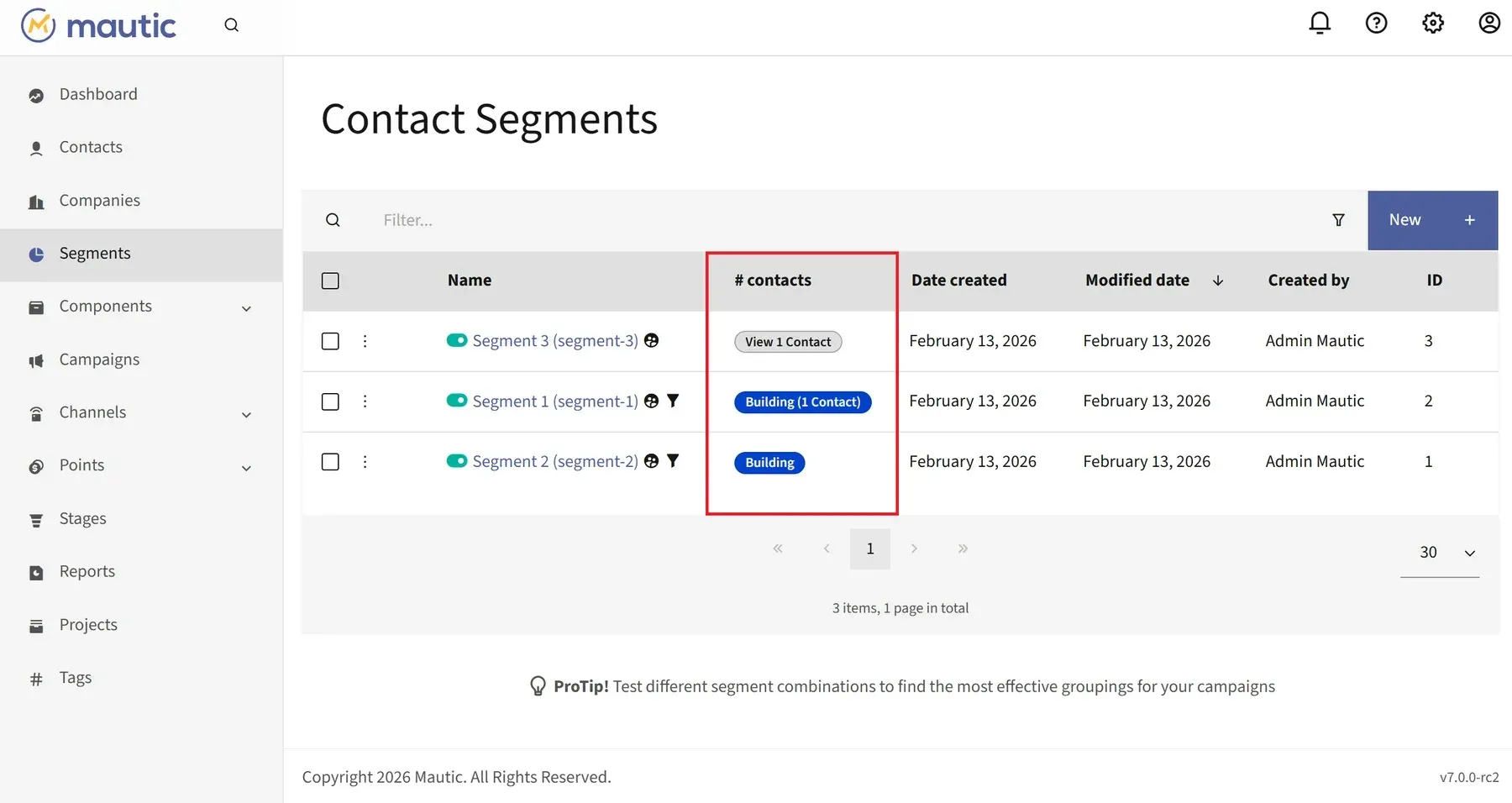
Official documentation screenshot of the Contact Segments page in a Mautic 7 release candidate, with segment sizes per row.
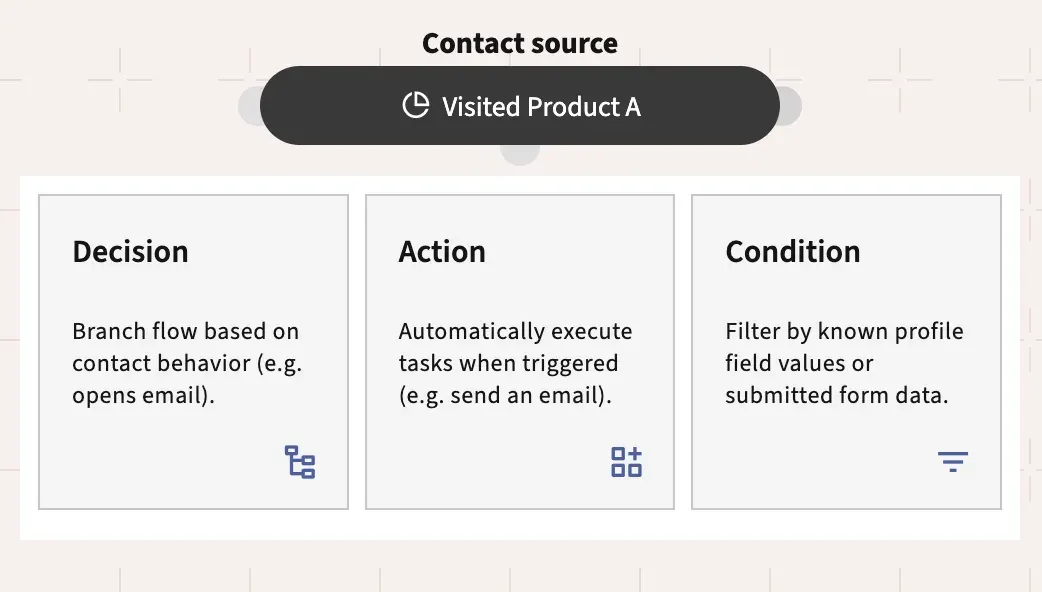
Official documentation screenshot of a campaign contact source and the Decision, Action and Condition choices.
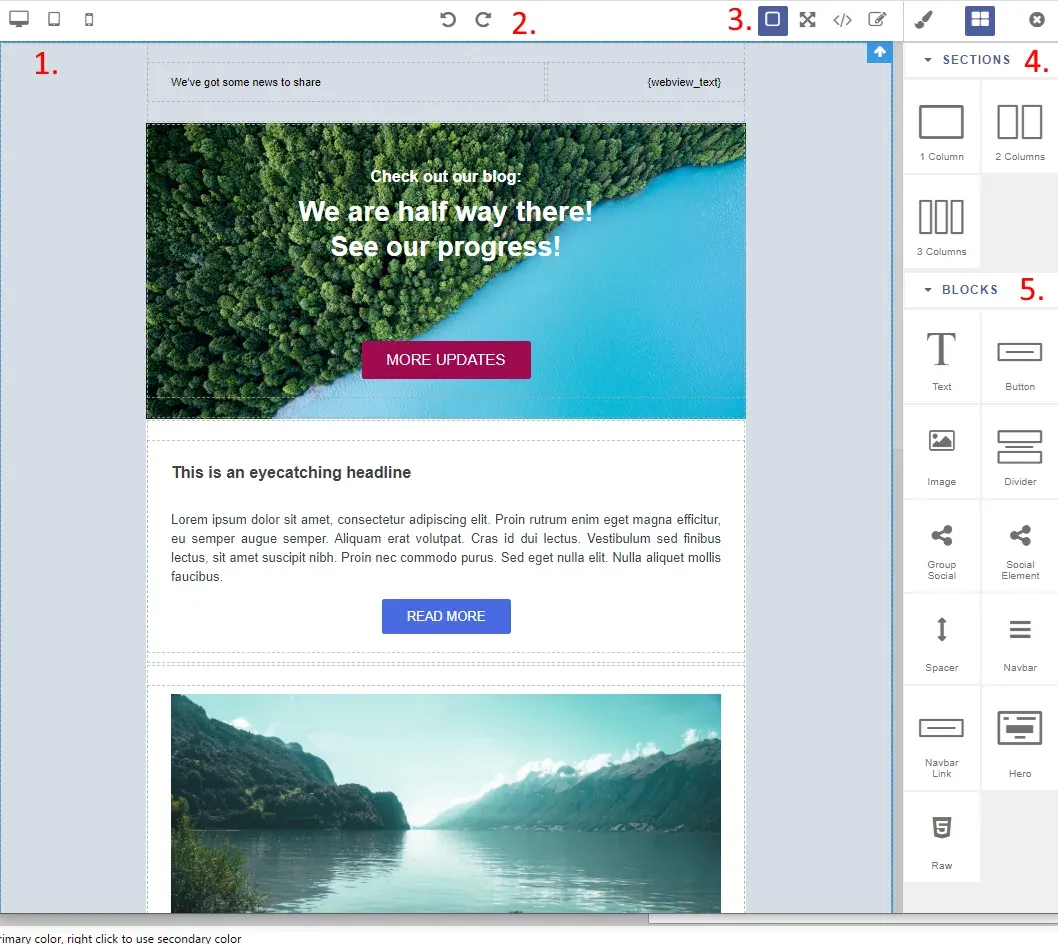
Official documentation screenshot of the drag-and-drop email editor with numbered areas for toolbar, sections and blocks.
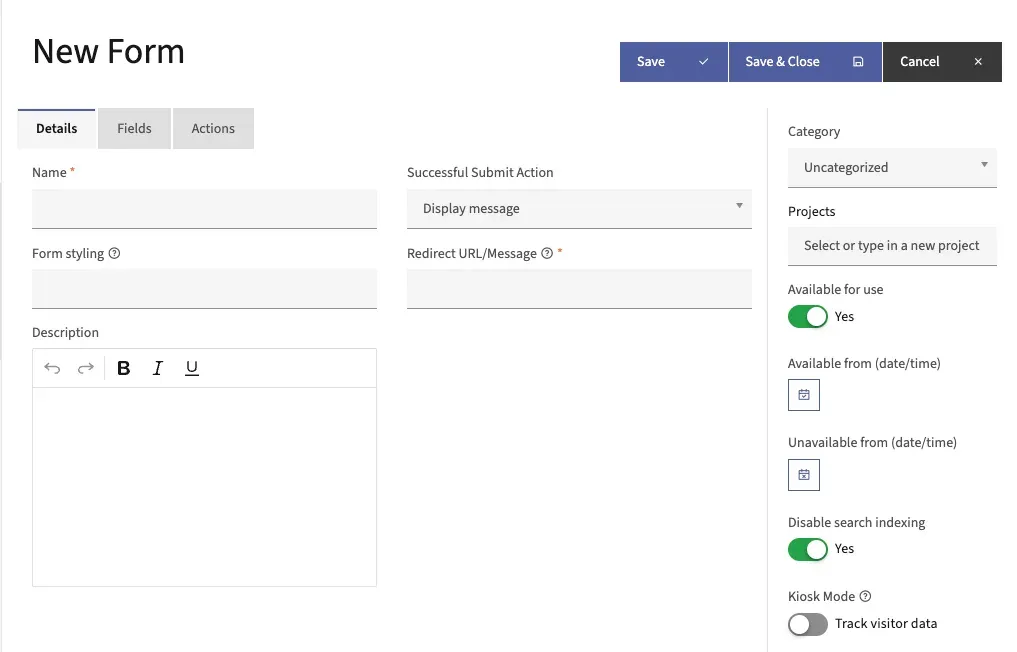
Official documentation screenshot of the form builder details tab with submit action and availability settings.
Source: official Mautic project page.
Key capabilities
- Contacts and companies Contacts are people tracked by email address, cookie or form submission, with custom fields, tags, a timeline of activity and ownership. Companies group contacts, and 7.2 added company list settings and bulk company owner assignment. Anonymous visitors are tracked until they identify themselves, then merged into a known contact.
- Segments Segments are dynamic lists defined by filters on fields, behavior, tags, points and more, and are refreshed by a console command run from cron. Contacts can also be added by hand, imported or batch updated. Segment size is visible in the list view of the admin interface.
- Campaign builder Campaigns start with contact sources such as a segment or a form, and continue with decisions, actions and conditions on a canvas. Actions send email, change points or tags, update fields or call webhooks. Campaigns can be exported and imported as files, and since 7.2 the canvas is infinite and a command can recover stuck events.
- Email marketing Template emails are triggered by campaigns and forms, segment emails go to a list on demand. Variants and A/B tests work for both kinds, and 7.2 added A/B tests for segment emails and truly transactional emails. Emails can be queued and sent by cron on larger instances, and tokens personalize content.
- Drag-and-drop builders Email and landing page content is built with a block editor with sections and blocks such as text, images, buttons and social elements, plus a code mode for custom themes. Themes are packages of templates that you can build or customize. A legacy builder still exists for older themes.
- Forms and landing pages The form builder creates embeddable forms with validation, CAPTCHA, file upload and actions after submission. Landing pages can be built with the editor, tracked and tested with variants. Forms can be embedded on any website or shown inside a focus item.
- Points and stages Point actions and triggers score contacts for behavior, positive or negative, and point groups keep several scores apart. Stages model where a contact is in your funnel, and 7.2 added stage merging and duplicate weight warnings. Scores are only as useful as the rules you define, so start with a few.
- Focus items, web and push notifications Focus items show bars, modals, notifications, popups and light boxes on your site, with timing and exit-intent options. They can collect data through a form, show a notice or promote a link. Web notifications and push notifications are separate channels that need their own set-up.
- SMS and other channels The SMS channel sends text messages from campaigns once an SMS transport such as Twilio is configured. Other channel types in the documentation include marketing messages that choose the channel per contact and social monitoring. Each outbound channel adds provider costs and legal duties of its own.
- Web tracking script A small JavaScript snippet placed before the closing body tag tracks page visits for contacts on your sites. The documentation also describes a consent-managed mode in which tracking starts only after the visitor agrees. Check your own cookie and consent rules before enabling it.
- Reports, dashboard and UTM tags Dashboard widgets and configurable reports show email, form, page, asset and point data, and reports can be scheduled. UTM tag support covers emails, landing pages, forms, asset downloads, dynamic web content and segment filters. Test report queries on large databases, since heavy reports can be slow.
- Dynamic web content and assets Dynamic web content swaps parts of a web page per contact segment, and the asset manager hosts downloads that are tracked per contact. Remote assets are validated since 7.2, and the 7.2.2 release closed a path traversal issue in the asset API, so keep that part patched.
- Preference center and frequency rules Contacts can manage their channel preferences and subscription categories through a preference center, and frequency rules cap messages per channel. Do Not Contact flags stop messages for unsubscribed addresses. These tools help with consent handling but do not replace legal advice.
- REST API and webhooks The REST API covers contacts, companies, campaigns, segments, emails, forms, points, reports and more, with authentication methods documented in the developer docs. Webhooks send event payloads to external URLs. This is the integration route for custom connectors and for tools like workflow automation platforms.
- Plugins, integrations and Marketplace Built-in plugins connect to CRM and email services such as HubSpot, Salesforce, Pipedrive, Mailchimp, Microsoft Dynamics, SugarCRM and Twilio. The Marketplace installs third-party plugins through Composer from Mautic 4.2 onward, but the documentation warns that it does not yet verify version compatibility. Test every plugin on staging before production.
- Users, roles and permissions Administrators create users and roles with permissions per area, and the interface can be translated into other languages by the community. Keep the number of administrators small, because the admin interface can change data for every contact.
- Installation options Install from a production zip with the web installer or the command line, with Composer using the recommended-project template, or from GitHub for development, where DDEV is supported through the repository configuration. The installer checks the environment and the database and mail settings. The documentation asks for a PHP execution time limit of at least 240 seconds.
- Cron jobs and queue Segments, campaigns, email queues and maintenance run through console commands that you schedule yourself; staggering the segment update, campaign update and campaign trigger jobs is recommended. Without cron, nothing happens on schedule. A message queue can be configured for heavy email sending.
- Managed hosting and trial The official trial and the Managed Mautic plans come from Dropsolid. The trial runs 14 days without a credit card, Essential starts at 247.50 euros per month when billed annually with up to 50,000 contacts and 50,000 emails a month, Professional starts at 1,237 euros per month and Enterprise is priced individually.
- Long term support and ELTS Each major series has a long term release and security support dates published on the releases page. Extended Long Term Support extends security fixes for a version and starts at 2,000 US dollars a year for non-members. The releases page lists security support for Mautic 5.2 ending June 30, 2026 and for Mautic 6.0 ending September 30, 2026.
Where Mautic fits
Lead capture and nurturing from a website
Put the tracking script on the site, embed a form on a landing page and start a campaign when the form is submitted. Send a welcome email, wait, then branch on whether it was opened. Check that submissions create contacts, that unsubscribe links work and that the campaign cron jobs actually run. Also confirm that the tracking script respects your consent banner before real visitors arrive.
Segmenting a newsletter audience
Import contacts, tag them by source and build segments on tags, fields and engagement. Send a segment email with an A/B test of two subject lines. Confirm that the segment update job is scheduled, because a stale segment sends to the wrong people. Send a test to your own address first and inspect the rendered email in several mail clients.
Scoring and handing leads to sales
Define point actions for page visits, form fills and email clicks, add a stage for qualified leads and sync qualified contacts to your CRM through a plugin or the API. Review the scoring after a month with real data, and remove rules that never separate good leads from poor ones. Agree with sales on what a qualified contact means before automating the handover.
Running on-site messages
Use a focus item with an exit-intent popup to collect an email address or announce an offer, restricted to a page or a segment. Check mobile display, accessibility of the popup and frequency so that visitors are not shown the same message repeatedly.
Self-hosting for data control
Install from the production package or Composer on a server you control, use your own SMTP provider with authenticated domains, set up cron and back up the database and the configuration. Keep a staging copy for upgrades and apply security releases promptly, as the 7.2.2 notes show.
Integrating with other systems
Use webhooks for outbound events and the REST API for creating contacts or reading segments. Store API credentials securely, limit the API user role to what the integration needs and test rate behavior on a staging instance before connecting a production system.
Reviews of Mautic
Be the first to share your experience with Mautic.
Write a review
Loading review form…
Alternatives to Mautic
 listmonkAGPL-licensed newsletter and mailing list manager that runs as one Go binary with PostgreSQL. It handles opt-in lists, SQL segmentation, templated campaigns, a transactional mail API, bounce processing, analytics and SMS or push messengers.
 NotifuseNotifuse is a self-hosted email marketing and transactional email platform in Go and React with a visual MJML editor, automations, web analytics and seven sending providers. Source-available under BSL 1.1, with EU Cloud plans.
 HubSpotHubSpot CRM stores contacts, companies and deals, and connects to Marketing, Sales, Service, Content, Data and Revenue Hubs with free and premium plans.