
What is Terrateam (Stategraph Orchestration)?
Terrateam is GitOps automation for Terraform and OpenTofu that runs plans and applies from pull requests. According to the Stategraph about page, two longtime collaborators started building Terrateam in 2021 with an engine written in OCaml, the engine was released as open source under MPL-2.0 in 2024, and work on Stategraph, which stores Terraform state as a database, began in 2025. The same page states that Terrateam's orchestration engine now lives on as Stategraph Orchestration. The former terrateam.io site and docs now redirect to stategraph.com, the terrateamio/terrateam repository redirects to stategraph/stategraph, and the company names Malcolm Matalka and Josh Pollara as co-founders. It describes itself as bootstrapped and independent.
The repository now covers two parts that work independently. Stategraph Orchestration, the continuation of Terrateam, plans every pull request on GitHub or GitLab, posts the plan as a comment, runs policy checks, cost estimates and approvals in the review, and applies on a stategraph apply comment or on merge. Stategraph Infrastructure as a Database stores each state as a dependency graph in PostgreSQL, so a plan reads only the resources a change reaches, non-overlapping changes apply at the same time, and states can be queried with SQL. Orchestration can run against an existing state backend, and Infrastructure as a Database is commercial software.
The code in the repository is licensed under MPL-2.0. The Editions page lists Orchestration Open Source (MPL-2.0), Orchestration Enterprise (commercial, adding RBAC, CODEOWNERS enforcement, Gatekeeper approval gates, centralized configuration, multiple drift schedules and API access tokens), and Infrastructure as a Database (commercial, including Orchestration Pro). The Open Source edition allows up to 3 active users per month per GitHub or GitLab installation with unlimited runs. A self-hosted Terrateam server is migrated by replacing the terrat-oss or terrat-ee image with stategraph-server-oss or stategraph-server while keeping the PostgreSQL database, GitHub App, webhook URL and run history, as described in Migrate from Terrateam.
The latest GitHub release is 3.2.28, published November 9, 2026. Its notes list migration guides with converters for Terraform Cloud, Digger, Atlantis, Spacelift and env0, a restart_on_change option for drift schedules, a fix for stuck plans, an AI docs section for Claude Code and other agents, Helm chart and ECS module updates, and a Checkov environment pin in the Docker image. The repository also publishes date-stamped builds between numbered releases, and the company states that releases go out every day after more than 20,000 automated tests.
Plans and applies run on the customer's GitHub Actions or GitLab CI runners, not on the Stategraph server; the server stores runs, states, users and tenants and serves the console and API. The server runs on Stategraph Cloud or self-hosted with Docker Compose, Kubernetes, Amazon ECS or Google Cloud Run on PostgreSQL 15 or later. Supported engines are Terraform, OpenTofu, Terragrunt, CDKTF, Pulumi and custom commands. Similar pull request automation listed on iThub includes Atlantis and Spacelift.
Terrateam (Stategraph Orchestration) screenshots
Explore the interface. Open a screenshot to view it at full size.
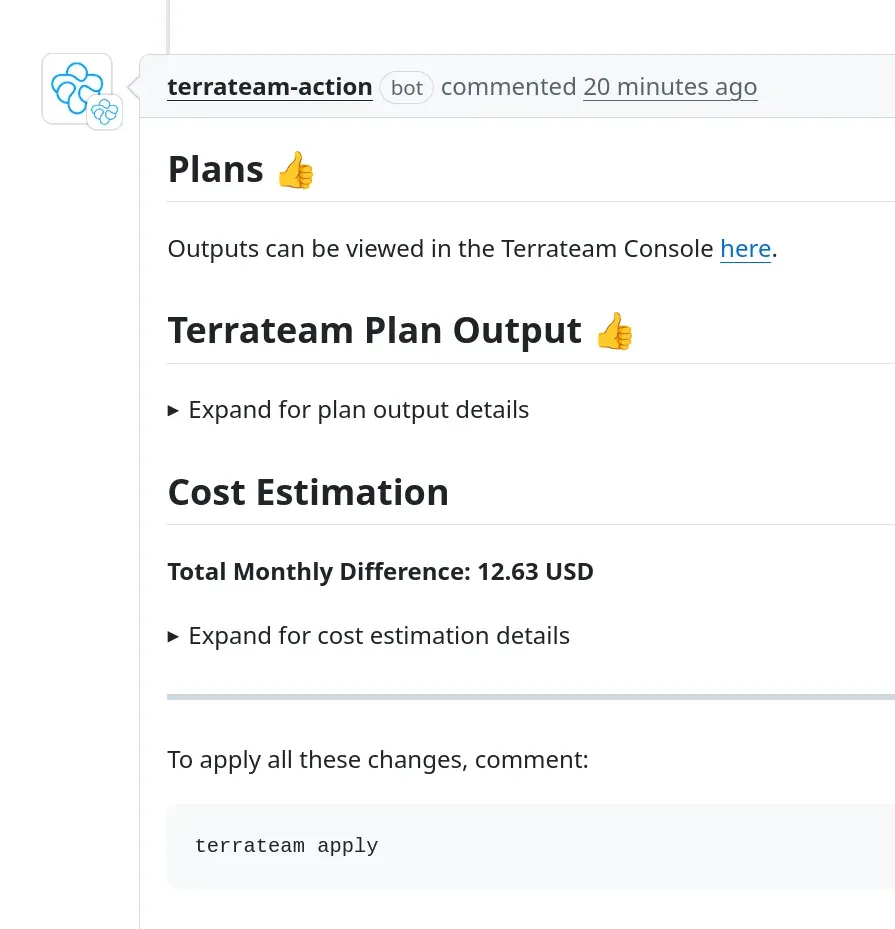
Plan comment posted by Terrateam on a GitHub pull request, with collapsible plan output, an Infracost cost estimation and the apply instruction; current versions use the stategraph apply command.
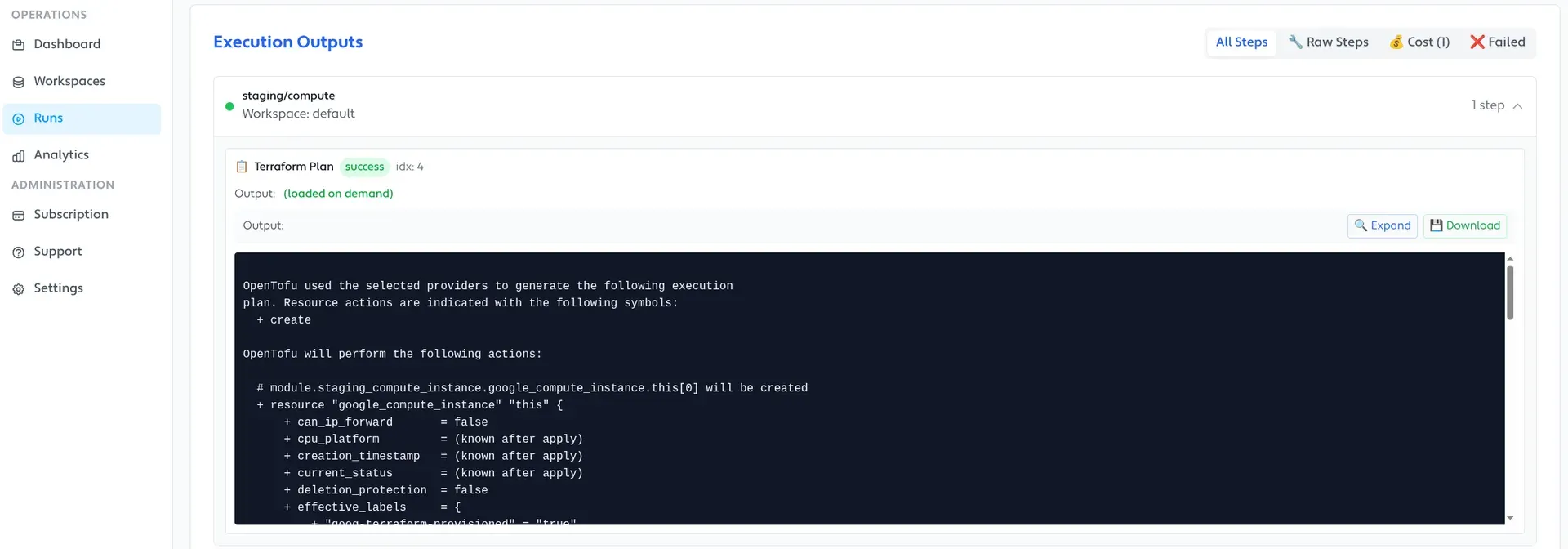
Run detail in the Terrateam console with execution outputs per directory and workspace and the OpenTofu plan of a Google Compute instance; cropped from the repository screenshot.
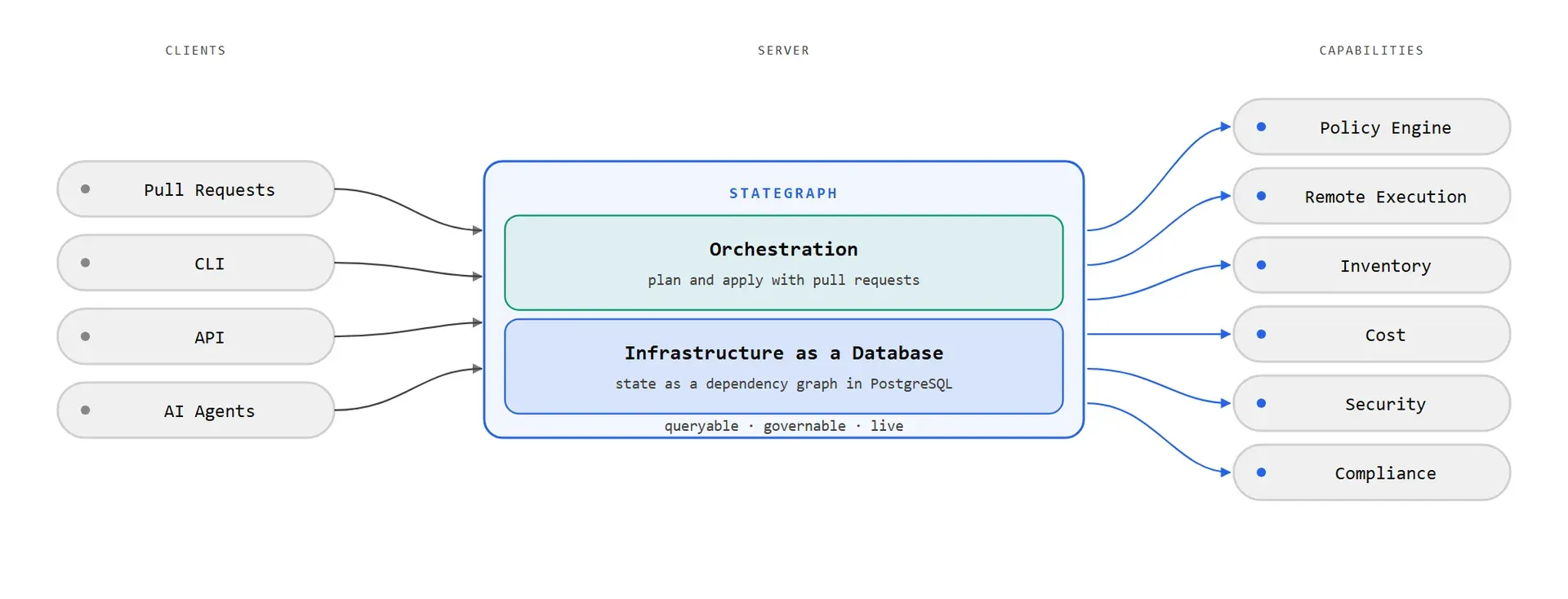
Official architecture figure from the repository README showing Orchestration, the continuation of Terrateam, on top of Infrastructure as a Database.
Source: official Terrateam (Stategraph Orchestration) project page.
Key capabilities
- Plan on every pull request Orchestration finds the directories and workspaces a pull request touches and plans each one against the branch merged with the destination branch, as described in the pull request workflow. The plan is posted as a comment and as commit checks, and a
stategraph plancomment plans again. Without a config file, defaults apply. - Apply from the pull request or after merge A
stategraph applycomment applies the reviewed plan, or applies run automatically after merge with when_modified.autoapply. Applied directories stay locked until the pull request merges, and if another pull request changes the same directories first, the apply stops and asks for a new plan. Rollbacks work by reverting the pull request and applying the resulting plan. - Apply requirements Apply_requirements in .stategraph/config.yml set what must be true before an apply: by default no merge conflicts and passing status checks, plus optional approvals from named users or teams per tag query. Access control decides who can override them. Requirements do not stop an autoapply after a merge.
- Policy checks Plans can run OPA and Conftest policies and Checkov scans; a failed check fails the plan or opens a gate. See Policy enforcement with OPA. Gatekeeper, where an authorized user approves a gate with a
stategraph gate approvetoken comment, is an Enterprise feature. - Cost estimation Each plan comment gets an Infracost diff between the base branch and the pull request, with one row per directory and workspace, and it is on by default in every edition. On Stategraph Cloud no Infracost key is needed; self-hosted servers set their own pricing endpoint and key, or runners use INFRACOST_API_KEY, as described in Cost estimation.
- Drift detection Drift detection runs plans hourly, daily, weekly or monthly on the default branch and matching destination branches, scoped by a tag query. It can open a GitHub or GitLab issue, send a notification, or reconcile drift by applying the plan without review. Open Source allows one drift schedule per repository; several schedules are an Enterprise feature.
- Tags, stacks and layered runs Tags group directories and workspaces, and tag queries scope workflows, access control, apply requirements, drift schedules and commands. Stacks and depends_on layers order plans and applies so dependent infrastructure runs after the layers it depends on, in parallel where possible. Module dependencies can trigger plans in the directories that use a changed module.
- Engines The engine can be Terraform, OpenTofu, Terragrunt, Pulumi, CDKTF, the stategraph CLI or a custom command, set globally, per directory or per workflow, with pinned CLI versions. A bundled Terragrunt config builder discovers modules in a monorepo and generates the dependency order, and a tree builder can replace Git file discovery.
- Custom workflows and hooks Workflows add run, env and oidc steps around init, plan and apply, and pre and post hooks run for all operations. Webhook steps send HTTP requests on success or failure, and an AI integration example sends plan results to an LLM in a post hook. YAML anchors and GitHub reusable workflows reduce duplicated configuration.
- Runners and cloud credentials Plans and applies run on GitHub Actions or GitLab CI runners chosen with runs_on, including self-hosted private runners in your network. Documented credential setups cover AWS, GCP and Azure with OIDC or static credentials, plus a custom credential script; plan files can be stored on the server, in S3, with custom commands or not at all.
- GitHub and GitLab support Orchestration connects through a GitHub App or to gitlab.com and self-managed GitLab 18.1 or later in a group namespace. On GitLab, team entries name groups by full path and role entries match project access levels. A self-hosted server needs a public HTTPS URL for webhooks, or Terratunnel when no such URL exists.
- Console and audit trail The console shows runs, logs, workspaces and drift status, and the audit trail can be queried by user, directory and date. With Orchestration, runs, pull requests and drift schedules can be queried with SQL in the tenant. Cloud plans keep 30 days of audit history on Free and 365 days on Orchestration Pro.
- Enterprise governance Enterprise adds RBAC over plan, apply, apply-force, apply-autoapprove, unlock and configuration updates, CODEOWNERS enforcement through require_completed_reviews, centralized configuration layered across repositories, a unified summary comment and scoped API access tokens. An Open Source server rejects a configuration that enables these settings and names the feature in a pull request comment.
- Infrastructure as a Database The commercial Infrastructure as a Database edition keeps state as a graph in PostgreSQL with resource-level locking, transactions, multi-state transactions, refactoring help and SQL queries across states. The CLI runs Terraform or OpenTofu with local credentials while the server stores state, and
stategraph states exportwrites a standard terraform.tfstate back out. - Migration converters Scripts convert atlantis.yaml and repos.yaml, digger.yml, HCP Terraform workspaces, Spacelift stacks and env0 environments to .stategraph/config.yml. The Atlantis guide states that Terraform code and state do not change and that plans and applies move from the Atlantis server to the CI runners.
- Self-hosted Open Source The Compose file in docker/stategraph runs ghcr.io/stategraph/stategraph-server-oss with PostgreSQL on port 8080 and needs Docker Engine 20.10 and Docker Compose 2.24 or later, as described in the self-hosted quickstart. The first visit creates the instance admin with local authentication; Google or OIDC sign-in is also documented. Kubernetes, Amazon ECS and Google Cloud Run deployments use the same image.
- Stategraph Cloud plans The pricing page lists a Free plan at USD 0 with every Orchestration feature including SSO and RBAC, 3 users, 50 runs a month and 1 concurrent worker; Orchestration Pro at USD 12,000 per year without limits, the same price self-hosted; and Infrastructure as a Database from USD 25,000 per year on an annual contract. New accounts start a 30-day Orchestration Pro trial without a credit card, and self-hosted Open Source is free.
Where Terrateam (Stategraph Orchestration) fits
Pull request workflow for a Terraform monorepo
A repository with many directories and workspaces adds .stategraph/config.yml, tags its directories, and lets Orchestration plan only the directories a pull request touches. Reviewers read the plan, the Infracost estimate and the policy results in the pull request, then comment stategraph apply or merge with autoapply turned on. Locks prevent another pull request from applying over the same directories until the first one merges.
Multiple environments and ordered deployments
Production, staging and QA live in separate directories, workspaces or tfvars files and are targeted with tag queries. Apply requirements can ask for more approvals on production than on development, and stacks or depends_on layers run networking before data and compute, then the applications, with independent layers planned in parallel.
Policy and approval gates
Conftest and OPA policies or Checkov scans run on every plan. In the Open Source edition a failing check fails the plan; with Enterprise, Gatekeeper records a named gate that an authorized person approves with a token comment, and CODEOWNERS reviewers must approve before the apply runs.
Scheduled drift detection
A drift schedule plans the matching directories on a fixed cadence and opens an issue with the affected resources, notifies a channel through a hook, or reconciles by applying the plan. The documentation warns that reconciliation applies without review. Drift status and history appear on the console Drift page.
Migrating from Atlantis, Digger or HCP Terraform
Converter scripts translate the existing configuration into .stategraph/config.yml and report items to resolve, and the rollout happens on a pull request. For HCP Terraform, Spacelift and env0, managed state moves to Infrastructure as a Database. Existing self-hosted Terrateam servers move by switching container images while keeping their database and GitHub App.
Faster plans on large states
Teams whose state files have grown large import a state with stategraph import tf and run stategraph plan and apply against Infrastructure as a Database, which plans only the affected subgraph and locks single resources. Orchestration can use it as its engine, or it runs from any CI without a VCS provider. This part is commercial and requires Stategraph Cloud, a license key or a BYOC deployment.
Install
git clone https://github.com/stategraph/stategraph && cd stategraph/docker/stategraph && docker compose up -dReviews of Terrateam (Stategraph Orchestration)
Be the first to share your experience with Terrateam (Stategraph Orchestration).
Write a review
Loading review form…
Alternatives to Terrateam (Stategraph Orchestration)
 AtlantisAtlantis is an Apache-2.0, self-hosted Go server that runs Terraform or OpenTofu plan and apply from pull request comments on GitHub, GitLab, Gitea, Bitbucket and Azure DevOps, with locking, apply requirements and conftest policies.
 SpaceliftSpacelift orchestrates Terraform, OpenTofu, Pulumi, CloudFormation, Kubernetes and Ansible workflows with stacks, policies as code and a free plan.
 PulumiPulumi is an infrastructure as code platform where you define cloud resources in languages such as Python, Go, .NET, Java and YAML, with a free tier.