
What is HyCanvas?
HyCanvas is a browser-based design and document editor for teams creating social graphics, posters, presentations, videos, whiteboards, documents and spreadsheets. It combines templates, visual editing, real-time collaboration and exports within shared workspaces. Collaboration features include comments, presence cursors, version history, approvals and sharing permissions.
The application can be used through its hosted service or deployed on an organization's own infrastructure. Self-hosted installations use PostgreSQL and local or S3-compatible storage, with Docker and prebuilt server binaries available. Workspace administration includes roles, single sign-on and two-factor authentication. A REST API and an MCP endpoint support programmatic access and AI assistant workflows.
HyCanvas is open source under the AGPL, with a separate commercial licensing option for uses that require keeping modifications private or embedding it in a proprietary product. The project describes itself as an early-stage product under active development. All features are available without feature-based paywalls; hosted paid plans charge for capacity and support. AI generation uses a connected provider account, billed separately by that provider.
HyCanvas screenshots
Explore the interface. Open a screenshot to view it at full size.
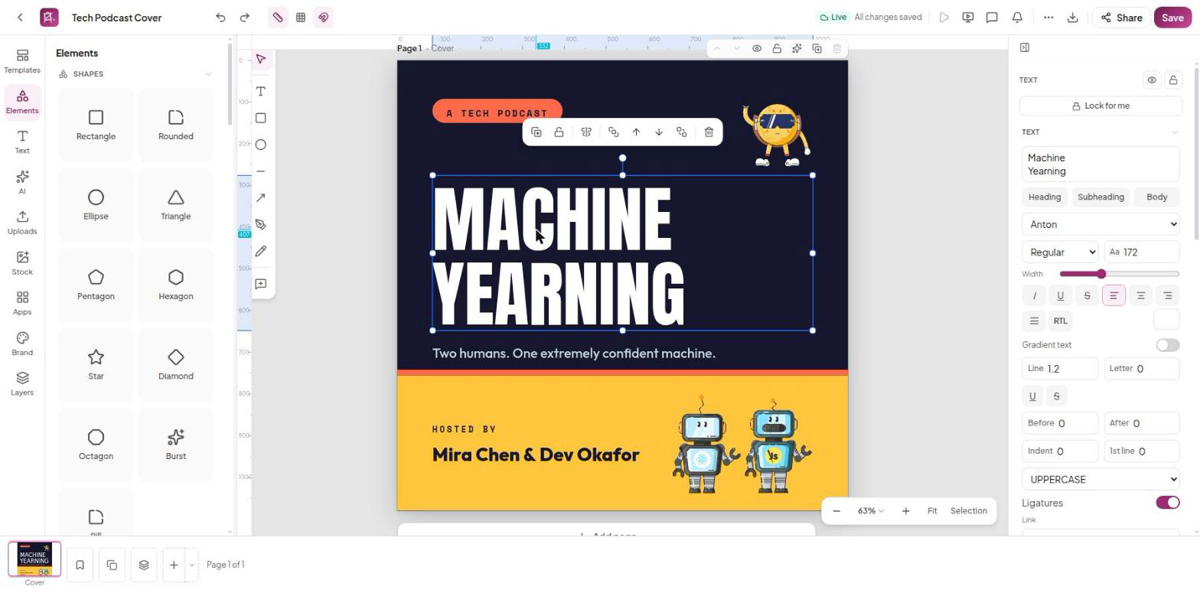
Source: official HyCanvas project page.
Key capabilities
- Visual editing Creates graphics and presentations with templates, shapes, charts, image tools, brand kits and presentation controls.
- Documents and media Includes a block document editor, spreadsheets with formulas, whiteboards and a multi-track video editor.
- Team collaboration Supports real-time co-editing, comments, version history, approvals and view, comment or edit sharing permissions.
- Export and portability Exports designs to image, document, presentation and video formats without watermarks, with portable design files also available.
- AI and automation Generates content through a workspace's own AI provider key and exposes REST and MCP interfaces for automated workflows.
- Deployment and access Supports self-hosting with PostgreSQL and configurable storage, workspace roles, single sign-on and two-factor authentication.
Where HyCanvas fits
HyCanvas fits collaborative content production where teams need graphics, slide decks, workshop boards and documents in a shared browser workspace. Brand kits and approval workflows can support review processes, while its API and MCP endpoint can connect content generation and export to scripted or assistant-driven workflows.
Before deployment, organizations should assess the project's early-stage maturity, test required editing and export workflows, and review AGPL obligations for modified network deployments. Self-hosting also requires decisions about database operation, storage, TLS and authentication. Teams using AI generation should check provider availability, data-handling requirements and direct provider charges.
Reviews of HyCanvas
Be the first to share your experience with HyCanvas.
Write a review
Loading review form…
Alternatives to HyCanvas
 CompositorCompositor is an MIT-licensed native macOS image editor for compositing and retouching, with layers, masks, adjustment layers, Camera Raw, PSD import and a documented .comp project format that scripts and AI agents can write.
 DooryOpen-source browser design editor for posters, social posts, slides, invitations and business cards, with guest editing, brand kits, animation, real-time co-editing, PNG to MP4 export, an opt-in MCP server and Docker self-hosting.
 GIMPGIMP, the GNU Image Manipulation Program, is a free and open source cross-platform image editor for GNU/Linux, macOS and Windows with scripting and plug-ins.