

What is Compositor?
Compositor is a free, open-source image editor for macOS, built by Robbie Tilton for photo compositing and post-processing. The author describes it as a Photoshop alternative for people who find Photoshop too expensive and GIMP too unfamiliar, so its menus, tools and keyboard shortcuts follow Photoshop conventions. It is a native Swift application using SwiftUI and AppKit, with C routines for pixel work and GPU rendering for layer effects. The project is maintained by one person, and the interface is English only; the README states that translation pull requests are not accepted for now.
The application is distributed as a signed and notarized DMG from the GitHub releases page and the official website, and as the Homebrew cask robbietilton-compositor. It requires macOS 26.0 or later on a Mac with Apple silicon. Installed copies update through Sparkle 2, which reads an appcast published in the repository and checks an EdDSA signature on each DMG. There is no Windows or Linux build; the README lists community ports such as CompositorWindows, Composa and CompositorLX, which the author does not review or support.
The repository was created on September 16, 2026, and version 1.0 was published the same day. More than 60 tagged releases followed in under two months. The current release, Compositor 1.6.4 from November 5, 2026, refreshes the color swatches, polishes tool bars and dialogs, makes Feather cumulative and fixes selection expansion and contraction. Version 1.6.0 added the Volumetric Light filter and kept 16-bit and HDR layers at full depth through 8-bit edits. Version 1.6.2 added a Reduce Noise filter and adjustment layer, and 1.6.3 added on-canvas size readouts and pixel distances while moving layers.
Volumetric Light depends on DepthMini, a 2.66 MB 6-bit Core ML depth model distilled from Depth Anything V2 Small (Apache-2.0). It is not bundled: the app downloads it from a separate depth-model release the first time the filter opens. Projects are saved as .comp packages, a folder holding a JSON manifest and one PNG per layer, described in the project format reference. Because the format is plain files, scripts and AI agents can build or change a project while it is open, and the canvas reloads.
The source code is released under the MIT license, and the Xcode project builds with Xcode 26 or later. Out of scope: CMYK documents, editable vector paths beyond the shape tool, non-horizontal Photoshop text, localization and any platform other than macOS on Apple silicon. Photoshop and Adobe are trademarks of Adobe Inc., and the project states it is not affiliated with or endorsed by Adobe.
Compositor screenshots
Explore the interface. Open a screenshot to view it at full size.
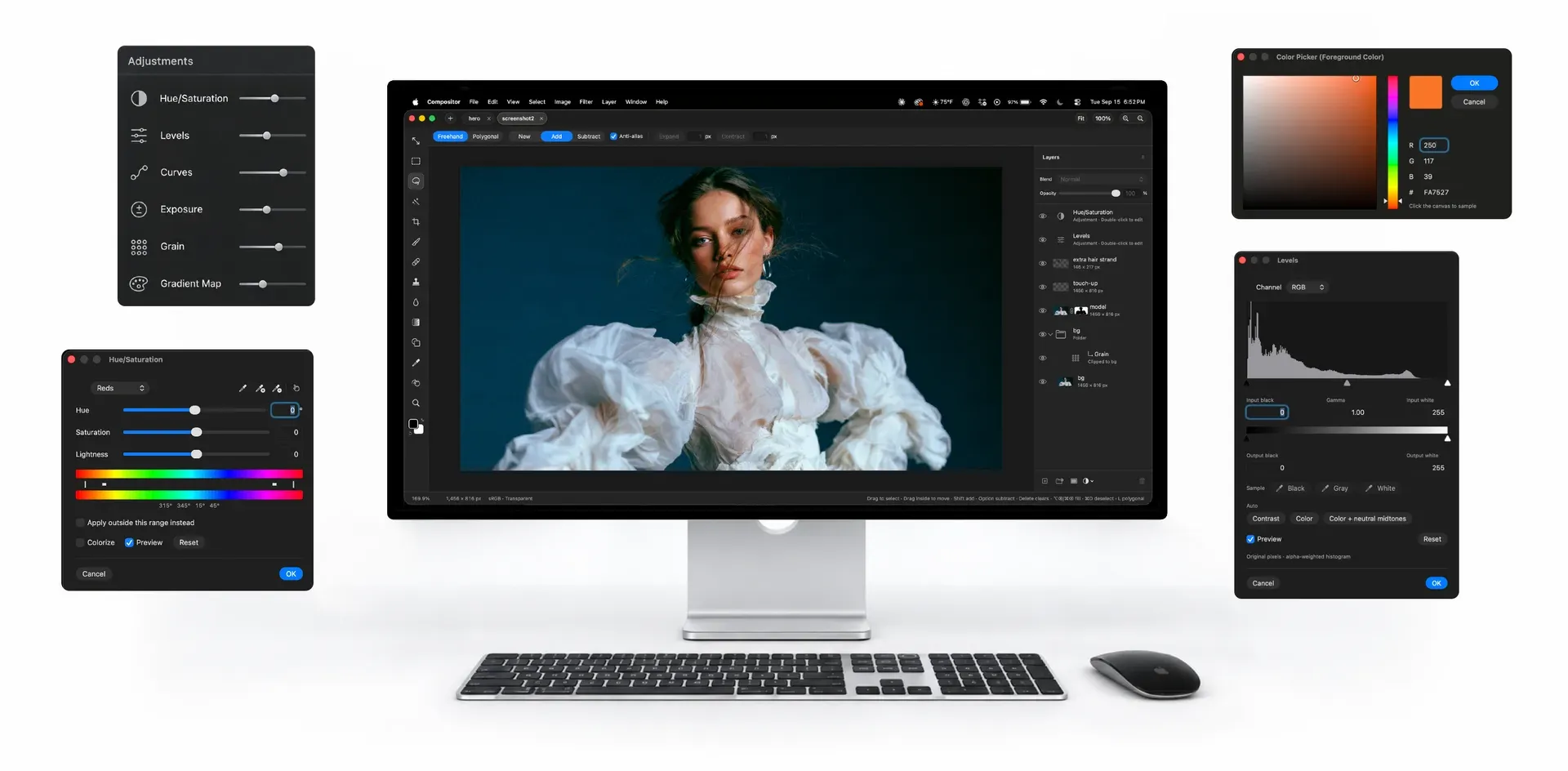
Official product image from the Compositor website: the main window with a layered portrait composite, surrounded by adjustment dialogs.
Source: official Compositor project page.
Key capabilities
- Download Compositor for macOS The release DMG (about 8.8 MB for 1.6.4) is available from the latest GitHub release or the website download button. The release script signs it with a Developer ID, notarizes it and staples the ticket. It requires macOS 26.0 or later on Apple silicon; Intel Macs are not supported.
- Install with Homebrew Run
brew install --cask robbietilton-compositorto install Compositor.app into the Applications folder. The Homebrew cask tracks the same GitHub DMG and is bumped automatically when a release appears. A managed fleet can use the cask for repeatable installs, while the app's own Sparkle updater can still offer newer builds. - Layers, folders and blend modes Layers and nested folders carry opacity and the full Photoshop set of blend modes in Photoshop order. A folder's opacity dims everything inside it. Layers can be duplicated, renamed inline, reordered by drag and drop, merged down or merged as a group, and copied or dragged between open projects.
- Layer masks and clipping masks Masks can be painted, filled, inverted, blurred and feathered anywhere on the canvas, including outside the layer's own pixels. Linking or unlinking a mask lets it be transformed independently. Clipping masks and folder masks are supported, and a layer or mask can be loaded as a selection.
- Adjustment and filter layers Non-destructive adjustment layers cover Hue/Saturation, Levels, Curves, Exposure, Gradient Map, Grain, Black and White, Color Balance and Invert. Filter layers add Gaussian Blur, Motion Blur, Progressive Blur, Sharpen, Reduce Noise, Noise, Vignette, Bloom and Glow, RGB Split, Lens Effects and Tonal Contrast. Since 1.6.2 the Layers panel has separate buttons for adjustment layers and filter layers.
- Layer effects on the GPU Stroke, Drop Shadow, Color Overlay, Inner Shadow, Outer Glow and Inner Glow stay editable at any time and are rendered on the GPU. They are effect settings on the layer rather than baked pixels. Their exact appearance next to Photoshop's equivalents should be compared on your own files.
- Non-destructive transforms Move, scale, rotate and flip keep the source at full resolution however small a layer is made. Free distort, multi-layer and folder transforms, exact numeric values and arrow-key stepping are included. Snapping, guides, Align and Distribute, and the Distances overlay added in 1.6.3 help with precise placement.
- Selections and subject masking Rectangle and Ellipse Marquee, Freehand and Polygonal Lasso, Magic Wand by color and an Object mode that traces what you click are available. Select Subject, Expand, Contract and Feather work on any selection, and Feather accumulates on repeated use since 1.6.4. Content-Aware Fill can fill a selection or extend an image past its edges.
- Painting and retouching tools The Brush has size, hardness, opacity and smoothing, with pen pressure on a graphics tablet. Spot Healing (content-aware), an aligned or non-aligned Clone Stamp sampling one or all layers, a Blur tool, Gradient and editable Shape tools and an Eyedropper with a full color picker complete the set. The Type tool edits multiline paragraph boxes inline and text can act as a clipping mask.
- Camera Raw filter and RAW import A Camera Raw panel beside the canvas covers light, color, curves, color mixer, color grading, detail, optics and geometry, with per-section resets. Camera RAW files open through a develop step before they become layers. The repository publishes performance notes for the GPU path.
- Creative filters with live preview Dither, Scanlines, Lens Effects (anamorphic flare, starburst, mist, prism and shaped bokeh), Rim Light with up to three colored back lights, Lens Correction and Remove Background sit alongside the blur and noise filters. Previews are live and limited to the active selection when one exists. Last Filter repeats the previous filter with the same settings.
- Volumetric Light with a downloaded depth model Added in 1.6.0, this filter adds haze that thickens with distance around the subject, lit by a light you place, with optional beams. Depth comes from the DepthMini Core ML model, which is downloaded on first use rather than shipped in the app. Since 1.6.1 the filter waits for the model instead of showing a rough first guess.
- PSD, PSB and broad import support Compositor imports JPEG, PNG, HEIC, TIFF, WebP, SVG, PDF (one layer per page, at 300 DPI or fitted), animated GIF and camera RAW. Photoshop PSD and PSB files open in 8-bit RGB only, not CMYK; folders, masks, blend modes, fill rectangles and ellipses and simple horizontal text stay editable, while other vectors and vertical text become pixels. Each Photoshop artboard opens in its own tab, and a conversion report is shown before anything is applied.
- Export formats Export PNG, JPEG, a one-page PDF at print size or an animated GIF from a GIF layer, with scaling, a live preview, JPEG quality and an estimated file size. Channel Pack writes layers into the red, green, blue and alpha channels of one PNG for game textures. Layers can also be exported individually as PNGs trimmed to their pixels.
- Canvas, rulers and navigation Projects open in tabs, with rulers, guides, an adjustable layout grid and Snap To for guides, grid, layers and document bounds. Crop supports fixed and custom ratios, Canvas Size, Image Size and Trim are available, and a Navigator minimap appears from 300 percent zoom. Search Commands finds any menu command or tool by name, and Toggle Fullscreen shows the canvas alone.
- Large documents and 16-bit layers The memory budget scales with the Mac's installed memory, and a Photoshop file too large to open has its layers cropped to the canvas. Since 1.6.0, 16-bit and HDR layers keep their depth through 8-bit edits, and Convert to 16-Bit or 8-Bit works on every selected layer. Saving runs in the background so editing can continue.
- Documented .comp project format A project is a macOS package with
manifest.jsonand animages/folder of PNG layers and masks. The format is at version 21 for new saves and reads versions 1 to 20. Documented limits are 30,000 pixels per side, 10,000 layers, a 4 MiB manifest and 512 MiB per encoded asset; invalid or unsafe files are rejected before the open document is replaced. - Live editing by scripts and AI agents The Writing Compositor projects guide explains how a script or a file-editing agent such as Claude Code or Codex can write layers, masks and adjustment layers into an open project. Compositor reloads about a third of a second after writes stop, keeps zoom and selection, and asks before replacing unsaved user changes. A malformed manifest is ignored without an error message, so writers should follow the atomic rename procedure in the guide.
- Photoshop-style shortcuts and editing comfort Keyboard shortcuts follow Photoshop and can be remapped under Edit, Keyboard Shortcuts. Number labels can be dragged to scrub values. Undo history and viewport are kept only for the current session and are not saved in the project.
Where Compositor fits
Compositing a portrait or product shot
Place each source image on its own layer, cut it out with Select Subject, the Object selection mode or Remove Background, and refine the edge on a layer mask with the brush, blur and feather tools. Group related layers in folders, clip Grain or Levels adjustments to a single folder, and finish with Rim Light or Volumetric Light if the scene needs matching light. Check mask edges at 100 percent and above, and remember that Volumetric Light needs a one-time model download before it works.
Opening existing Photoshop files
Open PSD or PSB files directly and read the conversion report before accepting it. Only 8-bit RGB documents are supported, so convert CMYK files elsewhere first. Folders, masks, blend modes, simple shapes and horizontal text remain editable, while other vector content and vertical text are rasterized. Each artboard opens in its own tab. Compare layer counts and a flattened export against the original before discarding the PSD.
Retouching and RAW development
Open a camera RAW file through the develop step, then refine it in the Camera Raw panel and with Levels, Curves or Reduce Noise layers. Use Spot Healing and the Clone Stamp on a separate empty layer so retouching stays reversible. Export a JPEG with a live preview of quality and file size. Test files from each camera body you use before relying on the RAW path, and keep the original RAW files.
Generating images with scripts or AI agents
Create an empty project in Compositor, keep it open, and point a script or file-editing agent at the project-writing guide. The writer adds PNG layers first, then replaces manifest.json through an atomic rename, and the canvas updates. Blend mode names, uppercase layer IDs and 8-bit PNG files must match the rules exactly, otherwise the whole write is silently ignored. Keep a saved copy, since a reload clears undo history.
Preparing game and interface assets
Build sprites or textures on layers, then use Channel Pack in Export As to pack separate grayscale layers into the red, green, blue and alpha channels of one PNG. RGB Split's Split to Layers reverses that packing for editing. Export individual layers as trimmed PNGs from the Layers panel context menu. Verify the packed channel order in the target engine before committing a batch.
Building a customized version from source
Clone the repository, open Compositor.xcodeproj in Xcode 26 or later and run the Compositor scheme. The only Swift package dependency is Sparkle 2.10.0, and the CompositorTests target runs in GitHub Actions on macOS 26 for every push. A fork that changes saved data must bump the format version, as AGENTS.md explains. Change the bundle identifier and the Sparkle feed before redistributing, so your build does not pull official updates.
Install
brew install --cask robbietilton-compositorReviews of Compositor
Be the first to share your experience with Compositor.
Write a review
Loading review form…
Alternatives to Compositor
 GIMPGIMP, the GNU Image Manipulation Program, is a free and open source cross-platform image editor for GNU/Linux, macOS and Windows with scripting and plug-ins.
 PhotoCraftPhotoCraft is a clean-room, Photoshop-style image editor written in Rust by the ArtCraft team. It edits layered PSD and PSB files, runs on macOS, Windows, Linux, FreeBSD and the web, and exposes 500+ commands to a CLI, JSON control channel and MCP server.GGraphiteGraphite is a free, open-source vector and raster graphics engine in alpha. Its editor combines nondestructive layer-based workflows with a node graph for procedural graphics and generative design.