

What is Doory?
Doory is a design editor that runs in the browser for posters, social posts, stories, slides, invitations, resumes, thumbnails and business cards. Users start from a template or a blank page, edit every element and export PNG, JPG, SVG, PDF, MP4, WebM or GIF. The README states that there is no paid plan, no locked features and no ads, that no account is needed to start, and that it can be run on one's own server with or without Docker. The project describes itself as an open-source Canva alternative. The public instance is at doory.art and the source is at github.com/shaongitbd/doory.
Doory is created and maintained by Siam, according to the README, with copyright held by Siam and the contributors listed in AUTHORS.md. It is released under the Attribution Assurance License: the software may be used, changed and redistributed, including commercially, but the license and NOTICE must be kept and a credit to the author must be shown prominently in the running app. Third-party software, fonts and content keep their own licenses. The README describes Doory as a young project whose editor is complete while the template library is small, with ten starter templates.
Guests design straight away and their work is saved in the browser on that device. An account stores designs on the server that runs Doory, enables sharing and brand kits, and moves existing guest designs over when the user signs up. Uploads go to a local volume or to S3-compatible storage. Optional integrations include email, Google sign-in, single sign-on through OpenID Connect, stock photos from Unsplash or Pexels, sound search on Freesound, server-side export and AI image providers for background removal.
The frontend uses React 19, TypeScript, Vite, Fabric.js for drawing, Yjs for live co-editing and Zustand. The backend is Django 5 with Django REST Framework, Channels and PostgreSQL, served as three entry points: the API and admin under gunicorn, realtime WebSockets under uvicorn and an MCP server. The Docker Compose stack adds nginx, optional Redis and S3-compatible storage. Releases publish Docker images for linux/amd64 and linux/arm64 on GitHub Container Registry. The latest release, v0.3.1 (November 9, 2026), adds Simplified and Traditional Chinese interface languages, Traditional and Hong Kong Chinese fonts, font weight selection, color editing in SVG illustrations, Shift-click range selection in the Layers panel and CJK font subsets for server-side exports. Earlier releases were v0.1.0 (October 19, 2026), v0.2.0 and v0.3.0.
Doory runs a Model Context Protocol server at /mcp that lets MCP clients such as Claude and Cursor list, create and edit designs with a user-created token; it is off by default. Server-side image, PDF and video export uses a headless Chromium and is optional. Similar design tools listed on iThub include Penpot for interface design and Grida, and image editors such as GIMP.
Doory screenshots
Explore the interface. Open a screenshot to view it at full size.
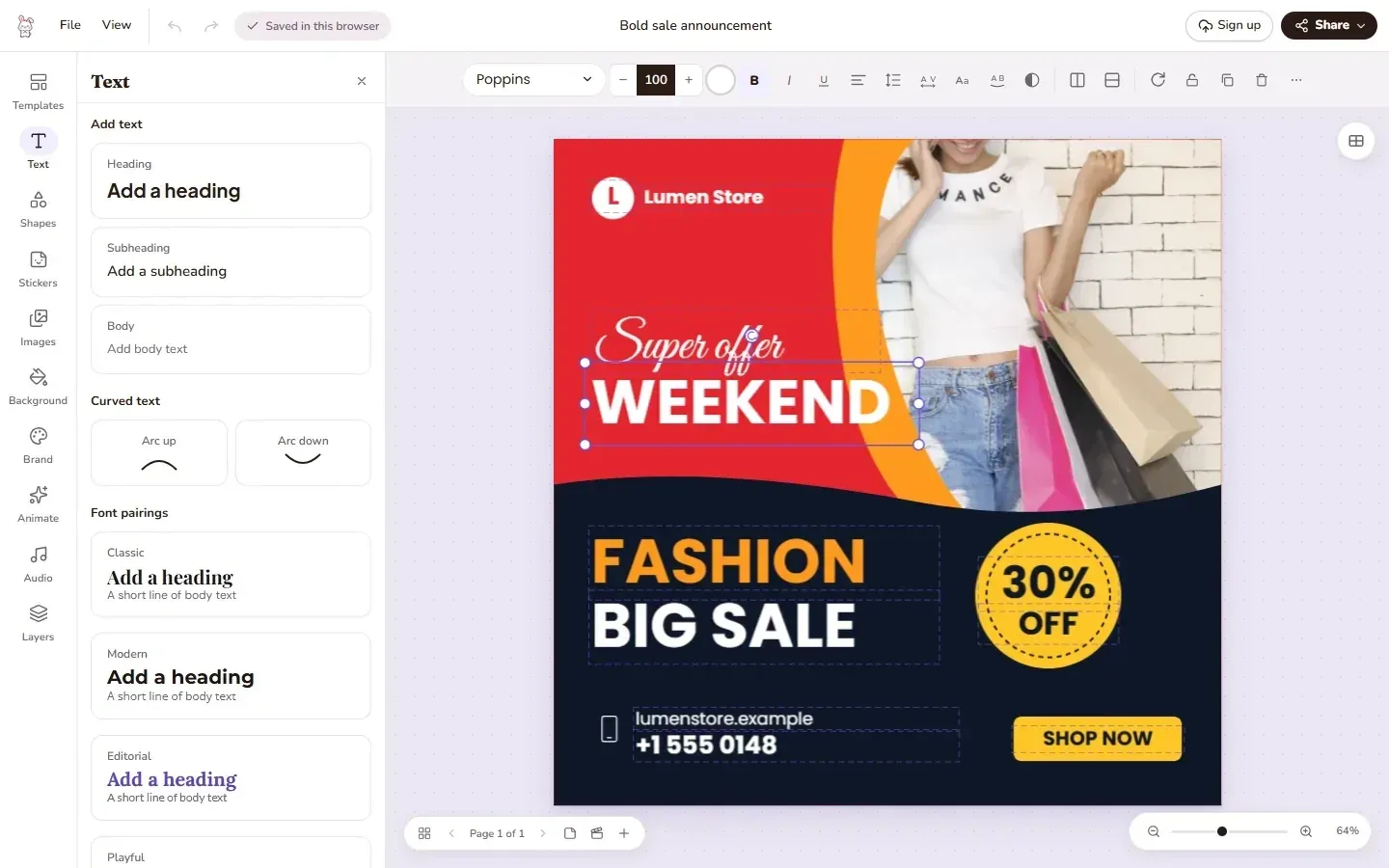
Official README screenshot of the editor with the sale post template and the Text panel.
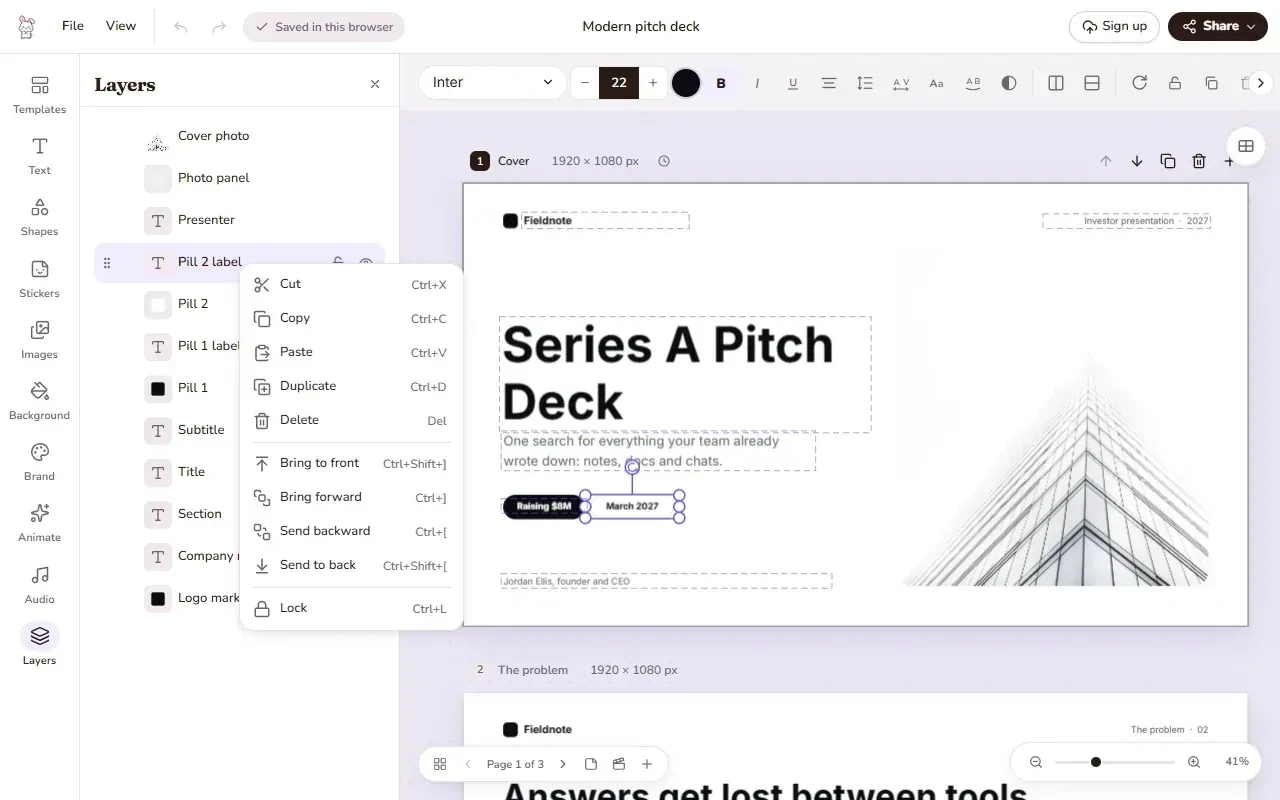
Official README screenshot of the Layers panel and its right-click menu on a pitch deck template.
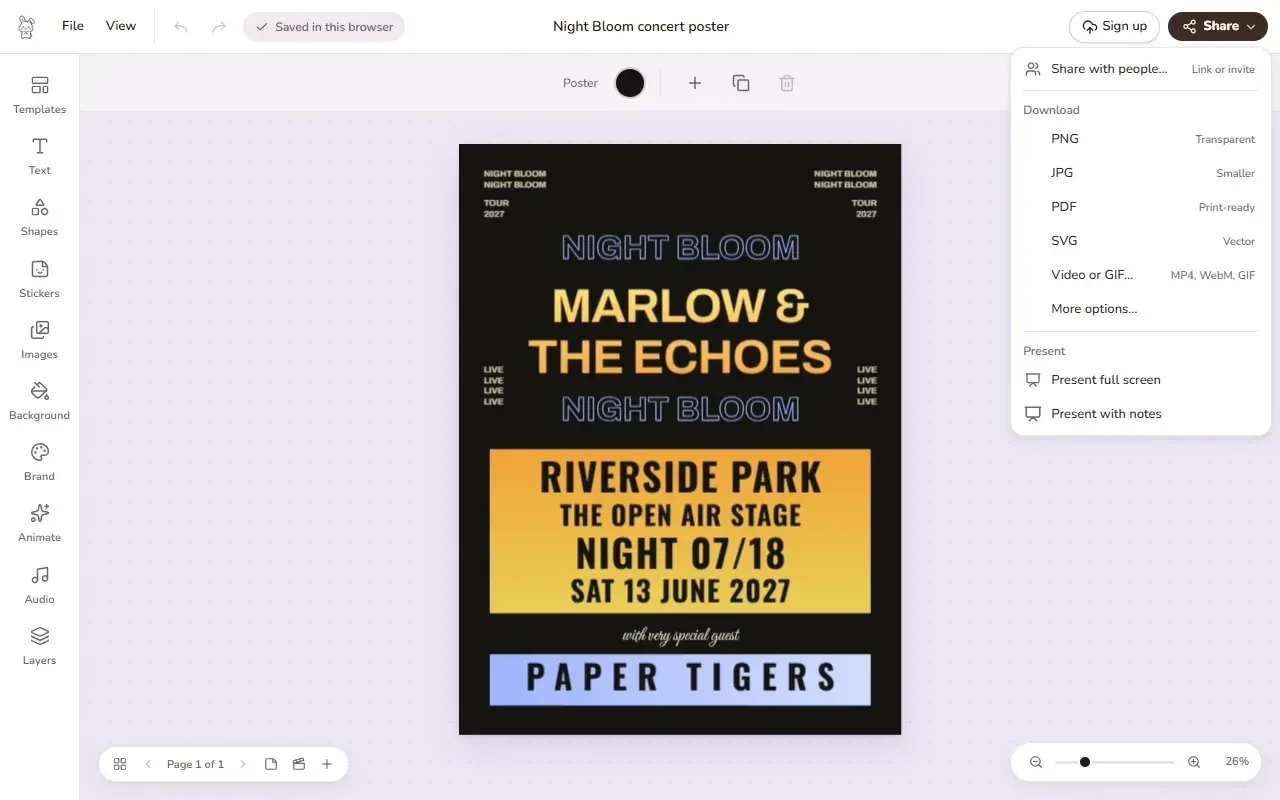
Official README screenshot of the Share menu with download formats and present options.
Source: official Doory project page.
Key capabilities
- Browser design editor Tools sit in a rail on the left (Templates, Text, Shapes, Stickers, Images, Background, Brand, Animate, Audio, Layers) and open as panels, while the toolbar above the page changes with the selection. A design can have several pages, each with its own size, and can be resized to another format.
- Templates Ten starter templates ship with Doory: a tour poster, an event story, a sale post, a pitch deck, a grand opening flyer, a wedding invitation, a YouTube thumbnail, a resume, a quote post and a business card. They use open-licensed fonts and, where they contain a photo, a CC0 image. Admins can add more templates in the admin site.
- Text Headings, curved text, text effects, font pairings and lists are available, with an open-licensed font catalogue and user-uploaded fonts. Version 0.3.1 adds font weight selection.
- Elements The element library includes shapes, lines and arrows, about 27,500 icons, emoji, illustrations, stickers and QR codes. Since v0.3.1, colors in SVG illustrations can be edited.
- Photos Images can be uploaded, cropped, masked and filtered. Background removal runs in the browser by default with a small model of about 4.6 MB, or on a configured AI server, and images can be upscaled 2x to 4x with a pure-code resampler. Stock photo search works with an Unsplash or Pexels key.
- Layout tools Layers can be renamed, locked, hidden, grouped and reordered, and a right-click menu offers copy, duplicate and arrange commands. Alignment guides, snapping and rulers help position elements.
- Animation and sound Doory provides 27 enter and exit animations, 12 emphasis animations, 16 page transitions, 24 music loops and 88 CC0 sound effects. Freesound search works with a key, and voiceover recording is built in. Video clips can be added when the server has ffmpeg.
- Present mode Designs can be presented full screen with speaker notes, timing, auto-advance and a second presenter window.
- Collaboration Share links can allow viewing, commenting or editing, optionally with a password. The editor supports pinned comments, version history and real-time co-editing through a WebSocket service.
- Brand kits Signed-in users can store brand colors, fonts and logos and apply them in the Brand panel.
- Export The Share menu combines share links, downloads and presenting. Downloads in PNG, JPG, SVG, PDF, MP4, WebM and GIF are made in the browser, and print PDFs can include bleed and crop marks.
- Server-side export When enabled, a headless Chromium on the server renders saved designs as PNG, JPG, WebP, AVIF, SVG, PDF or video through
POST /api/v1/designs/{id}/export/image/and the MCP toolexport_design, with options for scale, size, quality, maximum file size and bleed. Print PDF export is on by default; image and video export are off by default. - MCP server An opt-in MCP server at
/mcpuses personal tokens with selectable permissions and an expiry of at most one year. Assistants can manage designs and folders, add text, shapes, pictures, QR codes and pages, search templates, fonts and stock photos, handle comments, brand kits, share links and versions, and export pages. - Template filling and bulk generation Templates can be filled by field key from an assistant (
fill_design,bulk_fill) or from the REST API (/fill/and/bulk-fill/), creating one new design per row, with per-minute rate limits. - Accounts and sign-in Guests work without an account. Optional integrations cover email confirmation, Google sign-in and single sign-on with OpenID Connect.
- Accessibility A high-contrast mode with darker text, borders and focus rings follows the device setting or can be switched in the View menu or Settings.
- Interface languages English is the base language, and v0.3.1 adds Simplified and Traditional Chinese interface catalogs that load on demand.
- Docker self-hosting The Compose stack runs PostgreSQL 16, the API, the realtime service and an nginx web container, with optional
mcpandredisprofiles. Pre-built imagesghcr.io/shaongitbd/doory-backendandghcr.io/shaongitbd/doory-frontendare published for amd64 and arm64. - Installation without Docker The manual install guide covers nginx and systemd units. Documentation also covers every setting, upgrades, backups and troubleshooting.
Where Doory fits
Designing a social post or poster from a template
A user opens the template gallery, filters by category such as Social Media, Posters, Flyers or YouTube, opens a template and edits the text, images and colors. The design can then be downloaded from the Share menu as PNG, JPG, SVG or PDF, or shared with a link. Guests can do this without an account; the work is saved in the browser.
Building an animated presentation
Pages in a design act as slides, each with its own size. The Animate panel adds enter, exit and emphasis animations per element and transitions per page, the Audio panel adds music loops, sound effects or a recorded voiceover, and Present mode shows the result with speaker notes and a presenter window. The design can also be exported as MP4, WebM or GIF.
Working on a design as a team
Signed-in users share a design with links that allow viewing, commenting or editing, optionally protected by a password. Several people can edit at the same time through the realtime service, comments can be pinned to the page, and version history keeps earlier states. Brand kits keep shared colors, fonts and logos available in the editor.
Self-hosting Doory for an organization
The Docker guide copies .env.example to .env, sets DJANGO_SECRET_KEY and POSTGRES_PASSWORD, runs docker compose up -d --build and creates an admin with createsuperuser. A new site starts empty, so templates, fonts, icons and audio are added as described in the starter content guide. The stack serves plain HTTP on port 8080, and the guide describes running it behind a reverse proxy that handles TLS.
Editing designs from an AI assistant
After setting MCP_ENABLED=true and adding the mcp Compose profile, a user creates a token in Settings, AI assistants (MCP), and adds https://your-domain/mcp with a Bearer header to an MCP client that supports the HTTP transport. The assistant can then create a poster in a given size with brand colors, translate headlines on every page or move elements, within the permissions given to the token.
Generating many designs from one template
The REST endpoint /api/v1/designs/{id}/bulk-fill/ and the MCP tool bulk_fill create one design per data row by filling template fields by key. Image values can be public https URLs that the server copies into uploads while URL_IMAGE_UPLOADS is on, and the number of rows per request is capped by BULK_FILL_MAX_ROWS.
Reviews of Doory
Be the first to share your experience with Doory.
Write a review
Loading review form…
Alternatives to Doory
 GridaGrida is an Apache-2.0 canvas editor with a Rust and Skia engine, Figma import, slides, an SVG editor and AI generation through your own keys, Ollama or Grida credit. Desktop runs on macOS, Windows and Linux.
 GIMPGIMP, the GNU Image Manipulation Program, is a free and open source cross-platform image editor for GNU/Linux, macOS and Windows with scripting and plug-ins.