

What is Logto?
Logto is an open-source authentication and authorization platform for SaaS and AI applications, built on OpenID Connect and OAuth 2.1 with SAML support. It provides hosted sign-in and sign-up pages, an Admin Console, multi-tenancy through organizations, enterprise SSO, role-based access control and SDKs for more than 30 frameworks. Logto is developed by Silverhand Inc., which describes itself on its about page as a remote-first company focused on open-source software. The source code in the logto-io/logto repository is licensed under the Mozilla Public License 2.0 (MPL-2.0).
Logto is offered in two deployment types. Logto Cloud is the managed service at cloud.logto.io. Logto OSS is the self-hosted edition, distributed as the Docker images ghcr.io/logto-io/logto and svhd/logto, through npm init @logto@latest and as a logto.tar.gz release asset. The self-hosted plans page lists OSS Community as free with no license required, Self-hosted Pro (early access, 249 USD per month list price billed annually, 199 USD per month for early-access teams) and Self-hosted Enterprise with custom pricing; Pro and Enterprise features are unlocked by a signed license file pasted into the Console, and the instance keeps running as OSS if the license cannot be refreshed for 30 days.
The current release is Logto 1.46.0, published November 5, 2026. It adds OIDC step-up authentication (acr_values and max_age in requests, acr, amr and auth_time in tokens), a Sign-In with Ethereum wallet connector, a confirm_redirect_policy parameter that keeps the iOS Save Password prompt, self-service personal access tokens in Account Center, GeeTest CAPTCHA v4 and static attributes for SAML applications. The release also contains security fixes for MFA, social and enterprise sign-in, the Account API and Logto Tunnel; the release notes state that standard OAuth 2.0 and Microsoft Azure AD social connectors need a settings review after upgrading because of a new Disable Email Sync switch. Earlier releases in the 1.4x line were 1.45.0 (October 13, 2026) and 1.44.0 (September 30, 2026).
The project is a TypeScript monorepo. Its packages include the core OIDC service, the React Admin Console, the hosted sign-in experience, the Account Center, the CLI, schemas, a tunnel tool for local development and more than 50 connector packages. Self-hosting requires PostgreSQL 14 or later according to the OSS installation guide; the repository's engines field accepts Node.js 22, 24 and 26, and by default the core service listens on port 3001 and the Admin Console on port 3002. The docs recommend 2 vCPU, 8 GiB memory and 256 GiB disk, and state that the provided Docker Compose command is not meant for production.
Logto OSS does not support multiple Console administrators by default; console collaborators are a self-hosted Pro feature, and the docs point to Logto Cloud for support channels. Other open-source identity servers listed on iThub include Keycloak, authentik and Zitadel.
Logto screenshots
Explore the interface. Open a screenshot to view it at full size.
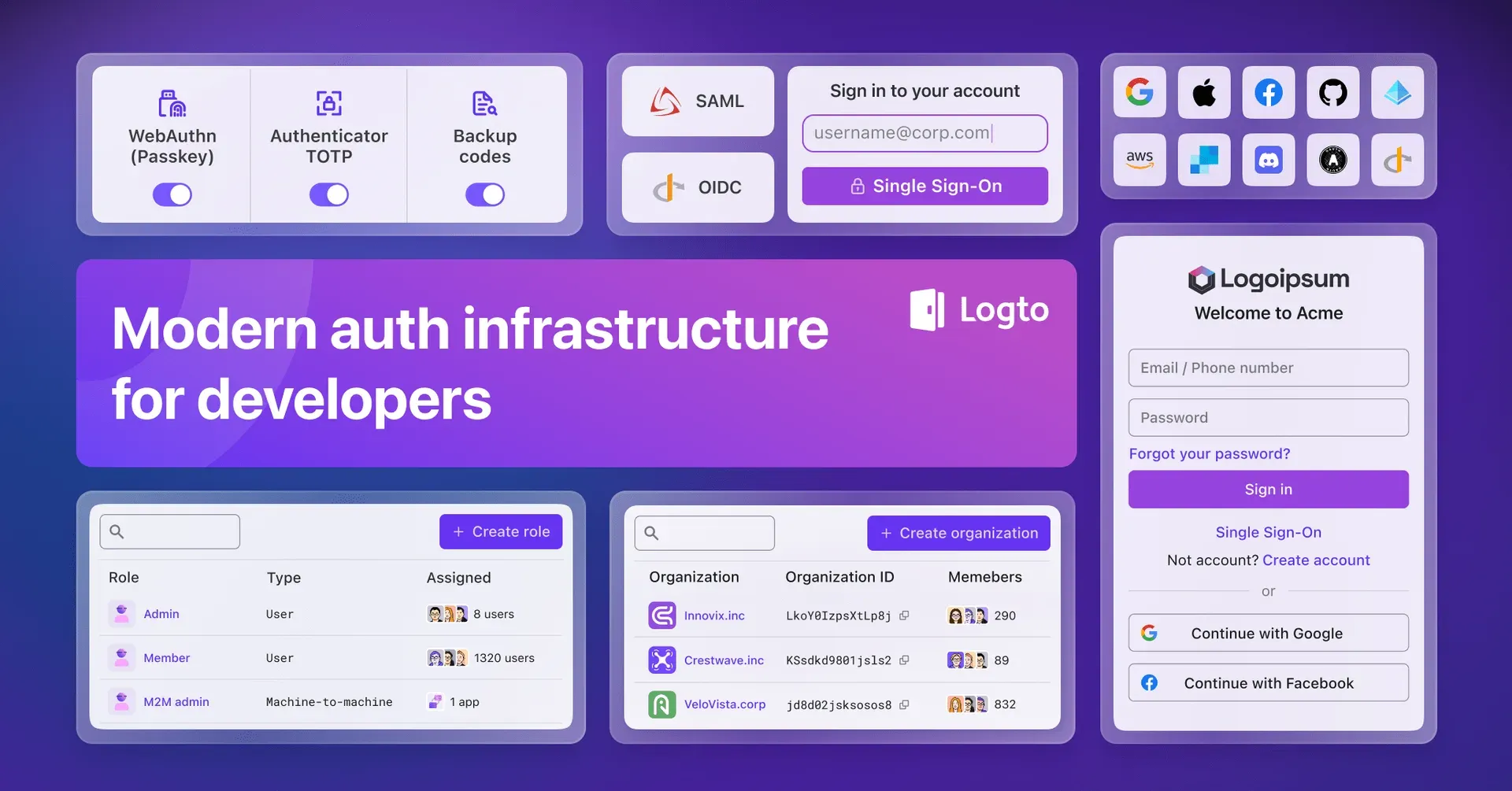
Official Logto feature overview from the GitHub README, combining Console and sign-in UI elements.
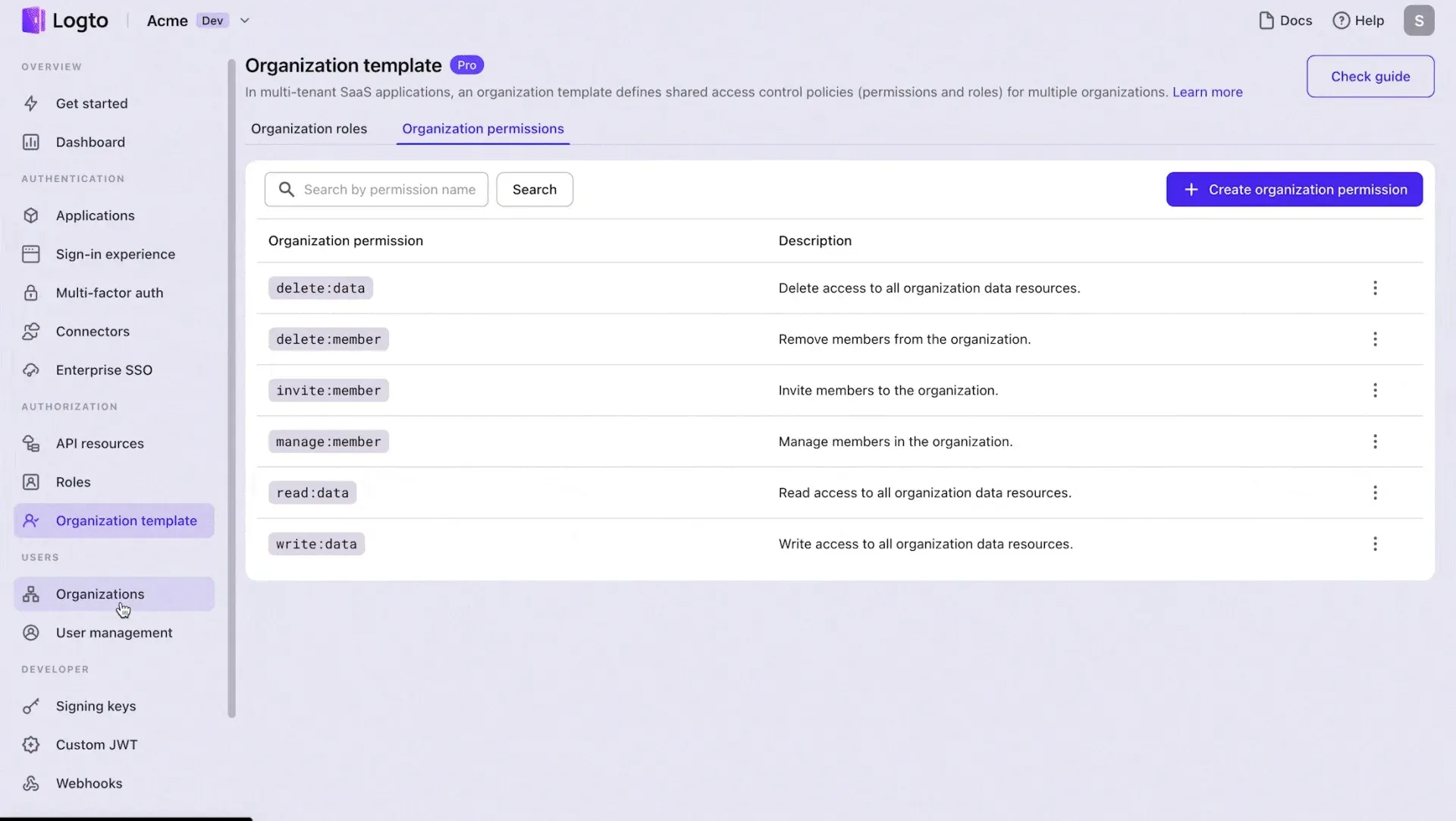
Organization template in the Logto Console, defining permissions shared by all organizations. Frame from the README multi-tenancy showcase.
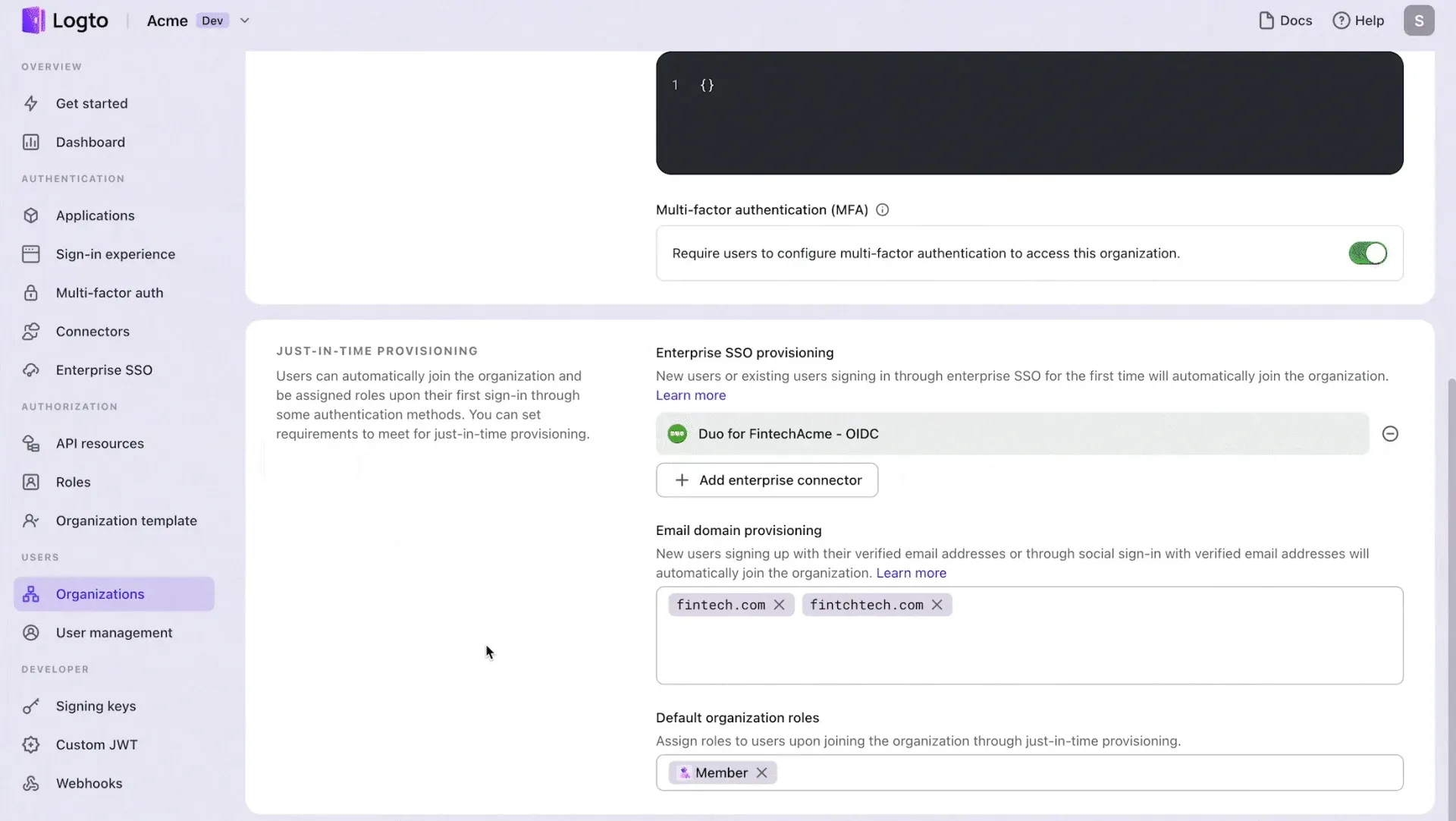
Just-in-time provisioning settings for an organization. Frame from the README multi-tenancy showcase.
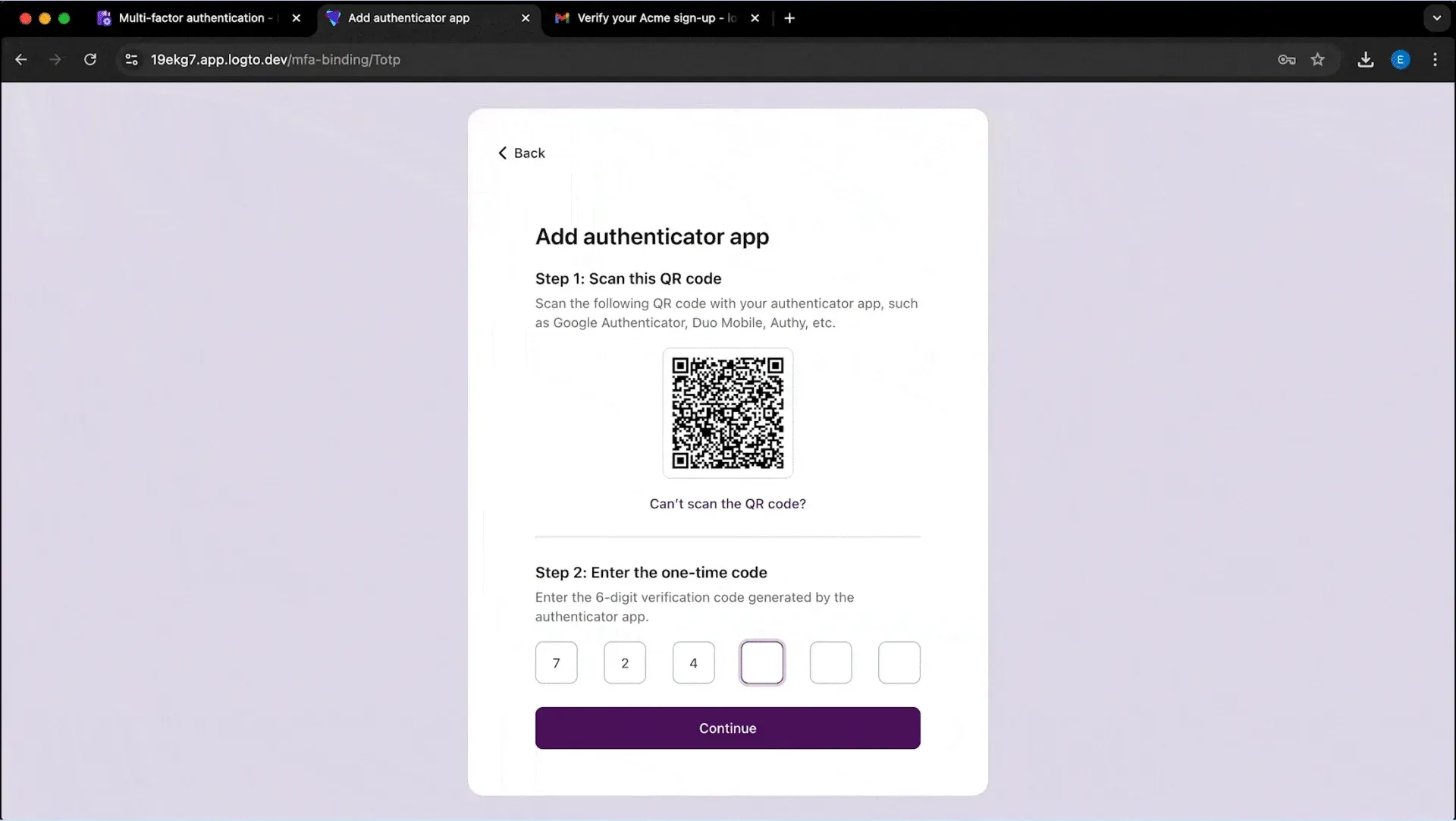
Authenticator app (TOTP) enrollment in the hosted sign-in experience. Frame from the README sign-in showcase.
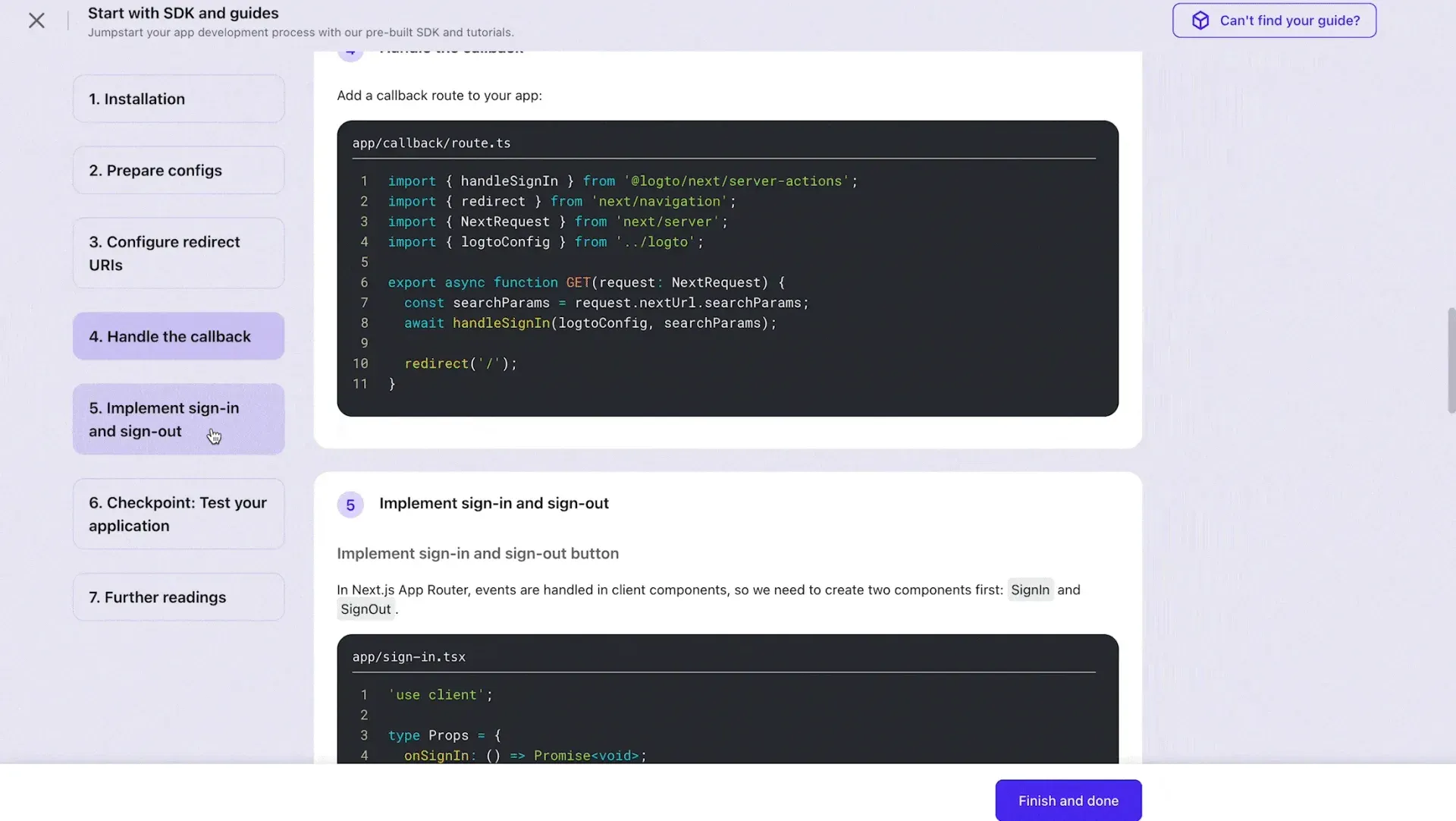
Built-in integration guide in the Logto Console for a Next.js app. Frame from the README SDK showcase.
Source: official Logto project page.
Key capabilities
- Logto Cloud The managed service has a Free plan (0 USD, up to 50K monthly active users and 50K tokens, 3 applications, 1 machine-to-machine app, 3 social connectors, 1 webhook, 1 tenant member, 3 days of audit log retention) and a Pro plan from 24 USD per month with unlimited MAU, 50K tokens included and 0.08 USD per 100 extra tokens. Pro add-ons are listed on the pricing page: RBAC (32 USD), Organizations (48 USD), MFA (48 USD), Enterprise SSO (48 USD per connector) and an Advanced security bundle (48 USD). Enterprise offers custom quotas, a custom data region, Logto Private Cloud and an SLA.
- Self-hosting with Docker The quick start pipes the repository's
docker-compose.ymlintodocker compose, which starts thesvhd/logtoimage with PostgreSQL 17, seeds the database and exposes ports 3001 and 3002. For production the docs describe running the image against an external PostgreSQL 14+ database and settingENDPOINTandADMIN_ENDPOINT. A Render blueprint and a GitPod demo are also linked from the README. - Self-hosting with Node.js
npm init @logto@latestdownloads and starts Logto on a machine with Node.js and an existing PostgreSQL database. The CLI seeds the database and applies database alterations withlogto db alteration deploywhen upgrading between versions. - OIDC and OAuth 2.1 provider Logto acts as an OpenID Connect provider with OAuth 2.1 flows for single-page apps, traditional web apps, native apps, machine-to-machine clients and devices. Release 1.46.0 adds step-up authentication, so clients can request a recent or stronger sign-in and read
acr,amrandauth_time. Authorization codes, device codes, pushed authorization requests and one-time tokens are accepted from a single request only; refresh tokens keep a reuse window. - SAML applications and enterprise SSO Logto can act as a SAML identity provider for SAML service-provider applications, with attribute mapping and, since 1.46.0, static attributes in every assertion. In the other direction, enterprise SSO connectors federate sign-in to a customer's SAML or OIDC identity provider. OSS Community includes 3 SAML applications; unlimited SAML applications and IdP-initiated SSO are self-hosted Pro features.
- SDKs for 30+ frameworks The quick starts cover frameworks including React, Next.js, Angular, Vue, Flutter, Go and Python, and the Console shows step-by-step integration guides with code for the chosen SDK. The README lists SPAs, web apps, mobile apps, APIs, machine-to-machine, CLI tools and Model Context Protocol servers as integration targets.
- Social and passwordless connectors Connectors add social sign-in (for example Google, Apple, Facebook, GitHub and Microsoft Azure AD), generic OAuth 2.0 and OIDC providers, and email or SMS providers for passwordless codes. Release 1.46.0 adds an Ethereum Wallet connector based on SIWE (EIP-4361) and a Disable Email Sync switch for the standard OAuth 2.0 connector. The integrations catalog lists the available connectors.
- Sign-in experience The hosted sign-in and sign-up pages support username, email and phone identifiers, passwords, verification codes, magic links through one-time tokens, social login, Google One Tap and enterprise SSO, with branding and custom CSS. Bring your UI (self-hosted Pro and above) replaces the hosted pages with custom assets, and the Experience API supports building a custom sign-in flow.
- Multi-factor authentication and passkeys MFA factors include authenticator app TOTP, WebAuthn passkeys, backup codes and email or phone codes, and passkeys can also be used as a sign-in method. Organizations and individual users can require MFA setup; release 1.46.0 adds a per-user Require MFA setup switch. Tenant-wide mandatory MFA is listed as a self-hosted Pro feature, while self-service MFA is in OSS Community.
- Organizations and multi-tenancy Organizations model the customers of a multi-tenant SaaS product. An organization template defines shared organization roles and permissions, and organizations support member invitations, organization-level MFA requirements and just-in-time provisioning by enterprise SSO connector or verified email domain with default roles.
- Role-based access control RBAC defines API resources with permissions (scopes), user roles and machine-to-machine roles. Access tokens are issued per API resource and carry the granted scopes; custom JWT claims can be added to access tokens and ID tokens with scripts in the Console.
- Account Center and Account API The built-in Account Center lets users manage their profile, identifiers, passwords, MFA factors, sessions and, since 1.46.0, personal access tokens that expire within 365 days. Sensitive operations require a recent sign-in (10 minutes by default). The Account API exposes the same operations under
/api/my-accountfor first-party applications. - Management API The Management API, documented at openapi.logto.io together with the Experience API and Account API, covers users, applications, roles, organizations, connectors, sign-in experience and logs. Release 1.46.0 adds user search by custom data and organization lookup by just-in-time provisioning domain.
- Webhooks and audit logs Webhooks send events such as sign-ins, user changes and organization changes to external endpoints; since 1.46.0 every payload carries a
deliveryIdthat stays the same across retries and links to the audit log entry for that delivery. Audit logs record authentication and management events, with retention depending on the Cloud plan. - Security controls Password policies, CAPTCHA (Google reCAPTCHA Enterprise, Cloudflare Turnstile and, since 1.46.0, GeeTest v4), a blocklist, identifier lockout and user impersonation are documented under security and developer features. Release 1.46.0 binds MFA and SSO verifications to the identified account and reduces connector request errors to name, code and message before logging.
- Authentication for MCP servers and AI agents The AI use-case guides cover adding authentication to MCP-powered apps, letting third-party AI agents access an MCP server or an app, and letting an agent call third-party APIs on behalf of users with stored provider tokens and incremental authorization. The docs also describe a Logto MCP Server for Logto Cloud.
- Self-hosted Pro and Enterprise licenses Self-hosted Pro adds console collaborators, tenant-wide mandatory MFA, Bring your UI, hidden Logto branding, IdP-initiated SSO, unlimited SAML applications and email support with a 3 business day response, for deployments up to 50K MAU. Self-hosted Enterprise adds a severity-based SLA, an LTS release channel, a built-in email service and contract terms.
Where Logto fits
Adding sign-in to a web or mobile application
A developer creates an application in the Admin Console, picks the matching SDK from the quick starts, configures redirect URIs and adds sign-in, sign-out and a callback route. Logto then serves the hosted sign-in experience with the configured identifiers, social connectors and MFA factors, and the app receives OIDC ID tokens and access tokens.
Running a multi-tenant B2B SaaS
Each customer becomes an organization. The organization template defines roles such as admin and member with permissions, members are invited or provisioned just in time by email domain or enterprise SSO connector, and organization tokens carry the member's organization scopes. Organization-level settings can require MFA for all members.
Connecting customers' identity providers
For enterprise customers, an administrator adds a SAML or OIDC enterprise SSO connector with the customer's identity provider details and maps email domains to it, so users from that domain are sent to their own IdP. Release 1.46.0 checks SAML assertion audiences strictly against the connector's SP entity ID.
Protecting APIs and machine-to-machine access
APIs are registered as API resources with permissions, and roles grant those permissions to users or to machine-to-machine applications that obtain tokens with the client credentials flow. Backend services validate the JWT access token and its scopes; custom claims can carry extra data from the Console's custom JWT scripts.
Securing MCP servers and AI agents
An MCP server or an AI-facing app uses Logto as its authorization server, so AI clients obtain OAuth tokens through user consent with scoped access, as described in the AI guides. Agents can also use stored third-party tokens to call external APIs on a user's behalf.
Operating a self-hosted identity service
Teams that run Logto OSS deploy the Docker image or the Node.js package against PostgreSQL, expose the core and Admin Console endpoints, and upgrade the schema with the CLI db alteration deploy command. Pro or Enterprise features are activated later by pasting a license file into the Console without a restart.
Install
curl -fsSL https://raw.githubusercontent.com/logto-io/logto/HEAD/docker-compose.yml | docker compose -p logto -f - upReviews of Logto
Be the first to share your experience with Logto.
Write a review
Loading review form…
Alternatives to Logto
 KeycloakApache-2.0 identity and access management server from the CNCF: single sign-on, social login, identity brokering, LDAP and Active Directory federation, MFA and passkeys, organizations and fine-grained authorization, self-hosted on Java.
 authentikauthentik is a self-hostable identity provider for single sign-on. It supports OAuth2 and OIDC, SAML, LDAP, RADIUS and SCIM, with flows, policies and outposts. Free open-source edition, paid Enterprise tiers.
 ZITADELZITADEL is an AGPL-3.0 identity and access management platform written in Go on PostgreSQL, with SSO, MFA, passkeys, B2B organizations, an event-based audit trail and APIs, self-hosted or run as ZITADEL Cloud.