

What is Fleetbase?
Fleetbase is an open-source, modular platform for logistics and supply chain operations. It combines dispatch, fleet management, live tracking, headless commerce, warehousing and billing in one web console, with a REST API, WebSockets, webhooks and an extension system. It is developed by Fleetbase Pte. Ltd., which the company page says was founded in Singapore in 2018 by Shiv Thakker (CEO) and Ronald A. Richardson (CTO).
The platform is a set of modules installed into the console as extensions. Fleet-Ops handles orders, drivers, vehicles, routing, configurable activity flows and maintenance. Storefront adds on-demand commerce and multi-vendor marketplaces, Ledger covers invoicing, payments and wallets, and the Customer Portal gives shippers a self-service workspace. IAM and the Developers console manage users, roles, policies, two-factor authentication, API keys, webhooks and request logs, with separate test and live environments. Two React Native apps, the Navigator driver app and the Storefront customer app, live in their own open-source repositories. The Pallet warehouse extension, Navigator v3 and a new extension registry are listed on the roadmap as in development for November 2026.
Fleetbase Cloud is the managed service. Self-hosting uses Docker Compose, through the @fleetbase/cli installer, a plain docker compose up or a setup script, and a Helm chart exists for Kubernetes. Each GitHub release publishes Docker images, a k6 performance report and single-file FrankenPHP builds of the API for Linux x86_64 and macOS Apple Silicon; those binaries still need MySQL and Redis, and Docker remains the recommended production path. The backend is Laravel on PHP served by Octane, the console is Ember.js with each extension loaded as an Ember Engine, MySQL 8.0 stores data, Redis handles cache and queues, and SocketCluster carries real-time events, as described in the architecture overview.
The current release is v0.7.75, published November 2, 2026, bundling console 0.7.75, core-api 1.6.74, Fleet-Ops 0.6.75 and Storefront 0.4.31. It only updates Storefront: Sign in with Apple tokens are stored encrypted and revoked when a customer deletes their account, and the Launch App link opens AppHelm. Version 0.7.74 made Fleetbase an OAuth 2.0 and OpenID Connect provider, moved order distance, ETAs and map routes to one routing engine with Valhalla as the default, and introduced Fleetbase Hosted Routing. Version 0.7.73 rebuilt the API image on FrankenPHP 1.13.2 with PHP 8.2.35 to close two critical PHP remote code execution bugs, and asked self-hosted installs to upgrade right away.
Fleetbase is dual-licensed: AGPL-3.0 for the open-source code, and a Fleetbase Commercial License that removes the copyleft obligations for proprietary modifications, SaaS products and white-label distribution. It is not a general business suite: payroll, HR and manufacturing planning are outside its documented scope, Ledger is aimed at logistics operators rather than full corporate accounting, and telematics depends on connecting your own GPS devices and sensors. The documentation covers installation, system services, extensions and the API.
Fleetbase screenshots
Explore the interface. Open a screenshot to view it at full size.
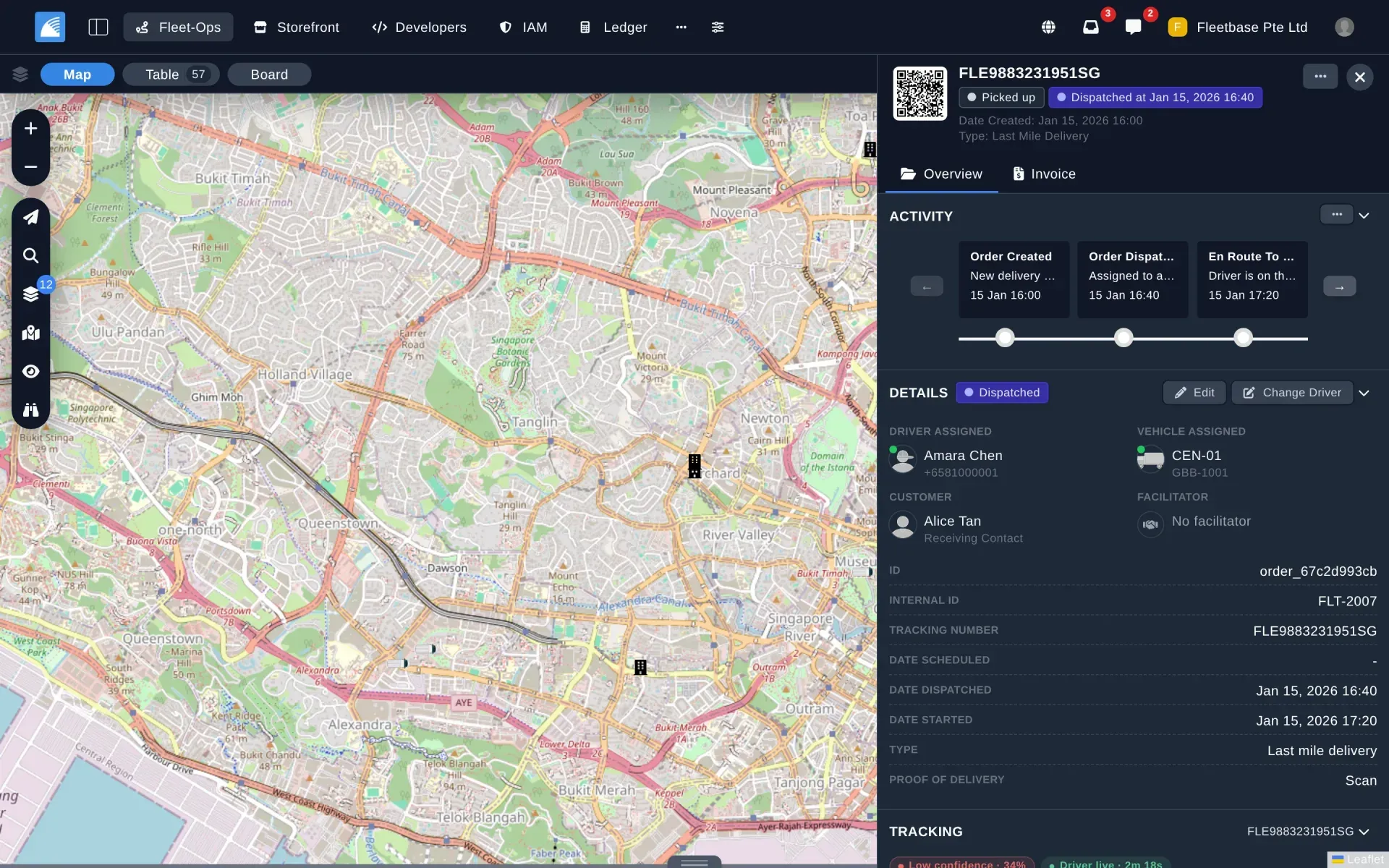
A last-mile order in Fleet-Ops: map view on the left, activity steps, driver, vehicle, customer and proof-of-delivery setting on the right. Official Fleetbase screenshot with demo data.
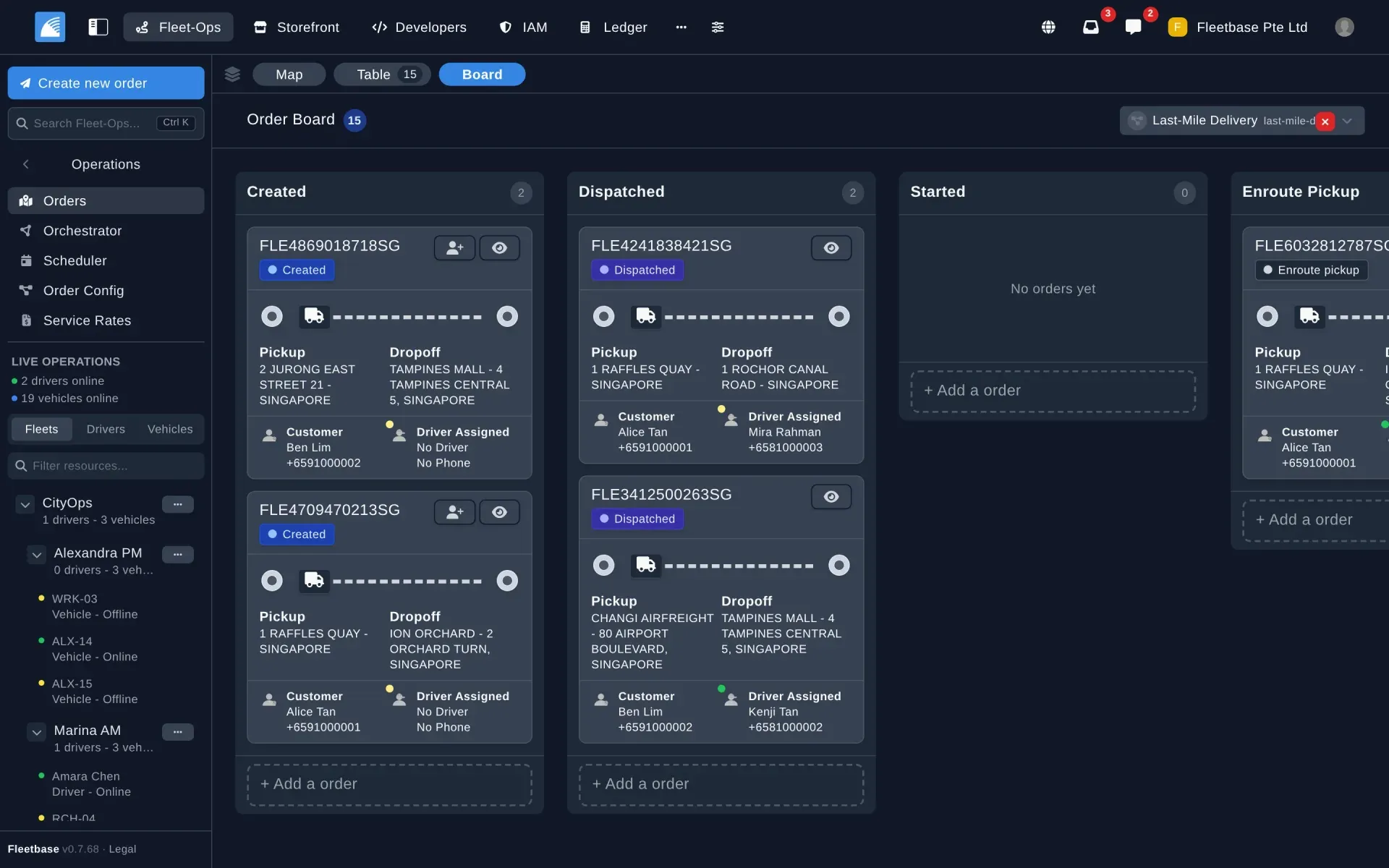
Kanban order board for a Last-Mile Delivery configuration, with pickup, dropoff, customer and assigned driver on each card, and fleets in the sidebar.
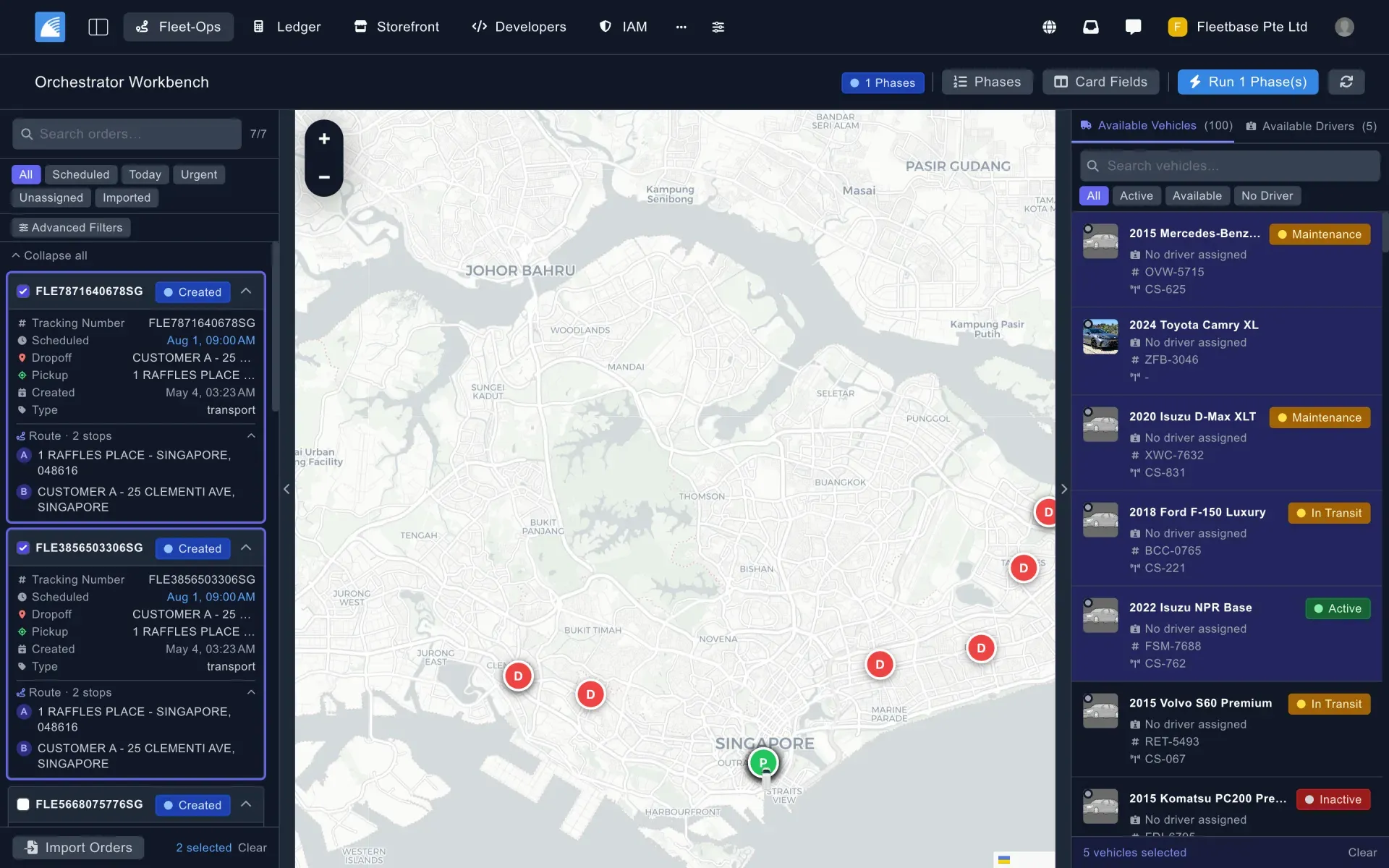
The Orchestrator Workbench: filter and select orders, choose available vehicles and drivers, and run planning phases before committing.
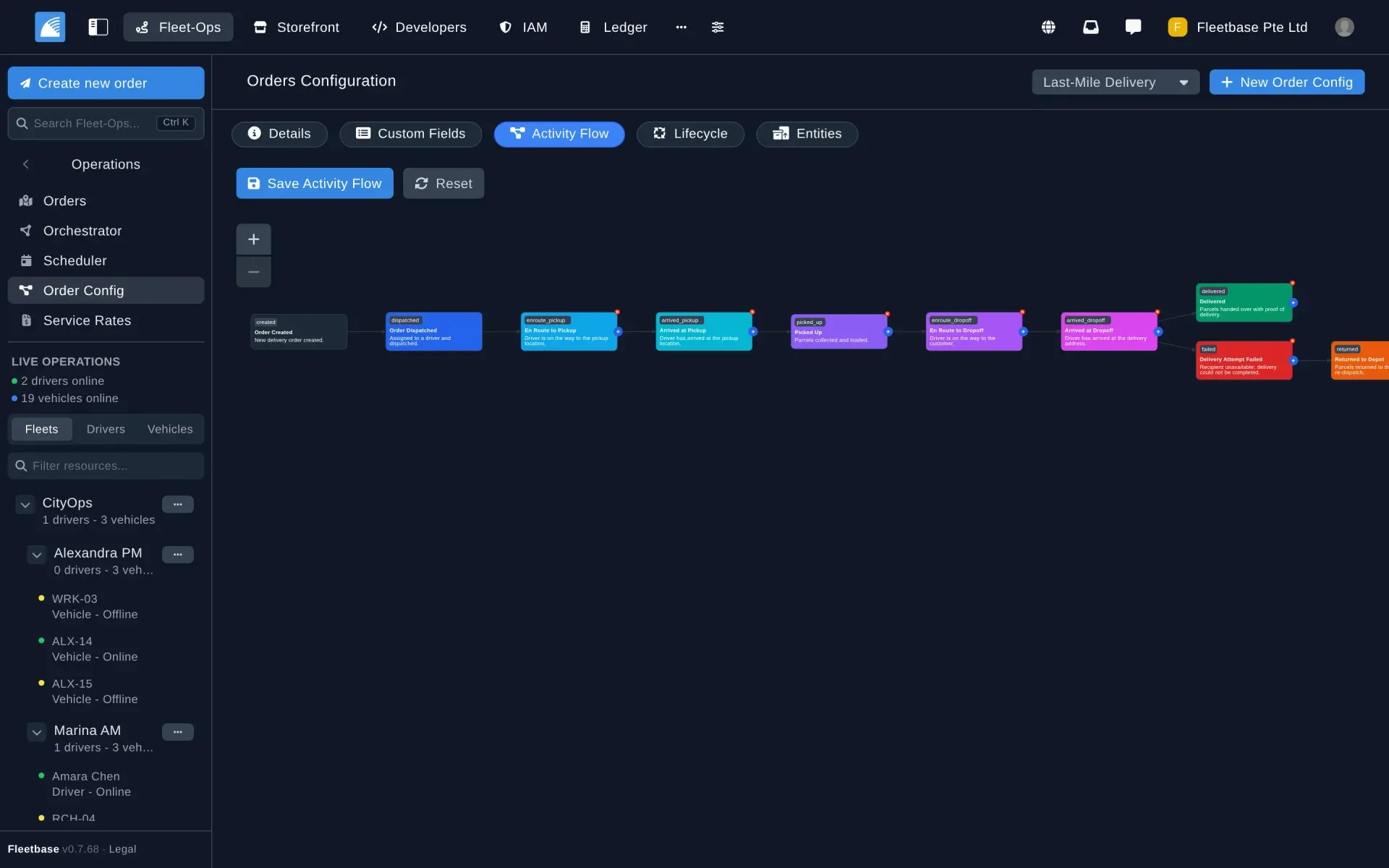
Activity flow editor for an order configuration, with tabs for details, custom fields, lifecycle and entities.
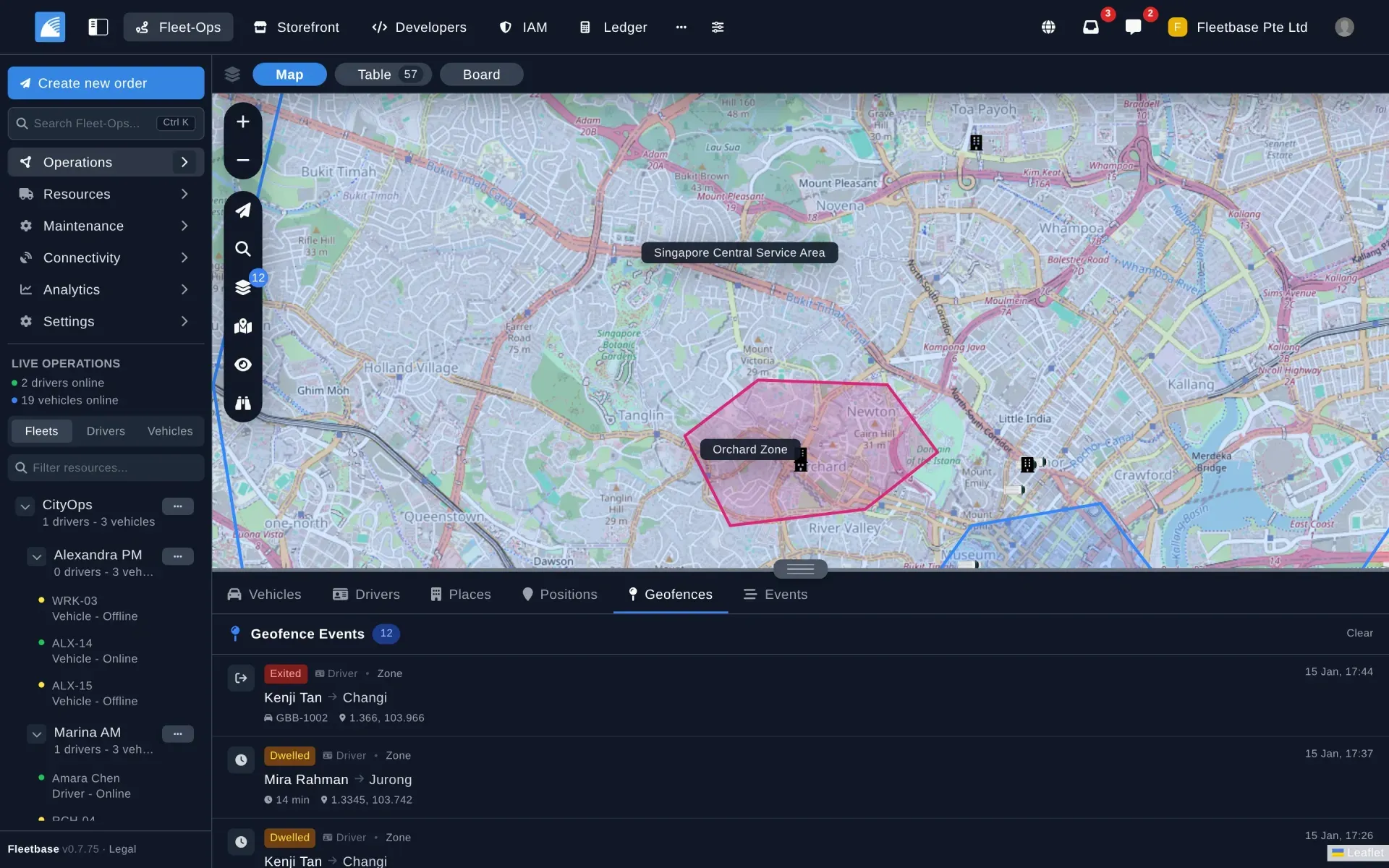
Service areas and zones on the live map, with geofence events showing which driver exited or dwelled in a zone and for how long.
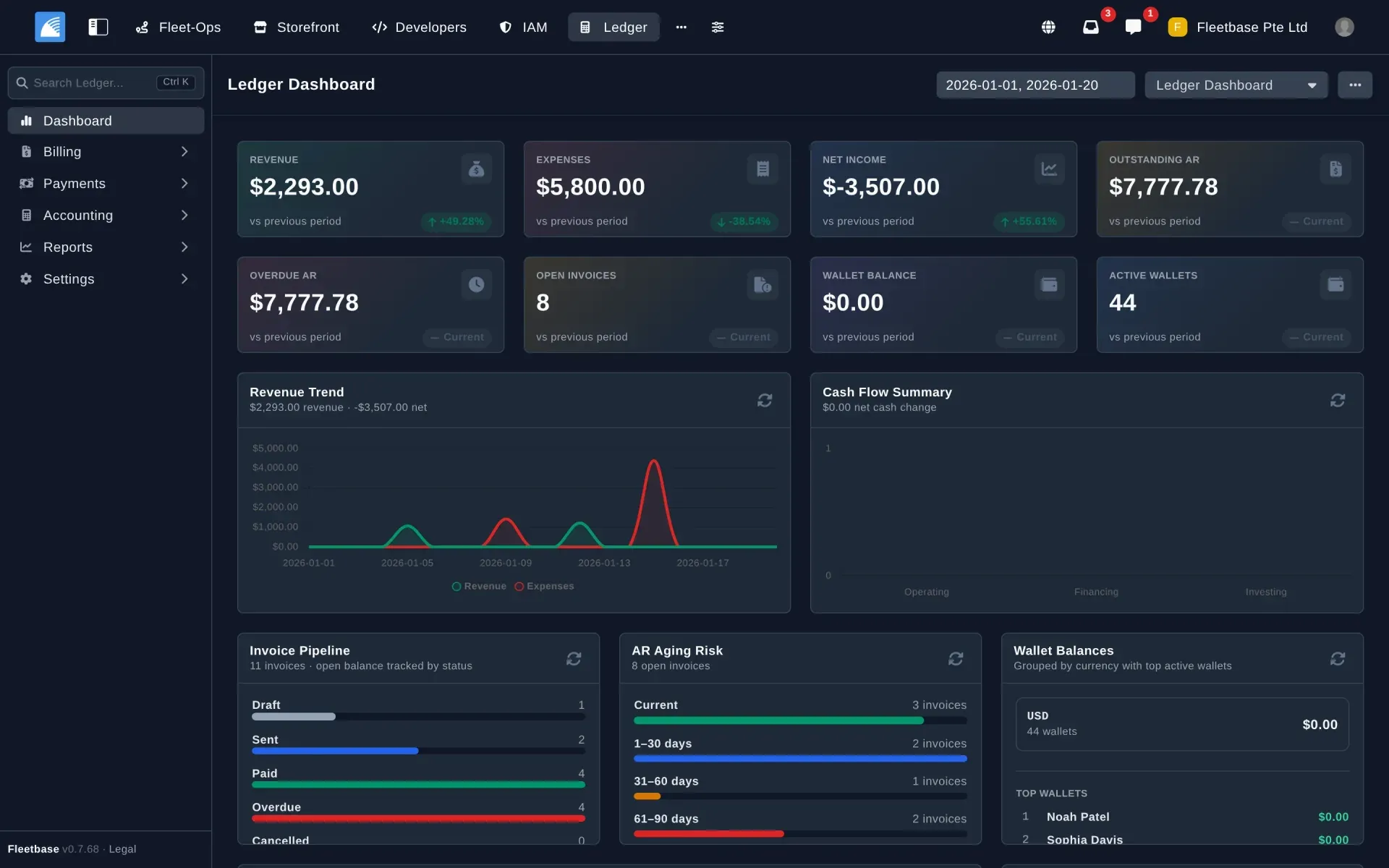
The Ledger dashboard for a date range: revenue and expense trend, open and overdue receivables, invoice status pipeline and wallet balances.
Source: official Fleetbase project page.
Key capabilities
- Self-hosting with Docker Compose The running locally guide requires Docker 20.10 or newer with Compose v2, Git, at least 4 GB of RAM allocated to Docker and 10 GB of free disk; Node.js 18 and npm are only needed for the CLI installer. The stack runs the API, console, SocketCluster, MySQL, Redis, a reverse proxy, a scheduler and a queue worker. The console listens on port 4200, the API on 8000 and the socket server on 38000. After every upgrade,
./deploy.shruns migrations and clears caches. - Fleetbase Cloud The managed service has one Platform plan with every module at $29 per month, plus $5 per month for each driver, each vehicle and each storefront beyond the first. Orders, users, webhook endpoints and API credentials are unlimited, with no per-delivery fee. API calls and webhook sends are metered at $0.25 per 100,000 after the first 100,000 each period, and gateway-paid invoices cost $0.10 each. A 7-day trial includes the full platform, according to the pricing page.
- Standalone API binaries Every release attaches
fleetbase-linux-x86_64andfleetbase-darwin-arm64, static FrankenPHP builds that bundle the API, PHP, required extensions including GEOS, and the web server. They remove the need for PHP or Composer on the host, but MySQL and Redis are still required and the console is served separately. The project recommends Docker for production. - Orders and dispatch in Fleet-Ops Orders appear on a live map, in a table and on a Kanban board grouped by status. An order can carry several waypoints, a tracking number with QR code, an assigned driver and vehicle, a customer and a facilitator. Proof of delivery can be a photo, a signature or a scan, set per order type. Service rates and service quotes price deliveries.
- Order configurations and activity flows Each order type is a template with its own activity flow, custom fields, lifecycle, required entities and proof-of-delivery method. The visual editor chains statuses such as dispatched, en route, arrived, picked up, delivered, failed and returned to depot. Branches let a failed attempt follow a different path from a successful delivery.
- Orchestrator and scheduler The Orchestrator Workbench is a multi-phase planner that runs vehicle allocation, driver allocation and route optimization in sequence. Dispatchers filter orders by schedule, urgency or import status, select vehicles and drivers, preview the plan and only then commit assignments. A separate scheduler handles orders planned for later dates. Route optimization uses the bundled VROOM component.
- Routing engines and Hosted Routing Since 0.7.74, stored order distance, live ETAs and map routes all come from the organization's routing engine instead of a straight-line estimate at about 50 km/h. Valhalla is the default, OSRM can be set under Admin, Fleet-Ops, Routing, and Google stays off until an administrator enables it. The default Valhalla server is Fleetbase Hosted Routing, offered with a free Community key at onboarding; route coordinates are processed on Fleetbase servers in Singapore and are not logged, per the release notes.
- Live tracking, service areas and geofences Drivers and vehicles stream positions to the console in real time. Service areas and zones are drawn on the map, and geofence events record when a driver enters, exits or dwells in a zone, with coordinates and duration. The map panel also lists vehicles, drivers, places and raw position history.
- Resources and maintenance Fleet-Ops tracks drivers, vehicles, trailers, fleets, vendors, contacts, places, issues and fuel reports. The maintenance area covers inspections, schedules, work orders, equipment and parts. Trailers are separate assets with effective-dated connections to vehicles. Fleets can contain sub-fleets, as the demo data in the official screenshots shows.
- Telematics and connected devices The Connectivity section manages telematics providers, devices, sensors and their events, so GPS units and sensors can feed live data into Fleet-Ops. Which hardware works depends on the provider integration in use. Evaluate with the specific device model before planning a rollout.
- Navigator driver app The open-source Navigator app for iOS and Android receives dispatched orders, steps the driver through the activity flow, navigates to each stop and captures proof of delivery. Drivers can report issues, log fuel and chat with dispatch. Operators rebrand and publish it to the App Store and Google Play under their own name. Version 3, in development, adds a Today view, route manifest, DVIR inspections and an offline queue.
- Storefront commerce and customer app Storefront is headless commerce for on-demand businesses: a single store, a multi-vendor marketplace or a food-truck network, with delivery handled natively by Fleet-Ops. The React Native Storefront app runs on iOS, Android and the web with the payment gateway you configure. AppHelm, a Fleetbase service, can publish a store as a branded web and mobile app without code.
- Ledger billing and Customer Portal Ledger handles invoicing, payments, wallets and accounting reports for logistics operators. Its dashboard shows revenue, expenses, outstanding and overdue receivables, an invoice pipeline, AR aging and wallet balances by currency. The Customer Portal lets shippers place and track orders, request quotes, pay, view invoices, manage documents and open support tickets.
- REST API, webhooks and developer console The API reference documents Bearer authentication with secret keys prefixed
flb_test_orflb_live_, plus restricted keys with granular permissions. Resources include orders, drivers, vehicles, contacts, zones, work orders and Storefront carts and checkout. The cloud base URL ishttps://api.fleetbase.io/v1; breaking changes ship as a new version. The Developers console manages keys, webhooks, socket events and request logs. - Identity, access and Sign in with Fleetbase IAM provides organizations, users, groups, roles, policies and two-factor authentication. Since 0.7.74 Fleetbase is also an OAuth 2.0 and OpenID Connect provider: administrators register OAuth apps, rotate secrets and disable apps, and users review and remove connected apps. Socket authentication can be switched between off, log and enforce from the console since 0.7.70.
- Extensions and the Fleetbase CLI An extension is a Composer package with a Laravel service provider plus an npm package that ships an Ember Engine, lazy-loaded in the console. Extensions are installed with
flb installor from the console marketplace, which lists free and paid extensions. Developers can publish their own; Registry v2, in development, adds npm and Composer delivery, licensing and publisher accounts. - AI module The AI module adds natural-language order creation, operational queries and order insights, using OpenAI or Claude as the model provider. Requests go to the provider you configure, so data handling follows that provider's terms. It is an optional module, not required for dispatch.
- Release artifacts for operators Each release includes component versions, upgrade steps, a k6 throughput and rate-limit isolation report compared with the previous release, and a regenerated entity relationship diagram of the full database. The benchmark runs on a GitHub-hosted runner, so it compares releases rather than predicting production throughput.
Where Fleetbase fits
Replacing a legacy TMS for a regional carrier
Model the fleet first: drivers, vehicles, trailers, fleets and places. Create an order configuration for each service type with the statuses, custom fields and proof-of-delivery method your contracts require, then import a week of real orders and plan them in the Orchestrator. Compare the routed distance and ETAs from Valhalla or OSRM with known trip times before trusting the plan. Check that maintenance schedules and inspections cover the records your regulator asks for.
Running last-mile delivery with a branded driver app
Build the Navigator app from its repository with your own name, icons and connection to your instance, then publish it through your Apple and Google developer accounts. Test a full shift: dispatch, navigation, photo or signature proof of delivery, a failed attempt and a return to depot. Configure FCM and APNs for push notifications and confirm that location streaming survives poor coverage. The Fleet-Ops documentation covers app setup, theming and build steps.
Launching an on-demand store or marketplace with delivery
Set up Storefront with products, catalogs and a payment gateway, then connect the Storefront app or a custom frontend through the Storefront API. Orders flow into Fleet-Ops for dispatch, and customers follow delivery live. For app store submission, prepare the reviewer access feature added in 0.7.74 so Apple and Google reviewers can sign in without receiving an SMS code. Verify phone sign-up on the current release, since 0.7.72 and 0.7.73 fixed phone registration bugs.
Billing shippers and tracking receivables
Use Ledger to issue invoices from completed orders, accept payments through a gateway or mark them paid manually, and manage customer wallets. The dashboard shows overdue receivables and aging buckets. Give business customers the Customer Portal so they can book, track, pay and download invoices themselves. On Fleetbase Cloud, remember that gateway-paid invoices carry a $0.10 fee each; reconcile Ledger totals with your main accounting system.
Integrating with ERP, e-commerce or WMS systems
Create a restricted API key in test mode, push orders through the REST API and subscribe to webhooks for status changes. Map your external identifiers to Fleetbase internal IDs and tracking numbers, and handle unknown response fields, since non-breaking additions ship to v1 continuously. Switch to a live key only after replaying a full order lifecycle. The API keys guide explains key types and permissions.
Self-hosting for data sovereignty
Install with the CLI or Docker Compose, point the API at managed MySQL 8.0, Redis and S3-compatible storage, and configure mail, SMS and maps. Decide whether to keep Fleetbase Hosted Routing or run your own Valhalla or OSRM server so route coordinates never leave your infrastructure. Pin image versions, read each release's upgrade steps, run ./deploy.sh after pulling, and restart the API, queue, scheduler and events containers.
Install
npm install -g @fleetbase/cli && flb install-fleetbaseReviews of Fleetbase
Be the first to share your experience with Fleetbase.
Write a review
Loading review form…
Alternatives to Fleetbase
 OdooOdoo is a web-based suite of business apps from Odoo S.A. The LGPLv3 Community edition covers CRM, sales, invoicing, inventory, manufacturing, POS and website modules on PostgreSQL; Enterprise apps, Studio and hosting are sold per user.
 ERPNextERPNext is an open-source ERP from Frappe Technologies covering accounting, stock, manufacturing, procurement, sales, projects and POS. It is GPL-3.0, self-hosted with Docker or bench, or run on Frappe Cloud.
 MedusaMedusa is an open-source commerce backend for Node.js with products, carts, orders, payments and inventory as modules, a React admin and Store and Admin APIs. Self-host it with PostgreSQL and Redis or run it on Medusa Cloud.