

What is OpnForm?
OpnForm is an open-source form builder for creating web forms, collecting submissions and sending them to other tools. It is developed by the OpnForm team in the OpnForm/OpnForm repository on GitHub (the repository was created in September 2022 under its original owner account, JhumanJ) and is offered in two ways: as the managed OpnForm Cloud service at opnform.com and as a self-hosted application that runs from the same code base. The README describes the core feature set as a no-code builder with unlimited forms and submissions, many input types, embedding, email notifications, integrations with Slack, Discord and webhooks, form logic, captcha protection and form analytics.
Self-hosting is documented in the Docker deployment guide. A setup script, scripts/docker-setup.sh, creates the environment files, sets the public URL, pulls the images and starts the stack. The stack consists of an Nginx ingress, a Nuxt server-rendered frontend, a Laravel API, a queue worker, a scheduler, PostgreSQL and Redis. Prebuilt images are published on Docker Hub as jhumanj/opnform-api and jhumanj/opnform-client for linux/amd64 and linux/arm64. The README states that the API resolves dependencies for PHP 8.3 and that the client requires Node 22.22.3 or 24.15.0 and later; the tech stack page lists MySQL/MariaDB and PostgreSQL as supported SQL databases, Redis for cache and queues and S3 or compatible storage for files.
Licensing is split. The README states that core OpnForm is licensed under the GNU Affero General Public License version 3 or any later version, while code under api/app/Enterprise/ is covered by a separate proprietary Enterprise license that only allows production use with a valid OpnForm Enterprise subscription. The self-hosted license page says the Community edition can be used for personal and commercial purposes, but is limited to 2 users across the whole instance; OIDC single sign-on works within that limit. A self-hosted Enterprise license, listed at $1,999 per year per instance on the pricing page, adds more users, SAML and LDAP SSO, multiple workspaces, white labeling, per-workspace SMTP, audit logs, external storage controls and custom code. License validation contacts api.opnform.com.
The latest release is v2.8.4, published on November 5, 2026. It fixes a crash on public forms when mentions reference an unanswered or invalid date range, preserves custom email notification bodies that contain large base64 images and updates six Symfony components to 7.4.23. It also adds the configured hostname to the telemetry of self-hosted instances; the existing OPNFORM_ANONYMOUS_TELEMETRY_DISABLED=true opt-out is unchanged. Version 2.8.0 (October 28, 2026) reduced the JavaScript loaded by public pages and made custom SEO, link previews and favicons available on Pro plans, and 2.7.0 (October 27, 2026) added a self-hosted welcome page, PDF template duplication, retries for failed integration events and versioned MCP draft previews, together with four database migrations and several security changes.
OpnForm also ships a remote Model Context Protocol server. On OpnForm Cloud it lets AI assistants such as ChatGPT, Cursor, Claude Code or Codex create a private form draft without an account, and after OAuth it can manage forms and run read-only submission searches, statistics and exports; on self-hosted instances MCP is disabled by default and always requires an account. End-user guides live in the help center. Similar form builders listed on iThub include HeyForm, Formbricks and Typebot.
OpnForm screenshots
Explore the interface. Open a screenshot to view it at full size.
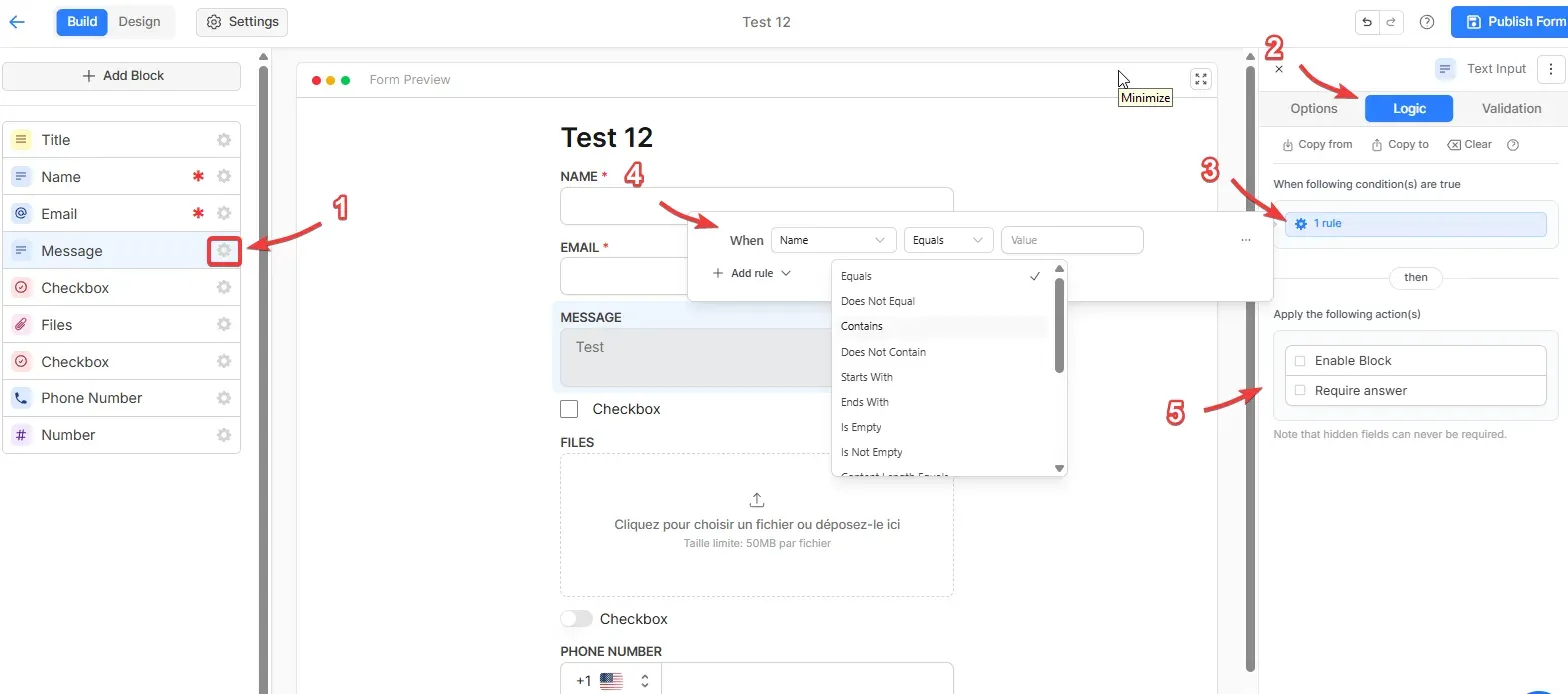
Help center screenshot of the form editor: a logic rule on a text block with condition operators and actions to enable or require the block. Numbered red arrows are part of the original guide; the form is a test form.
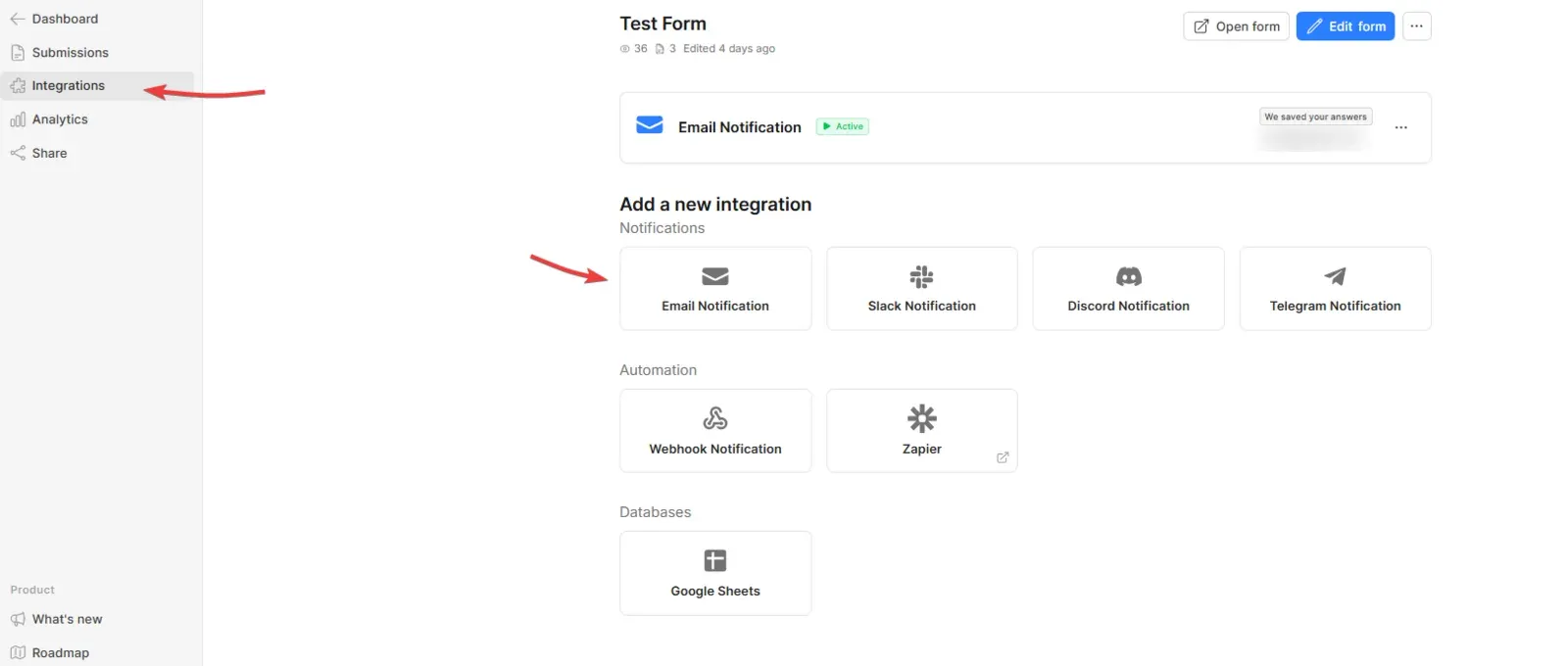
Help center screenshot of a form's Integrations tab with an active email notification and the available notification, automation and database integrations. iThub blurred a recipient address.
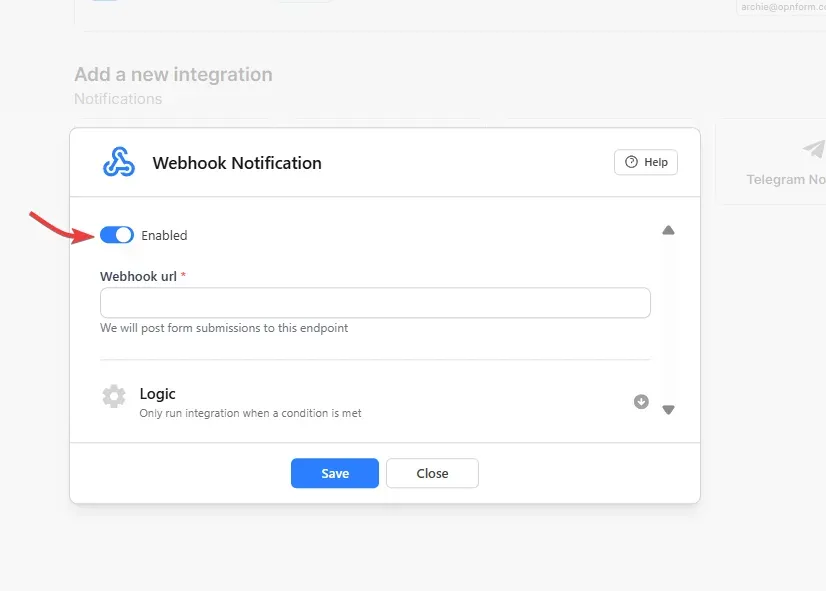
Help center screenshot of the webhook integration dialog, which posts form submissions to the configured endpoint.
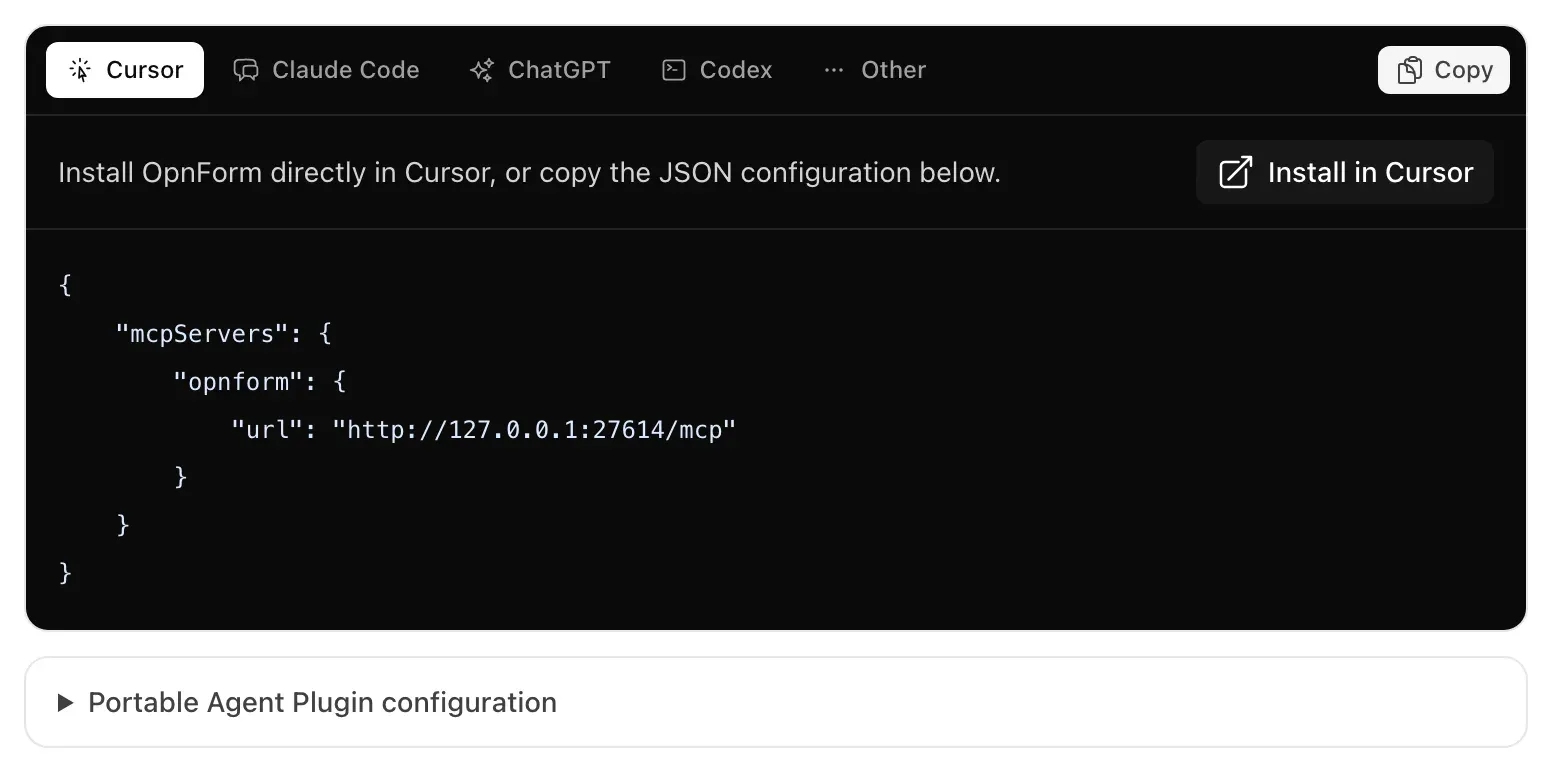
Documentation screenshot of the MCP client configuration panel with an Install in Cursor button and the server URL in JSON.
Source: official OpnForm project page.
Key capabilities
- No-code form builder Forms are assembled from blocks in a Build and Design editor with a live preview. The pricing page lists unlimited forms and submissions on every plan, including Free. Since v2.7.0 existing forms show a Save Changes button and a saved or unsaved status, and the editor keeps undo history.
- Input types The documentation lists text, date, URL, phone, email, checkboxes, select, multi-select, number, star ratings and file uploads, among other blocks. Stripe is listed in the integration directory, and release 2.6.0 refers to a payment editor for payment amounts. File upload limits depend on the plan: 10 MB on Free, 50 MB on Pro and 1 GB, configurable, on Business and Enterprise according to the pricing table.
- Conditional logic and validation Each block has Logic and Validation tabs where rules such as Equals, Contains, Is Empty or Starts With can show, hide or require fields. The README documents date comparisons against a fixed date, another date field or a computed variable, both in conditional logic and in custom validation.
- Computed variables The computed variables feature defines calculated values with Excel-like formulas that reference fields with
{field_id}. Variables are evaluated live while the form is filled and again on the server at submission, so they can be used in mentions, notifications and integrations. - Pre-fills and hidden fields Forms can be pre-filled through URL parameters, and hidden fields can carry values that respondents do not see. Pre-fills and URL parameters are listed as Free plan features on the pricing page.
- Embedding and JavaScript SDK Forms can be shared by link or embedded with an iframe. The JavaScript SDK resizes the iframe automatically, emits events such as
ready,submitStartandsubmit, can set field values and captures UTM and click ID parameters from the parent page. Since v2.7.0 answers are no longer sent to the embedding page unless the owner enables that option for a trusted host. - Notifications and integrations The integrations tab offers email, Slack, Discord and Telegram notifications, webhooks, Zapier and Google Sheets. The public integration directory also lists Make, n8n, Activepieces, Pabbly, Albato and Stripe. On Cloud, Slack, Discord and Telegram notifications start at Pro, and HubSpot, Salesforce and Airtable are listed as advanced integrations on Business and above.
- Webhooks and event retries A webhook integration posts each submission to a URL, and integrations can carry their own logic so they only run when a condition is met. The API reference documents webhook security and signature validation. Since v2.7.0 failed events can be retried from Integrations, Past Events, using the latest saved submission.
- REST API The REST API manages workspaces, workspace users, forms, submissions and webhook integrations. Requests use personal access tokens with abilities such as
forms-readorforms-write, and each IP address is limited to 100 requests per minute. The pricing page lists API access on the Free plan. - MCP server for AI assistants The remote MCP server at
api.opnform.com/mcplets an assistant draft a form, return a private preview and open it in the visual editor. OAuth with PKCE is used for saving forms and for read-only submission search, statistics and exports. Self-hosted instances expose MCP only after an administrator configures OAuth and enables it. - AI form generation The AI form builder page describes generating a working form from a short text description. The Cloud pricing page lists AI form generation as a Pro plan feature.
- Submissions, exports and PDFs Submissions can be browsed in the dashboard and exported to CSV or spreadsheets, which keep numeric zeros, leading zeros and Unicode. PDF templates place fields, computed variables, text and images on uploaded or blank pages to generate documents from submissions, and respondents can download their PDF from the completion screen.
- Analytics Each form records views and submissions, with a traffic breakdown by source, device, browser, operating system and country. Release 2.6.0 changed cleanup so these breakdowns are archived instead of discarded. The full analytics dashboard is listed on Pro and above.
- Security and access controls Forms can be protected with a password, closed after an expiration date, limited by IP rules and guarded with a captcha. Editable submissions and unique submission IDs are listed on Pro, and partial submissions with draft saving on Business.
- Branding, domains and SEO Pro removes the Made with OpnForm footer and adds custom domains, custom SMTP and, since v2.8.0, a custom page title, description, link preview image and favicon. Custom CSS and fonts are Business features, and new workspace domains need a TXT record proof in addition to the CNAME.
- Workspaces and roles Free accounts get one workspace; Pro adds multiple workspaces and team invitations, and Business adds multiple users with roles and permissions. Self-hosted Community instances are limited to 2 users in total across the instance.
- Self-hosting with Docker The Docker setup script configures
APP_URL,FRONT_URLand the Nuxt API base from a single--public-urlvalue, and the first visit opens a page that creates the admin account. Public registration is then disabled, and further users are invited by the admin. A comparison page lists what Cloud manages that self-hosted operators handle themselves, such as backups, upgrades and SSL. - Self-hosted Enterprise license The Enterprise license is activated with a key in user settings and validated against the OpnForm license API, with a short grace period if that API is unreachable. It enables SAML and LDAP SSO, more than 2 users, multiple workspaces, white labeling, workspace SMTP, audit logs, external storage and custom code.
Where OpnForm fits
Contact, lead and registration forms on a website
A form built in the editor is published at its own URL or embedded with an iframe and the JavaScript SDK, which resizes the frame and reports submit events to the host page. Email notifications go to the owner and, optionally, a confirmation goes to the respondent with mentions of submitted values. Captcha, password protection and form expiration limit unwanted submissions, and campaign parameters from the parent page are stored with each submission under meta.attribution.
Sending submissions to other systems
Each form has an integrations tab with email, Slack, Discord and Telegram notifications, webhooks, Zapier and Google Sheets. Integrations can have their own conditions, so a webhook can fire only for certain answers. The webhook security page documents how receivers validate signatures, and failed events appear under Past Events where they can be retried.
Quotes, calculators and documents
Computed variables combine numeric and text fields with formulas, for example a price multiplied by a quantity, and the result can be shown in the form, used in conditions or mapped into integrations. PDF templates turn each submission into a document with mapped fields and computed values, which can be attached to emails or downloaded by the respondent.
Building forms through an AI assistant
With the MCP server, an assistant such as ChatGPT, Claude Code, Cursor or Codex describes the form, receives a private preview and opens the draft in the OpnForm editor. On OpnForm Cloud this works without an account until the form is saved; managing saved forms and reading submissions requires OAuth. On a self-hosted instance an administrator enables MCP under Settings, MCP and AI agents.
Running OpnForm on your own server
The Docker guide clones the repository and runs ./scripts/docker-setup.sh --public-url https://forms.example.com, which starts the API, worker, scheduler, client, PostgreSQL, Redis and the Nginx ingress. Updates are done with git pull followed by docker compose pull and docker compose up -d, and release notes state whether a version contains database migrations. Behind another reverse proxy, TRUSTED_PROXIES is set so rate limits see the real client IP.
Automating form management through the API
Personal access tokens created in account settings carry abilities for workspaces, workspace users, forms and submissions. The API reference covers creating and updating forms, listing and exporting submissions, managing workspace members and registering webhook integrations, with a limit of 100 requests per minute per IP address.
Reviews of OpnForm
Be the first to share your experience with OpnForm.
Write a review
Loading review form…
Alternatives to OpnForm
 HeyFormHeyForm is an AGPL-3.0 form builder for conversational forms, surveys and quizzes with conditional logic, themes, file uploads and integrations, available as a Docker self-hosted edition or paid HeyForm Cloud workspaces.
 FormbricksFormbricks is an AGPLv3 survey platform for link, website, in-app and email surveys, with SDKs, REST APIs, an MCP server and self-hosting via Docker or Helm. SSO, workflows, dashboards and AI analysis require a paid Enterprise license.
 TypebotTypebot is a fair source chatbot builder: design flows from bubbles, inputs, logic and integration blocks, embed them on a site or WhatsApp number, run them over HTTP and collect answers as results. Cloud plans or self-hosting with Docker.