

What is HeyForm?
HeyForm is an open-source form builder for conversational forms, surveys, quizzes and polls. It presents one question at a time, supports conditional logic, and sends responses to spreadsheets, CRMs, chat tools and webhooks. The project describes itself as an open-source alternative to Typeform and as an improved experience over Google Forms, and it is developed in the open at the heyform/heyform repository with its own site at heyform.net. The site says it is bootstrapped, without outside investors.
There are two ways to run it. HeyForm Cloud is the hosted service at my.heyform.net with paid plans, and the Community Edition can be self-hosted for free from the heyform/community-edition Docker image. The self-hosting guide uses Docker Compose with MongoDB and a KeyDB (Redis-compatible) service, listens on port 9157 and needs an APP_HOMEPAGE_URL that matches the public address. A separate OpenID Connect guide covers single sign-on for self-hosted instances with providers such as Authelia, Authentik or Keycloak.
The repository is a TypeScript monorepo with a Node server, a React web app, a form renderer, an embed library and shared answer and type packages. The latest GitHub release is v3.0.6, published on November 1, 2026. It changed reply-to and respondent subject options for notification emails, added a page-app mechanism for integrations starting with Privatus Analytics, fixed form submissions with attached files, made progress reflect a respondent's route through logic, and moved the server build to SWC. Version 3.0.0 in August 2026 added Italian and Brazilian Portuguese interfaces and hardened the outbound request guard against alternate IPv6 encodings.
HeyForm is released under the AGPL-3.0 license. The license page separates three cases: self-hosting unmodified for your own use, forking for your own use, and commercializing a modified version. The last two require publishing the modifications, and a commercial fork must credit and link the original project. This profile reflects the project's own documentation and release notes.
HeyForm screenshots
Explore the interface. Open a screenshot to view it at full size.
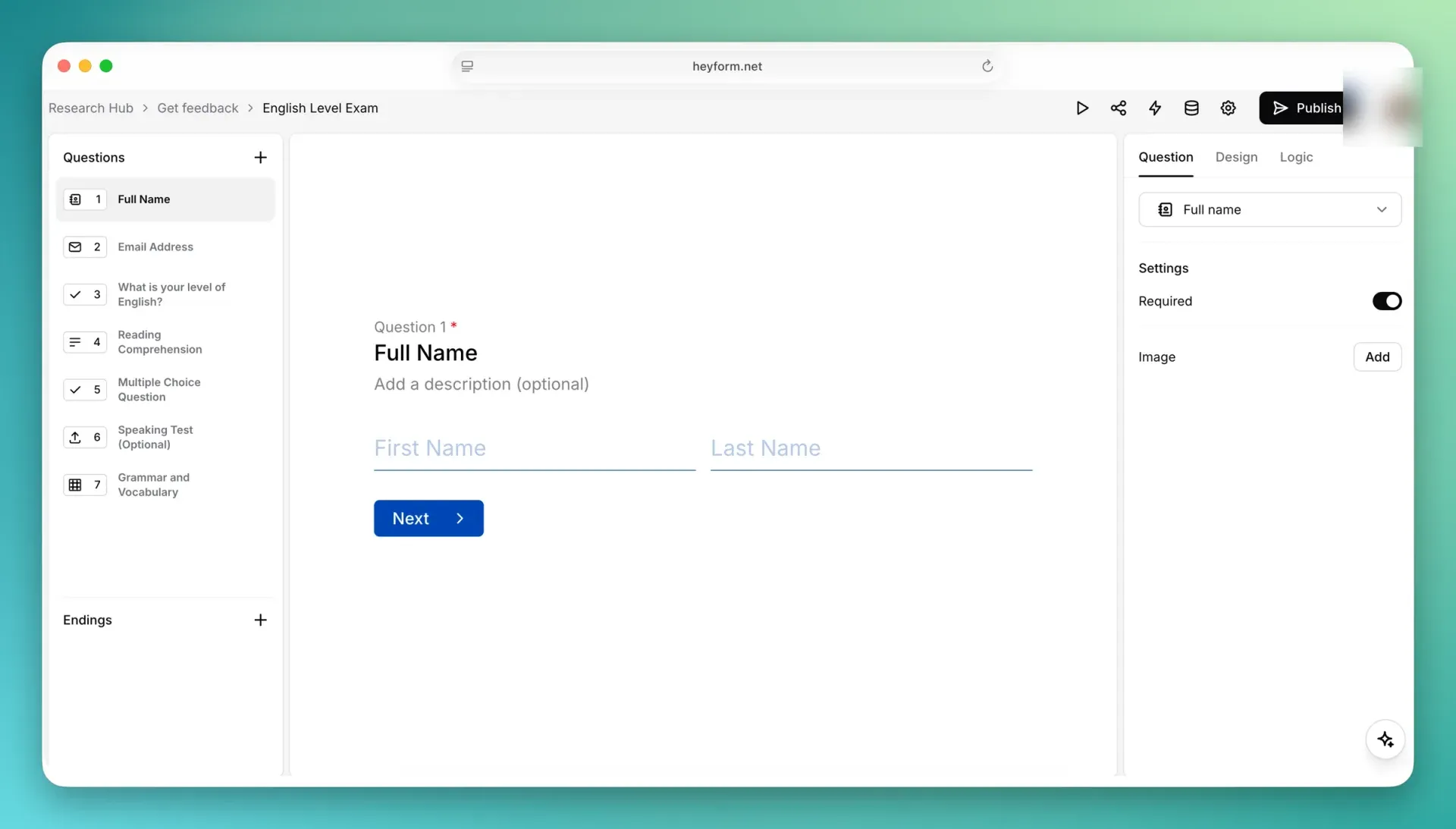
Official README screenshot of the builder; a profile avatar was blurred by iThub.
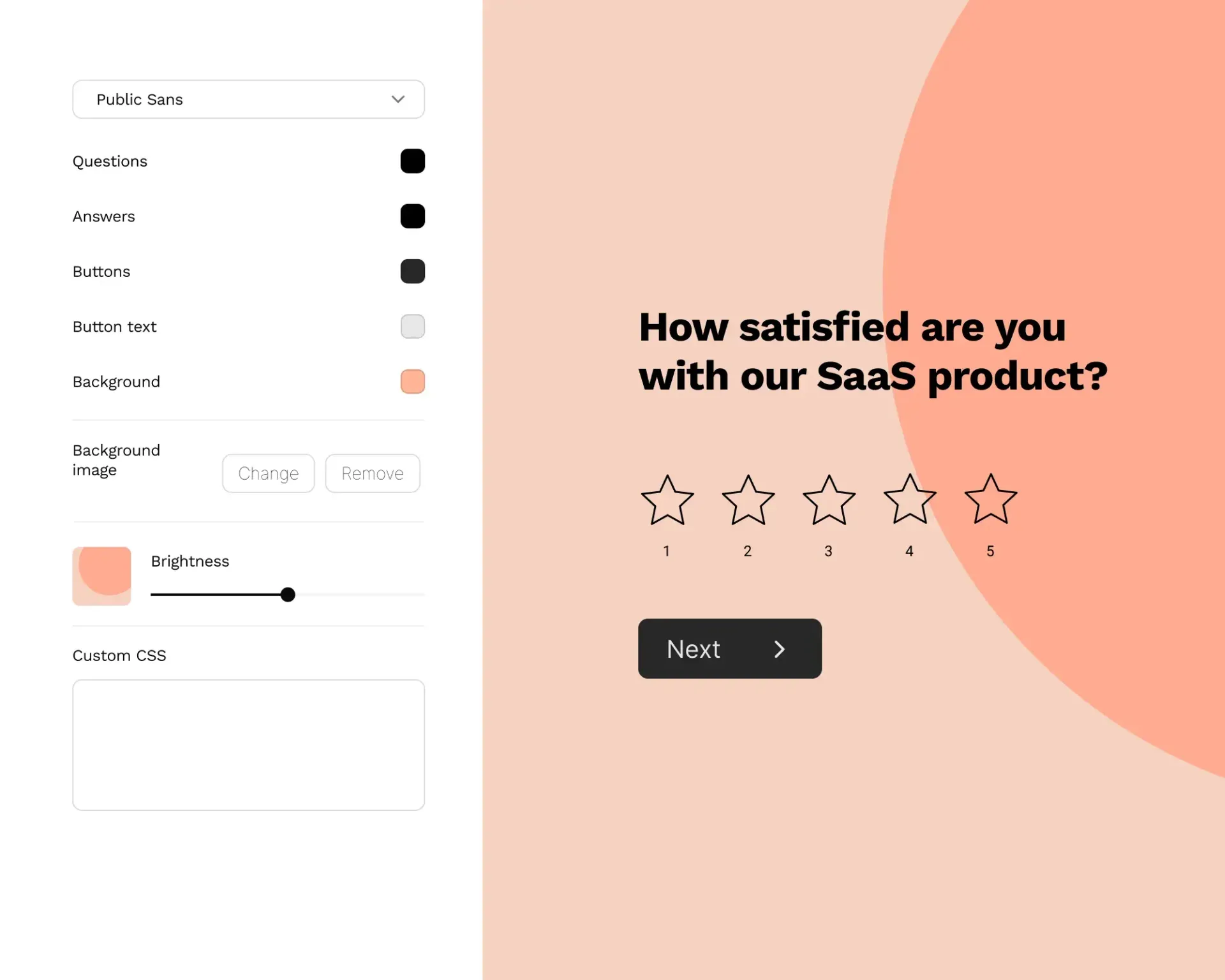
Official site image of the design panel with font, color, background and custom CSS controls.
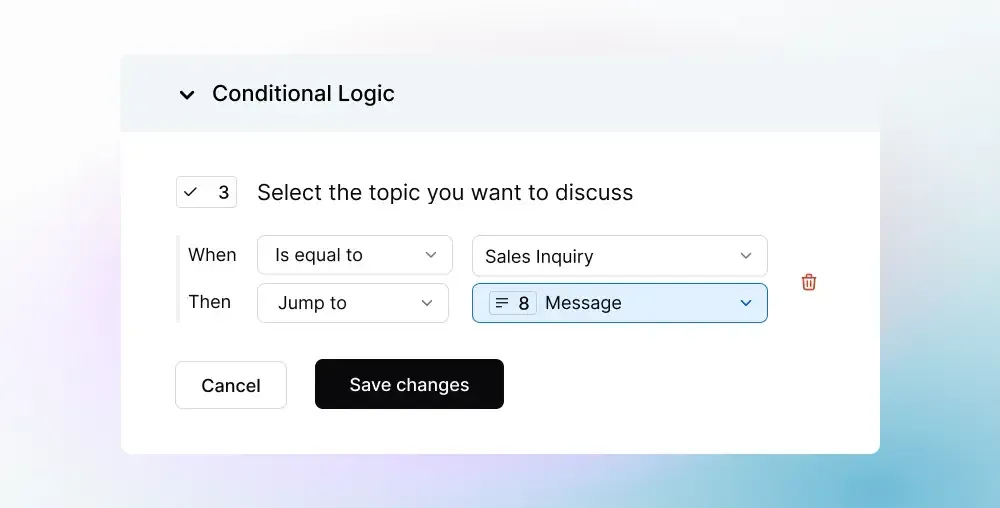
Official site image of a logic rule: when an answer equals Sales Inquiry, jump to a later question.
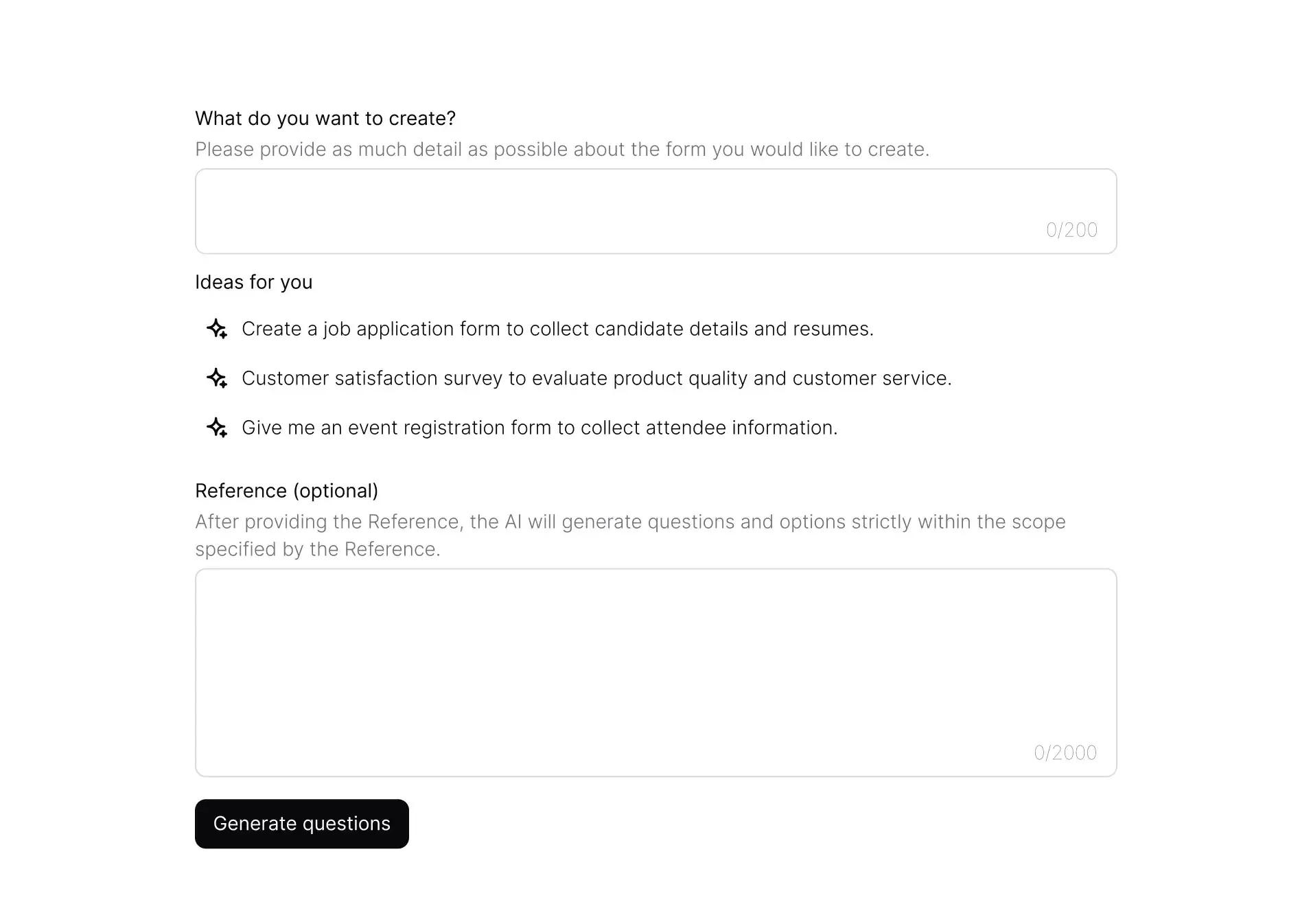
Official site image of the form generator that drafts questions from a description.
Source: official HeyForm project page.
Key capabilities
- Conversational form builder Questions appear one at a time in a builder with a question list on the left, a live preview in the center and Question, Design and Logic tabs on the right. Endings are separate from questions, so one form can finish in several ways.
- Wide set of input types The README lists text, email and phone fields, picture choices, date pickers and file uploads. The product pages add ratings, signatures, payments, hidden fields and a calculator. Check the full list in the editor, because some types depend on the plan or on configuration.
- Conditional logic and answer piping Logic rules read an answer and then jump to another question or ending, as in the official example that sends a Sales Inquiry answer to a message question. Answer piping inserts earlier answers into later questions, and the form renderer tracks progress along the respondent's route.
- Multiple endings and redirects A form can show different completion screens, redirect to a URL after submission, or trigger a follow-up step through an integration. Redirect on completion is listed on every Cloud plan.
- AI form generation The editor can draft questions from a plain description of up to 200 characters plus an optional reference text, with example prompts such as a job application or a customer satisfaction survey. Generated questions are a starting point that you edit. Confirm in a self-hosted install that the feature is available before relying on it.
- Templates A template gallery covers contact forms, feedback surveys, registration forms, lead capture, exit interviews and job applications, grouped by team type. A template is copied into your workspace and edited like any other form.
- Themes, fonts and custom CSS The design panel sets font, question, answer and button colors, background color or image, and brightness. Custom CSS goes further than the panel. On Cloud, custom CSS, a custom domain and removing HeyForm branding start at the Premium plan.
- Custom domain and metadata A workspace can serve forms from a subdomain such as forms.example.com and set its own link metadata. The documentation marks Custom Domain as a Premium plan feature on Cloud. A self-hosted instance uses the address set in APP_HOMEPAGE_URL.
- Embedding Forms can be embedded in a website, and the repository ships a form embed JavaScript library; the pricing table lists advanced embed options on all Cloud plans. Test the embed on a page with your own content security policy before publishing it.
- Analytics and reports The form analytics page shows views, submissions, completion rate and average duration. A report view lists the answers and statistics for each question and is documented as a Basic plan feature on Cloud. Analytics are cached on the server and the cache is cleared on each visit and submission in v3.0.6.
- Submissions inbox and export Submissions open in a detail view, can be selected to move or delete, and spam submissions are collected in a separate Spam list. Results export to CSV for analysis elsewhere.
- Integrations The help center documents Airtable, Email, Facebook Pixel, Google Analytics, Google Drive, Google Sheets, HubSpot, Lark Suite, Mailchimp, Slack, Telegram, Webhook, Zapier and Notion. Stripe is used for payment fields. Use the webhook for anything not listed, and check the response and retry behavior with a test endpoint.
- Team workspaces Members are invited at the workspace level by email, and the owner can remove members or transfer ownership. Removing a member does not delete forms that person created. Collaboration is a paid feature on Cloud, with member limits by plan.
- Notifications and spam controls Email notifications can go to the form owner and to respondents. Version 3.0.6 added reply-to, respondent subject and owner skip options. Spam prevention, a close date and a submission limit are listed as form settings.
- Languages The interface and transactional emails support several languages, and Italian and Brazilian Portuguese arrived in v3.0.0. Forms themselves can be multilingual according to the pricing feature table.
- Self-hosting with Docker Compose Run the community image with MongoDB and KeyDB, persist the upload directory and set the session key, form encryption key, database address and Redis host. Use your own random values for the two keys instead of the sample ones, and keep a backup of the MongoDB volume.
- Cloud plans HeyForm Cloud lists Basic at 15 USD per month, Premium at 24 USD and Business at 40 USD when billed yearly, each with a 7-day trial, plus custom Enterprise pricing. Response limits are 5k, 20k and 150k per month, and forms, questions and views are unlimited.
Where HeyForm fits
Customer feedback and satisfaction surveys
Start from a feedback template, keep the form short and use rating questions with one open follow-up. Send results to a spreadsheet or Slack through an integration and check the completion rate and average duration after a week to see where respondents drop off, then shorten or reorder the questions that lose people.
Lead capture and contact forms
Embed a form on a landing page, add hidden fields for campaign parameters and connect HubSpot, Mailchimp or a webhook. Confirm that notifications reach the right inbox and that spam submissions end up in the Spam list rather than your CRM.
Registrations and applications with file uploads
Use file upload and signature questions for job applications or event sign-ups. Check the file size limit for your plan or instance, decide where uploads are stored, and test the whole path from a phone, including a large file on a slow connection and a file type you did not expect.
Branded forms on your own domain
Use the theme panel and custom CSS to match a brand, then serve the form from a subdomain. Verify the DNS record and certificate, and look at how link previews render when the form is shared in chat.
Quizzes, polls and logic-driven surveys
Build branching paths with conditional logic and multiple endings so each respondent sees only relevant questions. Run the form through every branch before publishing and check that the progress indicator and the results report match. Keep a copy of the logic rules in your documentation, because complex branching is hard to review in the editor later.
Self-hosting forms for data control
Deploy the Docker image behind HTTPS, set a strong session and encryption key and connect an identity provider through OpenID Connect if the team needs single sign-on. Plan MongoDB backups, upgrades and an uploads volume before collecting real responses, and test a restore on a spare host.
Reviews of HeyForm
Be the first to share your experience with HeyForm.
Write a review
Loading review form…
Alternatives to HeyForm
 FormbricksFormbricks is an AGPLv3 survey platform for link, website, in-app and email surveys, with SDKs, REST APIs, an MCP server and self-hosting via Docker or Helm. SSO, workflows, dashboards and AI analysis require a paid Enterprise license.
 TypebotTypebot is a fair source chatbot builder: design flows from bubbles, inputs, logic and integration blocks, embed them on a site or WhatsApp number, run them over HTTP and collect answers as results. Cloud plans or self-hosting with Docker.
 Payload ContactMIT-licensed TypeScript plugin for Payload 3.x that adds a contact form component, a validated submit endpoint with honeypot and per-IP rate limit, a message inbox with statuses, a runtime settings global and optional SMTP notifications.