

What is Frappe CRM?
Frappe CRM is a web-based customer relationship management application for leads, deals, contacts, organizations, tasks, notes, emails and calls. It is built and maintained by Frappe Technologies Pvt. Ltd., the company behind Frappe Framework and ERPNext, and its public repository dates from July 2023. The source is licensed under AGPL-3.0, and the product page stresses two points: unlimited users and no per-user pricing. The same page says more than 1,000 teams use it and that Frappe's own sales team has handled over 300,000 leads and 29,000 deals in it over two years.
Technically it is a Frappe app. The server side is Python on Frappe Framework, so every record type (CRM Lead, CRM Deal, CRM Organization, CRM Task, FCRM Note and so on) is a DocType stored in MariaDB, with Redis for caching and background jobs. The user interface at /crm is a separate single-page application written in Vue 3 with the Frappe UI component library, while administrators can still open the classic Frappe desk for low-level settings. Because it shares the framework with ERPNext, Frappe HR and Helpdesk, it can be installed on the same site as those apps and use the same users and permissions.
There are three ways to run it. Frappe Cloud offers managed sites, with a CRM signup flow and a 14-day trial advertised on the product page. For self-hosting, the installation guide uses Frappe's easy-install.py script with the ghcr.io/frappe/crm container image, which sets up a production stack in about five minutes. Developers can use a Docker Compose file in the repository or a native bench setup. A public demo site is linked from the README.
The latest release when this listing was checked is v16.0.2, published November 5, 2026. On November 4, 2026 the project switched from its v1.x numbering to the framework version scheme: v15.x builds target Frappe v15 and v16.x builds target Frappe v16 (the version-16 branch pins frappe>=16.0.0,<17.0.0 and Python 3.10 or later). The last v1.x releases added scheduled sending for emails (v1.92.0), command palette search across comments, notes and emails (v1.91.0), a guided setup flow, user availability status and a rebuilt data import page (v1.89.0), and website-based data enrichment plus a new notes view (v1.88.0). Releases arrive weekly or faster, so check the release list before upgrading a production site.
Frappe CRM is deliberately narrow. It covers the sales pipeline, communication history and sales automation; invoicing, accounting, stock and quotation documents come from ERPNext through the built-in integration, and WhatsApp messaging needs the separate Frappe WhatsApp app. There is no native iOS or Android app: the mobile option is a Progressive Web App installed from the browser. Marketing automation features such as bulk email campaigns, landing pages or ad attribution are outside its documented scope.
Frappe CRM screenshots
Explore the interface. Open a screenshot to view it at full size.
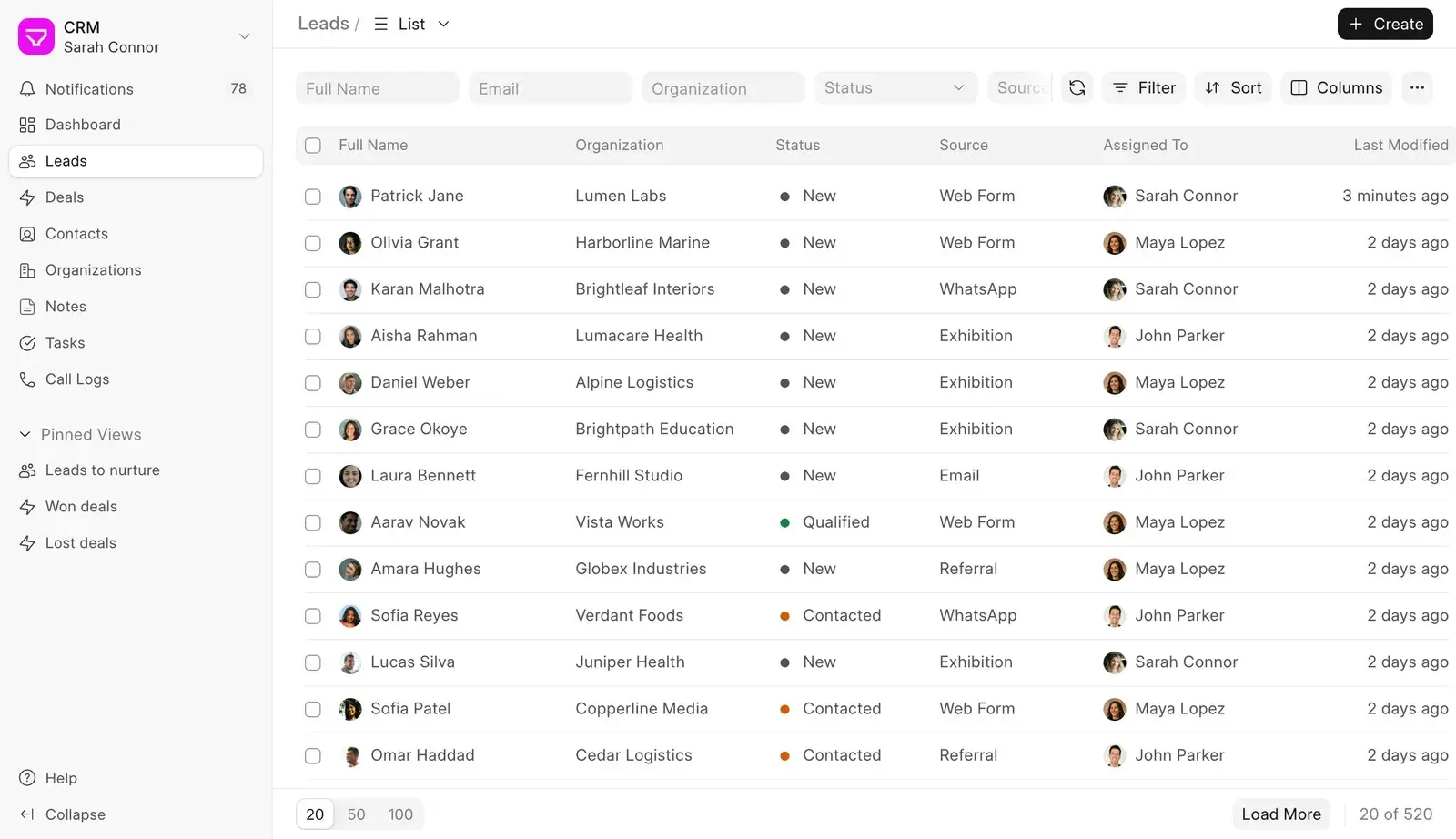
Official product image from frappe.io: the Leads list with quick filters, sort and column controls, pinned views in the sidebar and page sizes of 20, 50 or 100.
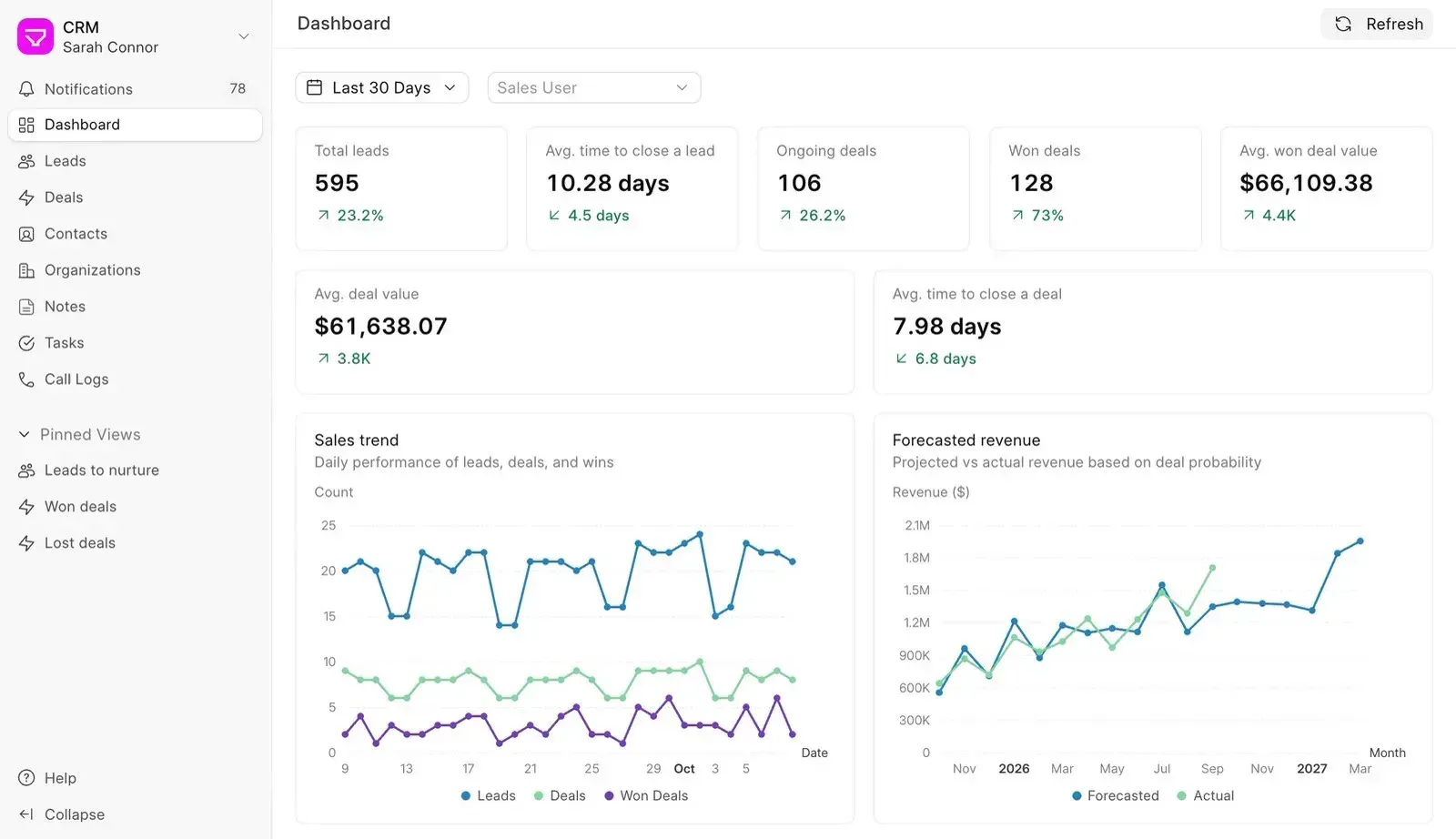
Official product image from frappe.io: the dashboard filtered to the last 30 days, with KPI cards, a daily sales trend and forecasted against actual revenue.
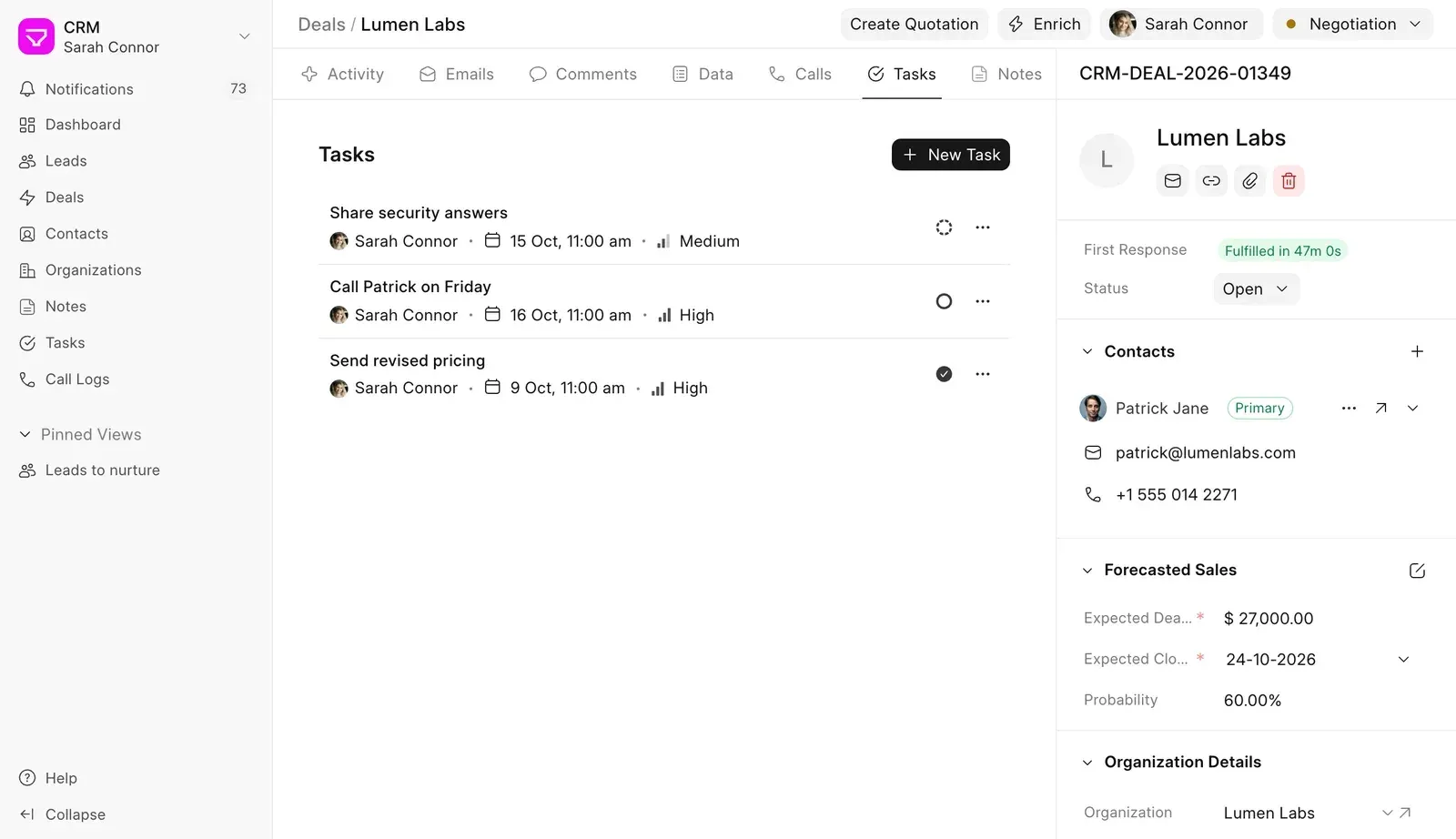
Official product image from frappe.io: a deal in the Negotiation stage with tasks, the fulfilled first response SLA, contacts and expected value, close date and probability.
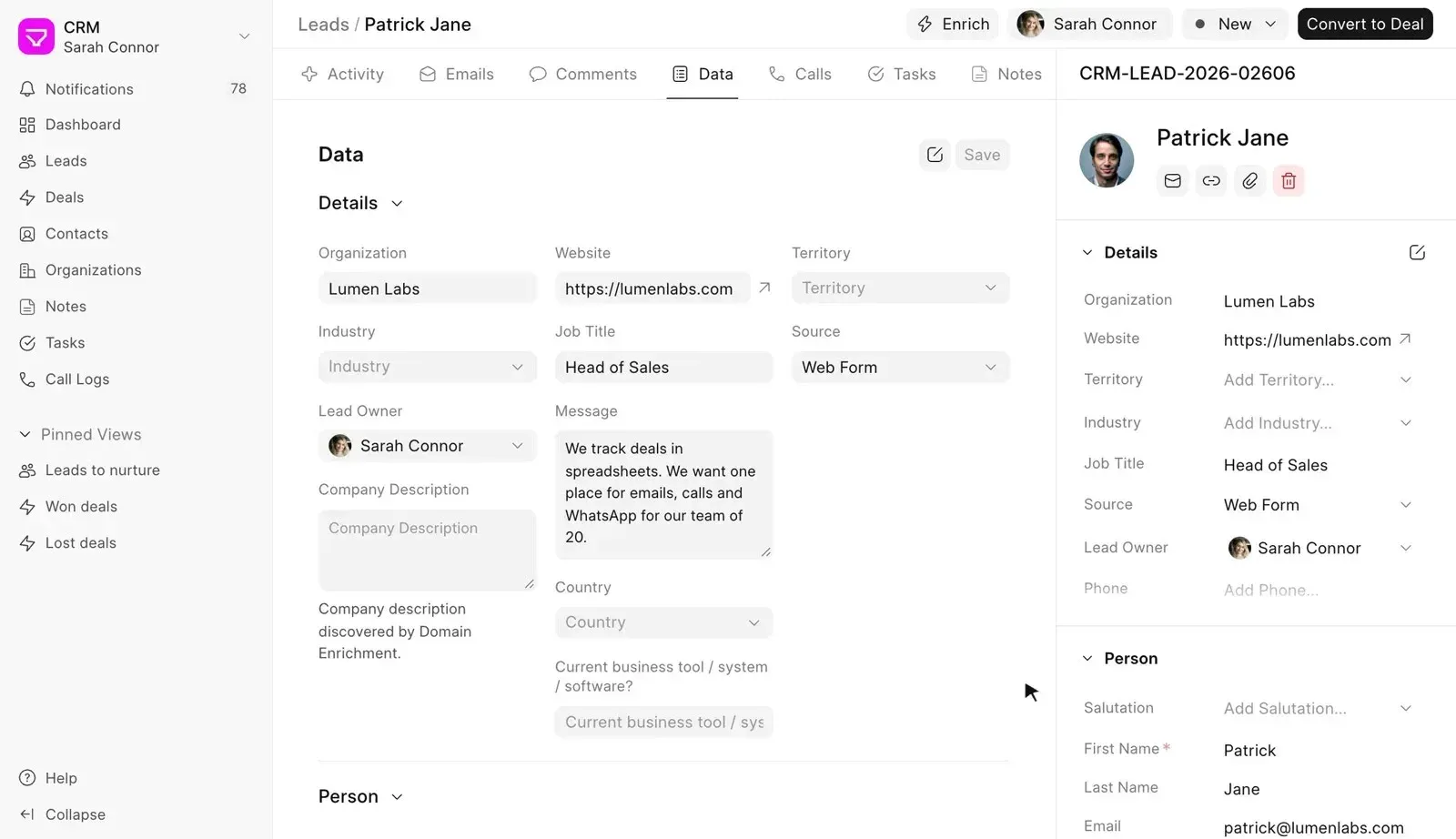
Official product image from frappe.io: the Data tab of a lead, with the Enrich action and a company description field filled by domain enrichment.
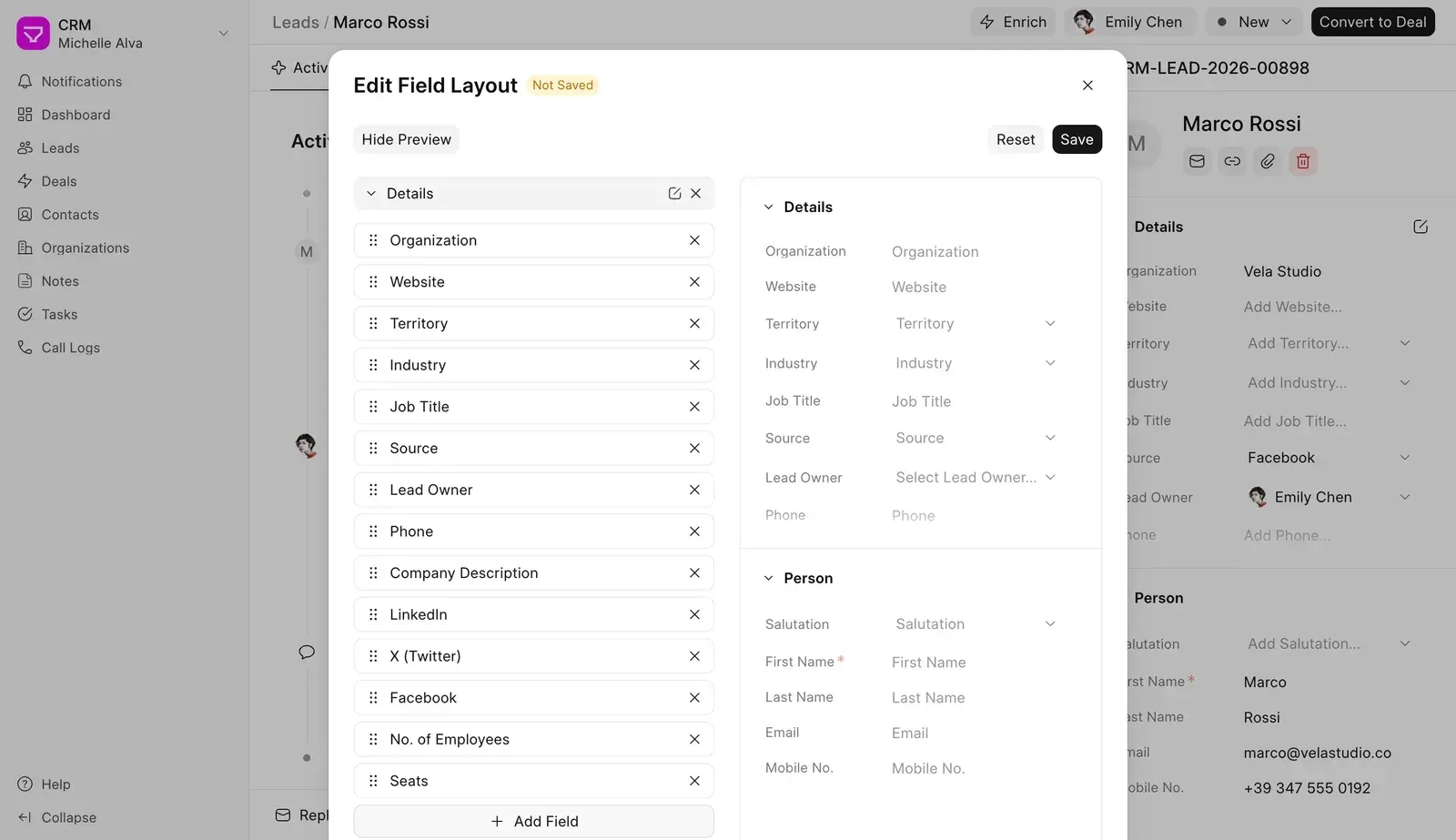
Official product image from frappe.io: the no-code field layout editor for the lead side panel, with drag handles, Add Field and a preview.
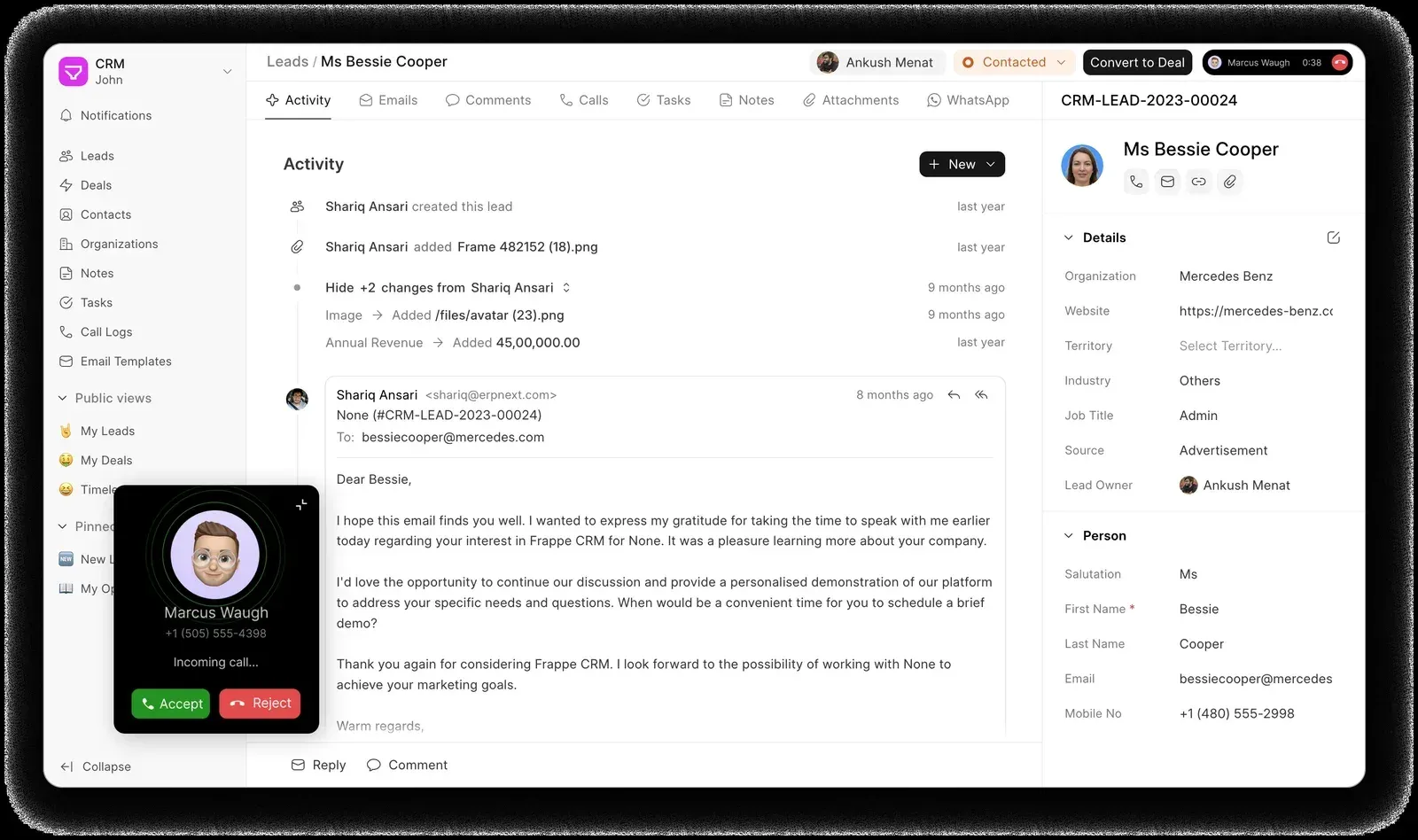
Official README screenshot: an incoming call pop-up from the telephony integration over a lead's activity timeline, with WhatsApp and Attachments tabs.
Source: official Frappe CRM project page.
Key capabilities
- Leads with a single working page Each lead has one page with tabs for Activity, Emails, Comments, Data, Calls, Tasks and Notes, and a side panel with organization, website, territory, industry, source and lead owner. Field changes and attachments appear on the activity timeline. A Convert to Deal action creates a contact and an organization and moves the conversation history to the new deal.
- Deals, products and forecasting A deal can hold several contacts with one marked as primary, a products table, an expected closure date, a probability and an expected deal value. With Auto Update Expected Deal Value enabled the value is calculated from the products table, and multi-currency deals use exchange rates. Marking a deal as lost asks for a lost reason, which feeds the dashboard.
- List, Kanban and grouped views Records open in list views with quick filters, sort, column selection and page sizes of 20, 50 or 100. Leads and deals also have a drag-and-drop Kanban board and a group-by view. Views can be saved, published to the team as public views or pinned to the sidebar, as described in the views documentation.
- Sales dashboard The dashboard shows total leads, ongoing and won deals, average deal value and average time to close, with comparisons to the previous period. Charts cover the daily sales trend, forecasted against actual revenue based on deal probability, lead sources and lost reasons, filtered by date range and by sales user.
- Email inside the record Email accounts are connected under Settings, Email, Accounts; the setup guide notes that Gmail and Outlook need an app password. Mail is sent and received from the lead or deal, email templates fill in record fields, v1.92.0 added scheduled sending, and since v1.89.0 the CRM warns and blocks sending to a recipient who has unsubscribed.
- Web forms for lead capture Settings, Forms builds public forms that create a Lead or a Deal, served at
/crm-form/<route>. The drag-and-drop builder supports sections, required fields, placeholders and help text, and fields the record itself requires move to a hidden required panel instead of being removed. Creating forms needs the Sales Manager or System Manager role. - Facebook and Instagram lead sync A Lead Sync Source pulls leads from Meta lead generation forms using an access token, with a field mapping table from form questions to CRM fields. Scheduled sync can run every 5, 10 or 15 minutes, hourly, daily or monthly, and a Sync Now button triggers it manually. Failed records are listed with a reason, such as a duplicate, and can be retried. The documentation still labels the feature beta.
- Data enrichment from the company website An Enrich button, or optional automatic enrichment on creation, crawls the public website of a lead, deal or organization and fills fields such as company description, industry, logo and social profiles. Extraction is driven by rules and field mappings that admins edit, every value keeps its source page, and crawl depth, page count and download size are capped. No third-party data provider or API key is involved, and a built-in guard refuses private or loopback addresses.
- Twilio and Exotel calling Both telephony integrations are built in. Twilio needs an Account SID, Auth Token and number, and can record calls; Exotel needs an Account SID, subdomain, API key and token, an Exophone and a completed Exotel KYC. Calls start from the lead, deal or contact page, a call window shows status and duration, and notes or tasks taken during the call are saved to the call log.
- WhatsApp conversations A WhatsApp tab on leads and deals sends and receives messages using the lead's mobile number or the deal's primary contact. It depends on the separate Frappe WhatsApp app and a WhatsApp Business account from Meta, plus a webhook pointed at your site, so message costs and policies follow Meta's terms.
- ERPNext integration When ERPNext runs on the same site, enabling the integration and choosing a company is enough; a different site connects with an API key and secret. Won deals can create ERPNext customers, a Create Quotation button pre-fills a quotation from the deal, and ERPNext items sync to CRM products. Product sync and its logs only work when both apps share one site, according to the ERPNext integration guide.
- Workflow automations Automations start from a record event, a prospect reply, a date or a schedule, filter records by conditions, and run steps with waits and if/else branches. Actions include sending email, notifying users, setting fields, changing a deal stage, converting a lead, assigning a rep, lead scoring, calling a webhook or running an API server script. A test run against a real record rolls back its changes, and editing automations requires the System Manager role.
- Assignment rules and sales hierarchy Assignment rules route leads or deals to selected users by round robin or by current workload, with condition builders for assignment and unassignment and a choice of days on which assignment runs. A sales hierarchy setting models reporting lines between users, and the three CRM roles are Sales User for assigned records, Manager for the whole team and Admin for configuration.
- Service level agreements SLA policies set first response and follow-up times for leads or deals, optionally with rolling responses, custom conditions and a validity period. Only communication inside the configured working hours counts, a holiday list excludes public holidays, and the record shows whether the first response was fulfilled and how long it took.
- No-code customization Administrators can add custom fields, rename or add statuses, edit the Data tab and side panel layouts with tabs, sections and columns, define quick entry layouts and add custom actions and list actions. Form scripts in JavaScript run inside the CRM interface, and larger changes belong in a separate Frappe app so upgrades of the CRM stay clean.
- REST API and webhooks Every DocType is reachable through the Frappe REST API at
/api/resource/<DocType>, for exampleCRM LeadorCRM Deal, and whitelisted Python methods are called at/api/method/. Authentication uses a per-user API key and secret, a session cookie or OAuth tokens, and calls inherit the user's roles. - Data import and command palette Leads, deals, contacts and organizations can be imported from CSV or Excel through a data import page rebuilt in v1.89.0. A command palette, which v1.90.0 made available from the sidebar, jumps to records and since v1.91.0 also searches comments, notes and emails.
- Mobile access as a PWA The CRM interface is responsive and can be installed as a Progressive Web App: Chrome on Android offers an install prompt, Safari on iOS uses Add to Home Screen. There is no App Store or Google Play package.
- Frappe Cloud hosting Managed sites start at 5 USD (410 INR) per month on shared servers, with managed upgrades, backups and support for custom apps; dedicated server plans start at 20 USD and 60 USD per month for higher tiers. Billing is per site or server, never per user. Existing Frappe Cloud sites can add the CRM from the Frappe Cloud Marketplace.
- Self-hosted production install Download
easy-install.pyfrom frappe.io and runpython3 ./easy-install.py deploy --project=crm_prod_setup --email=you@example.com --image=ghcr.io/frappe/crm --version=stable --app=crm --sitename crm.example.com. The script deploys the stack as Docker containers; the documented prerequisites arepython3,wgetand a DNS A record pointing the domain at the server, and for a local test host map the name to 127.0.0.1 in/etc/hosts. - Development setup with Docker or bench The repository's
docker/docker-compose.ymlstarts MariaDB 10.8, Redis and thefrappe/benchimage, and serveshttp://crm.localhost:8000/crmwith the default login Administrator and password admin, which must be changed. On a native bench, runbench get-app crmandbench new-site <site> --install-app crm; frontend work usesyarn devon port 8080.
Where Frappe CRM fits
Trying Frappe CRM before committing
Open the public demo linked from the README, or start the Docker Compose development stack locally and log in at crm.localhost:8000/crm. Walk through the guided setup, invite two test users with the Sales User and Manager roles, and create a few leads by hand and through a web form. Check that the default statuses, lead sources and deal stages can be renamed to match your sales process, and that the side panel shows the fields your team actually uses.
Capturing inbound leads from forms and Meta ads
Build a web form under Settings, Forms with a Lead target and embed or share its /crm-form/ URL, then add a Facebook Lead Sync Source with an access token and map the form questions to CRM fields. Pair both with an assignment rule so new leads go to the right rep by round robin or workload. Verify the lead source is set correctly, that duplicates show up in the failure log rather than as new leads, and how long the chosen sync interval leaves a lead waiting.
Running a pipeline with deals, tasks and forecasts
Convert qualified leads to deals, add products and enable forecasting so each deal carries a close date, probability and value. Use the Kanban view to move deals between stages, create tasks with due dates and priorities, and record lost reasons. At the end of the month, compare the dashboard's forecasted against actual revenue and the lost reason chart with what the team reports, and save public views such as Won deals or Leads to nurture for managers.
Keeping every customer conversation on the record
Connect shared and personal email accounts, set up email templates with record fields, and enable Twilio or Exotel for calls and Frappe WhatsApp for messages. Test that replies from customers land on the correct lead or deal, that call recordings and notes appear in the call log, and that SLA timers start and stop only within your working hours. Check how unsubscribed addresses are handled before any bulk follow-up.
Handing won deals to ERPNext
Install the CRM on the same site as ERPNext, enable the integration under Settings, ERPNext and pick the company. Mark a test deal as won, confirm a Customer is created with the organization name, and create a quotation from the deal. Review which fields do not carry over (territory and industry are dropped if they do not exist in ERPNext) and whether product prices follow the expected ERPNext price list.
Automating follow-ups and integrations
Create a workflow automation that waits three days after an email and creates a task or notifies the owner if there is no reply, and another that scores leads by source or field values. Use test runs, which roll back, before enabling them. For outside systems, create an integration user with minimal roles, generate an API key and secret, and call /api/resource/CRM Lead or a webhook action; confirm that permission rules hide records the integration should not see.
Install
wget https://frappe.io/easy-install.py && python3 ./easy-install.py deploy --project=crm_prod_setup --email=you@example.com --image=ghcr.io/frappe/crm --version=stable --app=crm --sitename crm.example.comReviews of Frappe CRM
Be the first to share your experience with Frappe CRM.
Write a review
Loading review form…
Alternatives to Frappe CRM
 TwentyTwenty is an open-source CRM with custom objects, workflows, AI agents and REST and GraphQL APIs, run on a managed cloud or self-hosted.
 Krayin CRMMIT-licensed CRM from Webkul built on Laravel 12 and Vue.js. It covers leads in Kanban pipelines, contacts, quotes, products, activities, an IMAP or SendGrid inbox, web forms and workflows, self-hosted or on managed cloud hosting.
 HubSpotHubSpot CRM stores contacts, companies and deals, and connects to Marketing, Sales, Service, Content, Data and Revenue Hubs with free and premium plans.