
What is Mitra?
Mitra is a self-hosted calendar that puts events and tasks on one timeline, so that free time for tasks is visible next to appointments. It shows entries in week, month, year, timeline and table views, keeps unscheduled tasks with due dates and estimates in a Planning tab, and can store calendars itself or sync them both ways with existing accounts. The project publishes its documentation and release notes at mitracal.com and runs a public demo in which each visitor gets a calendar with sample entries.
The README describes Mitra as early and moving fast, with rough edges and breaking changes to expect before 1.0. The current release is v0.7.1, published on October 21, 2026 as a patch of Mitra 0.7. Version 0.7 added AI connectors over the Model Context Protocol, file attachments on entries, region-aware formatting of dates, times and numbers, a home time zone that stays with the account while travelling, in-app release notes and a Chinese translation. The 0.7.1 patch fixed imported times without a time zone, due dates on tasks with a start but no end, and several sidebar and time zone menu issues.
Mitra is distributed as a container image at ghcr.io/a11delavar/mitra, with tags for the latest release, a minor line such as 0.6, an exact version or the dev build of the main branch. The documented setup is a Docker Compose file that publishes port 3000 and mounts one data folder. The image is built on Node.js from a TypeScript codebase and stores its data in SQLite inside that folder. Mitra speaks plain HTTP inside the container; the configuration guide describes putting it behind a reverse proxy such as Caddy, Traefik or nginx for HTTPS, which reminders, app installation and sign-in rely on.
Out of the box an instance is for one person and has no sign-in. Several people can share a server through any OpenID Connect provider, after which each person gets calendars of their own. Mitra runs in the browser and can be installed as a progressive web app on computers, Android, iPhone and iPad; it is not distributed through app stores. The README states that Mitra sends no telemetry, and the updates page explains that the server only asks GitHub a few times a day whether a newer version exists, a check that can be turned off.
The code is licensed under the GNU Affero General Public License v3.0, and issues and pull requests are accepted on GitHub. Other self-hosted scheduling tools in this directory include Cal.diy for booking pages, and Nextcloud, whose CalDAV server is one of the backends Mitra connects to.
Mitra screenshots
Explore the interface. Open a screenshot to view it at full size.
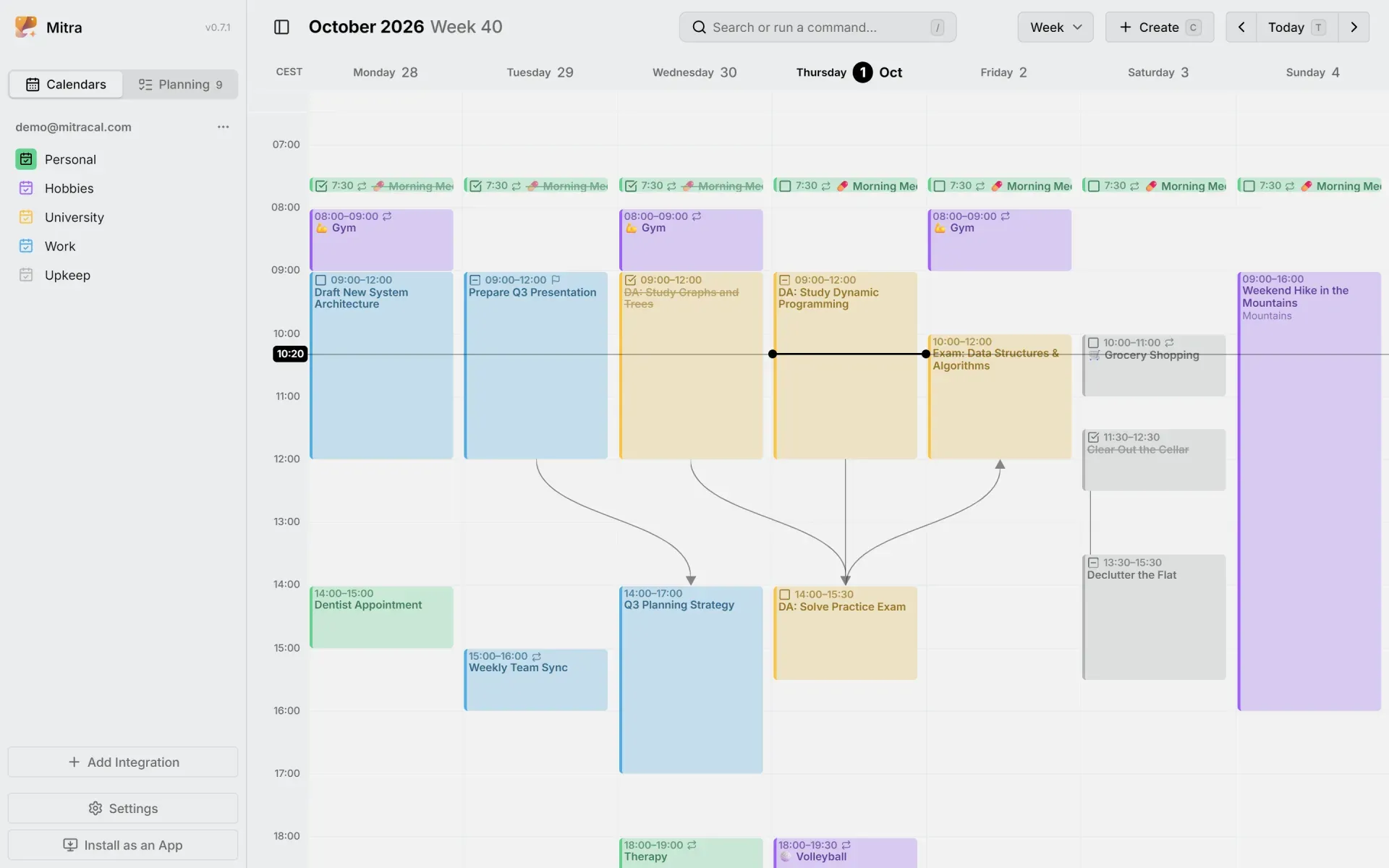
Week view of the sample calendar with events and tasks side by side, dependency lines and the current-time marker.
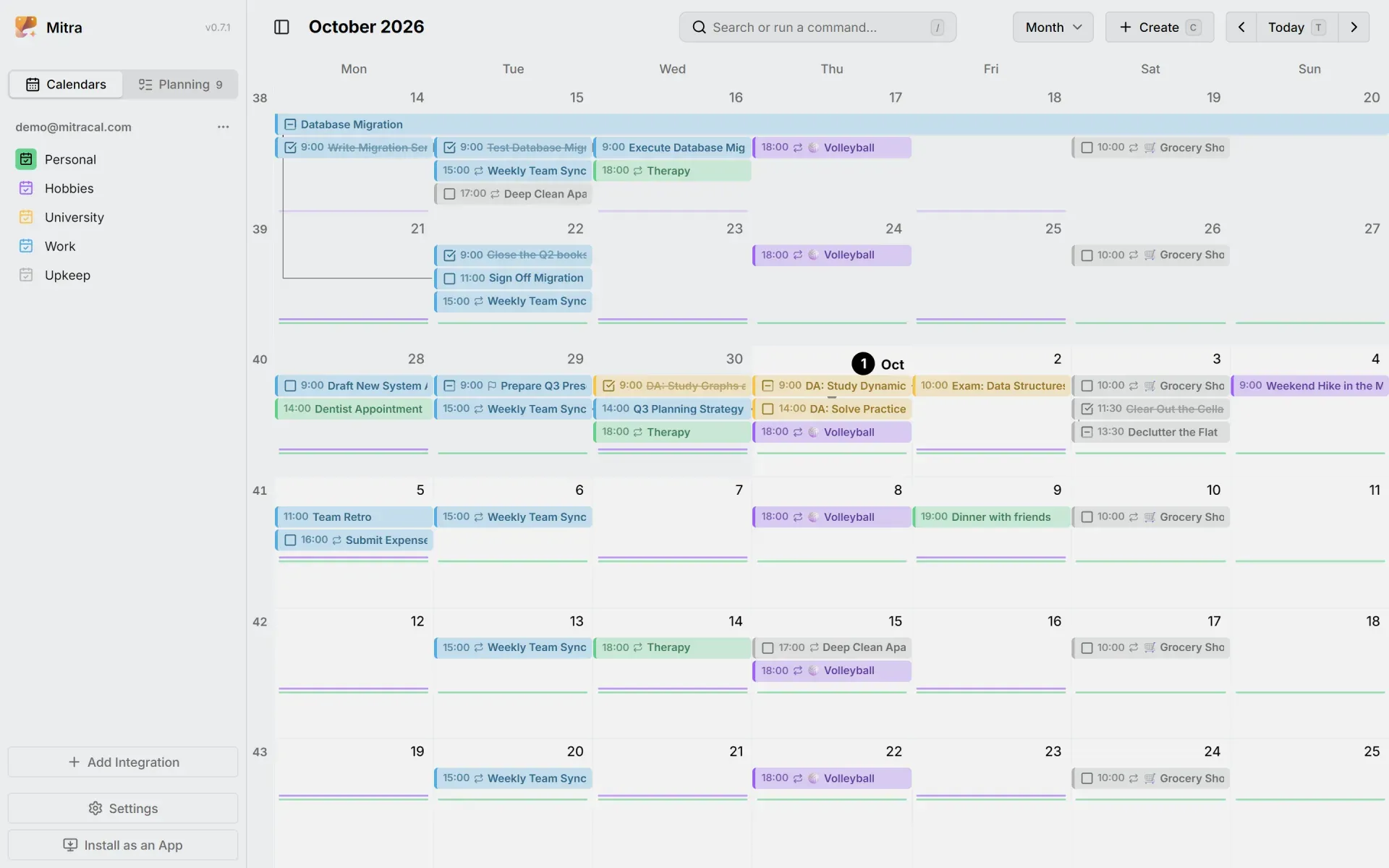
Month view with week numbers, recurring entries and a multi-week task.
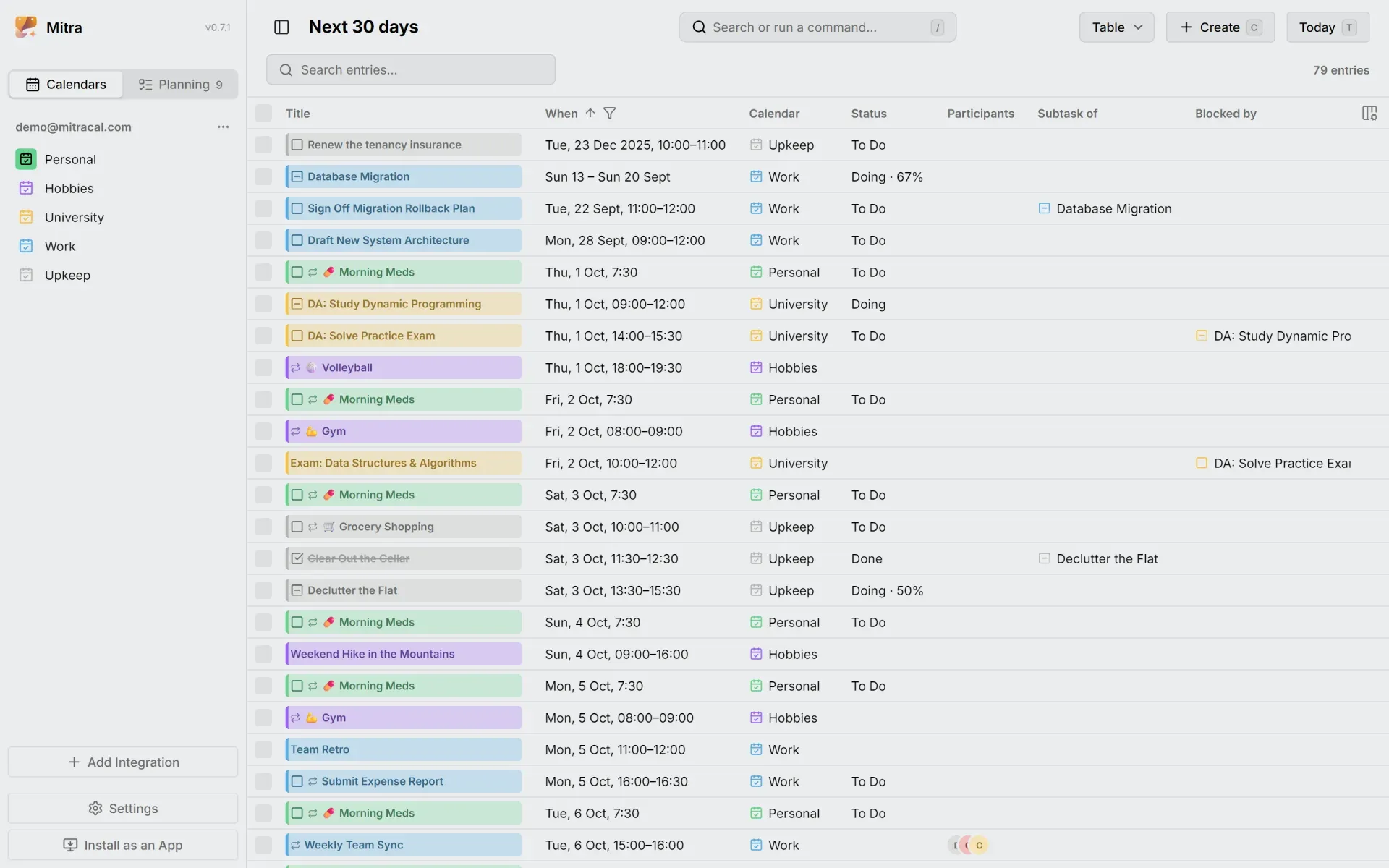
Table view of the next 30 days with status, subtask and dependency columns.
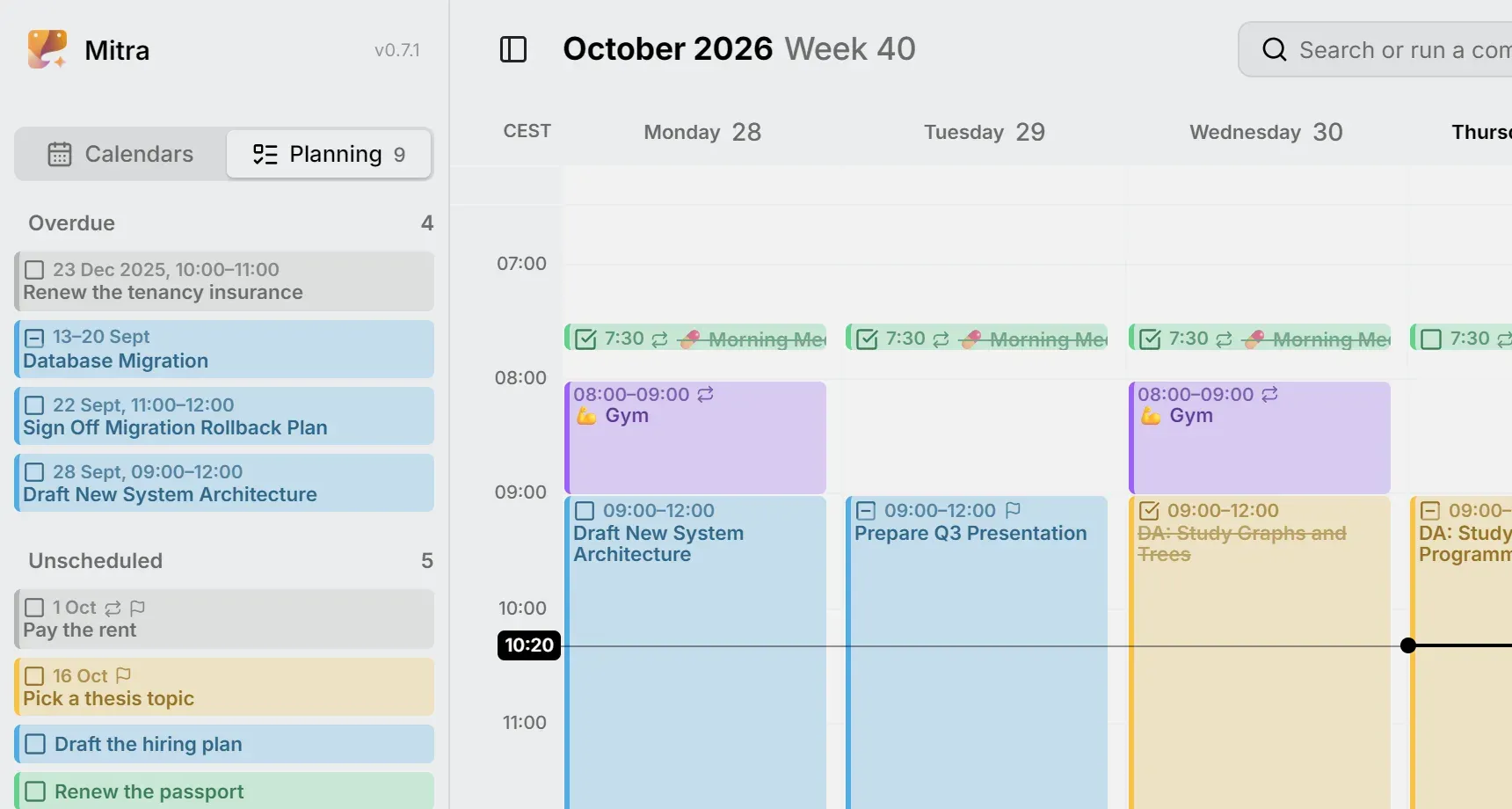
The sidebar's Planning tab with overdue tasks above unscheduled ones.
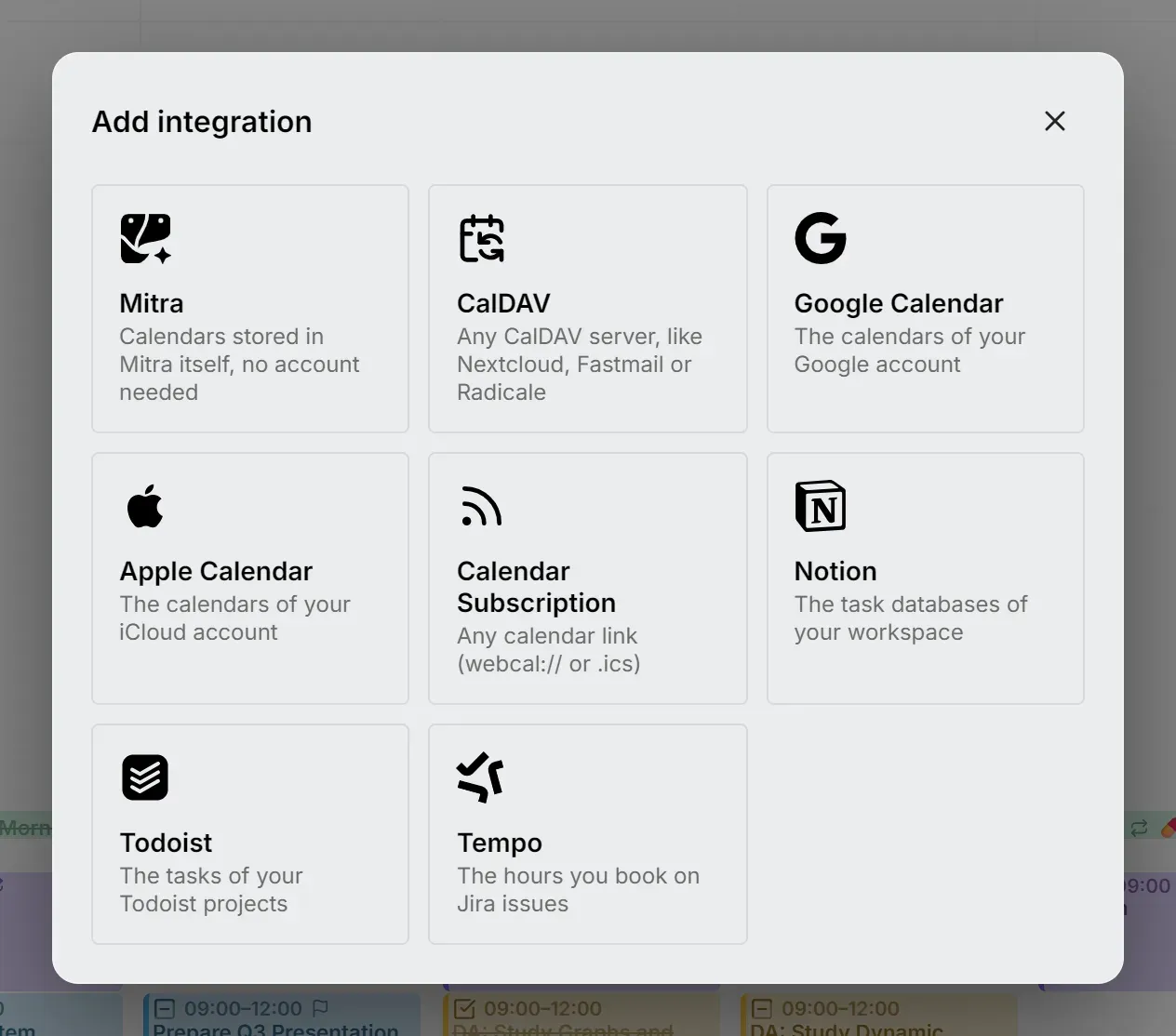
The Add integration dialog with the eight calendar sources.
Source: official Mitra project page.
Key capabilities
- Events and tasks on one timeline Events and tasks appear together in the week, month, year, timeline and table views. Entries can be created by dragging across empty time, and moved or resized by dragging. Tasks carry statuses such as To Do, Doing with a percentage, and Done.
- Planning tab for unscheduled tasks Tasks without a place in the week wait in the sidebar's Planning tab with a due date and an estimate, with overdue tasks listed above unscheduled ones. Mitra separates a task's schedule from its constraints, and dragging a task into the week gives it the length of its estimate. A flag shows when a scheduled task also has a due date.
- Calendars stored in Mitra Mitra calendars live on the server with no account behind them. Their entries exist only in the data folder, which the backup guide points out explicitly.
- Two-way sync with existing accounts Integrations cover CalDAV servers such as Nextcloud, Fastmail or Radicale, Google Calendar, Apple Calendar through iCloud, Notion task databases, Todoist projects and Tempo worklogs on Jira issues. Changes made in Mitra are written back to the provider. Google Calendar needs a one-time OAuth setup on the server; the others are added in the app.
- Sync intervals According to the integrations overview, CalDAV and Apple Calendar sync every 10 seconds while Mitra is open and every 5 minutes otherwise; Google Calendar, Notion, Todoist and Tempo about once a minute while open. Read-only calendar subscriptions refresh every 15 minutes. Only changes are fetched, and a calendar can be re-imported from its menu.
- Calendar subscriptions and files Published webcal:// or .ics feeds come in as read-only subscriptions. When Mitra is installed as an app on a computer, it can open .ics files and webcal:// links directly.
- Availability Regular time such as working hours or study time is shaded in the week view in the color of its calendar. Windows can carry a name or a place and be marked busy or free. The Add Availability command creates Monday to Friday 9:00 to 17:00 working hours as a starting point.
- Subtasks and dependencies Entries can have subtasks and can be blocked by other entries, across calendars and accounts. The week, month and timeline views draw connector lines between dependent entries, turn them red when the order is broken, and offer to move the whole chain when one entry is dragged.
- Attachments Since 0.7, files can be attached to an entry with the paperclip or by dragging them onto it, and images can be placed in the description. CalDAV calendars share attachments with other apps; for Google Calendar, Mitra shows attached Drive files but cannot add or remove them. MITRA_FILE_MAX_SIZE and MITRA_FILE_QUOTA limit file size and storage per person.
- Reminders as push notifications Reminders come from the Mitra server as system notifications, even when Mitra is closed, with presets from the start time to a day before and custom times. Notifications offer Snooze 10 min and, for tasks, Done. On iPhone and iPad they require the installed app on iOS or iPadOS 16.4 or later.
- Participants and replies Entries can list participants with optional status, and replies show as accepted, declined or tentative badges. Mitra never sends email itself: invitations and replies go through the calendar server, such as Google, iCloud or Nextcloud, while lists in Mitra calendars are only a record.
- Repeats and time zones Entries can repeat on standard or custom rules. Several time zones can be shown as columns, and since 0.7 a home time zone stays with the account while the calendar follows the device during travel.
- AI connectors over MCP Mitra exposes an MCP endpoint at /api/mcp, so tools such as Claude, Claude Code and Cursor can look at a week, find entries, plan tasks and move meetings. On servers with sign-in, each tool uses an access token that is read-only or read-write and can be revoked; the AI connectors guide includes configuration examples.
- Command palette and keyboard shortcuts The / key or Ctrl+K opens a command palette for search and commands such as Add Availability and What's New. The ? key lists every shortcut, and since 0.7 shortcuts also work with keyboards that type another script.
- Single sign-on with OpenID Connect Setting MITRA_OIDC_ISSUER, MITRA_OIDC_CLIENT_ID and MITRA_URL turns on sign-in through providers such as Pocket ID, Authelia, Authentik, Keycloak or Google. Sign-in uses the authorization code flow with PKCE on the server, and sessions last 30 days from last use. Turning sign-in on starts every person, including the first user, with a new empty account.
- Languages, regions and themes The interface supports right-to-left languages, light and dark themes and a color per calendar. Since 0.7 a country can be chosen alongside the language so dates, times, numbers, the first day of the week and the weekend follow that region. The documentation is published in twelve languages.
- One container and one data folder Mitra runs as a single container configured entirely through environment variables. Everything it stores, including entries, accounts, credentials of connected services, settings, attachments and the reminder key, sits in /app/data, so backing up that folder backs up the instance.
- Install as an app Chromium browsers, Safari on macOS, Android and iOS can install Mitra as a web app with its own window and icon. This works on https:// addresses and on http://localhost.
Where Mitra fits
Personal calendar on a home server
The getting-started guide creates a compose.yaml with the ghcr.io/a11delavar/mitra image, port 3000 and a ~/mitra data folder, then runs docker compose up -d and opens http://localhost:3000. On first launch Mitra offers to add a Mitra calendar kept on the server or to connect an existing account such as CalDAV or Google Calendar.
Planning tasks into the week
Tasks are added with Add Task in the Planning tab, given a due date and an estimate, and dragged into the week when there is time. The Planning tab lists overdue tasks first, and the week view shows due-date flags and dependency lines, so the schedule can be compared with the constraints described on the planning page.
Combining work and personal accounts
A Google Calendar account, an iCloud calendar, a CalDAV server, Notion task databases, Todoist projects and Tempo worklogs can be connected side by side with Mitra calendars. Entries can be moved between calendars, and each connected account syncs in the background and receives the changes made in Mitra.
Sharing one server with family or a team
With an OpenID Connect provider configured and the redirect address MITRA_URL/auth/callback registered there, everyone who may sign in at the provider gets their own Mitra account and calendars. The sign-in guide notes that sign-in should be turned on before calendars are filled, because existing single-user data does not carry over.
Letting an AI assistant manage the calendar
Settings, AI shows the MCP address and, on servers with sign-in, creates named access tokens limited to reading or reading and writing. Claude Code can be connected with a claude mcp add command, Cursor through mcp.json and Claude Desktop through mcp-remote. Changes made by a connected tool sync to the providers like any other change.
Backing up and updating
The backup guide uses restic, Borg, rsync, snapshots or a tar archive on the data folder, ideally with the container stopped, and restores the folder as a whole. Updates are pulled with docker compose pull and docker compose up -d, and database migrations run when Mitra starts; a minor tag such as 0.6 receives only 0.6.x releases.
Reviews of Mitra
Be the first to share your experience with Mitra.
Write a review
Loading review form…
Alternatives to Mitra
 Cal.diyCal.diy is the MIT-licensed community edition of Cal.com with the enterprise code removed. You self-host the Next.js and PostgreSQL app to publish booking pages, sync calendars and connect video, payment and CRM apps. No hosted version exists.
 Easy!AppointmentsEasy!Appointments is a GPL-3.0 PHP and MySQL appointment scheduler with a customer booking page, provider calendars, working plans, Google Calendar and CalDAV sync, a REST API and webhooks.