

What is Cal.diy?
Cal.diy is an open-source scheduling platform. Account holders publish event types and booking pages, Cal.diy checks connected calendars for conflicts, and each confirmed booking gets a meeting location and notification emails. It is the community edition of Cal.com and lives in the repository Cal.com, Inc. originally used for its own product, which began in March 2021 under the name Calendso (environment variables such as CALENDSO_ENCRYPTION_KEY still carry that name). The Cal.diy refactor, merged on April 15, 2026, removed the commercial Enterprise Edition code and placed the whole codebase under the MIT License. Before that, the repository combined AGPLv3 code with a separately licensed enterprise directory.
The project is explicit about its status. The Cal.diy documentation describes it as community maintained, states that Cal.com, Inc. does not guarantee its security, and recommends it strictly for personal, non-production use. Commercial and enterprise scheduling is directed to the hosted Cal.com service or to Cal.com's on-premises enterprise access. There is no hosted Cal.diy: every instance runs on infrastructure its operator controls, and contributions to this repository do not flow into Cal.com's production platform.
The latest tagged GitHub release is v6.2.0, published on March 1, 2026, six weeks before the split. Its notes list fixes to the booking details sheet, invite-link settings and app-store seeding, plus an axios update to 1.13.5. No release has been tagged since, but the main branch remains active. Commits from early November 2026 move the runtime from Node.js 20 to 22, bind the Redis and Prisma Studio ports in the Compose file to the loopback interface, send notification emails when a calendar integration fails during booking, and stop publishing the @calcom/atoms package from this repository.
Cal.diy is a TypeScript monorepo managed with Turborepo and Yarn 4. The web application uses Next.js, React, tRPC, Tailwind CSS and NextAuth, with Prisma managing a PostgreSQL 13 or later database. A separate REST API v2 service lives in apps/api/v2 and uses Redis. Distribution is source-first: clone the repository, configure .env and .env.appStore, apply migrations and build. The Compose file references a calcom/cal.diy image, but that Docker Hub repository listed no published tags when checked on November 7, 2026, so plan to build the image yourself.
Several capabilities are out of scope by design: teams, round-robin and collective team event types, managed event types, organizations, workflows, routing forms, the Insights dashboard, SAML SSO, SCIM directory sync, impersonation, Cal.com video recordings and the legacy API v1. The feature comparison on the documentation home page lists each difference. Cal.diy is therefore a scheduler for individual accounts on one instance, not a coordinated team booking system.
Cal.diy screenshots
Explore the interface. Open a screenshot to view it at full size.
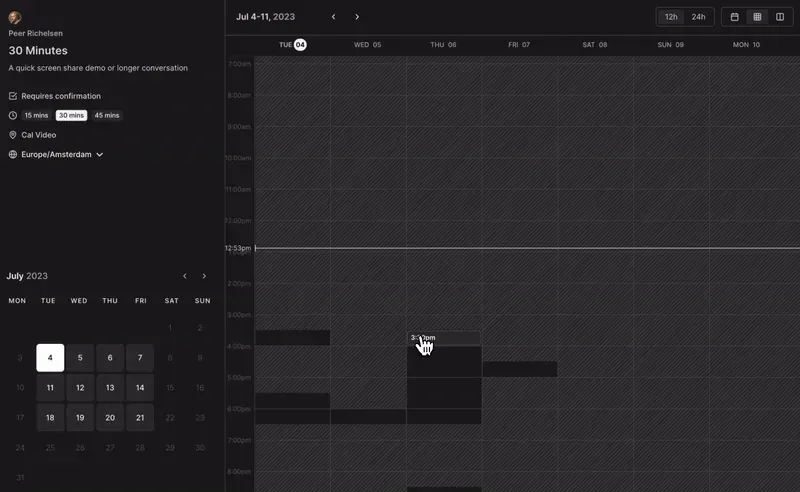
Frame from the booking-page recording in the Cal.diy README: a 30-minute event with duration options, Cal Video location, time zone selector and week view.
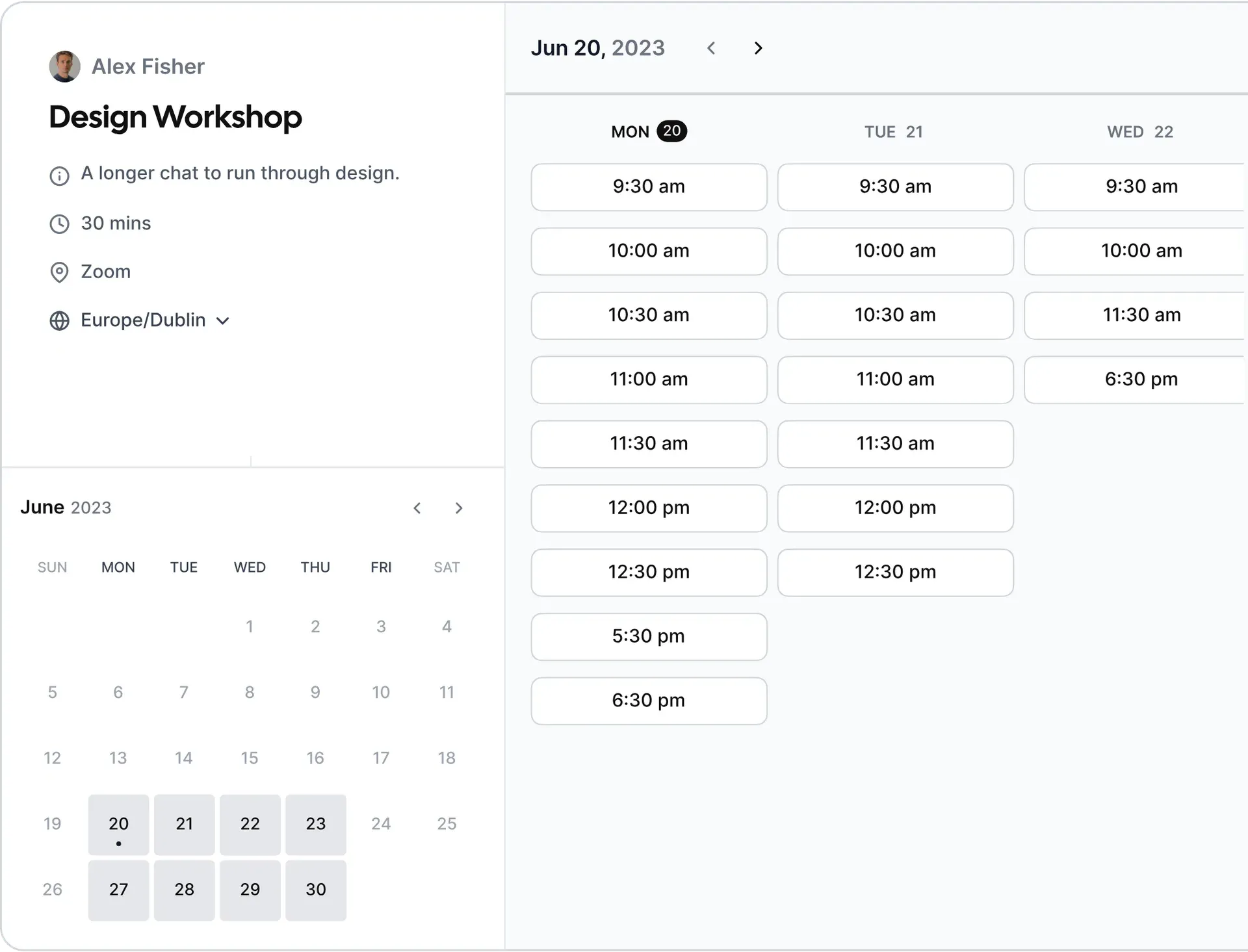
Booker illustration shipped in the Cal.diy web app assets, rasterised from SVG: event details on the left, month calendar below and three days of open slots.
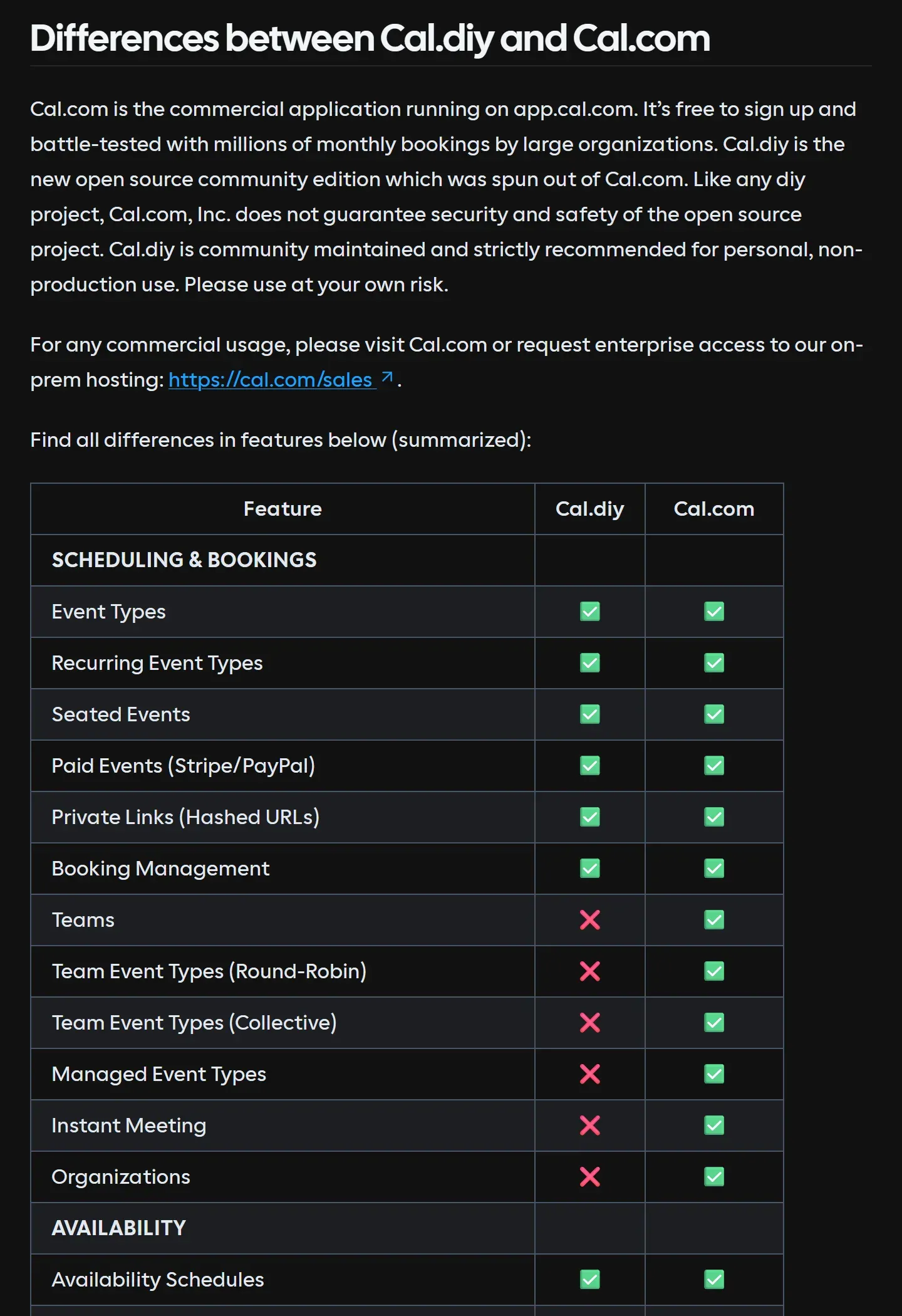
Part of the official feature comparison: event types, recurring, seated and paid events are included, while teams, team event types, managed event types and organizations are Cal.com only.
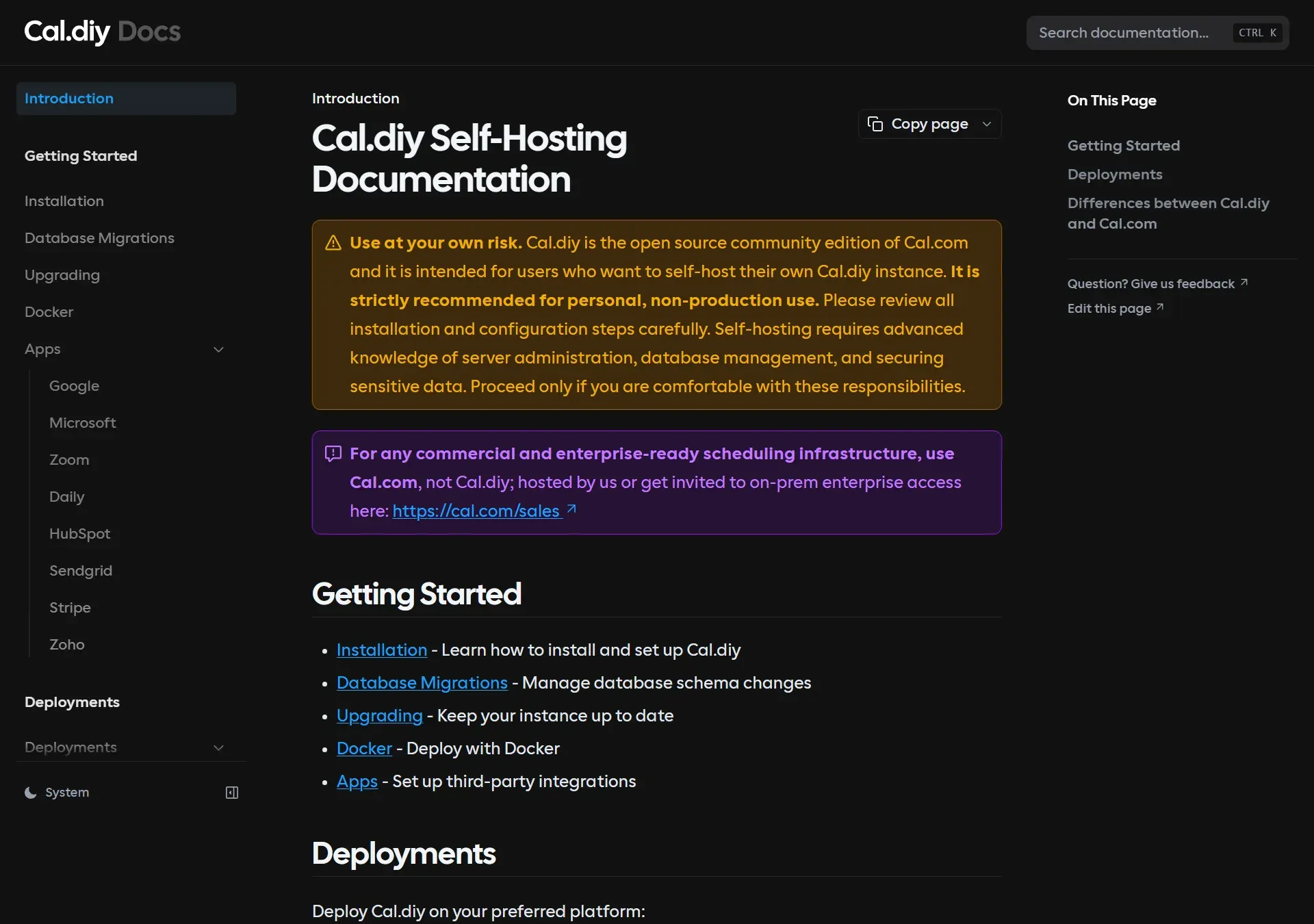
The Cal.diy documentation home page, with the personal, non-production use notice, the pointer to Cal.com for commercial use and links to installation, migrations, upgrading, Docker and apps.
Source: official Cal.diy project page.
Key capabilities
- Docker Compose deployment The repository's Compose file defines PostgreSQL, the web app on port 3000, the API v2 service, Redis and an optional Prisma Studio bound to 127.0.0.1:5555.
docker compose up -dstarts the full stack, whiledocker compose up -d calcomruns only the web app against an existingDATABASE_URL. Because no image tags were published on Docker Hub when checked, build locally withDOCKER_BUILDKIT=0 docker compose build calcom; a reachable database is required during the build. The Docker guide covers updates and troubleshooting. - Manual installation on Linux, macOS, Windows or BSD The installation guide requires Node.js, Yarn, Git and PostgreSQL, and suggests Linux for production. You clone the repository, run
yarn, copy.env.exampleto.env, then runyarn buildandyarn start. On Windows, clone withcore.symlinks=trueand replace the Prisma.envsymlink with a real copy. Building is the most resource-intensive step; the README setsMAX_OLD_SPACE_SIZEto 4096 by default for Docker builds. - Platform deployment guides The documentation has deployment pages for AWS, Azure, GCP, Elestio, Northflank, Railway, Render and Vercel. Vercel requires a Pro plan because of the serverless function limit on its free plan. Any host that runs a Next.js application can work, but reverse proxies, TLS gateways and other edge cases are not officially supported.
- Event types and booking pages Create one-off, recurring and seated event types, publish them on a public booking page, and share private hashed links for invitation-only slots. Bookers pick a date and time in their own time zone; the interface offers month, week and column layouts and a 12h or 24h clock. Event types can require confirmation, and booking management lists upcoming, past and cancelled bookings with reschedule and cancel actions.
- Availability rules Availability schedules define working hours per account, with date overrides for exceptions. Buffer times before and after meetings, minimum notice and booking limits control how dense a calendar can become. Travel schedules and out-of-office entries handle time zone changes and absences without editing every event type.
- Calendar connections Supported calendars include Google Calendar, Outlook and Office 365, Apple Calendar, CalDAV, Exchange, Zoho Calendar, Lark, Feishu and ICS feeds. Connected calendars supply busy times and receive new bookings. Each provider needs your own OAuth application: the Google guide requires the Calendar API, the
calendar.eventsandcalendar.readonlyscopes and two redirect URIs on your domain. - Video conferencing locations Bookings can generate links for Cal Video (built on Daily.co), Zoom, Google Meet, Microsoft Teams, Webex, Jitsi, Whereby, Huddle01 and other providers. Cal Video needs a
DAILY_API_KEY, and recording requires Daily's Scale plan. Zoom requires a user-managed app with themeeting:write:meetinganduser:read:settingsscopes. - Paid events Stripe and PayPal can charge for a booking. Stripe needs
STRIPE_PRIVATE_KEY,STRIPE_CLIENT_IDandSTRIPE_WEBHOOK_SECRETin.envplusNEXT_PUBLIC_STRIPE_PUBLIC_KEY. Without these values the Stripe app is shown as not installed and payment features stay disabled; the rest of the application still works. - CRM integrations The app store includes HubSpot, Salesforce, Close, Zoho CRM, Zoho Bigin, Pipedrive and Attio. The HubSpot app needs read and write access to
crm.objects.contactsandcrm.lists, and then records each booking as a meeting for the matching contact. As with calendars, you register and maintain the OAuth client yourself. - Webhooks and automation platforms Webhooks send booking events to your own endpoints, and app entries exist for Zapier, n8n, Make and Pipedream. The built-in Workflows feature for reminders and follow-ups is a Cal.com feature and is not part of Cal.diy, so reminder logic has to live in an external automation tool.
- Messaging, AI agent and analytics apps Additional apps cover messaging (Discord, Telegram, WhatsApp), voice AI agents (Retell AI, ElevenLabs, Synthflow) and booking-page analytics (GA4, Google Tag Manager, PostHog, Fathom, Plausible, Umami, Matomo). Each one is optional and configured per instance. Adding tracking scripts to booking pages changes what visitors' browsers send to third parties.
- Embeds for other websites Booking pages can be embedded inline, as a popup or behind a floating button on another site. The embed loads from your own instance URL, so that URL must be public and correctly set in
NEXT_PUBLIC_WEBAPP_URL. - REST API v2 and API keys API v2 (REST), API keys and platform OAuth clients are available; the legacy API v1 is not. Build and start it with
yarn workspace @calcom/api-v2 buildandstartafter copyingapps/api/v2/.env.example. The OpenAPI specification ships in the repository. - Authentication options Sign-in supports email and password, Google OAuth and Azure AD or Microsoft OAuth. SAML SSO, SCIM directory sync and impersonation are not included.
NEXTAUTH_SECRET(fromopenssl rand -base64 32) andCALENDSO_ENCRYPTION_KEY(32 bytes for AES-256, fromopenssl rand -base64 24) are required, and the defaultsecretplaceholder must not reach production. - Setup wizard and email delivery On first start a setup wizard creates the first user; a calendar connection step can be skipped by opening
/event-typesdirectly. Notification emails go through any SMTP server set in theEMAIL_SERVER_*variables or through SendGrid. For development, the README uses MailHog on ports 1025 and 8025 to capture outgoing mail. - Database migrations and upgrades Prisma migrations manage schema changes. Production instances use
yarn workspace @calcom/prisma db-deploy; the development commanddb-migratecan clear a database. The migration guide explains how to baseline an existing database after a P3005 error withprisma migrate resolve --applied. - Cron jobs Some features depend on scheduled calls to the cron routes in
apps/web/app/api/cron. Self-hosters must create these schedules on their own platform; Vercel users follow Vercel's cron documentation. The.env.examplefile ships a sampleCRON_API_KEYvalue, which should be replaced with your own. - Security headers, rate limiting and telemetry Setting
CSP_POLICY=non-strictenables a strict Content Security Policy on the login page and report-only mode on other server-rendered pages; static pages are not covered yet. Optional rate limiting uses an Unkey root key, and without it the app runs with no rate limiting. Anonymous usage telemetry is collected unlessCALCOM_TELEMETRY_DISABLED=1is set at build time.
Where Cal.diy fits
Running a personal booking page on your own domain
Set NEXT_PUBLIC_WEBAPP_URL and NEXTAUTH_URL to the public HTTPS address without a trailing slash, generate fresh secrets, and place a reverse proxy in front of port 3000. NEXT_PUBLIC_WEBAPP_URL is inlined at build time, so rebuild the Docker image after changing it. The troubleshooting guide describes the typical failure: sign-in redirects that point back to localhost:3000. Check that the booking link, confirmation emails and calendar callbacks all use the public domain.
Blocking double bookings with Google or Microsoft calendars
Register an OAuth client in Google Cloud or an Azure app registration, add the documented redirect URIs for your instance, and put the credentials in GOOGLE_API_CREDENTIALS or MS_GRAPH_CLIENT_ID and MS_GRAPH_CLIENT_SECRET. Google consent screens left in testing mode only accept listed test users, so publish the app or add every account. Then create a busy event in the external calendar and confirm the matching slot disappears from the booking page.
Taking paid consultations
Install the Stripe app with test keys first, attach a price to an event type and complete a booking with a Stripe test card. Verify the webhook secret, because payment confirmation depends on the webhook reaching your instance. Refund and cancellation handling should be tested before switching to live keys. PayPal is the documented alternative for paid events; iThub lists Stripe separately for the payment side.
Sending bookings to a CRM or automation tool
For sales calls, connect HubSpot or Salesforce so that each booking appears as a meeting on the contact record. For custom logic, register a webhook and process booking events in a tool such as n8n. Since Cal.diy has no built-in Workflows, reminder emails or SMS follow-ups also belong in that automation layer. Check what attendee fields the webhook payload carries before forwarding it to another service.
Embedding scheduling on an existing website
Choose the inline, popup or floating-button embed from the event type and paste the snippet into the target page. Test it on mobile widths and with the site's own Content Security Policy, which must allow your Cal.diy origin. If analytics apps are enabled on booking pages, confirm that the cookie banner and privacy notice on the host site cover them.
Upgrading a self-hosted instance
Back up the PostgreSQL database first. For a source install, follow the upgrade guide: git pull, yarn, yarn workspace @calcom/prisma db-deploy, yarn predev to detect new environment variables, then build and start. For Docker, stop the stack, rebuild or pull, and start it again. Because v6.2.0 is the last tag, decide whether you track a pinned commit on main and record which one is deployed.
Reviews of Cal.diy
Be the first to share your experience with Cal.diy.
Write a review
Loading review form…
Related to Cal.diy
 StripeStripe offers APIs and hosted components for payments; Billing and Radar add subscription and risk workflows with their own scopes.
 n8nn8n is a fair-code workflow automation platform from n8n GmbH in Berlin. It combines a node-based visual editor with JavaScript and Python code, AI agent nodes, 1500+ integrations, a REST API and an MCP server, self-hosted or on n8n Cloud.