

What is Jitsi Meet?
Jitsi Meet is an open-source video conferencing application built on WebRTC. It runs in the browser, on Android and iOS, and in an Electron desktop app, and it can be embedded into other products through web and native SDKs. The code lives in the jitsi-meet repository, and Jitsi is a set of related projects that also includes Jitsi Videobridge, which forwards participants' audio and video streams instead of mixing them, as the About Jitsi page explains. The README describes Jitsi Meet as a set of open source projects for deploying video conferencing platforms.
According to the same page, the Jitsi community started the Jitsi Meet project in 2014. Atlassian acquired the team's company in 2015, and 8x8 acquired the Jitsi technology and team from Atlassian in 2018. The jitsi.org history lists Jitsi as a Service, the hosted offering from 8x8, as released in 2020. The README credits the Jitsi team at 8x8 and a community of contributors. The public service at meet.jit.si is free to use and needs a Google, Facebook or GitHub account to start a meeting, according to the README, while the jitsi.org page describes the software as usable without an account.
You can run your own installation using Debian and Ubuntu packages, a Docker Compose setup or a build from source. The self-hosting guide lists Debian 12 or newer and Ubuntu 24.04 or newer for the package install and asks for OpenJDK 17. Prebuilt desktop applications for Windows, macOS and Linux and the mobile apps are listed on the releases page of the handbook. The apps are on Google Play, F-Droid and the Apple App Store.
The latest GitHub release is 2.0.11248, published September 14, 2026. The release page has no prose notes; it attaches a changelog text file, so read that file for details. The code is written mostly in TypeScript and licensed under Apache 2.0. Jitsi Meet is a conferencing product, not a webinar platform with registration and analytics, a team chat suite or a telephony provider, although dial-in is possible through the Jigasi component.
Jitsi Meet screenshots
Explore the interface. Open a screenshot to view it at full size.
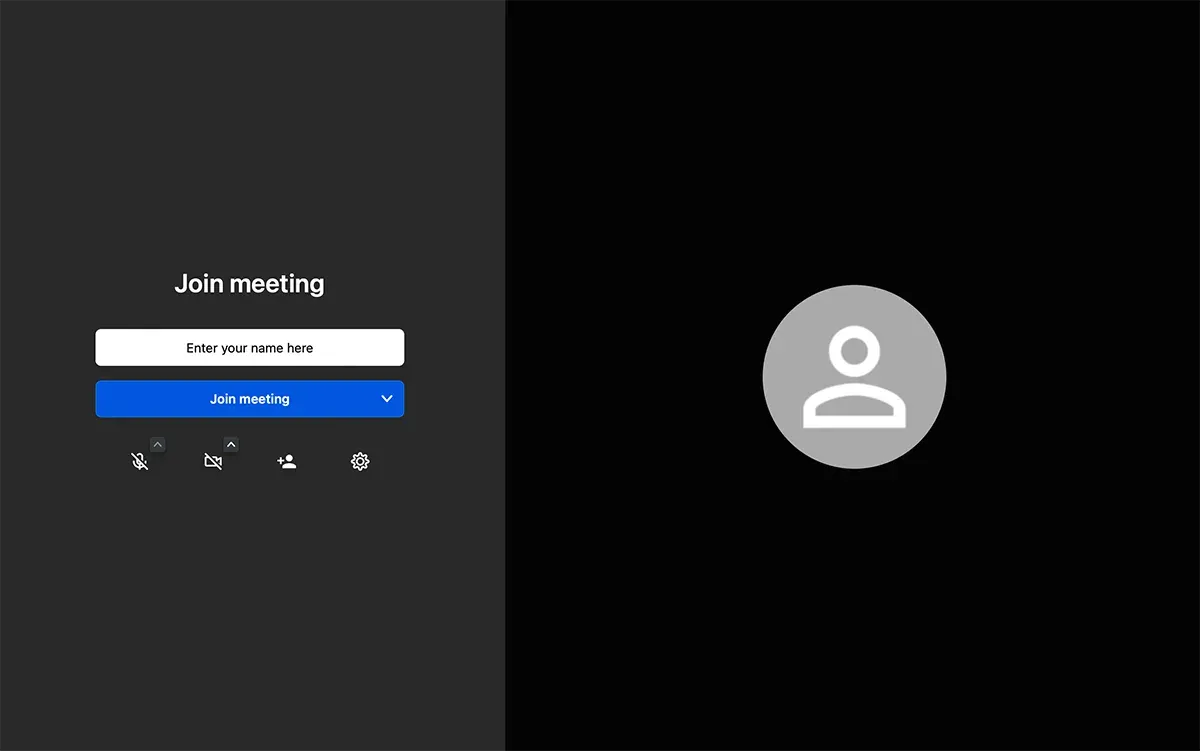
Official Jitsi handbook figure of the pre-join screen with a name field, Join meeting button and device controls.
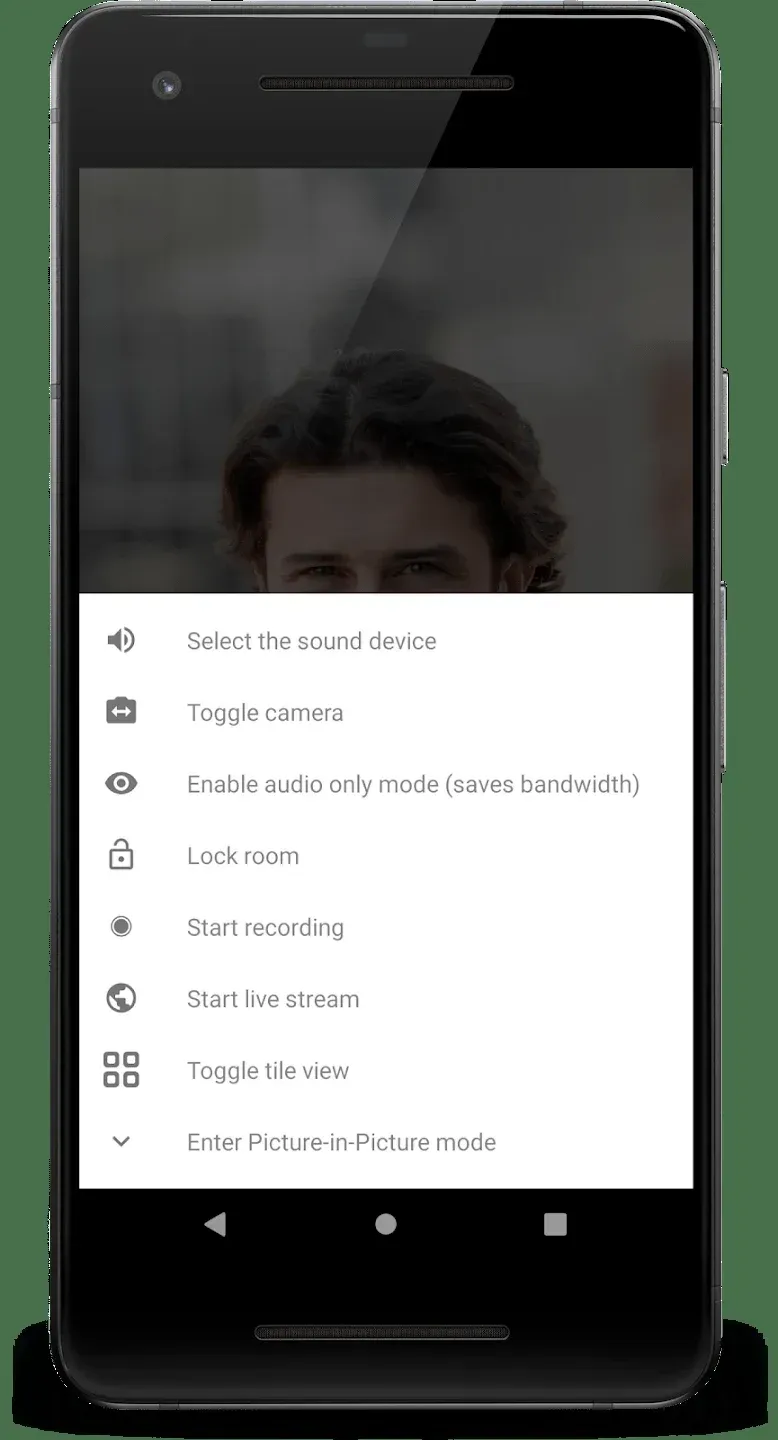
Official Android screenshot of the in-call menu: sound device, toggle camera, audio-only mode, lock room, recording, live stream, tile view and picture-in-picture.
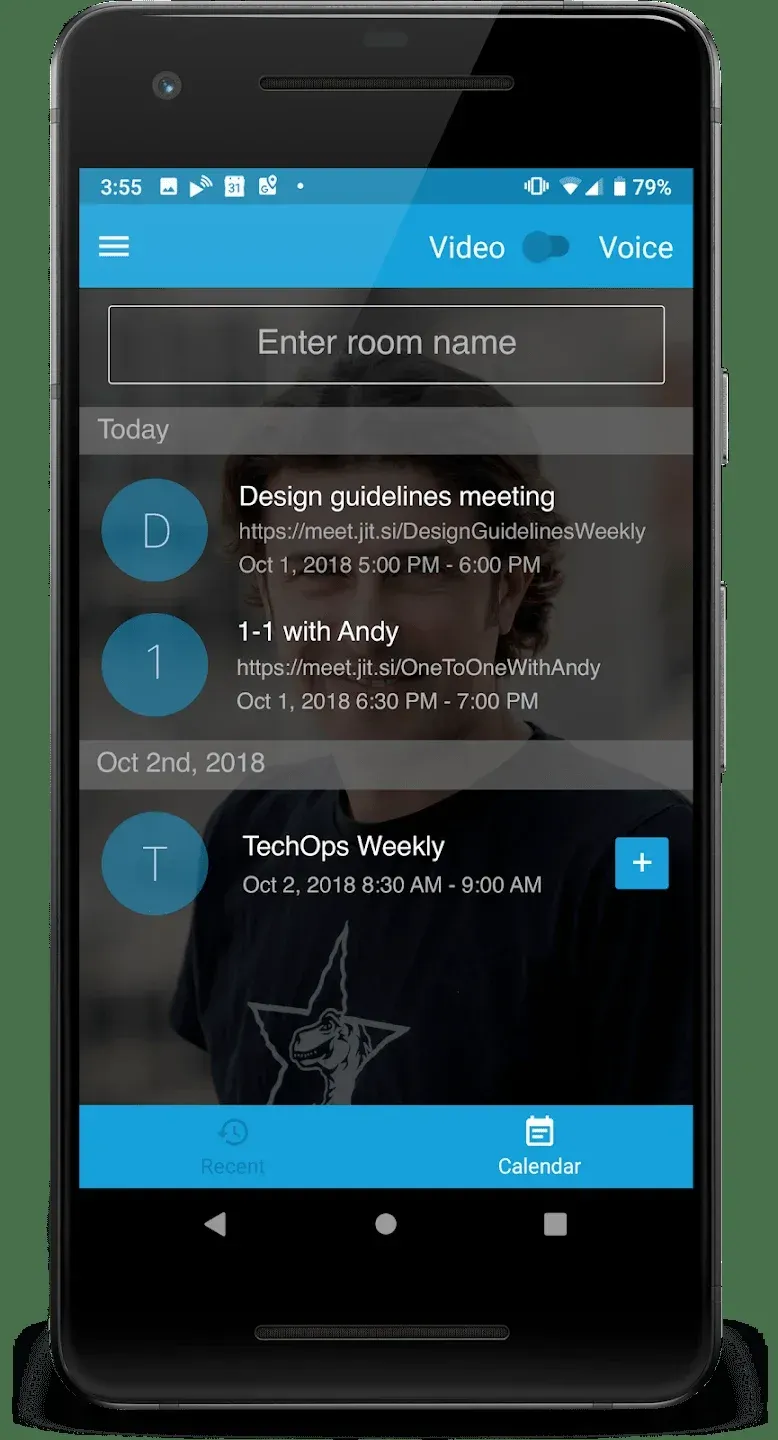
Official Android screenshot of the start screen with a room name field and a calendar list of meetings.
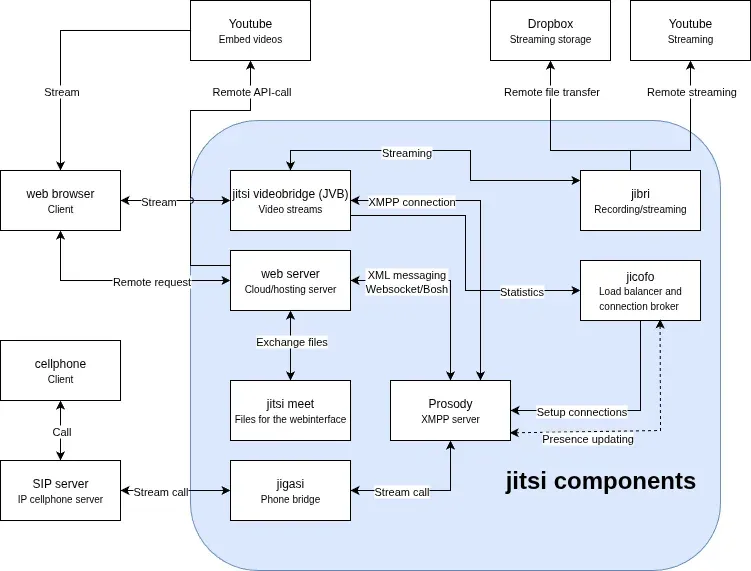
Official Jitsi handbook architecture diagram showing the web server, Videobridge, Jicofo, Prosody, Jibri, Jigasi and their connections.
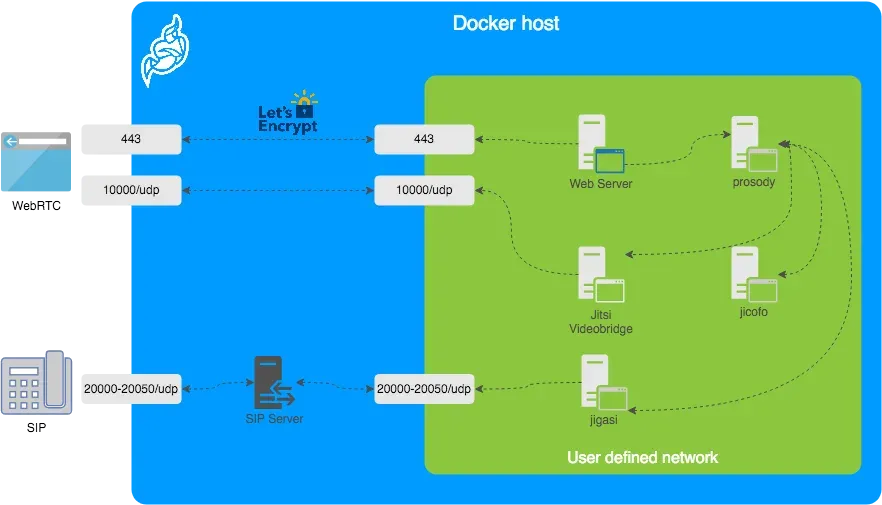
Official Jitsi handbook diagram of the Docker host showing ports 443 and 10000 UDP and the web, Prosody, Videobridge, Jicofo and Jigasi containers.
Source: official Jitsi Meet project page.
Key capabilities
- Use in the browser Open meet.jit.si or your own server and join a room through a URL. Jitsi Meet supports all current browsers according to the README, and a meeting can be started by choosing a custom room name. Because it uses WebRTC, the page needs HTTPS to access the camera and microphone.
- Download the Android app The mobile app is published on Google Play and on F-Droid as org.jitsi.meet. The handbook releases page also offers an open beta through the Play Store. The app has an audio-only mode, a lock room action, tile view and picture-in-picture, as shown in the official screenshots.
- Download the iOS app The iPhone and iPad app is on the App Store, with a TestFlight beta program for early features.
- Download the desktop app Desktop applications for Windows, macOS and GNU/Linux (AppImage and Deb) are based on Electron, and a Homebrew cask named jitsi-meet exists for macOS according to the handbook.
- Self-host with Docker The Docker guide asks you to download and extract the latest docker-jitsi-meet release instead of cloning, copy env.example to .env, run gen-passwords.sh and create the configuration directories. Starting with release stable-11146 the containers run rootless with a read-only file system, so the guide tells you to create the storage and tmp directories yourself.
- Self-host with Debian or Ubuntu packages The quick install adds the Jitsi package repository, sets a fully qualified domain name and installs the stable packages. The documentation describes stable, testing and nightly channels, and it asks for DNS and TLS to be configured for the domain.
- HD audio and video The README advertises HD audio and video, and jitsi.org points to Opus for audio. Jitsi Videobridge routes streams with simulcast and bandwidth estimation instead of mixing them, which keeps latency lower and lets one server handle more rooms.
- Content sharing Participants can share their desktop or a window. jitsi.org also mentions presentations, and the Docker setup can add Etherpad for shared documents and an Excalidraw whiteboard through extra compose files.
- Chat, hand raising and reactions The README lists raise hand, reactions, and chat with private conversations.
- Polls Meetings can run polls, which the README lists as a core feature.
- Virtual backgrounds Participants can blur or replace their backgrounds.
- Recording and live streaming The mobile menu includes start recording and start live stream. Server-side recording uses the Jibri component, which the Docker guide describes as needing a configured host.
- Dial-in through SIP The Jigasi gateway connects SIP calls to conferences. You configure SIP credentials in the environment file and start the extra compose file.
- Security and encryption The README links a security page and an end-to-end encryption whitepaper. jitsi.org says conversations are encrypted by default and that more advanced security settings exist. Read the whitepaper to see which modes cover which parts of a meeting.
- Authentication The handbook documents authentication options and shows a Keycloak setup, for example. A server can require sign-in to create rooms, which helps stop strangers from using a public instance.
- Web and native SDKs Developers can embed meetings in their own web pages or apps through the web SDK and the Android and iOS SDKs, which the handbook distributes through Maven and CocoaPods. The developer guide in the handbook describes the API.
- Jitsi as a Service 8x8 offers JaaS as a managed, branded Jitsi platform for people who want to avoid monitoring, scaling and updates. It is a commercial service separate from the open-source code.
- Community and documentation The handbook covers user, developer and self-hosting guides, and the community forum is the place for questions. Security vulnerabilities follow the process in SECURITY.md.
Where Jitsi Meet fits
Hosting a private meeting server
Pick a domain, point DNS at the server, install from the Debian package or the Docker release and configure authentication so only your staff create rooms. Test with participants on mobile networks as well as the office LAN, and check UDP port 10000 and the TLS certificate first, since those are common causes of failed media.
Running meetings from a browser or phone
Share a room link, let people join without installing anything and use the mobile app when a participant needs a more reliable connection. Check microphone and camera permissions in the browser, and use audio-only mode on a weak network.
Embedding video in your own product
Use the web SDK to load meetings in a page or the native SDKs in a mobile app, and decide whether to host the backend yourself or use JaaS. Prototype with your own branding, test on the browsers your customers use and plan for what happens when the server is unavailable.
Recording and streaming sessions
Recording and live streaming depend on Jibri, which needs a dedicated host in the Docker setup. Confirm where recordings are stored, who can start them and how participants are told that recording is on, and keep consent records where the law requires them.
Connecting phone callers
Add Jigasi with SIP credentials from a provider, then test dialing in and out with different carriers. Note the call cost, number format and codec limits, which belong to the SIP provider and not to Jitsi.
Sizing and scaling
Start from the architecture of Prosody, Jicofo, Jitsi Videobridge and the web server, and measure CPU and bandwidth with a realistic number of participants. Scale the bridge separately from the other components, and keep an eye on upgrade notes, because the Docker layout changed in release stable-11146. Document the versions of the web, Videobridge and Jicofo components you run, so a rollback is possible if a release misbehaves.
Reviews of Jitsi Meet
Be the first to share your experience with Jitsi Meet.
Write a review
Loading review form…
Alternatives to Jitsi Meet
 ZoomZoom Workplace combines meetings, team chat, phone, whiteboard and contact center products, with APIs, a Meeting SDK and a marketplace for integrations.
 LiveKitLiveKit server is an Apache 2.0 WebRTC selective forwarding unit written in Go. It routes audio, video and data between browsers, apps, phones and AI agents, runs as a binary, Docker image or Helm chart, and scales across nodes with Redis.
 ElementElement is the open-source Matrix client from Element Creations for browsers, Windows, macOS and Linux. It connects to any Matrix homeserver, encrypts DMs and private rooms by default and can be self-hosted as static files, a Debian package or a Docker image.