

What is Ycode?
Ycode is a visual website builder and CMS published by Ycode Inc. Designers arrange layers on a canvas with desktop, tablet and phone breakpoints, bind them to CMS collections, build forms and publish the result without writing the page markup by hand. The same code base is offered in two forms: an MIT-licensed project on GitHub that you deploy yourself, and Ycode Cloud, a managed service that includes hosting, updates, SSL and a global CDN.
The open-source code base replaced an earlier hosted product. According to the Legacy shutdown notice, the original platform, now called Ycode Legacy, was permanently retired on July 1, 2026. Active Legacy projects were migrated to Ycode Cloud with their pages, components, CMS data, assets, forms, fonts, site settings and subscriptions. The public repository was created in February 2026, version 1.0.0 was tagged on May 1, 2026, and releases have since arrived several times a week.
The current release is 1.41.0, published November 6, 2026, which improves gradient editing in the color picker. Version 1.40.0 translates long rich text in segments. Version 1.40.1 speeds up CMS pages with large collections, resolves CMS links without loading whole collections and, according to its release notes, cuts database transfer for CMS content by six to seven times. The 1.39 series lets MCP clients bind component instance content to CMS fields and adds built-in fields to collections created through MCP, while 1.38 added CMS bindings for grid column and row spans and resizable sidebars.
Ycode is a TypeScript application built on Next.js 16 and React 19, with Tailwind CSS 4 for generated styles, Knex migrations, and Supabase for the PostgreSQL database, authentication and file storage. The documented self-hosting path is a fork of the repository deployed to Vercel, connected to a Supabase project on Supabase Cloud or a self-hosted Supabase instance. A setup wizard at /ycode/welcome runs the migrations, creates the first owner account and offers a starter template. The installation guide lists Node.js 18 or later, while the 1.41.0 package.json declares Node.js 20.9.0 or later. Docker images and hosting targets other than Vercel are not documented for the builder itself.
Every project exposes a Model Context Protocol server and a REST API, and an in-builder AI agent runs on the user's own Anthropic, OpenAI, Google Gemini or xAI key when self-hosted, or on plan credits in Ycode Cloud. The documentation does not describe a store, checkout or payment feature. Official support is reserved for Cloud projects; self-hosted users rely on the Ycode Discord and GitHub issues. Cloud plans add hosting and email support but cap CMS collections and languages, while the self-hosted edition has no product limits beyond your own infrastructure.
Ycode screenshots
Explore the interface. Open a screenshot to view it at full size.
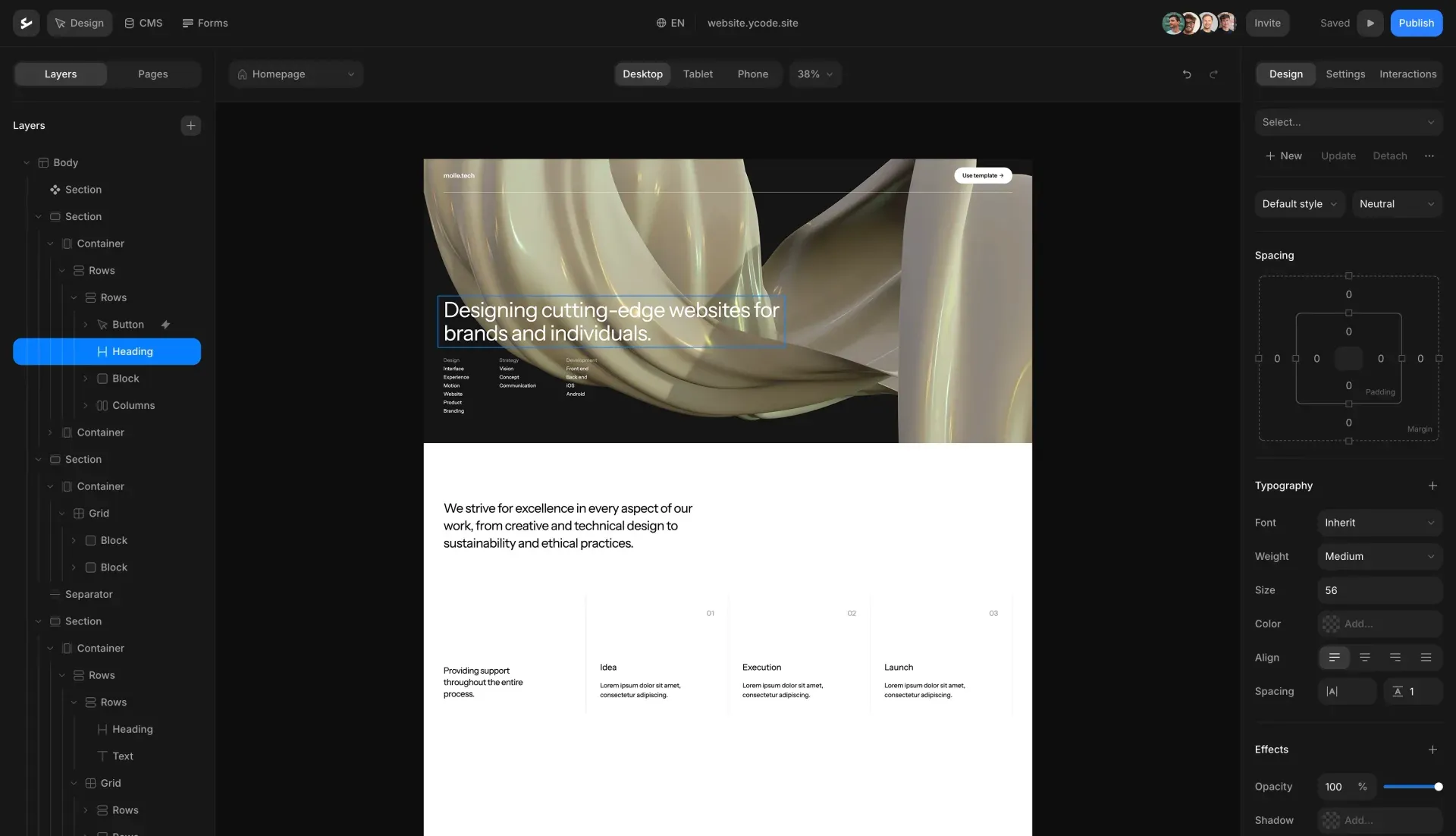
The visual builder in dark mode: layer tree on the left, a selected heading on the desktop canvas and spacing, typography and effects controls on the right.
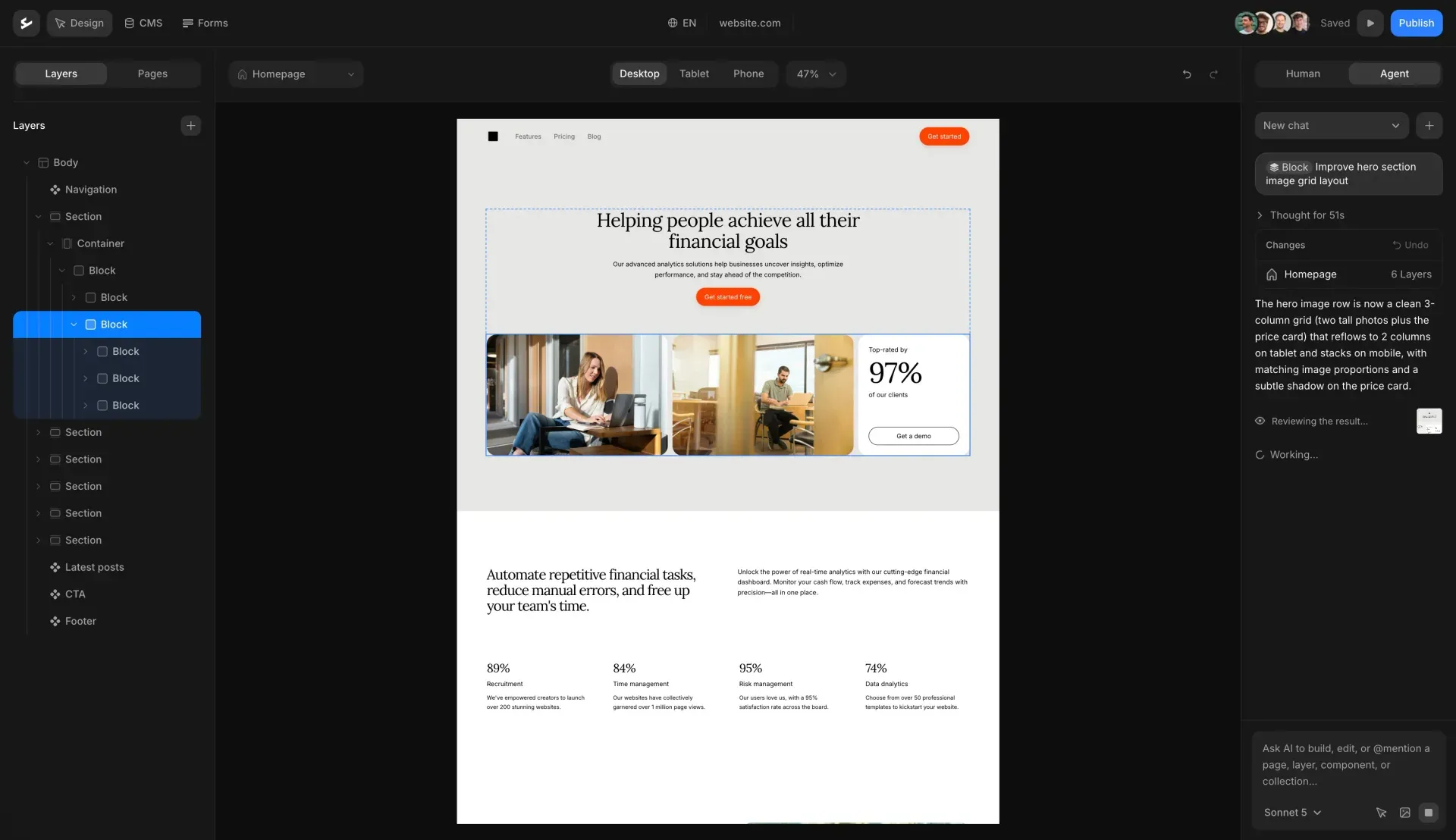
The Agent tab of the builder: a chat request, a Changes card listing six edited layers with Undo, and the resulting hero grid on the canvas.

Preview image of a blog posts section from the layout library in the Ycode repository; the posts and authors are placeholder content.

Preview image of a hero section from the layout library shipped in the Ycode repository, shown with placeholder text and imagery.
Source: official Ycode project page.
Key capabilities
- Self-hosted deployment on Vercel and Supabase Fork the repository, import the fork into Vercel with the default Next.js build settings and add four Supabase variables: publishable key, secret key, transaction-pooler connection URL and database password, plus
SUPABASE_URLfor a self-hosted Supabase. Supabase email confirmation must be turned off so that invitations work. After a redeploy, the welcome wizard runs migrations and creates the owner account. The Supabase Cloud free tier is accepted, according to the installation guide. - Local development Clone the repository, run
npm install, copy.env.exampleto.env, add the Supabase credentials and startnpm run dev. The builder opens athttp://localhost:3002/ycodeafter the wizard at/ycode/welcome. - Ycode Cloud The managed edition needs no installation: sign up, create a project and work in the hosted builder. Free projects use a
*.ycode.websitesubdomain, include 500 one-time AI credits and are deleted after seven days of inactivity if never subscribed. Basic costs $15 per month or $10 per month billed annually, with 5 collections, 2 languages and 1,000 monthly AI credits; Pro costs $30 or $25, with 50 collections, unlimited languages and 3,000 credits. Prices exclude VAT or sales tax. - Visual canvas and layer tree Pages are built from a tree of sections, containers, blocks, grids, rows, columns, headings, text and other elements, edited on a canvas with desktop, tablet and phone views and zoom. The left panel switches between layers and pages, and the right panel holds design, settings and interaction controls.
- Design controls, variables and fonts Spacing, typography, color, opacity and shadow are set in the Design panel, with separate documentation for responsive design across breakpoints. Reusable Layer Styles can be stacked on a layer, and color variables, Google fonts and uploaded custom fonts are managed at project level. Release 1.41.0 reworked gradient editing in the color picker. Published pages are styled with Tailwind CSS.
- Components, variants and layouts Repeated blocks such as navigation, footers or cards become components with variants, and instances can override content. Since 1.39.0, component instance content can be bound to CMS fields. A layout library in the repository provides ready sections for headers, heroes, features, pricing, statistics, team, testimonials, FAQ, blog lists and footers.
- CMS collections and field types Collections support text, rich text, number, boolean, date, date-only, option, color, email, phone, link, image, audio, video, document, reference, multi-reference and computed count fields. Inverse references appear automatically as data sources for collection lists. Dynamic pages render one page per item, and filtering and sorting control collection lists. Cloud plans allow up to 20,000 items; the collections guide documents each field type.
- CSV import and Webflow migration A CSV import maps columns to fields, imports rows in batches and reports per-row errors, downloading image URLs into the asset manager. The Webflow app migrates collections, fields, items, references, assets and publish status with an API token holding the
sites:readandcms:readscopes. Layers copied from the Webflow Designer can be pasted onto the canvas once a published Design URL is set. - Forms and submissions Forms are built visually and submissions are stored with their field values, IP address, user agent, referrer and page URL, under the statuses new, read, archived or spam. Email notifications are configured per form. Spam protection is on by default: same-site origin checks, a hidden decoy field, a limit of 10 submissions per IP address per 10 minutes and payload size checks.
- Localization Languages, including regional variants such as
nl-be, are added in settings and published individually. The default language has no URL prefix, other locales use their code, and translated CMS slugs become canonical with 308 redirects. Published pages emitlang, hreflang alternates withx-defaultand reciprocal sitemap entries. Since 1.38.2, custom attributes such asaria-labelandtitleare translatable. - SEO, redirects and security settings Page titles, descriptions and social images are set per page and per locale, and the project generates a sitemap. Redirects and security headers have their own settings pages, and an llms.txt option was clarified in 1.39.0. Global and per-page custom code is available for analytics or third-party scripts.
- AI agent in the builder The agent edits pages, layers, CMS collections and items, components, styles, assets, fonts, translations, animations, forms and settings through roughly 130 tools. Each turn produces a Changes card that can be undone as a whole, and work stays in the draft until a person publishes. Self-hosted projects use their own provider keys, entered in Settings, Agent or in
.env; the AI agent guide notes a cap of about 30 requests per minute per user and project. - MCP server for external AI clients Each project serves Streamable HTTP MCP at
/ycode/mcp, and Cloud uses one shared endpoint atmcp.ycode.cloud. OAuth access tokens last one hour and rotating refresh tokens 30 days; legacy URL tokens never expire until deleted. Claude, Claude Code, Cursor, ChatGPT and VS Code are documented clients. Unlike the in-app agent, MCP tools can publish, so the MCP guide advises keeping publish and delete tools on ask. - REST API and API keys The REST API at
/ycode/api/v1uses Bearer API keys created under Integrations, API Keys. It lists collections with field definitions, reads, creates, replaces, patches and deletes items, and lists forms and creates or reads submissions. Item lists acceptpage,per_pageup to 1,000, sorting andfilter[field_slug]. Created items are published immediately and deletes are permanent. - Webhooks Webhooks fire on
form.submitted,collection.item.created,collection.item.updated,collection.item.deletedandsite.published, optionally filtered by form or collection. Each JSON payload carries the event, an ISO 8601 timestamp and event data. A signing secret enables HMAC-SHA256 signatures, deliveries are logged, and a Test button sends a sample. Retry counts are not specified in the webhooks guide. - Apps and third-party services The documented apps cover Airtable, Webflow, Figma, MailerLite, Google Maps, Mapbox and static export, and the repository also contains Mailchimp, Make and Zapier app folders. Connected apps such as MailerLite can act on new form submissions, while spam submissions trigger neither apps nor webhooks.
- Static HTML export Self-hosted installs can export every published page and one file per CMS item as static HTML, with Tailwind CSS, fonts, SEO tags, sliders, lightboxes and forms. Targets are a local directory, Amazon S3 or a GitHub branch, and a CLI script supports scheduled runs. Only the default locale is exported, and hover, scroll and GSAP property animations do not fire. The export guide says Cloud support is on the way.
- Users and roles Four roles are available: Owner, Admin, Designer and Editor. Designers have full builder access including publishing but no user or settings management; Editors change existing text, images, CMS items and translations only. Self-hosted users are system-wide, while Cloud scopes team membership per project.
- Backup, restore and migration A backup downloads one
.ycodefile with pages, components, CMS data, assets, forms and submissions, fonts, translations, webhooks, API keys and settings, optionally encrypted with AES-256-GCM. Restoring replaces all current project data and runs pending migrations. Projects move in either direction between Cloud and self-hosted instances; Cloud restores are capped at 500 MB.
Where Ycode fits
Moving a Webflow site to an open-source stack
Connect the Webflow app with a read-only API token and migrate collections, references, items and assets, then paste Designer layers page by page after setting the published Design URL. Check that combo classes became the expected Layer Styles, that reference fields still resolve and that unpublished Webflow items kept their status. Interactions and custom code are not listed as imported, so rebuild them deliberately. The Webflow import guide describes both workflows.
Running a multilingual marketing site with a content team
Give designers the Designer role and copywriters the Editor role, so editors can change text, images, CMS items and translations without touching layout or schema. Add each locale, translate page SEO fields and CMS text, and publish a language only when its translations are complete. Inspect translated pages on the canvas, because longer strings can break layouts, and check the generated hreflang tags and sitemap after the first publish.
Letting an AI client edit pages through MCP
Copy the MCP URL from Settings, add it as a custom connector in Claude, Cursor, VS Code or ChatGPT and approve the OAuth request. Keep publish and delete tools on ask in the client, and review the draft before publishing. Clients that connect from vendor servers, such as Claude.ai and ChatGPT, need a public HTTPS deployment rather than localhost. Revoke unused connections from the Connections list, and prefer OAuth over legacy URL tokens, which never expire.
Feeding CMS and form data into other systems
Create a scoped API key for scripts that read or write collection items, and remember that created items go live immediately and deleted items cannot be recovered through the API. Add webhooks with a signing secret for form submissions, item changes or site publishes, verify the HMAC-SHA256 signature on the receiving side and return a 2xx response quickly. Watch the delivery logs during the first week, because retry counts and intervals are not documented.
Publishing to static hosting
On a self-hosted instance, configure Static HTML Export with a local directory, an S3 bucket or a GitHub branch such as gh-pages, and set the site base URL so canonical, og:url and hreflang tags are written. Compare the exported site against the dynamic one: only the default locale is exported, CMS content is fixed at export time and hover or scroll animations do not run. Use the bundled scripts/export.ts command from CI for scheduled rebuilds.
Moving between Ycode Cloud and self-hosting
Download an encrypted .ycode backup from the source project, keep the password separately, then restore it on the target instance, which replaces all of that project's data. Confirm that assets, form submissions, API keys and webhooks arrived, and recreate custom domains and AI provider keys on the new side. Cloud restores are limited to 500 MB, so large media libraries may need trimming. The backup guide lists every included object.
Reviews of Ycode
Be the first to share your experience with Ycode.
Write a review
Loading review form…
Alternatives to Ycode
 WebflowWebflow is a hosted website platform with a visual builder, CMS, hosting, SEO tools and REST APIs, aimed at marketing, design and engineering teams.
 FramerFramer is a website builder combining freeform visual design with a built-in CMS, animations and one-click publishing, plus the option to extend pages with custom React code components.
 Payload CMSOpen-source, code-first CMS and application framework for Next.js and TypeScript. One config generates an admin panel, REST and GraphQL APIs, auth and access control on MongoDB, Postgres or SQLite.