

What is Linky?
Linky is an open-source link-in-bio builder, described in its repository as a dynamic personal page builder. An account claims a handle such as lin.ky/yourname, places blocks on a page and shares that one address in social profiles. Besides plain links, a page can hold live blocks that read data from Spotify, Instagram, TikTok, Threads and GitHub, so the page shows the latest track, post, follower count or commit activity without manual edits. The hosted service runs at lin.ky; the site footer names Hyperdusk Ltd and shows a copyright range of 2023 to 2026, and the home page states that more than 3,000 creators use the service. The source code is published in trylinky/linky.
The project was previously named Glow, and some identifiers still carry that name: the README links to the license in the older tryglow/glow repository, the local development database is called glow_development, and an official illustration shows a @tryglow handle. The current repository was created on GitHub in January 2024.
The hosted service is sold in three tiers on the pricing page: Free at $0 with one page and up to 5 blocks, Premium at $4 per month with custom domains, unlimited pages and blocks, a verification badge, private pages and analytics, and Team at $14 per month with all Premium features, a separate team space and up to 5 invited members. According to the site FAQ, every new account starts with 14 days of Premium without a card, and payments are processed by Stripe.
The codebase is a TypeScript monorepo managed with pnpm 9.15 and Turborepo. It contains three apps (api, frontend and marketing) and shared packages for blocks, database access, notifications, SEO, Tinybird analytics and UI components. The README lists Next.js, TypeScript, Tailwind, better-auth for authentication, Hono on Cloudflare Workers for the API, Resend for email and Vercel for frontend deployments; the frontend package currently pins Next.js 16.2.4 with React 19 and Tailwind 4, and the Node.js version in .nvmrc is 24. Data is stored in PostgreSQL with a Drizzle schema in packages/db.
There are no tagged GitHub releases. SECURITY.md states that Linky is developed on main, that the hosted version at lin.ky tracks that branch, and that there are no long-lived release branches. The most recent commit on main at the time of this profile is fa006f7 from October 20, 2026, which changed how the frontend scales image uploads. The code is released under the MIT license (LICENSE, copyright line dated 2024). The self-hosting guide is marked by the project as a work in progress. Other open-source link-in-bio projects listed on iThub include LinkStack and LittleLink.
Linky screenshots
Explore the interface. Open a screenshot to view it at full size.

Official illustration of the drag-and-drop editor, with a Content block being placed on a stack of tool entries.
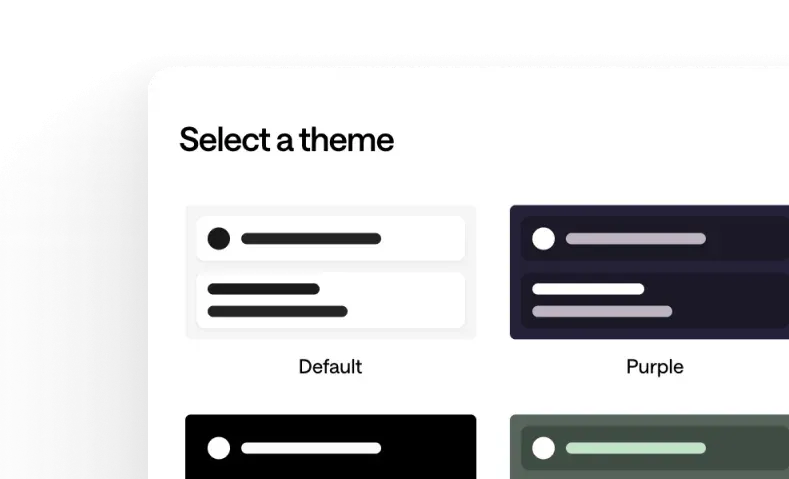
Official illustration of the theme picker with Default, Purple and further colour themes.
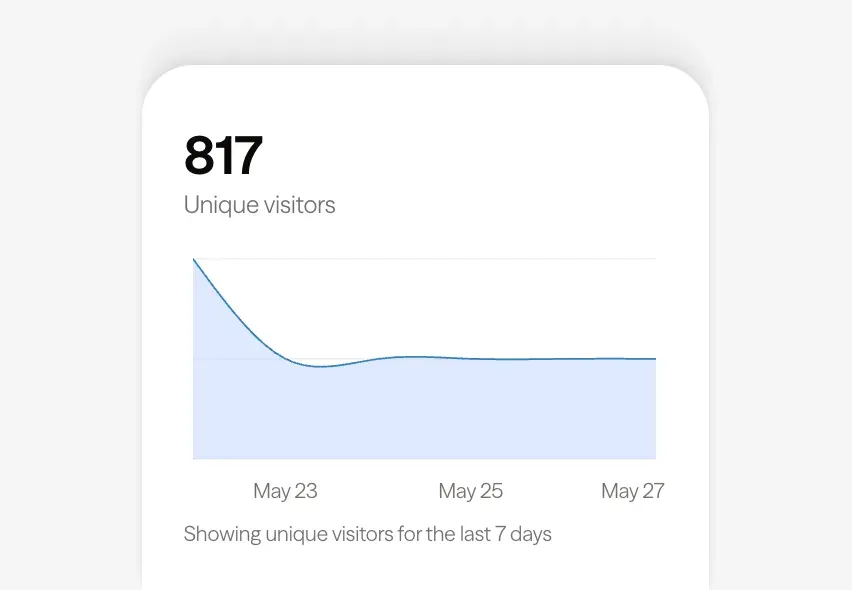
Official illustration of the analytics view with unique visitors for the last 7 days, a Premium feature.
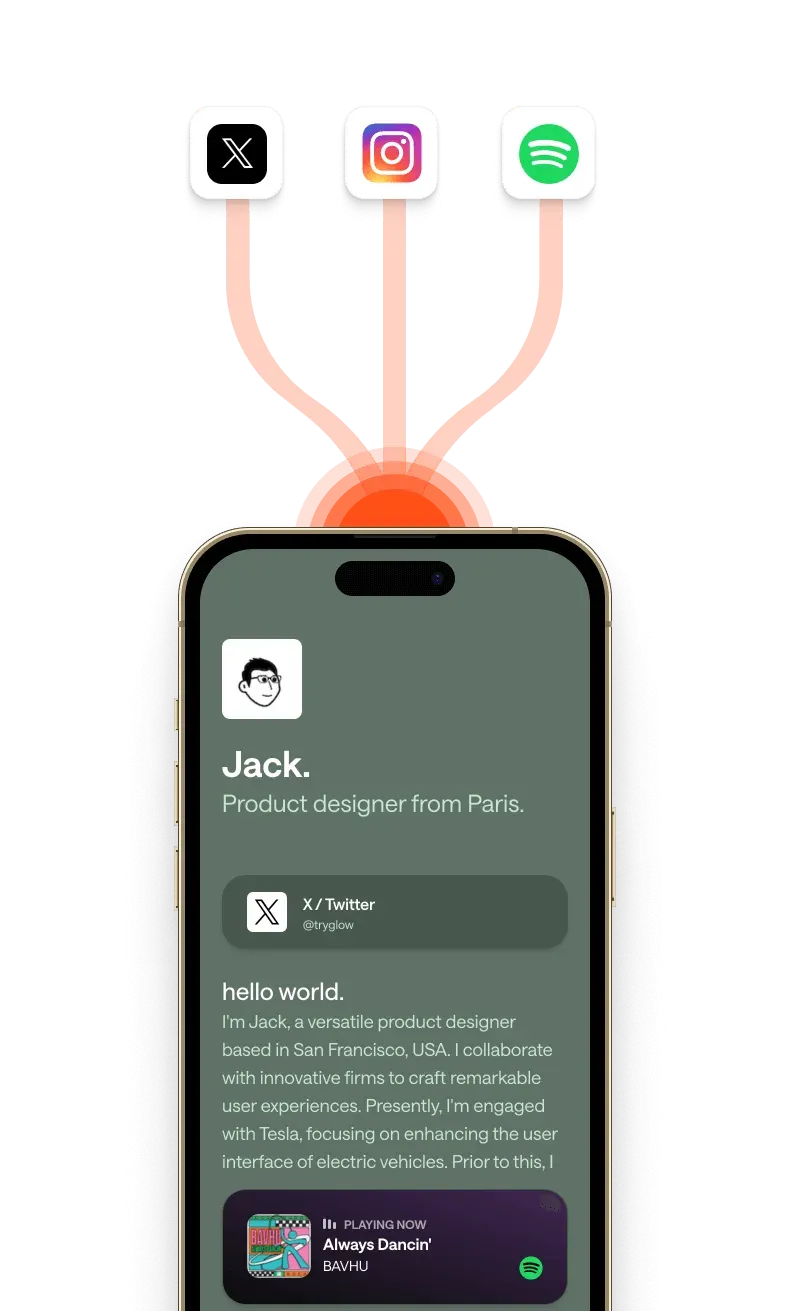
Official illustration of a fictional demo page on a phone with live content flowing in from X, Instagram and Spotify.
Source: official Linky project page.
Key capabilities
- Handle and public page A page lives at
lin.ky/yourname; the home page describes claiming a username as a step of about thirty seconds. Visitors do not need an account to view a page. The site states that a page stays live on every plan, including Free. - Drag-and-drop block editor Blocks are arranged on a grid and reordered by dragging; the frontend uses react-grid-layout and ships a touch polyfill for drag and drop on mobile browsers. Official marketing assets show a desktop and a mobile preview toggle. The editor has separate sections for analytics, forms, integrations, settings and themes.
- Nineteen block types in the source The shared blocks package defines header, content, image, link bar, link box, stack, map, YouTube, form, waitlist email, reaction, Spotify embed, Spotify playing now, Instagram latest post, Instagram follower count, TikTok latest post, TikTok follower count, Threads follower count and GitHub commits this month. Each block type has its own configuration in
packages/blocks. - Header, content and link blocks The header block carries a name, a short bio line and a profile image; the content block holds formatted text. Link bar and link box blocks present a destination as a row or as a larger tappable card. The stack block groups several entries, for example a list of tools with a name and a category each.
- Spotify integration After connecting a Spotify account, the Now Playing block shows the current or most recently played track and updates as listening activity changes. The musicians use-case page states that Linky requests read-only access to listening activity. A separate Spotify embed block is also defined in the source. Spotify is included in the Free plan.
- Instagram integration The integrations page lists latest post and follower count blocks for an Instagram Business or Creator account. Self-hosted instances need their own Instagram client ID, secret and callback URL. Instagram is included in the Free plan.
- TikTok and Threads integrations TikTok blocks show the latest TikTok post and the follower count; the Threads block shows the follower count. Both connect through OAuth with credentials configured on the server. The self-hosting guide notes that the TikTok orchestrator in the API exceeds the free Cloudflare Workers CPU limit.
- GitHub commits block The GitHub block shows commit activity over roughly the past 30 days and, according to the integrations page, needs only a GitHub username. The landing page presents it as a commits-this-month counter with a change percentage.
- Media and location blocks A YouTube block embeds a video that plays on the page, an image block shows an uploaded picture and a map block shows a location. Uploads are stored in AWS-backed asset storage; the latest commit scales uploads in the browser to the crop size the API produces (1200x800 or 800x800).
- Forms and waitlist The site lists a built-in form builder that collects emails, phone numbers and other fields, and the source includes a separate waitlist email block. The editor includes a forms section. SECURITY.md states that form submissions are rate limited by client IP.
- Reaction block Visitors can leave reactions, shown as a counter on the page. Reactions are stored in a DynamoDB table in the reference setup, and per-visitor reaction caps are keyed on the client IP.
- Templates and custom themes The templates page lists 22 named palettes, including Classic, Violet, Midnight, Forest, Ocean, Graphite, Neon and Paper. Colours can be changed after picking a template, and the site lists a custom theme builder for matching a brand. Custom themes are part of the Free plan.
- Analytics (Premium) Premium shows views and clicks for every link and block, and official assets show a unique-visitor chart for the last 7 days. The self-hosting guide lists Tinybird and PostHog for analytics, both configured through environment variables on self-hosted instances.
- Custom domains (Premium and Team) According to the FAQ, a custom domain is connected by emailing support with the page and domain; the lin.ky address then redirects to the custom domain. The frontend has a dedicated route for serving pages on custom domains, and SECURITY.md notes that such pages only call session-free API endpoints.
- Private pages and verification badge Premium adds pages that are only accessible to the owner and their team, and a verified badge shown next to the page name. The API has a verification module for this badge.
- Teams and agencies The Team plan gives a separate team space and invitations for up to 5 members. The pricing FAQ states that agencies can create separate team spaces for each client and that custom billing is available on request; yearly pricing is not listed.
- Self-hosting The guide lists Node.js, Docker and Docker Compose, PostgreSQL 15.1 or later and Git, plus credentials for AWS asset storage, Google, X and TikTok sign-in, Stripe, Sentry, Tinybird, PostHog, DynamoDB and Slack. The frontend is built with Turbo, and the API is deployed with
pnpm wrangler deployto Cloudflare Workers with a Hyperdrive binding to Postgres; the Workers Paid plan is required. LeavingPAYWALL_ENFORCEDunset gives every organisation the paid limits. - Security settings for self-hosters SECURITY.md documents
TRUSTED_ORIGINSfor credentialed requests, anENCRYPTION_KEYthat encrypts stored integration credentials, anINTERNAL_API_KEYshared between frontend and API, Stripe webhook signature checks and the proxy setup needed for reliable client IPs. Vulnerabilities are reported through private GitHub security advisories. - MIT-licensed code with CI checks The code can be used, modified and redistributed under the MIT license. Pull requests run typecheck, lint, Vitest tests (including database-backed API integration tests) and Prettier, as described in CONTRIBUTING.md.
Where Linky fits
Creating and sharing a link-in-bio page
The home page describes three steps: claim a username so the page exists at lin.ky/yourname, drag in links, music, video and live integrations and pick a theme, then place the single link in every social bio. The page can be edited at any time while the shared address stays the same. On the Free plan the page holds up to 5 blocks after the 14-day Premium trial ends.
A musician page with live listening data
The project's musicians page outlines a layout: a header block with artist name, bio and image, the Spotify Now Playing block, a YouTube block for a music video, and three or four link box blocks for streaming services, merchandise and tour dates. Spotify is connected through the Integrations tab with read-only access to listening activity. The page names the Midnight and Violet templates for this use. Similar use-case pages exist for photographers and restaurants.
Showing social and developer activity
Connected accounts feed live blocks: Instagram (Business or Creator accounts) and TikTok supply the latest post and follower count, Threads supplies the follower count, and the GitHub block shows commits over roughly 30 days from a username alone. The integrations page describes each connection, and the blocks refresh without manual edits.
Branded pages on a custom domain
Premium and Team accounts can use their own domain. The FAQ describes the process as an email to support with the page and the domain, after which the domain is connected and the lin.ky link redirects to it. Premium also adds private pages, the verification badge and per-link and per-block analytics.
Agencies managing client pages
The Team plan at $14 per month includes a separate team space and invitations for up to 5 members. The pricing FAQ states that agencies can keep a separate team space per client to manage that client's pages, and that larger teams can request a custom billing arrangement.
Running a self-hosted instance
The project points to the local development guide first: clone the repository, copy .env.example, start PostgreSQL with Docker Compose, run pnpm install, pnpm dev:push and pnpm dev:seed, then pnpm dev, which serves the frontend on port 3000 and the API under wrangler dev on port 3001. For production, the self-hosting guide covers environment variables from turbo.json, database migrations, the Turbo frontend build and a Wrangler deployment of the API to Cloudflare Workers.
Reviews of Linky
Be the first to share your experience with Linky.
Write a review
Loading review form…
Alternatives to Linky
 LinkStackAGPL-licensed, self-hosted PHP and Laravel app for a Linktree-style profile page, with multi-user registration, themes, analytics, a one-click updater, a Docker image and optional hosted plans.
 LittleLinkLittleLink is an MIT-licensed, do-it-yourself Linktree alternative: one static HTML page with more than 100 branded buttons, auto, light and dark themes and one-click deploys to Cloudflare, Vercel, Netlify and more.
 FramerFramer is a website builder combining freeform visual design with a built-in CMS, animations and one-click publishing, plus the option to extend pages with custom React code components.