

What is Frappe Builder?
Frappe Builder is an open-source visual website builder that runs as an app on the Frappe Framework. You lay out pages on a canvas in a Figma-like editor, optionally fill them with records from your Frappe database, and publish with one click. The documentation describes it as a low-code builder aimed at both designers who want ease and developers who want to customize, and the project's stated motivation is to produce fast pages without the bloat of scripts and styles that other tools add.
It is developed by Frappe, the company behind ERPNext and other Frappe apps, in the public repository github.com/frappe/builder under the MIT license. The repository was created in January 2023, and the company's own site, frappe.io, is built with Builder according to the README. The product page is frappe.io/builder.
You can use it on Frappe Cloud, the official hosting service, or install it yourself. The README describes a self-hosting path with Pilot, Frappe's tool for running benches and sites, which needs Frappe v16 or later, is still pre-release and requires Linux for production. Alternatives in the README are an existing bench with bench get-app, and a Docker compose setup for development. Builder itself is a Python and Vue application: it uses Frappe Framework on the server and Frappe UI, a Vue library, for the editor.
The latest release is v1.37.5, published November 6, 2026, a small release that fixes a survey display on Frappe Cloud V2 sites and defers importing litellm until a model is called. Releases are frequent: v1.37.0 on November 4 introduced experimental editor plugins that the Bob assistant can write, a two-step AI provider setup and AI credits on Frappe Cloud, and v1.36.0 on October 21 added Bob's slash commands and a skill for external coding agents. Builder is not a standalone application, so it needs a Frappe site, and it is not a hosted page builder for people who want no server unless they use Frappe Cloud.
Frappe Builder screenshots
Explore the interface. Open a screenshot to view it at full size.
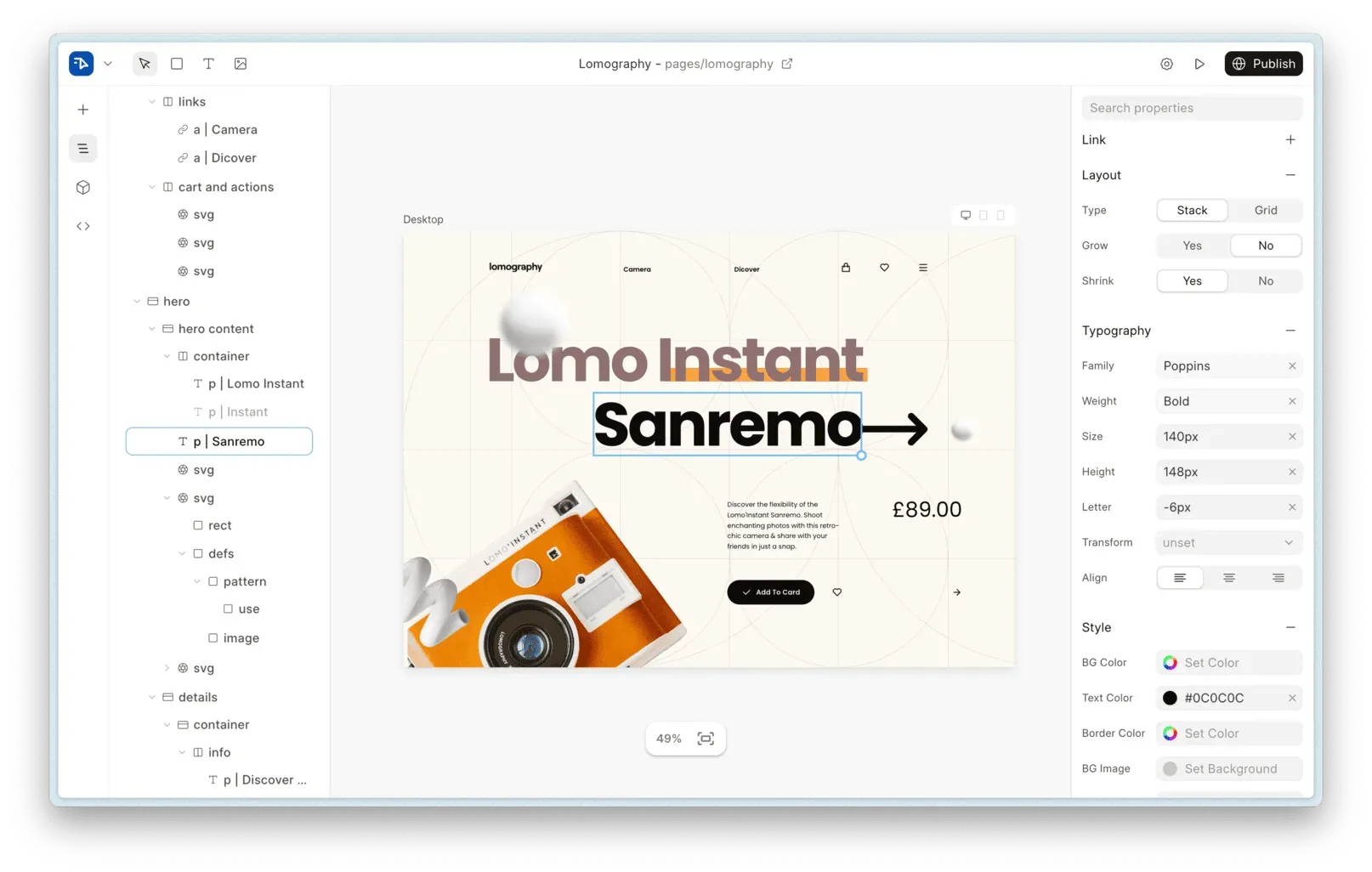
Official README screenshot of the editor: layers, canvas with a selected text block, typography and style properties and the Publish button.
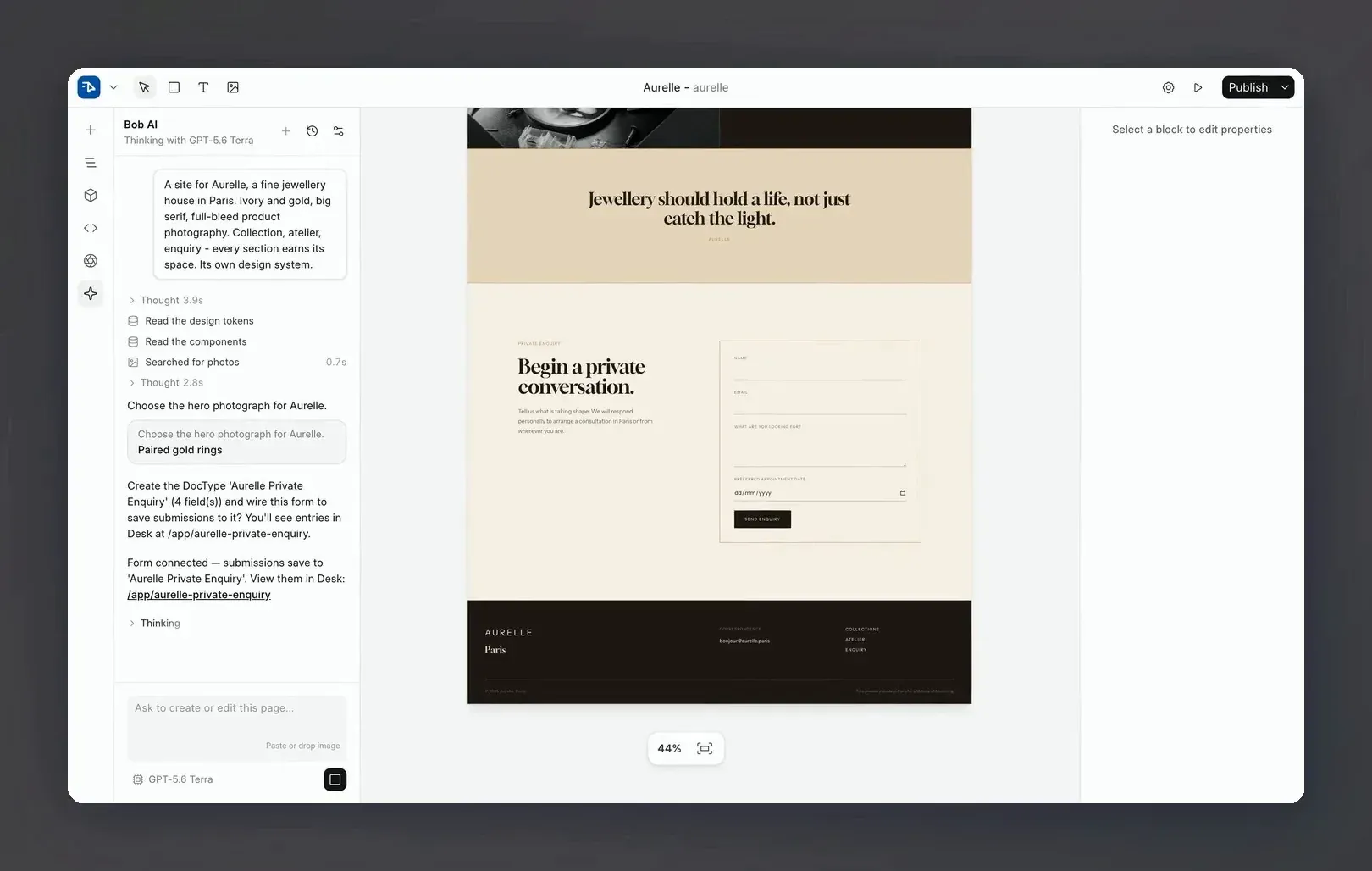
Official README image of the Bob assistant building a page from a short description and offering to create a DocType for an enquiry form.
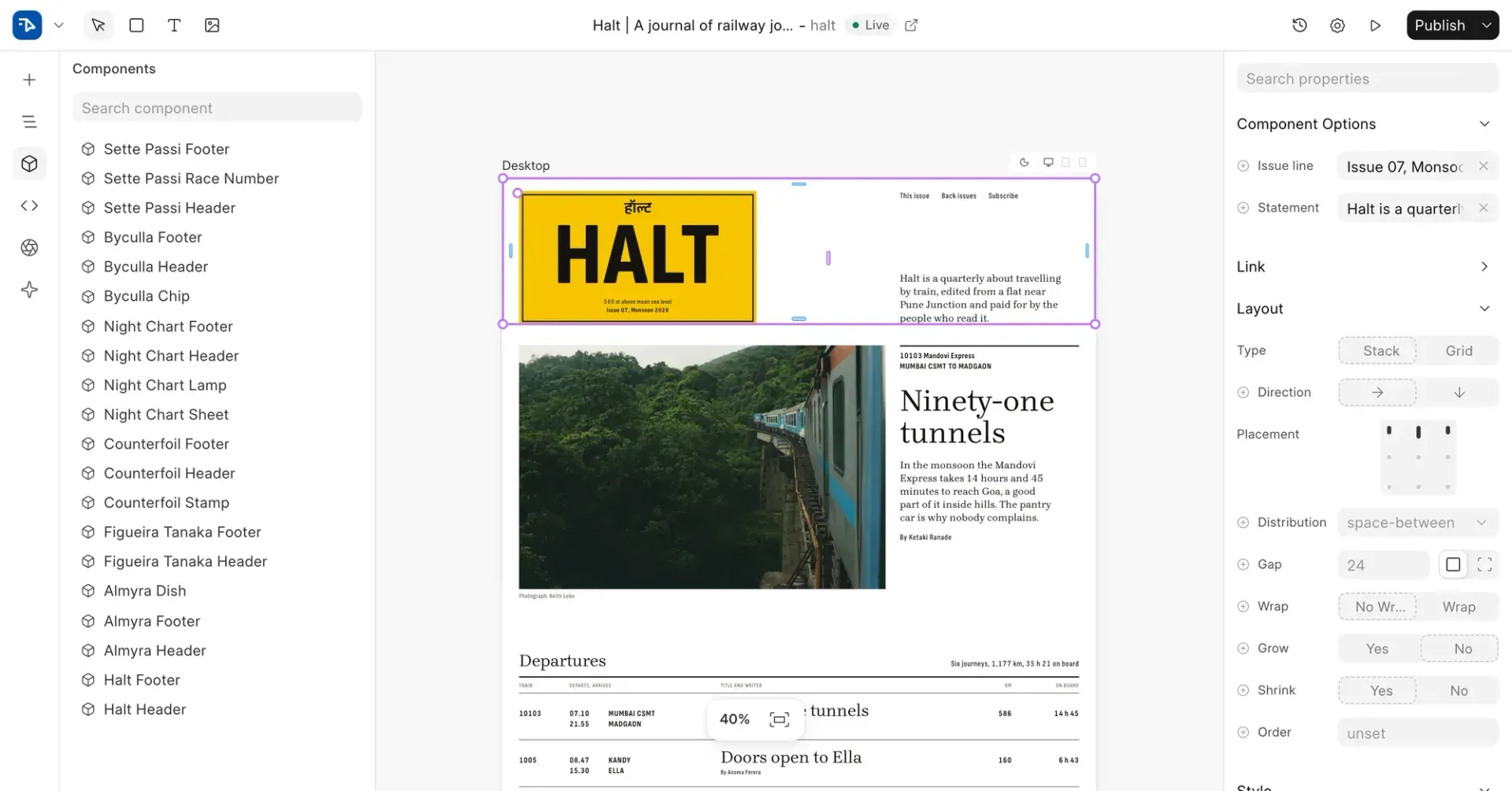
Official README image of reusable components: the component list on the left and the props of the selected header on the right.
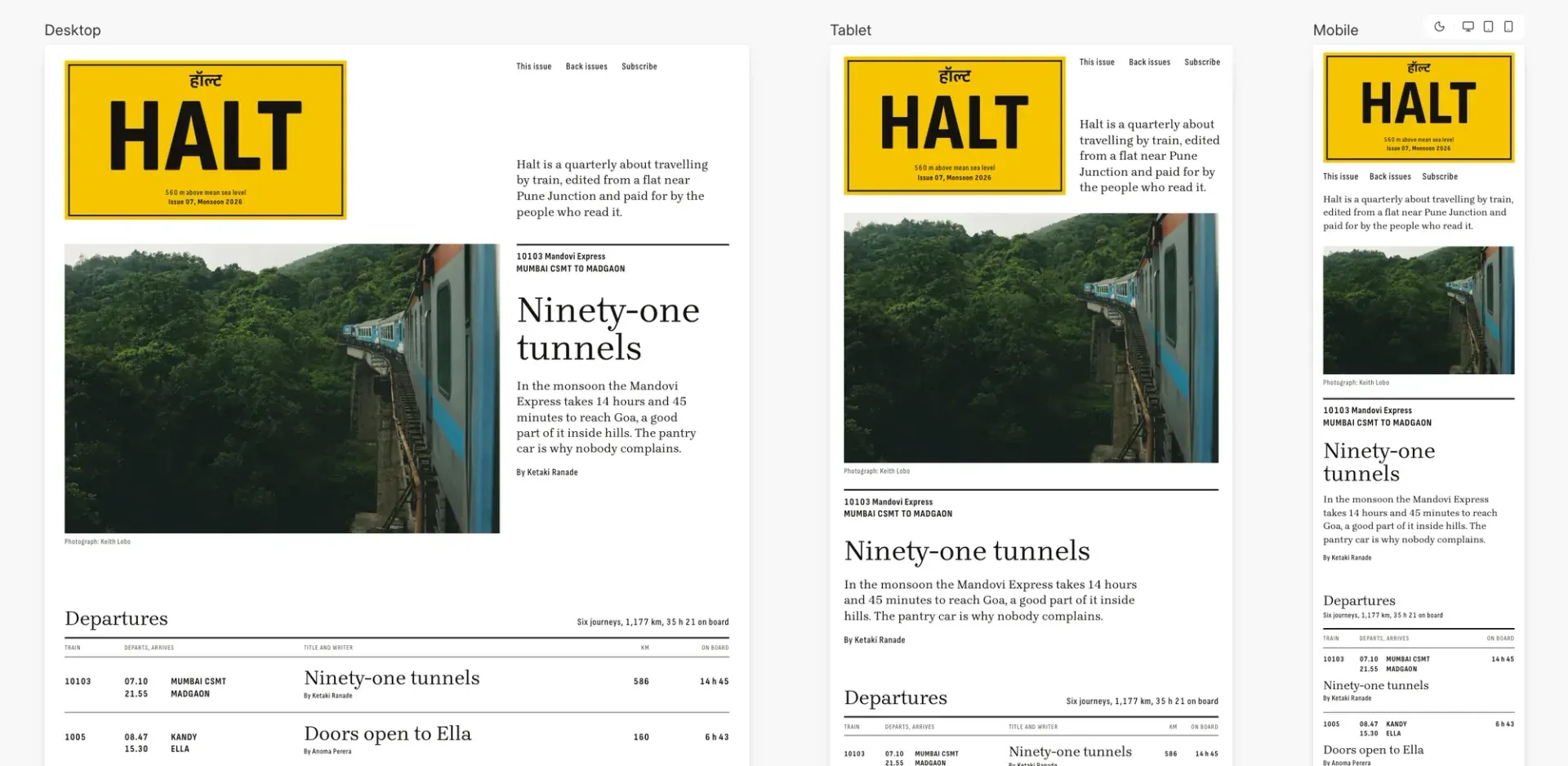
Official README image of the three breakpoints shown together on one canvas.
Source: official Frappe Builder project page.
Key capabilities
- Visual canvas editor Drag blocks onto a canvas and style them from a properties panel with layout (stack or grid), typography, colors, borders and background images. A layers tree and a search box for properties help with large pages, and the interface is modeled on design tools such as Figma.
- Responsive views side by side Desktop, tablet and mobile views sit next to each other on the canvas, and a change made in the tablet or mobile view applies only to that screen size. This makes breakpoint checks part of normal editing and removes the need to preview each device separately.
- Bob, the built-in AI assistant You describe a page and Bob builds it on the canvas using the colors, fonts and components your site already has, and you can ask for changes in plain words. Bob asks before creating a DocType to store form submissions, and you can revert its changes. It acts with the signed-in user's permissions, and its model provider is one you connect.
- Bob slash commands and providers Typing
/model,/providers,/chatsor/newin Bob's composer switches models, connects or removes providers, reopens a chat on the page or starts a fresh one. Since 1.37.0 connecting is two steps, sign in or paste a key, and on Frappe Cloud Bob can use the site's AI credits. - Pages from your data A data script, a few lines of Python on the page, fetches records such as posts or products with
frappe.get_all, and a block can repeat once per record. With a dynamic route like/blog/:slug, one design produces a page for every record. - Forms that save to the database Bob can wire an enquiry form to a new DocType so that submissions appear in Desk, Frappe's admin interface, and the form entry shows the DocType name and fields before creation. Visitor-submitted text is bound as raw HTML, so the skill's notes advise escaping it in the data script.
- Reusable components with props Save a header, card or any group of blocks as a component and use it on many pages. Edit once and every page that uses it updates, and props let each instance show different content. A components panel lists everything saved on the site.
- Design tokens with light and dark values Colour and font tokens each carry a light and a dark value, and pages can switch between the two modes. Hover, focus and active states are set in the editor without writing CSS, and you can upload custom fonts.
- Fast static output Published pages are plain HTML and CSS, and no JavaScript runs unless you add some. The project publishes a Lighthouse comparison against Framer, Webflow and Wix on near-identical test pages, which is vendor data that you can reproduce with your own pages.
- One-click publishing and version history Publish from the toolbar and restore earlier versions of a page. Pages can also be limited to signed-in visitors, and manual snapshots can be taken before large edits.
- SEO basics Pages have meta tags and the site gets a sitemap, and uploaded images are converted to WebP automatically. You still need to write titles, descriptions and alt text, and to check canonical URLs for dynamic routes.
- Built-in page analytics Views, visitors and referrers are measured without a third-party script, which keeps pages light and avoids sending visitor data to an analytics vendor. Check the data against your privacy policy and consent requirements.
- Client scripts and global scripts Custom JavaScript and CSS can be attached to a page or to the whole site, and block text and attributes render through Jinja, so a template expression is evaluated on the server. Scripts go live as soon as they are saved, unlike the draft of the block tree.
- Figma plugin A community-published Figma plugin, Figma to Frappe Builder, brings frames from Figma into the editor as blocks. Check the result for layout, fonts and images, since design imports rarely match perfectly.
- Templates and copy between sites The site lists starter templates for finished sites, and blocks can be pasted between sites. Together with components, this lets an agency reuse headers, footers and sections across client sites.
- Editor plugins (experimental) Since 1.37.0, System and Website Managers can install plugins from Builder Hub in the Plugins tab, and Bob can write a plugin from a request. Plugins are marked experimental and can change between releases, and each user can turn them off in settings.
- Skill for coding agents The repository includes a
frappe-builderskill installed withnpx skills add frappe/builder, which lets Claude Code, Codex or OpenCode create, edit and publish pages on a local bench or a Frappe site through frappectl. The skill reads and writes Builder documents and includes lint and transfer scripts. - Installation and hosting options Frappe Cloud signs you up through a web form, and the site says it is free to start there. For self-hosting, install Pilot with its install script, create a bench on Frappe version 16, get the app from the master branch, create a site, install the builder app and set up production with TLS. Default development credentials in the Docker setup are Administrator and admin, so never use them on a public server.
Where Frappe Builder fits
Build a marketing site that stays fast
Start from a template or an empty page, build header and footer as components, and set tokens for colors and fonts in both light and dark values. Check each page in the desktop, tablet and mobile views, then publish and run Lighthouse on the live URL. Confirm that no unexpected JavaScript loads.
Create a blog or catalog from Frappe data
Add a data script that fetches published records with frappe.get_all, repeat a card block for each record and add a dynamic route such as /blog/:slug for detail pages. Test an unpublished record, a missing slug and a long list, because a data script exception returns a server error page.
Collect enquiries into Desk
Ask Bob for a contact form or add a form block, approve the creation of the DocType and check the entries in Desk after a test submission. Review permissions on the new DocType so guests cannot read other people's submissions, and add spam protection before you go live.
Reuse design across several sites
Save sections as components with props, copy blocks between sites and use tokens to switch a brand palette. Keep a shared component naming scheme, and test a component change on one page before it updates all pages that use it. Document which props each component expects, so that colleagues who edit an instance know what to fill in.
Let an AI assistant draft pages with limits
Connect a model provider in Bob, describe a page and review what it built against your brand. Use the revert button and snapshots, keep script changes under review because they go live at once, and check which model provider receives page content before using it on confidential sites.
Add custom tools to the editor
Install a plugin from Builder Hub or ask Bob for a panel such as a list of images without alt text. Treat plugins as experimental, test them on a staging site and note that they can change between releases. Keep a list of installed plugins and their versions so you can reproduce the editor setup on another site or after an upgrade.
Reviews of Frappe Builder
Be the first to share your experience with Frappe Builder.
Write a review
Loading review form…
Alternatives to Frappe Builder
 WebstudioWebstudio is an AGPL-licensed visual builder for websites from Webstudio, Inc. It exposes every CSS property, binds data from any HTTP or GraphQL API, lets AI agents edit projects through MCP, and publishes to Cloudflare or exports sites for self-hosting.
 YcodeYcode is an MIT-licensed visual website builder with a CMS, forms, localization, an AI agent, an MCP server and a REST API. Self-host it on Vercel and Supabase or use the managed Ycode Cloud plans.
 FramerFramer is a website builder combining freeform visual design with a built-in CMS, animations and one-click publishing, plus the option to extend pages with custom React code components.