

What is Voicetypr?
Voicetypr is a desktop dictation app for macOS and Windows. You press a global shortcut, speak, and the app transcribes the audio and inserts the text at the cursor of whatever application has focus. It is written with Tauri v2, Rust and React, and the source is published under AGPL-3.0 at github.com/ideaplexa/voicetypr. The product site at voicetypr.com presents it as offline AI voice dictation from Ideaplexa, built by a solo founder as a one-time purchase instead of a subscription.
Local transcription is the default. On macOS and Windows the app runs Whisper models on the device, and on Apple Silicon it also offers Parakeet models through a sidecar process. Optional cloud speech-to-text providers are Soniox, OpenAI, Groq, Deepgram and Cohere, and optional AI formatting can use OpenAI, Anthropic, Gemini or a custom OpenAI-compatible endpoint. The README includes a table that states what leaves the machine in each mode, which is the right starting point for a privacy review.
The latest stable GitHub release is v2.0.11, published November 2, 2026, which fixes a macOS crash when the app was opened a second time while already running. The preceding 2.0.10 release reworked local-CLI based polish providers, removed Cline, Droid and Grok polish options, and made Reset delete only Voicetypr data. Pre-release builds of the 2.1 line are published on a beta channel, and the app lets you choose Stable or Beta updates. Microsoft Store installations are updated by the Store.
Distribution is a signed and notarized macOS package (Apple Silicon is the primary target, Intel is a legacy Whisper-only build) and a Windows installer or a Microsoft Store listing. The Windows installer is not yet code-signed according to the website, so SmartScreen shows an unknown publisher warning. The app needs microphone permission and, on macOS, Accessibility permission to insert text. Voicetypr is a dictation tool, not a meeting recorder or a server product; the developer help center is at voicetypr.com/help.
Voicetypr screenshots
Explore the interface. Open a screenshot to view it at full size.
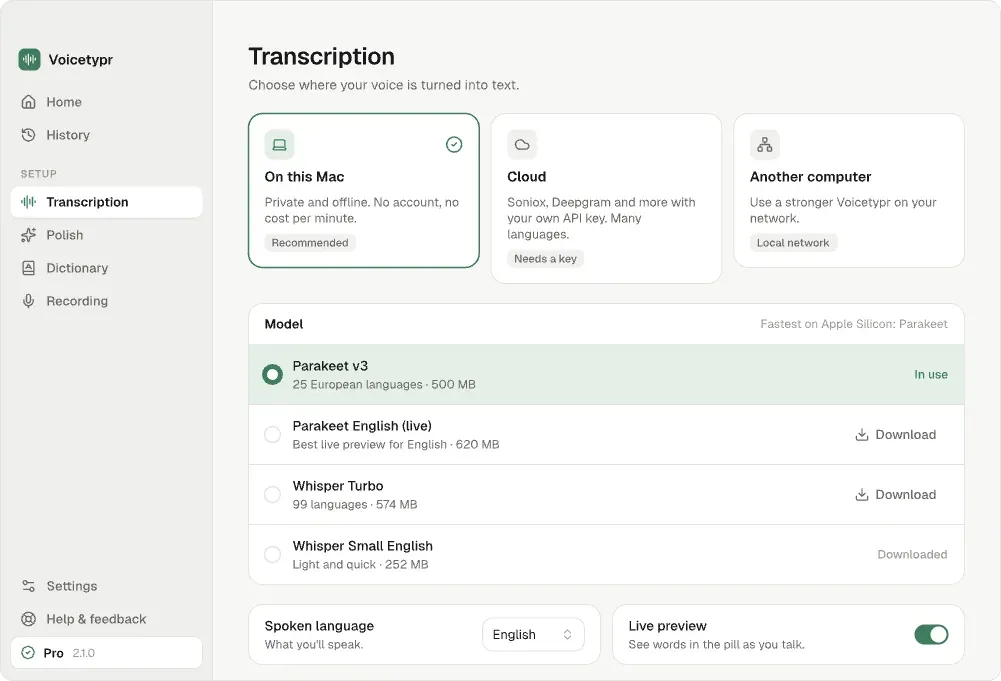
The Transcription page from the official 2.1 interface exports in the repository: choose local, cloud or another computer, then pick a model with size and language notes.
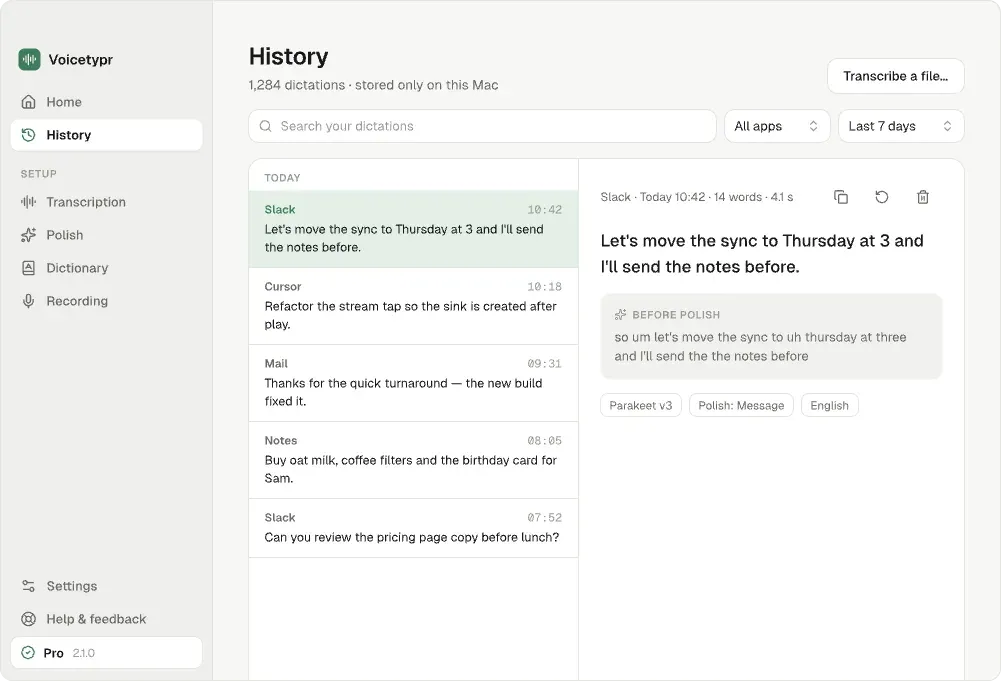
The History page from the official 2.1 interface exports: searchable dictations with the target application, the final text and the text before Polish. Sample data.
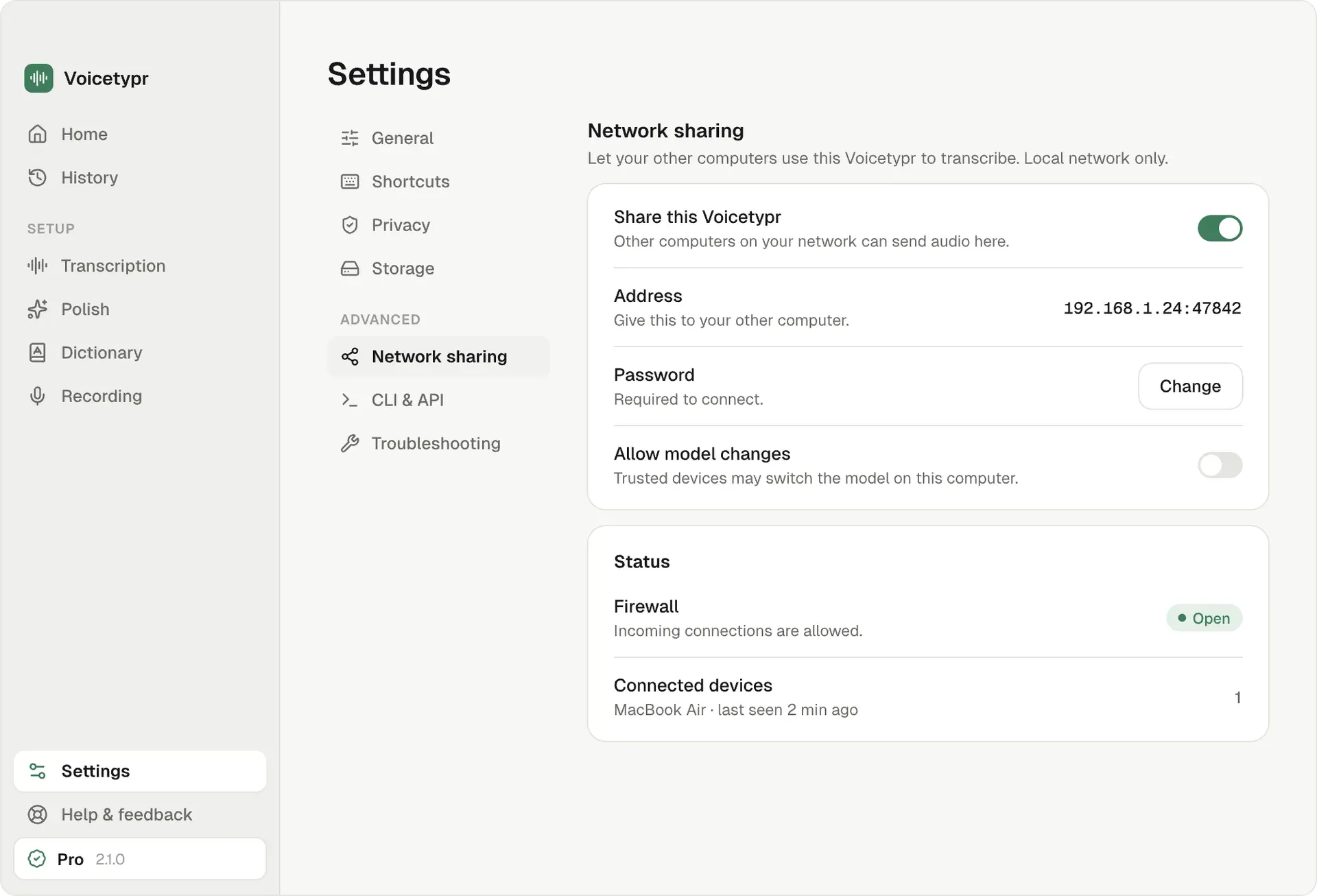
The Network sharing settings from the official 2.1 interface exports: sharing toggle, server address, password, model-change permission and connected device status. Sample data.
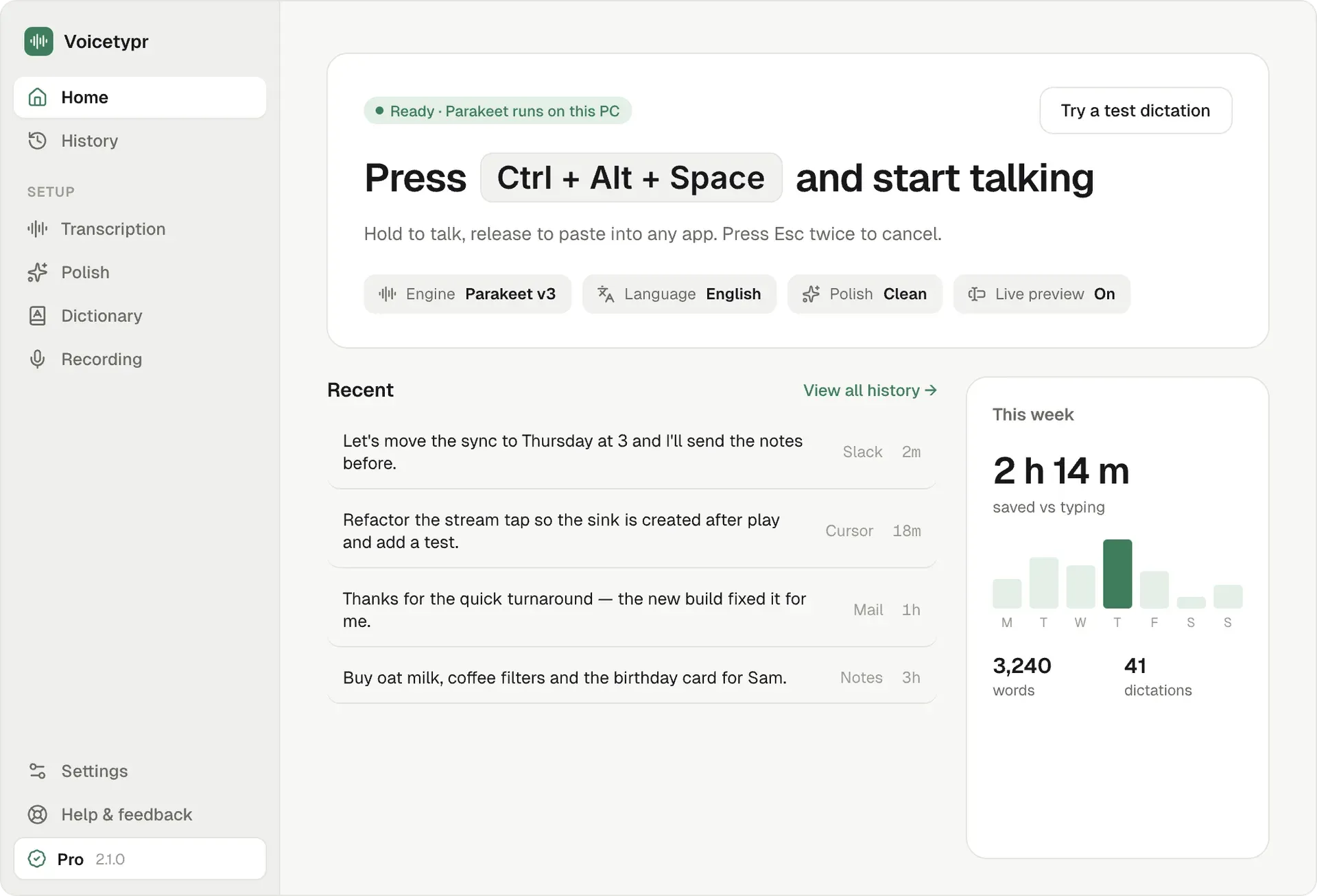
The Windows home screen from the official 2.1 interface exports: shortcut prompt, engine and Polish status, recent dictations and a weekly summary. Sample data.
Source: official Voicetypr project page.
Key capabilities
- System-wide dictation and push-to-talk A global shortcut starts and stops recording, with hold-to-talk, tap-to-toggle and hands-free lock modes, and the result is inserted at the active cursor. The default shown in official screenshots is a modifier combination plus Space, and shortcuts are configurable. Stream Deck and other external tools can trigger recording since 2.0.5.
- Local Whisper and Parakeet models Whisper runs on both platforms, and Parakeet models run on Apple Silicon. The model page in the app lists sizes and languages; the 2.1 interface export shows a Parakeet v3 model for 25 European languages and a Whisper Turbo model for 99 languages. Models are downloaded once and stored locally. Intel Macs are limited to Whisper.
- Optional cloud transcription You can switch to Soniox, OpenAI, Groq, Deepgram or Cohere with your own API key when a machine is too slow for local models. Audio then goes to that provider under its terms and billing. Release 2.0.4 warms the cloud connection at the start of recording so the first request is faster.
- AI formatting called Polish Polish rewrites rough dictation into cleaner text using OpenAI, Anthropic, Gemini or a custom endpoint, and the site says only the transcript text is sent, never the audio. Local CLI providers such as Claude Code can also be used. It is optional and can be turned off, and the app shows whether formatting ran or was skipped.
- Formatting modes, dictionary and per-app rules The website lists six formatting modes, custom vocabulary, translation and per-application rules. These shape output for email, chat or code, and the dictionary corrects names the speech model gets wrong. Check each rule on the application you actually use.
- File transcription Audio and video files can be transcribed from the app, and supported cloud providers offer speaker diarization. The 2.0.5 release limits long speaker timelines so Copy and Save stay reachable. Long files take time on a local model, so test with a representative recording.
- Transcript history History is stored locally and can be searched and filtered, with metadata, the original and formatted text side by side, copy, save and re-transcribe actions. The official 2.1 interface export shows a history list with the app each dictation was inserted into.
- Network Sharing One Voicetypr installation can act as a private transcription server for another computer on a LAN or configured network, so a laptop can use a desktop with a GPU. The settings screen shows an address, a password, a toggle for allowing model changes and a firewall status. Audio goes to the server you configure.
- Agent-ready command-line interface The
voicetyprcommand, installed from Settings, supports status, models, transcribe and record commands with plain text or JSON output, for examplevoicetypr transcribe --file note.wav --json. It lets scripts and local AI agents get speech-to-text without a per-minute fee when a local model is used. See the README for the command list. - Windows GPU acceleration with CPU safety The main Windows executable stays CPU-safe, and an optional Vulkan Whisper sidecar runs in a separate process and falls back to CPU if the GPU path fails. Release 2.0.5 prefers a discrete GPU on hybrid laptops and guards the CPU fallback against memory exhaustion.
- Release channels and updates Stable and Beta update channels are selectable in the app, and direct-install prerelease builds default to Beta. The Windows direct installer updates itself, while the Microsoft Store build is Store-managed. Pin yourself to Stable on managed machines.
- Licensing and trial The website offers a 3-day free trial without a card, then a one-time lifetime license with a 7-day money-back guarantee and a choice of 1, 2 or 4 device activations. A paid license keeps working through temporary validation outages, according to the 2.0.5 notes. Source code is free to build under AGPL-3.0.
- Installation on macOS and Windows MacOS 14 or later is required with microphone and Accessibility permission, and Windows needs 64-bit Windows 10 build 19041 or later or Windows 11. The help center has step-by-step install guides including Gatekeeper and SmartScreen prompts. Minimum memory is listed as 4 GB.
- Diagnostics and problem reporting A Report a problem page gathers diagnostics, previews the system details that will be attached and keeps email and copy fallbacks. Product analytics and crash reporting controls are in Settings, and the privacy policy describes retention. Review these settings before deploying to a regulated team.
Where Voicetypr fits
Dictating into any application
Install the app, grant microphone and Accessibility access, pick a model and set a shortcut. Click into an email, a chat or an editor and test short and long dictations in each application you use. If text is transcribed but not pasted, the help center has a dedicated troubleshooting page for insertion problems.
Keeping audio on the device
Choose a local model, turn off cloud transcription and AI formatting, and confirm in Settings what diagnostics are enabled. Watch network activity during a test session. The README states that local mode keeps recorded audio and transcription on the device and that model files are downloaded once.
Using a stronger computer for transcription
Enable Network Sharing on a desktop, set a password and note its address, then connect from a laptop and compare latency with the laptop's own local model. Keep the server on a trusted network and decide whether trusted devices may change the model on the server.
Giving scripts and agents speech input
Install the command-line tool from Settings and run status, models and transcribe with the JSON flag. Build a small script that transcribes a recorded file and parses the output. Check exit codes and the behaviour when no model is installed before relying on it in automation.
Cleaning up text with AI formatting
Add your own provider key, enable a formatting mode and dictate the same paragraph with and without it. Compare original and formatted text in history. Remember that the transcript goes to the provider you choose, so exclude sensitive content or use a local provider.
Transcribing recorded audio and video
Drop a meeting recording or a voice memo into file transcription, choose a model and review the result for names and numbers. For speaker labels use a cloud provider that supports diarization and accept that the audio is uploaded to it. Keep the original file until you have checked the transcript against the recording.
Reviews of Voicetypr
Be the first to share your experience with Voicetypr.
Write a review
Loading review form…
Alternatives to Voicetypr
 HandyHandy is a free, MIT-licensed speech-to-text app for Windows, macOS and Linux. Press a shortcut, speak, and a local Whisper, Parakeet or other model transcribes the audio and pastes the text into the focused field, without a cloud service.
 OpenWhisprMIT-licensed dictation app for macOS, Windows and Linux that types speech at the cursor, records meetings with speaker labels and keeps searchable notes. Runs Whisper, Parakeet and other models locally, or uses OpenWhispr Cloud or your own API keys.
 VoiceInkGPL-3.0 voice-to-text app for macOS that transcribes on-device or through your own provider keys, pastes at the cursor and applies per-app Modes. Prebuilt app is a one-time license from $25; the source can be built for free.