

What is Prismical?
Prismical is an open-source AI note taker for meetings, lectures, interviews and voice notes. The desktop app records your microphone together with the audio your computer plays, so the other side of a Zoom, Google Meet, Microsoft Teams, Slack or Webex call is captured without a bot joining the meeting. Audio is transcribed on the device with whisper.cpp or in the cloud, and an Enhance step combines the transcript with the rough notes you typed during the call to write a summary, decisions and action items. The official documentation describes one loop: capture, transcribe, enhance.
The project is published by the team behind the Amical dictation app in the amicalhq/prismical repository under the MIT license. The website privacy policy names Exa Labs LLC as the service provider, and the about page describes the team. The repository contains the desktop app for macOS (Apple silicon and Intel) and Windows x64. Web, iOS and Android clients exist and require a Prismical account; their source is not in this repository. Desktop installers are attached to each GitHub release as DMG files and a Squirrel .exe installer, and packaged builds update themselves.
The latest release when this profile was checked is v0.3.24, published on October 26, 2026. It adds a retry for a recording whose finalization failed and lets users browse and resume saved Ask chats in local mode, with fixes that keep retried failures consistent across windows. v0.3.23 moved uploads of imported audio into the main process, and v0.3.21 unified transcription model selection under AI models. Releases arrive every few days; the version number below 1.0 signals that settings and behaviour are still moving.
The desktop client is a TypeScript monorepo built with pnpm and Turborepo: Electron, React, Effect, TanStack Router and Query, a Tiptap editor, SQLite with Drizzle, Tailwind and shadcn/ui. Audio capture uses native helpers, Swift on macOS and C# on .NET 8 with NAudio on Windows, plus a prebuilt WebRTC AEC3 echo canceller. Local transcription runs whisper.cpp v1.8.2 as an N-API addon in a separate Node worker, and a Silero VAD model trims silence. Models are downloaded from Hugging Face on demand and checked against pinned SHA-1 hashes, as recorded in NOTICE.md.
On first launch the desktop app asks how it should run. Signing in with a Prismical account enables sync, sharing, calendar, automations and Prismical Cloud models. Continuing without an account creates a local workspace whose notes, recordings and transcripts stay on that computer, with your own AI keys or Ollama for text generation. Switching modes later erases the data stored on the device. Linux builds, a self-hostable backend and an audio download feature are not part of the current release.
Prismical screenshots
Explore the interface. Open a screenshot to view it at full size.
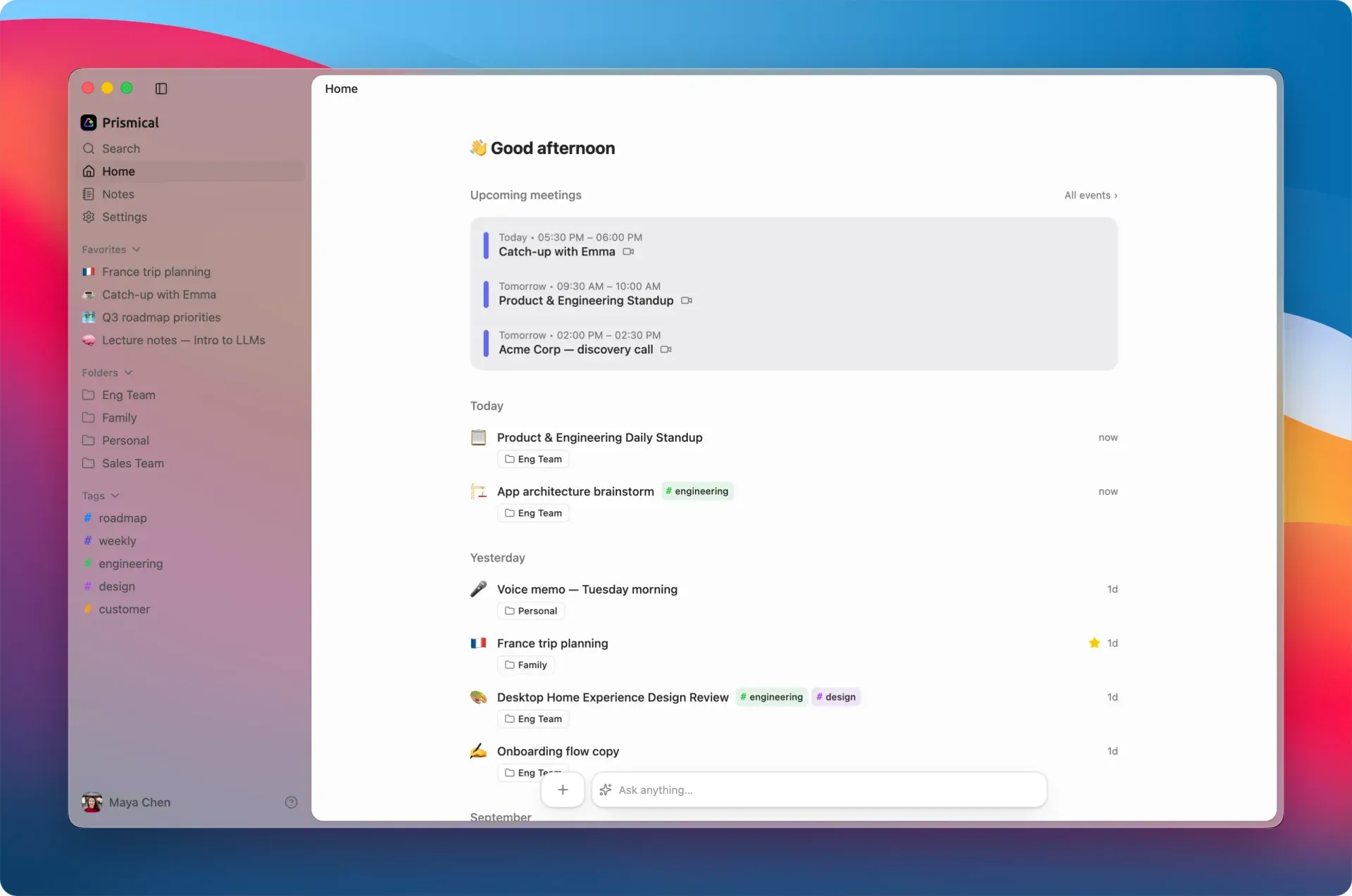
Official README screenshot of the desktop Home screen: calendar meetings at the top, recent notes grouped by day and an Ask anything bar.
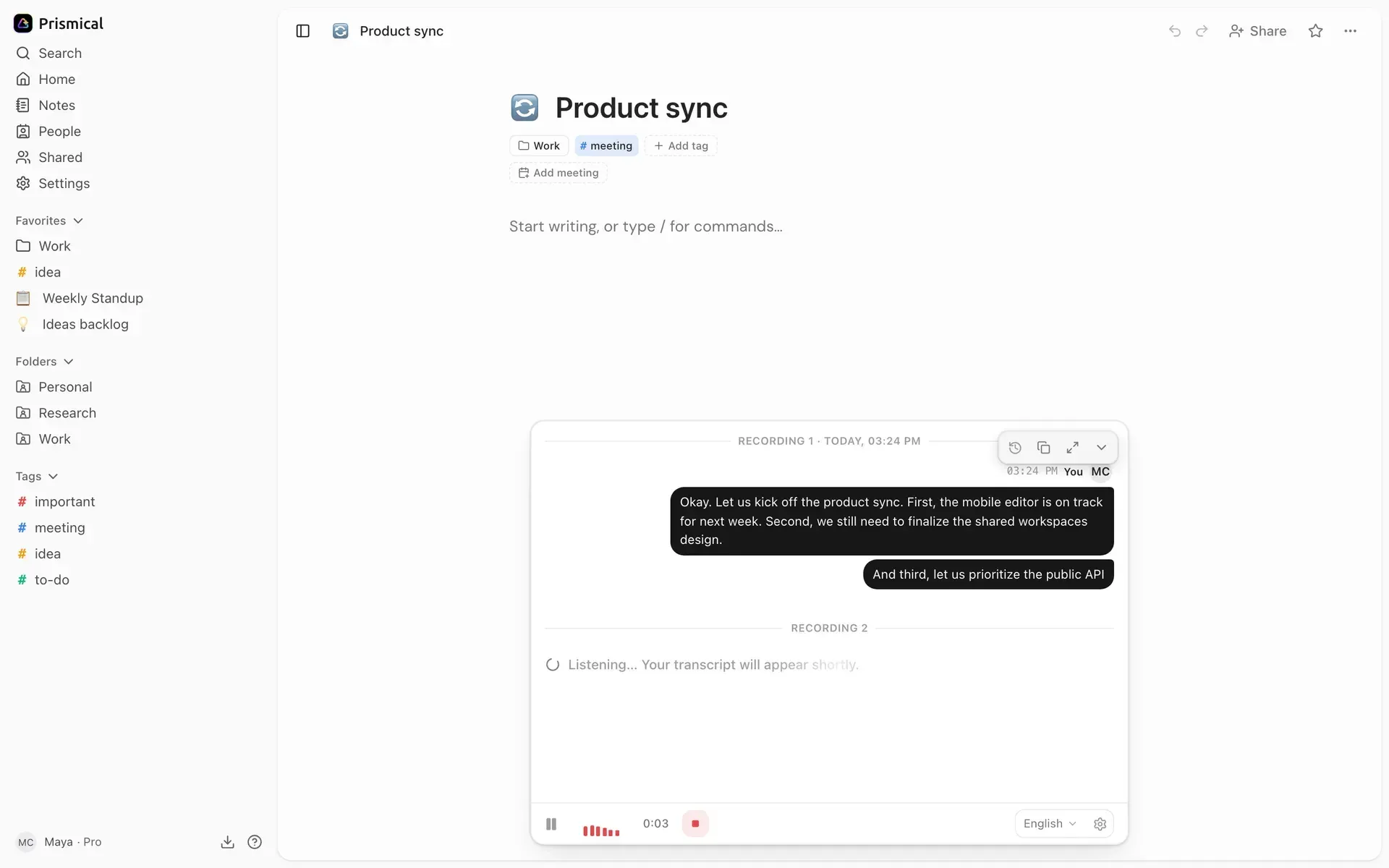
Documentation screenshot of a live recording: the transcript fills in under Recording 1 while a second recording listens, with language and stop controls in the dock.
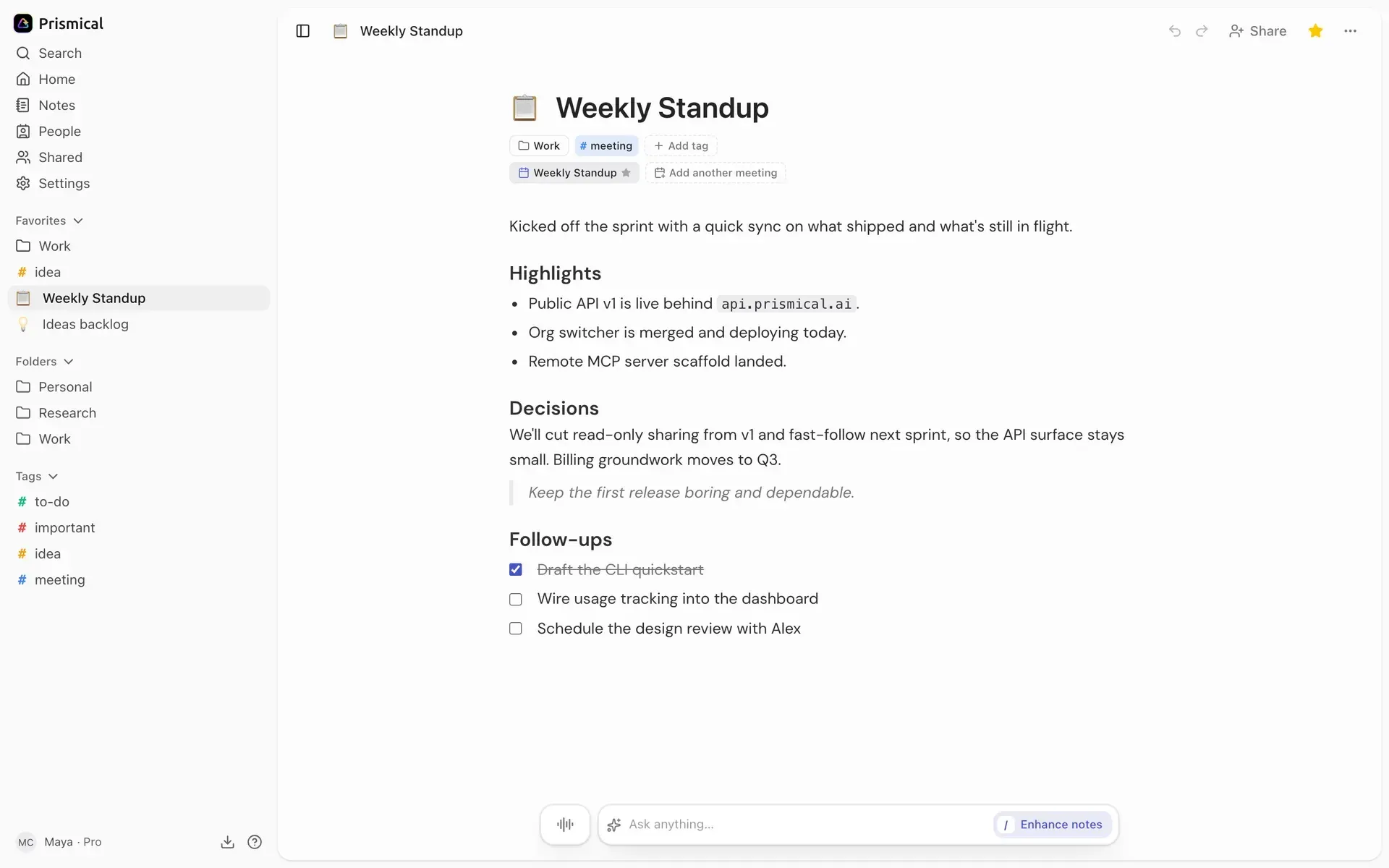
Documentation screenshot of a finished note after Enhance, with highlights, decisions and a follow-up checklist linked to a calendar meeting.
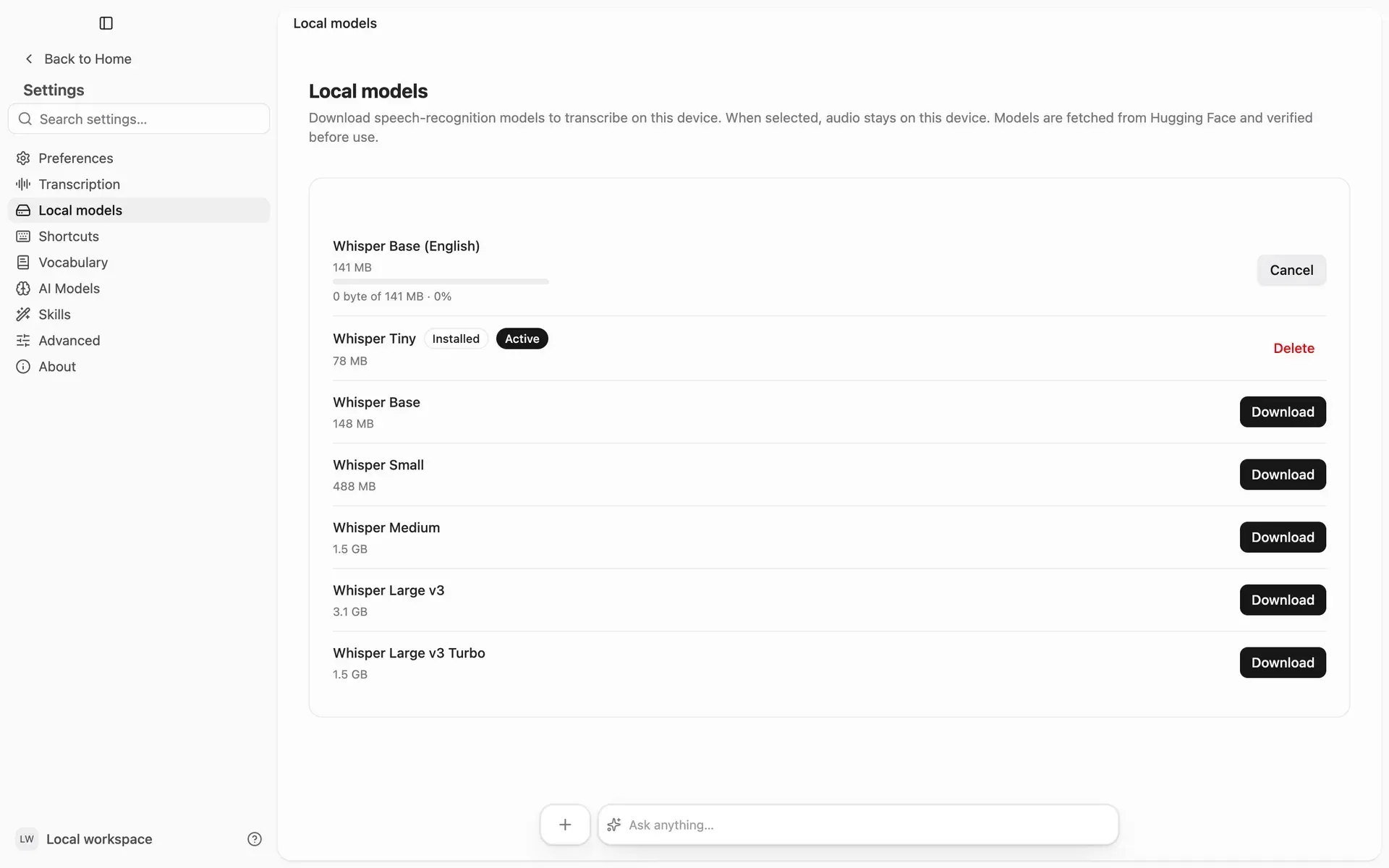
Documentation screenshot of the desktop Local models screen in a local workspace: Whisper Tiny active, Base (English) downloading and larger models ready to download.
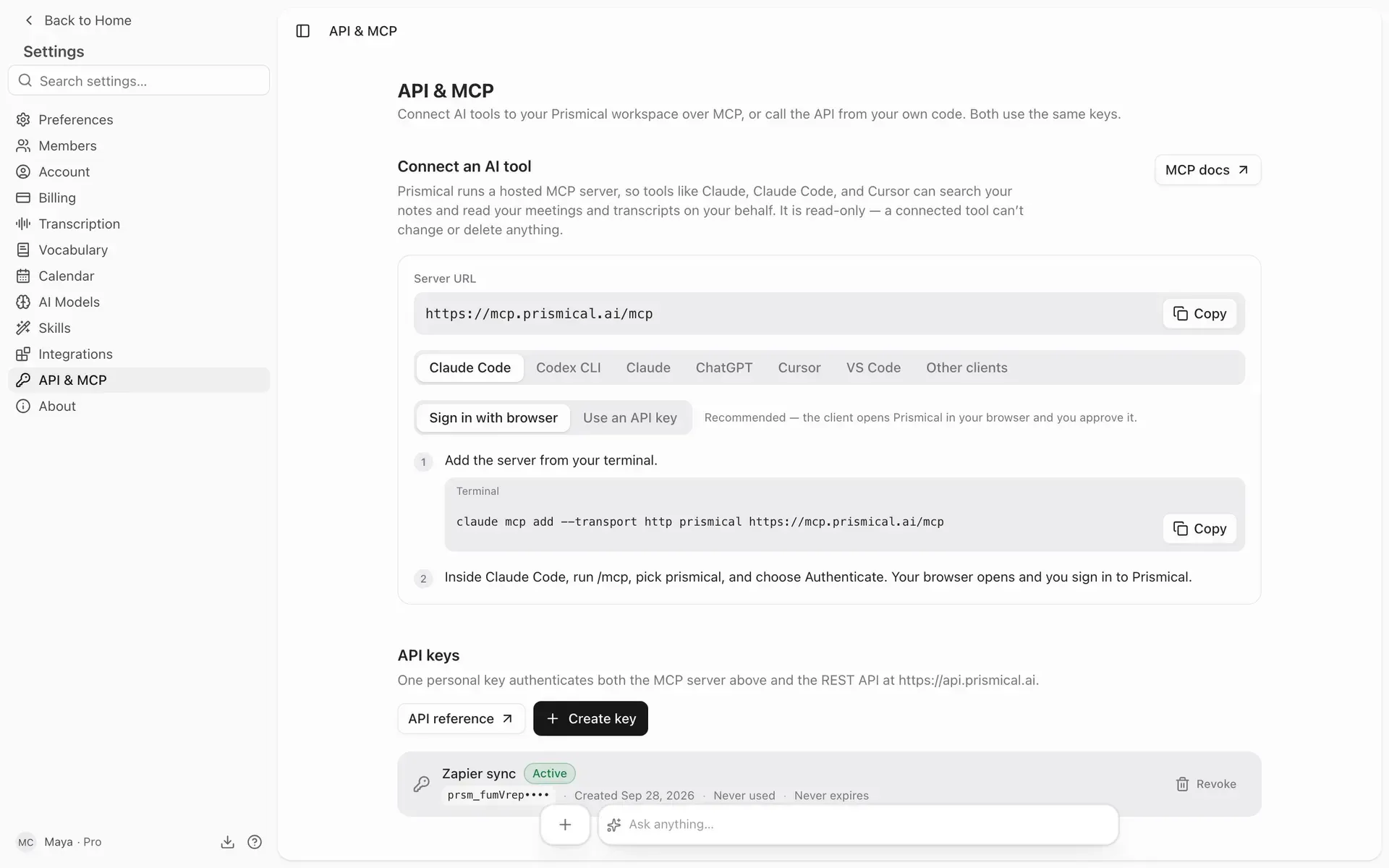
Documentation screenshot of Settings, API and MCP: the hosted read-only MCP endpoint, per-client setup tabs and personal API keys.
Source: official Prismical project page.
Key capabilities
- Download Prismical for macOS Each release ships
Prismical-macos-arm64.dmgfor Apple silicon andPrismical-macos-x64.dmgfor Intel Macs; open the DMG and drag the app to Applications. Release builds are signed and notarized according to the release workflow. Local transcription needs macOS 14 or later, and capturing other participants through system audio needs macOS 14.2 or later. The ZIP files on the latest release page are auto-update payloads, not installers. - Download Prismical for Windows The Windows build is a 64-bit Squirrel installer,
Prismical-windows-x64.exe, for Windows 10 or 11, signed through Azure Trusted Signing in the release workflow. Run it and the app opens when installation finishes. The .nupkg and RELEASES files are update payloads. There is no Windows on Arm or Linux package in the current release. - Web, iOS and Android clients A browser app at app.prismical.ai and mobile apps on the App Store and Google Play share the same notes once you sign in. iOS needs version 16.4 or later. These clients record the microphone only, so they suit in-person conversations rather than video calls. Mobile keeps a local copy for offline reading and keeps recording when the screen is locked, as described in the platform support page.
- Bot-free meeting recording Prismical captures audio from your own machine, so nothing joins the call, appears in the attendee list or notifies the meeting platform. On macOS 14.2 or later, and in the current Windows 10/11 app through the default output device, both sides of a call are recorded. Live recording captures audio, not video. The documentation warns that the absence of a bot also means participants get no visual cue, so consent rules still apply.
- Meeting detection and floating widget The desktop app watches for a known meeting app or browser holding the microphone for a few seconds and then offers a Take Notes card. Recognized apps include Zoom, Teams, Slack, Webex, Discord, WhatsApp and Gather, plus Chrome, Firefox, Safari, Edge, Arc and other browsers. Detection never starts recording on its own. The meeting detection guide explains the two independent switches that control the widget and the offers.
- Local transcription with Whisper Settings, Local models lists Whisper Base (English) as the default plus multilingual Whisper Tiny (about 78 MB), Base (148 MB), Small (488 MB), Medium (1.5 GB), Large v3 (3.1 GB) and Large v3 Turbo (1.5 GB). Each download is verified before use and can be cancelled or deleted. Local transcription works offline and does not count against a plan limit, but it does not label speakers, and the docs describe its accuracy as close to the cloud on clean single-speaker audio.
- Prismical Cloud and bring-your-own-key models Signed-in users default to Prismical Cloud Auto for transcription and text generation. Premium accounts can add their own OpenAI, Google Gemini, Deepgram or OpenRouter keys; only Deepgram labels speakers. Keys are encrypted at rest and fetched model lists confirm they work. In local mode the source code also enables Anthropic, OpenAI-compatible endpoints and Ollama without an account. See Bring your own key.
- Enhance and AI skills When a recording stops, Enhance reads the transcript and your typed notes together and proposes a summary, action items and decisions as a draft that you apply or discard. The first Enhance replaces the note body; later runs append a section. Custom skills are saved prompts with an Add a section or Rewrite entire note mode and an optional transcript input, and they can be exported as JSON. Details are in the AI Skills guide.
- Notes, recordings and transcripts A note is what you wrote; each recording attached to it carries its own transcript, and one note can hold several recordings, such as a weekly sync that grows over time. The editor supports Markdown shortcuts, folders, colored tags and favorites. Transcripts can be copied as Speaker: text lines. Navigating to another note stops the current recording.
- Ask AI and full-text search Ask AI answers questions across your notes and cites the notes it used, and the answer can be scoped to specific notes or folders. A command palette searches note titles, bodies and transcripts. The latest desktop release lets local-mode users browse and resume earlier Ask chats. Text generation always uses a cloud or configured provider model, not the local Whisper engine.
- Audio import Desktop and web users can import MP3, PCM WAV or M4A/MP4 files with AAC audio into a note. Each file must have one audio track, stay under 250 MB and fit the plan duration limit, up to four hours per file. Imports always use Prismical Cloud and count toward the cloud allowance, even when live recordings use a local model. Audio import is disabled in the accountless local workspace.
- REST API A personal API key from Settings, API and MCP authenticates calls to
https://api.prismical.ai/v1/. Notes, folders, tags and vocabulary support create, read, update and delete; recordings, events and artifacts are readable, with speaker names resolved. Keys start withprsm_, can expire after 30 to 365 days and are limited to 240 requests a minute. The API documentation links the generated OpenAPI specification. - Hosted MCP server A read-only MCP server at
https://mcp.prismical.ai/mcplets Claude, ChatGPT, Claude Code, Cursor and other MCP clients search notes, fetch notes and list events, recordings and transcripts. Clients sign in through OAuth or a bearer API key and see only what the user can see in the active organization. It is a hosted service tied to an account, not a local server. The MCP server guide lists its seven tools. - Signed webhook automations Automations send a POST webhook when a recording is transcribed, a note is created, filed in a folder or tagged, optionally filtered by folders and tags. Each request carries an HMAC-SHA256
Prismical-Signatureheader, and failed deliveries are retried five times over about two and a half hours. The payload carries ids rather than content, so the receiver fetches data through the API. Up to ten automations are allowed; see Automations. - Sharing, organizations and calendar Signed-in users can share a note or folder as viewer, editor or manager, publish a read-only public link, and work inside organizations with roles. A connected calendar shows upcoming meetings and links notes to events, and a People view is built from calendar attendees. These features need a Prismical account and are switched off in local mode.
- Crash-safe desktop recording The desktop app writes audio to a file as it is captured, before anything is sent. A crash, force-quit or lost connection does not lose the recording; it is transcribed when the app reopens or the network returns. Release v0.3.24 adds a retry for recordings whose finalization failed. In the browser client a recording exists only in the tab and is lost if the tab closes.
Where Prismical fits
Taking notes on a video call without a bot
Install the desktop app on a Mac running macOS 14.2 or later, or on Windows 10/11, and grant microphone and, on macOS, system audio permission at the first recording. Start from the Meeting detected card or from the dock in a note, type names and decisions as they come, and stop at the end. Check that the transcript contains both your voice and the remote participants, and tell participants they are being recorded, as the meeting recording guide recommends.
Keeping audio on the machine
Choose Continue without an account at first launch, or keep a signed-in workspace and select a downloaded Whisper model under Settings, Local models. Whisper Base (English) suits English-only speech; other languages need a multilingual model. Disconnect the network during a test recording to confirm transcription still runs. Remember that Enhance, skills and Ask AI still send note text to a cloud provider or to an Ollama endpoint you configure, and that local transcripts carry no speaker labels.
Turning lectures and interviews into reviewable notes
Record long sessions as several recordings in one note, because Free accounts cap a single continuous recording at 30 minutes (temporarily extended to 60) and Premium at two hours. Add names, jargon and acronyms to Vocabulary before an interview series. For attributed quotes, use Prismical Cloud or a Deepgram key so speakers are separated, then rename speakers in the transcript before running Enhance.
Feeding meeting notes into other systems
Create an automation on Recording transcribed, limited to a sales or support folder, and point it at Zapier, Make, n8n or your own endpoint. Verify the Prismical-Signature header before trusting the payload, then fetch the note or transcript through the REST API. Check event.type before writing back through the API, because a write can trigger the same automation again and form a loop.
Giving an AI assistant access to past meetings
Add https://mcp.prismical.ai/mcp as a connector in Claude, or run claude mcp add --transport http prismical https://mcp.prismical.ai/mcp in Claude Code, and approve the consent screen. The assistant can then search notes and read transcripts but cannot change anything. Review which organization is active and the assistant provider data policy first, because transcripts are the raw record of what was said.
Exporting or leaving the service
Copy single notes as Markdown from the note menu and transcripts from the transcript panel. For a full export, page through GET /v1/notes and fetch each body with include_body=1, as the export guide describes. There is no bulk export button, no note trash and no audio download, and account deletion is immediate with no grace period.
Reviews of Prismical
Be the first to share your experience with Prismical.
Write a review
Loading review form…
Alternatives to Prismical
 MeetilyMeetily is an MIT-licensed meeting assistant for Windows and macOS that records microphone and system audio, transcribes locally with Whisper or Parakeet, and writes summaries with a built-in model, Ollama or your own provider.
 AnarlogAnarlog is an MIT-licensed AI meeting notepad for macOS, Windows and Linux. It captures meetings without a bot, transcribes on-device or with your chosen provider, and keeps notes in local SQLite with optional encrypted sync.
 MinutesMinutes is a free, MIT-licensed conversation memory app for macOS, Windows and Linux. It transcribes meetings, calls, memos and dictation on-device with Whisper or Parakeet and saves Markdown that Claude Code, Codex or any MCP client can query.